Orca alternative
Looking for an alternative to Orca? Meet AgentsRoom.
Orca is an open-source worktree IDE that runs any terminal agent CLI, from Claude Code, Codex and OpenCode to Pi, where code stays at the center. AgentsRoom is a full visual command center where agents and projects take the stage, with per-agent diff, a backlog that drives agents and 14 specialized roles.
Both tools run multiple AI coding agents in parallel, and both now have a phone app. Orca organises them around isolated git worktrees and keeps the editor central. AgentsRoom organises them around your projects, with detachable windows, a backlog kanban that spawns agents, a public backlog for clients, a live preview tunnel, and agent teams with specialized roles.
Setup time: 30 sec
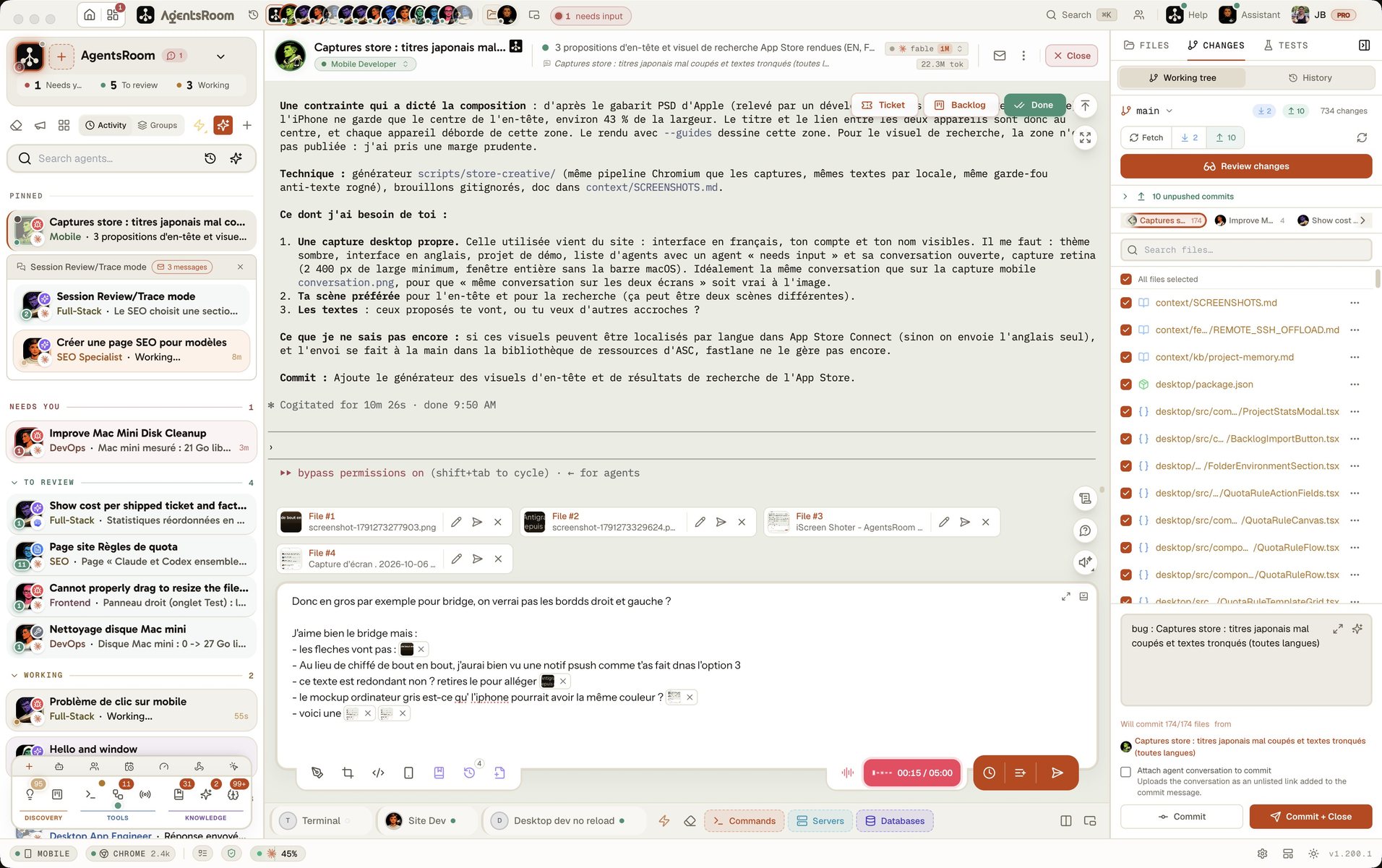
See AgentsRoom in action
A visual cockpit for Claude, Codex, GitHub Copilot CLI, Cursor and 15 other agent CLIs, across every project.
The desktop app, in Simple mode
On a phone the demo runs the real desktop app in its Simple interface mode: one project, its agents, one prompt. The full cockpit is on your computer.
The difference at a glance
With Orca
- •Worktree-first workflow: every agent runs in its own isolated git worktree
- •Code stays central: file editor, diff viewer and terminal panes dominate the layout
- •One window built around worktrees: a sidebar of repositories and their worktrees, a file editor, a diff viewer and Ghostty-class terminals with infinite splits
- •Runs any terminal agent CLI: its README names more than thirty, from Claude Code, Codex and OpenCode to Pi, Cursor and Copilot
- •macOS, Linux and Windows, plus an iOS and Android companion in beta, SSH hosts and self-hosted Orca servers
- •Tasks come from GitHub, Linear, Jira or GitLab: no backlog of its own, no public client portal, no live preview tunnel
With AgentsRoom
- +Per-agent diff without forced worktrees: one branch, clean per-agent attribution, commit per agent or per feature
- +Agents at the center, code one click away: switch projects and all your terminals, agents and commands follow
- +Detachable windows: split agents, commands, backlog or Claude terminals across monitors
- +19 providers supported: Claude Code, Codex, GitHub Copilot CLI, OpenCode, Antigravity CLI, Aider, Grok Build, Mistral Vibe, Kimi Code, Amp, oh-my-pi, Freebuff, Devin, Cursor, Command Code, Muse Code, Pi, MiniMax Code, ZCode
- +iOS and Android companion over an E2EE relay: monitor, prompt and restart agents from your phone
- +Backlog kanban that spawns agents, public backlog for clients, prompt library, live preview tunnel
Feature-by-feature comparison
How AgentsRoom and Orca stack up on the features that matter when you run several AI agents in parallel.
| Feature | AgentsRoom | Orca |
|---|---|---|
| Multi-agent support | ✓ | ✓ |
| Agent status (working / done / needs input) | ✓ | ✓ |
| Multi-project command center | ✓ | Several repos |
| Auto-sync on project switch (agents, commands, terminals) | ✓ | ✗ |
| Detachable windows per surface | ✓ | ✗ |
| Per-agent diff and commit | ✓ | Via worktree |
| Git worktrees | Optional | Required |
| Same request on several CLIs, each in its worktree | ✓ | ✓ |
| Backlog kanban that spawns agents | ✓ | From GitHub, Linear, Jira, GitLab |
| Public backlog for clients | ✓ | ✗ |
| Live preview tunnel | ✓ | ✗ |
| Mobile companion app | ✓ | Beta (iOS, Android) |
| Prompt library | ✓ | Saved prompts |
| Providers supported | 19 | Any CLI agent |
| Setup time | 30 sec | ~2 min |
When Orca might be the better choice
Honest take: Orca is a solid open-source IDE. Here is when it fits better than AgentsRoom.
You want strict git worktree isolation by default
Orca is built around isolated worktrees. Every agent gets its own branch copy, by design. If your workflow depends on strict isolation per task and you do not want to think about it, Orca handles that natively.
You want a fully code-centric, open-source, free IDE
Orca is MIT-licensed and free. If keeping everything open source matters more than the full AgentsRoom cockpit (backlog, roles, live preview, per-agent diff without worktrees), Orca is a fair pick.
You run many different agent CLIs, or your tasks live in Linear or GitHub
Orca runs any agent that works in a terminal and names more than thirty in its README, where AgentsRoom integrates 19. It also opens a worktree straight from a GitHub, Linear, Jira or GitLab task, and runs agents on SSH hosts or on an Orca server you host. If your team already plans its work in one of those trackers and switches between many CLIs, Orca follows that workflow without a second backlog.
Moving from Orca takes 30 seconds
AgentsRoom reads your existing projects as-is. Your repos and CLAUDE.md files stay untouched.
Download AgentsRoom
Download the desktop app for macOS, Windows or Linux from agentsroom.dev and open it. No worktree migration.
Add your projects
Drop your repos in. Existing CLAUDE.md, .claude/settings.json and hooks are detected automatically.
Launch your agents
Pick Claude, Codex, GitHub Copilot CLI, Cursor or any of the 15 other agent CLIs AgentsRoom supports, per agent. Skip worktrees if you want, or keep them manually.
Frequently asked questions
Ask us something elseWhat is Orca?
How is AgentsRoom different from Orca?
Does AgentsRoom force git worktrees like Orca?
Which AI providers does AgentsRoom support vs Orca?
Does Orca have a mobile app or a public client backlog?
Can I use AgentsRoom and Orca together?
Orca vs Herdr: what is the difference?
Does Orca have a chat view now?
What did Orca add in its 1.4.262 and 1.4.263 releases?


























Try AgentsRoom today
A visual cockpit for your AI agents, with per-agent diff and no forced worktrees. Free for 2 projects.
Companion app: monitor your agents on the go
Bring your own: Claude, Codex, Antigravity CLI, or other AI provider.
Push bugs and requests straight to your public backlog.
Other comparisons
See how AgentsRoom stacks up against other agent managers.