Agents for Work That Is Not Code,
a Name, a Mission, No Repository
A workspace is a project you open from a name, a mission and an agent, with no directory to point at. AgentsRoom creates the folder, and Claude Code, Codex or the agent CLI you picked starts in it with the mission already in its brief.
Handle a support incident, prepare a trip, research a product, build a mock-up. The agent keeps its memory and its skills, the backlog and the teams work as in any project, and nothing asks you for a git repository.
~/AgentsRoom/Personal/plan-the-next-trip
- Mission in every agent brief
- Agent memory and pinned skills
- Backlog, teams, dev commands
- No git repository needed
A workspace starts from three answers. The app makes the folder and every agent of the workspace reads the mission when its session starts.
Agent CLIs such as Claude Code do not need a code repository. They read files, write files and run commands in the folder you start them in, which is exactly what research, writing, support or planning work needs. What they lack for that kind of work is a place: a folder that exists for the task, a brief you do not retype every morning, and an agent that remembers what it learned last time.
A workspace gives them that place. You give it a name and a mission, you pick an agent, and AgentsRoom creates the folder outside any repository. From then on it is a project like the others: it sits in your sidebar, its agents start with the mission in their brief, and the memory, skills, backlog, teams and dev commands of AgentsRoom all work on it. The code surfaces (the Changes tab, the branch badge, Cloud Agents) simply do not show, because there is no git repository.
The agent is the point. The picker lists your saved agents first, copied whole with their name, persona, model, pinned skills and avatar, so a workspace opened for a client incident starts with the agent that already knows that client, not with a blank specialist.
What a Workspace Gives Your Agents
A mission instead of a repository
The mission is the standing brief of the workspace, in your own words. It rides in the boot prompt of every agent of the workspace, whatever CLI it runs on, so you never retype the context. You can change it later in Project settings, General, Mission.
Your own agent, with its memory
Pick one of your saved agents and it arrives with its notebook and its pinned skills: a line under the picker says so. The agent's memory is keyed on its name, which is why the name is copied with it. You can also start from a plain role.
The folder is made for you
AgentsRoom creates the directory under the root folder of the sidebar folder you file it in, and shows the path live while you type the name. Left unset, it is an AgentsRoom folder in your home directory, one sub-folder per sidebar folder.
Everything a project has
Project memory, the shared memory of its sidebar folder, skills, the backlog, agent teams, scheduled tasks, dev commands and the phone app work on a workspace unchanged. There is no special kind of project to learn: a workspace is a project with a mission.
An agent can open one for you
Tell an agent "open a work folder for this incident" and it calls workspace_create from AgentsRoom MCP, which goes through the very same creation path as the dialog. On its own idea it asks first, because a workspace adds a permanent entry to your sidebar.
From your phone too
The + button of the Projects tab in the mobile app offers Create a workspace with the same four fields. The folder is created on the desktop your phone is connected to, and the phone opens the new project as soon as it appears.
Create a Workspace in Five Steps
From the projects home of the desktop app.
- 1
Click Create a workspace
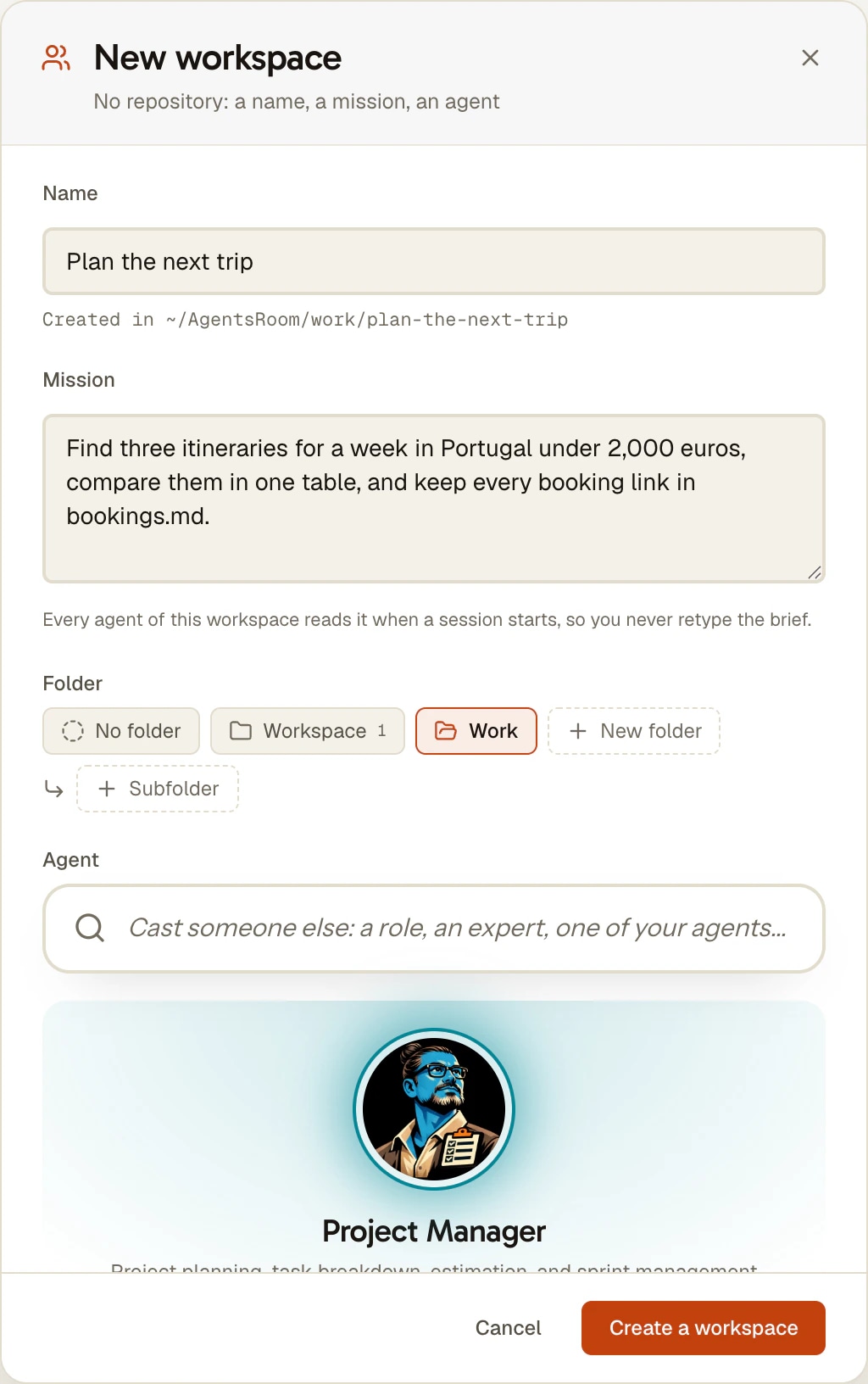
On the projects home, the + tile of every folder offers Open project, for a folder you already have, and Create a workspace. The dialog that opens is New workspace: no repository, a name, a mission, an agent.
- 2
Name it
Type a name such as Plan the next trip. The line Created in shows where the folder will be made, and two workspaces never share a directory: a duplicate name gets a number.
- 3
Write the mission
Say what you want to hand to the agent, the way you would brief a colleague: the goal, the sources to read, what the result should look like. Every agent of the workspace reads it when a session starts.
- 4
Pick the agent
Your agents come first, then the roles. A saved agent brings its own memory and its pinned skills, and the agent CLI it runs on: Claude Code, Codex, Antigravity CLI or any of the others AgentsRoom supports.
- 5
File it and create
Choose the folder of your sidebar it belongs to, or No folder, then click Create a workspace. The workspace opens with its agent ready in the list, and the mission is shown above the empty room under the heading Mission.
What People Open a Workspace For
The four cases the feature was built around.
A support incident
One workspace per incident: the mission names the client and the symptom, the agent reads the logs and the tickets you drop in the folder, and drafts the answer. When it is closed, the folder keeps the whole trail.
A trip to prepare
The agent compares itineraries, keeps a running file of bookings and budgets, and picks up where it left off the next day, because the mission and its memory are still there.
A product research
A workspace for one question, with its notes, sources and drafts in one folder, and a backlog to split the research into tasks you can hand to several agents.
A mock-up to build
Start without a repository, let the agent produce the files, and the day it becomes real code run git init in the folder: the Changes tab and the other git tools appear on their own.
What a Workspace Is Not
It is not a chat window. The agent is the same agent CLI you would run in a terminal, working on real files in a real folder, with the permissions you gave it. What changes is that the folder, the brief and the agent are set up for the task instead of for a codebase.
It is not a separate product mode either. There is no workspace type, no badge and no filter: after creation nothing distinguishes it from a repository project, by design. Any project, a repository included, can be given a mission.
For code you already have, open the folder as a project instead. For one project that spans several existing folders, use linked folders. A workspace is for the work that has no folder yet.
Limits Worth Knowing
- A workspace counts toward the project limit of your plan like any other project.
- The mission is written on the project on this computer; it does not follow your account to your other computers.
- Cloud Agents runs need a git repository, so they are refused in a workspace that has none. Run git init in the folder and they work.
- No Changes tab, no branch badge and no commit tools until the folder holds a git repository.
- Where workspaces land is a setting of each computer: Folder settings, Workspaces, Root folder.
- Creating a workspace from the phone needs the desktop to be connected, since the folder lives on that computer.
FAQ
Can I use Claude Code for non-coding tasks?
Yes. Claude Code works on files and commands in whatever folder it starts in, and nothing in it requires a git repository or source code: research, writing, support answers and planning all work. In AgentsRoom you give that work a place with a workspace: a name, a mission and an agent, and the app creates the folder. The same goes for Codex, Antigravity CLI and the other agent CLIs AgentsRoom runs: the mission reaches every one of them.
Do I need a git repository to use AgentsRoom?
No. A workspace has no repository at all, and any folder without git can be opened as a project. Only the git surfaces wait for one: the Changes tab, the branch badge and Cloud Agents runs. Run git init in the folder and they appear on their own.
What is the mission of a workspace?
The standing brief of the project, in your own words: what it is for, what to read, what the result should look like. It is added to the boot prompt of every agent of the project when a session starts, word for word, whether the agent was started from the desktop or the phone. Change it in Project settings, General, Mission. Repository projects can have one too.
Which agent does a new workspace start with?
The one you pick in the dialog. Your saved agents are listed first and are copied whole: name, persona, model, CLI, pinned skills and avatar. The name matters because an agent's memory notebook is keyed on it, so the agent arrives with what it already learned. You can also start from a plain role such as Brainstormer or PM.
Where are the files of a workspace?
In the folder shown under Created in when you named it, under the root folder of the sidebar folder you filed it in. Set that root in Folder settings, Workspaces, Root folder. Left empty, AgentsRoom uses an AgentsRoom folder in your home directory, with one sub-folder per sidebar folder.
Can an agent create a workspace for me?
Yes, with workspace_create from AgentsRoom MCP: a name, a mission, and optionally the sidebar folder and the role. Asked for it, the agent acts; on its own idea it asks you first, because a workspace adds a permanent entry to your sidebar. Without a role, the new workspace starts with an agent of the same role as the one that opened it.
Can I create a workspace from my phone?
Yes. In the mobile app, tap + in the header of the Projects tab, then Create a workspace, and fill in the name, the mission, the folder and the agent. The phone must be connected to the desktop that will hold the folder; without it the entry is visible but disabled.
Why is there no Changes tab in my workspace?
Because the folder has no git repository, exactly as in any folder without git. The Changes tab, the branch badge and the commit tools are about version control. Run git init in the workspace folder and they come back.
You may also like
Project Memory
Give your AI coding agents a long-term memory. Decisions, architecture and pitfalls persist across sessions and are shared with everyone on the project. Free, unlimited.
Customize Agents
Pick from 14 built-in agent roles, add specialist agents from The Agency, or build your own custom AI coding agent with its own system prompt. Then share your agents with your team through the chat, and publish them to the community so everyone levels up together.
Linked folders
Add other folders and repositories to an AgentsRoom project without moving them. Every agent you start gets them through --add-dir on Claude Code, Codex and four other CLIs, and the Changes tab commits each repo.
Multi-project · Multi-agent · Parallel
AgentsRoom runs AI agents in parallel across multiple projects, all in a single window: Claude, Codex, GitHub Copilot CLI, Cursor and 13 other agent CLIs. Color-coded roles, live status, per-project counters, native desktop and mobile notifications. The visual alternative to 12 terminal tabs and the chaos of Claude Code sessions scattered across iTerm2, Warp and tmux.
Give Your Next Task a Workspace
Download AgentsRoom, click Create a workspace, and hand the mission to the agent that already knows the job.
Companion app: monitor your agents on the go
Bring your own: Claude, Codex, Antigravity CLI, or other AI provider.
Push bugs and requests straight to your public backlog.