A proxy for each agent CLI,
set once for all its agents
Your company wants Claude Code to leave through its proxy, while your personal Codex goes out through your home connection. Exporting HTTPS_PROXY in your shell sends every CLI down the same road. AgentsRoom gives each provider its own way out.
Pick a provider in Settings > AI providers, unfold Advanced settings, type the proxy address and press Test: AgentsRoom shows the exit IP before you launch anything. Every agent of that provider then starts with the proxy variables set, and AgentsRoom's own quota checks for that provider take the same road.
- Claude CodeCompany proxyproxy.corp.example:3128Exit IP203.0.113.10
- CodexHome proxyhome.example.net:8080Exit IP198.51.100.24
- GitHub Copilot CLIDirectExit IP192.0.2.7
Each provider leaves through its own proxy, or directly, and Test shows the address the provider will see.
Most agent CLIs already know how to use a proxy: they read the standard HTTPS_PROXY, HTTP_PROXY and NO_PROXY variables when they start. The catch is where those variables live. Export them in your shell profile and every CLI you run takes the same exit, so you cannot keep Claude Code on the company network and Codex on your home connection at the same time.
AgentsRoom moves the setting one level down, to the provider. Each provider tab in Settings > AI providers has a Proxy field under Advanced settings. Every agent of that provider starts with the proxy variables in its terminal, whatever project it runs in, and the other providers are left alone.
It also covers the calls AgentsRoom makes to the provider by itself, such as reading your Claude or Codex usage. They go through the same proxy, so the account sees one address, not the agent's on one side and your computer's on the other.
What the Proxy field does
One field per provider, applied to every agent of that provider when it starts.
One proxy per provider
Claude Code, Codex, GitHub Copilot CLI and the other agent CLIs each have their own Proxy field. Leave one empty and that provider goes out directly.
HTTP, HTTPS or SOCKS
http://, https://, socks5:// and socks5h:// addresses are accepted. Claude Code does not support SOCKS, so give Claude agents an http:// proxy.
Test shows the exit IP
Before you launch anything, Test asks for your public address directly and through the proxy, and shows both with the latency. If they match, the proxy does not change your IP, and the panel says so.
Exceptions, localhost always direct
List the hosts that must skip the proxy, such as an intranet or a package registry. localhost, 127.0.0.1 and ::1 are always excluded, so hooks and local MCP servers keep working.
Quota checks take the same road
AgentsRoom's own calls to that provider, such as the usage gauges, go through the proxy too. If the proxy is down they fail like a network error: they never fall back to a direct connection.
No password in plain text
The setting follows your account to your other computers, so a password cannot be typed in clear. Save it in the Secret Manager and write http://user:{{secret:NAME}}@host:port.
How to set it up
Five steps, once per provider.
- 1
Open the provider's tab
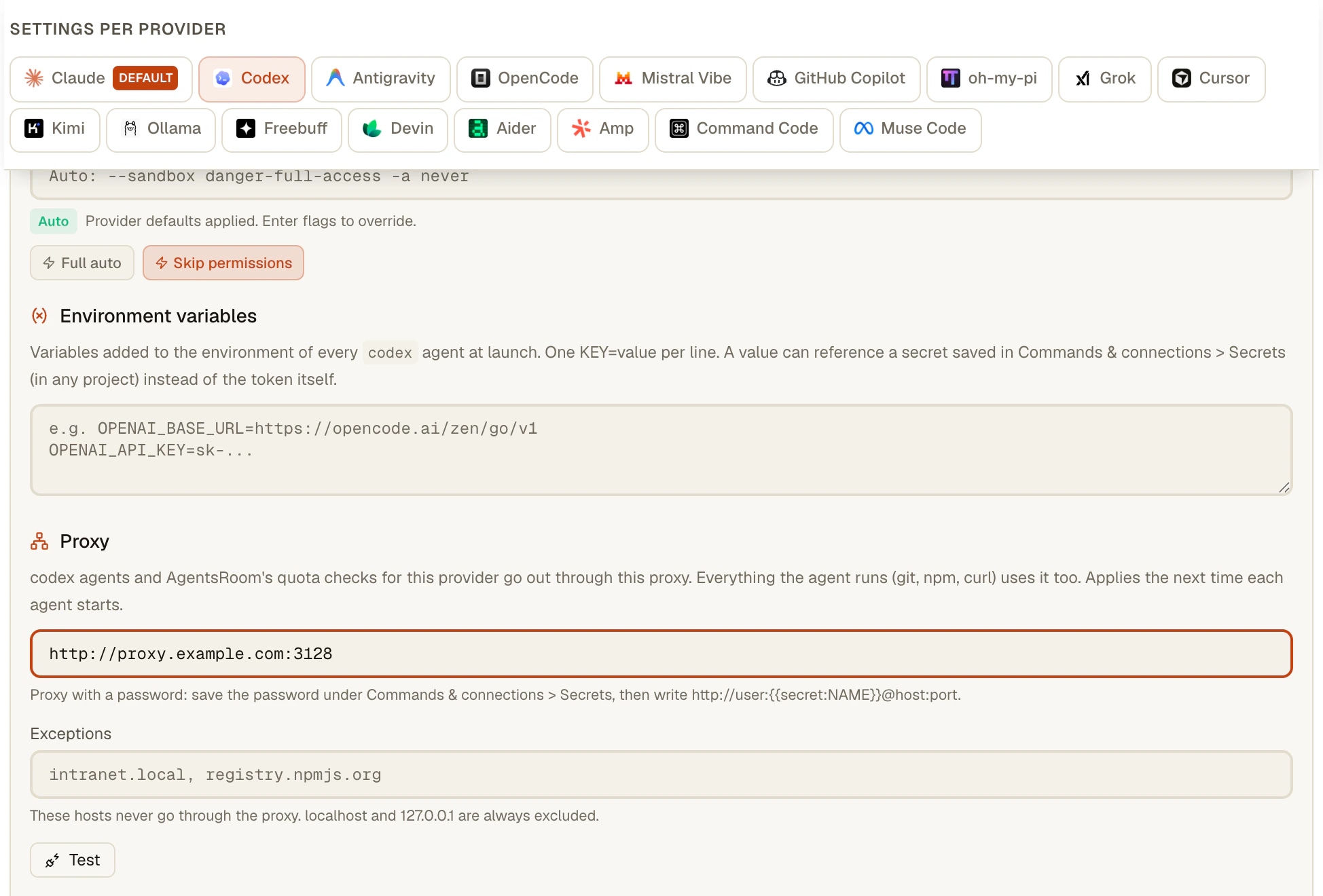
Settings > AI providers, select the provider (Codex, for example), then unfold Advanced settings. The Proxy field sits under the environment variables. Typing Proxy in the Settings search takes you there too.
- 2
Type the proxy address
Enter the address, for example http://proxy.example.com:3128, and in Exceptions the hosts that must go direct. The switch next to the title turns the proxy off without forgetting it, handy when the home proxy cannot be reached from the office.
- 3
Press Test
AgentsRoom shows the exit IP through the proxy, the latency, and your address without the proxy. A rejected password, an unreachable proxy or a proxy that does not answer is named plainly.
- 4
Start the agents
The proxy applies when an agent starts: every new agent of that provider gets HTTPS_PROXY, HTTP_PROXY, ALL_PROXY and NO_PROXY, in upper and lower case, since some tools such as curl only read the lower-case form. An agent that is already running keeps its route until you restart it.
- 5
Everything the agent runs follows
git, npm or curl launched by the agent in its terminal go through the same proxy. Add a host to Exceptions when one of them must stay on the direct line.
What Claude Code and Codex already do on their own
Claude Code reads HTTPS_PROXY, HTTP_PROXY and NO_PROXY, lower-case forms included, and accepts a username and password inside the proxy URL. Its documentation says plainly that it does not support SOCKS proxies. It recommends setting these variables in the env block of ~/.claude/settings.json rather than in the shell, the only configuration that reliably reaches its background agents, and /status shows the proxy it picked up. Behind a TLS-inspecting corporate proxy it trusts the certificates of the operating system and NODE_EXTRA_CA_CERTS. (Claude Code documentation, Enterprise network configuration, read on 21 October 2026.)
Codex CLI reads HTTPS_PROXY, ALL_PROXY and NO_PROXY from its environment, and takes a custom root certificate from CODEX_CA_CERTIFICATE or SSL_CERT_FILE. In codex-cli 0.163.0, following the macOS system proxy or a PAC file is an under-development feature, off by default (codex features enable respect_system_proxy). The Network proxy entry of its /experimental menu is something else: it limits what sandboxed commands can reach, it does not choose the address OpenAI sees.
So for one CLI on one computer, the variables are enough, and a proxy in ~/.claude/settings.json already stays with Claude Code alone. What they do not give you is one place for every CLI, a check of the exit IP before you launch, the same route for the quota reads, and a setting that follows you to your other computers without a password in it. That is the part AgentsRoom adds.
Limits
- The proxy applies when an agent starts. An agent that is already running keeps its route until you restart it.
- A CLI that ignores the standard proxy variables connects directly for its own traffic. AgentsRoom does not force it, while its quota checks for that provider still go through the proxy.
- Claude Code does not support SOCKS proxies. For Claude, use an http:// or https:// proxy.
- No silent fallback: when the proxy is down, the agents of that provider cannot reach it and its usage gauges show a network error.
- The password secret lives in each computer's vault, and secrets are not synced: on a second computer, save a secret with the same name.
- Only that provider's agents and AgentsRoom's calls to that provider use the proxy. The built-in browser, your dev servers and the commands you start in other terminals keep their own network path.
- An explicit HTTPS_PROXY line in an environment variables block (provider, folder, project or agent) wins over this setting for the agent's terminal.
Frequently asked questions
How do I set a proxy for Claude Code?
Claude Code reads the standard HTTPS_PROXY, HTTP_PROXY and NO_PROXY variables, from your shell or from the env block of ~/.claude/settings.json, and does not support SOCKS. In AgentsRoom, open Settings > AI providers, select Claude, unfold Advanced settings and type an http:// proxy address in Proxy: every Claude Code agent started afterwards gets the variables, and the other CLIs keep their own route.
How do I make Codex CLI use a proxy?
Codex CLI reads HTTPS_PROXY, ALL_PROXY and NO_PROXY from its environment, and a custom root certificate from CODEX_CA_CERTIFICATE or SSL_CERT_FILE. In codex-cli 0.163.0, following the operating system's proxy settings is still an under-development feature, off by default. In AgentsRoom, the Proxy field of the Codex tab sets those variables for every Codex agent, and the Codex usage reads go through the same proxy.
Can Claude Code use one proxy and Codex another at the same time?
Yes. Each provider tab has its own Proxy field, so Claude agents can leave through the company proxy while Codex agents use your home connection, in the same project and at the same moment. A provider with no proxy goes out directly.
How do I check which IP address the provider sees?
Press Test next to the proxy address. AgentsRoom asks a public endpoint for your address twice, directly and through the proxy, and shows both with the latency. When the two are the same, the proxy does not change your address and the panel warns you.
Can I use a proxy that needs a username and password?
Yes, without writing the password in clear. The proxy setting follows your account to your other computers, so a plain-text password is refused. Save the password in the Secret Manager, then reference that secret in the proxy address: it is resolved on your computer when the agent starts. If the password contains @, : or /, store it URL-encoded.
Does the proxy apply to npm, git and the commands an agent runs?
Yes. The variables are set in the agent's terminal, so everything the agent launches there (git, npm, curl, a test runner) uses the proxy too. Put the hosts that must stay direct in Exceptions; localhost, 127.0.0.1 and ::1 are always excluded.
What happens if the proxy goes down?
Nothing falls back to a direct connection, on purpose: you chose that exit so the provider never sees your other address. The agents of that provider cannot reach it, and its usage gauges show a network error until the proxy is back or you switch it off.
Do I have to set it again on each computer?
Not the address and the exceptions: they are saved with your account and come back on every computer where you sign in. A password, yes: secrets stay in each computer's vault, so save a secret with the same name on the second computer. An agent you start from the phone runs on the desktop and uses its proxy.
You may also like
Multi-Provider
AgentsRoom supports 16 AI coding providers: Claude, Codex, GitHub Copilot CLI, OpenCode, Antigravity CLI, Aider, Grok Build, Mistral Vibe, Kimi Code, Amp, oh-my-pi, Freebuff, Devin, Cursor, Command Code and Muse Code. Assign a different provider per agent, switch provider mid-conversation, and keep full context with automatic handoff. The best multi-provider AI coding tool.
Claude Multi-Account
Run two or more Claude Code accounts on one computer, side by side in AgentsRoom. Keep a personal account on one project, a work account on another, a client account on a third. Pin one account per project, override per agent, sign in from the app. Free to download on macOS, Windows and Linux.
Codex Multi-Account
Run several Codex CLI accounts side by side in AgentsRoom. Use a personal OpenAI account on one project, a work account on another, a client account on a third. Pin one Codex account per project, override per agent. Sign in directly from the app via codex login, no terminal hack required.
Account auto-switch
When a Claude or Codex account hits its usage limit, AgentsRoom moves the same conversation to another account you are signed in to and carries on. Full context, no restart, no waiting for the 5-hour window.
SSH Connections
Save your SSH connections, open a built-in terminal over SSH, and run Claude Code, Codex or Antigravity CLI directly on your remote server or VPS. SSH key or password auth, per-project connection profiles, no separate SSH client needed.
Give each agent CLI its own way out
Download AgentsRoom, open Settings > AI providers and set a proxy per provider. Available on every plan.
Companion app: monitor your agents on the go
Bring your own: Claude, Codex, Antigravity CLI, or other AI provider.
Push bugs and requests straight to your public backlog.