مكتبة المهارات
إجراءات معيارية، أي وقت تشغيل
احفظ الإجراءات التي يكررها الوكلاء. أرفقها بالمهام أو الوكلاء. قم بالتصدير إلى Claude و Cursor و Codex عند الحاجة. يعني التوجيه القائم على المحفزات أن المهارة الصحيحة تُحمل عندما تكون ذات صلة.
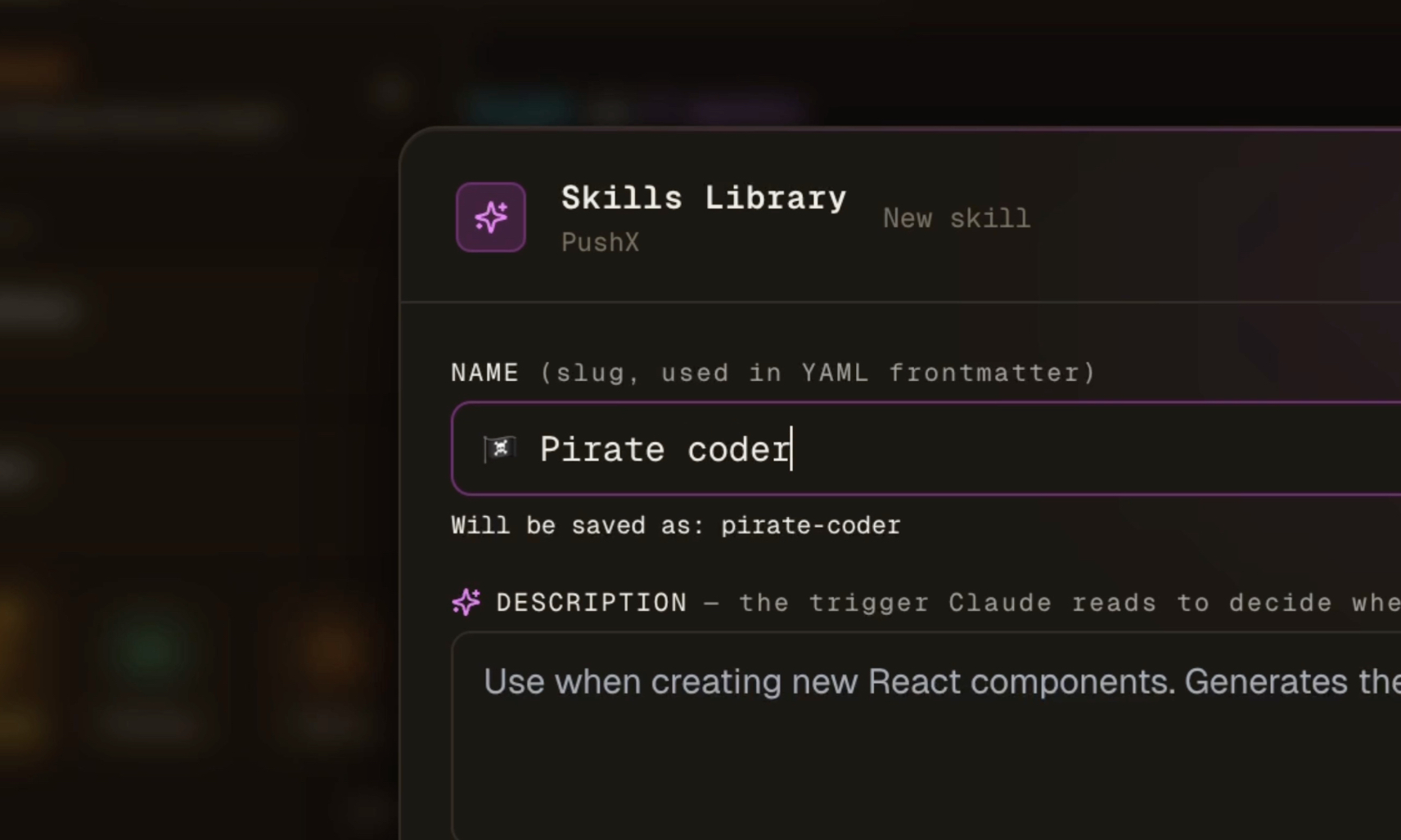
---
name: react-component-builder
description: Use when creating new React components.
  Generates them with TypeScript, Tailwind, and colocated tests.
allowed-tools: Read, Edit, Bash
---

# React component builder

When asked to create a new component:

1. Place it in `src/components/<Name>.tsx` unless told otherwise.
2. Use `forwardRef` if it accepts a `ref` prop.
3. Type props with an exported interface named `<Name>Props`.
4. Style with Tailwind utility classes; no `@apply` outside of `globals.css`.
5. Add a colocated test `<Name>.test.tsx` covering the happy path
   and one edge case.

Avoid:
- `React.FC` (prefer typed function declarations)
- Index re-exports unless explicitly requested
- Inline objects in JSX props (extract to `useMemo` if needed)
مكتبة واحدة، كل وقت تشغيل
مكتبة المهارات مبنية على مواصفات Claude SKILL.md، لكنها تُترجم إلى أي وقت تشغيل يستخدمه فريقك اليوم.
يحركها المحفز
لكل مهارة وصف "متى يتم الاستخدام". يقرأ Claude وصف كل مهارة في النطاق ويوجهك تلقائياً إلى الصحيح — لا اختيار يدوي.
أرفق المهام أو الوكلاء
أرفق مجموعة مهارات مسبقاً بالوكيل بحيث تتابع مجموعة أدواته كل مهمة ينفذها. أو حدد مهارات معينة لتذكرة تراكم واحدة. كلا السطحين لهما إعدادات افتراضية لاصقة.
التصدير العالمي
احفظ مرة واحدة وأرسل إلى Claude (.claude/skills/) و Cursor (.cursor/rules/) و Codex (AGENTS.md) و Windsurf أو Aider بنقرة واحدة. قم بتبديل أوقات التشغيل دون إعادة كتابة مهاراتك.
مهارات متعددة الملفات
المهارة مجلد وليست ملفاً واحداً: ضع النصوص البرمجية المساعدة والمستندات المرجعية والقوالب بجوار SKILL.md. استورد مجلد مهارة موجوداً كما هو، وعند بدء تشغيل الوكيل تُفكّ الملفات على القرص ليتمكن من قراءتها وتشغيلها.
سجل الإصدارات
كل حفظ يغيّر مهارة يحتفظ بإصدارها السابق، بما في ذلك الملفات المرفقة. قارن إصدارًا سابقًا بالإصدار الحالي واستعده بنقرة واحدة، من سطح المكتب أو من تطبيق الهاتف.
التحديث من git
اربط مهارة بمستودع git، مع فرع أو وسم اختياري ومجلد فرعي عندما يضم المستودع الواحد عدة مهارات. يجلب التحديث أحدث SKILL.md وملفاته باستخدام صلاحيات git الخاصة بك، ويبقى الإصدار السابق في السجل.
المزامنة عبر الأجهزة
تتابع مهارات المشروع مستودعك. وتتابعك مهارات الحساب في كل مكان. يقرأ سطح المكتب والهاتف ويكتبان وينشران معاً: الهاتف ليس واجهة للقراءة فقط.
قائمة التحقق من الأدوات المسموحة
قيد المهارة إلى مجموعة فرعية من الأدوات (Read و Edit و Bash...). يفرض وقت التشغيل قائمة التحقق عند تحميل المهارة — حدود أكثر وضوحاً وعدد أقل من المفاجآت.
المهارات الشخصية، يتم تجاهلها من قبل git
قم بوضع علامة على المهارة كشخصية وتبقى على جهازك. تدخل مهارات المستوى المشروع إلى git حتى يحصل الفريق عليها؛ لا تسرب الخاصة بك.
كيفية العمل
افتح مكتبة المهارات
انقر على بلاط المهارات في شريط جانب المشروع (أو اضغط عليه من محطة الوكيل على الهاتف المحمول). تصفح علامات التبويب للمشروع + العامة، والبحث، والتنظيم في المجلدات.
اكتب المحفز أولاً
حقل "الوصف" هو ما يقرأه Claude لتحديد ما إذا كان سيتم تحميل المهارة. صيغه كـ "استخدم عندما..." أو "استخدم ل...". جملتان واضحتان تفوقان فقرة طويلة.
أرفقها بمهمة أو وكيل
عند إنشاء مهمة، حدد مهارات متعددة بجانب منتقي الوكيل. أو قم بتعيين الإعدادات الافتراضية لكل وكيل حتى تتنقل مجموعة أدواته معه. المجموعة الأخيرة لاصقة للمهمة التالية.
يتم حقن المهارات عند بدء المهمة
عندما تنتقل المهمة إلى in_progress، يتم إلحاق نص كل مهارة برسالة الوكيل الأولى بتنسيق SKILL.md الأصلي — يتعامل Claude معها كما لو تم تحميلها من القرص.
اختياري: التصدير إلى القرص
انقر على "حفظ في" على أي مهارة لكتابة ملف حقيقي: Claude تحت .claude/skills/<name>/ و Cursor تحت .cursor/rules/ و Codex مضاف إلى AGENTS.md وما إلى ذلك.
.claude/skills/<name>/SKILL.mdاكتب مرة واحدة وانشر لأي وكيل
تُحفظ المهارات في AgentsRoom بصيغتها الأساسية (Claude SKILL.md). عند النقر على "حفظ في"، يقوم AgentsRoom تلقائياً بترجمتها إلى التنسيق الذي يتوقعه وقت التشغيل الهدف.
Claude Code
.claude/skills/<name>/SKILL.mdCursor
.cursor/rules/<name>.mdcWindsurf
.windsurf/rules/<name>.mdOpenAI Codex
AGENTS.md (كتلة مدارة)Aider
CONVENTIONS.md (كتلة مدارة)عام
<name>.mdالأسئلة الشائعة
ما الفرق بين المهارة والموجه؟
الموجه هو نص تنسخه إلى الوكيل. المهارة هي إجراء مع وصف "متى يتم الاستخدام" يحمله وقت التشغيل عند الطلب عندما يكون ذا صلة. تتابع المهارات عبر المهام؛ الموجهات هي مدخلات إجبارية لمرة واحدة.
هل يعمل هذا فقط مع Claude Code؟
التخزين بتنسيق Claude (SKILL.md)، لكن قائمة التصدير تُترجم إلى Cursor و Windsurf و Codex و Aider و Markdown عادي. أي وكيل يستهلك أحد أوقات التشغيل هذه يمكنه استخدام مهاراتك.
كيف يتم تسليم المهارات إلى الوكيل؟
عندما تنتقل المهمة إلى in_progress، يتم حقن أجسام المهارات المرفقة في الموجه الأولي للوكيل كبلوكات SKILL.md أصلية. يقرأها الوكيل بنفس الطريقة التي تقرأ بها المهارات على القرص.
هل يمكنني مشاركة المهارات مع فريقي؟
تتم مزامنة مهارات المشروع عبر واجهة برمجة تطبيقات AgentsRoom إلى كل عضو في الفريق على نفس المشروع. تبقى المهارات المميزة كشخصية على جهازك.
هل يمكنني استيراد المهارات التي كتبتها بالفعل؟
نعم — يقوم زر الاستيراد بمسح .claude/skills/ و .cursor/rules/ و .windsurf/rules/ في مشروعك (أو الصفحة الرئيسية للمستخدم لـ Claude)، وتحليل مقدمة YAML وإضافة المطابقات إلى مكتبة AgentsRoom.
هل يمكن أن تنطبق مهارة على مشروع كامل بدل وكيل واحد؟
نعم. تتراكم المهارات في ثلاث طبقات: خط أساس للمشروع يرثه كل وكيل فيه، والإعدادات الافتراضية المرتبطة بوكيل بعينه، والاختيار المثبّت على تذكرة واحدة في قائمة المهام. وخط الأساس هو ما يُستخدم للأعراف التي لا يجوز نسيانها أبداً، مثل قواعد الـ commit أو قائمة مراجعتك، لأنه ينطبق أياً كان الوكيل الذي يتولى العمل.
أين أجد مهارات كتبها مطورون آخرون؟
في تبويب «المجتمع» داخل مكتبة المهارات، دون مغادرة AgentsRoom. ابحث في الكتالوج العام، وصفِّ حسب الفئة، واقرأ المهارة كاملة، ثم استخدمها كما هي أو انسخها إلى مكتبتك مع اختيار ما إذا كانت ستحطّ في هذا المشروع أو في حسابك. نشر مهارتك هو مربع اختيار في محرر المهارات، غير محدَّد افتراضياً، وكل مشاركة تخضع لمراجعة بشرية قبل ظهورها.
هل يمكنني استخدام مهاراتي من تطبيق الهاتف؟
نعم. تُزامَن المكتبة مع الرفيق المحمول عبر المُرحِّل المشفّر من طرف إلى طرف، فيمكنك إرفاق مهارة بمهمة من هاتفك بالطريقة نفسها التي تفعلها على سطح المكتب.
هل يمكنني إبقاء مهارة بعيدة عن كل الوكلاء إلا إذا أرفقتها؟
نعم. حدّد مهارة بخيار "الوكلاء المرفقون فقط" في المحرر فتختفي من المكتبة التي يتصفحها الوكلاء عبر MCP: لا يمكن رؤيتها وتحميلها إلا من قبل الوكلاء الذين ترفقها بهم (كإعداد افتراضي للوكيل، أو في خط أساس المشروع، أو على تذكرة). هكذا تبقى المكتبة الكبيرة قابلة للاستخدام دون أن يتم التقاط كل إجراء متخصص كلما بدا الطلب مشابهاً.
هل يمكنني إبقاء مهارة متزامنة مع مستودع git؟
نعم. في محرّر المهارة، افتح مصدر git وأدخل عنوان URL للمستودع، وفرعًا أو وسمًا اختياريًا، والمجلد الفرعي الذي يحتوي على SKILL.md إذا كان المستودع يضم عدة مهارات. يقرأ الجلب أو التحديث SKILL.md والملفات المجاورة له باستخدام صلاحيات git على حاسوبك (مفتاح SSH أو مساعد بيانات الاعتماد)، ويعرض النتيجة في المحرّر، ويحتفظ الحفظ بالإصدار السابق في السجل، لذا يمكن دائمًا التراجع عن أي تحديث.
قد تحب أيضاً
مكتبة الموجهات
احفظ الموجهات التي تعيد استخدامها وتنظمها في مجلدات وأرسلها إلى أي وكيل بنقرة واحدة. نفس حمض DNA مكتبة المهارات.
الفرق (سير عمل متعدد الوكلاء)
ربط عدة وكلاء في خط أنابيب. تنتقل المهارات المرفقة بكل وكيل مع التسليم.
AgentsRoom MCP
خادم MCP الذي يستخدمه الوكلاء لقراءة / حفظ المهارات والموجهات وأوامر dev في وقت التشغيل — لا توصيل إضافي.
الأعمال المتأخرة ولوحة المهام
أرفق المهارات مباشرة إلى بطاقات التراكم — يحمل الوكيل عندما يلتقط المهمة.
قراءات إضافية
Claude Ads: مهارة Claude Code التي تدقّق حساباتك الإعلانية
Claude Ads مهارة مفتوحة المصدر لـ Claude Code: أكثر من 250 فحصاً على Google وMeta وLinkedIn وTikTok وAmazon Ads، مع درجة من 100 وخطة عمل مرتّبة حسب الأولوية، خلال عشر دقائق تقريباً. التثبيت والأوامر والحدود، وكيفية تشغيلها ضمن AgentsRoom.
AGENTS.md: ملف سياق واحد لكل وكيل برمجة (Codex وAntigravity وClaude)
AGENTS.md هو ملف التعليمات المحمول الذي تقرأه وكلاء البرمجة لديك قبل أن تلمس شيفرتك. ما الذي تضعه فيه، وكيف يختلف عن CLAUDE.md، وكيف تحافظ على سياق واحد عبر Codex وAntigravity وClaude.
بناء مجموعة مهاراتك
قم بتنزيل AgentsRoom وابدأ مكتبة المهارات في 30 ثانية. مجاني لما يصل إلى 2 مشاريع.
التطبيق المرافق: تابع وكلاءك أينما كنت
استخدم Claude أو Codex أو Antigravity CLI أو أي مزود AI آخر.
أرسل الأخطاء والطلبات مباشرة إلى قائمة المهام العامة.