A chat view for Claude Code,
Codex and five more CLIs
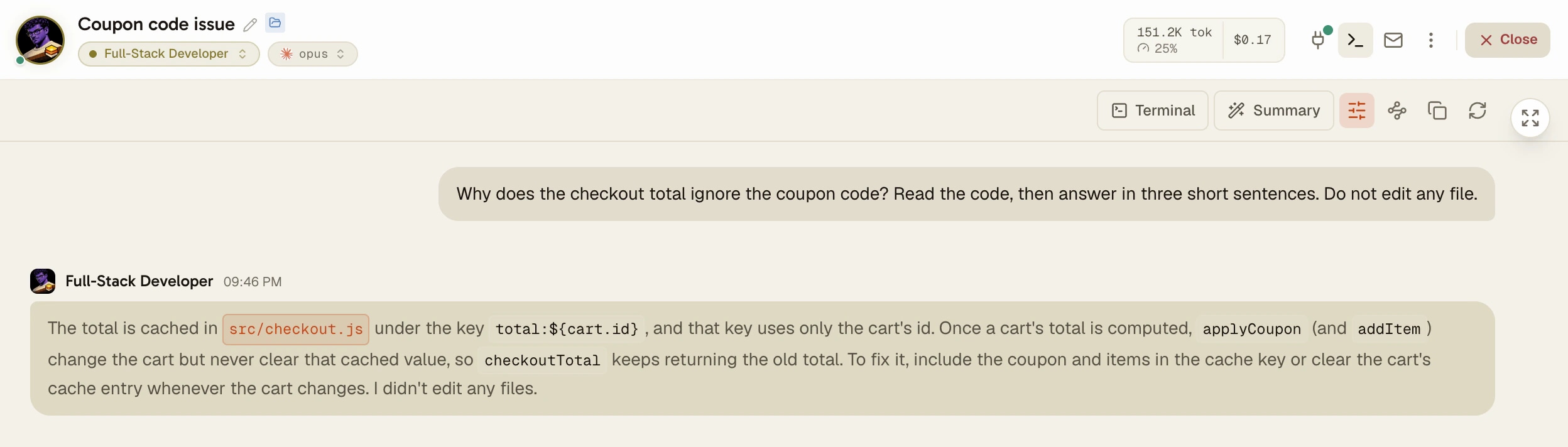
One button turns an agent pane into a chat: your messages on the right, the agent's answers signed with its name, tool calls folded into one line. The CLI keeps running underneath, and one more click brings the terminal back.
AgentsRoom reads the transcript the CLI writes on disk, so the thread is the real session, not a copy typed into a chat window. Claude Code, Codex, Grok Build, Mistral Vibe, oh-my-pi, Pi and Antigravity CLI, on macOS, Windows, Linux and your phone.
Why did the checkout total ignore the coupon?
The discount was applied after tax. I moved it before the tax step and added a test.
The terminal and the conversation show the same session. Switching never touches the CLI.
A coding agent CLI talks to you in a terminal. That is fine while you watch it work, and hard when you come back to a long session: the answer you need is three screens up, between file reads, diffs and shell output, and a full-screen interface may have repainted over it.
Every CLI keeps the session somewhere on disk. Claude Code writes one JSONL file per session under ~/.claude/projects/, Codex one per session under ~/.codex/sessions/. AgentsRoom reads that file and draws it as a conversation, in the same pane as the terminal.
You pick the face you want at any moment. The CLI never notices: it keeps running in its real terminal, with its own commands and its own prompts, and the conversation follows it turn by turn.
What the conversation view shows
Two voices, easy to tell apart
Your messages sit in a neutral bubble on the right. Each agent answer is signed with the agent's face, name and time, in the color of its role, and markdown is rendered.
Tool calls folded, or hidden
A burst of file reads and commands becomes one line such as 3 tool calls, open it to see each call in full. Since October 2026 tool calls are hidden by default, one click shows them again.
The answer appears as it is written
With Claude Code, Codex and Antigravity CLI, the answer shows up in the thread as fast as in the terminal, then turns into the formatted version once the CLI saves it.
Questions and permissions as cards
When Claude Code asks a question with options, you click one in the thread. A Claude Code or Codex permission prompt becomes a card with Allow and Deny, without going back to the terminal.
The same thread on your phone
The iOS and Android apps show the same conversation, read on your desktop and sent end-to-end encrypted, with a Copy answer button under every agent answer.
Act on what you read
Select a passage to summarize it, explain it, quote it in the composer or send it to another agent or to the backlog. Listen reads an answer aloud. Copy the conversation takes the whole thread.
How to use it
Five steps, nothing to configure.
- 1
Open an agent
Start or open an agent on Claude Code, Codex, Grok Build, Mistral Vibe, oh-my-pi, Pi or Antigravity CLI. Its pane opens on the terminal, as usual.
- 2
Click Conversation
The Conversation button sits in the pane header, on the right. The pane switches to the thread, scrolled to the latest turn. The button becomes Terminal.
- 3
Read, fold, copy
Scroll back through the session. Show tool calls brings the calls back for this pane, a click on a tool line shows it in full, Copy the conversation copies everything.
- 4
Keep talking to the agent
Type in the composer as usual: every message you send jumps the thread back to the bottom. When the CLI needs its own screen (a model picker, a plan dialog), the pane hands itself back to the terminal, then returns.
- 5
Make it the default
Settings > Terminal > Conversation view: Auto, Always or Never, also per project. Tool calls in the conversation view can be shown or hidden everywhere, per project or per agent.
What the CLIs already give you, and what this adds
Claude Code has its own transcript viewer: Ctrl+O toggles a detailed view of the session inside the terminal, with each tool call, a timestamp and the model on every answer. /export writes the current conversation as plain text, /resume opens a picker of past sessions, and each session is a JSONL file under ~/.claude/projects/ (checked on Claude Code 2.1.310, October 2026).
Codex CLI keeps every session as a JSONL file under ~/.codex/sessions/, and codex resume opens a picker of recorded sessions that can preview a transcript (checked on codex-cli 0.164.0). Both stay terminal screens: they show the session where the agent runs, one CLI at a time.
The conversation view does not replace those commands, it reads the same files. What it adds is a readable thread next to the live terminal, the same layout for seven CLIs, cards you can click, and the thread on your phone. For sessions you started in a plain terminal, AgentsRoom can list and resume them first, then you read them here.
Which CLIs it works with
The view exists only where AgentsRoom can read the CLI's transcript back. On the other CLIs the pane stays on the terminal.
Conversation view
Claude Code, Codex, Grok Build, Mistral Vibe, oh-my-pi, Pi and Antigravity CLI.
Answer while it is written
Claude Code, Codex and Antigravity CLI. The others show the answer once the CLI has saved it.
Clickable cards
Question cards: Claude Code. Allow and Deny on permission prompts: Claude Code and Codex.
Limits
- No transcript, no view: GitHub Copilot CLI, OpenCode, Cursor, Aider, Kimi Code, Amp, Freebuff, Devin, Command Code and Muse Code stay on the terminal.
- The view reads what the CLI saves. Reasoning a CLI does not persist is marked Reasoning not saved by the CLI, and some full-screen dialogs never appear in the thread.
- The live answer is plain text until the saved version replaces it, and it needs the agent's pane to be open in AgentsRoom on the desktop.
- Mistral Vibe and Antigravity CLI fill the thread once they have saved a first turn, within a few seconds.
- An oh-my-pi or Antigravity agent started on a remote SSH host has no view: its session file lives on the host.
- On the phone the conversation is for reading and answering cards: you send messages from the terminal screen.
Frequently asked questions
Is there a chat view for Claude Code?
Claude Code itself is a terminal app. Its Ctrl+O transcript viewer gives a detailed view of the session, still inside the terminal. AgentsRoom adds a Conversation view to every Claude Code agent: one button in the pane header turns the session into a chat, read from the JSONL transcript Claude Code writes under ~/.claude/projects/, and one more click brings the terminal back. Claude Code keeps running the whole time.
How do I view my Claude Code conversation history?
In the terminal: /resume opens a picker of past sessions, Ctrl+O shows the detailed transcript of the current one, and /export writes it as plain text. On disk, each session is a JSONL file under ~/.claude/projects/, in a folder named after the project path. In AgentsRoom, open the agent and click Conversation: the whole thread is there, with a day marker when it spans several days. A session you started in a plain terminal can be listed and resumed in an agent first, then read the same way.
Does the conversation view work with Codex?
Yes. AgentsRoom reads the session files Codex writes under ~/.codex/sessions/, and since October 2026 the answer appears in the thread while Codex writes it. The view also works with Grok Build, Mistral Vibe, oh-my-pi, Pi and Antigravity CLI. GitHub Copilot CLI, OpenCode, Cursor and the other CLIs do not write a transcript AgentsRoom can read, so their pane stays on the terminal.
Does switching to the conversation interrupt the agent?
No. The CLI keeps running in its real terminal underneath, and only what you see changes. Messages you type in the composer go to the same CLI whichever face is on screen.
Can I hide the tool calls and read only the answers?
Yes, and it is the default since October 2026. Show tool calls in the view's toolbar brings them back for this pane. For good, set Tool calls in the conversation view in Settings > Terminal, in the project settings or in Edit agent: the narrowest scope wins.
Can I answer the agent from the conversation view?
Yes. You keep typing in the composer as usual. When Claude Code asks a question with options, the card in the thread takes your click and sends it to the CLI. When Claude Code or Codex asks for permission to run a command or edit a file, a card offers Allow, Deny and More choices in the terminal.
Can I read an agent's conversation on my phone?
Yes. In the agent console of the iOS or Android app, Show the conversation switches to the same thread, read by your desktop and sent end-to-end encrypted. Copy answer copies a whole answer, ready to paste in another app, and you can answer question cards while the agent's console is open on the desktop.
Why is the conversation view empty?
Either the agent runs a CLI that writes no readable transcript (GitHub Copilot CLI, OpenCode, Cursor and the others outside the seven listed above), or the CLI has not saved its first turn yet: Mistral Vibe and Antigravity CLI need a few seconds. An oh-my-pi or Antigravity agent started on a remote SSH host has no view, because its session file lives on the host.
Further reading
How Fast Is Claude Code? Tokens per Second, Measured on 20,000 Turns
Claude Code never prints its output speed, but every session transcript carries what you need to compute it. We ran a 40-line script over 319 of our own sessions, 20,408 turns and 12 million output tokens: Opus 5 streams at a median 63 tokens per second, Opus 5.5 at 95, Sonnet 5 at 77, and a short answer is always slower than a long one. Method, script, numbers, and what fast mode changes.
How to Communicate With Your AI Agents: Claude, Codex, Antigravity, Grok Build
Code is no longer the bottleneck, communication is. Here is how to talk to your AI agents Claude, Codex, Antigravity and Grok Build to ship faster, more precisely and with fewer tokens.
You may also like
Started in a terminal
Already running Claude Code, Codex or Antigravity in a terminal? Open the folder in AgentsRoom: your recent conversations are listed, and one click resumes any of them in an agent, with its whole history. Free on macOS, Windows and Linux.
Structured questions
Your AI coding agent asks in a card with clickable options, right above its input box, and waits for your answer. Codex, Claude Code, Cursor, Copilot CLI.
Read Aloud
Read Aloud is a text-to-speech reader built into AgentsRoom. Listen to a markdown file, a terminal selection or your AI agent's last answer in a natural synthetic voice, with a progress bar, pause and a spoken summary option. Built for dyslexia, eye strain and long changelogs.
Claude Code GUI
AgentsRoom adds a visual GUI to Claude Code. See your agents as cards, assign roles, monitor terminals in real time, and manage multiple projects from a native desktop app.
Read your agents, don't decode them
Download AgentsRoom, open an agent and click Conversation.
Companion app: monitor your agents on the go
Bring your own: Claude, Codex, Antigravity CLI, or other AI provider.
Push bugs and requests straight to your public backlog.