Cloud Agents: il tuo computer è spento,
la correzione parte lo stesso.
Avvia un task da AgentsRoom, dal desktop o dal telefono, e un agente di coding lo esegue su una macchina usa e getta nel cloud invece che sul tuo portatile. Clona il repository, lavora, fa commit e spinge un branch accompagnato da un rapporto scritto.
Niente portatile in borsa, niente desktop remoto, nessuna sessione da tenere in vita. Il punto d'incontro è git, ed è esattamente per questo che la macchina sulla tua scrivania può restare spenta.
Un agente cloud è un job, non una sessione remota. Non c'è nessuno schermo a cui collegarsi né terminale da tenere aperto. Parte una macchina effimera, clona il tuo repository, esegue Claude Code o Codex in headless sull'istruzione che hai dato, fa commit di ciò che ha modificato, spinge un branch dedicato, scrive un rapporto e poi si distrugge.
Le due macchine non si parlano mai. È questa singola decisione di progettazione a rendere utile la funzionalità: dato che l'appuntamento è un branch git e non una connessione viva, dalla tua parte non deve restare sveglio niente. Il tuo portatile può essere chiuso, scarico, in valigia o a tremila chilometri di distanza.
Quello che torna indietro è codice e il racconto di ciò che è stato fatto, mai la memoria dell'agente. Finché la macchina è accesa, puoi rispondere all'agente tra un passo e l'altro, dall'app desktop o dal telefono. Una volta che si ferma, un agente cloud non si riprende, se ne rilegge il lavoro. Ti vengono proposte tre azioni di pari peso: validare il branch, rilanciarlo nel cloud con un'istruzione aggiuntiva, oppure continuare in locale in una normale sessione AgentsRoom con il contesto già compilato. Quest'ultima strada è quella che un prodotto puramente cloud non può offrirti.
Un utente segnala un bug. Tu sei in spiaggia, senza computer.
Non è un esperimento mentale, è la catena che AgentsRoom è stato costruito per chiudere. Ogni anello esiste già come funzionalità, e gli ultimi due sono la tua pipeline.
- 1
- 2
- 3
- 4
Qualche minuto dopo viene spinto un branch con la correzione già committata
L'esecuzione finisce e rende conto: il nome del branch, il commit, i file toccati e un riepilogo scritto del ragionamento. Lo leggi sul telefono come leggeresti un messaggio.
- 5
La tua CI prende il branch e lancia la build
Questo anello è tuo, non nostro, ed è proprio il punto. Un branch spinto sul tuo repository è esattamente l'evento che la tua pipeline già ascolta. I test girano, la build esce, e nulla è stato trattato a parte perché di mezzo c'è un'AI.
- 6
Il continuous delivery lo manda online
Viene distribuito un sito, caricata una build mobile, srotolato un container, quello che la tua consegna già fa. La correzione è in produzione e nessuno dei tuoi computer è mai stato acceso.
La lezione riguarda la catena, non l'agente
Niente di tutto questo funziona perché il modello è brillante. Funziona perché ogni passo è stato industrializzato prima: un posto pubblico dove lasciare le segnalazioni, ticket abbastanza circoscritti da poter briefare un agente che lavora senza di te, un repository i cui branch fanno partire una pipeline, e una consegna che non aspetta una mano umana. AgentsRoom fornisce l'innesco e l'inquadramento. La tua CI/CD fornisce la messa online. Il telefono non è un IDE di emergenza, è il telecomando di una catena che gira già senza di te.
Le vacanze sono solo il caso più ovvio
Tutte queste situazioni hanno la stessa forma: il lavoro deve essere fatto, e la macchina che di solito lo fa non è disponibile.
Di reperibilità, di domenica
L'allarme scatta mentre sei fuori. Leggere il ticket sul telefono e far partire un'esecuzione vale più che tornare a casa ad aprire un portatile, e il branch è già lì da rileggere quando rientri.
Il tuo portatile è morto o te l'hanno rubato
Una batteria scarica, un caffè rovesciato, una borsa sparita in stazione. I tuoi progetti non sono ostaggio di un singolo pezzo di hardware: lo stato vive nel repository, e una macchina cloud può riprendere il lavoro da un telefono in prestito.
Un volo, un treno, il tragitto verso l'ufficio
Puoi mettere in coda un'esecuzione prima di imbarcarti e leggere il rapporto all'atterraggio. Dieci ore di tempo morto diventano un branch che ti aspetta, senza aprire un portatile sul tavolinetto dell'aereo.
Quattro ticket prima di andare a dormire
I ticket indipendenti non devono per forza essere svolti uno alla volta. Mandane diversi nel cloud in parallelo, ognuno sulla sua macchina pulita e sul suo branch, e rileggi la pila la mattina invece di guardarli girare.
Il task pesa più della tua macchina
Un lungo aggiornamento di dipendenze o un refactor ampio si mangia il portatile per un'ora. Affittare una macchina al minuto tiene le ventole zitte e l'editor reattivo mentre la cosa succede altrove.
La macchina dell'ufficio non vale la pena di essere svegliata
Un refuso in produzione, un bump di versione, una correzione di testo. Non tutto giustifica di prendere il controllo remoto della tua postazione. Un'esecuzione cloud risponde con un branch e un rapporto, che è tutto ciò che serve a una modifica piccola.
Come si svolge davvero un'esecuzione
Cinque schermate, dal momento in cui scegli un agente fino al branch che ti aspetta sul tuo host git.
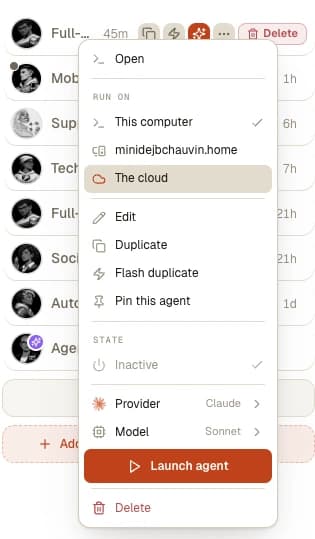
Scegliere dove gira l'agente
Ogni agente di AgentsRoom porta con sé una scelta Run on: questo computer, un'altra macchina della tua flotta, o il cloud. Nell'agente non cambia nient'altro, quindi il ruolo di cui ti fidi già in locale è lo stesso che girerà da remoto.
Scrivere il brief e impostare l'esecuzione
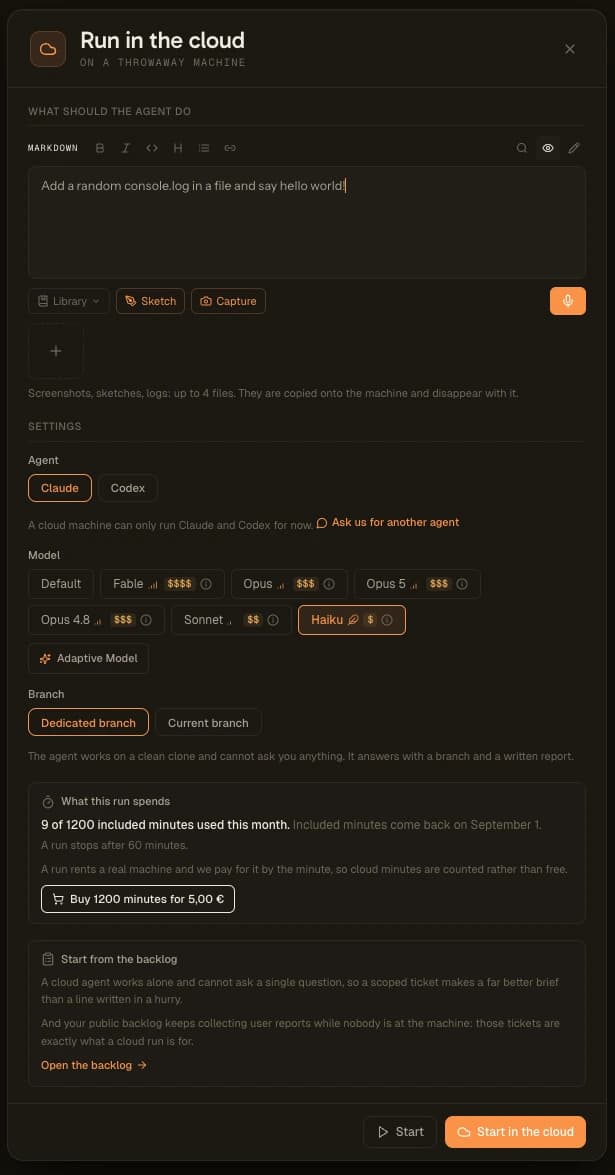
La finestra riceve l'istruzione, l'agente (per ora Claude o Codex su una macchina cloud), il modello da Haiku fino a quello di punta, e la scelta tra un branch dedicato e quello corrente. Possono viaggiare insieme fino a quattro file, uno screenshot, uno schizzo o un log, copiati sulla macchina e distrutti insieme a lei.
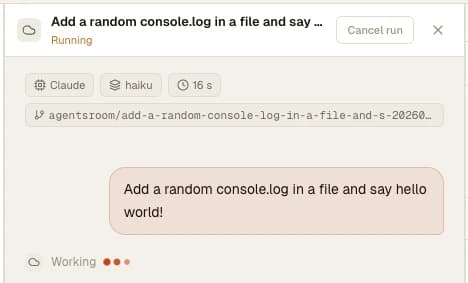
Guardarla, oppure no
L'esecuzione rende conto in diretta: tempo trascorso, modello in uso, branch in costruzione e istruzione ricevuta. Quando l'agente termina un passo, puoi rispondergli dalla stessa vista, sul desktop o sul telefono. Se nessuno risponde, fa il push del suo lavoro e la macchina si spegne qualche minuto dopo. Puoi annullare l'esecuzione in qualsiasi momento, o chiudere tutto, perché la macchina non dipende dalla tua finestra rimasta aperta.
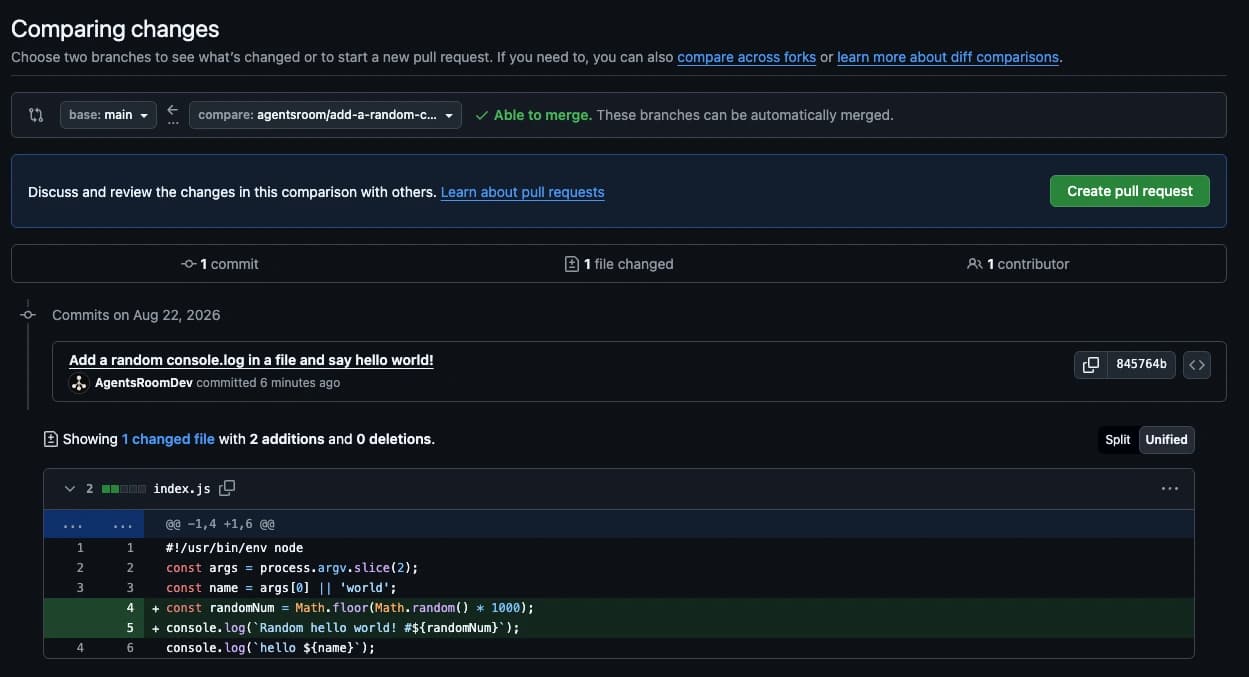
Il risultato è un branch sul tuo host git
Alla fine il lavoro si trova dove i tuoi strumenti lo cercano già: un branch spinto, un commit vero, un diff da rileggere e una pull request a un clic. Non serve reimportare niente in AgentsRoom perché la modifica esista.
Poi validare, rilanciare o riprendere in locale
Un'esecuzione finita ti lascia tre gesti di pari peso: tenere il branch, rimandarlo nel cloud con un'istruzione di seguito, oppure aprirlo come una normale sessione di agente locale con il contesto già caricato. Il terzo è il ponte, ed è per questo che un'esecuzione cloud non è mai un vicolo cieco.
Quattro decisioni che danno forma alla funzionalità
Quasi tutto ciò che sorprende in un'esecuzione cloud discende da queste, quindi vale la pena dirle chiaramente.
Un job, non una sessione remota
La migrazione a caldo di una sessione di agente in corso è stata studiata e poi scartata come irrealizzabile. Trattare un'esecuzione cloud come un job elimina un'intera classe di problemi: niente da riconnettere, niente da tenere in vita, niente di perso quando cade la rete.
Git è l'unico punto d'incontro
La macchina cloud e la tua non si scambiano nient'altro che un branch. Non si dà per scontata nemmeno una forge: le credenziali sono conservate per host git, quindi GitHub, GitLab, Bitbucket, Gitea, OneDev e qualsiasi server git che ospiti tu stesso via https funzionano tutti allo stesso modo.
Un clone pulito, ogni volta
L'agente lavora su una copia nuova, su una macchina effimera: non può toccare il tuo worktree, entrare in collisione con un agente locale né lasciare niente dietro di sé. Quando l'esecuzione finisce, la macchina e tutto ciò che conteneva sono spariti.
Non resta ad aspettarti
Puoi rispondere all'agente tra un passo e l'altro finché la macchina è accesa, ma non aspetta mai a lungo: senza una risposta entro qualche minuto, fa il push di ciò che ha e la macchina si spegne. Quindi l'esecuzione o riesce sul brief che ha ricevuto, o spiega perché non ce l'ha fatta, e la qualità di un'esecuzione cloud continua a decidersi prima che parta.
Il tuo backlog pubblico è la fonte naturale delle esecuzioni cloud
Un agente cloud è pensato per finire senza di te, quindi un ticket circoscritto è un brief molto migliore di una riga scritta di fretta. Non è un limite da aggirare, è un'abitudine che conviene avere comunque.
Spiega anche perché le due funzionalità stanno bene insieme. Il tuo backlog pubblico continua a raccogliere le segnalazioni degli utenti mentre alla macchina non c'è nessuno: di notte, nel fine settimana, per tre settimane ad agosto. Quei ticket sono esattamente ciò a cui serve un'esecuzione cloud: già scritti, già descritti da chi ha incontrato il problema, e in attesa di una decisione più che di una tastiera.
Contata in minuti di macchina, non in token
Tutto il resto di ciò che si misura in AgentsRoom consuma token. Un'esecuzione cloud affitta una macchina vera fatturata al secondo, quindi si conta in minuti di macchina, ed è questa differenza a comandare tutte le regole.
I piani Plus e Pro includono minuti che si ricaricano con il mese solare. I minuti acquistati a parte non scadono mai, perché confiscare credito pagato alla fine di un mese sarebbe indifendibile. Ogni esecuzione è limitata due volte, da una durata massima e dal numero di esecuzioni in parallelo, così un task che va storto non può consumare tempo macchina illimitato.
Il piano gratuito non include nessun minuto cloud, e quello zero è una regola più che un tetto: un'esecuzione è hardware vero affittato con soldi veri, e un piano gratuito non può assorbirlo. Cloud Agents è attualmente in beta e si apre tramite il programma beta self-service.
Cosa non fa, detto chiaramente
Una pagina di funzionalità che elenca solo i punti di forza è una pagina di cui non ci si può fidare.
- Per ora Claude e Codex sono gli unici agenti che girano su una macchina cloud. Gli altri provider restano in locale.
- Un'esecuzione ha una durata massima e si ferma quando la raggiunge. È dimensionata per un task circoscritto, non per un pomeriggio di esplorazione aperta.
- L'agente ti sente solo tra un passo e l'altro, e la macchina aspetta al massimo qualche minuto, quindi un brief ambiguo tende comunque a tornare indietro come un branch ambiguo.
- Le esecuzioni le avvii tu o una pianificazione, dal desktop, dal telefono o da un ticket del backlog. Un webhook può far partire un agente, è a questo che servono i Trigger webhook, ma sulla tua macchina e non nel cloud: una pipeline in errore non può ancora far partire da sola un'esecuzione cloud.
- Non viene unito niente al posto tuo. Un'esecuzione risponde con un branch, e il seguito sono la tua revisione e la tua pipeline.
FAQ
I miei agenti girano ancora in locale?
Sì, e resta il comportamento predefinito. AgentsRoom esegue i tuoi agenti tramite il CLI che paghi già, sulla tua macchina, sul tuo worktree reale. Cloud Agents è una scelta esplicita presa esecuzione per esecuzione, non una modalità in cui il prodotto ti sposta.
Posso davvero avviare un agente di coding a computer spento?
Sì. L'app mobile legge i tuoi progetti e il tuo backlog dall'API di AgentsRoom e non passando dal tuo desktop, e un'esecuzione cloud avviene su una macchina affittata: dalla tua parte non serve che resti sveglio niente. È questa la differenza con il pilotaggio a distanza di un agente locale, che invece richiede il computer acceso.
Cosa torna indietro quando un'esecuzione finisce?
Un branch spinto sul tuo repository con commit veri, più un rapporto scritto: cosa è stato cambiato, quanti file e il ragionamento dietro. Non recuperi né la memoria dell'agente né una sessione da riprendere, perché l'esecuzione e la sua macchina non esistono più.
Come si aggancia alla mia CI/CD?
Con niente di particolare, ed è proprio il punto. Un'esecuzione cloud spinge un branch ordinario sul tuo repository ordinario, quindi tutto ciò che la tua pipeline fa già su un push avviene esattamente come prima. Build, test, deploy di anteprima, build mobile, continuous delivery: niente di tutto questo deve sapere che il commit lo ha scritto un'AI.
Il codice è al sicuro su una macchina che non è mia?
La macchina è usa e getta e dedicata a una sola esecuzione. Clona il repository, fa il lavoro, spinge il branch e si distrugge, portandosi via il clone e i file allegati. Le credenziali git sono conservate per host e non vengono mai consegnate all'agente come testo.
Quanto costa un'esecuzione cloud?
Si conta in minuti di macchina e non in token, perché l'esecuzione affitta hardware vero fatturato al secondo. I piani Plus e Pro includono minuti mensili, si possono acquistare minuti extra che non scadono mai, e il piano gratuito non ne include nessuno. Gli importi in vigore sono sulla pagina dei prezzi.
Cosa rende buono un brief per un agente cloud?
Un ticket che qualcuno si è già preso la briga di descrivere. L'agente lavora su un clone pulito ed è pensato per finire senza di te, quindi gli servono i criteri di accettazione, il file o l'area interessata e come capire che ha funzionato. Un ticket di backlog ben circoscritto di solito è un brief migliore di una frase digitata di corsa dal telefono.
Posso riportare un'esecuzione cloud dentro una sessione normale?
Sì, ed è una delle tre azioni proposte quando un'esecuzione finisce, accanto a validare il branch e rilanciare nel cloud. Continua in locale apre un normale agente AgentsRoom con il contesto già compilato, così il lavoro esplorativo di seguito prosegue senza il limite di tempo di una macchina cloud.
In cosa è diverso da Warp Oz o da Devin?
Il modello di esecuzione è simile, il posizionamento no. Cloud Agents è una modalità dentro un prodotto il cui comportamento predefinito è l'esecuzione locale sull'abbonamento CLI che hai già, tanto che un'esecuzione cloud può essere restituita a una sessione locale con il suo contesto. Gli strumenti nati cloud-first non hanno un equivalente di questa strada di ritorno.
Cloud Agents è disponibile per tutti?
Non ancora. È in beta e si apre tramite il programma beta self-service, che chiede almeno tre mesi di fila di abbonamento Pro e uno storico di feedback su cui il team è davvero intervenuto. La scheda Beta nelle impostazioni mostra quali condizioni soddisfi già.
Le funzionalità che reggono questo flusso
Backlog pubblico
La board pubblica dove gli utenti lasciano le segnalazioni che diventano esecuzioni cloud, ognuna con il suo filo di discussione.
Companion mobile
L'app iOS e Android che ti fa leggere il backlog e avviare lavoro dal telefono, senza che nessuno dei tuoi computer sia sveglio.
Scoping dei ticket
Trasformare una segnalazione vaga in un brief abbastanza preciso per un agente pensato per finire senza di te.
Attività pianificate
Far partire esecuzioni ricorrenti secondo un calendario, l'altro modo di far avanzare il lavoro quando alla tastiera non c'è nessuno.
Flotta remota
Far girare agenti su tutte le tue macchine da una sola finestra, quando la macchina che vuoi è tua e non affittata.
Controllo remoto
Pilotare dal telefono gli agenti che girano sul tuo desktop, per quando il computer è acceso ma tu non gli sei davanti.
Approfondimenti
Lavorare in vacanza con gli agenti IA (senza che la famiglia se ne accorga)
Chiudere bottega per tre settimane, oppure essere quello col portatile sotto l'ombrellone. Gli agenti di codice IA rendono possibile una terza via: il setup che fa avanzare i progetti dei clienti con dieci minuti al giorno.
Agenti di codice in background: metti la tua IA nel turno di notte
Un agente di codice non ha bisogno che tu lo guardi. Ecco come far girare gli agenti in background mentre fai altro, e come lasciare che un'intera flotta programmi di notte mentre dormi.
Gestire i Tuoi Agenti di Codifica Dal Tuo Telefono Mentre Lavorano
I tuoi agenti codificano per 20 minuti di fila. Non è necessario sedersi davanti allo schermo. Ecco come monitorarli e sbloccarli dal tuo telefono., che girino su Claude, Codex o Antigravity.
Smetti di essere il punto di rottura unico
Monta la catena una volta sola: un backlog pubblico, ticket degni di briefare un agente e una pipeline che consegna a partire da un branch. Dopodiché una correzione può uscire dalle tue mani senza che tu apra un portatile.
App companion: monitora i tuoi agenti in movimento
Usa Claude, Codex, Antigravity CLI o un altro provider IA.
Invia bug e richieste direttamente nel tuo backlog pubblico.