Claude Code token usage,
tracked per session, in real time
AgentsRoom watches your Claude Code token usage in every agent terminal. A small token counter sits in the agent's header, on the right, and updates live, with how full the context window is. When the context fills up, the badge turns orange, then red, and warns you before the CLI has to compact the conversation.
Click the badge and the session monitor opens : input tokens, output tokens, cache reads, cache writes, cache hit rate, message count, models routed, session duration and tool uses. One panel, one Claude session, all the numbers that drive your Claude Code token usage.
Free · macOS, Windows, Linux · 100% local, no proxy
Live demo of the Claude Code token usage badge in AgentsRoom: a live counter on every agent that opens a full session monitor with input tokens, output tokens, cache reads and cache writes.
Claude Code token usage is the number one variable cost of running AI coding agents. Every prompt, every tool call, every CLAUDE.md re-injection eats tokens. Without visibility, you find out you blew through your budget when the API throttles or the bill arrives. AgentsRoom puts a live Claude Code token usage meter on every agent session so you see consumption as it happens, not after.
The token counter sits in the agent's header, on the right. It updates a few seconds after each Claude turn. The number is the running total of the session: input tokens, output tokens, cache writes and cache reads, all summed. Next to it, when the CLI reports it, the badge shows how full the live context window is, for example 42%. At 60% the badge turns orange with a warning icon, at 85% it turns red: the context is nearly full, answers tend to get worse and the CLI will soon compact the conversation.
Click it and the session monitor opens. You get a live snapshot of the active Claude session : duration since the first message, number of user prompts versus assistant turns, tool uses, models that handled the conversation, the Claude session id (copyable for --resume), and the full token breakdown. Cache hit rate is computed on the fly, color-coded green / amber / red, with a one-line reminder that cache reads cost roughly ten times less than fresh input. That single panel turns Claude Code token usage from a black box into a real-time gauge.
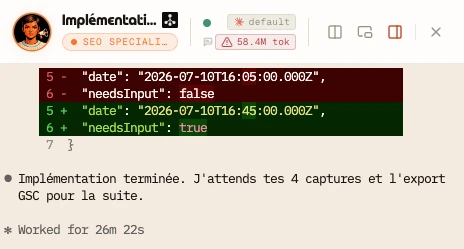
The token badge sits in the agent's header, next to the model, and turns red when the session's context window is nearly full.
Why per-session Claude Code token usage matters
Most Claude wrappers report token usage at the account level, once a day, in a dashboard you have to remember to open. By then the damage is done. AgentsRoom pushes Claude Code token usage to the surface, on every single agent terminal, so you cannot ignore it. The token counter sits right next to the model name of each agent. You glance at it like you glance at the unread badge on your phone.
Per-session is the right granularity. A team of agents running in parallel does not tell you who is burning tokens. One agent might be looping on a stuck prompt while four others are quiet. With a per-session Claude Code token usage meter, the noisy agent stands out instantly: its total climbs faster than the others, its cache hit rate is low, its message count is climbing fast. You jump in, fix the prompt, save the budget.
The token meter is computed on your machine. AgentsRoom reads your Claude Code token usage straight from the JSONL transcripts Claude writes to ~/.claude/projects/. No third-party usage tracker. No proxy in front of the API. The token counter in AgentsRoom is just a faster, more visible reading of the data Anthropic already saves on your disk. The only figures that leave your computer are counts sent to your own AgentsRoom account, so your other devices can show them; never a prompt or your code.
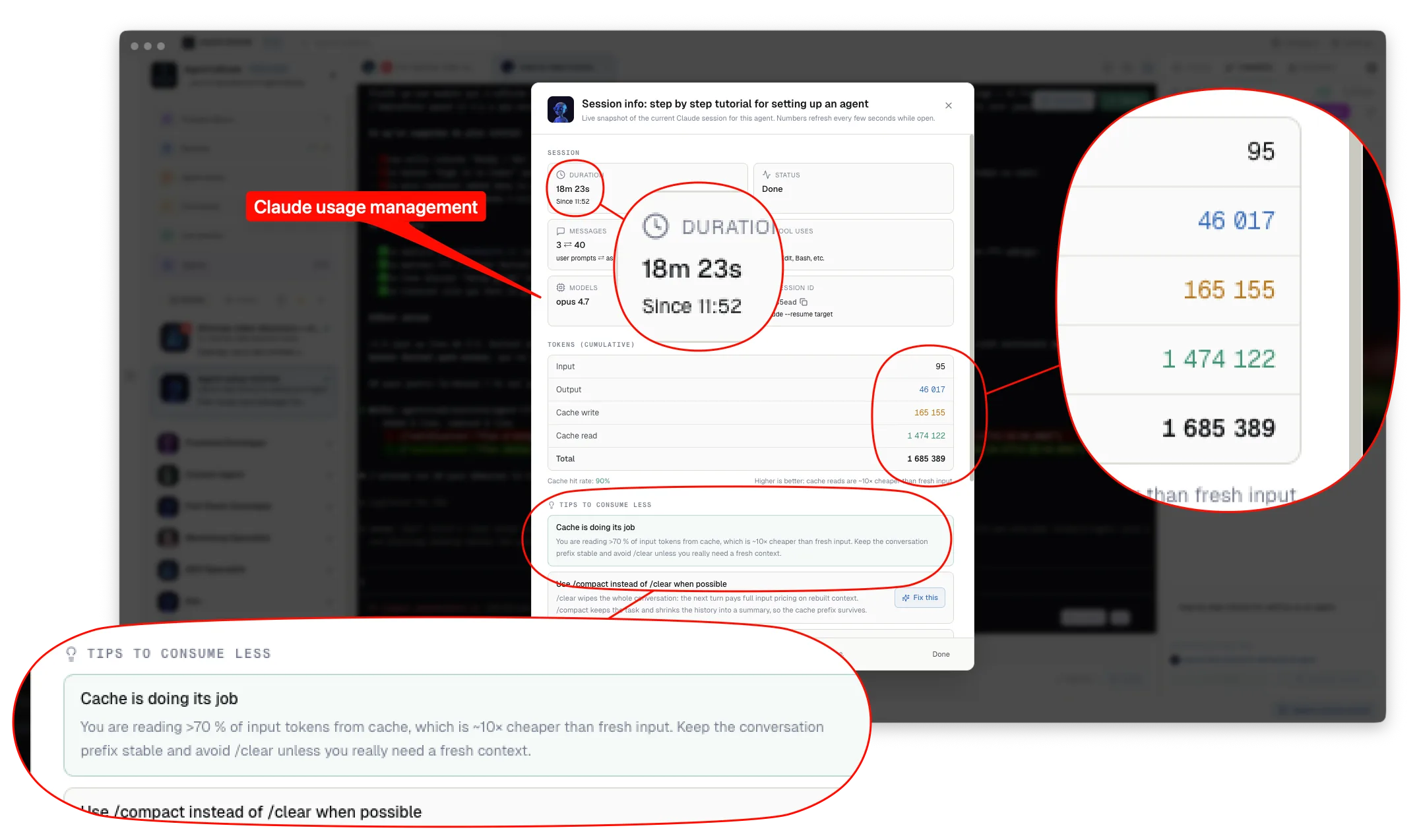
The Claude Code token usage panel in AgentsRoom. Click the per-session token badge in any agent's header, get every number that matters, plus tips to lower your token consumption.
What the Claude Code token usage panel shows
One click on the token badge opens a live session monitor. Here is every number you get on the active Claude session.
Session duration
Time elapsed between the first and the last message of the active Claude session, refreshed live. Useful to spot agents that have been chewing context for hours.
Live agent status
Idle, working, done, or needs input. The status pairs with the token counter so you see at a glance which Claude session is consuming and which is just sitting there.
Messages and assistant turns
Count of user prompts versus assistant turns in the active Claude session. A lopsided ratio is a strong signal that an agent is looping or that your prompt is too vague.
Tool uses
Total number of Read, Edit, Bash, Grep, Glob and other tool calls executed by Claude in the session. Tool calls drive a big share of input tokens, so this number tracks Claude Code token usage closely.
Models used
Every Claude model that handled a turn in the session : Sonnet, Opus, Haiku, dated variants. AgentsRoom de-dups and shortens names so you immediately see if your session was auto-routed across models.
Claude session id
The internal Claude session identifier, copyable in one click. Use it to claude --resume the exact same conversation from the CLI without losing context.
Input tokens
Fresh input tokens sent to Claude during the session, before any cache reuse. This is the most expensive bucket of your Claude Code token usage.
Output tokens
Tokens generated by Claude in the session. Output tokens are billed at a higher rate than input, so high values without progress mean an agent is spinning.
Cache writes
Tokens Claude writes to the prompt cache during the session. Cache writes are charged at a small premium but they unlock cheap cache reads on the next turns.
Cache reads
Tokens served from the prompt cache instead of being re-priced as fresh input. Cache reads cost roughly 10x less than input tokens, which is why the cache hit rate is the leading metric of your Claude Code token usage.
Cache hit rate
Percentage of input-side tokens served from cache, color-coded green above 70 percent, amber between 30 and 70, red below 30. Higher is cheaper. The single best lever on Claude Code token usage.
Total tokens
Cumulative sum across input, output, cache writes and cache reads for the active session. Useful as a single headline number when you compare token consumption across agents.
Which project, and which agent, is using your plan
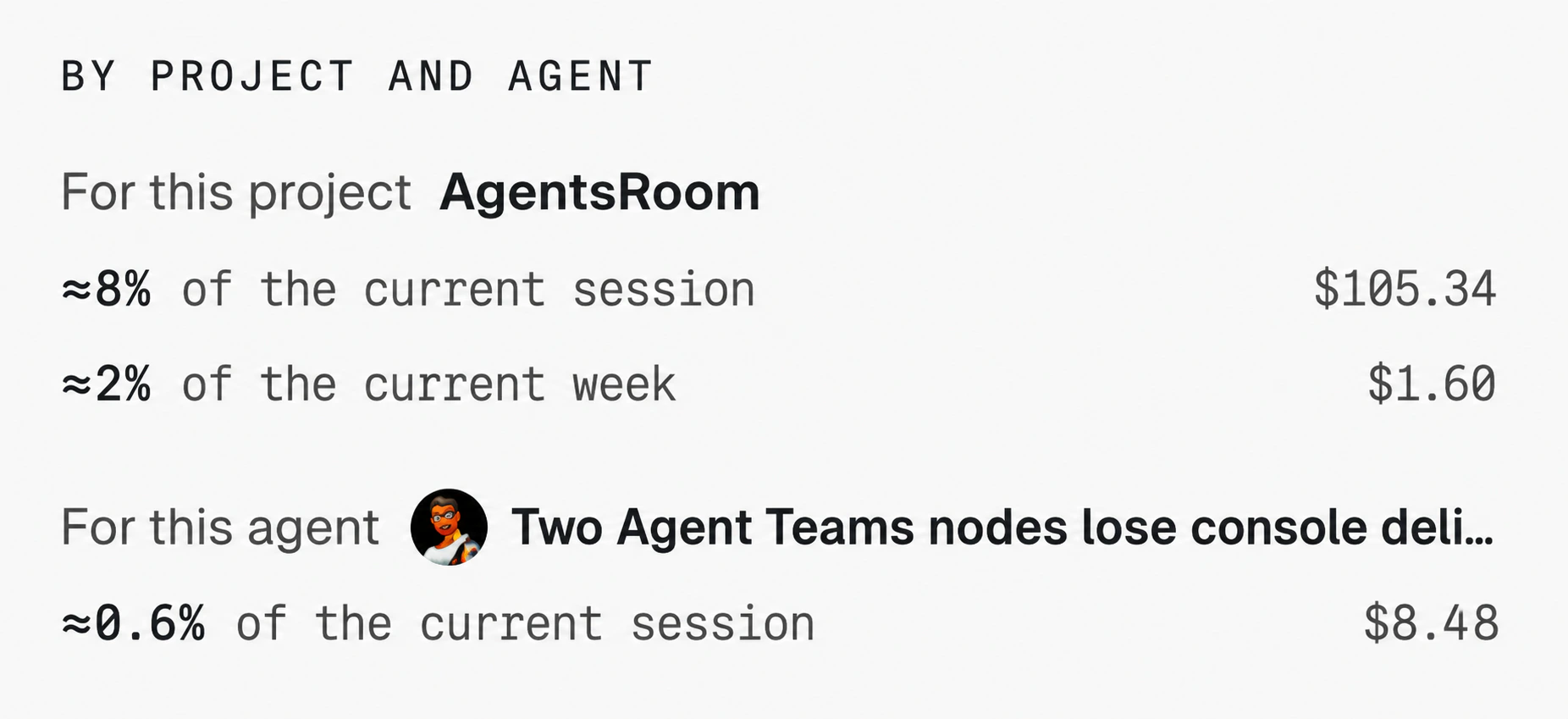
Your provider publishes one number: how much of the current window your account has burned. It never says where it went. AgentsRoom splits that percentage across your projects and your agents, weighting each session by what it would cost at API rates, so the shares always add back up to the figure the provider reports.
You read it in the same popover as the gauge: this project took about 8% of the current session window and 2% of the current week, this agent about 0.6% of the session. It is an estimate, not an invoice. Work done on another machine or on the web is not measured here, and on a subscription the dollar figure is only the weight used to split the plan.
Why the token meter turns orange, then red
The warning is about the live context window, not the running total, which is mostly cheap cache reads. After each turn, AgentsRoom reads how full the session's context is. From 60% the badge turns orange with a warning icon, from 85% it turns red. That is the cue to open the session monitor and decide what to do: compact, fork a new agent, switch model, or finish the task and wrap up. When a CLI does not report its context, the badge stays neutral and shows no percentage rather than guessing one.
Red is not a hard limit. AgentsRoom does not throttle your agent or interrupt the run. It is a visual nudge, on a single agent, so a session does not quietly run into its context limit while you focus on another window. A long session whose context stays small keeps a neutral badge, whatever its total.
How AgentsRoom tracks Claude Code token usage
Three layers : a usage poller, a JSONL parser and a live UI.
Poller reads token totals every 15 seconds
A background task reads the per-session token usage from your local Claude state and pushes it into the renderer store. No proxy on the API, no extra network call. Just a faster, visible reading of the numbers Claude already writes to disk.
JSONL parser refreshes every 10 seconds while the modal is open
The session monitor adds a one-shot IPC call that walks the active Claude session's JSONL transcript to compute message counts, assistant turns, tool uses, models routed and first/last timestamps. Refresh runs every 10 seconds while the panel is on screen, so the numbers stay live without burning the parser on every renderer poll.
Live UI : badge plus session monitor
The badge in the agent's header reads the token totals and how full the context is, and picks its color. Click it and the session monitor opens, in a portal so it overlays the whole window. Numbers are formatted with thousands separators, cache hit rate is colored, and a tips section nudges you to consume less.
Session trace: what filled the context, turn by turn
The token meter tells you how much a session used. The session trace tells you where it went. It replays the session from the transcript the CLI writes on your computer, turn by turn: the prompt, every model request, every tool call with what it touched, the bytes that came back and how much context they added, plus what the CLI injected on its own (CLAUDE.md and AGENTS.md, hook output, system reminders, skill bodies).
Context window and tokens billed, over time
One chart shows the size of the context window after each request, with the limit of the window, so a compaction reads as a drop. The other shows the running total of tokens billed. Click a point to open its turn.
What filled the context
Every source of the session ranked by the context it added: a tool, a skill, an MCP tool, a sub-agent, your prompts, the agent's own output and the starting context. The answer to "which skill or tool should I refactor".
Biggest single additions
The twelve heaviest single additions of the session: a whole file read, a long command output, a screenshot, a skill body. The first place to look when a context fills up faster than it should.
Every turn, every call
Filter the turns by prompt, tool, file or skill, then open one: each call with its target, the bytes it returned, the context it added, its duration and its errors. On Claude Code, a sub-agent's spend in its own window is attached to the call that started it.
Context added is read from the usage the provider bills between two requests, not estimated, then shared by size between what entered the context.
Where to find it: click the token badge of an agent to open Session info. The Session trace section sits right under the context window gauge and folds: folded, it shows one line of key figures (turns, requests, peak context, data into the context, sub-agents, compactions), and the app remembers your choice. Its expand icon opens the full view, and the conversation view has a trace icon too.
Claude Code and Codex are traced in tokens. Antigravity's CLI records no token usage, so its trace counts bytes. Other CLIs are not covered yet, and the trace button does not appear for them.
Everything is read on your computer, nothing is sent. While it is open, the trace refreshes every 10 seconds, so you can watch an agent work.
Claude Code usage per machine, session by session
The gauges of the AgentsRoom Usage panel show the quota of your account, as Anthropic and OpenAI publish it: every computer, claude.ai and any other tool together. Switch the panel from Account to Per machine and you get the other side: what each of your computers actually spent, read from the Claude Code and Codex transcripts it keeps, with every session listed.
Each computer, side by side
Estimated cost, tokens and number of sessions for today, 7 days or 30 days, for this machine, any other computer signed in to your AgentsRoom account, or all of them compared.
Every session, not just the open one
The most recent sessions of the period, newest first: project, agent, models, start time, duration, tokens and estimated cost. Above the list, the cost per day, per CLI and per model.
Sessions run outside AgentsRoom too
A Claude Code or Codex session started in a plain terminal writes the same transcript, so it is counted and marked Outside an agent. Sub-agent turns count in the session that launched them.
On your phone as well
The same view, read only, in the mobile app under Activity, Usage, Per machine. It reads your account, so it works without a desktop connected.
Where to find it: click the usage badge in the footer of the desktop app, then Per machine in the title row of the panel.
Costs are estimates at public API prices, not a bill: a Claude or ChatGPT subscription is not charged per token.
Claude Code and Codex sessions are counted. Sessions of the other CLIs are not.
Only counts reach your AgentsRoom account: tokens, estimated cost, model, project and agent names, and the name of the computer. Never a prompt, a file, a path or your code.
Tips to lower your Claude Code token usage
The session monitor surfaces these tips contextually, based on your live cache hit rate. Send any of them straight to the agent terminal in one click.
Low cache hit rate : stabilize the prompt prefix
Below 30 percent, Claude is paying full input price every turn. Editing CLAUDE.md mid-session, switching model, or rearranging early system messages busts the cache. Lock the top of the prompt and watch the cache hit rate climb.
Use /compact instead of /clear
Slash clear wipes the conversation and forces full input pricing on the next turn. Slash compact keeps the task and shrinks the history into a summary, so the cache prefix survives. Same fresh feel, much lower Claude Code token usage.
Read partial, not whole
On files larger than 100 lines, ask the agent to use Read with offset and limit, or grep for the symbol first. Loading a 4000-line file every turn is the silent number one Claude Code token usage sink.
Edit instead of Write
The Edit tool only sends the diff back to Claude. Write retransmits the entire file. On a 600-line component, that doubles output tokens and inflates the next turn's input.
Spawn sub-agents for wide searches
Glob and Grep across hundreds of files dump a lot of noise into your main context. The Agent tool runs in its own context window and only returns a summary, keeping the parent prompt small.
Shrink your CLAUDE.md
CLAUDE.md is prepended to every turn. Each useless paragraph there costs cached input tokens times every message. Move long context into context/ and reference it on demand.
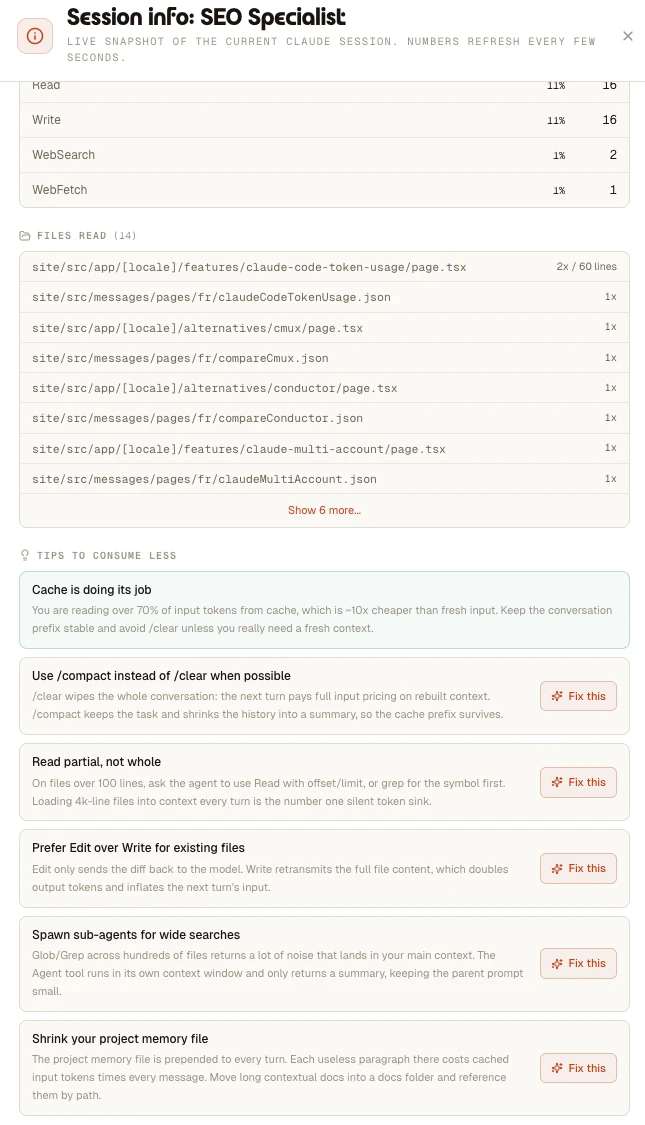
The session monitor reads your live cache hit rate and surfaces ready-to-send fixes. One click on Fix this sends the prompt straight to the agent.
AgentsRoom token meter vs vanilla Claude Code
Vanilla Claude Code shows token totals at the end of a session, in a small footer line you have to scroll up to find. There is no live meter. No per-session breakdown. No cache hit rate at a glance. No warning when consumption spikes. You discover overuse after the fact, when the API rate-limits or the monthly invoice is too high.
AgentsRoom turns Claude Code token usage into a first-class signal. Every agent gets its own token counter. Orange, then red, when its context fills up. Click for the full breakdown. Cache hit rate computed in real time. Tips that read your live numbers and propose ready-made prompts to fix the leak. The same Claude session, same JSONL transcripts, but with the visibility a fleet of parallel agents actually needs.
When the Claude Code token usage meter saves you
Three real situations where the per-session token tracker pays for itself.
An agent is stuck in a loop
One agent keeps re-reading the same file and re-trying the same fix. Its total climbs within minutes, its context fills up and the badge turns orange, its cache hit rate plummets, its message ratio is lopsided. You spot it on the dashboard, jump in, rewrite the prompt, save the budget.
A long task is going great
Three hours into a refactor, you wonder if the agent is still on track. Open the session monitor : 700 messages, 180 tool uses, 78 percent cache hit rate, all green. Token consumption is high in absolute, normal in efficiency. Let it cook.
Overnight run on a fleet
Five agents grind through a backlog while you sleep. In the morning, the per-session token usage tells you which one was efficient, which one looped, which one ran out of context. Triage in two minutes instead of reading every transcript.
The Claude Code token usage meter is one piece of a bigger monitor surface. Live agent status, dock badges and mobile push notifications complete the picture.
See how AgentsRoom monitors AI agentsSeeing the number is step one. Our full guide breaks down exactly where Claude Code tokens go and how to cut the bill without slowing down: tighter context, the right model, delegation and more.
Read: cut your Claude Code token costsFAQ
Is the Claude Code token usage tracker accurate ?
Yes. AgentsRoom reads the same JSONL transcripts Claude itself writes to ~/.claude/projects/. Input tokens, output tokens, cache writes and cache reads are pulled directly from the per-message usage payload Anthropic emits. There is no estimation, no proxy, no rounding. The numbers in the session monitor match what Anthropic bills.
Does the token counter slow down my agent ?
No. The poller reads local files every 15 seconds. The JSONL parse only runs when the session monitor is open, every 10 seconds. There is no extra network call to Anthropic, no instrumentation injected into Claude, no overhead on tool calls. Your agent runs at full speed.
When does the badge turn red?
When the session's live context window is 85% full or more. From 60% it turns orange first, with a warning icon. The running total of tokens never colors the badge: it is mostly cache reads, cheap and normal on a long session. The percentage only appears when the CLI reports how full its context is; otherwise the badge stays neutral. Red is a warning, not a throttle.
Why is the cache hit rate so important ?
Cache reads cost roughly 10x less than fresh input tokens. A session at 80 percent cache hit rate costs roughly a third of the same session at 0 percent. Cache hit rate is the single best lever on your Claude Code token usage. AgentsRoom shows it live so you can correct course mid-session instead of finding out at the end.
Does it support Codex, GitHub Copilot CLI, Cursor and the other agent CLIs too?
Claude Code, Codex and OpenCode each get a per-session token meter. Claude Code is read from the JSONL transcripts in ~/.claude/projects/, with the prompt-cache breakdown, which is a Claude-only billing detail. Codex is read from the rollout files the CLI writes under the CODEX_HOME AgentsRoom generates per project. OpenCode keeps its transcript in a SQLite database, so its figures are pushed to AgentsRoom by the plugin AgentsRoom installs in OpenCode: the same tokens and cost its own TUI prints, non-zero even on the flat-rate OpenCode Go plan. Antigravity, Grok Build, Mistral Vibe, Cursor and Aider get no token badge; status, role and notifications work for every provider. The quota bars of the Usage panel are a separate surface and cover Claude Code, Codex, GitHub Copilot CLI, Grok Build, Kimi Code, Cursor, Antigravity, OpenCode Go and the Z.AI Coding Plan.
Does AgentsRoom send my Claude Code token usage to a server ?
The token counter, the session monitor and the cache hit rate are computed entirely on your own computer, from local files. To compare your computers in the Usage panel (Per machine), each desktop signed in to your AgentsRoom account sends counts to that account: tokens, estimated cost, model, project and agent names, per session and per day. Never a prompt, a file, a path or your code, and nothing goes to a third party. The optional sync with the mobile companion stays end-to-end encrypted through the AgentsRoom relay.
Can I save the tips as reusable prompts ?
Yes. Each tip in the session monitor has a Fix this button that opens an editable, ready-made prompt. Send it straight to the agent terminal, copy it to the clipboard, or save it to your global prompt library so the same fix is one click away on every project.
How do I check my Claude Code token usage?
Inside Claude Code, type /usage: it shows what the current session has cost, how much of your plan limits is used and your activity stats (/cost and /stats are aliases of the same command). /context draws the context window as a colored grid and tells you what is filling it. To keep a figure on screen all the time, /statusline sets up a status line that can print the context percentage and the session cost. All three answer for one session, the one you are in. Claude Code also writes every message to a JSONL transcript in ~/.claude/projects/, with the exact input, output, cache write and cache read counts Anthropic bills you for. AgentsRoom reads those same files and shows the running total on each session, updated every 15 seconds, so you see the number climb on every agent at once instead of asking each one in turn.
How do Claude Code tokens actually work?
Every exchange is billed on four separate counters, not one. Input tokens are what you send: prompt, files read, tool results, and the whole conversation so far, re-sent at every turn. Output tokens are what Claude writes back. Cache writes store a chunk of that context so the next turn does not pay full price for it. Cache reads replay it, at roughly a tenth of the input price. This is why a long session gets expensive: the conversation is resent in full at each turn, so input tokens grow with every message unless the cache absorbs them.
How do I know how many tokens I have left?
On a Claude Pro or Max subscription there is no token balance to read: Anthropic meters you on rolling usage windows, and what Claude Code shows with /usage is the share of those windows you have used, not a number of tokens. What you can track in tokens is consumption. AgentsRoom keeps a per-session total for every running agent, so the session that climbs fastest stands out, and the Usage panel shows the share of your 5-hour and weekly windows already used, well before Claude Code stops answering.
Can I see whether I am spending my weekly quota too fast?
Yes. Weekly and monthly usage bars carry a pace marker: where you should be if you spread the quota evenly over the window, next to where you actually are, with a clear status when you run ahead of plan and a warning when budget is about to expire unused at the reset. The pace card adds your consumption day by day. If you only work some days of the week, set your work days and the marker counts only those. The same reading shows on the phone and in the usage_overview tool, so an agent can slow down on its own. AgentsRoom also counts the 5-hour windows left before the weekly reset, on your work days, with or without nights, and can warn you before part of the week can no longer be used.
Why does my Claude Code context fill up so fast?
Usually because of a few big additions rather than many small ones: a whole file read, a long command output, a screenshot, a long skill body or a large MCP tool result. The session trace in AgentsRoom lists the biggest single additions of the session and shows each step on its context window chart, so you see which turn and which call did it. Compactions show as drops on the same chart.
How do I find which tool or skill fills my context?
Open the session trace (Session info, under the context window gauge) and read What filled the context: every source of the session, a tool, a skill, an MCP tool, a sub-agent, your prompts, the agent's own output and the starting context, ranked by the context it added. It covers Claude Code and Codex in tokens, and Antigravity in bytes.
Can I see the tokens of each turn and of each tool call?
Yes. In the session trace, every turn shows the tokens billed for it and lists its calls with what they targeted, the bytes that came back, the context they added, their duration and their errors. The context added is the growth of the context between two requests, read from the usage the provider bills, then shared by size between what entered it.
Can I see my Claude Code usage per machine?
Yes. In the Usage panel of AgentsRoom, switch from Account to Per machine. Each desktop signed in to your account reads the Claude Code and Codex transcripts of its own computer and sends the counts to your account, so you can compare your laptop and your desktop over today, 7 days or 30 days, from either of them or from your phone. The account gauges, by contrast, mix every computer and claude.ai together.
Can I list the token usage and cost of every Claude Code session?
Yes. The Per machine view lists the most recent sessions of the period, newest first, with their project, agent, models, start time, duration, tokens and estimated cost, including the sessions you ran in a plain terminal outside AgentsRoom. Above the list you get the cost per day, per CLI and per model.
Why is the cost per machine different from my plan's usage bar?
They measure two different things. The usage bar is the share of your subscription's window that Anthropic counts for the whole account: every computer, claude.ai and any other tool. The machine view prices the tokens of each local session at public API rates. It tells you where the work went, not how much of your plan is left.
Further reading
What Are Tokens in Claude and How Do They Work? We Counted 3.8 Billion
A token is a piece of a word, and Claude counts four kinds of them: input, cache writes, cache reads and output. We counted 30 days of our own Claude Code sessions, 3.8 billion tokens: 98% were the conversation being re-read from the cache, 0.3% were what Claude wrote. What each kind costs, why a session gets heavier with every turn, and what the 5-hour window measures.
How Fast Is Claude Code? Tokens per Second, Measured on 20,000 Turns
Claude Code never prints its output speed, but every session transcript carries what you need to compute it. We ran a 40-line script over 319 of our own sessions, 20,408 turns and 12 million output tokens: Opus 5 streams at a median 63 tokens per second, Opus 5.5 at 95, Sonnet 5 at 77, and a short answer is always slower than a long one. Method, script, numbers, and what fast mode changes.
How to check Claude Code token usage: 4 ways to see what your agents spend
Four ways to check Claude Code token usage: the /cost command, the session transcripts, the ccusage CLI, and a live per-session meter. See exactly what each agent spends.
Stop guessing your Claude Code token usage
Download AgentsRoom and get a live per-session token meter on every Claude agent. A warning when the context fills up, cache hit rate at a glance, tips to consume less. All local, all yours.
Companion app: monitor your agents on the go
Bring your own: Claude, Codex, Antigravity CLI, or other AI provider.
Push bugs and requests straight to your public backlog.