Erfahren Sie, wann Agenten fertig sind
Mehrere Claude-Sitzungen gleichzeitig bedeuten, dass Ausgaben in Terminals erscheinen, die Sie gerade nicht beobachten. AgentsRoom markiert ungelesene Agenten, sendet native Benachrichtigungen bei Abschluss und zeigt Badge-Zähler an, damit nichts übersehen wird.
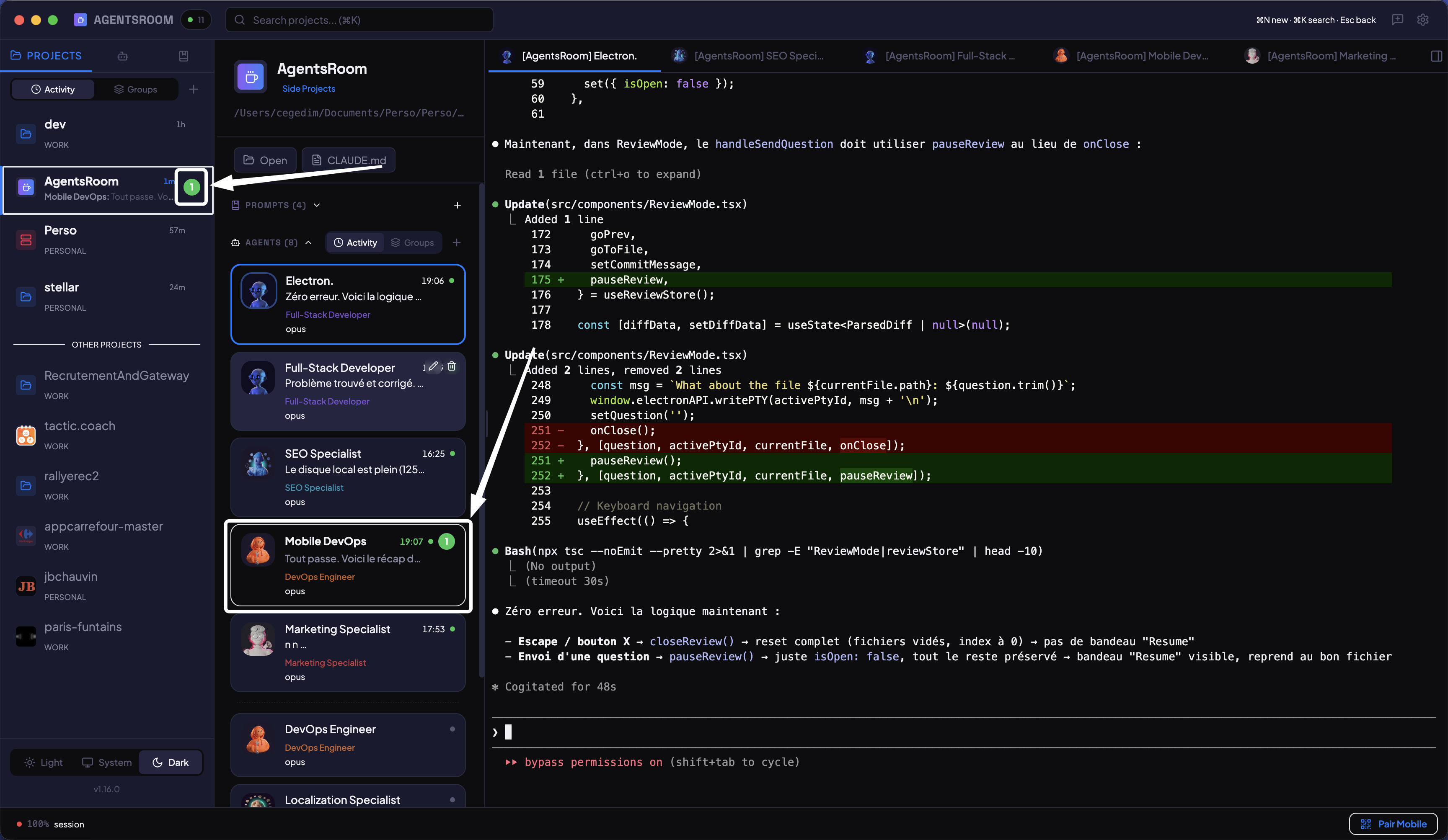
Seitenleiste mit Ungelesen-Zählern pro Projekt, grün getönte ungelesene Zeilen und Vorschau der letzten Nachricht beim Hovern.
So funktionieren Benachrichtigungen
Von In-App-Ungelesen-Indikatoren über native Betriebssystem-Benachrichtigungen bis zu mobilen Push-Benachrichtigungen.
Ungelesen-Zähler-Badges
Jedes Projekt in der Seitenleiste zeigt ein Badge mit der Anzahl der Agenten, die seit Ihrer letzten Ansicht Ausgaben produziert haben. Auf einen Blick sehen Sie, welche Projekte Aufmerksamkeit erfordern.
Vorschau der letzten Nachricht
Fahren Sie mit der Maus über ein Projekt, um eine WhatsApp-ähnliche Vorschau zu sehen: der Agentenname gefolgt von der letzten Ausgabezeile. Nützlich, um zu entscheiden, welchen Agenten Sie zuerst prüfen, ohne den Tab zu wechseln.
Native Desktop-Benachrichtigungen
Wenn ein Agent seine Arbeit abschließt und Sie das Terminal nicht betrachten, sendet AgentsRoom eine native Desktop-Benachrichtigung. Klicken Sie darauf, um direkt zu diesem Agenten zu navigieren.
Dock-Badge-Zähler
Das AgentsRoom-Dock-Symbol zeigt die Gesamtzahl der ungelesenen Einheiten über alle Projekte. Auch wenn die App im Hintergrund läuft, sehen Sie, wie viele Agenten neue Ausgaben produziert haben.
Mobile Push-Benachrichtigungen
Push-Benachrichtigungen erreichen Ihr iOS- oder Android-Gerät, außer Sie sitzen wirklich am Rechner: Fenster im Vordergrund und kürzliche Tastatur- oder Mausaktivität. Das Telefon selbst kann sich darüber hinwegsetzen und wählen, immer oder nie benachrichtigt zu werden. Jede Push-Benachrichtigung trägt den Avatar des Agenten, der gesprochen hat, und ein 5-Sekunden-Fenster zur Entdopplung verhindert wiederholte Meldungen desselben Agenten.
Wählen Sie, welche Agenten Ihr Telefon erreichen
Stellen Sie jeden Agenten, jedes Projekt oder Ihr ganzes Konto auf Alle, Nur wenn er Sie braucht oder Aus. So läuft eine geschäftige Pipeline stumm, und Sie hören weiter von dem einen Agenten, der sie koordiniert.
Agenten können Nachrichten an Ihr Telefon senden
Ein Agent, der ohne Sie arbeitet, etwa ein geplanter Lauf, der Ihr Board in Bewegung hält, kann eine Push-Benachrichtigung mit eigenen Worten senden, wenn er eine Entscheidung braucht. Die Benachrichtigung trägt den Agenten und das Projekt im Titel und kommt auch dann an, wenn dieser Agent auf Nur wenn er Sie braucht eingestellt ist.
Der Agent-Avatar in Ihrer Mitteilungszentrale
Früher kam eine Push-Benachrichtigung mit dem App-Symbol an. Jeder Agent erzeugte dieselbe graue Zeile, und um herauszufinden, welcher fertig war, mussten Sie das Telefon entsperren und die App öffnen.
Jede Push-Benachrichtigung trägt jetzt die Identität des Agenten, der gesprochen hat: seinen Avatar als Absenderbild, seinen Namen als Titel, das Projekt darunter. Unter iOS wird die Benachrichtigung als Nachricht eines Kontakts dargestellt, und mehrere Push-Benachrichtigungen desselben Agenten werden zu einem Verlauf gebündelt, statt einzeln aneinander vorbeizulaufen. Unter Android wird derselbe Avatar zum Symbol der Benachrichtigung.
Was darüber entscheidet, ob eine Push-Benachrichtigung überhaupt gesendet wird, hat sich nicht geändert. Sie geht nur raus, wenn Sie nicht wirklich am Rechner sitzen, also Fenster im Vordergrund und kürzliche Tastatur- oder Mausaktivität, und das Telefon kann sich in beide Richtungen darüber hinwegsetzen: immer oder nie. Benachrichtigungen, die zu einem Projekt oder einem Konto statt zu einem Agenten gehören, behalten das App-Symbol.
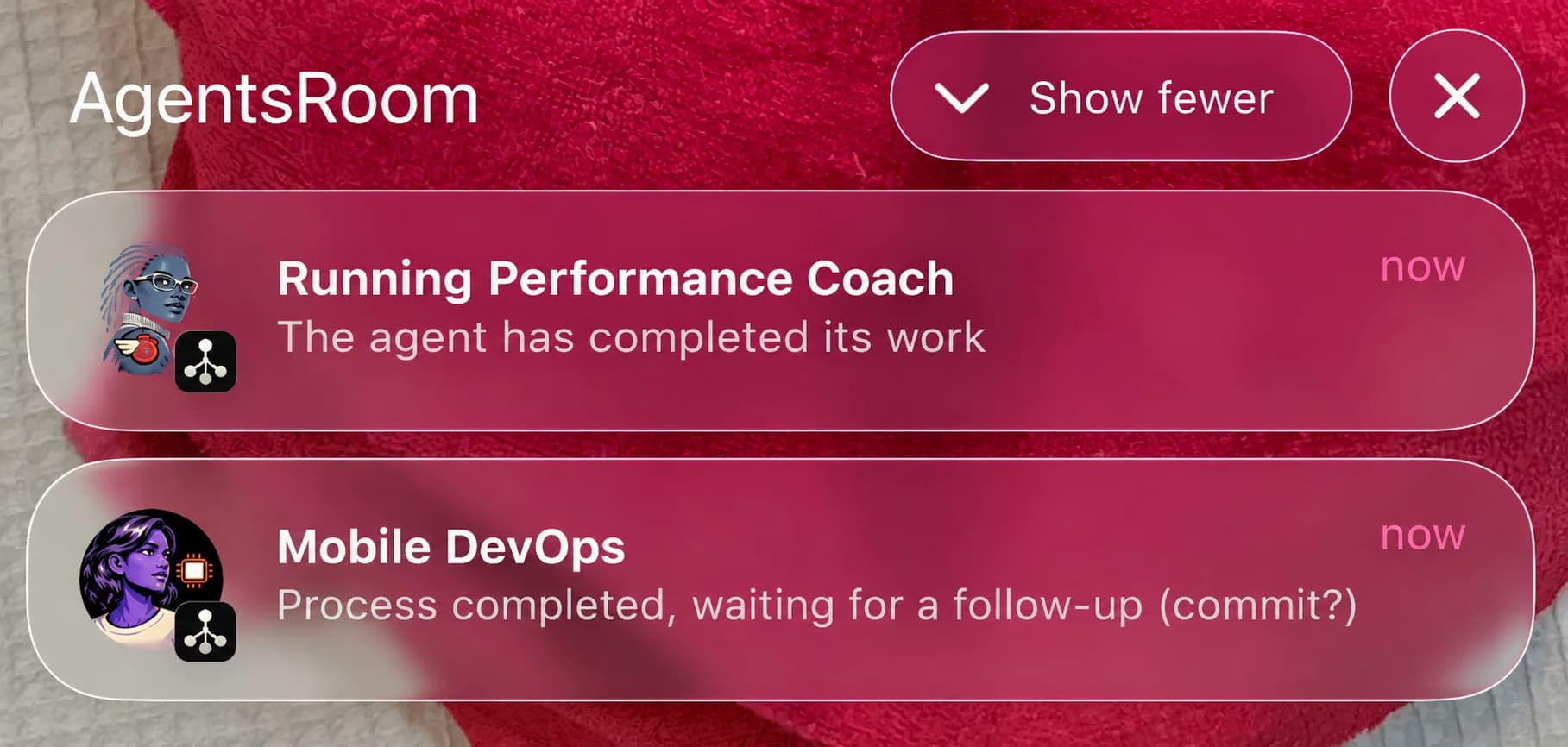
Die Desktop-Seite ist in AgentsRoom 1.164.0 enthalten. Der passende mobile Build wird gerade im App Store und bei Google Play geprüft, die Avatare erscheinen also auf Ihrem Telefon, sobald das Update ankommt.
Solange eine Live-Aktivität den Raum auf Ihrem iPhone zeigt, ersetzt sie die Push-Benachrichtigungen pro Agent für eine beendete Runde oder eine wartende Frage, damit Sie dasselbe Ereignis nicht zweimal erreicht. Die Live-Benachrichtigung auf Android bleibt stumm, deshalb kommen diese Push-Benachrichtigungen dort weiterhin an.
Agenten live auf Ihrem SmartphoneVon der Ausgabe zur Benachrichtigung
Vier Schritte zwischen der Ausgabe eines Agenten und Ihrer Benachrichtigung.
Agent produziert Ausgabe
Während Sie das Terminal eines anderen Agenten betrachten, schreibt ein anderer Agent neue Ausgaben. AgentsRoom erkennt diese Aktivität im Hintergrund.
Sitzung als ungelesen markiert
Die Agentenzeile erhält einen grün getönten Hintergrund und fetten Text. Das Seitenleisten-Badge des Projekts wird erhöht. Das Dock-Symbol aktualisiert seinen Gesamtzähler.
Benachrichtigung gesendet
Eine native Desktop-Benachrichtigung erscheint mit Agent-Name und Projekt. Außer du sitzt wirklich am Rechner oder hast die Telefon-Benachrichtigungen dieses Agenten ausgeschaltet, geht zusätzlich eine Push-Benachrichtigung an dein Telefon.
Ungelesen beim Ansehen gelöscht
Öffnen Sie das Terminal des Agenten und die Ungelesen-Markierung wird automatisch entfernt. Der Badge-Zähler verringert sich. Kein manuelles Verwerfen erforderlich.
FAQ
Wann wird eine Sitzung als ungelesen markiert?+
Funktionieren mobile Push-Benachrichtigungen ohne Konto?+
Kann ich Benachrichtigungen deaktivieren?+
Wie funktioniert die Deduplizierung bei mobilen Push-Benachrichtigungen?+
Zeigt eine Push-Benachrichtigung, welcher Agent fertig ist?+
Ein Build, eine Testsuite oder ein Docker-Image kann mehrere Minuten laufen. Sie wechseln zu etwas anderem, und das Terminal steht zehn Minuten lang fertig da, bevor Sie es bemerken. Aktivieren Sie die Glocke auf einem Terminal-Tab, und AgentsRoom sagt Ihnen in der Sekunde Bescheid, in der der Befehl durch ist, mit dem Namen des Befehls und seiner Laufzeit.
Werden Sie benachrichtigt, wenn ein langer Befehl fertig istNicht nur, wenn ein Agent fertig ist. Dieselben Kanäle, Desktop-Banner und Push aufs Telefon, tragen auch eine Nutzungsbenachrichtigung, wenn ein Kontingent-Balken von Claude, Codex, Grok, GitHub Copilot CLI, Kimi, Cursor, Antigravity, OpenCode Go oder Z.AI Coding Plan einen Schwellenwert überschreitet, den du gewählt hast.
NutzungsbenachrichtigungenHören Sie auf, Terminals manuell zu prüfen
Laden Sie AgentsRoom herunter und lassen Sie sich von Benachrichtigungen informieren, wenn Agenten fertig sind. Desktop und Mobil, mit integrierten Ungelesen-Indikatoren.
Companion-App: Agenten auch unterwegs im Blick behalten
Nutzen Sie Claude, Codex, Antigravity CLI oder einen anderen KI-Anbieter.
Bugs und Wünsche direkt in dein öffentliches Backlog schicken.