Catch your AI agent
before it starts hallucinating
A long session with an AI coding agent rarely breaks all at once. It quietly skips one instruction, then a turn or two later it invents a file, an API or a decision that never existed. The AgentsRoom canary spots that moment of context drift early, so you act before the hallucinations reach your code.
It runs on a signal your agents already produce, so there is nothing to set up and nothing to remember. Claude Code, Codex, Antigravity CLI and every provider piloted by AgentsRoom are covered.
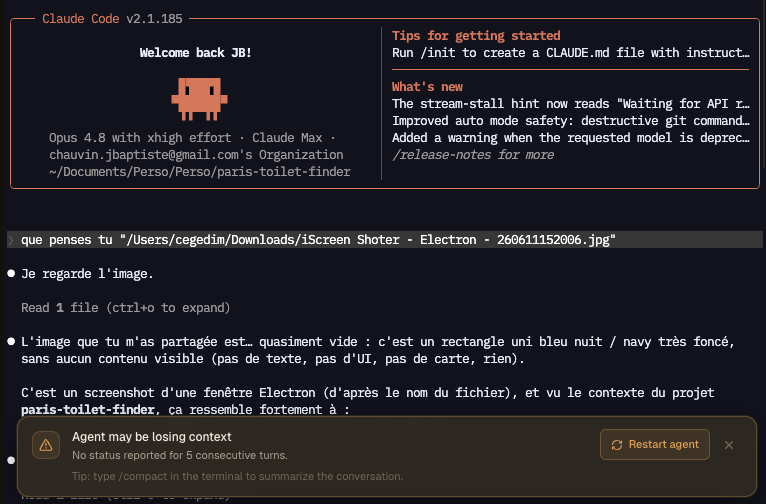
When the canary goes quiet, AgentsRoom raises this warning above the agent terminal: restart on a clean context, or compact the conversation.
Context rot is the quiet killer of long agent sessions. Every turn, the model re-reads the whole conversation and rebuilds its understanding from scratch. As the context window fills up, instruction-following is the first thing to slip. The model still sounds confident, but it has started dropping the constraints it judges least important to keep up.
That is the key insight behind the canary. Degradation does not start with a hallucination. It starts with the model silently ignoring a small instruction. Plant an instruction whose only job is to be noticed when it goes missing, and you get a tripwire that fires before the real damage.
AgentsRoom already gives every agent that instruction. Each agent writes a one-line status at the end of every turn, the short summary you see in the sidebar and on your phone. That per-turn write is the canary. While it keeps updating, the agent is still reading and honoring its instructions. The first turns where it goes missing are your early warning.
Why a canary beats watching the output
On a single agent you can read every reply and feel when it drifts. Across a fleet of agents working in parallel, nobody re-reads every response in real time. A canary gives you a passive signal you cannot miss.
Context rot and the lost-in-the-middle effect are well documented: the longer the context, the less reliably a model honors any single instruction buried inside it. The canary turns that fragility into a visible alarm.
The canary leads the hallucinations. The status stops updating a turn or two before the agent starts inventing things, which is exactly the window you want to react in.
No test to run, no command to type. The detection happens on its own while you work on another agent or another project.
How the canary works
A built-in early-warning loop on top of the status each agent already reports.
Every agent gets the canary, automatically
When you launch an agent through AgentsRoom, the session instruction is injected into its prompt: write a one-line status to its session file at the end of every turn. You do not add anything. The canary is the same status that powers the sidebar and the mobile push.
AgentsRoom snapshots the status at the start of each turn
The moment an agent starts thinking, AgentsRoom records the current status. This is the reference it will compare against once the turn ends.
It checks again after the turn settles
A short grace delay after the turn finishes, AgentsRoom re-reads the agent session file. Enough time for the agent to write and for the status poller to pick it up, so a slow write is never mistaken for a dead canary.
A missed update bumps the streak
If the status did not change, the missed-turn counter goes up. If the agent wrote a fresh status, the counter resets to zero and any warning clears. One quiet turn is not enough to alarm, because a short legitimate turn can leave the status unchanged.
Two quiet turns in a row raise the warning
When the agent skips its status two turns running, that is the clean signal of an oubli, not noise. A warning banner appears above that agent terminal: the canary is dead, the agent is probably drifting.
Restart clean, or compact, then carry on
The banner offers a one-click restart that kills and respawns the agent on a fresh context, plus a reminder to compact the conversation. When the agent starts reporting its status again, the warning disappears on its own.
The canary in the coal mine, for your AI session
Miners carried a canary underground because it reacted to toxic gas long before they did. Same idea here.
A prompt canary is a trivial instruction the agent is supposed to honor on every turn. As long as it does, you know the model is still reading your instructions end to end. The first reply that forgets it is your tripwire.
AgentsRoom does not bolt a separate gimmick onto your agents. It reuses the status each agent already writes for the sidebar and the phone notification, so the canary costs nothing and is impossible to forget to set up.
The point was never the status text. It is the timing. A clean context window with a tight brief beats a bloated one every time. When the canary dies, you are not losing progress, you are dropping the dead weight that was dragging the model down.
Status tracking, then drift detection
Most cockpits tell you an agent is working or done. The canary tells you it is starting to slip.
Without a canary
- : You only notice the agent is off when you read a hallucinated file path or a wrong API.
- : By then the last few replies are already suspect and you are debugging the agent, not your code.
- : On several agents at once, a drifting one hides in plain sight.
- : You restart too late, after bad output has landed.
With the AgentsRoom canary
- : A warning appears above the terminal the moment an agent stops reporting its status.
- : You catch the drift a turn or two before the hallucinations start.
- : You reset only the agent that slipped, not the whole project.
- : You restart on a clean, short context and the agent gets sharper and faster.
Early warning instead of post-mortem. That is the whole point of the canary.
Why a fresh context makes a better agent
The more information you pile into an agent, the more it tends to drift, hallucinate and slow down. A context window that is mostly stale exploration, dead ends and resolved questions is working against the model on every turn.
When the canary dies, the fix is rarely to push harder on the same thread. Stop trusting the last couple of replies, then compact the conversation or start a fresh session and re-inject only what matters: the file you are editing, the goal, and the decisions already made.
Compacting summarizes the conversation so the agent keeps the gist without the bulk. Restarting gives it a clean slate. Both get you back to a tight brief, which is where coding agents perform best. The AgentsRoom canary tells you which moment is the right one.
This is provider-agnostic by design. Claude Code, Codex, Antigravity CLI and other agents all share the same context limits and all report a status through AgentsRoom, so the same canary protects every one of them. The drift detection lives in AgentsRoom, not in any single CLI.
Read the full canary playbook
We wrote a deep dive on the canary trick: why agents go off the rails, how to plant a canary in your CLAUDE.md or AGENTS.md by hand, and what to do the moment it dies. AgentsRoom automates the watching part across your whole fleet.
Read the canary articleFAQ
What is the canary in AgentsRoom?
It is an early-warning signal for context drift. Every agent writes a one-line status at the end of each turn. When an agent stops updating that status for two consecutive turns, AgentsRoom treats the canary as dead and warns you that the agent is likely losing context, usually before it starts hallucinating.
Do I have to set anything up?
No. The canary reuses the per-turn status that every AgentsRoom agent already writes for the sidebar and the mobile notification. Launch an agent and the detection is on. There is nothing to configure and nothing to remember.
What is context rot?
As a conversation grows, the model re-reads everything each turn and instruction-following degrades. It starts quietly dropping small constraints, then hallucinates: invented files, wrong APIs, decisions you ruled out. The related lost-in-the-middle effect means instructions buried in a long context are honored less reliably.
Why wait for two missed turns instead of one?
A single short turn can legitimately leave the status unchanged, for example when the agent just reads a file and answers briefly. Two quiet turns in a row is the clean signal that the agent has actually stopped following its instructions, which keeps false positives down.
What do I do when the warning appears?
Two paths. Restart the agent with one click to get a fresh, clean context, or type /compact to summarize the conversation and keep the gist without the bulk. Both bring the agent back to a tight brief, which is where it performs best.
Does it work with Codex and other providers, not just Claude?
Yes. The canary relies only on the session status protocol that every AgentsRoom agent follows, regardless of the underlying CLI. Claude Code, Codex, Antigravity CLI and others are all covered. The detection lives in AgentsRoom, not in any single provider.
Will the warning go away by itself?
Yes. The moment the agent writes a fresh status again, the missed-turn counter resets and the banner clears on its own. You can also dismiss it manually for that session.
Is this useful when I run only one agent?
It helps, but it shines with several agents at once. On a single agent you can read every reply. Across a parallel fleet, nobody re-reads each response in real time, so a passive drift alarm is what keeps a quietly degrading agent from slipping through.
Does the canary slow my agent down?
No. It piggybacks on the one-line status the agent already writes each turn. There is no extra prompt, no extra model call, no added latency.
Why does a clean context make the agent better?
The more stale context an agent carries, the more it drifts, hallucinates and slows down. Restarting or compacting drops the dead weight and brings the agent back to a short, focused brief, where coding agents are most reliable and fastest.
You may also like
Agent status tracking
Live color-coded indicators showing which agents are thinking, done or waiting for input.
Dynamic Island
A floating, always-on-top agent status indicator that stays visible above every app.
Agent notifications
Unread badges and push notifications when an agent finishes or needs your input.
Token usage
See live token consumption and cost per session, and learn where to optimize.
Project statistics
Time, prompts, tokens and cost per project and per agent in one dashboard.
Multi-provider
Run Claude Code, Codex and Antigravity CLI side by side and switch without losing context.
Further reading
The Canary Trick: Catch Claude (or Any AI Agent) Before It Starts Hallucinating
A one-line trick to know when your AI coding agent is degrading: make it begin every reply with a name. When the name vanishes, the canary is dead and it is time for a fresh session. Works on Claude, Codex, Antigravity CLI, Mistral Vibe and every LLM.
Should You Still Review Your AI Agent's Code?
Your agents write better code than half the pull requests you used to merge. So do you still read every line? The honest case for both sides, the 10 signals that tell you an agent messed up, and how much review each change actually deserves.
Catch context drift before it costs you
Run your AI coding agents in a cockpit that warns you when one starts losing the thread. Download AgentsRoom for macOS, Windows and Linux.
Companion app: monitor your agents on the go
Bring your own: Claude, Codex, Antigravity CLI, or other AI provider.
Push bugs and requests straight to your public backlog.