Stop typing prompts.
Dictate them.
Voice dictation lives right in the agent composer. Click the microphone, speak your prompt, and the transcribed text drops into the draft at your cursor. Speech to text for your AI coding agents, with no separate dictation app to babysit and no copy-paste between windows.
Typing a long, precise prompt eats minutes. Dictating the same prompt takes seconds. More context to your agent, fewer clarification round-trips, fewer wasted tokens. The value moved from the code to the prompt, and voice dictation is the fastest way to write a good one.
Voice dictation in action : click the mic, speak the prompt, watch the live waveform, and the speech-to-text transcript lands in the composer ready to edit and send.
Here is the shift voice dictation answers to. The hard part of working with an AI coding agent is no longer writing the code, the agent does that. The hard part is writing the prompt : describing what you want, the constraints, the edge cases, the file to touch, the behavior to avoid. A precise prompt is the difference between one shot and ten frustrating round-trips. And a precise prompt is long, which makes it slow to type.
Voice dictation removes the typing tax. You click the microphone button in the composer, you say everything you would have typed, often more than you would have bothered to type, and the speech-to-text transcription appears in the draft. You talk at 150 words a minute, you do not type at 150 words a minute. Dictation is just faster, and a faster channel means you give your agent more context per task.
This is not a bolt-on. The microphone is part of the AgentsRoom composer, next to the prompt library and the sketch tools. The transcript is inserted at your caret, so you can mix typing and dictation in the same draft. Nothing is sent automatically : the text lands in the draft, you read it, fix the one word the model misheard, and press Enter when you are ready. Voice dictation here is a writing aid, not an autopilot.
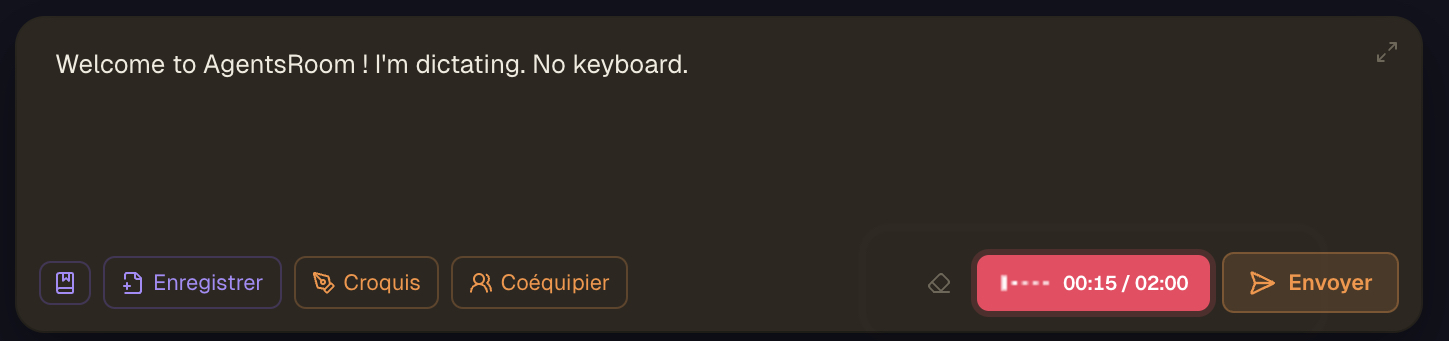
The microphone button sits in the composer toolbar. While recording, a live voice waveform shows the input level, then the transcribed prompt appears in the draft.
Why dictate your prompts instead of typing them
Speed. You speak several times faster than you type, and you do not lose your train of thought hunting for keys. A two-paragraph prompt that would take three minutes to type is a thirty second voice dictation. Across a full day of prompting your agents, that time adds up to real hours back.
Precision. Because dictation is cheap, you say more. You describe the edge case you would have skipped, the file you would not have named, the behavior you want avoided. A richer prompt is a more precise prompt, and a more precise prompt is exactly what makes an AI coding agent land the task on the first try.
Token economy. Every clarification round-trip with an agent costs tokens : the agent asks, you answer, it re-reads the context. A precise dictated prompt up front collapses those round-trips. Fewer back-and-forths means fewer tokens spent reaching the same result, which is a direct saving on your AI coding bill.
Hands-free and mobile. On the desktop you keep your hands free while an agent runs and dictate the next prompt out loud. On the phone, voice dictation is the single fastest way to feed an agent without fighting a mobile keyboard. Speak the idea, it lands in your agent on the desktop.
How voice dictation works
Click the mic, speak, review, send. Four steps, no separate app, no copy-paste.
Click the microphone in the composer
Place your cursor in the agent composer and click the mic button in the toolbar. The first time, macOS asks for microphone permission, AgentsRoom routes that request to the system so you grant it once.
Speak your prompt
The button switches to recording : a pulsing state with a live voice waveform that shows your input level in real time, so you know the mic is actually capturing audio. Say everything you want your agent to know, in your own language.
Stop, and it transcribes
Click again to stop. The audio is sent for transcription and the button shows a transcribing state while the speech-to-text runs. You do not pick a model : AgentsRoom uses its accurate default on a normal clip and switches to a loop-resistant model past ninety seconds of recording, where the accurate one starts repeating itself on long or noisy audio.
The transcript lands at your cursor
The transcribed text is inserted into the draft at the caret, with a separating space when needed. Your cursor position is restored, so you can keep typing or dictate another chunk. Typing and dictation mix freely in the same prompt.
Review and edit
Nothing is sent yet. The prompt sits in the draft. Read it, fix the rare word the model misheard, add a line by keyboard, reorder a sentence. You stay in full control of what your agent actually receives.
Send when ready
Press Enter to send the prompt to your agent, exactly like a typed message. From the agent's point of view it is just text, so voice dictation works the same with Claude, Codex, GitHub Copilot CLI, Cursor and 10 other agent CLIs.
Faster prompts, fewer tokens
Why dictating a better prompt up front is cheaper than typing a thin one and iterating.
A thin prompt is expensive in a way that does not show on the clock. The agent does not have enough to go on, so it guesses, you correct, it re-reads the whole context, you correct again. Each of those turns is input tokens, output tokens and cache reads. Three round-trips to clarify a feature can cost more than the feature itself.
Voice dictation flips the economics. Because speaking is fast, you front-load the context : the constraints, the file paths, the behavior to avoid, the example you have in mind. The agent gets it right closer to the first try. You trade a thirty second dictation for two or three avoided clarification cycles.
This compounds. A normal day is dozens of prompts. If voice dictation saves one round-trip on a good share of them, the token savings stack up across the day, across the team, across the month. The cheapest token is the one you never had to spend re-explaining yourself.
It is also just less friction. Less friction means you actually write the longer, better prompt instead of the lazy one-liner you would have typed because typing the full version felt like too much work. Voice dictation makes the good prompt the easy prompt.
Pick your spoken language
Voice dictation on the desktop lets you set the spoken language in settings. The transcription model is not a setting : it is picked from the length of your recording.
How the model is chosen (desktop)
- Short clip, up to ninety seconds: the accurate default model
- Longer recording: a loop-resistant model that will not repeat itself on long or noisy audio
- Offline mode, if you turn it on: a local model on your own machine, no network and no credits
Spoken languages
- Auto-detect (default, the model figures out the language)
- Čeština, Slovenčina, English, Français, Español, Deutsch, Italiano, Português, Nederlands
- Русский, Українська, 中文, 日本語, 한국어
- العربية, हिन्दी, Bahasa Indonesia, Polski, Türkçe, ไทย, Tiếng Việt
Auto-detect is the default and handles most cases. Force a specific language when short recordings get mis-detected, but only force the language you are actually speaking. 21 languages plus auto-detect, so you dictate in your own words and your agent gets clean text.
What voice dictation actually does under the hood
On the desktop, the composer records your voice with the browser MediaRecorder API and posts the audio to the AgentsRoom transcription backend. The transcription runs server-side, so the heavy speech-to-text work does not depend on your machine, and the transcript comes back as plain text inserted at your caret. The microphone, the recording and the insertion are all part of the same composer you already type in.
On mobile, voice dictation works differently on purpose. The companion app uses on-device speech recognition, so the audio never leaves your phone. The recognized text is then relayed to the desktop over the AgentsRoom end-to-end encrypted connection and dropped into the input of the agent you have focused on the desktop. Hold the mic button, speak, release, and the text appears in your desktop agent.
Both surfaces share one rule : voice dictation never sends on its own. On desktop the transcript lands in the draft for review. On mobile the text is pasted into the focused agent input without a carriage return, so you still press Enter yourself. Dictation is a way to write the prompt, not a way to fire it blind.
The configuration is provider-neutral. Transcription runs on the speech-to-text backend, not on your agent CLI. Whether your agent is Claude, Codex, GitHub Copilot CLI, Cursor or any of the 10 other agent CLIs AgentsRoom supports, the dictated text is just text in the composer, so voice dictation behaves identically across every provider AgentsRoom supports.
Where voice dictation works
Built into the desktop composer and the mobile companion, in 21 languages.
Desktop composer
A microphone button in the agent composer, on macOS, Windows and Linux. Server-side transcription, with the model picked from the length of your recording. Live voice waveform while recording, transcript inserted at the caret, free to mix with typing. Pick your spoken language in settings.
Mobile companion
On the iOS and Android companion, hold the mic to dictate. Speech recognition runs on-device so the audio stays on the phone, and the recognized text is relayed end-to-end encrypted to the focused desktop agent. The fastest way to feed an agent from your pocket.
Multilingual
21 spoken languages plus automatic detection : Čeština, Slovenčina, English, French, Spanish, German, Italian, Portuguese, Dutch, Russian, Ukrainian, Chinese, Japanese, Korean, Arabic, Hindi, Indonesian, Polish, Turkish, Thai and Vietnamese. Dictate in your native language, your agent receives clean transcribed text.
Typing prompts vs dictating them
Same agent, same task. Different speed, different context, different token bill.
Typing every prompt
- : You type at a fraction of the speed you talk, so prompts stay short.
- : Short prompts skip context, so the agent guesses and you correct it.
- : Each correction is another round-trip, more input and output tokens.
- : A separate dictation app or system dictation means copy-paste between windows.
- : On the phone, the mobile keyboard makes long prompts painful, so you barely prompt at all.
Dictating with voice dictation
- : You speak the full prompt in seconds, so you naturally say more.
- : More context up front means the agent lands the task closer to the first try.
- : Fewer clarification round-trips means fewer tokens spent on the same result.
- : The mic is in the composer, the transcript lands in the draft, no copy-paste.
- : On the phone, hold the mic and the text appears in your desktop agent over the encrypted relay.
Voice dictation is the cheapest way to make every prompt longer, more precise and faster to write at the same time.
What a dictated prompt sounds like
You do not have to write any of this. You say it out loud, the speech-to-text turns it into the prompt below, and you press Enter. Try saying a prompt this detailed by typing it and feel how long it takes.
Spoken into the mic
Add a rate limiter to the login endpoint.
Use a sliding window of five attempts per minute per IP.
Return a 429 with a Retry-After header when the limit is hit.
Keep the existing success path untouched.
Add a unit test for the limit being reached and one for it resetting after a minute.
Do not touch the signup endpoint.FAQ
What is voice dictation in AgentsRoom ?
Voice dictation is a microphone button in the agent composer that turns your speech into text. You click the mic, speak your prompt, and the transcribed text is inserted into the draft at your cursor. It is built-in speech-to-text for writing prompts to your AI coding agents, with no separate dictation app and no copy-paste between windows.
Why would I dictate prompts instead of typing them ?
Speed, precision and token economy. You speak several times faster than you type, so prompts take seconds instead of minutes. Because dictating is cheap, you naturally say more, which makes the prompt more precise. A precise prompt means fewer clarification round-trips with the agent, which means fewer tokens spent reaching the same result.
Which transcription models can I use ?
There is nothing to pick. AgentsRoom transcribes a normal clip on its accurate default model, and switches to a loop-resistant one past ninety seconds of recording, because the accurate model has no repetition guard and starts looping on long or noisy audio. What you do choose in settings is the spoken language, and whether to download the offline model.
Is this just OpenAI Whisper ?
Under the hood, partly. Whisper is what AgentsRoom falls back on for long recordings, where its built-in loop detection keeps a ten-minute dictation readable, and it is also the model of the optional offline mode. But it is not a setting you manage : the point of AgentsRoom voice dictation is that the dictation targets your agent's prompt input directly, so you do not dictate into one window and copy-paste into another.
What languages does voice dictation support ?
21 spoken languages plus automatic detection : Čeština, Slovenčina, English, French, Spanish, German, Italian, Portuguese, Dutch, Russian, Ukrainian, Chinese, Japanese, Korean, Arabic, Hindi, Indonesian, Polish, Turkish, Thai and Vietnamese. Auto-detect is the default. You can force a specific language in settings when short recordings get mis-detected.
Does my voice get sent to a server ?
It depends on the surface. On the desktop, the audio is sent to the AgentsRoom transcription backend, which runs the speech-to-text and returns the text; you can also download the offline model and keep everything on your machine. On mobile, speech recognition runs on-device, so the audio never leaves your phone and only the recognized text is relayed to the desktop over the end-to-end encrypted connection.
Does the prompt get sent automatically after I dictate ?
No. Voice dictation always lands the text in the draft, never the send. You read the transcript, correct the rare misheard word, add or reorder by keyboard if you want, and press Enter when you are ready. You stay in control of exactly what your agent receives.
Can I mix typing and dictation in the same prompt ?
Yes. The transcript is inserted at your cursor, not in place of the whole draft. So you can type the first half, dictate a long paragraph in the middle, then type a final line. Voice dictation is a faster way to fill the composer, fully compatible with the keyboard.
Can I dictate from my phone to an agent on my computer ?
Yes. The mobile companion app has a microphone button : hold it, speak, release. The speech is recognized on-device and the text is relayed end-to-end encrypted to the agent you have focused on the desktop. It is the fastest way to feed a prompt to your desktop agent without using a mobile keyboard.
Does voice dictation work with Claude Code, Codex and Antigravity ?
Yes, with all three, and with every other agent CLI AgentsRoom supports: 14 in total, GitHub Copilot CLI and Cursor included. The dictated text is just text in the composer, and the transcription configuration is provider-neutral, so voice dictation behaves identically no matter which agent CLI you are running.
Goes well with
Scratchpad
A bigger prompt editor, one Expand away in the composer. Dictate a long brief, refine it there, then send it to your agent.
Prompt Library
Save the prompts you dictate as reusable templates. Voice writes the first draft, the library keeps the good ones.
Mobile-Desktop Sync
The end-to-end encrypted link that carries your dictated text from the phone to the focused agent on your computer.
Remote Agent Control
Drive your desktop agents from your phone. Dictation is the fastest way to send them a prompt while you are away from the keyboard.
Multi-Provider
Run Claude, Codex, Antigravity, OpenCode, Aider, Grok Build, Mistral Vibe and Kimi Code side by side. Voice dictation works the same across every one of them.
Sketch
Draw and annotate in the composer. Pair a dictated prompt with a quick sketch to give your agent both words and a picture.
Talk to your agents, stop typing prompts
Download AgentsRoom and dictate your prompts straight into the composer. Faster to write, richer in context, lighter on tokens. Voice dictation built into your AI coding IDE, on desktop and on mobile.
Companion app: monitor your agents on the go
Bring your own: Claude, Codex, Antigravity CLI, or other AI provider.
Push bugs and requests straight to your public backlog.