Restore agents and terminals
exactly where you left them
AgentsRoom can restore agents and terminals on restart. Quit the app at the end of the day, and the next morning everything is back : your AI agents, your dev command tabs, your terminal commands and your working directories, each dev server one click from running, or already running if you asked for it. No more wasted first hour. No more guessing which terminals were running yesterday.
This is what AgentsRoom is really about : not just another terminal or another IDE, but a tool that lets you control your agent sessions, your open terminals and your dev environment in one place, then restore agents and terminals on the next launch in a single click.
AgentsRoom asks you on quit if you want to restore agents and terminals. The next launch reopens every agent and every dev command tab where you left them : the commands wait for a click on Start, or start again on their own when Restore commands on launch is turned on.
Most developers lose 30 to 60 minutes every morning just rebuilding yesterday's setup : reopen the IDE, relaunch the dev servers, retype the commands, reattach the agents to the right project, remember which branch each one was on. AgentsRoom kills that ritual. With one click on quit, you decide to restore agents and terminals on the next launch, and the next morning you reopen AgentsRoom and you are back in the exact state you left.
On quit, AgentsRoom asks the question : you currently have three agent terminals and one dev command terminal open, restore them on the next launch ? It counts what is actually running, you answer once, and the next launch replays it faithfully : the projects that were open, your AI agents (Claude, Codex, GitHub Copilot CLI, Cursor and 10 other agent CLIs), your long-running dev servers, your terminal command sessions.
Restore agents and terminals is not a memory trick or a hack on top of your shell history. It is a real session snapshot : agent role, agent provider, agent project, working directory, process category, command line, scrollback intent. Everything is stored locally in your project so you can restore agents and terminals across reboots, across power outages, across macOS updates.
More than a terminal. More than an IDE.
AgentsRoom is built for one thing : speed. Speed of opening a project. Speed of spawning an agent. Speed of switching between dev servers. And speed of getting back to work the next day. That last point is exactly why we built restore agents and terminals : because the friction of restarting your environment every morning was killing the productivity we worked so hard to give you the rest of the day.
The idea is simple. You finish your day. You hit Cmd+Q. AgentsRoom asks if you want to restore agents and terminals tomorrow. You say yes. You sleep. You drink your coffee. You open AgentsRoom. Everything is back. The agents you had running are back. The terminals you had open are back. The dev server tabs are back, one click from running. The working directories are back. You start coding in the same second you opened the app.
This is what makes AgentsRoom different from a plain terminal emulator like iTerm2 or Warp, and from a heavy IDE like VS Code or JetBrains. Terminal emulators forget everything when you close them. IDEs remember files but not running processes. AgentsRoom remembers agents, terminals, dev servers and command sessions, and lets you restore agents and terminals as a single, conscious choice.
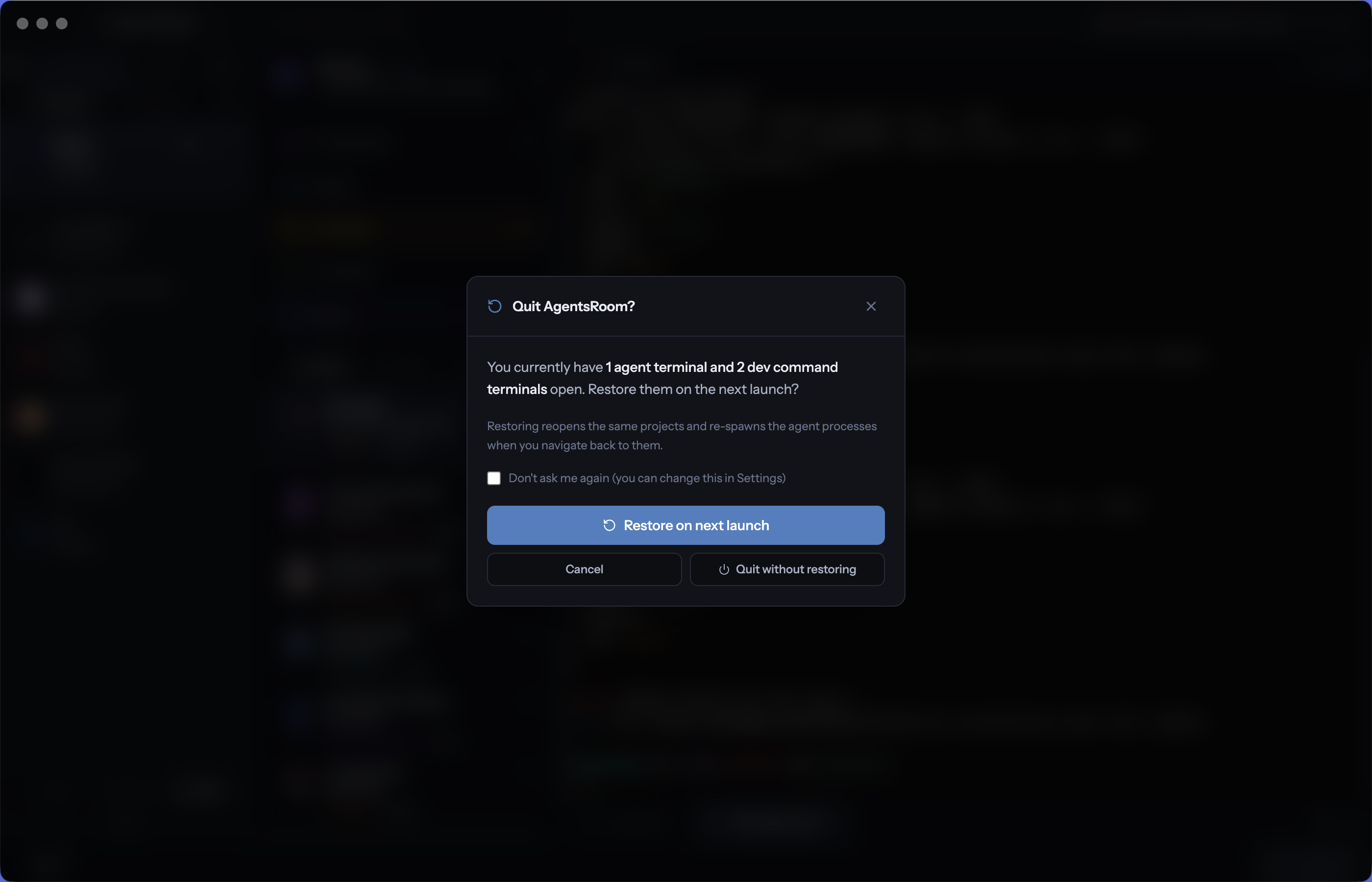
On quit, AgentsRoom tells you what is open and asks whether to restore it on the next launch. One answer, zero friction, one less ritual every morning.
How restore agents and terminals works
Three steps. No config file. No script. Just one answer on quit and a one-click restore on launch.
On quit : answer once
When you press Cmd+Q or click the close button, AgentsRoom shows a clean dialog that counts what is open : so many agent terminals, so many dev command terminals. Two buttons, Restore on next launch or Quit without restoring, plus a Don't ask me again box if you have made up your mind for good. AgentsRoom stores the snapshot inside your project metadata.
On launch : everything comes back
The next time you open AgentsRoom, the app detects the saved snapshot and proposes to restore agents and terminals. One click. Every project that was open reopens. Every AI agent reattaches to its conversation. Every terminal command session reappears in the right tab, idle, waiting for a click on Start. Turn on Restore commands on launch, in the Commands window of the project or in Settings under Dev tools, and the commands that were still running when you quit, your dev servers, start again by themselves ; a test suite or a one-shot script that had finished stays idle.
Resume in seconds, not in minutes
From a cold app start, you are typing into a working agent in under five seconds, and watching the live logs of your dev server as soon as you click Start, or right away with Restore commands on launch. No more reading yesterday's notes to remember which port you used. No more cd-ing into folders. Restore agents and terminals does it for you, every morning.
What gets restored
Restore agents and terminals brings back the entire shape of your work session, not just file tabs.
AI agents and roles
Every agent that was open, with its provider (Claude, Codex, GitHub Copilot CLI, Cursor and 10 other agent CLIs), its role, its project context and its current branch. Reattach to your conversation in one click.
Terminal command sessions
Every terminal command session that was open, with the right working directory, the right shell command and the right framework category. Restore agents and terminals together, in the same restore action.
Long-running dev servers
Backend, frontend, mobile bundler, worker, database, microservices. Every tab comes back with its command, in the right folder, idle until you click Start. With Restore commands on launch, the processes that were still running when you quit start again on their own, in parallel.
Open projects
Every project that was open in the sidebar reopens. The active project is the same. The selected agent inside that project is the same. The cursor lands where you left it.
Working directories
Each terminal command remembers its cwd relative to the project root. After a restore, every command is in the right folder, ready to run, with no manual cd.
A real session snapshot
Restore agents and terminals is a real local snapshot stored in your project metadata, not a fragile hack on top of your shell history. It survives reboots, macOS updates and power outages.
Why a restore feature matters more than you think
Every developer has lived this scene : you spent the previous afternoon getting six terminals, three dev servers and four agents into a perfectly tuned configuration. You closed your laptop. The next morning, you reopen everything from memory and you cannot get back to the same state. Two ports are wrong. One worker is missing. The agent you had on the auth bug is gone. You spend an hour rebuilding the room before writing a single line of code.
AgentsRoom solves this problem at the source. Restore agents and terminals on quit means you never have to rebuild your room again. The snapshot is taken automatically the moment you ask, and replayed on the next launch. You stop relying on your memory. You stop relying on a notes app. You let AgentsRoom remember for you, and you focus on the actual work.
The feature is also a soft form of insurance. If your computer restarts because of a system update, if Electron crashes, if you accidentally quit the app, the latest snapshot is still there. Reopen AgentsRoom, pick restore, and you are back. Nothing lost, no panic, no scramble. Restore agents and terminals turns a potential disaster into a non-event.
AgentsRoom is not a terminal. Not an IDE. Something else.
Terminal emulators like iTerm2, Warp, Ghostty, Kitty, Alacritty or Terminal.app do not remember your running processes. They remember a few tab titles at best. When you reopen them, you are alone with a blank prompt. Heavy IDEs like VS Code, Cursor or JetBrains remember files and layouts, but not the actual processes you had running, and definitely not the AI agent conversations attached to each project.
AgentsRoom sits at a different level. It is a command center for AI coding agents, dev terminals and dev servers. The whole product exists to make your day faster : open a project faster, spawn an agent faster, launch a dev server faster, and yes, resume your session the next morning faster. Restore agents and terminals is the missing piece that ties all of that together.
Restore agents and terminals is the morning half of a bigger loop. The night half is an AI coding night shift : a fleet of agents that keep coding while you sleep.
Run an AI coding night shiftFAQ
What does restore agents and terminals actually save ?
It saves a snapshot of your session : every open project, every AI agent (with its provider, role and current conversation), every terminal command session, every long-running dev server and every working directory. On the next launch, you can restore agents and terminals in one click and the app comes back to the exact state you left it in.
When is the restore snapshot taken ?
On quit. When you press Cmd+Q or click the close button, AgentsRoom asks if you want to restore agents and terminals on the next launch. If you say yes, the snapshot is written to your project metadata before the app exits. If you say no, no snapshot is saved and the next launch starts clean.
Does it relaunch dev servers and processes automatically ?
Not by default. Since version 1.190, a restored command tab comes back idle and waits for a click on Start, so a restart never launches a server you did not ask for. To relaunch them automatically, turn on Restore commands on launch, in the Commands window of the project or in Settings under Dev tools for every project : the commands that were still running when you quit start again, with the same launch logic as the Start all button, and the ones that had finished (a test suite, a one-shot script) stay idle. That choice is independent of the restore-on-quit answer.
Can I choose what to restore ?
You choose on quit, for the whole session : Restore on next launch brings back the projects, the agents and the terminals that were open, Quit without restoring starts you clean tomorrow. There is no per-category checkbox, on purpose : the dialog names what is open so you decide with the count in front of you, and the answer takes one click. Tick Don't ask me again and AgentsRoom keeps applying your choice, which you can change back in the settings.
Does the snapshot survive a reboot or a crash ?
Yes. The snapshot is stored locally in your project metadata, on disk, not in memory. It survives reboots, Electron crashes, power outages and OS updates on macOS, Windows and Linux. As long as the file is on your disk, you can restore agents and terminals on the next launch.
Is restore agents and terminals private and local ?
Yes. The snapshot lives entirely on your machine, inside your project folder. It is never sent to any server. It is never synced to the cloud unless you explicitly enable mobile sync, in which case it is end-to-end encrypted via the AgentsRoom relay.
How is this different from saving a tmux session ?
tmux can save a terminal layout if you script it. AgentsRoom restores agents and terminals together with your AI agent conversations, your dev servers, your working directories and your project context, in one click, with zero config. It is the difference between restoring a few terminal panes and restoring an entire workday.
What if the restore did not bring my sessions back ?
Run it again by hand. Since AgentsRoom 1.205.0, when the restore at launch left some of a project's tabs closed (agents not set to start at launch, a project shown in its own window, agents not loaded in time, a remote server that was not reachable yet), the project says how many sessions from last time were not reopened and offers a Restore button; the same action sits in the project's menu as Restore previous sessions. Each agent comes back on its previous conversation, closed ones are started, and an agent already running is left alone. It works on the snapshot of the current launch: it is not offered under Never restore, and it is forgotten once AgentsRoom quits.
Stop rebuilding your dev environment every morning
Download AgentsRoom and let it restore agents and terminals on every launch. Quit clean tonight, reopen tomorrow, and pick up exactly where you left off.
Companion app: monitor your agents on the go
Bring your own: Claude, Codex, Antigravity CLI, or other AI provider.
Push bugs and requests straight to your public backlog.