Your agent starts when
something actually happens
A trigger answers one question: when does this agent start? A scheduled task answers with an hour. A webhook trigger answers with an event from the outside world. A pull request opens, a build breaks, an alert fires, and the agent is already running.
AgentsRoom gives each trigger a public URL and a signing secret. Paste the URL into GitHub, GitLab, Slack, Linear, Sentry or anything that can POST JSON. The call arrives, the signature is verified, the payload becomes variables in your prompt, and a real agent starts in your project with its terminal and its transcript.
One trigger, one public URL. The event lands, the signature is checked, the payload becomes prompt variables, and an agent starts in your project.
Scheduled tasks solved half the problem. You can already tell an agent to review pull requests every morning at 8. But most of the work you would hand to an agent does not happen at 8, it happens when someone opens a pull request, when the build goes red, when a customer files a bug at 2 in the afternoon.
Until now the only way to catch that was to make an agent watch: run it on a short schedule, have it poll the API, ask 'anything new?', and pay tokens for the answer 'no' several hundred times a day. That is expensive, it is slow to react, and it scales badly the moment you want to watch three repositories.
A webhook trigger flips it around. The service tells you. AgentsRoom hands you a URL, you paste it into GitHub, GitLab, Slack, Linear, Sentry or your CI, and nothing runs until that service calls. When it does, the agent starts with the event already in its prompt. Zero tokens while the day is quiet, an agent on the case within seconds when it is not.
Why an event beats a polling loop
You stop paying for silence. An agent that checks a repository every five minutes burns a full turn of context every five minutes, and almost every one of those turns finds nothing. A trigger consumes exactly nothing until the event arrives.
The reaction is immediate. No interval to tune, no window where a pull request sits for eleven minutes because the poll just ran. The agent starts on the call, so the review is waiting when the author refreshes the page.
The event comes with its data. The payload is parsed into variables you drop straight into the prompt: the title, the author, the URL, the number, the branch, or the whole raw JSON. The agent does not have to go and fetch what triggered it.
It is the same panel you already know. Triggers keep the list, the on/off switch, the per-run history, the agent picker and the per-machine scope of scheduled tasks. A webhook is just another answer to 'when does this fire'.
One trigger, five ways to fire
The panel holds all five. Pick the one that matches what you are waiting for.
Scheduled
The original mode, unchanged. Every N minutes, hourly, daily at one or several times of day, weekly or monthly, with no cron expression to write. For work that belongs to a clock: the morning review, the Monday dependency check, the Friday changelog.
Quota
The clock of your AI subscription instead of the wall clock. The trigger fires when your plan's usage window comes back, or at the tail of that window before it resets and only once you have actually burnt through it. For work that belongs to your credits: the code review you always launch at the end of a window.
Webhook
The agent waits for an event instead of an hour. AgentsRoom gives you a public URL and a signing secret, you paste the URL into the service, and the trigger fires when that service POSTs. For work that belongs to something happening: a pull request, a failed build, a new bug report.
On ship
The trigger fires when a ticket of the project enters Done, or In review if you want a check before closing it. No URL and no secret: the AgentsRoom server produces the event itself, the ticket travels as variables in the prompt, and each ticket starts one run, once. For work that belongs to a delivery: watch the logs and the user feedback for two hours after a change ships, and reopen the ticket if something regressed.
On demand
The answer when nothing fires it but you. No clock, no quota window, no URL: a saved brief with its prompt, its agent and its machine, that runs when you press its button. For work you repeat often and never on a rhythm: building the app, cutting a release, replaying a migration.
What to trigger
Real events, and the agent you would want on the other end.
Review every pull request as it opens
Point a GitHub or GitLab webhook at the trigger, filter on the pull request being opened, and a reviewer agent starts on the diff within seconds. The author gets feedback while the change is still fresh in their head.
Investigate a red build automatically
Your CI can POST when a pipeline fails. The trigger starts an agent with the branch and the run URL in its prompt, so it reads the failing job and comes back with a cause instead of a red badge.
Triage a crash the moment it is reported
Wire a Sentry alert to a trigger. A new exception in production starts a backend agent with the error title and the issue URL, so the first look at the stack trace happens before anyone opens the dashboard.
Start an agent from Slack
A Slack slash command or an outgoing webhook can hit the trigger URL. Someone types the request in a channel, the payload lands in the prompt, and the agent picks it up in the right project.
Scope a new issue as soon as it is filed
An issue created on GitHub, GitLab or Linear starts a product agent that reads the report, asks the questions that are missing and turns it into something a developer can pick up.
Run a QA pass after every deploy
Your deploy pipeline POSTs when a release goes out. The trigger starts a QA agent that exercises the app against the version that just shipped, instead of on a schedule that has nothing to do with releases.
Write the release notes on tag
A tag pushed, a release published, and a documentation agent turns the commits into readable notes. The event carries the tag name, so the agent knows exactly which range to summarize.
Anything that can POST JSON
There is no integration list to wait for. A cron on a server, a Zapier step, a monitoring tool, your own backend: if it can send a signed POST to a URL, it can start an agent in your project.
How a webhook trigger works, step by step
From an empty form to an agent that reacts to production, in a couple of minutes.
Create a trigger
Open the Triggers panel on your project and create a new one. Same list, same on and off switch, same history as a scheduled task, because it is the same panel.
Switch it to Webhook
Choose Webhook instead of Scheduled. AgentsRoom generates a public URL for this trigger and a signing secret next to it. The secret can be regenerated whenever you want to cut off whoever had the old one.
Paste the URL into the service
Drop it into a GitHub or GitLab webhook, a Slack app, a Linear or Sentry integration, or your CI. Give the service the signing secret too, so the calls it sends can be verified.
Filter what should actually fire
A repository sends a lot of events. Add an optional condition on the payload, for example action equal to opened, and everything else is ignored. Set a burst limit so a noisy service cannot start twenty agents in a minute.
Put the event in your prompt
Write the prompt with the event variables: the title, the author, the URL, the number, the branch, or the whole payload. They resolve when the trigger fires, exactly like the date and time variables scheduled tasks already support.
Replay the last call and ship it
The editor shows the last call the trigger received, raw JSON included, and replays it in one click. You wire a webhook by looking at it, not by guessing, and once it is right you switch the trigger on.
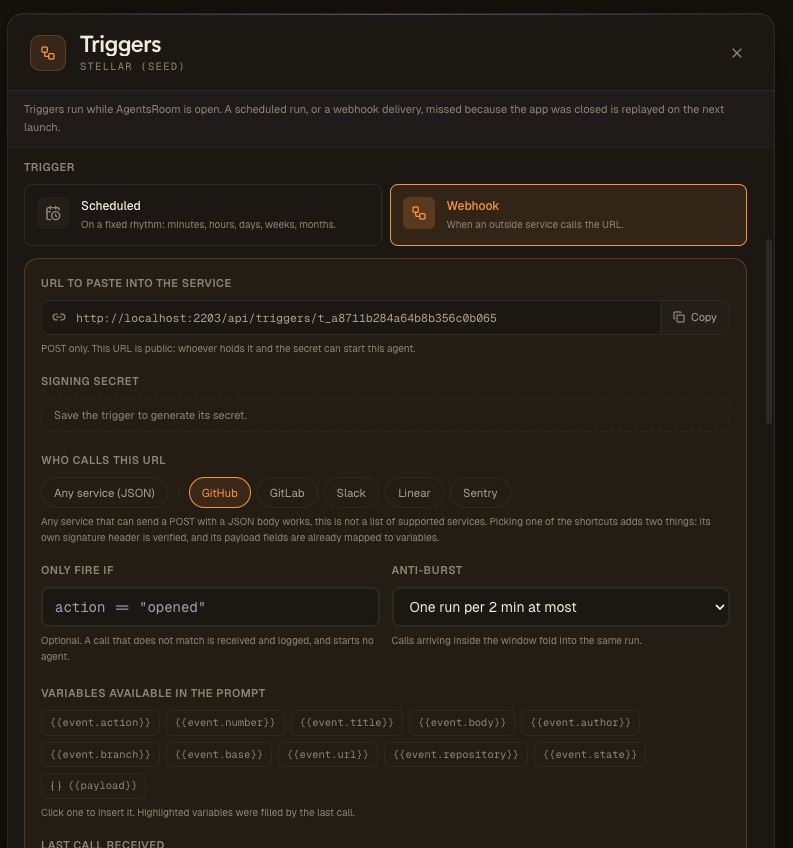
The row of services is a set of shortcuts, not an allow-list. The editor says so under the picker, and the first entry is Any service (JSON) for that reason: anything that can POST a JSON body works. Picking GitHub, GitLab, Slack, Linear or Sentry adds exactly two things, its own signature header to verify and its payload fields already mapped to the event variables. Nothing is refused because it is not in the list.
The variable chips are not documentation, they are buttons: click one to insert it in the prompt, and the ones the last call actually filled are highlighted. Under them sits the last call the trigger received, so you write the filter and the prompt against a real payload you can see, replay it, and only switch the trigger on once the run comes out right.
- The event lands on your trigger URL
The service POSTs its JSON. AgentsRoom checks the signature against your secret and rejects anything unsigned, then applies your filter if you set one.
- It waits if nobody is there
Your machine can be off. The event is held for up to a week and replayed on the next launch instead of being dropped, the same catch-up model scheduled tasks already use.
- One machine takes it, and only oneOffice desktopHome laptopBuild box
If several computers have the project open, the first one to pick the event locks it. The others see it is taken and move on, so a single event never produces two agents.
- The agent runs, once
A real agent opens in the project, with the role, provider and model you picked, its own terminal, its conversation view and an archived transcript you can read back later.
A public URL that is not an open door
The URL is reachable from the internet, so the trigger decides what it accepts before anything starts.
Every call is signed
AgentsRoom verifies every call against your secret before anything starts: X-Hub-Signature-256 for GitHub, X-Slack-Signature for Slack, the X-Gitlab-Token shared token for GitLab, a plain HMAC of the raw body for Linear and Sentry, and for a generic source a signature that also covers a timestamp and a delivery id. A call with no signature is rejected, so knowing the URL is not enough to start an agent on your machine.
A captured call cannot be replayed
A generic trigger signs a timestamp and a delivery id along with the body, on by default. A call older than its window, five minutes unless you pick another, is refused, and a delivery id already received never starts a second agent. Slack's own timestamp is checked the same way. A request that leaked into a CI log stays useless.
Rotate the secret when you want
The signing secret is shown in the editor and can be regenerated on the spot. Old calls stop verifying immediately, which is what you want the day a service is decommissioned or a secret leaks into a log.
Restricted runs for untrusted payloads
When the payload is written by someone you do not control, a pull request or a public issue, turn on Restricted run. The agent CLI itself then refuses the shell, the web and every AgentsRoom tool, keeps project files read-only and calls only the MCP tools you list. Put the token in the trigger's own MCP server, filled from your secret vault: the agent posts its review without ever reading it. Claude Code and Codex enforce it; other CLIs refuse the run rather than start it unprotected.
Filter on the payload
An optional condition decides whether the event deserves an agent. Fire only when action equals opened, only on one branch, only for one label. Everything that does not match is dropped without spawning anything.
Burst protection
At most one run per time window. A service that sends thirty events in ten seconds does not start thirty agents: the calls inside the window are grouped and one run covers them.
The payload becomes your prompt
The JSON the service sends is parsed into variables you write straight into the prompt. They resolve at fire time, like the date and time variables scheduled tasks already use.
Write the prompt once, and every run gets the data of the event that triggered it.
{{event.title}}The title of the event: the pull request title, the issue title, the alert name.{{event.author}}Who caused it: the author of the pull request, the person who opened the issue.{{event.url}}The link back to the event, so the agent can open the pull request or the alert.{{event.number}}The number of the pull request or the issue, when the service sends one.{{event.branch}}The branch the event concerns, for a push, a pull request or a failed build.{{payload}}The whole raw JSON, for anything the named variables do not cover.
Review pull request #{{event.number}} "{{event.title}}" opened by {{event.author}} on branch {{event.branch}}. Read the diff at {{event.url}} and reply with the risky parts first.The variable names are written between double curly braces in the prompt field, exactly like the date and time variables of a scheduled task.
event.actionevent.numberevent.titleevent.bodyevent.authorevent.branchevent.baseevent.urlevent.repositoryevent.stateevent.actionevent.numberevent.titleevent.bodyevent.authorevent.branchevent.baseevent.urlevent.repositoryevent.stateevent.actionevent.titleevent.bodyevent.authorevent.channelevent.urlevent.teamevent.actionevent.numberevent.titleevent.bodyevent.authorevent.assigneeevent.stateevent.priorityevent.urlevent.teamevent.actionevent.titleevent.bodyevent.levelevent.projectevent.urlevent.countevent.actionevent.titleevent.bodyevent.authorevent.urlevent.idWhat actually runs, and where
The same honest execution model as scheduled tasks, extended to events.
Where the events come from
Anything that can send a signed POST with a JSON body can start an agent. These are the ones people wire first.
Your CI, your backend, anything
A pipeline step, a monitoring tool, an internal service, a shell script with curl. There is no integration to request: a POST with a JSON body and a signature is the whole contract.
GitHub and GitLab
Pull requests and merge requests opened, reviewed or merged, issues created, pushes, releases, failing workflows. The classic source, and the one with the most useful payload.
Slack
A slash command or an outgoing webhook turns a message in a channel into an agent run in the right project. Slack signatures are verified with X-Slack-Signature.
Linear and Sentry
An issue moved into a column, a new exception in production, a regression alert. The tracker fires, the agent starts with the ticket or the error in its prompt.
The other half of the same panel
Triggers and scheduled tasks are one feature with two answers to the same question. A scheduled task is a trigger whose event is a clock. A webhook trigger is a scheduled task whose schedule is the outside world. They live in the same list, share the same agent configuration, the same enable switch, the same run history and the same per-machine scope.
So you pick per job rather than per tool. The dependency audit stays on Monday morning, because nothing outside announces that a package went stale. The pull request review moves to a webhook, because GitHub already knows the exact second it should happen. Read the scheduled tasks page for the clock side of the family.
See Scheduled Tasks, the clock side of the same panelFAQ
What is a webhook trigger in AgentsRoom?
It is a trigger that starts an AI agent when an external service sends it an event, instead of at a set time. AgentsRoom gives the trigger a public URL and a signing secret; you paste the URL into GitHub, GitLab, Slack, Linear, Sentry or any tool that can POST JSON. When that service calls, the signature is verified, your optional filter is applied, and an agent starts in your project with the payload already available as prompt variables.
How is this different from a scheduled task?
Only the question 'when does this fire' changes. A scheduled task fires on a clock (every N minutes, hourly, daily at one or several times of day, weekly or monthly) or on your AI plan's quota window (when the quota comes back, or before it resets). A webhook trigger fires on an event from outside. An on-demand trigger fires on nothing at all: it waits for you to press its button. Everything else is shared: the same list, the same on and off switch, the same agent configuration, the same per-run history, the same per-machine scope.
Why not just have an agent poll the API?
Because polling costs tokens on every loop, and almost every loop finds nothing. An agent checking a repository every five minutes runs a full turn every five minutes to answer 'no'. A webhook trigger consumes nothing while nothing happens, and reacts within seconds when something does. That is the whole economic argument for the feature.
Is the trigger URL safe to expose?
The URL alone is not enough to start anything. Every call has to prove it comes from the service that holds your secret: X-Hub-Signature-256 for GitHub, X-Slack-Signature for Slack, the X-Gitlab-Token shared token for GitLab, a plain HMAC of the raw body for Linear and Sentry, and for a generic source a signature that also covers a timestamp and a delivery id, so a captured call cannot be sent again. A call with no signature header is rejected, never waved through. The secret is shown in the editor and can be regenerated at any time, which immediately invalidates whatever was using the old one.
Can I fire only on some events?
Yes. A repository sends far more events than you want agents for, so a trigger takes an optional condition on the payload, for example action equal to opened. Events that do not match are ignored and nothing is spawned. There is also a burst limit: at most one run per time window, with the calls that arrive inside that window grouped together.
What happens if AgentsRoom is closed when the event arrives?
The event is queued on the server and replayed the next time you launch the app, so it runs late rather than never. Queued events are held for a week, which covers a laptop closed over a long weekend without replaying a month of stale work when you come back. It is the same in-app plus catch-up model scheduled tasks use. Webhook triggers do not run your agent in the cloud: the agent always runs on your machine, in your project.
I have the project open on two computers. Will the agent run twice?
No. An event is consumed once. The first machine that picks it up locks it, and the others see it is taken and skip it. You can also pin a trigger to specific machines, exactly like a scheduled task, if you want a particular computer to own it.
What can I put in the prompt from the event?
The payload is parsed into variables you write directly into the prompt field, between double curly braces: event.title, event.author, event.url, event.number, event.branch, and payload for the whole raw JSON. They are resolved when the trigger fires, the same way the date and time variables of a scheduled task are.
How do I know my webhook is wired correctly?
The editor shows the last call the trigger received, including the raw JSON body, and lets you replay it in one click. So you configure the filter and the prompt against a real payload you can see, then replay until the run is right, instead of pushing test commits to find out.
Which services are supported?
Any service that can send a signed POST with a JSON body. GitHub, GitLab, Slack, Linear and Sentry are the ones people wire first because their payloads are rich, but there is no allowed list: a CI job, a monitoring tool, your own backend or a curl in a shell script work exactly the same way.
Is this a visual automation builder with multi-step scenarios?
No, and it is not trying to be. A trigger has one job: decide when a run starts and hand it the event. The multi-step part belongs to what it points at. That is usually a single agent, which reads the code, runs the tools and does the work; when you want several agents handing work to each other, point the trigger at an Agent Team instead and the event starts the whole pipeline, gates and feedback loops included. What you never draw here is a scenario canvas of boxes and arrows around an API.
Can AgentsRoom send webhooks out to other services?
Triggers are inbound only: AgentsRoom receives events, it does not emit them. If you want an agent to call an external service at the end of a run, that is the agent's own job, with the tools and the MCP servers you gave it.
Can a webhook agent safely act on a pull request someone else wrote?
Yes, with a restricted run. A payload written by a stranger can hide instructions aimed at the agent, so AgentsRoom does not count on the prompt to hold them back: in a restricted run the agent CLI itself refuses the shell, the web and every AgentsRoom tool, keeps project files read-only and calls only the MCP tools you allowed. Give the trigger its own credential through the MCP server that needs it, and the agent can post its review without ever seeing the token. Claude Code and Codex support it; other CLIs refuse to start such a run.
Can a trigger simply start the next ticket of my backlog, without an agent?
Yes. Besides an agent or a team, a trigger can run a board action: Start next Todo ticket. It does exactly what the button of the board does, picks the top ticket of To do while skipping tickets still blocked by another one, and starts it with its own agent or team. The trigger itself has no prompt and makes no AI call, so a merged pull request, a green CI run or a schedule can keep a one-ticket-one-agent pipeline moving without paying for an agent turn whose only job would be to press that button.
Goes well with
Scheduled Tasks
The clock side of the same panel. Every N minutes, hourly, daily at one or several times of day, weekly, monthly, or on your AI plan's quota window.
Backlog Task Board
Drag a ticket to a column and an agent picks it up. A trigger does the same thing, with an outside event doing the dragging.
Agent Teams
Dev, QA and PM agents that hand work to each other. Point a trigger at a team and an event starts the whole routine.
AgentsRoom MCP
The tools an agent uses to read the backlog, the memory and the prompt library. A triggered agent gets them like any other.
Agent Notifications
Know the moment a trigger fires, on the desktop and on your phone, with one tap to open the agent it started.
Remote Fleet
Several machines on one account. Pin a trigger to the one that should answer it, and only that machine runs the agent.
Further reading
My AI Running Coach Is a Git Repo and a Claude Agent
I finish a run, my watch syncs, and three minutes later the analysis is written in my repository, the week has been adjusted, and my coach has left a comment under the Strava activity. No app built, no server written, no per-token API bill: a Claude subscription, AgentsRoom, and Markdown files. Here is the whole build, reproducible.
Background Coding Agents: Putting Your AI on the Night Shift
A coding agent doesn't need you watching it. Here's how to run agents in the background while you work on something else, and how to let a whole fleet code overnight while you sleep.
Driving Your Coding Agents From Your Phone While They Work
Your agents code for 20 minutes straight. You don't need to sit in front of the screen. Here's how to track and unblock them from your phone, whether they run on Claude, Codex or Antigravity.
Stop polling. Start reacting.
Download AgentsRoom, paste one URL into GitHub, GitLab, Slack, Linear or Sentry, and let the event start the agent. Nothing runs while nothing happens.
Companion app: monitor your agents on the go
Bring your own: Claude, Codex, Antigravity CLI, or other AI provider.
Push bugs and requests straight to your public backlog.