Stop reading the terminal.
Talk to your agent.
Voice Mode is a two-way voice conversation with a running AI coding agent. Tap once, speak your turn, and the agent answers out loud in a natural voice. No typing a prompt, no scrolling a wall of terminal output to find out what happened.
Turn on hands-free and it keeps listening between replies, so you can pace the room, watch the build, or sip your coffee while you talk through the plan. Ask where the refactor stands, it tells you. Say run the tests and report back, it does, then speaks the result.
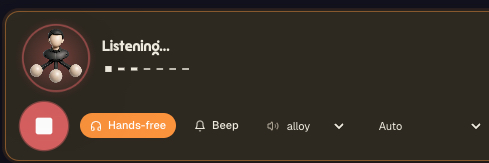
Voice Mode in action : the agent is listening, hands-free is on, the reply voice is set, and the agent answers out loud between your turns.
Here is the shift Voice Mode answers to. Your agent runs longer and does more on its own : it edits files, runs commands, writes tests, fixes what it broke. The bottleneck is no longer writing code, it is staying in the loop while the agent works. Reading line after line of terminal output, or typing yet another prompt to ask what is going on, pulls you back to the keyboard for every single turn.
Voice Mode turns that loop into a conversation. You speak your turn out loud, the agent answers out loud. You ask a question, give a correction, approve a plan, all by voice, and you hear the reply spoken back to you in a natural voice instead of parsing it on screen. It is the difference between supervising a process and talking to a teammate.
This is not the same as voice dictation. Dictation is one way : you speak, it transcribes your words into the composer, and you still read the agent's reply. Voice Mode is two way : speech in, speech out, a live back-and-forth. Dictation helps you write a prompt faster. Voice Mode lets you skip the keyboard and the screen entirely while you keep an agent moving.
Why talk to your agent instead of typing and reading
Stay in the loop, hands-free. A capable agent can run for minutes on a single instruction. With Voice Mode in hands-free, you stay in touch the whole time without sitting on the keyboard. Ask for a status, steer the next step, confirm a decision, all while you are standing at the whiteboard or watching the app reload.
A natural back-and-forth. Typing a prompt, waiting, reading the output, typing again is a stilted loop. Speaking your turn and hearing the answer is a conversation. It is faster for short turns (a quick yes, a small correction, one more question) and far less tiring than reading walls of terminal text for every update.
Eyes free, screen free. Hearing the agent's reply means you do not have to look at the terminal to know what it did. Glance at the build, your tests, your design, or nothing at all, and let the spoken update tell you where things stand. The agent narrates, you keep your eyes where the real work is.
On your plan's included AI allowance. Voice Mode uses the AgentsRoom voice backend, speech-to-text on the way in and text-to-speech on the way out, drawing on the same monthly allowance as dictation. Every plan includes one, and if you use it up before the month is over you can recharge, or attach your own OpenAI API key and let OpenAI bill you directly.
How Voice Mode works
Open it on a running agent, speak, listen, repeat. A spoken loop instead of type-and-read.
Open Voice Mode on a running agent
Voice Mode launches for an agent that is already running in its terminal, from the composer of that agent. It needs a live session because the conversation is with that specific agent, in its current context, not a fresh chat.
Tap to talk
Tap once and speak your turn : a question, an instruction, a correction. The state switches to listening with a live indicator, so you can see the mic is capturing. Choose hands-free to let it keep listening between turns, or tap-to-talk to take one turn at a time.
It transcribes and sends to the agent
When you finish, your speech is transcribed and sent into the running agent as your message, exactly as if you had typed it. The state moves through transcribing and sending, so you always know where your turn is in the pipeline.
The agent works
The agent processes your turn in its own session : it can read files, run commands, edit code, run tests, whatever your message asked for. Voice Mode shows a working state with the agent's name while it does the job, just like a normal turn in the terminal.
Hear the reply spoken out loud
When the agent answers, its reply is read out loud in the voice you picked. You hear the status, the result, the next question, without reading the terminal. An optional beep marks the boundary between turns so you know when it is your turn again.
Take your next turn
In hands-free, it is already listening again, so you just keep talking. In tap-to-talk, you tap to start your next turn. The conversation continues for as long as you want, then you close Voice Mode and the agent is right where you left it in its terminal.
Hands-free, so you stay in the loop without the keyboard
The point of Voice Mode is not novelty. It is keeping up with a fast agent without being chained to your desk.
A modern coding agent does a lot per turn, and the gaps between your turns are where you would normally lose context : you walk away, the agent finishes, and you come back to a screen full of output you now have to read. Hands-free Voice Mode closes that gap. The agent tells you what it did when it is done, out loud, and you answer without sitting back down.
Hands-free keeps the mic open between turns, so the conversation flows like a phone call : you talk, it works, it speaks, you talk again. Prefer to control each turn ? Tap-to-talk takes one turn at a time, which is handy in a noisy room or when you only want to drop in occasionally.
The beep cue is a small thing that matters in practice. When you are not looking at the screen, a short beep tells you the agent has finished speaking and it is your turn, so you are not talking over it or waiting in silence wondering if it is done.
This is what makes Voice Mode useful for real work and not just a demo. It is built for the moments when the agent is doing the heavy lifting and you want to steer, check in and approve, while your hands and eyes are free for everything else.
Pick your voice, follow the conversation
Voice Mode gives you the controls that make a spoken conversation comfortable, and shows you exactly where each turn is.
Voices and cues
- Reply voice : alloy and other natural voices
- Hands-free : keep listening between turns
- Tap-to-talk : take one turn at a time
- Beep cue : a short tone marks each turn boundary
- Auto language : speak in your own words, it detects the language
- Pause tolerance : choose how long a thinking pause can last before your turn is sent
Conversation states
- Listening : the mic is capturing your turn
- Transcribing : your speech is being turned into text
- Sending : your message is going to the agent
- Working : the agent is doing the job
- Speaking : the agent's reply is being read out loud
Auto language detection means you do not have to pick a language to start talking, and the visible states mean you are never guessing whether the agent heard you, is working, or is about to answer.
What Voice Mode actually does under the hood
Voice Mode is a full duplex layer on top of a normal agent session. On your turn, it records your voice and sends the audio to the AgentsRoom backend, which runs speech-to-text and returns the transcript. That transcript is injected into the running agent as your message, so from the agent's point of view it is just another turn in the conversation it is already having with you.
On the agent's turn, its textual reply is sent back to the AgentsRoom backend for text-to-speech in the voice you selected, and the resulting audio is played to you. Speech-to-text in, text-to-speech out, with the agent's real work happening in between. That is why Voice Mode needs an account and a running agent : the voice backend proxies the speech models and the conversation is bound to a live session.
Because the agent only ever sees text, Voice Mode is provider-neutral by construction. Whether the agent is Claude, Codex, GitHub Copilot CLI, Cursor or any of the 13 other agent CLIs AgentsRoom supports, your transcribed turn arrives as a message and its reply is spoken back the same way. Nothing in the voice layer depends on which CLI is running underneath.
Voice Mode and Voice Dictation draw on the same monthly allowance, since both lean on the same speech backend. Dictation spends it to transcribe your speech one way; Voice Mode spends it on the full round trip of transcription plus spoken replies, which is open-ended because a conversation can run as long as you keep talking. That is why the allowance is metered by time rather than by call.
Where Voice Mode works
A two-way spoken conversation with a running desktop agent, speech in and speech out.
Desktop, on a live agent
Voice Mode runs in the desktop app on macOS, Windows and Linux, launched from the composer of an agent that is already running. It talks to that specific agent in its current session, so the conversation has the full context the agent has built up, not a blank slate.
Speech in
Your turn is captured by the mic and transcribed by the AgentsRoom voice backend, then sent to the agent as your message. Hands-free keeps the mic open between turns; tap-to-talk takes one turn at a time. Language auto-detects.
Speech out
The agent's reply is read out loud with text-to-speech in the voice you choose (alloy and others). An optional beep marks the end of each spoken reply so you know it is your turn, even when you are not looking at the screen.
Voice dictation vs Voice Mode
Both use your voice. One writes a prompt for you, the other holds a conversation.
Voice dictation (one way)
- : You speak, it transcribes your words into the composer.
- : You still read the agent's reply on screen yourself.
- : Great for writing a long, precise prompt fast.
- : You stay at the keyboard to send and to read the result.
- : One direction : voice in, text in the draft, you take it from there.
Voice Mode (two way)
- : You speak your turn, the agent answers out loud.
- : You hear the reply, no need to read the terminal.
- : Great for steering and checking in while the agent works.
- : Hands-free keeps the conversation going without the keyboard.
- : Both directions : voice in, the agent works, voice out.
Use dictation to write a great prompt in seconds, and Voice Mode to talk with the agent while it carries the prompt out.
What a spoken turn sounds like
You do not type any of this. You say your turn out loud, the agent does the work, and it speaks the reply back. Here is one round of a Voice Mode conversation.
A round of conversation
You: Where are we on the login refactor?
Agent: The rate limiter is in and the success path is untouched. Two tests are still red.
You: Fix the two failing tests, then run the whole suite and tell me the count.
Agent: Done. Both pass now. Full suite: 142 passed, 0 failed.
You: Good. Commit it with a short message and stop there.FAQ
What is Voice Mode in AgentsRoom ?
Voice Mode is a two-way voice conversation with a running AI coding agent. You tap and speak your turn, your speech is transcribed and sent to the agent, the agent does the work, and its reply is read back to you out loud in a natural voice. It lets you talk with an agent and hear its answers instead of typing prompts and reading terminal output.
How is Voice Mode different from voice dictation ?
Voice dictation is one way : you speak and your words are transcribed into the composer as a prompt, then you read the agent's reply on screen. Voice Mode is two way : you speak your turn and the agent answers out loud, a live spoken back-and-forth. Dictation helps you write a prompt faster; Voice Mode lets you hold a hands-free conversation while the agent works.
Does the agent actually talk back ?
Yes. The agent's reply is converted to speech with text-to-speech and played out loud in the voice you pick. You hear the status, the result and the next question, so you do not have to read the terminal to know what the agent did.
What is hands-free mode ?
Hands-free keeps the microphone open between turns, so the conversation flows like a phone call : you talk, the agent works, it speaks, and it is already listening for your next turn. If you prefer to control each turn, tap-to-talk takes one turn at a time, which is handy in a noisy room.
Can I choose the voice ?
Yes. You pick the reply voice (alloy and other voices) used for the agent's spoken answers. You can also turn an optional beep cue on, which plays a short tone at the boundary between turns so you know when the agent has finished speaking and it is your turn.
What languages does Voice Mode support ?
Voice Mode auto-detects the language you speak, so you can talk in your own words without picking a language first. The transcription is handled by the AgentsRoom voice backend, the same speech stack used for dictation.
Do I need an account and a running agent ?
Yes to both. Voice Mode needs a signed-in account because the voice backend proxies the speech models and draws on your plan's monthly allowance, and it needs an agent because the conversation drives that agent.
Does Voice Mode use credits ?
Yes. Voice Mode draws on the same monthly allowance as dictation. Dictation spends it to transcribe your speech one way; Voice Mode spends it on the full round trip of transcription plus spoken replies, which is open-ended because a conversation can run as long as you keep talking. If you use it up before the month is over, you can recharge your month, or attach your own OpenAI API key in the app and let OpenAI bill you directly.
Is it available in the live web demo ?
No. The public web demo mocks the backend, so the realtime voice conversation cannot run there. Clicking Voice Mode in the demo shows a notice inviting you to download AgentsRoom, where Voice Mode talks to your real agents.
Does Voice Mode work with Claude Code, Codex and Antigravity ?
Yes, with all three, and with every other agent CLI AgentsRoom supports: 17 in total, GitHub Copilot CLI and Cursor included. The agent only ever sees text, so your spoken turn arrives as a message and its reply is spoken back the same way, no matter which agent CLI is running underneath.
Does Codex have a voice mode of its own?
Yes, on OpenAI's side. ChatGPT Voice, powered by GPT-Live, is a two-way spoken conversation you open on a Codex task in the ChatGPT desktop app, or through Codex on iOS once your phone is paired with a desktop host: you talk the task through, and the voice can start tasks, check on them and send them follow-up instructions. A separate voice dictation only turns speech into prompt text. OpenAI offers it on the Plus, Pro, Business, Edu and Enterprise plans, with one voice chat active at a time (OpenAI documentation, October 2026). The Codex CLI has one too: in the terminal, /voice starts a spoken conversation on the current thread and /voice settings picks the voice (codex-cli 0.162.1, on macOS, Windows and Linux). Both stay on OpenAI's side: they drive Codex, plus Chat and Work tasks in the desktop app, not the other agent CLIs. AgentsRoom Voice Mode starts from the other end: it wraps the session of whichever agent CLI you launch, so the same spoken back-and-forth works with Claude, Codex, GitHub Copilot CLI, Cursor and 13 other agent CLIs, and voice dictation fills the composer when you only want to dictate a prompt.
Goes well with
Voice Dictation
The one-way sibling of Voice Mode. Dictate a long, precise prompt into the composer by voice, then talk with the agent as it carries it out.
Remote Agent Control
Drive your desktop agents from your phone. Voice is the most natural way to keep up with an agent while you are away from the keyboard.
Mobile-Desktop Sync
The end-to-end encrypted link between your phone and your desktop agents, so you stay connected to what is running on your computer.
Agent Status
See who is working, who is done, who is stuck at a glance. Voice Mode lets you ask a working agent for that status out loud.
Multi-Provider
Run Claude, Codex, Antigravity, OpenCode, Aider, Grok Build, Mistral Vibe and Kimi Code side by side. Voice Mode talks to any of them the same way.
Scratchpad
A bigger editor in the footer for notes and longer briefs. Pair it with voice when a turn is too long or too precise to speak.
Further reading
Voice Mode in Codex, OpenCode, Antigravity and Claude Code: Which CLI Has One?
We checked five coding agent CLIs and two apps on October 13, 2026. Codex CLI and oh-my-pi hold a spoken conversation, Claude Code and Antigravity CLI only dictate into the prompt, OpenCode has nothing built in. How to start each one, where the audio goes, and what voice costs in tokens.
Does Claude Code Remote Control Use More Tokens? And Does Codex Have One?
Two questions people type into Google since Anthropic shipped Remote Control: does driving a Claude Code session from your phone cost more tokens, and is there an equivalent for Codex. Short answers: no, a turn is a turn wherever you type it, and yes but only half of it exists. Here is what Remote Control actually is, how to measure the token question yourself in four commands, what codex remote-control does today, and how a mobile remote that never talks to a provider changes the math.
Talk to your agents, hear them talk back
Download AgentsRoom and open Voice Mode on a running agent. Speak your turn, hear the reply, and stay in the loop hands-free while the agent does the work. A two-way voice conversation built into your AI coding IDE.
Companion app: monitor your agents on the go
Bring your own: Claude, Codex, Antigravity CLI, or other AI provider.
Push bugs and requests straight to your public backlog.