Tutto cio che AgentsRoom fa per te
Ogni funzionalita e progettata per farti risparmiare tempo e mantenere il controllo. Sfogliale tutte qui sotto.
Guarda ogni funzionalita in azione
Ogni funzionalita qui sotto e accompagnata da un breve video dimostrativo. Clicca il pulsante play su qualsiasi card per avviarla.
Gestire una flotta di agenti
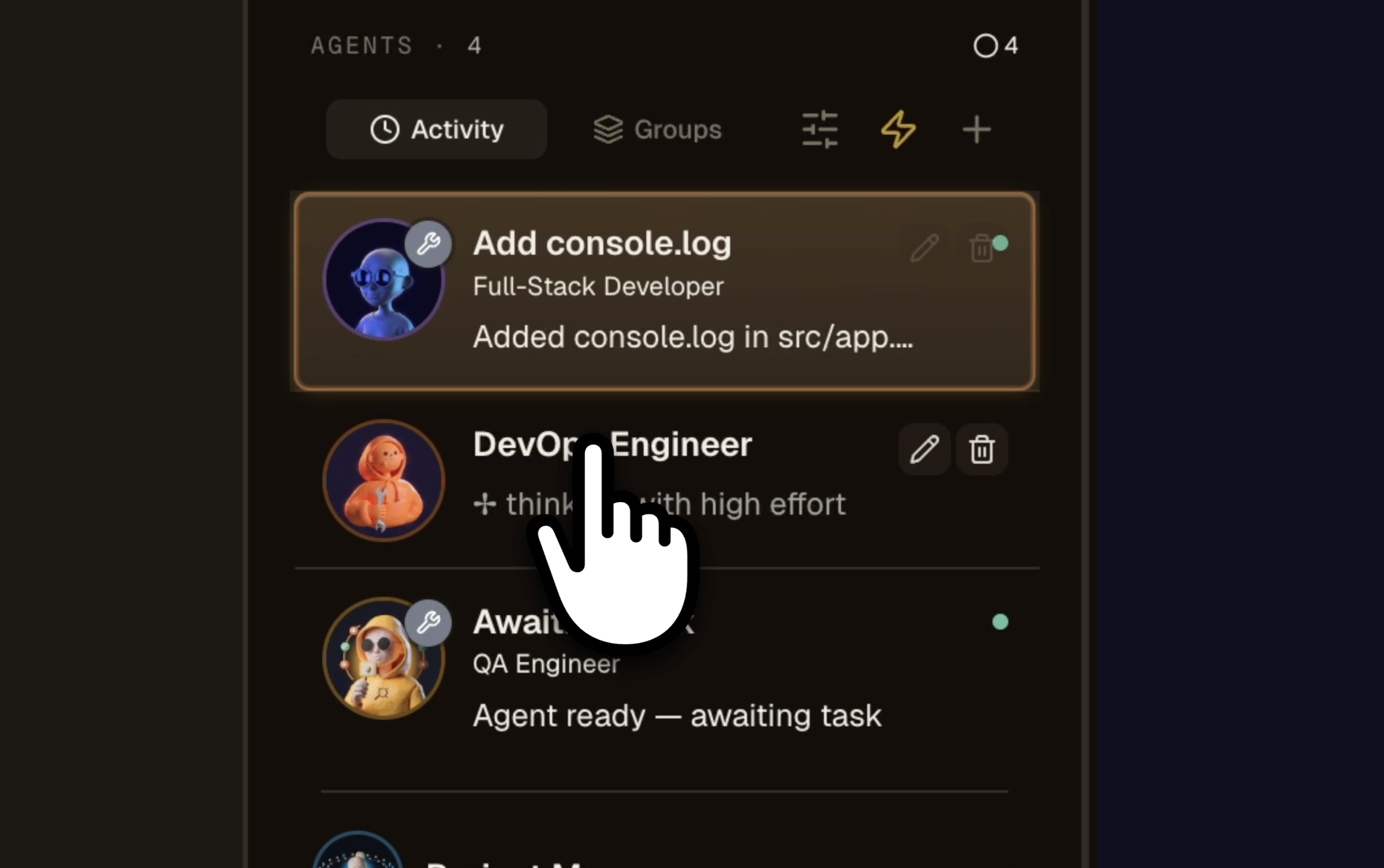
Più progetti, più agenti IA, una sola finestra
La cabina di pilotaggio visiva per guidare Claude, Codex, GitHub Copilot CLI, Cursor e altre 10 CLI di agenti in parallelo su tutti i tuoi progetti nello stesso momento. Ruoli con codice colore (DevOps arancione, Frontend ciano, QA rosso, Architect blu), punto di stato animato su ogni scheda agente, contatori attivi/completati per progetto, indicatore rosso pulsante nel momento in cui un agente si blocca. Sai in un secondo quale agente sta lavorando su quale progetto, quale ha finito, quale attende la tua risposta. Basta 12 tab del terminale, basta indovinare a che punto eri. La griglia multi-progetto e multi-agente che le tue sessioni Claude Code hanno sempre meritato.
“non ritrovo i miei vecchi export”
chat di supporto“l'export è sepolto in un sottomenu”
modulo pubblico“aggiungete la modalità scura”
ticket retrocessoLa bacheca delle idee che ordina i feedback dei tuoi utenti
Butta nel Radar i messaggi di supporto, le richieste di funzionalità e gli appunti scritti a metà: tornano raggruppati per tema, deduplicati e contati per numero di persone che li hanno chiesti. Leggi lo stesso corpus in quattro modi: temi, matrice impatto/sforzo, opportunity solution tree, mappa semantica. I tuoi utenti votano e commentano sulla bacheca pubblica, un product manager IA propone il prossimo ticket, e un'idea matura diventa un ticket del backlog mentre un ticket che non svilupperai torna a essere un'idea.
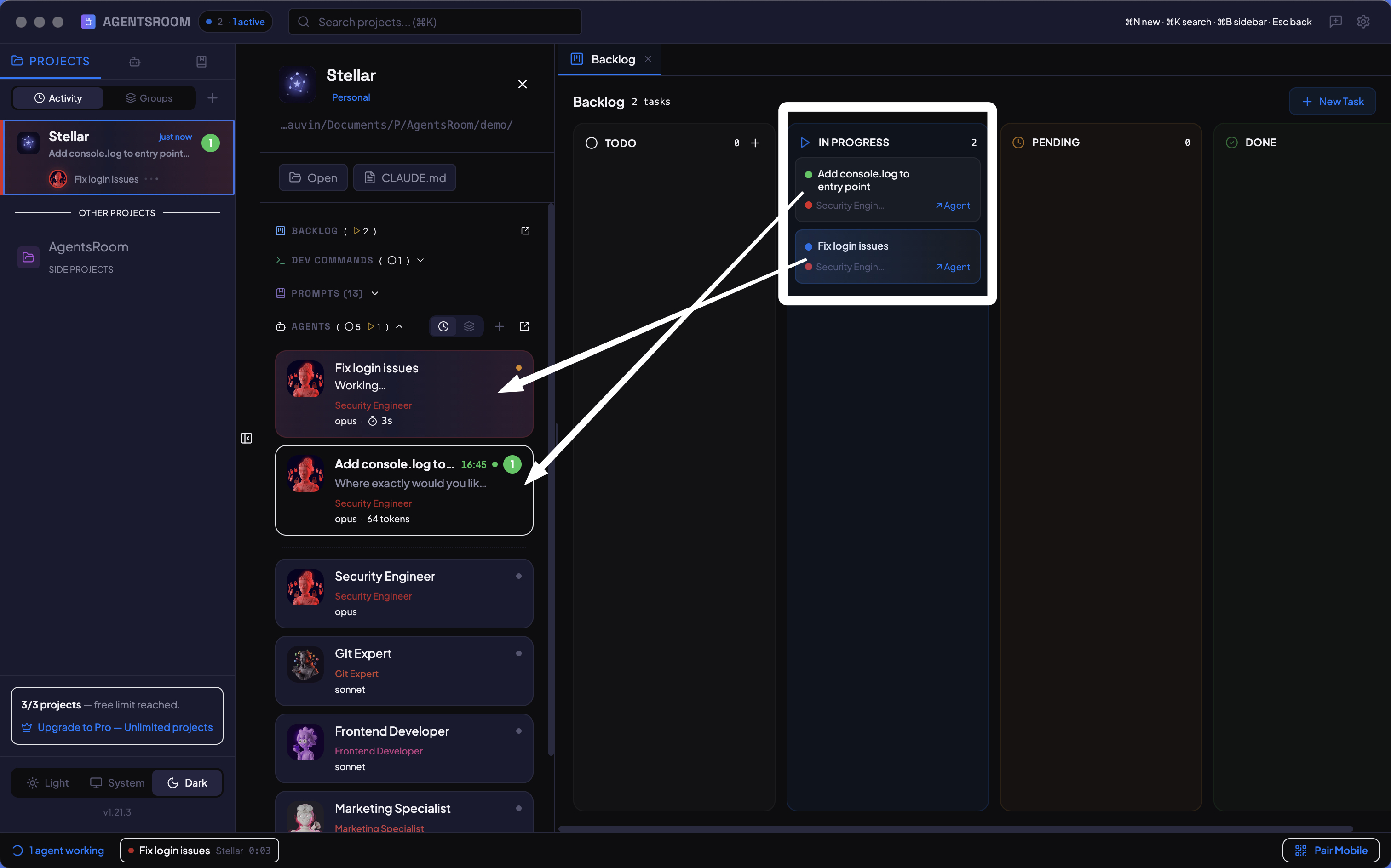
Trascina un'attivita, avvia un agente
Bacheca kanban per i tuoi agenti IA. Crea attivita, trascinale su In Corso, e un agente inizia subito a lavorare. Monitora ogni funzionalita visivamente: chi fa cosa, cosa e fatto, cosa viene dopo.
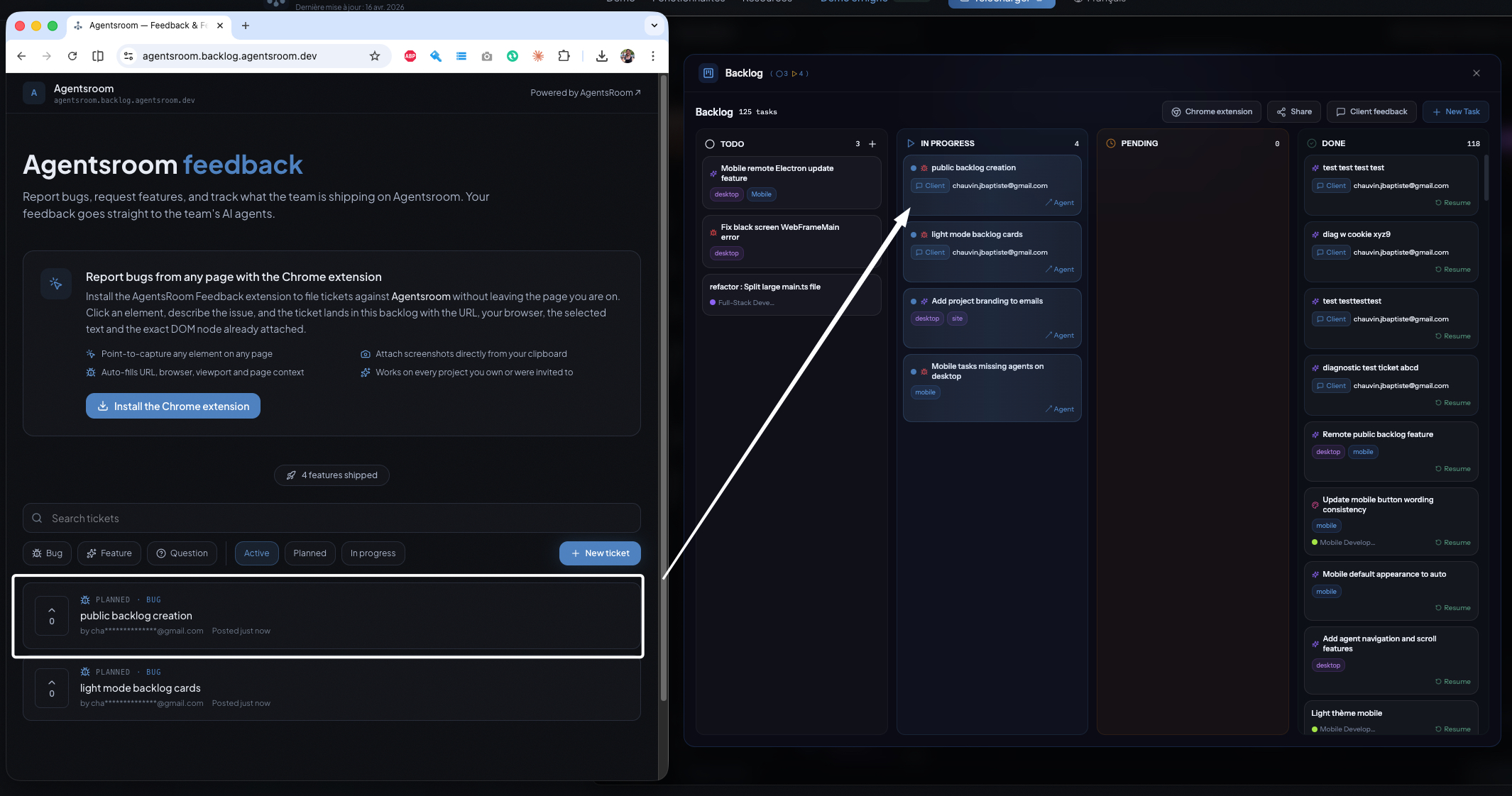
I tuoi clienti guidano il backlog, i tuoi agenti lo spediscono
Esponi il backlog del tuo progetto come portale di feedback pubblico o privato. I clienti segnalano bug, chiedono funzionalita, votano i ticket, lasciano commenti, e ogni ticket atterra direttamente nello stesso backlog AgentsRoom su cui lavorano i tuoi agenti IA. Sviluppo IA guidato dal feedback, widget ed estensione Chrome inclusi.
“Aggiungi un pulsante da qualche parte nella schermata del profilo”
Fai lo scoping dell'ideaTrasforma un feedback vago in un mockup prima di sviluppare
Un clic su un ticket di feedback avvia un agente AI Product Manager che legge la tua codebase e costruisce un mockup fedele al tuo prodotto reale, con la modifica richiesta nel contesto. Valida l'idea e chiariscila in una conversazione bidirezionale sullo stesso ticket, tutto prima che inizi qualsiasi sviluppo. Lo scoping non avvia mai il task e non invia mai una notifica.
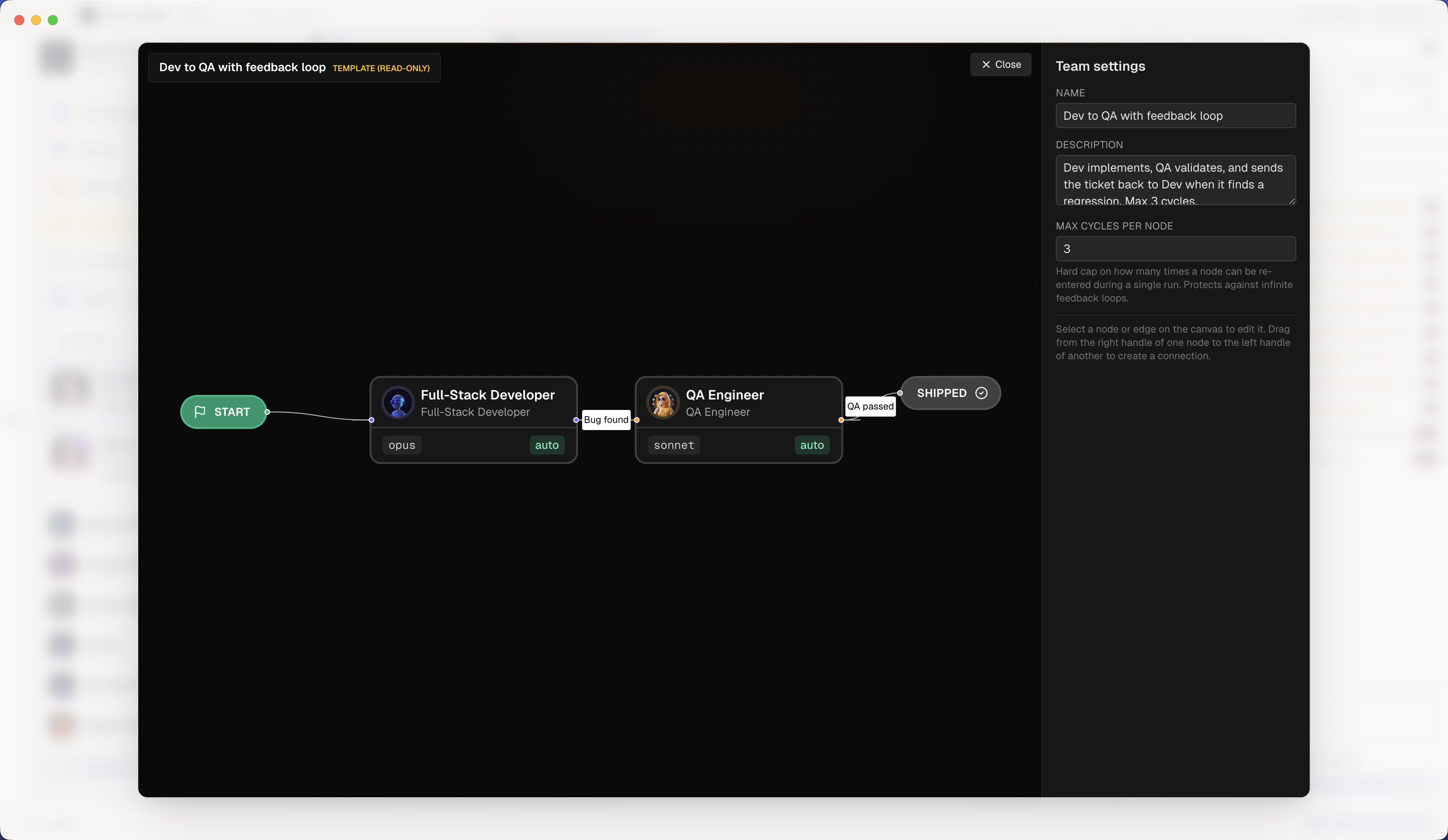
Agent Teams: una vera squadra tecnica, scriptata
Concatena i tuoi agenti IA come una vera squadra di sviluppo. Trascina nodi su un canvas visuale (Dev, QA, PM, Security, DevOps), connettili e AgentsRoom orchestra l'handoff: riassunto della feature, diff, rischi, hint di test. Scegli come girano i ruoli: un agente che fa morph da un ruolo all'altro e tiene tutto il contesto, oppure un agente vivo per ruolo che si parlano mentre lavorano, in qualsiasi direzione. Edge condizionali, feedback loop, max-cycles guard. L'editor di workflow stile n8n che mancava al tuo team IA.
Destinatario occupato, messaggio trattenuto
I tuoi agenti si scrivono, da qualsiasi CLI
Gli agenti salvati di un progetto diventano membri permanenti con un indirizzo vero e un'inbox vera. Ognuno può scrivere a un altro, qualunque CLI stia facendo girare, e il messaggio è salvato su disco prima ancora che si tenti una consegna. Un agente offline, una CLI che va in crash o un riavvio dell'app non ne perdono mai uno : aspetta, arriva, e la conferma dice che è stato davvero letto.
Agent Morphing: cambia ruolo, mantieni il contesto
Cambia il ruolo del tuo agente in esecuzione, al volo. Il PM diventa Sviluppatore Fullstack e poi QA, nella stessa sessione, con tutto il contesto della conversazione preservato: niente respawn, niente da rispiegare. Fai il morph verso uno qualsiasi dei 14 ruoli integrati, gli esperti di The Agency o gli agenti della community, con un'opzione fresh eyes per le review critiche e una scia di ogni ruolo attraversato. Un solo agente, un'intera squadra, qualunque sia il tuo agente CLI.
- lettura di auth/session.ts
- approccio cookie scartato
- provo il refresh via token
Fai il fork di un agente, tieni tutta la conversazione
Un clic su un agente AI in esecuzione crea un gemello che ha già tutta la sua conversazione: stesso ruolo, stesso CLI, stesso modello, stesso contesto. Su Claude, Codex e Grok è il fork di sessione del CLI stesso; ovunque altro il gemello parte da zero con la trascrizione del padre da leggere, e l'app lo scrive a schermo. Fai girare le due console in parallelo su conversazioni separate, oppure apri la bolla Chiedi nel composer per porre una domanda a una copia in sola lettura dell'agente: la risposta arriva in streaming mentre il suo terminale continua a lavorare e la sua cronologia resta intatta.
Crea, condividi e installa agenti di codifica AI
AgentsRoom non è un solo assistente, è un intero roster di agenti. Inizia con 14 ruoli integrati, aggiungi agenti specialisti da The Agency, o crea il tuo agente personalizzato con il proprio prompt di sistema. Poi condividi un agente con un compagno di squadra in un drag attraverso la chat, o pubblicalo nella comunità affinché tutti possano crescere insieme. Ogni agente lavora con Claude, Codex, GitHub Copilot CLI, Cursor o una qualsiasi delle altre 10 CLI di agenti supportate da AgentsRoom.
Descrivi il compito, ottieni l'agente giusto
Non sai quale agente usare? Scrivi cosa vuoi fare e AgentsRoom suggerisce l'agente più adatto: dalla tua room, dai ruoli integrati o da 260+ esperti del catalogo, ogni scelta con una motivazione in una riga. Un clic lo aggiunge, apre il suo terminale e precompila il tuo compito.
Pianifica i tuoi agenti AI come un cron, senza il cron
Scheduled Tasks fa girare i tuoi agenti AI di coding su base ricorrente, senza nessuna espressione cron da scrivere. Programma una sessione Claude Code o Codex per rivedere le pull request ogni mattina alle 8 e di nuovo alle 18, scansionare i log di crash ogni notte, controllare le dipendenze ogni lunedì o pubblicare un changelog settimanale. Scegli una frequenza (ogni N minuti, oraria, giornaliera a uno o più orari del giorno, settimanale, mensile, oppure sulla finestra di quota del tuo abbonamento IA), un prompt e un ruolo agente. Ogni esecuzione crea un agente in background nel tuo progetto, ti invia una notifica, recupera le esecuzioni saltate al lancio successivo e conserva uno storico riapribile. Un'alternativa al cron pensata per i workflow di sviluppo AI ricorrenti, provider-agnostic tra Claude Code, Codex e Antigravity.
Il tuo agente parte quando succede davvero qualcosa
I trigger webhook avviano un agente AI di coding su un evento esterno invece che su un orologio. Ogni trigger riceve un URL pubblico e un segreto di firma che incolli in GitHub, GitLab, Slack, Linear, Sentry o in qualsiasi servizio capace di inviare un POST JSON. Si apre una pull request, si rompe una build, viene segnalato un crash, e l'agente lo sta già leggendo. La firma viene verificata, un filtro facoltativo decide cosa merita un'esecuzione, un limite anti-raffica impedisce a un servizio rumoroso di avviare venti agenti, e il payload diventa variabili del prompt. Un evento che arriva mentre l'app è chiusa viene messo in coda e riprodotto al lancio successivo, e con più macchine lo prende una sola. Automazione guidata dagli eventi per sviluppatori, senza un loop di polling che brucia token per rispondere no.
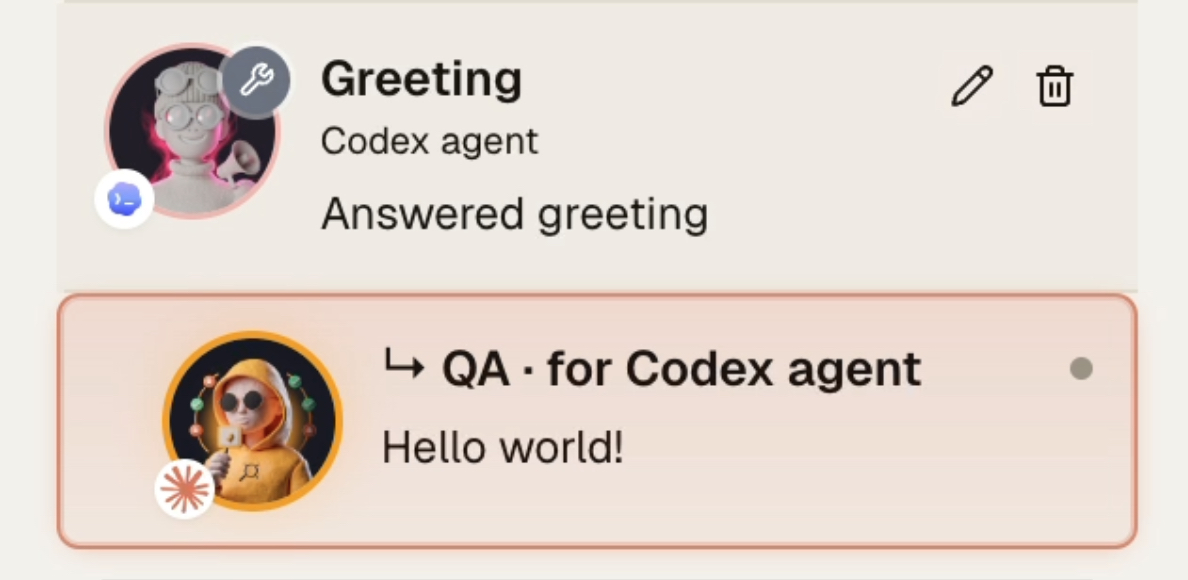
Il tuo agente dev delega il test a un agente QA più economico
Quando una feature è pronta, l'agente dev (Claude Opus, Codex) chiama un singolo strumento MCP e passa la validazione a un agente QA effimero che gira su un modello più economico (Claude Haiku, Codex mini). L'agente QA pilota il browser integrato, verifica il risultato e riporta un pass o fail pulito. Smetti di pagare prezzi premium per i clic nel browser e smetti di appesantire il contesto dell'agente dev con screenshot e dump del DOM. Il modello giusto al prezzo giusto per ogni passaggio.
Parla con i tuoi agenti a modo tuo
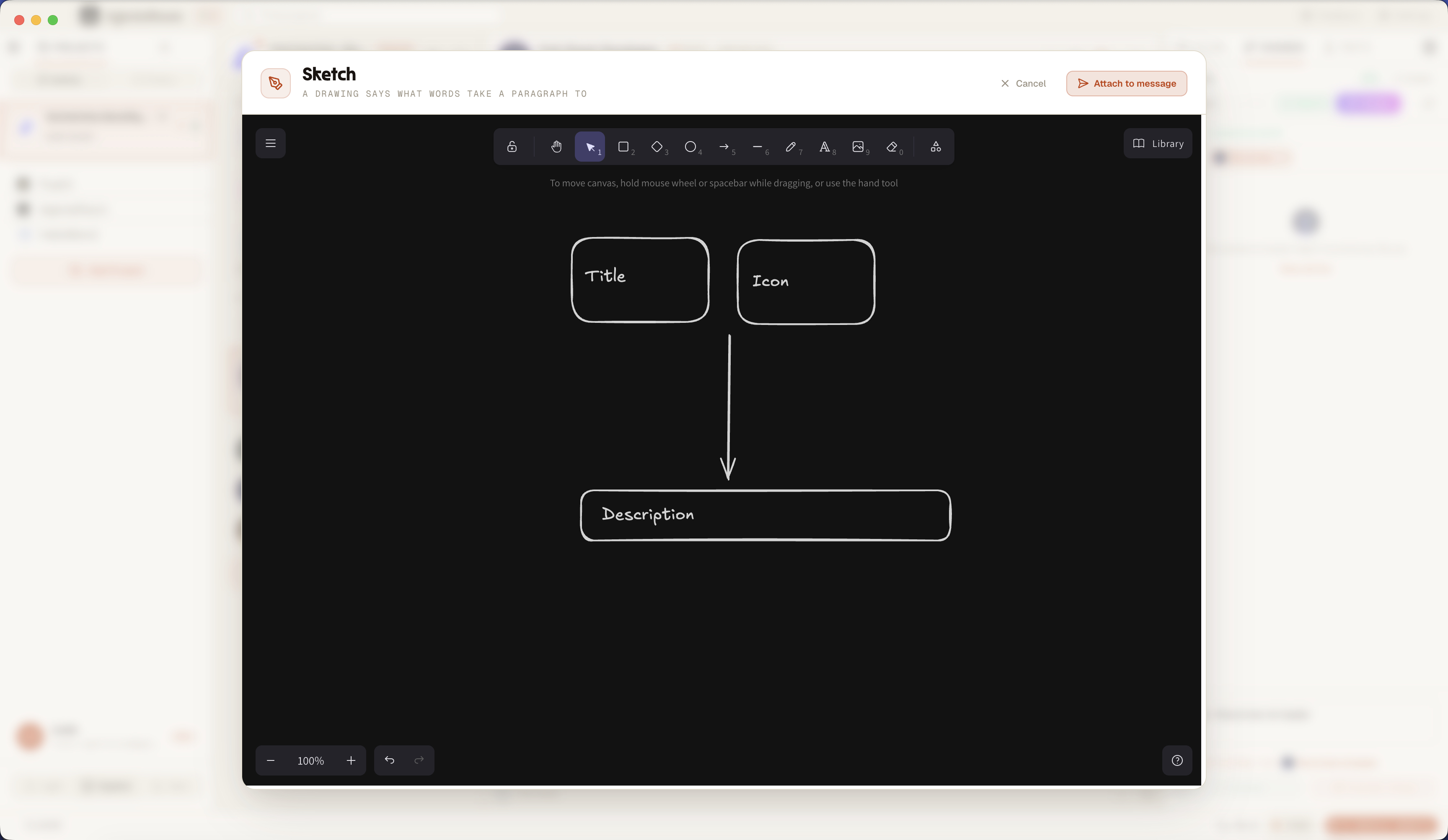
Disegnalo e l'agente capisce cosa intendi
Sketch è una tela di disegno integrata nel composer dell'agente. Apri una tela bianca per abbozzare un mockup o un diagramma, oppure apri uno screenshot per annotarlo: cerchia il bug, traccia una freccia, evidenzia l'area. Il disegno viene allegato al tuo messaggio e inviato al tuo agente IA di coding. Un'immagine vale più di mille parole: quindi smetti di descrivere il bug visivo e disegnalo, senza mai uscire dal terminale.
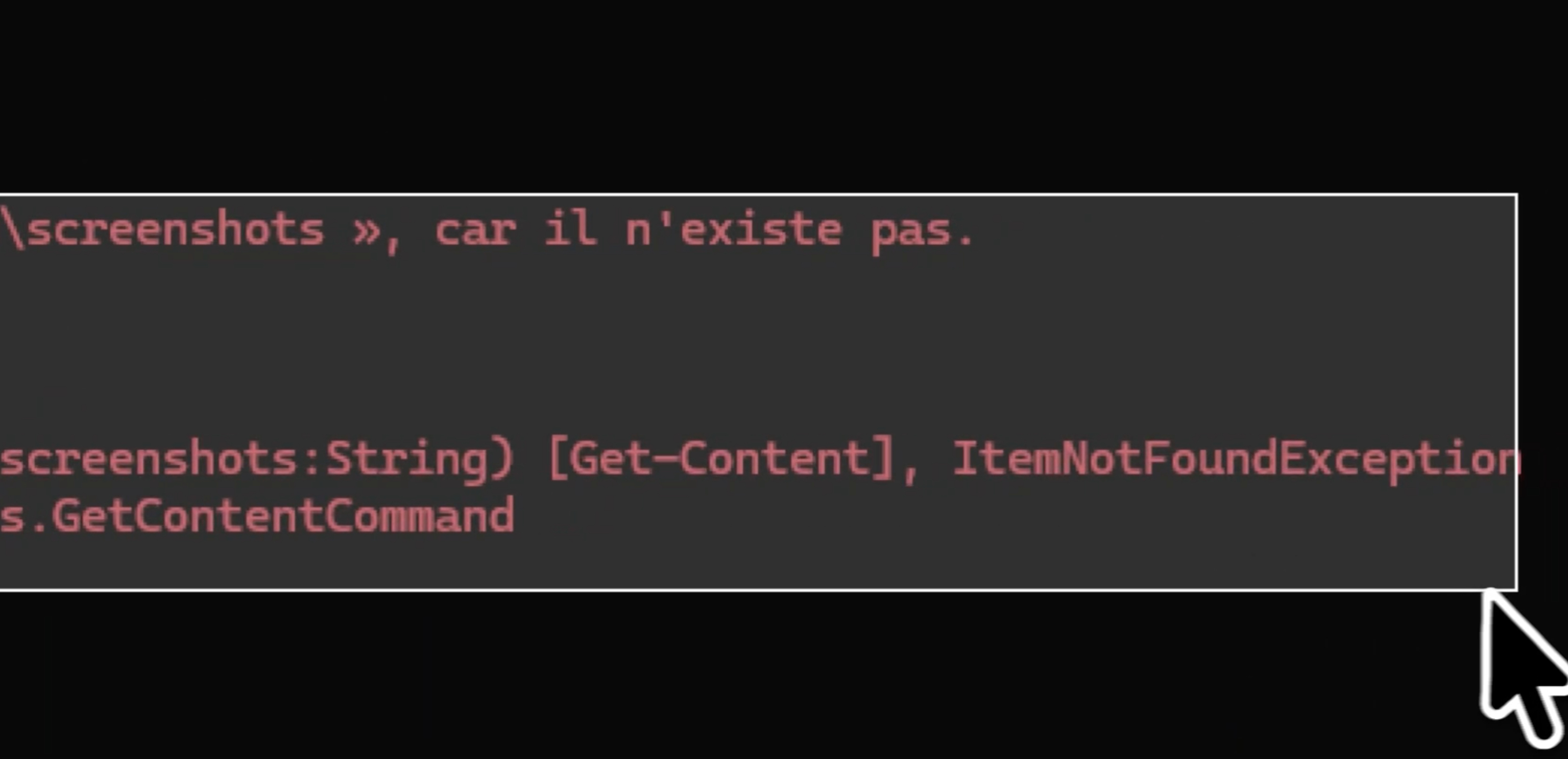
Dallo screenshot all'agente, con una sola scorciatoia
Invia uno screenshot al tuo agente IA di coding senza mai staccare le mani dalla tastiera. Premi la scorciatoia configurabile (Cmd+Shift+2 per impostazione predefinita, Ctrl+Shift+2 su Windows e Linux) o il pulsante screenshot del composer, traccia un riquadro attorno al bug e la cattura dello schermo si allega da sola al tuo messaggio. Nessuna app esterna per gli screenshot, nessun file da salvare su disco, niente da trascinare nel composer. Cattura la porzione di schermo, l'agente la vede, tu resti nel tuo flusso.
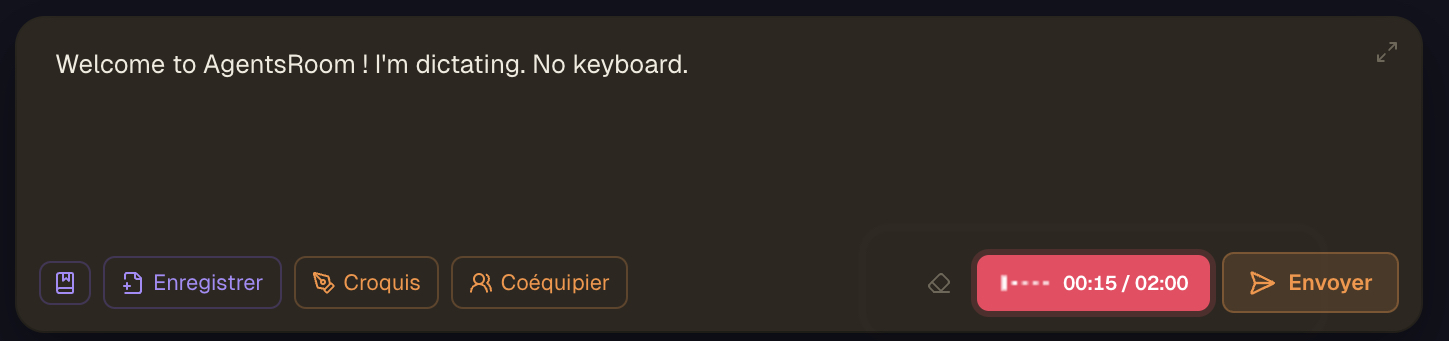
Detta i tuoi prompt, il tuo agente scrive il codice
La dettatura vocale è integrata direttamente nel composer dell'agente. Clicca il microfono, detta il tuo prompt e la trascrizione speech-to-text arriva nella bozza alla posizione del cursore. Nessuna app di dettatura separata, nessun copia-incolla tra finestre. Non c'è nessun modello di trascrizione da scegliere, viene deciso dalla durata della registrazione, detta in una qualsiasi di 19 lingue più il rilevamento automatico e guarda una forma d'onda vocale dal vivo mentre registri. Su mobile, il riconoscimento vocale gira on-device e il testo viene inoltrato al tuo agente desktop a fuoco. Digitare un prompt lungo e preciso richiede minuti, dettarlo richiede pochi secondi : più contesto per il tuo agente, meno scambi di chiarimento, meno token sprecati. Niente viene inviato automaticamente, la trascrizione arriva nella bozza così rileggi, modifichi e invii con Enter. Dettatura vocale per Claude, Codex, GitHub Copilot CLI, Cursor e altre 10 CLI di agenti, il modo più rapido per scrivere un prompt preciso.
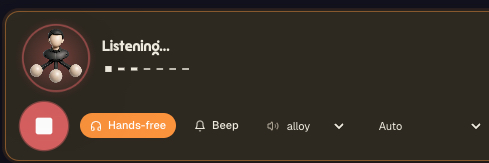
Parla con i tuoi agenti, ascoltali risponderti
Voice Mode è una conversazione vocale bidirezionale con il tuo agente di coding IA. Un tocco, parli, e l'agente risponde a voce alta con una voce naturale : niente da digitare, niente muri di output del terminale da leggere. Attiva le mani libere e continua ad ascoltare per il tuo prossimo turno, così puoi muoverti per la stanza, sorseggiare il caffè o guardare la build mentre discuti il piano. Chiedi a che punto è il refactor e te lo dice. Di' lancia i test e fammi sapere : li lancia e ti annuncia il risultato a voce. Scegli la voce di risposta (alloy e altre), tieni un segnale acustico tra i turni e lascia che la lingua si rilevi da sola per parlare con parole tue. Voice Mode si appoggia al backend AgentsRoom (riconoscimento vocale in entrata, sintesi vocale in uscita) e funziona allo stesso modo con Claude, Codex, GitHub Copilot CLI, Cursor e altre 10 CLI di agenti. È il modo più naturale per restare aggiornato su un agente che gira a lungo senza essere incatenato alla tastiera.
I crediti vocali ora sono condivisi tra dettatura, Voice Mode e lettura ad alta voce.
Il pannello di selezione del terminale guadagna un pulsante Ascolta per tutto quello che evidenzi.
La barra di stato tiene una pastiglia di controllo finché una lettura è in corso.
Ascolta i tuoi documenti invece di leggerli
Read Aloud è la sintesi vocale integrata in AgentsRoom. Clicca l'altoparlante nell'anteprima markdown e un README, una specifica o un changelog da trecento righe viene letto ad alta voce con una voce sintetica naturale. Evidenzia qualsiasi cosa in un terminale e premi Ascolta. Clic destro per sentire l'ultima risposta del tuo agente, presa dalla trascrizione della sua conversazione e non raschiata dallo schermo. I blocchi di codice, le tabelle markdown e i percorsi di file isolati vengono tolti prima che venga pronunciata una sola parola: senti prosa, non punteggiatura. Hai fretta? Lo stesso pulsante offre una lettura condensata: prima viene scritto un riassunto IA ed è quel riassunto che ascolti, calibrato sulla durata parlata che scegli, dieci secondi, trenta o un minuto. Un changelog da quaranta minuti risolto in dieci secondi. Barra di avanzamento, tempo rimasto, pausa, ripresa e una pastiglia di controllo nella barra di stato che sopravvive alla finestra da cui sei partito. L'idea è arrivata da uno sviluppatore dislessico che copiava e incollava la nostra anteprima markdown in uno strumento di sintesi vocale esterno, e si ripaga anche sugli occhi stanchi.
Accumula i tuoi messaggi, inviali nell'ordine giusto
Una coda messaggi integrata nel composer. Accumula più prompt sopra il campo di input e inviali al tuo agente IA uno alla volta, nell'ordine che scegli, invece di un unico mega-prompt sovraccarico. Ogni messaggio in coda riceve un breve titolo generato dall'IA e conserva i suoi screenshot e allegati. Trascina per riordinare, riapri per modificare, invia quando vuoi. Un messaggio in coda può anche portare un orologio, o seguire il tuo abbonamento invece dell'orologio da muro: invialo appena la quota torna disponibile, oppure poco prima che si azzeri una finestra di 5 ore, giornaliera, settimanale o mensile, così una lunga revisione del codice gira sui crediti che stavano per scadere.
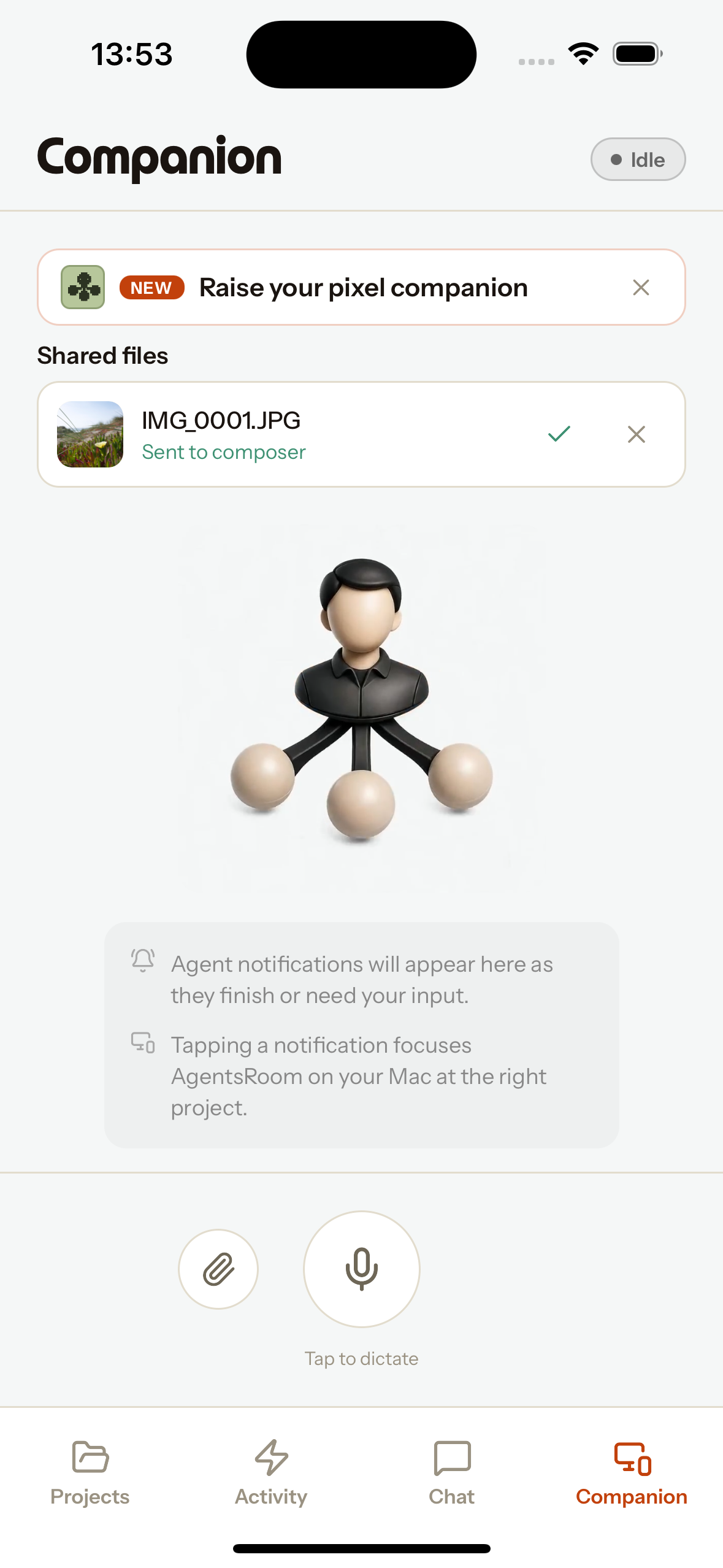
Il tuo telefono, un telecomando per i tuoi agenti AI
Il Mobile Companion trasforma il telefono in un telecomando per gli agenti AI di coding in esecuzione sul tuo desktop. Detta un prompt con il microfono del telefono e la trascrizione arriva nel composer del tuo agente attivo. Allega una foto o qualsiasi file dal telefono e finisce nel composer di quell'agente come allegato, proprio come uno screenshot desktop. Soprattutto, un'estensione di condivisione nativa iOS e Android mette AgentsRoom direttamente nel menu di condivisione del sistema: condividi uno screenshot da qualsiasi app e va dritto al tuo agente desktop attivo, nel progetto giusto, nel campo di input giusto. Perfetto per segnalare un bug mobile, inviare contesto in movimento o dettare quando la tua macchina di sviluppo non ha un microfono. Tutto viaggia sul relay crittografato end-to-end, funziona su rete mobile e resta in una coda offline quando il desktop non è raggiungibile. Agnostico rispetto al provider: funziona con Claude Code, Codex CLI e altri.
Il tuo assistente personale, a una frase dal telefono
L'assistente è l'unico agente del tuo account AgentsRoom che puoi raggiungere da ovunque. Di' "Talk to Bot" a Siri, premi il tasto Azione dell'iPhone, tocca un widget o un riquadro Android, la scheda Assistente dell'app, oppure condividi un testo con lui: l'app apre la schermata dell'assistente con il microfono già in ascolto, trascrive ciò che hai detto con il riconoscimento vocale di AgentsRoom nel composer nel caso un nome sia venuto fuori male, e lo invia tramite il relay cifrato end-to-end al tuo desktop. Lì l'assistente gira tramite la CLI di agente che già usi, con i tuoi connettori MCP (mail, calendario, messaggistica) e gli strumenti AgentsRoom che raggiungono tutti i progetti: legge e crea ticket nel backlog ovunque, avvia un agente su uno di essi, abbozza una risposta con il tuo tono e conferma prima di qualsiasi cosa visibile ad altri. Inizia una nuova conversazione ogni giorno e, se glielo permetti, si ricorda di te in una memoria privata tutta sua che gli agenti dei tuoi progetti non vedono mai. La risposta torna come push e, quando finisce un'attività lunga, il desktop ti chiama per nome. Si chiama "Assistente personale" per impostazione predefinita, rinominabile, avatar personalizzato, un'unica pagina di impostazioni su entrambi gli schermi.
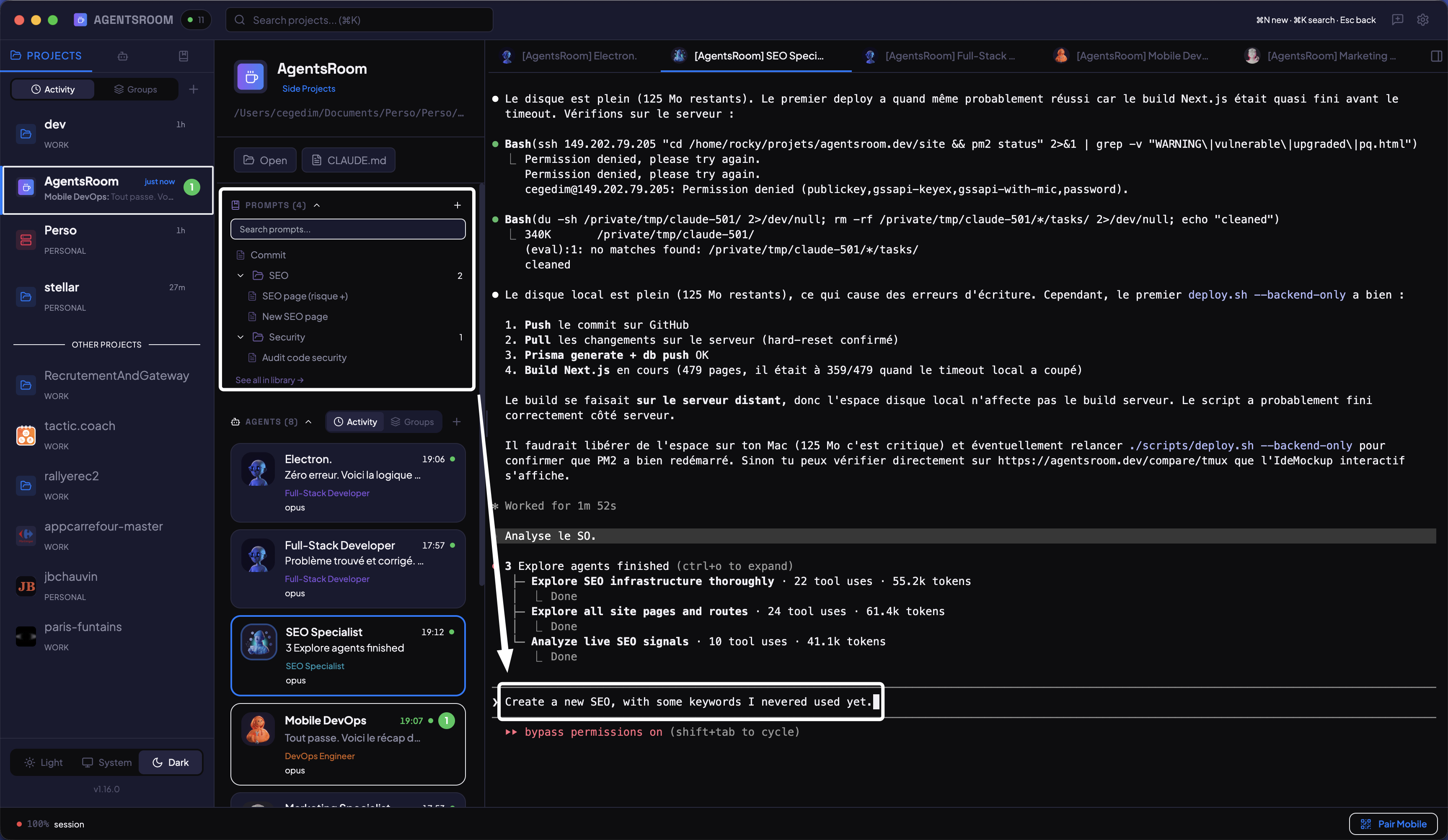
Salva e riutilizza i tuoi migliori prompt
Organizza i prompt in cartelle, per progetto. Condividili con il tuo team via git. Mantieni i prompt personali privati con gitignore automatico. Invia qualsiasi prompt a un agente con un clic.
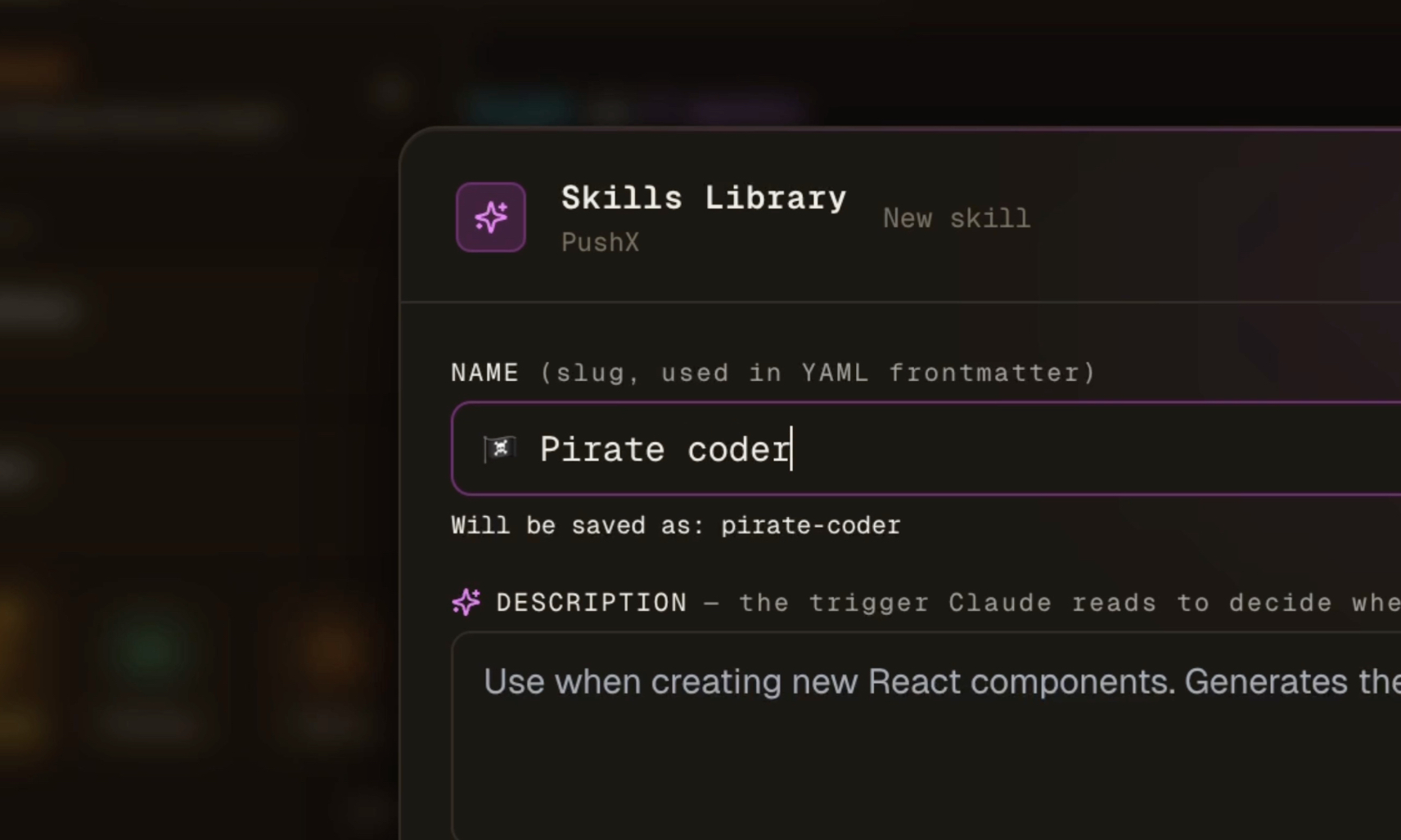
Procedure modulari, ogni runtime
Salva skill in formato Claude SKILL.md, collegale a task o agenti, ed esportale su Cursor, Codex, Windsurf o Aider con un clic. Il routing basato su trigger carica la procedura giusta automaticamente.
Il cervello condiviso del tuo codice
I tuoi agenti annotano ciò che imparano: decisioni, architettura, trappole, convenzioni. Sopravvive alla sessione, e ogni agente e collega del progetto legge la stessa memoria.
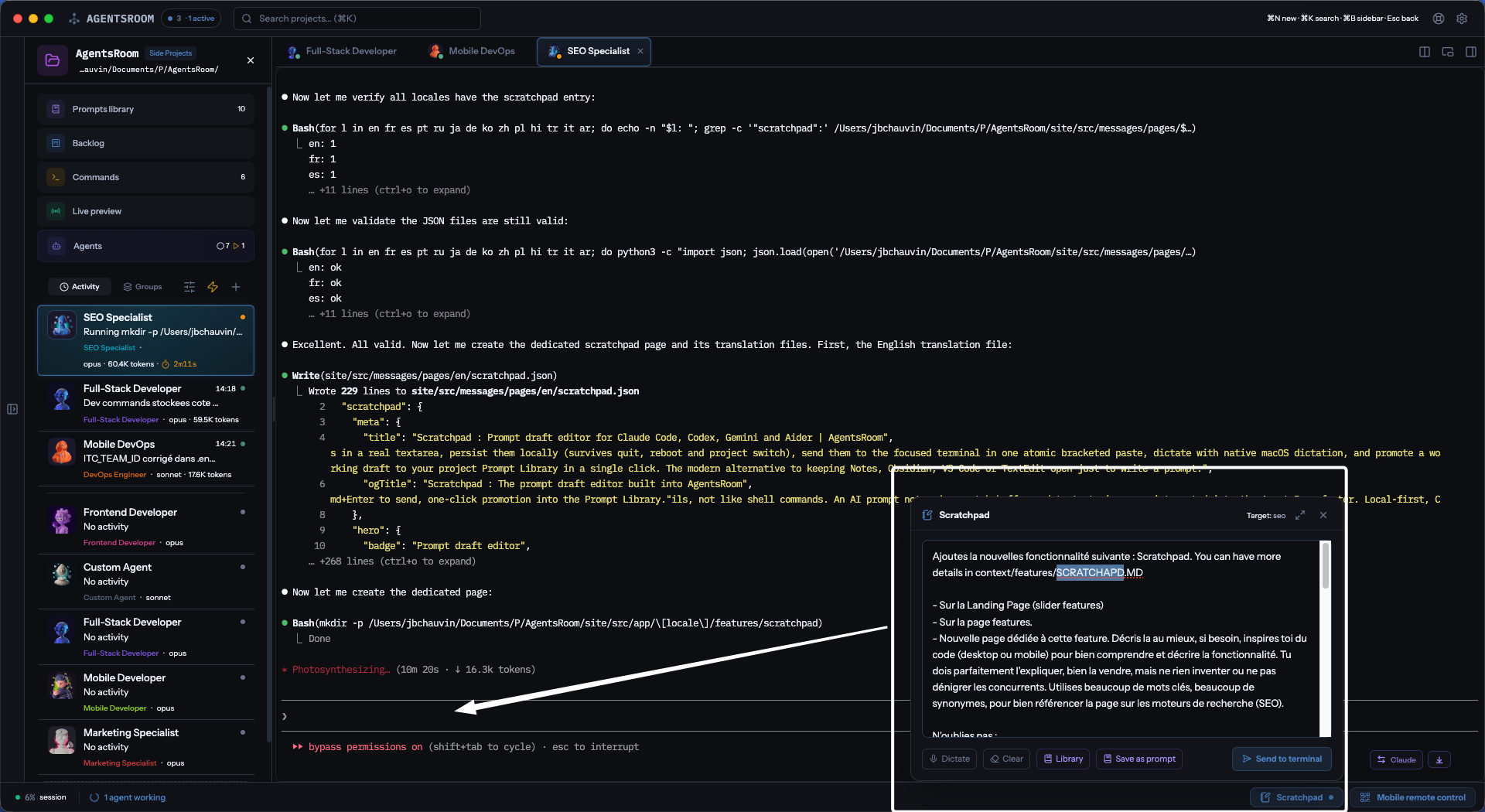
Scrivi il tuo prompt come scrivi un'email
Un editor di prompt ancorato al footer di AgentsRoom. Redigi prompt lunghi e strutturati per i tuoi agenti IA in una vera area di testo. La tua bozza e sempre li quando torni, anche dopo aver chiuso l'app. Un clic invia tutto all'agente focalizzato, e un clic salva una buona bozza come prompt riutilizzabile per il tuo team.
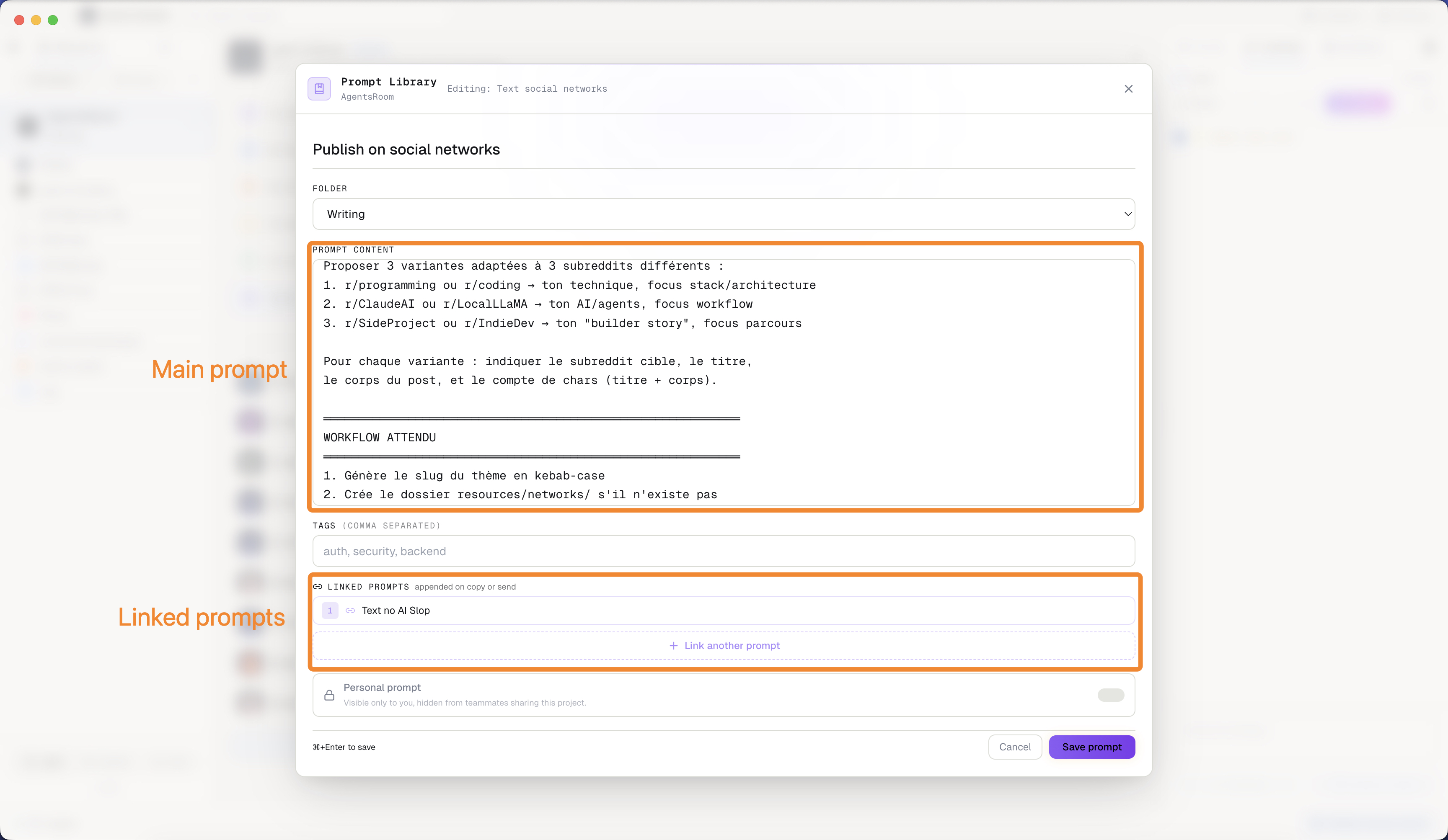
Prompt che richiamano altri prompt
Un prompt della tua libreria può collegarsi ad altri prompt e recuperarne il contenuto quando viene eseguito. Scrivi una volta sola le regole condivise (il tuo stack, le tue convenzioni, la tua checklist di review), poi richiamale da ogni prompt di task invece di ricopiarle e lasciarle divergere. Le catene si risolvono al momento dell'invio, quindi l'agente riceve un unico brief completo, e aggiornare il blocco condiviso aggiorna ogni prompt che lo eredita.
Da un frame Figma a una UI rilasciata
Cattura qualsiasi frame direttamente dal canvas di Figma con l'estensione Chrome di AgentsRoom, trascinalo su un ticket del backlog o sul prompt di un agente e lascia che l'agente lo costruisca sui tuoi componenti reali. Il design viaggia come immagine, più la tua intenzione scritta, quindi non dipende da un server MCP Figma attivo, autenticato o compatibile con il tuo file. La cattura resta allegata al ticket, così l'agente che lo prende in carico più tardi vede ancora esattamente cosa era stato chiesto.
Resta in controllo, in tempo reale
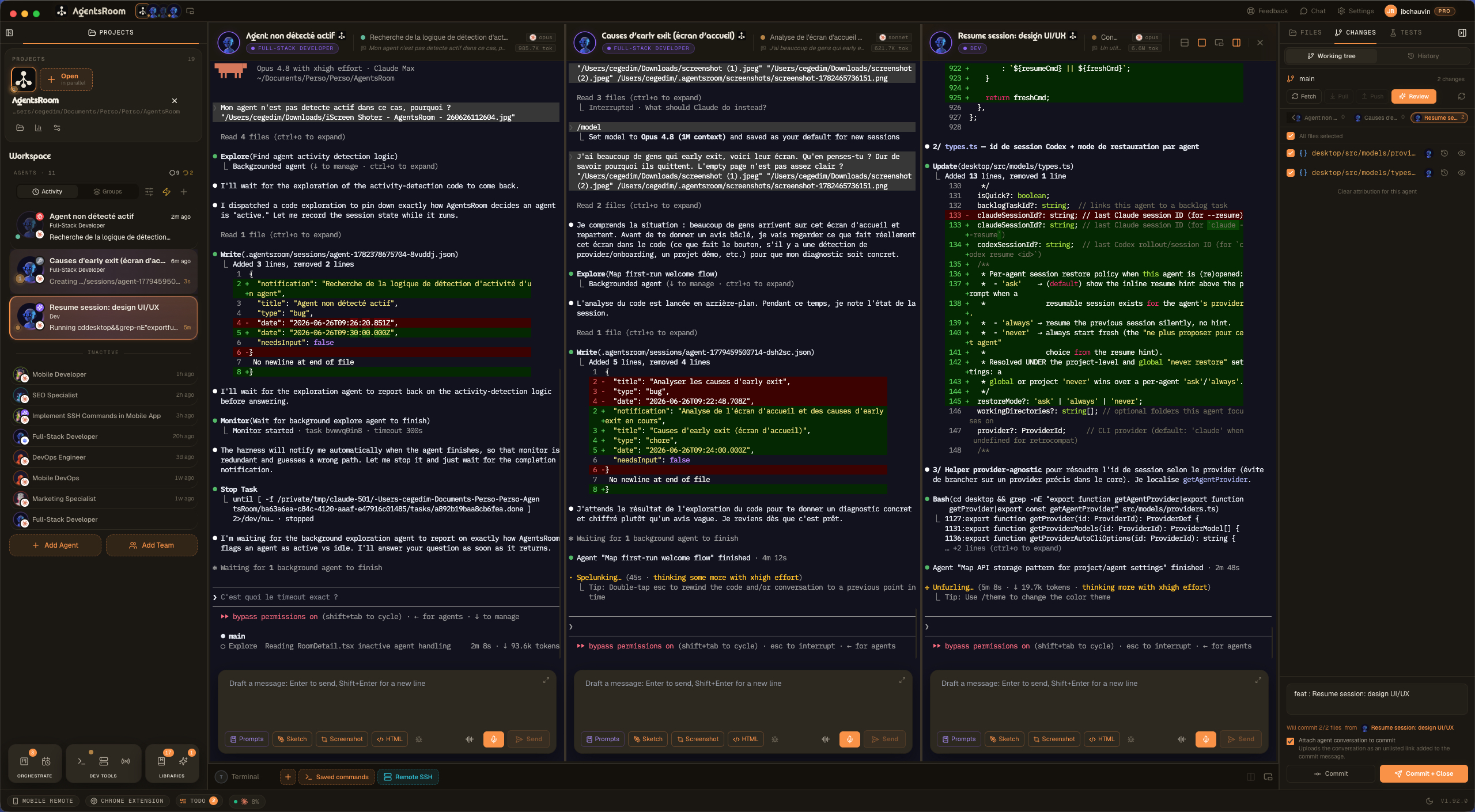
Vedi ogni agente in una volta, affiancato
Suddividi il tuo spazio di lavoro in piu pannelli e guarda diversi agenti IA di coding lavorare nello stesso momento, affiancati. Trascina il terminale di un agente su un altro e rilascialo su un bordo: sinistra o destra divide in colonne, alto o basso impila in righe, in stile iTerm2. Passa l'intera disposizione da orizzontale a verticale con un clic. Ogni pannello mantiene il colore di ruolo del suo agente, l'avatar e lo stato in tempo reale, il pannello con il focus riceve un alone di evidenziazione e la tua disposizione split viene ripristinata in modo identico quando riapri l'app. Esegui Claude Code sul backend in un pannello, Codex sul frontend in un altro, un agente QA Antigravity in un terzo, e tieni d'occhio tutti senza saltare tra le schede. Lo schermo diviso multi-pane che mancava ai tuoi agenti in parallelo.
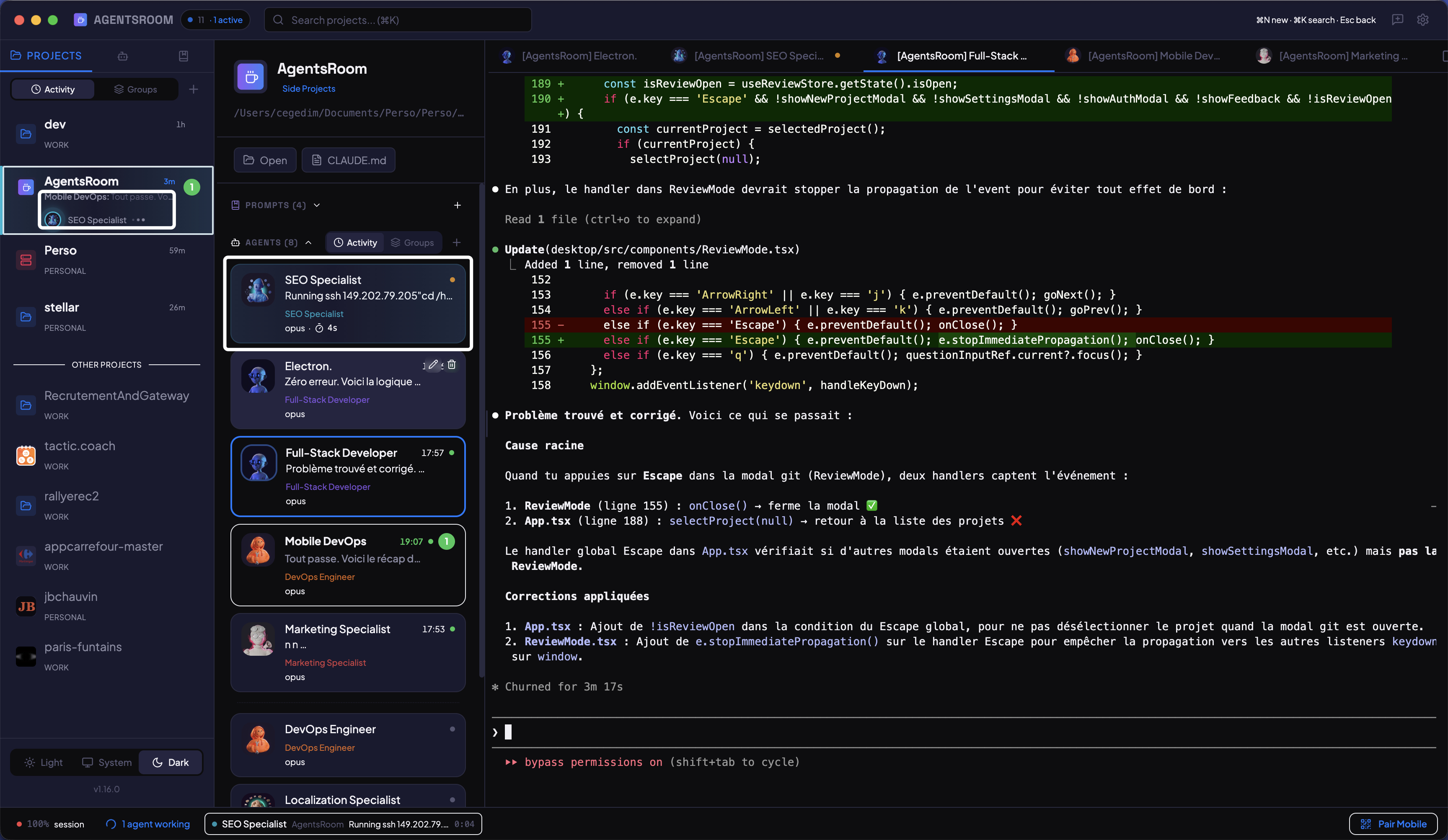
Vedi chi sta lavorando, adesso
Indicatori di stato con codice colore su ogni scheda agente. Punto giallo pulsante quando pensa, verde quando ha finito, rosso quando attende il tuo input. Tempo trascorso e attivita corrente visualizzati in tempo reale.
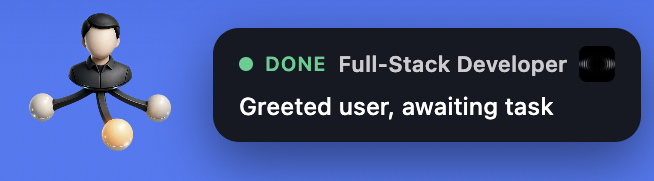
Lo stato dei tuoi agenti, sempre in vista
Un'isola fluttuante e sempre in primo piano mostra se i tuoi agenti Claude Code, Codex e Antigravity sono inattivi, al lavoro o in attesa di una risposta, anche quando AgentsRoom è in secondo piano. Quando un agente finisce, una notifica appare accanto all'isola. Cliccala e atterri direttamente sull'agente giusto, nel progetto giusto. Smetti di fare alt-tab per controllare.
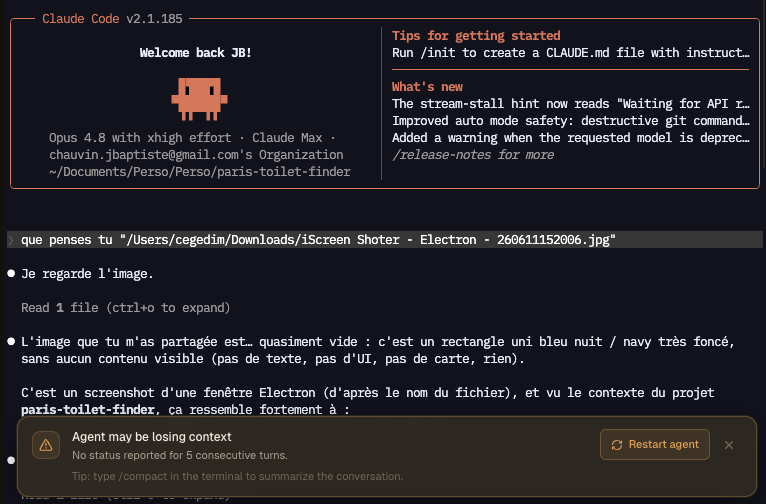
Cogli un agente IA prima che inizi ad allucinare
AgentsRoom sorveglia un canary integrato su ogni agente: lo stato di una riga che ogni agente scrive alla fine di ogni turno. Quando un agente smette di aggiornarlo per due turni di fila, è il classico segno precoce di context rot e calo di qualità, quindi AgentsRoom mostra un avviso sopra il terminale prima che inizino le allucinazioni. Un clic rilancia l'agente su un contesto pulito, e un suggerimento ti ricorda di compattare la conversazione. Funziona con Claude Code, Codex e ogni provider.
Il rilevatore di processi bloccati per agenti IA
Un agente IA lancia un vero processo di sistema per ogni chiamata a uno strumento: una ricerca, una build, uno script. Quasi tutti finiscono in pochi secondi, alcuni mai, e quelli continuano a tenersi gigabyte di RAM allo 0% di CPU finché la macchina non arranca. In una sessione misurata, sette processi bloccati occupavano 41,8 GB su un portatile da 16 GB, lo swap era al 95%, e terminarli ha restituito 15,5 GB all'istante. Il guardiano dei processi passa al setaccio i processi figli dei tuoi agenti una volta al minuto e ne segnala uno solo quando è grosso, vecchio E fermo sul processore, così una build vera non viene mai scambiata per un processo bloccato. Misura l'impronta di memoria reale, pagine compresse e pagine finite in swap comprese, perché un processo bloccato può mostrare 20 MB pur tenendone 8 GB. Vengono presi anche i processi orfani sopravvissuti al loro agente. I tuoi terminali di comandi dev, la shell e la CLI dell'agente stessa non vengono mai toccati, e niente viene terminato se non lo chiedi tu.
Il modello IA giusto per ogni task, scelto automaticamente
Adaptive Mode legge il tuo prompt prima che invii il primo messaggio e suggerisce il modello più economico per il compito. Un fix rapido o una traduzione vengono instradati verso un modello leggero ed economico come Claude Haiku; un refactor profondo o una progettazione di architettura verso uno pesante come Claude Opus. Un clic lo applica, passando a caldo su una sessione in corso o salvandolo per il prossimo avvio. Funziona con Claude, Codex e Antigravity. Smetti di pagare troppo con un modello flagship per task banali: spendi meno per task ed esegui più task al giorno con lo stesso piano.
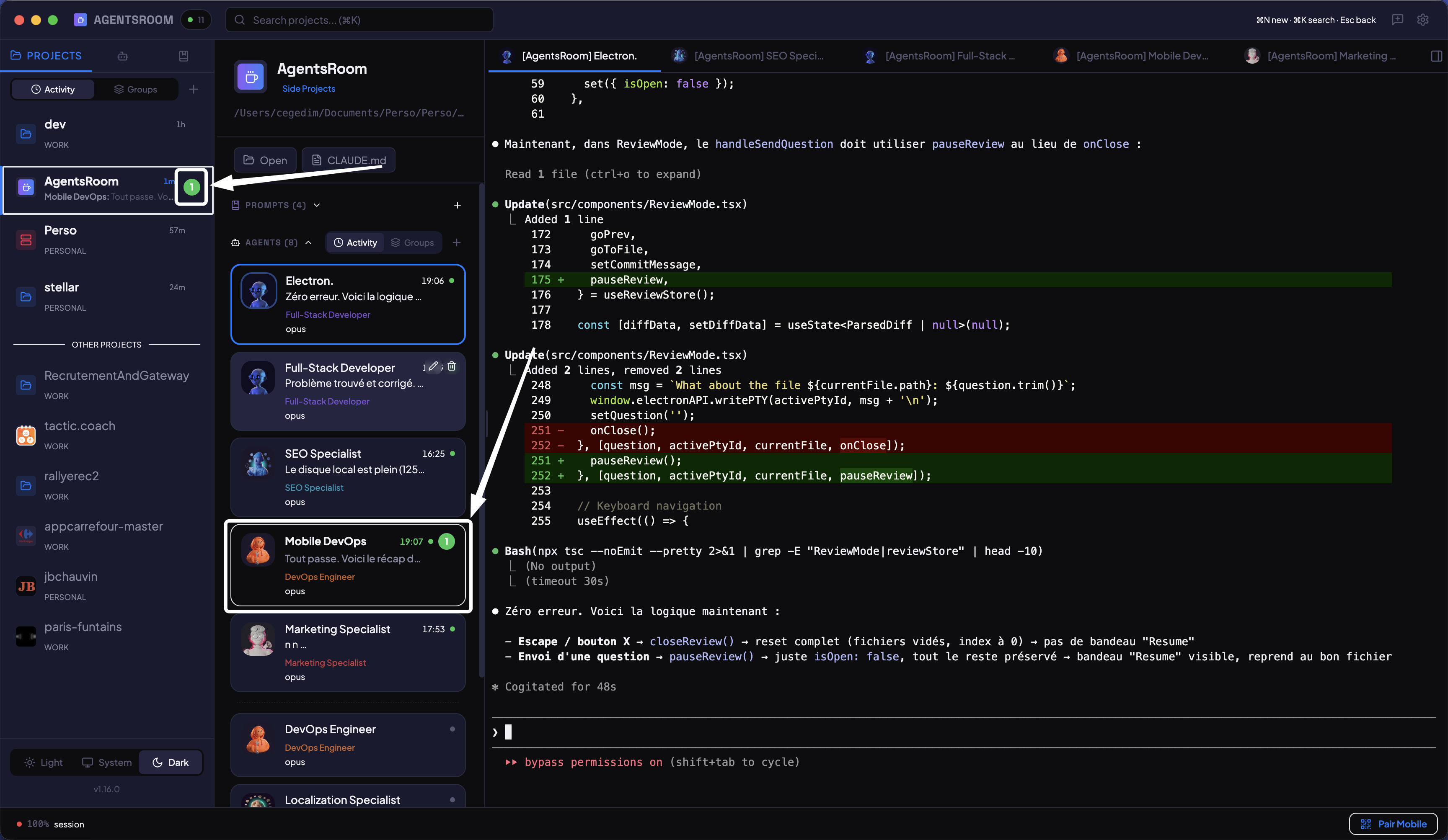
Sai esattamente quale agente ha finito
Indicatori di non letto per progetto e per agente, come in un'app di messaggistica. Notifiche push desktop e mobile quando un agente completa o necessita di input. Niente piu incertezze.
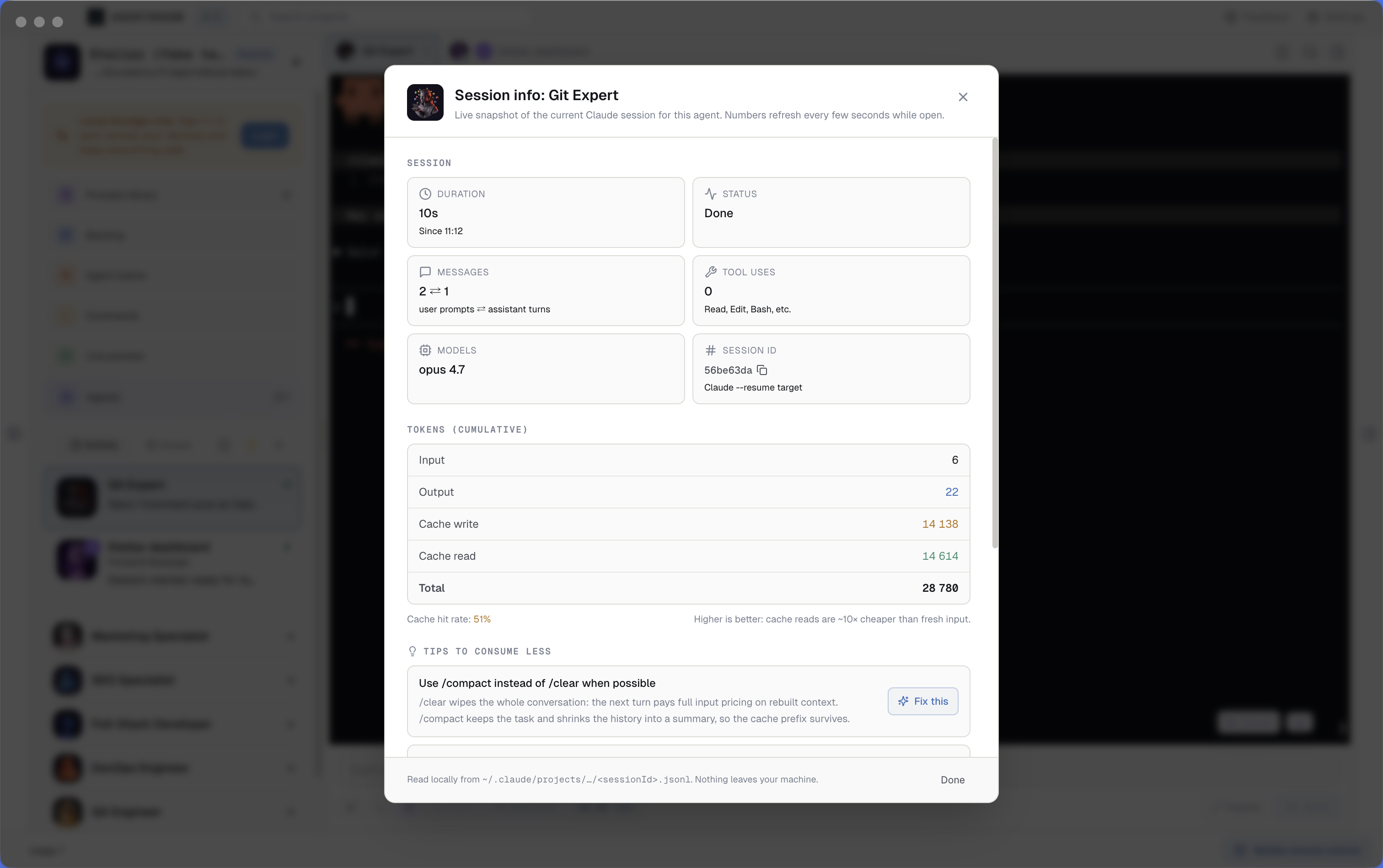
Uso di token Claude Code per sessione, in tempo reale, con tasso di cache hit
Ogni terminale di agente Claude in AgentsRoom mostra un contatore in tempo reale dell'uso di token Claude Code. Il badge diventa rosso in caso di consumo elevato. Cliccalo per aprire il monitor di sessione: input token, output token, cache write, cache read, tasso di cache hit, numero di messaggi, modelli instradati, durata della sessione, più suggerimenti contestuali per ridurre il consumo di token. Tutto in locale, letto direttamente dai JSONL di ~/.claude/projects/.
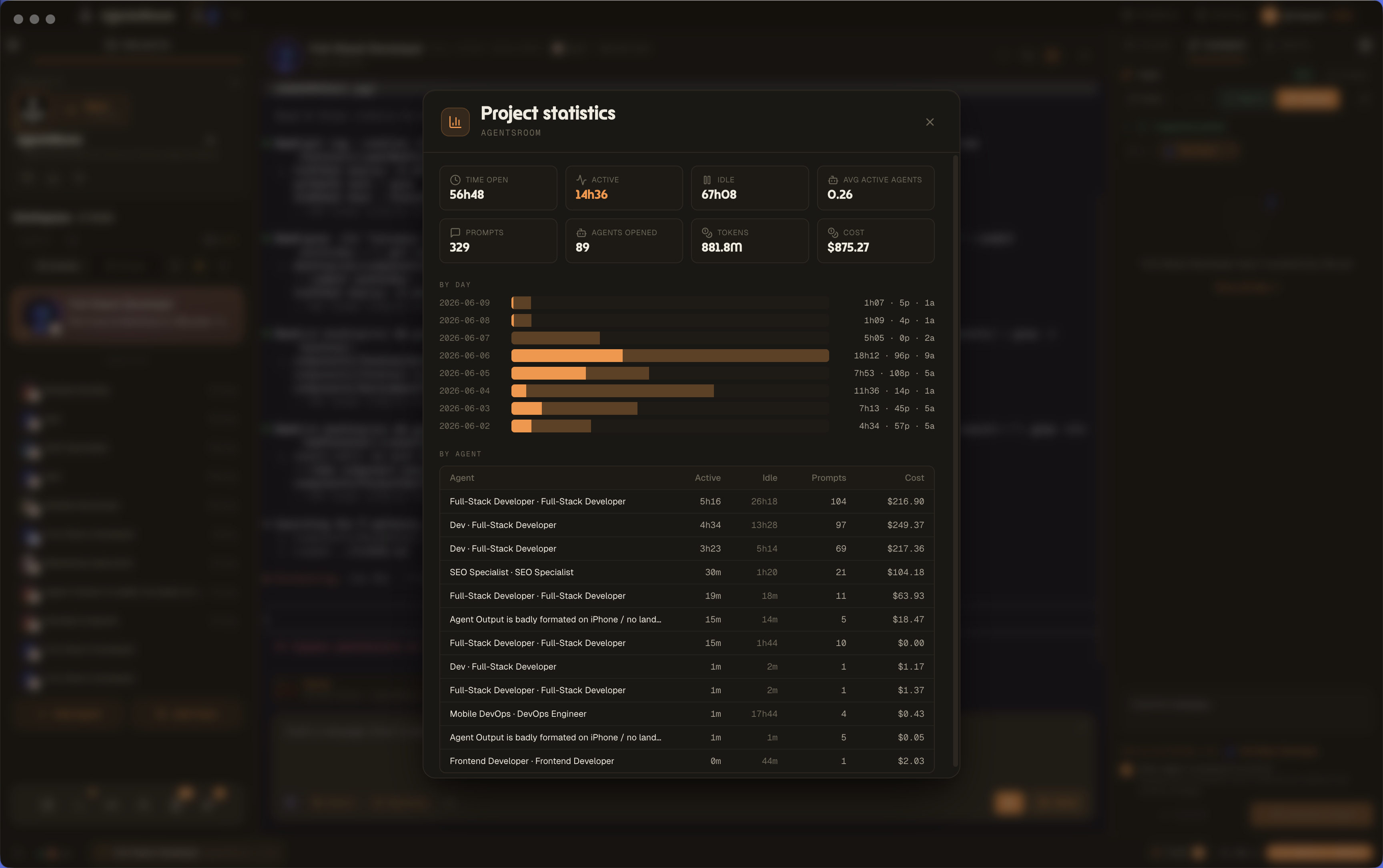
Statistiche di progetto: tempo, prompt e costo per progetto
Apri il pannello delle statistiche di progetto su qualsiasi progetto e leggi tempo aperto, tempo attivo e inattivo, media agenti attivi, prompt, agenti aperti, token e costo. Un grafico delle attivita per giorno e una tabella di ripartizione per agente trasformano il lavoro grezzo degli agenti in analisi di progetto per fatturazione, retro e controllo dei costi.
Settimana corrente (tutti i modelli) è al 76% (avviso impostato al 75%). Si reimposta il 24 set, 04:00
Una notifica prima del limite di utilizzo, non dopo
AgentsRoom legge le barre di quota che Claude Code, Codex, Grok Build, Kimi Code, Cursor, Antigravity, OpenCode Go e Z.AI Coding Plan pubblicano, di sessione, settimanali, per modello o per gruppo di limite, per ogni account a cui hai effettuato l'accesso, e mette una campanella accanto a ciascuna. Quando una barra supera una soglia, il 50% e poi il 75% per impostazione predefinita, ricevi una notifica desktop nativa, un push nell'app mobile di AgentsRoom, o entrambi. Fai clic destro su una campanella per scegliere le soglie di quella barra o silenziarla. Il promemoria viene inviato una volta per finestra di quota e riarmato al reset, così una barra all'80% è un banner, non uno a ogni aggiornamento.
Verificare e convalidare il lavoro
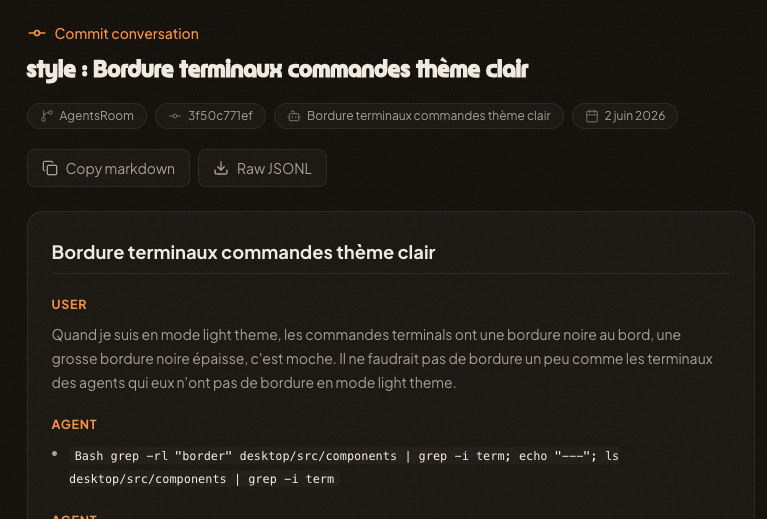
Ogni commit mantiene la conversazione che l'ha scritta
Gli agenti dell'IA non hanno memoria tra le sessioni, quindi il ragionamento dietro un commit di solito muore quando il terminale si chiude. Commit Context allega la conversazione dell'agente completo dietro ogni commit come un gist non elencato e aggiunge un link Agent-Conversation al messaggio di commit. Il prossimo agente o compagno di squadra apre quel link e recupera il motivo dietro la modifica: i suggerimenti, le decisioni, i vincoli, le modifiche. Il Contesto è il valore che un agente deve essere preciso, quindi AgentsRoom lo tiene attaccato alla tua cronologia git. I segreti vengono oscurati prima del caricamento, il link non è elencato, e si può anche creare gists a mano su gist.agentsroom.dev. Funziona con Claude Code, Codex, GitHub Copilot CLI, Cursor e altre 10 CLI di agenti.
Messaggi di commit scritti dal tuo vero diff
Smetti di digitare "wip". Clicca sulla scintilla nel campo di commit e AgentsRoom legge il git diff dei file che stai committando, poi scrive un messaggio pulito in formato Conventional Commits. Digita un draft grezzo come "fix temp pdf", ricevilo indietro come un messaggio di commit appropriato. Le regole di formato del tuo team, impostate una sola volta per progetto, vengono applicate a ogni generazione.
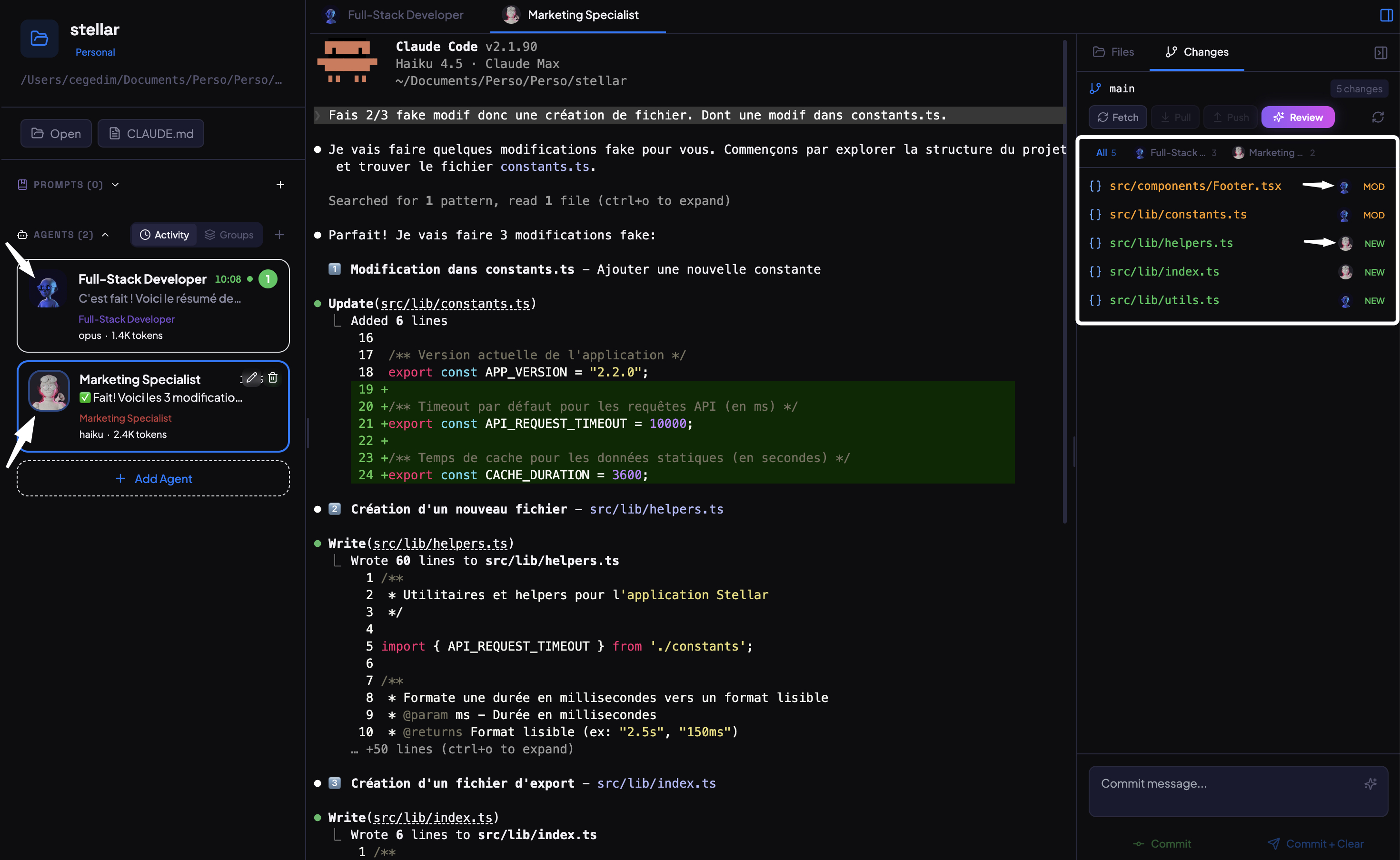
Diff per agente & task
Quando piu agenti lavorano in parallelo, filtra le modifiche al codice per agente. Visualizza solo le modifiche di un singolo agente, rivedi i diff isolatamente, e fai il commit di ogni contributo separatamente. Cronologia git pulita, zero confusione.
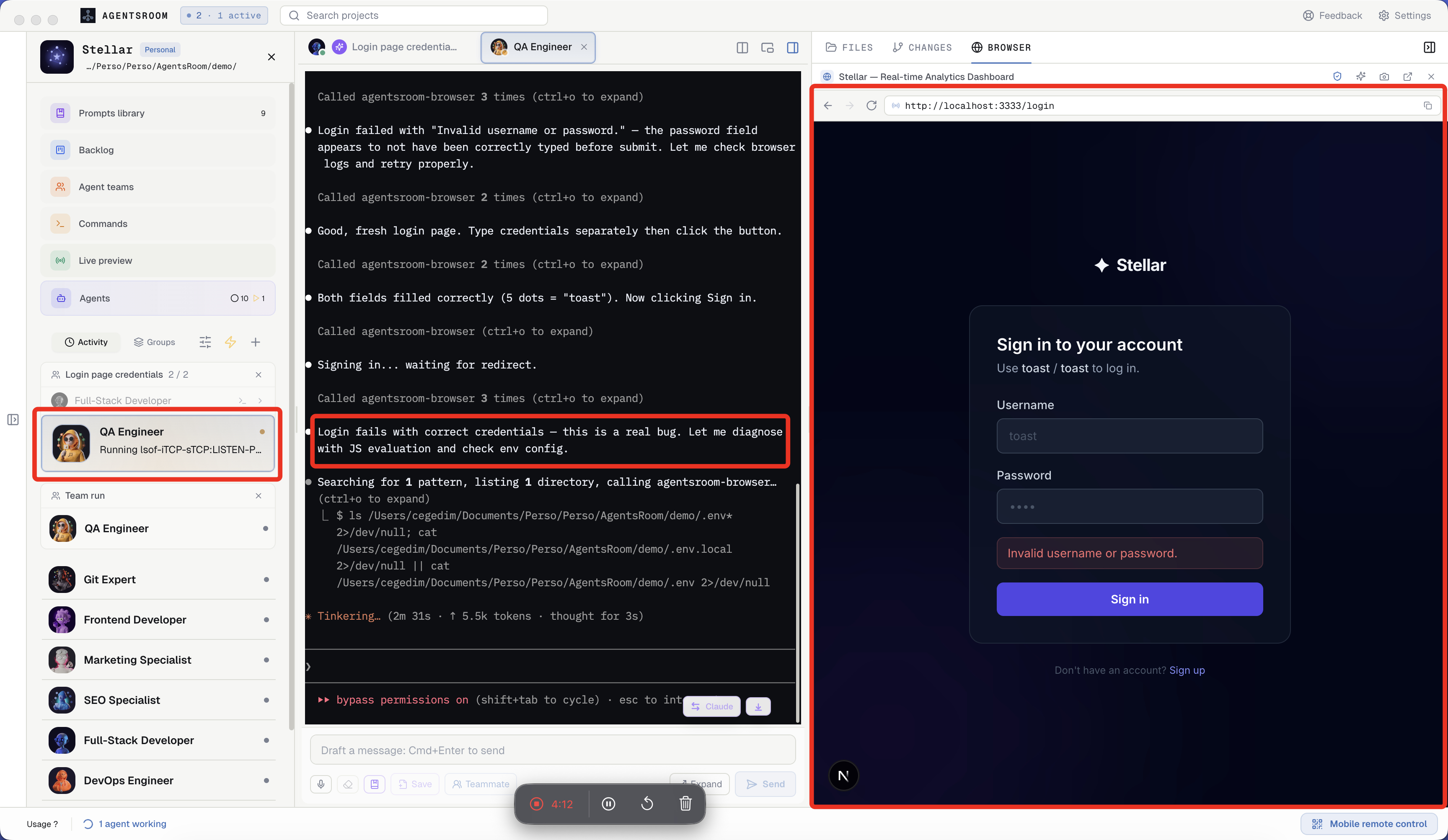
I tuoi agenti cliccano, scrivono e testano il browser
AgentsRoom integra un browser nativo in ogni progetto, piu un AgentsRoom Browser MCP server. Il tuo agente QA naviga sul sito localhost, clicca, scrive, fa screenshot, legge i log della console e verifica che la feature funzioni davvero prima dell'handoff. Vera browser automation per Claude Code, senza scrivere config Playwright.
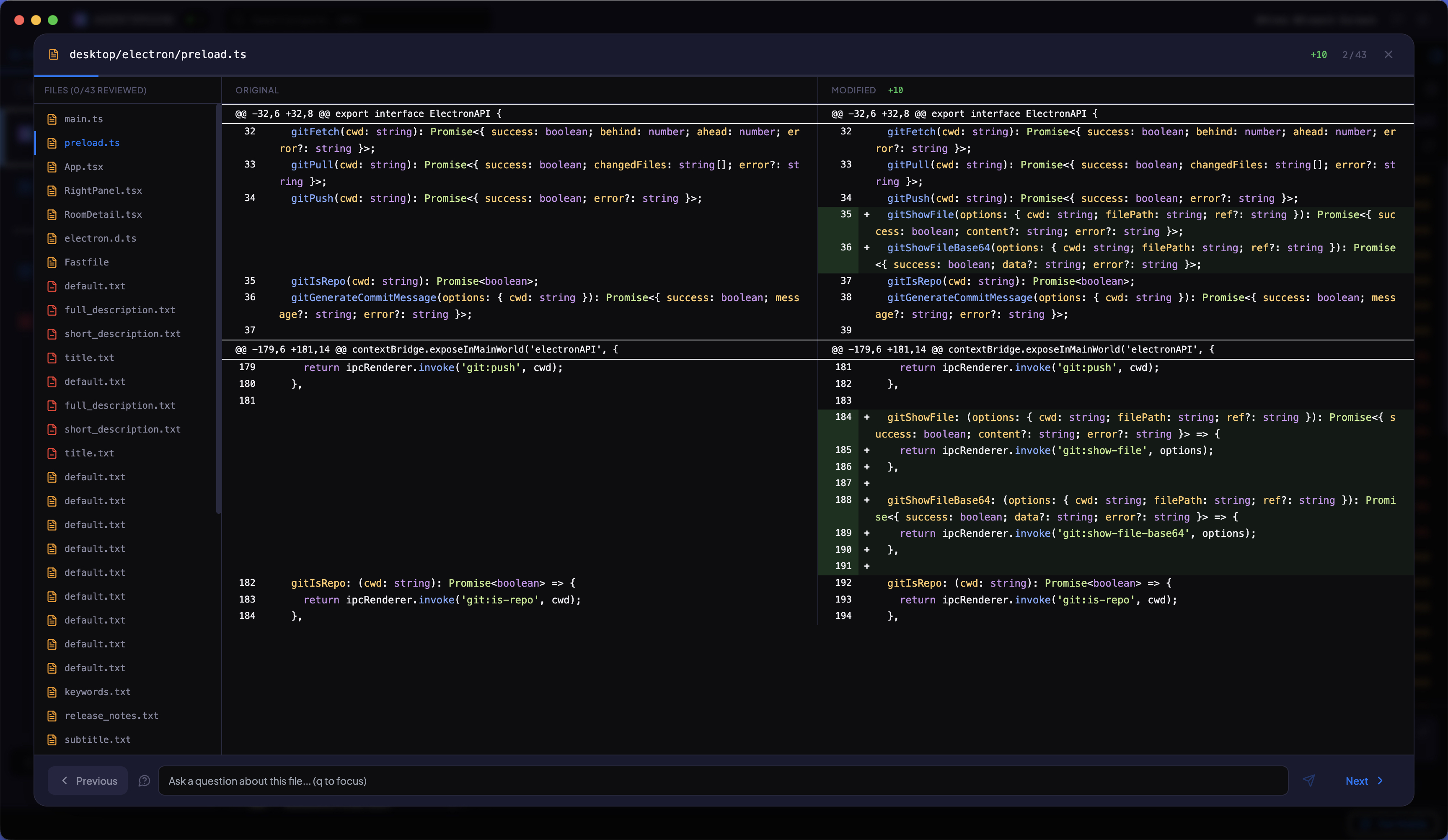
Rivedi tutte le modifiche, file per file
Naviga tra ogni file modificato dai tuoi agenti AI con i tasti freccia. Visualizza diff affiancati con evidenziazione della sintassi. Fai domande a Claude su qualsiasi modifica. Fai il commit quando sei pronto.
Il tuo ambiente di sviluppo
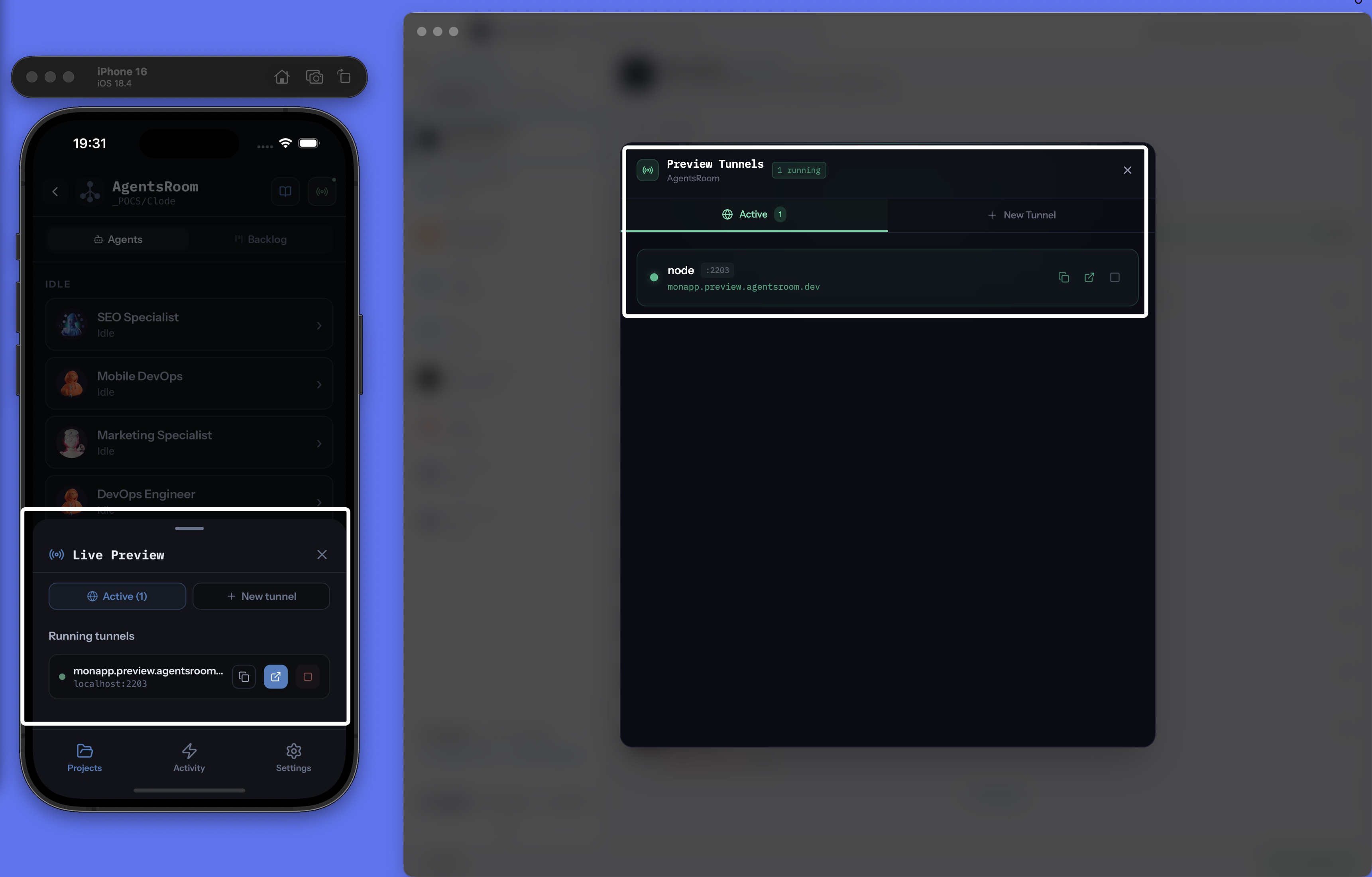
Condividi localhost con un URL HTTPS pubblico
Esponi il tuo server di sviluppo locale su internet istantaneamente. Scegli un sottodominio personalizzato, ottieni un link HTTPS pubblico e condividi il tuo lavoro con chiunque, senza deploy. Alternativa gratuita a ngrok integrata in AgentsRoom.
browser_select_target "Chrome · Pro"browser_select_target "Chrome · Personal"browser_navigatebrowser_clickbrowser_screenshotI tuoi agenti pilotano il tuo vero Chrome, un target per account
L'estensione AgentsRoom trasforma ogni profilo Chrome in un browser con nome che i tuoi agenti possono pilotare: Pro, Personale, Cliente, ciascuno con i propri cookie e i propri account loggati. Un agente sceglie il suo target per nome, ci apre una scheda nuova e clicca, scrive, legge la console e fa screenshot, mentre un altro agente lavora su un altro account nello stesso momento. Il Chrome può trovarsi su un'altra delle tue macchine: l'estensione parla con il relay AgentsRoom, crittografato end-to-end, lo stesso trasporto che usa l'app mobile. È un server MCP, quindi Claude Code, Codex, GitHub Copilot CLI, Cursor e altre 10 CLI di agenti ricevono gli stessi tool. Il browser integrato resta il target predefinito.
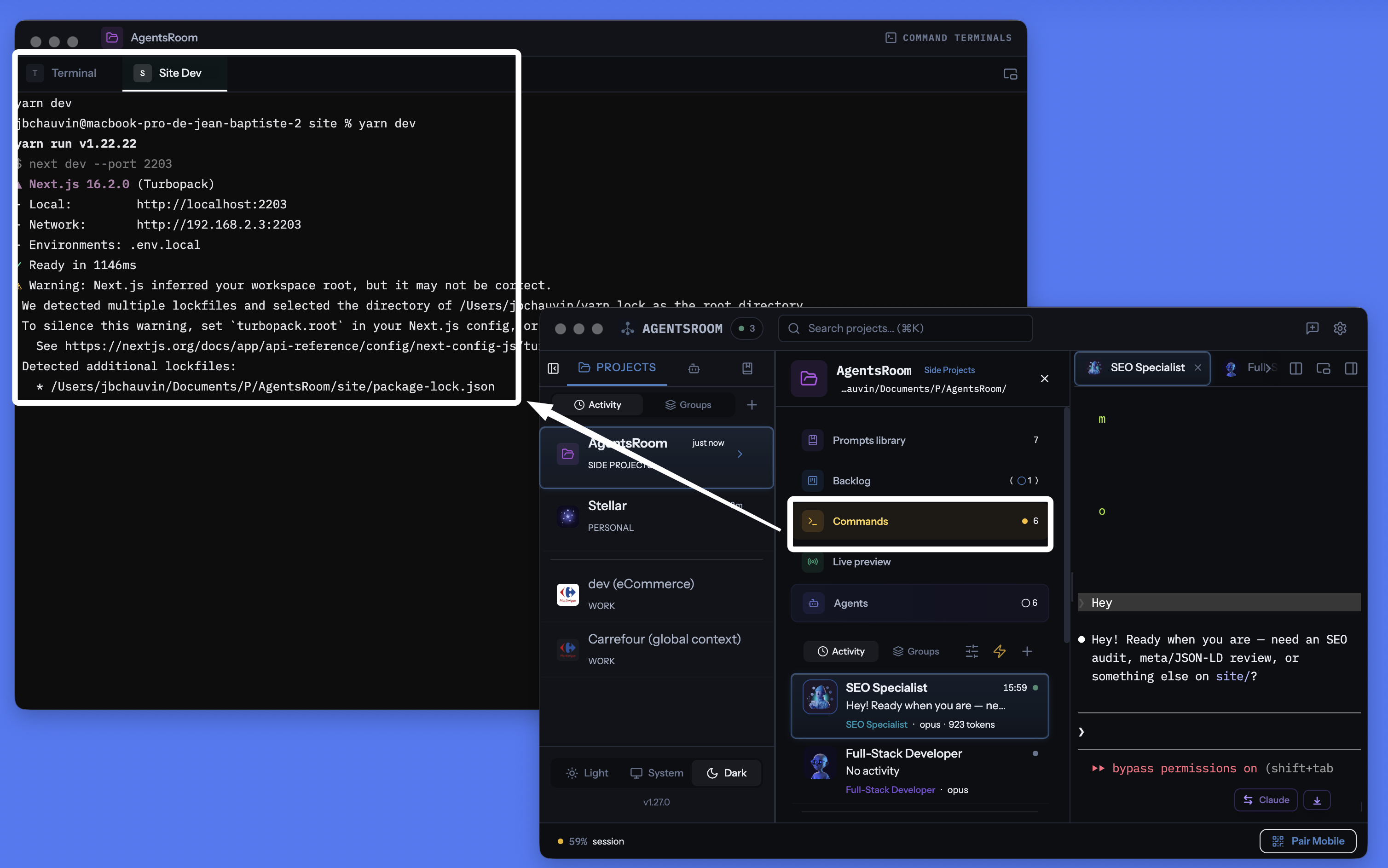
Un terminale di progetto pilotabile dal tuo smartphone
Un vero gestore di terminale per progetto integrato in AgentsRoom. Memorizza ogni comando (backend, frontend, bundler mobile, Docker, worker, database) e avvialo con un clic. Sgancia la finestra su un secondo monitor o lancia i comandi dal cellulare in 4G/5G: il tuo computer diventa un dev server pilotabile a distanza. L'alternativa moderna a iTerm2, Warp, Ghostty, Kitty, Alacritty, WezTerm, Hyper, Tabby e Terminal.app, pensata per i tuoi progetti.
Una barra di ricerca per tutto quello che c'è nel tuo progetto
AgentsRoom contiene i tuoi agenti, le tue skill, i tuoi prompt, i tuoi agenti pianificati e i trigger webhook, il tuo backlog, i tuoi comandi dev, le tue connessioni SSH e database, e il repository stesso. La command palette cerca in tutto questo da un solo campo, aperto con Cmd K su macOS o Ctrl K su Windows e Linux. La corrispondenza è fuzzy, quindi lettere e accenti mancanti trovano lo stesso quello che intendevi, e i risultati tornano raggruppati per categoria invece che in una lista piatta. Un carattere di prefisso restringe la ricerca a una sola fonte, le frecce spostano, Enter apre, Escape ti riporta dov'eri. I file rispettano .gitignore, i commit arrivano dal branch su cui sei, e l'indice viene costruito in background la prima volta che apri la palette, mai mentre l'app sta partendo. Niente di quello che scrivi viene mandato a un server.
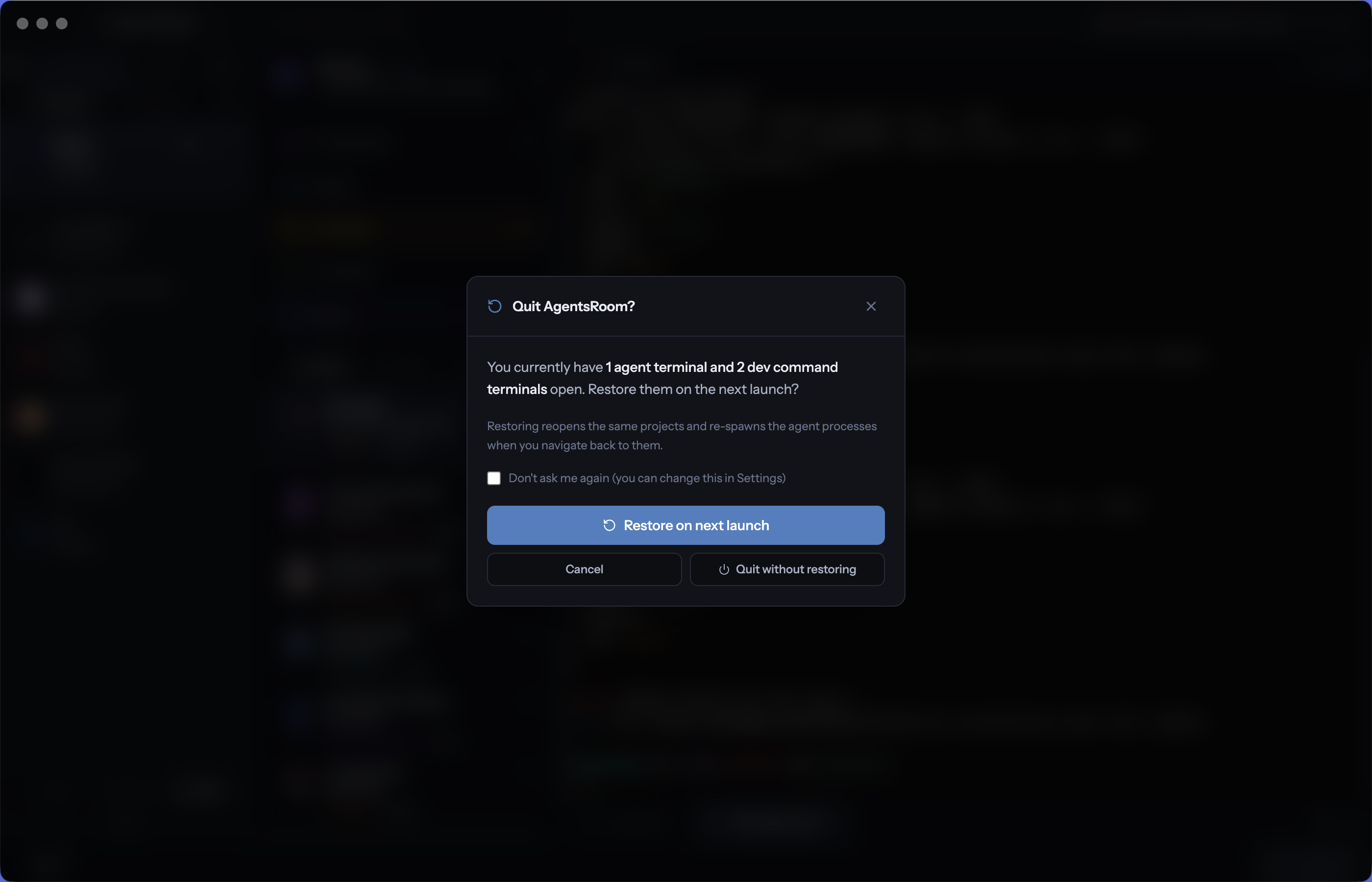
Ripristinare agenti e terminali al prossimo avvio
Chiudi AgentsRoom alla fine della giornata, scegli di ripristinare agenti e terminali domani e riapri l'app il mattino dopo per ritrovare ogni agente IA, ogni terminale di sviluppo, ogni dev server di lunga durata e ogni directory di lavoro esattamente dove li avevi lasciati. Una casella alla chiusura, un clic all'avvio, zero attrito. Riprendi da dove avevi lasciato e inizia a programmare in pochi secondi invece di ricostruire l'ambiente per un'ora.
Un IDE che i tuoi agenti pilotano, non solo con cui chattano
Quattro server MCP (Backlog MCP, Terminal Commands MCP, Prompt Library MCP, Browser MCP) espongono l'IDE AgentsRoom a Claude, Codex, GitHub Copilot CLI, Cursor e altre 10 CLI di agenti. Gli agenti leggono e aggiornano il backlog, rispondono ai ticket del backlog pubblico, eseguono comandi di dev salvati (e ne creano di nuovi), riutilizzano o salvano prompt, e pilotano il browser integrato per verificare il lavoro. Manuale quando vuoi, automatizzato quando no. Il vantaggio unico che rende AgentsRoom un IDE controllabile dagli agenti.
Avvia i tuoi agenti direttamente su un server remoto, via SSH
AgentsRoom è un gestore di connessioni SSH e un terminale SSH integrato, tutto in uno. Salva i tuoi VPS e server remoti una volta sola, connettiti con una chiave SSH o una password, poi esegui Claude Code, Codex o Antigravity CLI direttamente sulla macchina remota, senza aprire un client SSH separato. Fissa una connessione per progetto, così un progetto che vive su una macchina remota apre sempre il suo terminale sulla connessione SSH giusta. Esegui build pesanti, job GPU o agenti di lunga durata su un server potente mantenendo la stessa cabina di pilotaggio, lo stesso monitoraggio dello stato e le stesse notifiche sul tuo laptop.
Segreti che i tuoi agenti possono usare ma non leggere mai
Chiavi API, token e password vivono in una cassaforte locale alla macchina cifrata tramite il portachiavi del tuo sistema operativo, in un unico file scritto in modo atomico e riservato al solo proprietario. Richiami un segreto per nome e AgentsRoom lo risolve all'avvio, nel processo principale, dentro l'ambiente del comando che sta partendo. Un agente può elencare i nomi e chiedere che uno venga iniettato, e non esiste alcun percorso di codice che restituisca un valore a un agente, all'interfaccia o tramite MCP. Nulla viene sincronizzato su un server, e una macchina senza un portachiavi utilizzabile riceve un rifiuto invece di un file in chiaro.
Lascia che gli agenti interroghino i tuoi database, in sola lettura per impostazione predefinita
Salva le tue connessioni MySQL, PostgreSQL e MongoDB con host, porta, utente, database e TLS, poi raggiungi quelle non esposte pubblicamente tramite un tunnel SSH o una sessione di port forwarding AWS SSM costruita sulle connessioni che hai già salvato. Ogni connessione nasce in sola lettura: una scrittura richiede sia una connessione scrivibile sia una conferma esplicita, e una connessione contrassegnata come produzione rende quella conferma più severa. Una sola istruzione per chiamata, istruzioni impilate rifiutate, risultati limitati. Gli agenti interrogano via MCP nominando una connessione, quindi la password non arriva mai a loro. Le tue connessioni ti seguono con il tuo account da una macchina all'altra, e un database può essere esportato in un file, reimportato oppure copiato direttamente su un altro server, con un backup del database di destinazione eseguito prima.
Raggiungi un database RDS in una subnet privata, senza bastion
La tua istanza Amazon RDS non ha endpoint pubblico, non ha SSH in ingresso e ha un security group che lascia entrare solo l'applicazione. AgentsRoom la raggiunge tramite una sessione di port forwarding AWS Systems Manager: chiede al sistema operativo una porta di loopback libera, esegue aws ssm start-session con il documento AWS-StartPortForwardingSessionToRemoteHost attraverso un nodo gestito EC2, e aspetta che quella porta accetti davvero una connessione TCP prima di collegarci il suo client di database. Nessun bastion host da aggiornare, nessuna VPN da predisporre, nessun endpoint e nessuna password copiati in un messaggio di chat. L'autorizzazione arriva dal profilo AWS già configurato sulla tua macchina, quindi l'app non conserva nessuna chiave, e la porta inoltrata è associata solo a 127.0.0.1. MySQL, PostgreSQL e MongoDB, quindi RDS MySQL, RDS PostgreSQL, Aurora e DocumentDB.
Scopri perché la CLI del tuo agente non partiva
Una CLI di agente che muore all'avvio di solito non dice nulla di utile, e la causa è sepolta in un comando che non hai mai digitato. AgentsRoom registra il comando esatto che ha eseguito, marca ogni flag con l'impostazione che lo ha iniettato, legge cosa ha stampato la CLI e risponde in parole semplici: cosa si è rotto e i passi ordinati per rimediare. I controlli deterministici, come un binario mancante o un flag rifiutato, ottengono risposta immediata senza alcuna chiamata AI, l'oscuramento avviene sulla tua macchina e niente viene mai eseguito al posto tuo.
Porta dentro i tuoi repository GitHub e GitLab
Collega GitHub o GitLab una volta sola, vedi i repository a cui hai davvero accesso, spunta quelli che ti servono e clonali in un solo passaggio. Ognuno diventa un progetto con il percorso già impostato, pronto ad accogliere agenti. Autenticati con un token oppure riusa la sessione gh o glab già attiva sulla tua macchina, punta al tuo host GitLab self-hosted se ne hai uno e tieni tutto in locale: il token è cifrato su disco e le credenziali di clone non vengono mai scritte nella tua configurazione git.
Ovunque, con qualsiasi agente
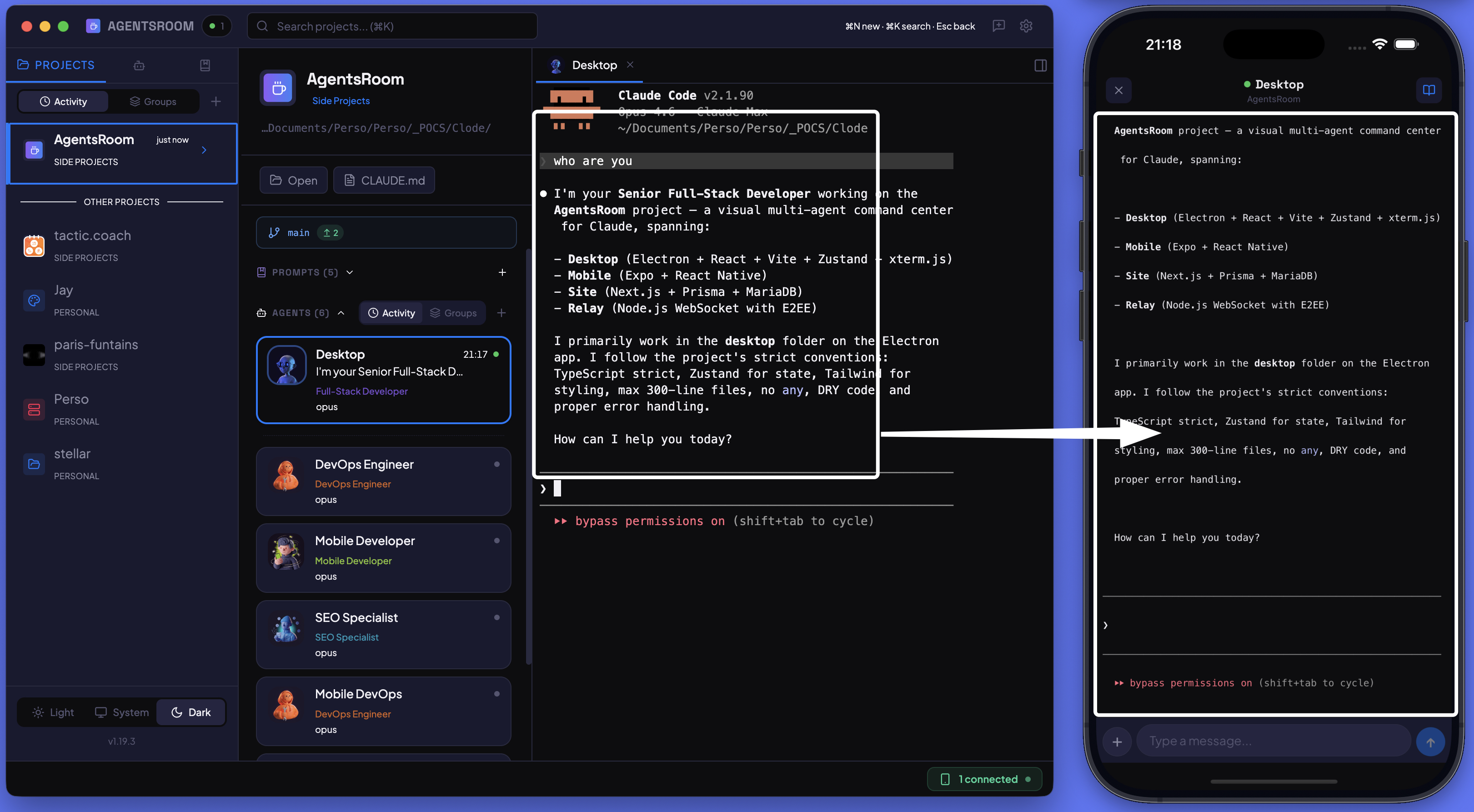
Controlla i tuoi agenti dal telefono
Avvia agenti, scrivi nel terminale, invia prompt e monitora i progressi dal tuo iPhone o Android. Sincronizzazione in tempo reale con crittografia end-to-end tra desktop e dispositivo mobile.
3 agenti al lavoro
- BackendLimite di richieste sull'API12 min
- FrontendModalità scura nelle impostazioni7 min
- QATest end-to-end del checkout3 min
Tutti gli agenti che avvii, nella schermata di blocco
Un'unica Attività in tempo reale per tutta la tua stanza di agenti di coding AI, qualunque sia la CLI e qualunque sia il computer: un anello di stato con ogni agente, il suo compito e un timer in tempo reale, nella schermata di blocco dell'iPhone, nella Dynamic Island, su Apple Watch e in StandBy. Quando un agente ha bisogno di te, la sua domanda viene per prima, e su iPhone è l'unico aggiornamento che emette un suono. Rispondi a una domanda o a una richiesta di autorizzazione di Claude Code dalla schermata di blocco, protetta da Face ID. Quando nella stanza torna la calma, un riquadro di riepilogo mostra la durata, gli agenti, i file e le righe modificate. Nomi, compiti e domande crittografati end-to-end. Widget per la schermata Home e la schermata di blocco, un widget della quota e una notifica in tempo reale con Aggiornamento in tempo reale su Android. Gratis per tutti.
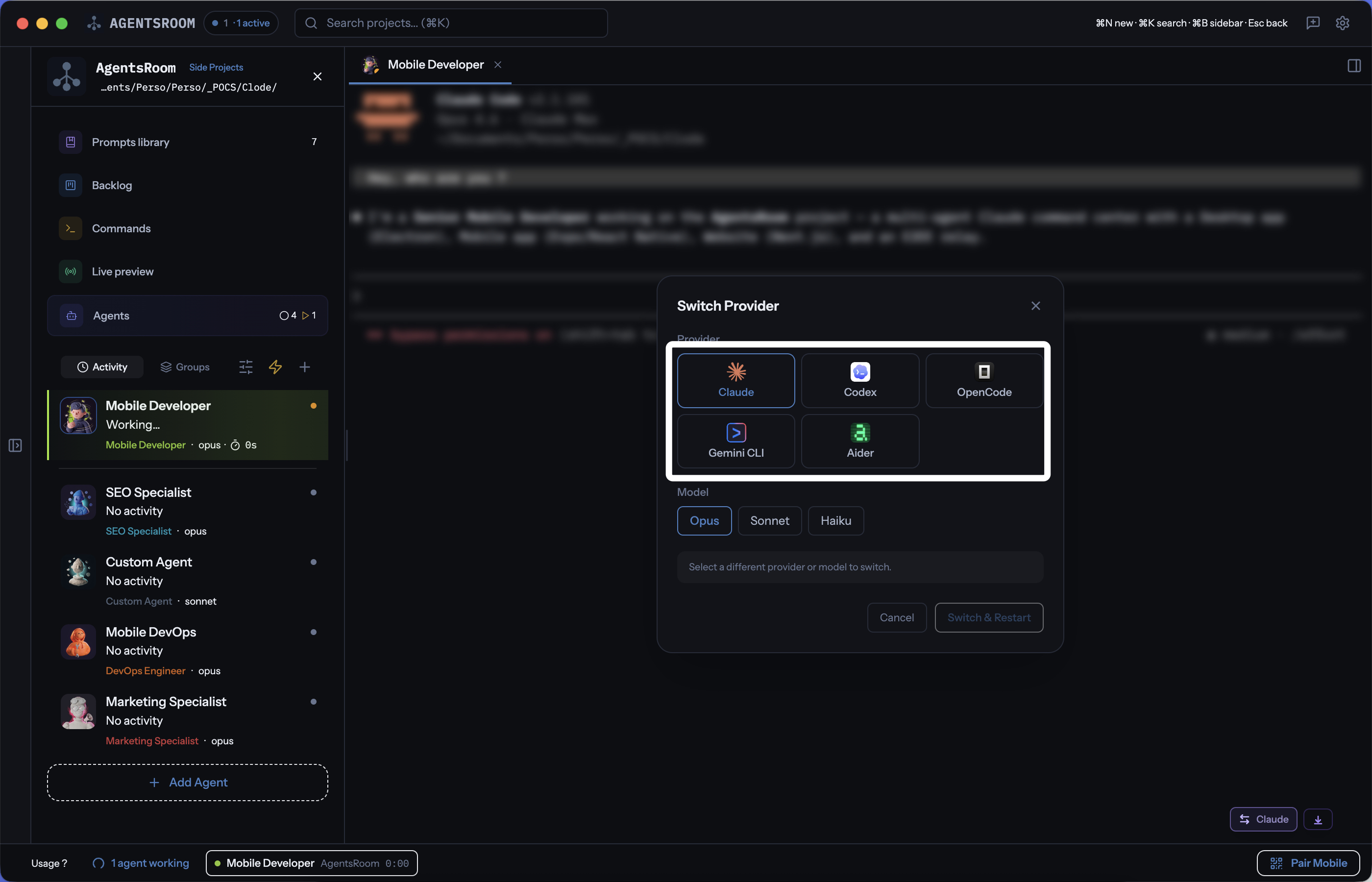
Passa tra Claude, Codex, GitHub Copilot CLI, Cursor e altre 10 CLI di agenti
Usa 14 provider AI per il coding nello stesso progetto. Scegli un provider per agente, cambia durante la conversazione e mantieni tutto il contesto con handoff automatico. Claude, Codex, GitHub Copilot CLI, OpenCode, Antigravity CLI, Aider, Grok Build, Mistral Vibe, Kimi Code, Amp, oh-my-pi, Freebuff, Devin, Cursor: tutti in un'unica app.
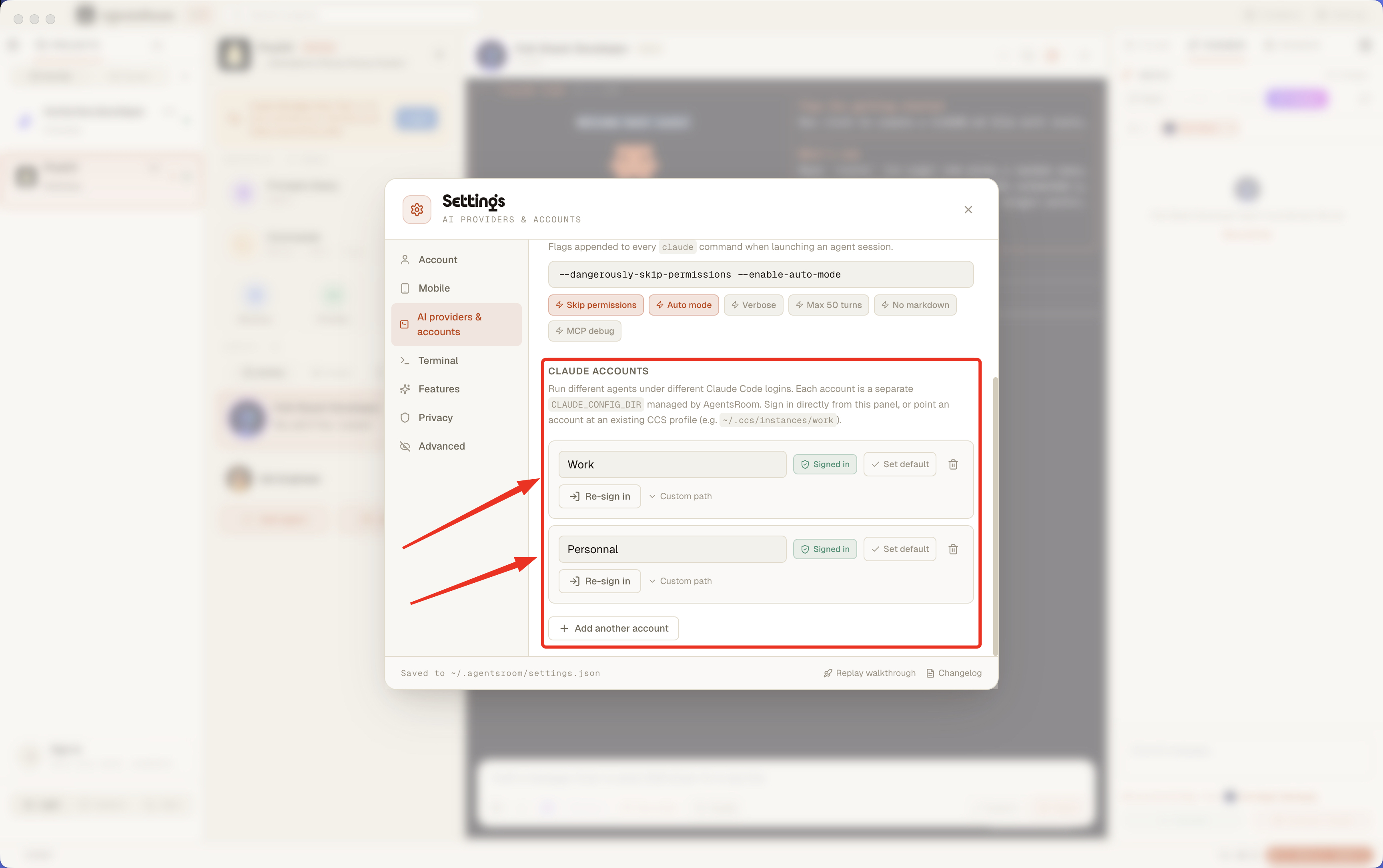
Più account Claude Code, un'unica app, zero acrobazie da shell
Usa un account Claude di lavoro, uno personale, uno cliente, tutti nello stesso momento in AgentsRoom. Fissa un account per progetto, sovrascrivi per agente. Accedi direttamente dal pannello Settings, senza trucchi da terminale. Compatibile anche con i profili CCS.
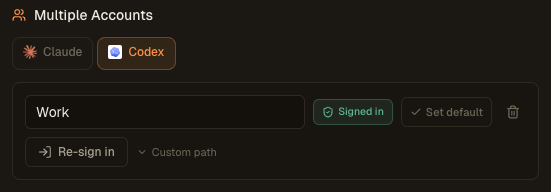
Several Codex accounts, one app, zero shell gymnastics
Use a Work Codex account, a Personal one, a client account, all at the same time in AgentsRoom. Pin one account per project, override per agent. Sign in via codex login directly from the Settings panel, no terminal trick required.
GROK_HOME~/.grok-work~/.grokPiù account Grok, un'unica app, zero logout
Usa un account Grok Build di lavoro, uno personale e uno cliente nello stesso momento in AgentsRoom. Fissa un account per progetto o per cartella, fai l'override per agente. Accedi con grok login direttamente dal pannello Impostazioni, senza GROK_HOME da esportare a mano.
CURSOR_CONFIG_DIR~/.cursor-work~/.cursorPiù account Cursor, un'unica app, zero logout
Usa un account Cursor di lavoro, uno personale e uno cliente nello stesso momento in AgentsRoom. Fissa un account per progetto o per cartella, fai l'override per agente. Accedi con cursor-agent login direttamente dal pannello Impostazioni, senza CURSOR_CONFIG_DIR da esportare a mano.
Raggiungi un limite di utilizzo, il lavoro continua
Quando l'account Claude, Codex o Grok Build su cui gira un agente raggiunge la soglia di quota che hai impostato, una regola di quota passa il lavoro a un altro account a cui hai già effettuato l'accesso e tutto prosegue: la stessa sessione con tutto il suo contesto, nessun riavvio e nessuna attesa che la finestra da 5 ore o quella settimanale si azzeri. L'account esaurito resta in panchina finché la quota non torna, poi rientra nel gruppo da solo. Trasforma diversi abbonamenti piccoli in qualcosa che si comporta come un piano molto più grande, e tiene in vita le esecuzioni non presidiate: un'attività pianificata alle 2 di notte non muore più in silenzio sul limite.
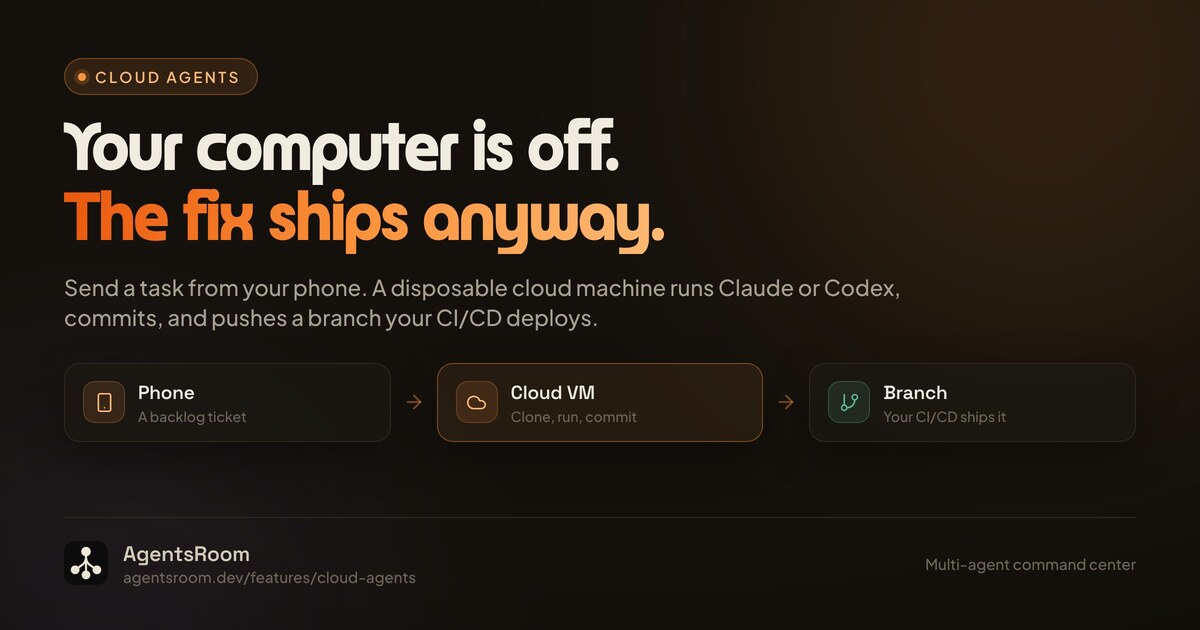
Un task gira mentre il tuo computer è spento
Avvia un task di coding dall'app desktop o dal telefono: gira su una macchina usa e getta nel cloud invece che sul tuo portatile. Un agente cloud è un job, non una sessione remota: la macchina clona il repository, esegue Claude o Codex in headless, fa commit, spinge un branch dedicato e scrive un rapporto, poi si distrugge. Dato che il punto d'incontro è git, dalla tua parte non deve restare sveglio niente: una segnalazione di un utente può arrivare sul tuo backlog pubblico, diventare un'esecuzione cloud avviata dalla scheda backlog del telefono e raggiungere la produzione tramite la tua CI/CD senza che si accenda nemmeno uno dei tuoi computer. Alla fine validi il branch, lo rilanci nel cloud oppure continui in locale in una sessione normale con il contesto già compilato.
Ogni progetto, ogni macchina, una sola finestra
Non programmi più su un solo computer. C'è il desktop dell'ufficio, il portatile di casa, forse un server di build in un angolo. Remote Fleet li collega in un'unica vista unificata, così ogni progetto e ogni agente Claude, Codex o Antigravity compare in un'unica finestra, qualunque sia la macchina su cui gira davvero. Ogni macchina continua a eseguire i suoi agenti in locale e la vista flotta aggrega il loro stato, i terminali e i progetti. L'orchestrazione multi-dispositivo passa per un relay esclusivo crittografato end-to-end, così il tuo codice e l'output dei tuoi agenti non lasciano mai le tue macchine in chiaro.
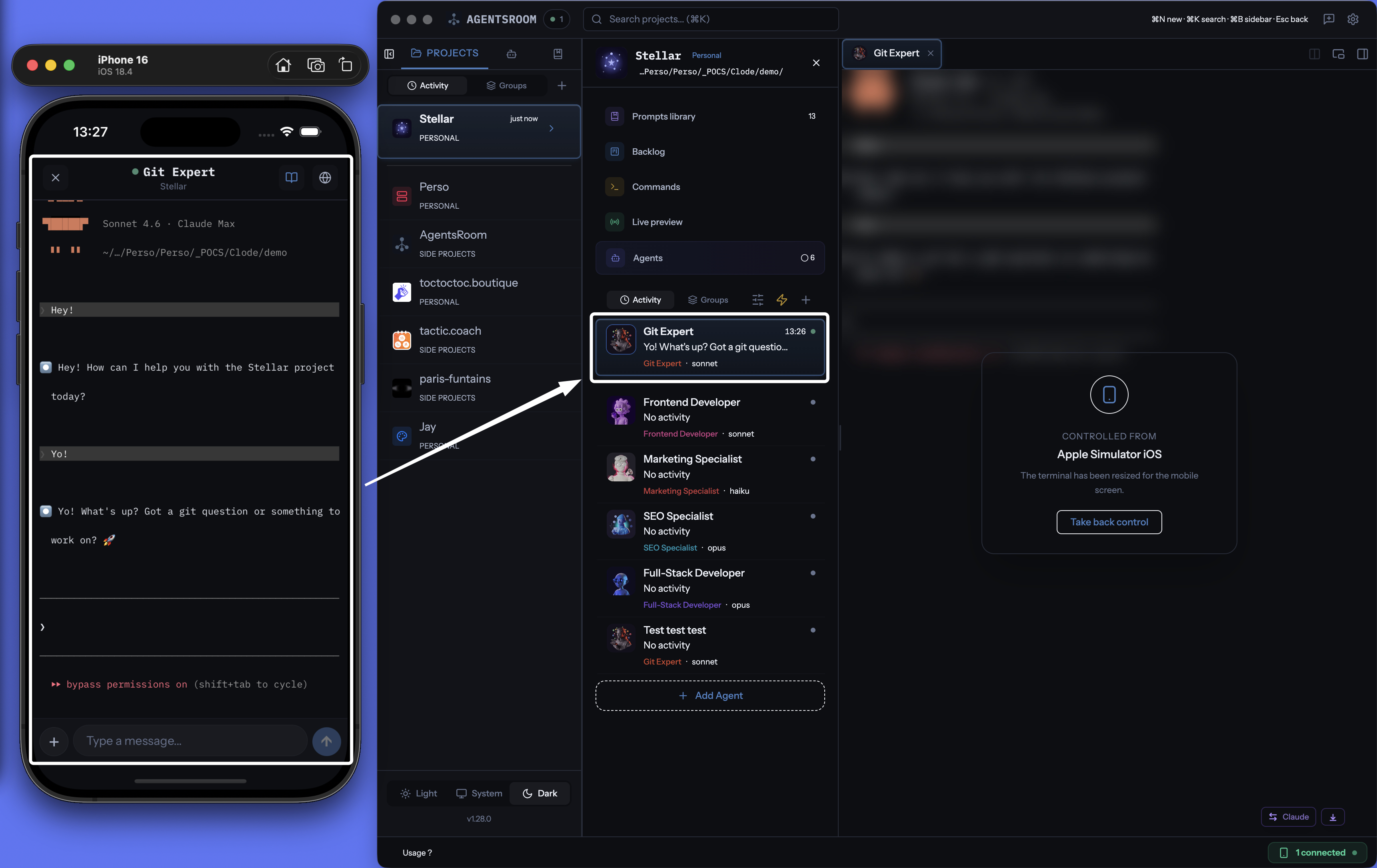
Prendi il controllo di un agente in esecuzione dal telefono
L'agente continua a girare sul desktop, con la sua CLI, sulla tua macchina. Il telefono diventa il telecomando: leggi il terminale mentre trasmette, rispondi a una richiesta di permesso, invia l'istruzione successiva, lancia un prompt salvato, sposta un ticket del backlog, apri un dev server in tunnel nel browser del telefono. Le notifiche push ti avvisano nel momento in cui un agente finisce o resta bloccato ad aspettarti, così un task lungo non ti incatena più alla scrivania. Tutto viaggia sul relay AgentsRoom crittografato end-to-end.