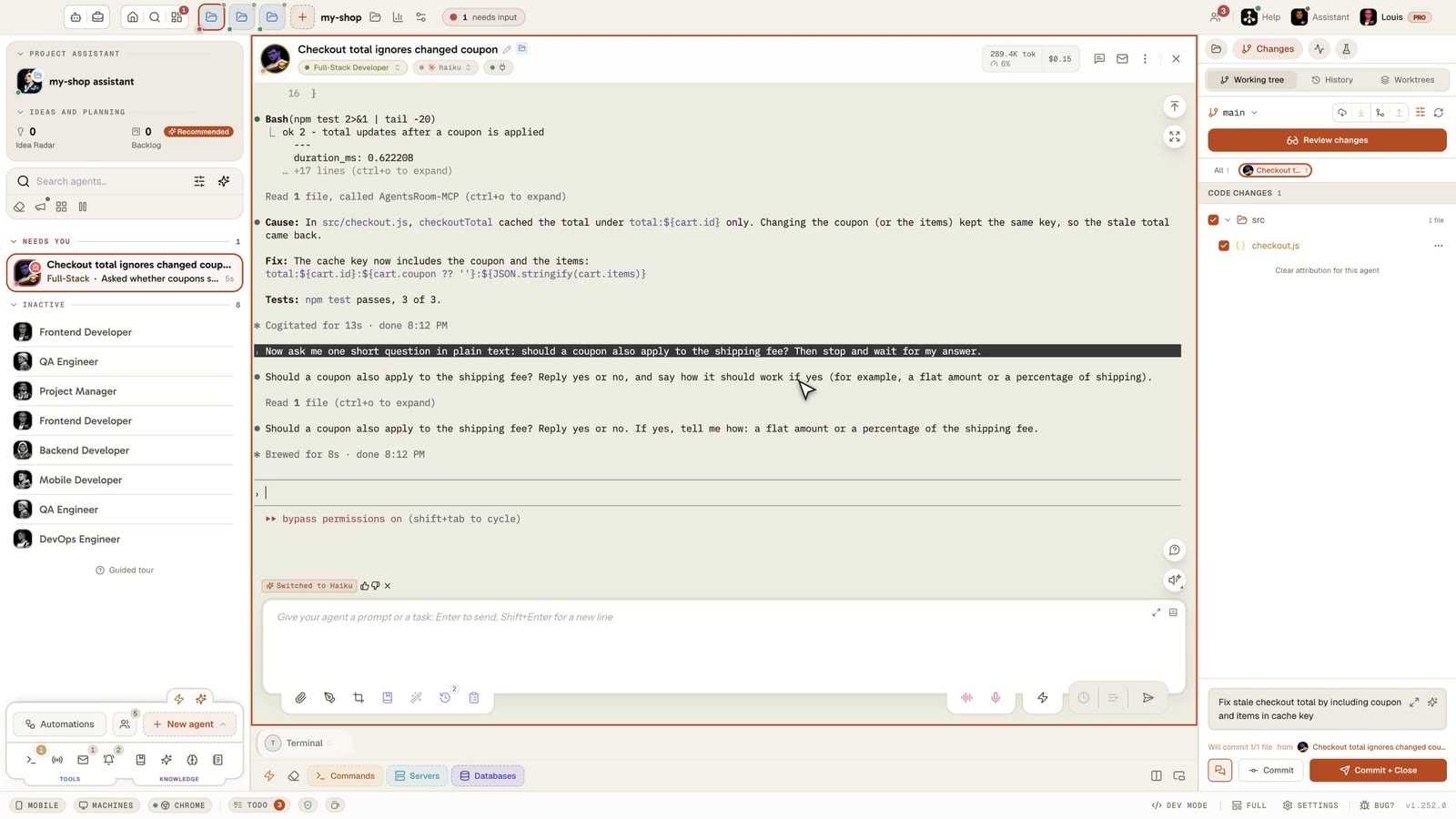
Ask the agent on the side.
Its terminal keeps working.
Your agent is twenty minutes into a refactor and you want to know where it is, or why it dropped the approach you suggested. Typing in its terminal would interrupt it and leave your question in its history for good.
Click the round Ask on the side button at the bottom right of its console instead. A copy of its conversation answers you in a bubble, read-only, while the agent carries on as if nothing happened.
A real session, filmed in the app: an AI coding agent is given a long job (refactor the checkout, fix a bug, add tests and run them). While it works, the round Ask on the side button opens a bubble, and a copy of its conversation answers what is done and what is left as the agent keeps writing code. The agent never sees the question, finishes the job, and all ten tests pass.
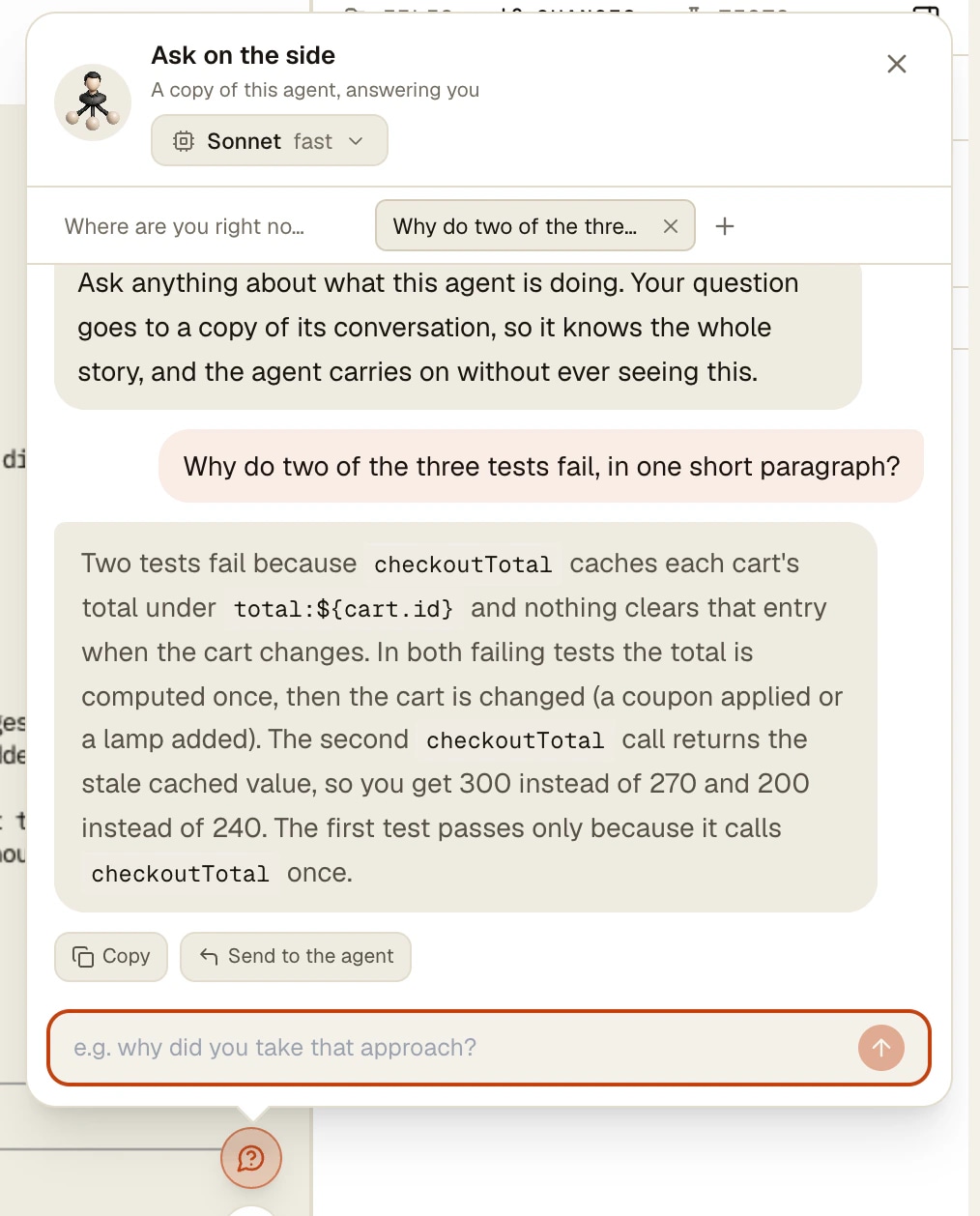
You ask in the bubble, a read-only copy answers, and the agent's terminal never reacts.
Every agent CLI has the same problem. The only place to talk to the agent is the prompt it is busy with. A quick question becomes a real turn: it waits in line or interrupts, it takes the screen, and the answer lands in the conversation the agent will carry for the rest of the session.
Claude Code answered part of it with /btw: a one-off question answered from the context, in an overlay of the same terminal, with no tools. Codex CLI has no equivalent command yet. AgentsRoom takes the idea out of the terminal: the question runs in the background on a copy of the agent's conversation, and the answer streams into a bubble next to its console.
It works on eight agent CLIs, keeps one thread per tab with up to five tabs in parallel, keeps going when you close the bubble, and answers on a faster model by default. The agent never sees the question, and nothing of it enters its history.
What the bubble does
A copy that knows the whole story
On Claude, Codex and Grok the question goes to a fork of the agent's real session: the files it read, the decisions it took, the dead ends. Elsewhere, a fresh session reads the console first, and the bubble's subtitle tells you which of the two you got.
Five tabs, five threads
Each tab keeps its own thread, so a follow-up builds on the previous answers. The + in the tab bar opens another conversation on the side, up to five, each thinking in parallel.
Close the bubble, the answer waits
Closing the bubble cancels nothing. The round button spins while a question is thinking, then shows a badge with the number of answers to read. Closing a tab, on the other hand, stops its run.
A faster model by default
A side question is reading, not building. On Claude, Codex, Grok and Antigravity it opens on a lighter, faster model, and you pick another one in the bubble header. An agent already on a light model keeps its own.
Read-only where the CLI allows it
Plan mode on Claude and Grok, a read-only sandbox on Codex, the plan agent on Mistral Vibe. The copy can read files to answer you, it does not edit your repository.
Copy it, or hand it to the agent
Every answer has Copy and Send to the agent. Send only pre-fills the agent's composer: you press Enter, or you do not. Nothing reaches the real agent without you.
How it works
One button, one bubble, and the agent left alone.
- 1
Open the bubble from the agent's console
Among the round buttons at the bottom right of the console, just above the composer and next to Read aloud, click Ask on the side. The button only shows on an agent whose CLI can answer on the side.
- 2
Ask your question
Type it and press Ask. A waiting line shows what the CLI is doing (opening a copy of the session, reading the conversation, waiting for the model, running a tool) with a seconds counter, then the answer streams in, rendered as Markdown.
- 3
Follow up, or open a second tab
Ask again in the same tab and the copy knows what it just told you. Open a new tab for an unrelated question: it runs in parallel with the first one.
- 4
Close it whenever you want
Go back to your editor while the copy thinks. When the answer is in, the round button carries a badge until you open the tab. The bubble grows from its top edge and corner, and remembers its size on your account.
- 5
Act on the answer, or not
Copy the answer, or send it to the agent's composer as a draft. The agent's own turn was never interrupted, and its history holds none of what you asked.
Claude Code /btw, and what changes here
Claude Code's /btw answers from what is already in the conversation: your messages, its replies, the tool results it gathered. It has no tool access, gives a single response per question in a dismissible overlay of the terminal, replays the newest 20 exchanges with each ask, and keeps that thread in memory until you exit Claude Code. Press f and the question becomes a forked subagent with full tool access. In the VS Code extension it opens a panel instead.
AgentsRoom does not replace it, it moves the question somewhere else. The answer lives in a bubble next to the console, not over it, so the terminal stays in view. Follow-ups keep a thread per tab, the copy can read files in plan mode to check what it says, and the same gesture works for Codex, Grok, GitHub Copilot CLI, OpenCode, Mistral Vibe, Antigravity CLI and Kimi Code.
Codex CLI 0.163.0 has no /btw command (checked on 20 October 2026). In AgentsRoom, a side question to a Codex agent forks its session with codex exec in a read-only sandbox, so the copy holds the real conversation.
Which agent CLIs can answer on the side
Eight CLIs, three ways of making the copy, each flag read off the CLI's own help rather than guessed.
Claude Code and Grok
The first question forks the session into a side conversation, and every follow-up resumes that side conversation. A follow-up costs one question, not the whole parent conversation again.
Codex
Codex names its forks itself, so each question forks the parent again and carries the side thread in its prompt. Same answers, a little more context read per question.
Copilot CLI, OpenCode, Mistral Vibe, Antigravity CLI, Kimi Code
No fork command to rely on: a fresh session is started and handed the console's transcript to read. It knows what was said on screen, not everything the agent holds, and the bubble says so.
Limits
- Eight CLIs only. On Aider, Amp, oh-my-pi, Freebuff, Devin and Cursor the one-shot mode has not been verified on a real binary yet, so the button does not show rather than fail.
- On the five CLIs without a fork, the copy has read the console, not the agent's full context: files it read without printing them are not in there.
- Where no read-only flag was verified (Copilot CLI, OpenCode, Antigravity CLI, Kimi Code), none is invented. Those CLIs ask for approval before acting, and a run with nobody there to approve answers without writing to disk.
- A side question runs on your own CLI account and counts against your plan like any other turn. A fork re-reads the context, which on Claude is mostly served from cache.
- Side threads live on the computer while the agent's console is open. They are not saved once it closes: they described a conversation that has ended.
- Five tabs at most per agent. A conversation too long for the faster model is answered once more on the agent's own model, and the answer says so.
Questions
Ask us something elseWhat is a side question in AgentsRoom?
Is this the same thing as Claude Code's /btw?
Does Codex have a /btw command?
Does the agent see my question, or stop what it is doing?
Which agent CLIs support side questions?
Can a side question change my code?
Which model answers, and does it cost tokens?
Can I ask a side question from my phone?
Further reading
How to Communicate With Your AI Agents: Claude, Codex, Antigravity, Grok Build
Code is no longer the bottleneck, communication is. Here is how to talk to your AI agents Claude, Codex, Antigravity and Grok Build to ship faster, more precisely and with fewer tokens.
Claude Code Subagents and Agent Teams: A Practical Guide
Subagents, Agent Teams, orchestration: what it actually means, when you need it, and how to stay in control when it sprawls.
You may also like
Agent Fork
Fork a running AI agent in one click and get a twin that already has the whole conversation: same role, same CLI, same context. Or ask a side question in a bubble the agent never sees, so its terminal keeps working.
Structured questions
Your AI coding agent asks in a card with clickable options, right above its input box, and waits for your answer. Codex, Claude Code, Cursor, Copilot CLI.
Status Tracking
Track the status of every Claude Code agent at a glance. Color-coded indicators for working, done, idle, and needs-input states. Elapsed timers, activity summaries, and project-level counts.
Mobile Companion
Dictate prompts and attach files from your phone. Share screenshots on iOS or Android, choose a project and send to an agent or save in its backlog.
































Ask the agent, let it work
A side question for eight agent CLIs, on your desktop and your phone. Free to try.
Companion app: monitor your agents on the go
Bring your own: Claude, Codex, Antigravity CLI, or other AI provider.
Push bugs and requests straight to your public backlog.
Agents you read like a conversation
Each agent has a role, a face, and a thread you read like a messaging app.