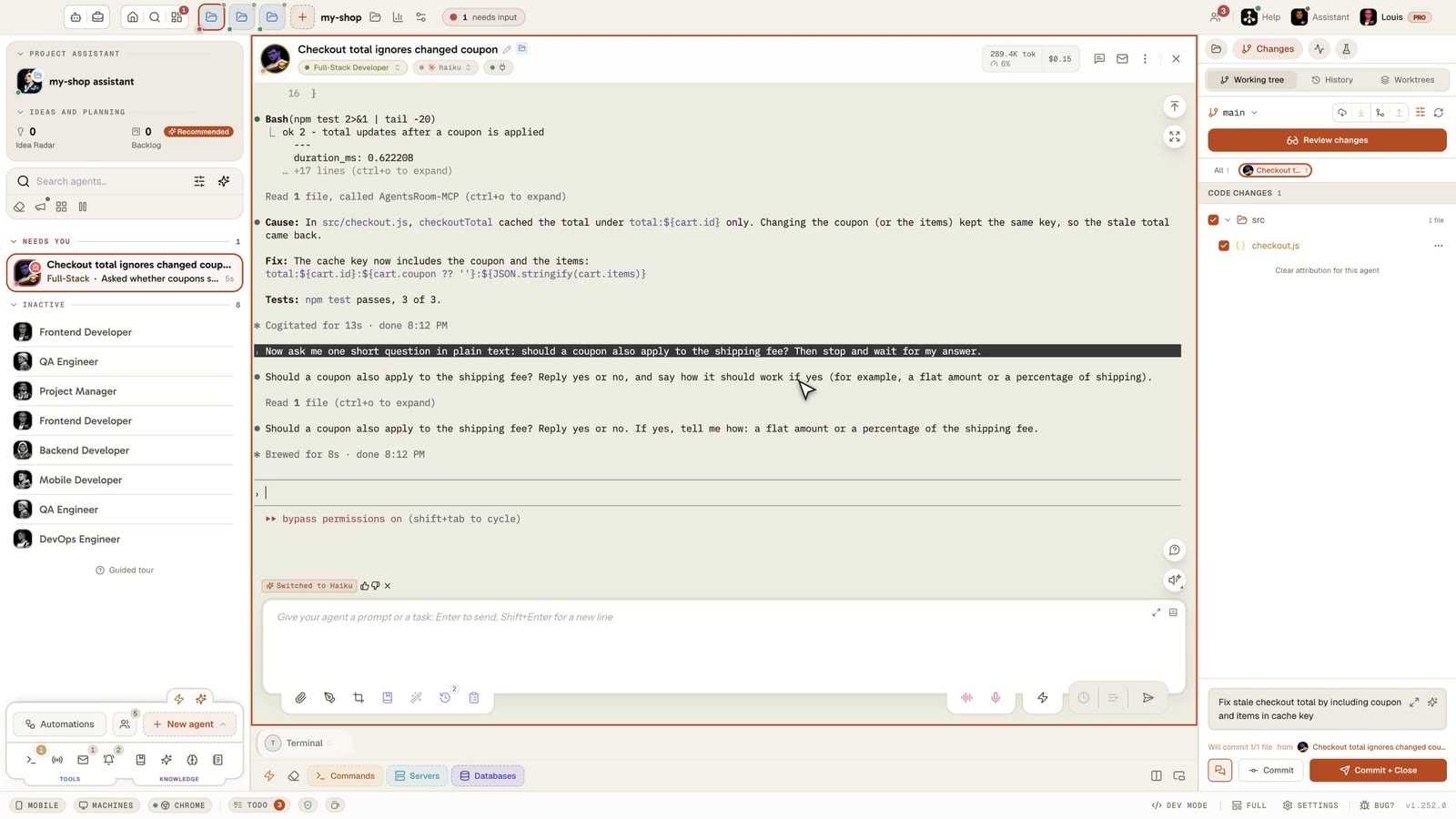
Agent permissions

Skip permission prompts in Claude Code and Codex.
And the questions that still get through.

An agent working without you is only useful if it does not stop on a question nobody is there to answer. In AgentsRoom, every agent CLI that offers a bypass has a permission mode, Autonomous or Manual. Autonomous launches the agent with that CLI's own bypass flag, then deals with what Claude Code keeps asking anyway.

You choose once per CLI, at its first launch. Every action stays visible in the terminal, and you can stop the agent at any time.

What still stops an agent
  • Bypass Permissions mode warningAnswered by AgentsRoom
  • Yes, I trust this folderAnswered by AgentsRoom
  • Dangerous rm operationAnswered by AgentsRoom
  • Input holds your account emailAnswered by AgentsRoom

Four questions Claude Code can ask in bypass mode, and the switch that handles each one. All four are on by default and can be turned off.

Most people meet this in the same order. Claude Code asks before every command, so you look up the flag and start it with --dangerously-skip-permissions. The prompts stop. Then you leave an agent running, come back an hour later and find it sitting on a question: a warning at launch, a folder to trust, a deletion to confirm.

Those questions are not bugs. Bypass mode skips permission prompts, and Anthropic's documentation lists the actions it does not skip. On your own terminal they cost a keypress. On a backlog ticket, a scheduled task or a team of agents running at night, they cost the whole run.

This page is two things: a plain account of what each CLI does on its own, with its real flags, and what AgentsRoom adds on top. If you only want the flag, it is in the tables below, and you do not need AgentsRoom to use it.

Claude Code's six permission modes

From Anthropic's documentation, read on 7 November 2026. Claude Code 2.1.318 lists the same six in claude --help.

ModeWhat runs without askingHow to start it
default (Manual)Reads only. Everything else asks. Labeled Manual in the CLI.--permission-mode default
acceptEditsReads, file edits and common filesystem commands such as mkdir, touch, mv and cp.--permission-mode acceptEdits
planReads and read-only commands. It does not edit your source files.--permission-mode plan
autoEverything, with a separate classifier model checking actions before they run.--permission-mode auto
dontAskFile reads in your working directories and tools you pre-approved. Anything that would prompt is denied.--permission-mode dontAsk
bypassPermissionsEverything, except the short list of actions no mode approves.--dangerously-skip-permissions

Shift+Tab cycles between modes during a session, but you cannot enter bypassPermissions from a session started without it: enable it at launch. The --allow-dangerously-skip-permissions variant only adds it to the cycle. In VS Code it also needs the Allow dangerously skip permissions toggle in the extension settings.

What still asks in bypass mode

Each question as you see it in the terminal, why it appears, and what AgentsRoom does about it.

"WARNING: Claude Code running in Bypass Permissions mode"

The first interactive session in this mode shows a warning with two rows, 1. No, exit and 2. Yes, I accept. No, exit is selected, so a reflexive Enter closes Claude. Once accepted, Claude Code records it and stops asking.

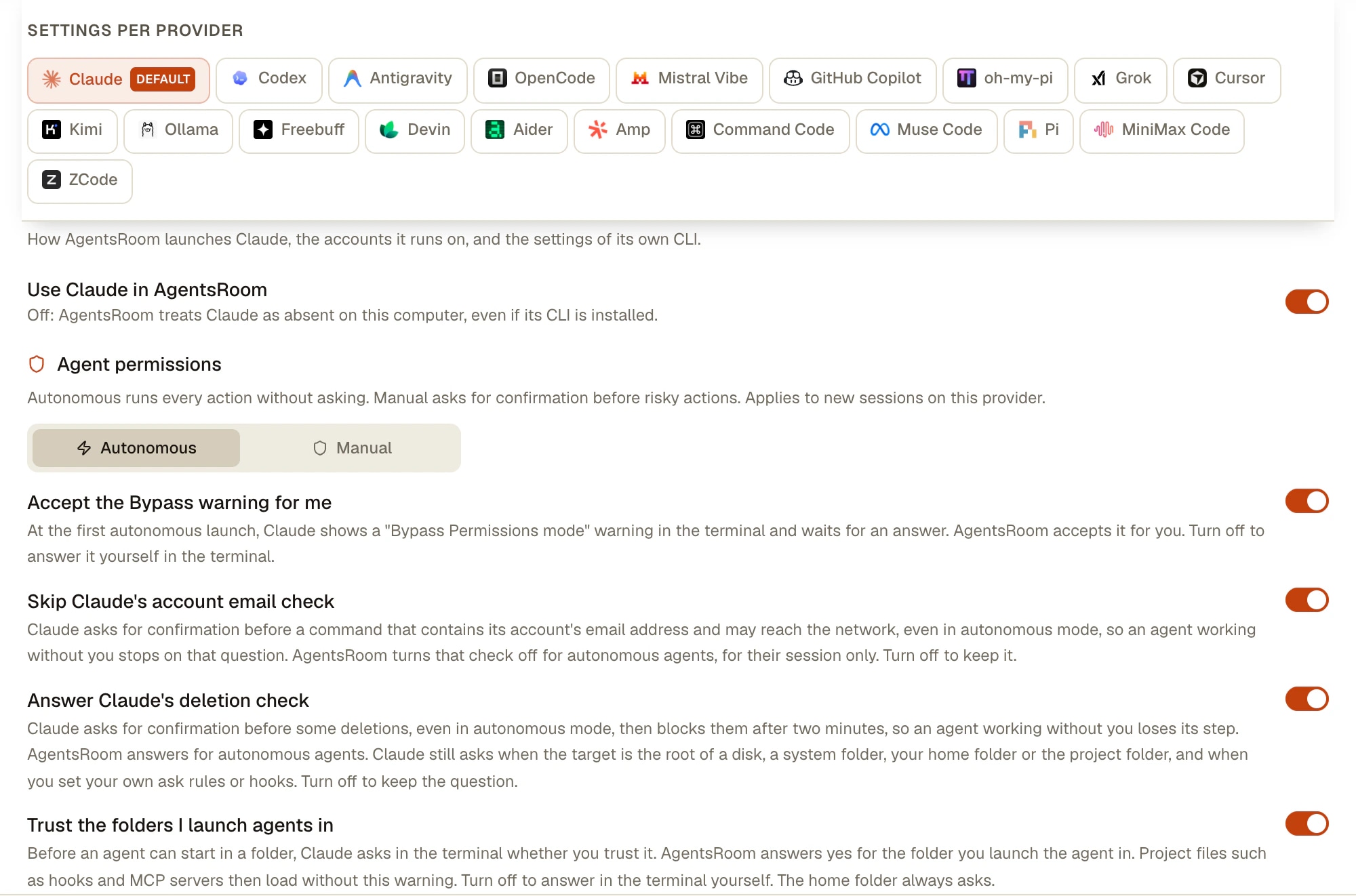
Accept the Bypass warning for me: AgentsRoom records your acceptance before the launch. Autonomous mode only, never over SSH.

"Yes, I trust this folder"

Before starting in a new folder, Claude asks whether you trust it, because a repository can carry its own hooks and MCP servers. This one comes before bypass mode applies, and it was the most frequent stop we measured on first launches in early November 2026.

Trust the folders I launch agents in: AgentsRoom answers yes for the folder you launch the agent in, in both permission modes. That folder's hooks and MCP servers then load without the warning. Your home folder always asks.

"Dangerous rm operation", "Compound command contains cd with write operation"

Claude Code asks before some deletions, such as rm -f * after a cd, then blocks the command after two minutes with "Claude Code will automatically block this request". Despite the wording, the cd is not the problem: the deletion is.

Answer Claude's deletion check: AgentsRoom answers for autonomous agents on ordinary deletions. Claude still asks when the target is the root of a disk, a system folder, your home folder or the project folder, or one of their parents, and for sudo, eval or sh -c.

"This call's input holds your account email address"

Claude asks before a command that contains its account's email address and may reach the network, so an agent committing or calling an API with your address can stop there.

Skip Claude's account email check: AgentsRoom turns this check off for autonomous agents, for their session only. Nothing is written to your Claude settings, and a webhook trigger acting on an outside payload keeps the check.

What AgentsRoom leaves alone

  • Your own permissions.ask rules, and a PreToolUse hook answering ask. The CLI runs hooks before it checks the mode, so these keep prompting. Settings shows a notice with a button to open the folder.
  • A managed policy. If your company set permissions.disableBypassPermissionsMode to disable, the mode is off and AgentsRoom does not go around it.
  • Deny rules. They block in every mode, including bypass.
  • Questions from the agent itself. When an agent needs a decision from you, it still asks.
AgentsRoom Settings, AI providers, Claude tab: Agent permissions set to Autonomous, with switches for the Bypass warning, the account email check, the deletion check and folder trust
The Claude tab of Settings > AI providers. Autonomous or Manual applies to new agents of this CLI, and the switches below answer the questions Claude Code asks anyway.

The same switch in every agent CLI

Choose Autonomous and AgentsRoom passes the flag below. Outside AgentsRoom, these are the flags to use yourself.

CLIFlag passed in Autonomous mode
Claude Code--dangerously-skip-permissions --enable-auto-mode
Codex--sandbox danger-full-access -a never
Antigravity CLI--dangerously-skip-permissions
GitHub Copilot CLI--allow-all-tools
Cursor--force
Grok Build--always-approve
OpenCode--auto
Kimi Code--auto
Mistral Vibe--agent auto-approve --trust
Amp--dangerously-allow-all
Devin--permission-mode dangerous
oh-my-pi--yolo
Command Code--yolo
Muse Code--yolo
ZCode--mode yolo

OpenCode's --auto approves what you did not explicitly deny. Kimi has two flags: --yolo still stops before sensitive actions, --auto does not. GitHub Copilot CLI has no Manual flag, so AgentsRoom applies its flag unless you set your own CLI options. Aider always auto-confirms here, Pi never asks for a tool approval by design, and Freebuff has no permission flag. oh-my-pi runs in yolo by default, so Manual passes --approval-mode always-ask. MiniMax Code has no flag: AgentsRoom writes the mode into its config file, which also applies to mcode outside AgentsRoom.

How to set it up

One choice per CLI, and an exception wherever you need one.

  1. 1

    Choose at the first launch

    The first agent of a CLI opens Agent permissions: Autonomous, marked Recommended for your dev machine, or Manual. If you are never asked, Autonomous is what applies.

  2. 2

    Change it for a whole CLI

    Settings > AI providers, select the CLI, then Agent permissions. It applies to new sessions of that CLI. The Claude tab also carries the switches described above.

  3. 3

    Change it for one agent

    Edit agent, Advanced options, Agent permissions: Inherited, Autonomous or Manual. A review agent can stay on Manual while the others run freely.

  4. 4

    Set it on a scheduled task

    In a task's Advanced section, Permission mode offers the same three values. Your manual agents on that CLI keep asking while the 3 AM run does not stop.

  5. 5

    Pass your own flags

    CLI options, on the provider tab or on one agent, take any flag of the CLI. In Autonomous, AgentsRoom still adds the bypass flag you did not set yourself. To run Claude Code in auto mode rather than bypass, choose Manual and add --permission-mode auto.

When an agent does stop

Autonomous mode reduces the stops, it does not make them impossible: your own hook can ask, a protected deletion can ask, the agent can have a real question. AgentsRoom flags it so it does not wait in silence: a red halo on the agent, the project raised in the sidebar, an inbox with Cmd/Ctrl+Shift+I, and a push notification on your phone, where you can answer.

A prompt the CLI settles by itself, such as a safety check refusing a command, clears on its own as soon as the agent goes back to work.

Should you run agents this way?

Anthropic's advice is stricter than our default, and you should read both. Its documentation says of bypass mode: "Only use this mode in isolated environments like containers, VMs, or dev containers without internet access, where Claude Code cannot damage your host system." It also says the mode "offers no protection against prompt injection or unintended actions" and points to auto mode for background safety checks with far fewer prompts.

AgentsRoom defaults to Autonomous because its agents often run without you, on a ticket, a schedule or a team step, where one stopped agent loses the run. That is a trade-off, not a safety feature: Autonomous is not a sandbox, and an agent can delete, push or send what its command allows.

Sensible limits if you use it: deny rules for what must never run, such as Bash(git push *), a git worktree per agent so a bad run stays contained, per-agent review before anything is committed, and a throwaway server or container for repositories you do not trust. On anything with production credentials within reach, choose Manual.

Deny rules hold in every mode (.claude/settings.json):

{
  "permissions": {
    "deny": ["Bash(git push *)", "Read(*.env)"]
  }
}

Limits

  • The permission mode is a launch setting. It applies to new sessions: restart an agent that is already running.
  • Consoles on a remote host over SSH run without AgentsRoom's hooks and pre-acceptance: Claude keeps asking there unless you already answered on that machine.
  • Folder trust is written for a local Claude agent. A CLAUDE_CONFIG_DIR set by your shell profile can still show the question.
  • The four switches concern Claude Code. For the other CLIs, the folder question is handled at launch with no switch: Codex through its config, Kimi and Antigravity through their registry, Cursor, Grok and Vibe with --trust.
  • These prompts belong to Claude Code and can change with any version. The messages quoted here were read in November 2026.
  • AgentsRoom does not sandbox your agents. It runs the CLI on your machine, with your files and your credentials.

Frequently asked questions

Ask us something else
How do I stop Claude Code asking for permission?
Start it with claude --dangerously-skip-permissions, or claude --permission-mode bypassPermissions, which is equivalent. For a milder option, use --permission-mode acceptEdits to approve file edits only, --permission-mode auto to have a classifier check actions instead of you, or add permissions.allow rules for the commands you trust. In AgentsRoom, Autonomous is the default permission mode, so agents start this way without typing a flag.
Why does Claude Code still ask for permission in bypass mode?
Because bypass mode has exceptions. According to Anthropic's documentation it still stops on explicit ask rules, on recognized removals of critical paths and commands flagged Dangerous rm operation, and on questions the agent asks you. A first-launch warning and the folder trust screen also come up before it applies. Your own PreToolUse hook answering ask keeps prompting as well. See the list above for what each message means.
How do I skip "Yes, I trust this folder"?
Claude Code stores your answer per folder in ~/.claude.json, so it only asks once per folder, except in your home folder, where no answer is kept. In AgentsRoom, Trust the folders I launch agents in answers for the folder you launch the agent in, and it is on by default. Accepting means that folder's hooks and MCP servers load without the warning: turn the setting off if you open repositories you did not write.
Bypass permissions or auto mode: what is the difference?
Bypass permissions skips the prompts and the safety checks: tool calls run immediately. Auto mode also runs without routine prompts, but a separate classifier model reviews actions first and blocks what goes beyond your request, targets unknown infrastructure or looks driven by hostile content. Anthropic recommends auto mode for that reason, and notes that it does not guarantee safety either. It depends on your plan, your model and your organization's settings.
Can I make bypass permissions the default in settings.json?
Yes. Set permissions.defaultMode to bypassPermissions in your user settings, ~/.claude/settings.json, in a file passed with --settings, or in managed settings. Anthropic's documentation does not list project settings for this value, and the documented way to forbid the mode is permissions.disableBypassPermissionsMode set to disable.
Can I turn on bypass permissions in the middle of a session?
Not from a session started without it. Anthropic's documentation says to enable it at launch. Start with --allow-dangerously-skip-permissions to add it to the Shift+Tab cycle without activating it, then pick it when you need it.
Why does it say "cannot be used with root/sudo privileges"?
On Linux and macOS, Claude Code refuses to start in this mode as root or under sudo, unless the session runs inside a sandbox it recognizes. The fix is to run it as a normal user, which is also what Anthropic asks for in containers.
What is the same flag in Codex and the other CLIs?
AgentsRoom passes --sandbox danger-full-access -a never to Codex, which turns approvals off and removes its sandbox; codex --help also documents --dangerously-bypass-approvals-and-sandbox. Antigravity CLI takes --dangerously-skip-permissions, Grok Build --always-approve, Amp --dangerously-allow-all, Cursor --force and Kimi Code --auto. The table above lists them all.
Is Autonomous mode safe to leave on?
It is a trade-off, not a protection. It removes the questions, not the risk: an agent can delete or push what its commands allow, and a repository you open can carry instructions written to mislead it. Use deny rules for what must never run, a worktree per agent, and review before committing. Choose Manual, or a throwaway machine, when production credentials are within reach.
Do I have to use AgentsRoom for this?
No. The flags and settings above are the CLIs' own and work in any terminal. What AgentsRoom adds is one choice per CLI instead of a flag on every launch, the answers to Claude Code's remaining questions, an exception per agent or per scheduled task, and a visible alert on the desktop and the phone when an agent does stop.

You may also like

Claude Code Hooks

A complete guide to Claude Code hooks: PreToolUse, PostToolUse, UserPromptSubmit, Stop, Notification and SubagentStop lifecycle hooks. Configure hooks in .claude/settings.json, automate guardrails, and monitor every hook event in real time across multiple Claude Code agents with AgentsRoom, the visual command center for Claude Code hooks.

Per-Agent Review

Review code changes from each AI agent separately. AgentsRoom tracks which Claude Code agent modified which files. Filter diffs by agent, review individually, commit per agent for clean git history.

Scheduled Tasks: cron for AI agents

Schedule recurring AI agents and development workflows without writing a single cron expression. Run a Claude Code or Codex session every morning to review pull requests, scan crash logs every night, check dependencies every Monday, generate a weekly changelog or run a QA pass after every deploy. Pick a frequency (every N minutes, hourly, daily once or twice a day, weekly, monthly, or on your AI plan's quota window), a prompt and an agent role. AgentsRoom launches it for you, catches up missed runs on next launch and keeps a reopenable run history.

Multi-Provider

AgentsRoom supports 19 AI coding providers: Claude, Codex, GitHub Copilot CLI, OpenCode, Antigravity CLI, Aider, Grok Build, Mistral Vibe, Kimi Code, Amp, oh-my-pi, Freebuff, Devin, Cursor, Command Code, Muse Code, Pi, MiniMax Code and ZCode. Assign a different provider per agent, switch provider mid-conversation, and keep full context with automatic handoff. The best multi-provider AI coding tool.

Autonomous Coding Agent

An autonomous coding agent is an AI developer that plans, executes, tests and self-corrects without constant human input. Learn what autonomous coding agents are, how they differ from copilots, the main autonomous AI coding agents available today (Claude Code, Codex CLI, Antigravity CLI, OpenCode, Aider, Grok Build, Mistral Vibe, Kimi Code), and how AgentsRoom is the visual command center for running a fleet of autonomous coding agents in parallel.

DevOps EngineerWriterFrontend DeveloperSales RepresentativeBackend DeveloperCoach & TrainerSoftware ArchitectLegal CounselQA EngineerFinance & AdminFull-Stack DeveloperCreative DesignerMobile DeveloperResearcherSecurity EngineerHR & Recruiting
Project ManagerTranslatorGit ExpertData AnalystSEO SpecialistAccountantLocalization SpecialistCommunications & PRBrainstormerOperations & LogisticsMarketing SpecialistCustomer SupportProject assistantProcurement BuyerCommunity ManagerPersonal Assistant

Let your agents finish what they started

Download AgentsRoom, choose Autonomous or Manual once per CLI, and get an alert only when an agent really needs you.

Download AgentsRoomFree

Companion app: monitor your agents on the go

Bring your own: Claude, Codex, Antigravity CLI, or other AI provider.

Get the extension
Chrome Web Store

Push bugs and requests straight to your public backlog.

Agents you read like a conversation

Each agent has a role, a face, and a thread you read like a messaging app.

Conversation view

AgentsRoom conversation view: an AI coding agent's work shown as a chat thread
Multiple projects
Multi-provider
Multiple agents
Live status
File diff & commit
Mobile companion
Live preview
Agent teams
Browser automation
Backlog-driven dev
Prompt Library
Skills Library
View all features