Linked Prompts
prompt chaining, built in
Write your coding standards, writing guidelines, or security rules once. Link them to any prompt that needs them. Every time you copy or send that linked prompt, AgentsRoom appends the attached content automatically, in order, each block clearly titled.
The first prompt library with native prompt chaining. No plugins. No config. Link and use.
Project prompts
Write a LinkedIn post about our latest release...
Use short sentences. Active voice. Never em-dash...
Linked prompts in the editor: numbered chips, reorder arrows, and a +2 badge on the card.
Every team that uses AI agents has shared rules. Coding standards. Tone of voice. Security guardrails. Today those rules live in a document somewhere, and every prompt that needs them copy-pastes a chunk of that doc. They drift. You fix one linked prompt, forget the three others.
Linked prompts change that. Write a shared rule set once, as its own prompt. Link it to any prompt that depends on it. When you copy or send a linked prompt, AgentsRoom composes the full text on the fly: the main prompt first, then each linked prompt in declared order, each prefixed with a markdown H1 title so the model parses the structure cleanly.
One source of truth for shared instructions. Zero manual composition. What lands in your clipboard is always complete.
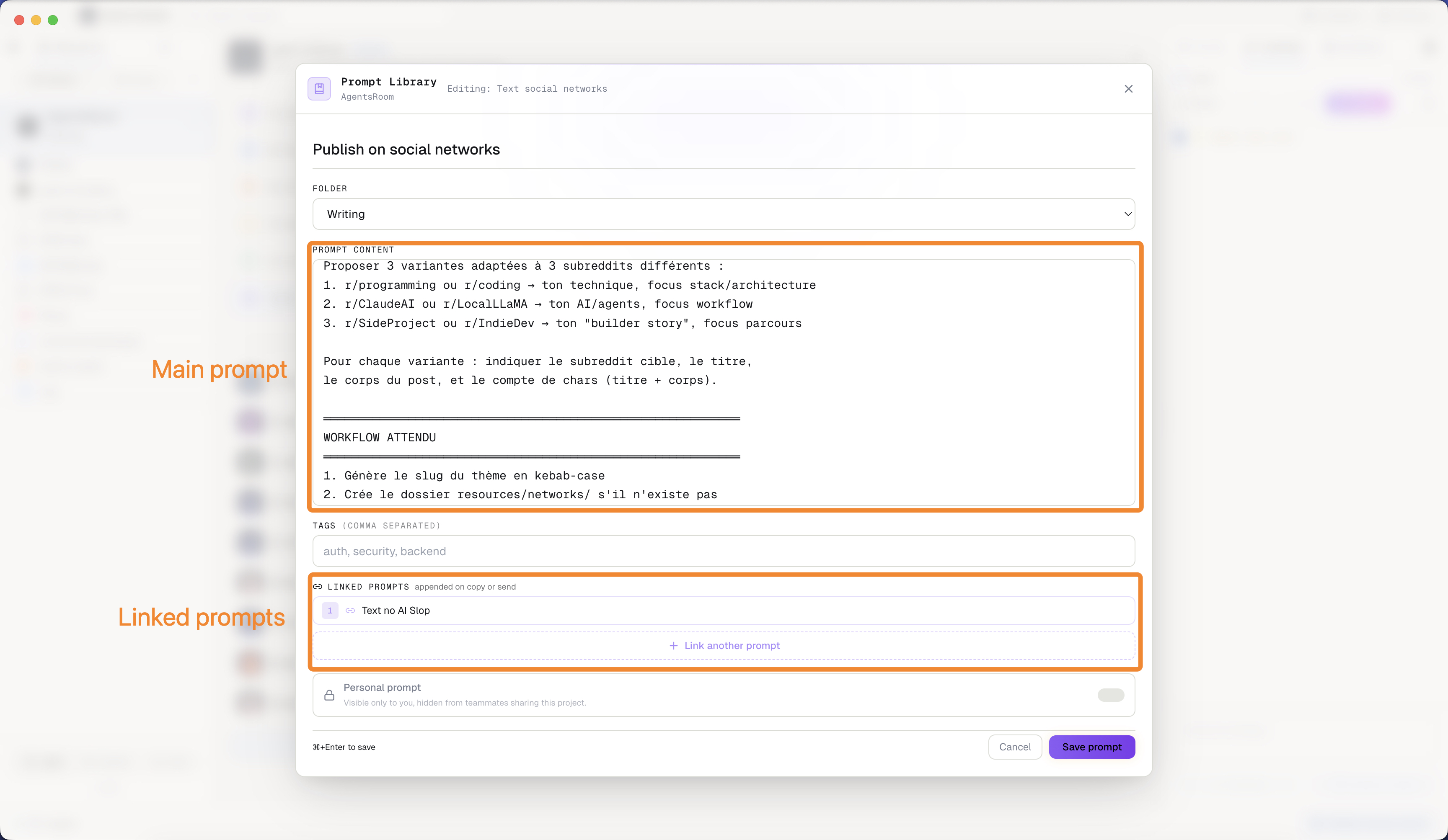
Linked prompts in the Prompt Library: chain rules, inherit context, copy everything in one click.
Every prompt library stores prompts. We built the first with inheritance.
Every prompt manager out there, including all the built-in tools in AI coding assistants, gives you folders and tags. You can organize your prompts beautifully. What you cannot do is express that one prompt depends on another. Until AgentsRoom.
Linked prompts is a dependency mechanism for AI context. Your post on LinkedIn prompt no longer carries its writing rules inline. It points to them. Your writing rules prompt becomes a single source of truth. Update it once, and every linked prompt that references it picks up the change on the next copy.
Six things to know about linked prompts
Built into the editor. Saved to your git repo. Works with project prompts and global prompts alike.
Link any prompt to any other
Open any prompt in the editor. Scroll to the Linked prompts section. Pick one or more prompts to attach. The links are saved in .agentsroom/prompts.json and committed to git with your team.
Transitive chains
Prompt A links to B, B links to C. Copy A and you get all three. The chain resolves depth-first, so each prompt's own dependencies follow it immediately before moving to the next sibling.
Title-labeled output
Each block in the composed output is prefixed with a markdown H1 carrying its title. Models parse this structure cleanly. You see exactly which content came from which linked prompt.
You control the order
Reorder linked prompts with the up and down arrows in the editor. Your main prompt always leads. Each linked prompt follows in the sequence you set.
Cycle detection
If you accidentally create a loop (A links to B, B links back to A), AgentsRoom detects it and stops the chain there. No infinite loops, no corrupt output.
Scoped per library
Project linked prompts resolve against other project prompts. Global linked prompts resolve against other global prompts. IDs never cross scopes, so there are no naming conflicts.
How to link prompts
Open the editor
Create a new prompt or edit an existing one. The Linked prompts field sits just below Tags, inside the same editor panel.
Search and attach
Click Link a prompt. A search picker opens. Type to filter by title, content, or tag. Click any result to attach it as a linked prompt. Repeat for as many as you need.
Set the order
Each linked prompt shows a numbered chip with up and down arrows. Reorder them until the composition feels right. Prompt 1 is appended first, prompt 2 second.
Copy or send as usual
Hit Copy on the card, or click Send to agent. AgentsRoom assembles the full content in real time: your prompt, then each linked prompt titled and appended in order. Clean, complete, ready to paste.
Stop copy-pasting your own rules
Most teams have three or four base-rule prompts that show up in 80% of their other prompts: commit message format, code style conventions, error handling rules. Right now those rules are duplicated everywhere. Fix one, and the others stay stale.
With linked prompts, you write those base rules once and reference them from every prompt that depends on them. Change the source, and every linked prompt picks it up on the next copy. The bigger your prompt library grows, the more this saves you.
FAQ
Can I link project prompts to global prompts?
No, intentionally. Project linked prompts resolve against project prompts only. Global linked prompts resolve against global prompts only. This keeps the dependency graph predictable and avoids ID collisions between scopes.
What happens if I delete a prompt that is linked from another?
The stale ID is cleaned up automatically the next time you save the parent prompt. You will not see an error at copy time. The deleted linked prompt is simply skipped in the composition.
Can I attach more than one linked prompt?
Yes. Attach as many linked prompts as you need. They are appended in the order you set in the editor. Use the up and down arrows to reorder them.
When I duplicate a prompt, do the links carry over?
Yes. Duplicating a prompt in the same scope preserves its linked prompt IDs. The copy starts with the same dependency set as the original.
You may also like
Prompt Library
The prompt manager where linked prompts live. Save, organize, and reuse your best prompts per project or globally.
Scratchpad
A prompt editor pinned to the footer. Draft long, structured prompts and send them to the focused agent in one click.
Prompt Engineering for AI coding
The practical guide to writing prompts that ship code. Structure, context, constraints: the patterns that work with AI agents.
Agent Teams
Chain multiple AI agents on a visual canvas. Dev, QA, Security: a full engineering crew, automated.
Write once. Reuse everywhere.
Download AgentsRoom and link your first prompts in under a minute. Free up to 2 projects.
Companion app: monitor your agents on the go
Bring your own: Claude, Codex, Antigravity CLI, or other AI provider.
Push bugs and requests straight to your public backlog.