Schedule terminal commands, AI agents
and dev workflows, straight from your workspace
Scheduled Tasks lets you program a recurring AI agent run on any project. Choose a name, a prompt and a frequency, and AgentsRoom launches the agent for you: every morning, every night, every hour or every Monday. It is a cron for coding agents, with no cron expression to learn.
A scheduled task spawns a real agent session in your project, with its own role, provider and model, and hands it your prompt as the first message. Review pull requests at 8 AM and again at 6 PM, scan production logs overnight, ship a weekly changelog on Friday, or leave the clock out of it and run on your AI plan's usage window instead. Set it once, it runs on its own.
Each scheduled task fires on its own schedule and launches a background agent with its role and prompt. Every N minutes, hourly, daily, weekly, monthly or on your plan's quota window, no cron expression required.
Some development work is the same every single day. Reviewing the pull requests that landed overnight. Reading the crash logs from production. Checking whether a dependency shipped a security patch. Writing the changelog before the weekly demo. It is repetitive, it is easy to forget, and it always lands at the worst moment.
Scheduled Tasks turns that recurring work into a standing order. You write the prompt once, pick how often it should run, choose which agent should do it, and AgentsRoom takes it from there. The agent wakes up on schedule, does the job in your project and leaves you a result to review. No babysitting, no manual relaunch, no sticky note on your monitor.
Think of it as a cron for AI coding agents, except you never touch a crontab. Instead of cryptic five-field expressions, you pick a plain frequency: every few minutes, every hour, every day at one or several times you set, every week on a weekday, every month on a date, or on your AI plan's quota window. The scheduling is structured and readable, and the next run is shown in plain language right next to each task.
Why schedule your agents
Recurring work runs itself. Set up the morning code review once and it happens every day at 8 AM without you lifting a finger. The repetitive tasks leave your to-do list for good.
The right time, automatically. Heavy or noisy work moves to off-hours. Let an agent scan the logs overnight and dig through the git history on the weekend, so your working hours stay free for the work that needs you.
You are notified the moment it starts. Every automatic run sends a notification on your desktop and a push to your phone, so you always know an agent just kicked off and you can jump in when it matters.
Nothing is lost the next morning. AgentsRoom archives what each run's agent wrote, so you reopen a recent run to take over its terminal, and you can still read an older one, or one that ran on your other machine, long after its session is gone.
What to schedule
Concrete recurring jobs you can hand to a scheduled agent today.
Schedule code reviews
Launch an agent every night to review your repository: read the day's diffs, flag risky changes, suggest fixes. A standing reviewer that never skips a day.
Schedule a code review on your last credits
Put the review on your plan's usage window instead of an hour. Once the window is consumed past the threshold you pick and its reset is close, an agent reads the day's diffs on the credits that were about to expire. It repeats on every window, so there is nothing left to remember.
Schedule Claude Code every morning
Run a Claude Code session every day at 8 AM to review the pull requests that opened overnight, summarize them and leave you a triage list before your first coffee.
Schedule dependency updates
Run a dependency check every Monday: scan for outdated and vulnerable packages, propose safe bumps and open the upgrade work, so security patches never sit ignored for weeks.
Schedule documentation generation
Generate changelogs, release notes and documentation automatically. Schedule a weekly doc pass that turns the week's commits into a clean, readable summary.
Schedule QA sessions
Launch a QA agent on a recurring schedule, or right after every deploy, to exercise the app, run the test suite and report what broke before your users do.
Schedule log analysis
Review production logs every morning. Have an agent comb through overnight errors, group them, surface the new ones and tell you what actually needs attention.
Schedule git history analysis
Generate weekly summaries of repository activity: who changed what, where the churn is, which areas grew risky. A recurring read on the health of your codebase.
Schedule multi-agent workflows
Launch several agents in parallel on recurring schedules, each with its own role, project and prompt. Build a whole automated routine that runs on the clock.
How Scheduled Tasks works, step by step
From an idea to a recurring agent in under a minute.
Open the Triggers panel
Open the workspace dock and click Triggers. Scheduled tasks live there alongside the webhook triggers: you see every one on the current project, with its schedule and the time of its next run.
Name it and write the prompt
Click New task. Give it a name like 'Scan crash logs' and write the prompt the agent will receive each time it runs. Pull a prompt from your library, attach a sketch or dictate it by voice.
Choose what fires it
First pick what fires the task: Scheduled for a calendar rhythm, Quota to follow your AI plan's usage window, Webhook for an outside event, or On demand when the honest answer is that nothing fires it but you. On Scheduled you then choose Minutes, Hourly, Daily, Weekly or Monthly and set the detail: an interval, a minute of the hour, one or several times of day, a weekday or a day of the month. On Quota you choose the window and whether it fires when the quota comes back or before it resets. No cron expression, ever.
Choose who runs it
Pick one agent, with its role, provider and model: a QA agent for the test pass, a DevOps agent for the logs, a reviewer for the morning PRs. Or pick a whole team instead, and the prompt goes to its first step so the run plays the entire pipeline on its own. An Advanced block carries the rest of the launch, per task: permission mode, account, browser access, default skills, CLI options, environment variables and a system prompt.
Save and see the next run
Save the task. It appears in the list with its next run time spelled out. Toggle it on or off in one click, or hit Run now to fire it immediately without waiting for the schedule. Right-click Run now and you can send that run to another computer of your account that holds the project, so a build fires on the machine that has the toolchain from whichever laptop you are sitting at.
It runs on its own
At the scheduled time, AgentsRoom spawns the agent in the background and feeds it your prompt. You get a notification, the run lands in the task's history, and you reopen it whenever you want to review the work.
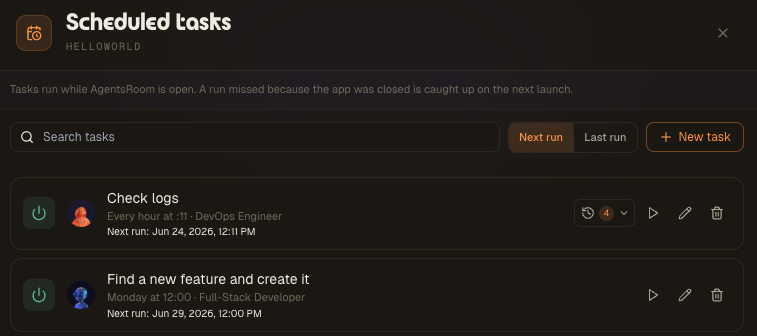
Every scheduled task lives on its project and shows you everything at a glance: the schedule in plain words, the agent role behind it, and exactly when it fires next. Search across tasks, sort by next run or last run, and flip any task on or off with the power toggle.
The controls on each row are the whole loop: Run now fires the task on demand, the history button reopens the agents from recent runs so you can see what they did, and edit and delete keep the list tidy. The task list syncs to your account, so it follows the repository instead of being stuck on one machine.
Six ways to schedule, zero cron syntax
Five calendar rhythms picked from a menu instead of typed as an expression, plus one that follows your AI plan's usage window rather than the clock.
Every N minutes
Run a task on a tight interval, for example every 15 minutes. Ideal for short, frequent checks like polling a queue or watching a build.
Hourly
Fire once an hour at the minute you choose, for example at :15. A steady heartbeat for log scans and health checks through the day.
Daily
Run every day at a set time, for example 08:00, or several times a day at 09:00 and 18:00. The classic morning routine: review overnight PRs, summarize errors, prep the day.
Weekly
Run on a chosen weekday and time, for example Monday at 09:00. Perfect for dependency checks, weekly reports and recurring grooming.
Monthly
Run on a chosen day of the month, for example the 1st. For monthly audits, billing reconciliations and end-of-month summaries.
On your quota
Run on your AI plan's usage window instead of the clock: the moment the quota comes back, or at the tail of the window before it resets. For the code review you always launch on your last credits.
How runs actually fire
A simple, honest execution model with no surprises.
Schedule any agent, any provider
Scheduled Tasks is provider-agnostic. The agent it launches goes through the normal provider layer, so you schedule whichever CLI you already use.
Claude Code
Schedule recurring Claude Code sessions: a daily reviewer, a nightly log scan, a weekly changelog. Pick the role and model per task, from a light model for quick checks to a flagship for deep work.
Codex
Schedule recurring Codex CLI runs the same way. The scheduler never touches the CLI invocation directly, so a scheduled Codex agent behaves exactly like one you launch by hand.
Antigravity CLI
Schedule Antigravity CLI agents for recurring analysis, summaries and checks. One scheduler, every provider, no provider-specific setup.
And more
Any agent CLI wired into AgentsRoom can be scheduled. The recurring run spawns through the same provider-agnostic path as a manual launch, so new providers work out of the box.
Already using tmux, cmux or cron?
If you script your workflow with tmux or cmux today, Scheduled Tasks adds automation on top of your terminal sessions: instead of attaching to a pane and typing commands by hand, AgentsRoom launches the commands and the AI agents for you at predefined times.
And where a system cron, launchd or the Windows Task Scheduler only fires a shell script with no project context, a scheduled task spawns a full coding agent inside your project, with its role, its model, its prompt and a reopenable history. It is a cron alternative built for AI development workflows, not just for running a script.
FAQ
What are Scheduled Tasks in AgentsRoom?
Scheduled Tasks is a cron-style scheduler for AI coding agents. You create a recurring task on a project with a name, a prompt, a frequency and an agent (role, provider, model). When the time comes, AgentsRoom spawns a background agent in that project and feeds it your prompt as its first message. It is the simplest way to run a Claude Code, Codex or Antigravity session on a repeating schedule without writing any cron syntax.
How is this different from a normal cron job?
A system cron, launchd or the Windows Task Scheduler fires a shell command with no awareness of your project, your agent role or your model. A scheduled task launches a real coding-agent session inside your project, hands it a prompt, sends you a notification and keeps a reopenable history of each run. You also never write a cron expression: you pick a plain frequency from a menu.
What frequencies can I set?
Five calendar frequencies: every N minutes, hourly at a chosen minute, daily at one or several times of day, weekly on a chosen weekday and time, and monthly on a chosen day. A sixth way to schedule sits next to them under What fires it: Quota, which follows your AI plan's usage window instead of the clock and fires when the quota comes back or before it resets. The schedule is structured and readable, and the next run time is shown next to each task in plain language. Times use your machine's local timezone.
Does it run when AgentsRoom is closed?
Scheduled tasks fire while AgentsRoom is open. If a run was due while the app was closed, it is caught up automatically the next time you launch the app, so a missed slot still runs once. It is an in-app scheduler with catch-up, not a 24/7 server-side cron.
What exactly happens when a task fires?
AgentsRoom spawns a temporary agent in the task's project with the role, provider and model you chose, plus whatever that task's Advanced block sets: permission mode, account, browser access, skills, CLI options, environment variables and system prompt. It then sends your prompt as the agent's first message. The agent runs in the background; you get a notification when it starts, and the run is added to the task's history so you can reopen the agent's terminal and review what it did.
Can I schedule different agents for different tasks?
Yes. Each task picks its own role, provider and model. Schedule a QA agent for a nightly test pass, a DevOps agent for hourly log scans and a reviewer for the morning pull-request review. You can run several scheduled agents in parallel across your projects.
Can I run a scheduled task immediately?
Yes. Each task has a Run now button that fires it on demand, bypassing the schedule. It is handy for testing a new task's prompt or for kicking off the job ad hoc without waiting for the next slot. A manual run opens the agent's tab right away so you can watch it work, and it sends no start notification: you are already looking at it.
Does it work with Codex and Antigravity, not just Claude Code?
Yes. Scheduled Tasks is provider-agnostic. The agent it launches goes through the same provider layer as a manual launch, so you can schedule Claude Code, Codex, Antigravity CLI and other supported agents. The scheduler never hardcodes a single provider.
Is this a tmux or cmux alternative?
It complements them. If you manage terminal sessions with tmux or cmux, Scheduled Tasks adds time-based automation on top: instead of attaching and typing commands yourself, AgentsRoom launches the commands and AI agents at predefined times, with notifications and a run history.
Where are my scheduled tasks stored?
Each task list is saved per project and synced to your AgentsRoom account, keyed to the repository rather than a single machine, with a local cache for offline use. The task list follows the repo, while the scheduler that fires the runs lives in the desktop app.
Will a scheduled agent get stuck waiting for me to approve something?
Only if you want it to. The permission mode is a field on the task itself, not a global provider setting, so a 3 AM run can be allowed to work without stopping at every approval prompt while the agents you drive by hand on the same provider keep asking you first. The same Advanced block carries the other things an unattended run needs: browser access when the agent has to read a web back office, environment variables, default skills and a system prompt. Leave a field empty and the task inherits your project and app settings, so a task you created before still behaves exactly as it did.
Can I run an agent when my Claude quota resets?
Yes, that is the Quota frequency. Choose when the quota comes back and the task fires as soon as your plan's usage window is available again, so the run you were blocked on starts without you watching for it. The window is read on the provider and the account that run will actually debit, and only the windows your plan publishes with a real reset time are offered: 5-hour, daily, weekly, monthly. AgentsRoom reads that window on a periodic usage scan rather than to the second, so the run starts shortly after the reset rather than at the exact minute.
Can a scheduled agent run twice a day?
Yes. A daily or weekly task can carry several times of day, up to six, so a single task fires at 09:00 and again at 18:00 without being duplicated. It is not the same thing as an interval in minutes: an interval spreads runs evenly across the day, while several times of day pin the two or three fixed moments your day is actually shaped around. The next run shown next to the task is always the closest one ahead.
Does AgentsRoom wake my computer for a scheduled task?
Yes, when you turn on Wake the machine, globally in Settings, per project or per task. AgentsRoom then arms the operating system's own wake timer for the next run (pmset schedule wake on macOS, a wake-to-run task in the Windows Task Scheduler, the RTC alarm on Linux), the same mechanism Time Machine or a scheduled backup uses, so the computer wakes at the right time with the screen off or the lid closed on power, runs the agent and is kept awake while it works. On macOS and Linux scheduling a wake needs administrator rights, so AgentsRoom asks for your password once, shows the single command it will be allowed to run, and never asks again; you can revoke it from the same place. A laptop on battery may ignore wake timers, so keep it plugged in for overnight runs. If the machine could not be woken, the run is caught up when it comes back, or recorded as missed if you opted out of catch-up, and either way the task row says so.
Can I create a trigger that never runs on its own?
Yes, that is the On demand mode. It is a trigger with no clock, no quota window and no webhook URL: a saved brief carrying its prompt, its agent and its machine, that runs only when you press its button. It exists for the job you repeat often but never on a rhythm, like building the app for every platform or cutting a release: everything is written once, and starting it costs one click instead of retyping the prompt. It keeps everything the other modes have, the run history, the per-machine scope and the notification, and the mobile app carries the same button, always asking which computer should run it since a phone runs nothing itself.
The Quota frequency answers one question: what should run again and again on the credits of each window, before they expire. The neighbouring questions belong to other pages.
Goes well with
Webhook Triggers
The same panel, fired by an event instead of a clock. A pull request opens, a build breaks, and the agent starts.
Backlog Task Board
Drag a task to a column and an AI agent picks it up. Scheduled Tasks is the same idea on a clock instead of a drag.
Agent Teams
Dev, QA and PM agents that talk to each other. Schedule a team workflow to run on a recurring routine.
Agent Delegation
A dev agent hands work to a cheaper agent through MCP. Pair it with a schedule for fully hands-off recurring runs.
Dev Terminals
Manage terminals, split panes and dev commands. The terminal surface your scheduled agents run in.
Restore Session
Quit and come back with every agent and terminal where you left them, so the next launch also catches up your due tasks.
Multi-Provider
Run Claude, Codex and Antigravity side by side. Schedule whichever provider each task should use.
Further reading
Background Coding Agents: Putting Your AI on the Night Shift
A coding agent doesn't need you watching it. Here's how to run agents in the background while you work on something else, and how to let a whole fleet code overnight while you sleep.
Working on Vacation With AI Agents (Without Your Family Noticing)
Close the shop for three weeks, or be the person on the laptop at the beach. AI coding agents make a third option real: the setup that keeps client projects moving on ten minutes a day.
How Many Tokens Do I Have Left in Claude? The Two Screens to Check.
Your Claude plan is not denominated in tokens, so no screen shows a token balance. What it actually meters, the two screens that do show it, why it drains while you are not typing, and what the September 2026 weekly-window change does to your week.
Put your recurring dev work on a schedule
Download AgentsRoom and let Scheduled Tasks run your AI agents on the clock. Review PRs every morning, scan logs every night, update dependencies every Monday, all without writing a single line of cron.
Companion app: monitor your agents on the go
Bring your own: Claude, Codex, Antigravity CLI, or other AI provider.
Push bugs and requests straight to your public backlog.