Dynamic Island:
el estado de tus agentes de IA, siempre a la vista
La Dynamic Island es una pequeña ventana flotante que se sitúa por encima de todas las demás aplicaciones y muestra lo que están haciendo tus agentes de programación con IA en este preciso instante. Inactivos, trabajando o esperando tu indicación: lees el estado global de tus agentes en un cuarto de segundo, sin volver a traer AgentsRoom al frente.
Cuando un agente termina su turno, surge una notificación junto a la island durante unos segundos. Haz clic en ella y AgentsRoom se abre directamente en ese agente, dentro de ese proyecto. Sin buscar entre pestañas, sin adivinar qué terminal hizo ping. La Dynamic Island convierte el estado de los agentes en algo ambiental en lugar de algo que tienes que ir a comprobar.
La Dynamic Island en acción: la island flotante refleja la actividad de los agentes, surge una notificación de finalización, un clic salta directamente al agente correcto.
Este es el problema que resuelve la Dynamic Island. Ejecutas varios agentes de programación con IA a la vez: Claude Code en un proyecto, Codex en otro, quizás un agente Antigravity en un tercero. Cada uno tarda minutos en pensar. Así que haces lo sensato y cambias a tu navegador, a Slack o a una herramienta de diseño mientras trabajan. Y entonces no tienes ni idea de lo que están haciendo, porque su estado solo vive dentro de la ventana de AgentsRoom que acabas de abandonar.
Así que vuelves con alt-tab. Nada ha cambiado. Vuelves con alt-tab otra vez dos minutos después. Sigue trabajando. Vuelves con alt-tab una tercera vez y un agente lleva noventa segundos esperando tu indicación, bloqueado, sin hacer nada. Esa comprobación constante es el impuesto que pagas por ejecutar agentes en paralelo, y es exactamente el impuesto que la Dynamic Island elimina.
La Dynamic Island es una ventana flotante, siempre en primer plano, sin bordes, anclada a un borde de la pantalla. Reproduce una animación distinta según el estado global de tus agentes: todos inactivos, al menos uno trabajando, o al menos uno esperando una indicación. Permanece visible por encima de tu navegador, tu terminal, tu otro IDE. Dejas de hacer alt-tab para comprobar, porque el estado ya está en tu pantalla.
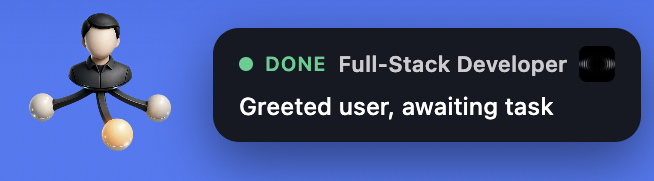
La Dynamic Island: un indicador de estado de agentes flotante con una notificación de finalización en la que se puede hacer clic para enfocar y un historial de los turnos recientes de los agentes.
Por qué la Dynamic Island se gana su lugar en tu pantalla
Visibilidad ambiental. El estado de cada agente está en tu pantalla en todo momento, por encima de la aplicación en la que realmente estás trabajando. No abres AgentsRoom para comprobar tus agentes. Echas un vistazo a la island. Inactivo, activo o esperando: la animación te lo dice en una fracción de segundo.
Notificaciones en las que se puede hacer clic para enfocar. Cuando un agente termina su turno, surge una notificación junto a la island con el nombre del agente y el proyecto. Un solo clic trae AgentsRoom al frente y abre el terminal de ese agente exacto, en ese proyecto exacto. Pasas de la notificación al agente correcto en un solo clic, sin ninguna búsqueda.
Un historial para ponerte al día. Si tres agentes terminan mientras estás en una reunión, no pierdes esas alertas. Haz clic en la island y se despliega debajo una lista de las últimas notificaciones. Cada fila se puede pulsar y salta a su agente. Cuando vuelves a traer AgentsRoom al frente, el historial se vacía solo.
Se mantiene apartada. Arrastra la island a cualquier lugar de tu pantalla, ánclala a una de las seis posiciones de borde, o muévela a un segundo monitor. Haz clic derecho sobre ella para ocultarla o abrir sus ajustes. La Dynamic Island está siempre en primer plano, pero nunca te estorba.
La Dynamic Island, turno a turno
Lanza tus agentes, abandona AgentsRoom y deja que la island te mantenga al tanto.
Lanza tus agentes y cambia de aplicación
Inicias uno o varios agentes de IA: Claude Code, Codex, Antigravity, los providers que uses. Luego cambias a tu navegador, tu correo, otra ventana. Un flujo de trabajo multiagente normal.
La island refleja el estado global
La Dynamic Island permanece flotando por encima de cada aplicación. Reproduce la animación activa mientras al menos un agente esté trabajando, así sabes que tus agentes están en marcha sin mirar AgentsRoom.
Un agente te necesita: la island lo muestra
Si un agente se detiene y espera tu indicación, la island cambia a su estado de espera de indicación. Lo ves con el rabillo del ojo e intervienes de inmediato, en lugar de dejar al agente bloqueado.
Un agente termina: surge una notificación
Cuando un agente termina su turno, surge una tarjeta junto a la island durante cinco segundos: una etiqueta «Listo», el nombre del agente, el icono o el nombre del proyecto, y una vista previa del mensaje. Luego se retrae por sí sola.
Haz clic en la notificación, aterriza en el agente
Haz clic en la tarjeta y AgentsRoom pasa al frente, abriendo el terminal de ese agente exacto en ese proyecto exacto. El mismo enfoque de un solo clic funciona también para la notificación nativa de escritorio.
¿La perdiste? Abre el historial
Si te perdiste la tarjeta, haz clic en la island. La lista de notificaciones de finalización recientes se despliega debajo. Haz clic en cualquier fila para saltar a ese agente. Cuando AgentsRoom recupera el foco, el historial se reinicia.
Una sola barra flotante para cada proyecto y cada agente
Ejecuta agentes en varios proyectos a la vez y la Dynamic Island los mantiene a todos en una sola barra, agrupados por proyecto. Cada segmento lleva un proyecto y los agentes que trabajan dentro de él, cada uno con su propio punto de estado. Un run de equipo también puede ocupar un solo lugar: activa el icono de equipo y sus consolas se agrupan en el emblema del equipo, que muestra el estado de todo el run.

La Dynamic Island agrupa tus agentes por proyecto: cada segmento de proyecto lleva su propio grupo de agentes, cada uno con un punto de estado en directo.
Tres estados, leídos de un vistazo
La Dynamic Island reproduce una animación distinta para cada estado global de los agentes. No hace falta leer nada.
Inactivo: nada en marcha
Todos los agentes están en reposo. La island reproduce su animación tranquila de inactividad. Por defecto, la island se oculta cuando todo está inactivo, así solo ocupa espacio en pantalla cuando hay algo que vigilar. Puedes mantenerla siempre visible desde los ajustes.
Activo: un agente está trabajando
Al menos un agente está pensando o ejecutándose. La island reproduce su animación activa. Estás en otra aplicación, pero sabes que tus agentes están ocupados y no necesitas hacer alt-tab para confirmarlo.
Espera de indicación: un agente está esperando
Al menos un agente se ha detenido y está esperando tu respuesta. La island reproduce su animación de espera de indicación. Este es el estado que más tiempo te ahorra: un agente bloqueado es un agente desperdiciado, y la island se asegura de que nunca dejes a uno atascado.
Sin la Dynamic Island y con ella
Los mismos agentes, los mismos proyectos. La diferencia es cuánto te cuesta la configuración en vigilancia de pantalla.
Sin la Dynamic Island
- : El estado de los agentes solo existe dentro de la ventana de AgentsRoom.
- : Vuelves a AgentsRoom con alt-tab cada dos minutos solo para comprobar.
- : Un agente espera una indicación y permanece bloqueado porque estás en otra aplicación.
- : Un agente termina, no lo notas, la siguiente tarea no arranca.
- : Cuando varios agentes terminan a la vez, pierdes la noción de quién es quién.
Con la Dynamic Island
- : El estado de los agentes flota por encima de cada aplicación, siempre visible.
- : Echas un vistazo a la island en lugar de hacer alt-tab hacia AgentsRoom.
- : Un agente en espera aparece de inmediato en el estado de espera de indicación.
- : Una notificación de finalización surge junto a la island y actúas sobre ella.
- : La lista de historial recoge cada turno que te perdiste, cada uno con un clic disponible.
La Dynamic Island es la diferencia entre ir a comprobar tus agentes y que te avisen.
Mira la island multiproyecto en movimiento
Observa cómo la barra se actualiza en directo a medida que los agentes arrancan, terminan y esperan en varios proyectos al mismo tiempo. Añade un proyecto y aparece su segmento, un agente cambia de estado y su punto lo sigue.
La Dynamic Island en una sesión multiproyecto real: los segmentos de proyecto y los puntos de estado por agente se actualizan en directo mientras los agentes trabajan, terminan y esperan.
Dónde encaja la Dynamic Island en el panorama multiagente
Un repaso a las herramientas que los desarrolladores usan para ejecutar agentes de programación con IA, y el hueco concreto que llena la Dynamic Island.
El espacio multiagente está sano y en crecimiento. Conductor ejecuta agentes Claude Code en paralelo en una app de Mac cuidada. Crystal gestiona varias sesiones de Claude Code con git worktrees. Vibe Kanban convierte un tablero kanban en una superficie de orquestación para agentes de programación. Claude Code, Codex y Antigravity CLI son excelentes agentes por sí mismos. Cursor incorpora agentes en segundo plano dentro de un IDE completo. Warp lleva agentes de IA a un terminal moderno. Cada una de estas herramientas es sólida, y AgentsRoom ejecuta el mismo tipo de agentes que ellas.
Lo que estas herramientas tienen en común es que el estado de los agentes vive dentro de su ventana. Para saber lo que hace un agente, traes esa ventana al frente y miras. Es un diseño razonable: así funciona la mayoría de las apps. La Dynamic Island hace una apuesta distinta. Saca el estado de los agentes de la ventana de AgentsRoom y lo lleva a una capa flotante que se sitúa por encima de todas las demás aplicaciones, de modo que la respuesta a «¿han terminado mis agentes?» ya está en tu pantalla.
Ese es el hueco que llena la Dynamic Island. No es un sustituto de una cabina de mando multiagente, es la capa ambiental que se pone encima de una. El agente termina, surge una notificación, haces clic, estás en el agente exacto. AgentsRoom combina esa capa ambiental con un centro de mando visual completo, un compañero móvil y notificaciones nativas, así que estés mirando donde estés, el estado te sigue.
FAQ
¿Qué es la Dynamic Island en AgentsRoom?
La Dynamic Island es una ventana flotante, siempre en primer plano, que muestra el estado en vivo de tus agentes de programación con IA. Reproduce una animación distinta según si tus agentes están inactivos, trabajando o esperando una indicación, y muestra una notificación en la que se puede hacer clic para enfocar cuando un agente termina su turno. Te permite supervisar el estado de los agentes sin mantener la ventana de AgentsRoom al frente.
¿Cómo funciona la notificación de finalización?
Cuando un agente termina su turno, surge una tarjeta junto a la island durante unos cinco segundos: una etiqueta «Listo», el nombre del agente, el icono o el nombre del proyecto, y una breve vista previa del mensaje. Al pasar el ratón por encima se pausa el temporizador. Hacer clic en la tarjeta trae AgentsRoom al frente y abre ese agente exacto en ese proyecto exacto.
¿Hacer clic en la notificación abre de verdad el agente correcto?
Sí. La notificación lleva tanto la identidad del proyecto como la del agente, así que un clic enfoca el terminal del agente preciso en el proyecto preciso, no solo la app. El mismo enrutado de un clic se comparte con la notificación nativa de escritorio, así que ambos caminos te llevan al mismo agente.
¿Qué pasa si me pierdo una notificación?
Haz clic en la island. Una lista de historial de las últimas notificaciones de finalización se despliega debajo. Cada fila se puede pulsar y salta a su agente y proyecto. Cuando vuelves a traer AgentsRoom al foco, el historial se vacía solo, así que siempre refleja lo que ocurrió mientras estabas fuera.
¿Puedo mover la Dynamic Island?
Sí. Arrástrala a cualquier lugar de la pantalla con el ratón, incluido a un segundo monitor. También puedes anclarla a una de las seis posiciones de borde desde los ajustes. La posición de arrastre se conserva durante la sesión y no se mantiene tras un reinicio, momento en el que vuelve al anclaje configurado.
¿La Dynamic Island estorba mi trabajo?
No. Es una pequeña ventana que nunca roba el foco a la aplicación que estás usando. Por defecto se oculta cuando todos los agentes están inactivos, así solo ocupa espacio en pantalla cuando hay algo que vigilar. Haz clic derecho sobre ella para ocultarla por completo o para abrir sus ajustes.
¿Qué agentes de IA sigue la Dynamic Island?
Todos. Los estados inactivo, activo y espera de indicación de la island se derivan del estado de sesión de los agentes, que es independiente del provider. Claude Code, Codex, Antigravity CLI y otros agentes compatibles contribuyen todos al mismo estado global que se muestra en la island.
¿La Dynamic Island es solo para macOS?
La Dynamic Island forma parte de la app de escritorio AgentsRoom. Es una ventana flotante, siempre en primer plano, sin bordes, que se ancla a un borde de la pantalla y te sigue a través de los espacios y las aplicaciones a pantalla completa.
¿Cómo activo o desactivo la Dynamic Island?
La Dynamic Island tiene un indicador de funcionalidad y una sección de ajustes dedicada. Puedes activarla o desactivarla, elegir en qué pantalla aparece, seleccionar una de las seis posiciones de anclaje, y mantenerla siempre visible incluso cuando los agentes están inactivos. Hacer clic derecho en la island también te ofrece una ocultación rápida y un acceso directo a sus ajustes.
¿En qué se diferencia la Dynamic Island de una notificación de escritorio normal?
Una notificación normal se dispara una vez y desaparece. La Dynamic Island es un estado ambiental persistente: muestra en todo momento si los agentes están trabajando o esperando, conserva un historial en el que se puede hacer clic de las finalizaciones recientes, y permanece anclada en tu pantalla. AgentsRoom también envía notificaciones nativas y notificaciones push móviles, así que la island es la capa permanente y la push es la alerta puntual.
La misma sala también vive en tu teléfono: una Actividad en vivo en la pantalla de bloqueo del iPhone, en la Dynamic Island del iPhone y en el Apple Watch, y una notificación en vivo en Android. Esta página trata de la island de tu ordenador.
Agentes en vivo en tu teléfonoCombina bien con
Seguimiento del estado de los agentes
Indicadores de estado en vivo para cada agente dentro de la ventana de AgentsRoom. La Dynamic Island es la versión ambiental, fuera de la ventana, de la misma idea.
Notificaciones de agentes
Insignias estilo «sin leer» para el último mensaje de un agente. Se combinan con las notificaciones de finalización de la island para que nunca te pierdas un turno.
Sincronización móvil y escritorio
Observa y controla tus agentes desde tu teléfono. El compañero móvil es la capa ambiental de los agentes cuando estás lejos de tu Mac.
Multiproyecto y multiagente
El centro de mando visual que ejecuta todos los agentes sobre los que informa la Dynamic Island, en todos los proyectos a la vez.
Multi-provider
Ejecuta Claude, Codex y Antigravity en paralelo. La island los sigue a todos con los mismos estados independientes del provider.
Restaurar sesión
Retoma exactamente donde lo dejaste. Tus agentes, terminales y la island vuelven juntos.
Deja de hacer alt-tab para comprobar tus agentes
Descarga AgentsRoom y deja que la Dynamic Island mantenga el estado de tus agentes de IA en pantalla. Inactivo, activo, esperando una indicación: lo ves sin abandonar tu trabajo, y un clic en una notificación de finalización te devuelve al agente correcto.
App complementaria: supervisa tus agentes en movimiento
Usa Claude, Codex, Antigravity CLI u otro proveedor de IA.
Envía bugs y peticiones directamente a tu backlog público.