Stop reading everything.
Listen to it.
Read Aloud is text to speech built into AgentsRoom. One click on the speaker and a markdown file, a terminal selection or your agent's last answer is read out loud in a natural synthetic voice, with a progress bar, a pause and a stop.
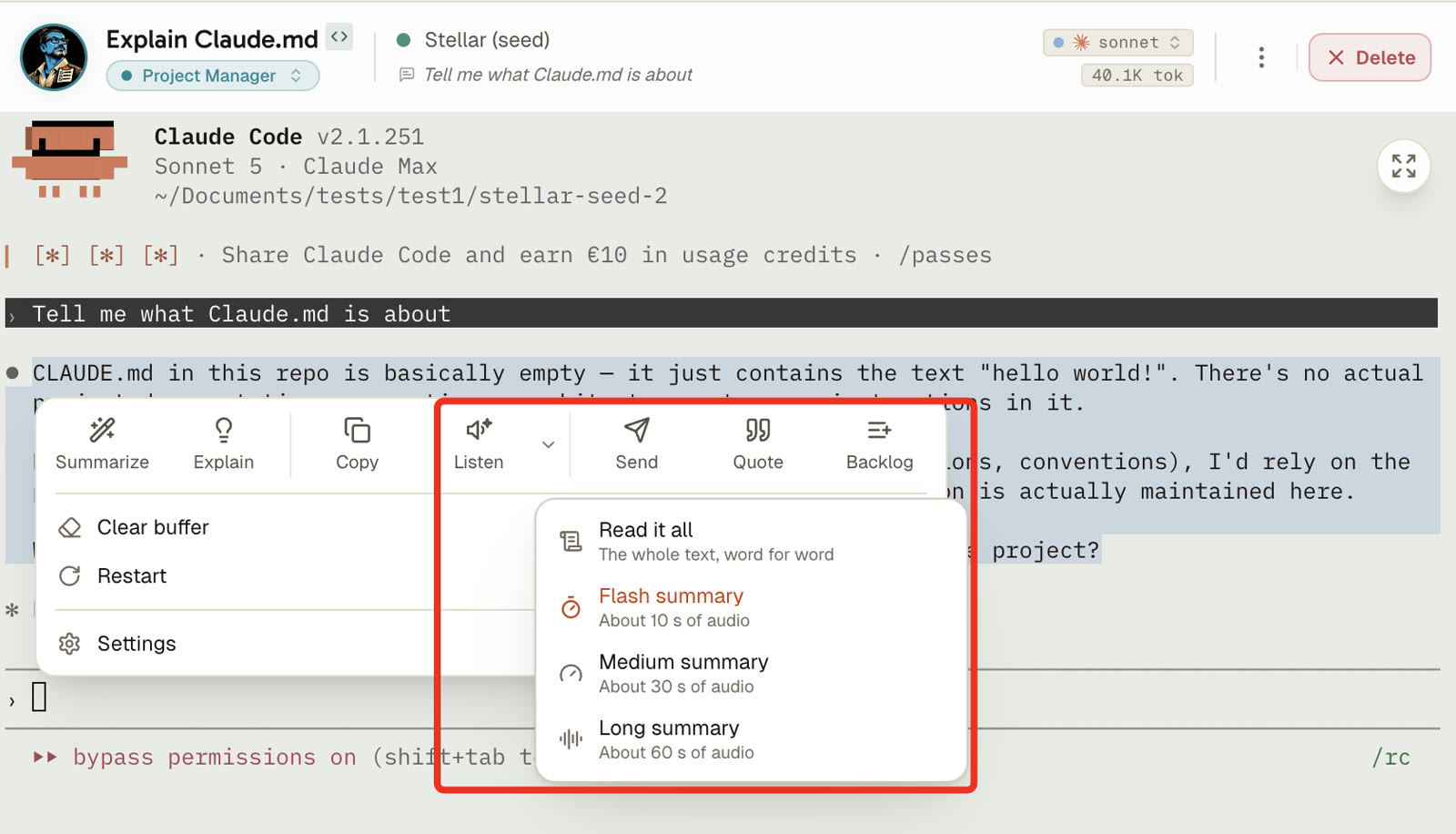
Not in the mood for the whole thing? The same button reads you a condensed version instead, and you pick how long it talks: ten seconds, thirty, or a minute. A forty-minute changelog answered in ten seconds.
Sound on: select the agent's answer, click Listen, and a synthetic voice reads it out. The chip in the status bar shows the progress and the time left, with pause and stop.
Development is a reading job. A README you did not write, a changelog three hundred lines long, a spec that landed in your inbox, an agent answer that explains a migration in four paragraphs. Your eyes do all of it, all day, and by six in the evening they are done. Read Aloud takes that load off them.
It came from a user. He is dyslexic, he uses AgentsRoom every day, and he was copy-pasting the markdown preview into a separate text-to-speech tool to get through the documentation. Copy, switch app, paste, listen, come back, find your place again. So the voice moved into the app: the speaker button sits right next to the Source button in the file preview, and the document is read where it already is.
It is not a screen reader and it is not an accessibility certification. It reads a text you picked, out loud, with a progress bar and a pause. That narrow promise is the whole point: it is the one thing you can trust it to do.
Voice credits are now shared between dictation, Voice Mode and Read Aloud.
The terminal selection panel gains a Listen button for anything you highlight.
The status bar keeps a control chip for as long as a read is playing.
The markdown preview reading a changelog out loud, then the same document condensed into a spoken summary.
Four places to press play
Same reader everywhere, one read at a time. Starting a second one stops the first, because two voices talking over each other is never what anybody meant.
A markdown file, whole
Open any markdown file in the preview and a speaker button appears next to Source. Click it and the document is read from the top. A README, a CLAUDE.md, a spec, a changelog, an architecture note. This is the entry point the feature was built for.
Whatever you highlighted in the terminal
Select text in an agent terminal and the selection panel opens with a Listen button. It reads exactly what you highlighted: one paragraph of an answer, an error explanation, the part of a long output you actually care about. The panel closes on its own and the read keeps going.
Your agent's last answer
Right-click in an agent terminal and pick the read entry. The answer comes from the agent's on-disk conversation transcript, not from a scrape of the terminal, so you get the real message and not a screenful of CLI chrome. The agent finished while you were in another window: listen to it instead of scrolling back.
An AI summary or explanation
The selection panel can already summarize or explain a highlighted chunk. When the answer comes back, a speaker button on the result bubble reads it out loud. Ask what a gnarly stack trace means, then listen to the explanation while you keep typing.
It reads prose, not punctuation
Markdown sent raw to a text-to-speech engine is unlistenable. Read Aloud cleans it first.
Release 1.14.
The reader now shares its credits.
Pause and resume anytime.
What reaches the voice: prose only. Code, tables and bare file paths are dropped before a single word is spoken.
Send a technical document straight to a speech engine and you get "backtick slash src slash services slash foo dot ts backtick", then a markdown table read cell by cell, then a separator line announced as a run of dashes. Nobody listens to that twice. So before anything is spoken, the text goes through one cleaning pass.
Fenced code blocks are removed entirely. Markdown tables, horizontal rules and lines that are nothing but a file path go too. Bold, italic and inline code markers are stripped while their words stay. A link becomes its label, an image disappears. Headings and list items get a full stop when they lack one, otherwise the voice runs a whole bullet list into a single breathless sentence.
- Paragraphs and prose
- Headings and list items, as real sentences
- Link labels, without the URL
- Bold and italic words, without the markers
- Fenced code blocks
- Markdown tables
- Lines that are only a file path
- Horizontal rules and separators
Or listen to the short version
Same button, second option: an AI summary is written to fit a spoken length you choose, and that summary is what gets spoken.
Some documents do not deserve a full reading. A changelog you want the shape of. A spec you need the gist of before a meeting. An agent answer that took four paragraphs to say one thing. The condensed read handles those: AgentsRoom summarizes the text to fit the length you asked for, then reads that out loud.
You buy seconds, not words. Spoken length is the only unit a listener actually cares about, and it happens to be the unit your plan grants you, since speech is billed per character. Ten seconds of gist instead of thirteen minutes of document is a rounding error on your monthly minutes.
Three lengths, one click
Ten seconds. The headline: what the document is about and what changed. This is the default.
Thirty seconds. The gist with its reasons, enough to decide whether the full read is worth your time.
One minute. A real briefing: the structure of the document, its main points and its caveats.
The one-click condensed read uses whichever length you set in the AgentsRoom settings. Ten seconds out of the box.
- ·The summary is written in your interface language, so a French user gets a French recap of an English document.
- ·It draws on your monthly AI summary allowance for the text, then on your listening minutes for the audio.
- ·Markdown is stripped before the summary is written, so the summarizer spends its budget on the prose and not on code fences.
A player that behaves
Everything you expect from something that talks for twenty minutes.
Who this is actually for
No grand claims. Four situations where people press the button.
Dyslexic developers, and anybody who reads slowly. Written technical English is the hardest kind to decode, and a synthetic voice removes the decoding step. This is where the feature came from and it is the case it serves best.
Eyes that have had enough. Late afternoon, third screen of documentation, focus gone. Listening to a spec while you stand up and stretch is not a productivity hack, it is just less painful.
The long-running agent. It has been working for eleven minutes, it finally answered, and the answer is four paragraphs. Right-click, listen, keep doing what you were doing.
Reviewing your own prose. A README, a release note, a support answer: hearing it read back catches the clumsy sentence your eyes have stopped seeing.
What it does not do
The honest list, so nothing surprises you after you install it.
- It is not a screen reader. It does not narrate the interface, it does not follow your keyboard focus, and it makes no accessibility conformance claim. It reads a text you chose.
- A single read is capped at 12,000 characters, roughly thirteen minutes of speech. Past that the read is truncated and the interface says so, because speech is billed per character and one click on a huge file should not swallow a month of listening in silence.
- Reading a file, a selection or a summary works with every agent provider. Reading the agent's last answer needs an addressable conversation transcript, which today means Claude Code, Codex, Grok Build, Mistral Vibe, oh-my-pi and Antigravity CLI; other providers report that there is nothing to read rather than guessing.
- It needs a connection. Speech is synthesized server-side, so there is no offline voice, and a document that contains only code or only file paths has nothing left to speak once it is cleaned.
Included from Plus on, in listening minutes
A monthly allowance in minutes of speech, then the same voice wallet as Voice Mode and dictation.
Read Aloud is metered in listening time : 30 minutes a month on Plus, 2 hours on Pro, none on Free. Voice dictation has its own monthly allowance of transcribed audio, 5 minutes on Free, 30 minutes on Plus, 3 hours on Pro, and Voice Mode is paid as you go from the shared voice wallet, because a spoken reply is short, around nine hundred characters. A document is tens of thousands. That difference in consumption is the whole reason Free gets none, and it has its own row in the Free/Plus/Pro comparison table.
Inside the monthly minutes, a read costs you nothing. Past them, reading falls back on the voice credits already shared with Voice Mode and dictation, so a heavy reader is never stopped dead, only asked to pay for the excess. You can also attach your own OpenAI API key : reads then run on your account and cost zero credits.
Past the monthly minutes, reads fall back on the voice credits shared with Voice Mode and voice dictation.
FAQ
What exactly is Read Aloud?
A text-to-speech reader inside AgentsRoom. You pick a written text (a markdown file, a terminal selection, your agent's last answer) and it is read out loud in a natural synthetic voice, with a progress bar, a pause and a stop. It is the opposite direction from voice dictation, which turns your speech into text.
Can I listen to a markdown file, like a README?
Yes, that is the main entry point. Open the file in the AgentsRoom preview and click the speaker button next to Source. The whole document is read from the top: README, CLAUDE.md, changelog, architecture note, spec. Markdown syntax is cleaned first so you hear the text and not the markup.
Does it read code out loud?
No, and that is deliberate. Fenced code blocks are removed before anything is spoken, along with markdown tables, horizontal rules and lines that are just a file path. Spoken code is unlistenable, so Read Aloud keeps the prose and drops the rest.
Can I listen to a summary instead of the whole document?
Yes. Every entry point offers a condensed read: an AI summary is written first, sized to the spoken length you picked, and that summary is what gets spoken. Three lengths are available, roughly ten seconds, thirty seconds and a minute, with ten seconds as the default. It turns a long changelog into a short audio recap and spends far less of your monthly listening minutes than reading the whole text. The summary is written in your interface language.
Is this useful if I am dyslexic?
That is where the feature came from. A dyslexic user was copy-pasting the AgentsRoom markdown preview into an external text-to-speech tool, so the voice was brought into the app. It removes the decoding step on technical documentation. It is not a screen reader and it makes no conformance claim, but for reading documents it does the job it was asked to do.
How long a document can it read?
A single read is capped at 12,000 characters of speakable text, roughly thirteen minutes. Past that the read is truncated and the interface tells you it was shortened. The cap exists because speech is billed per character: without it, one click on a huge file could swallow a month of listening before you reacted.
What happens if I close the file while it is reading?
The read keeps going. The player lives outside the window that started it, and a control chip appears in the status bar with the progress, the remaining time, pause and stop. It is the control that is always available, and it disappears when the read ends.
Does it work with every agent?
Reading a file, a selection or an AI summary works with any provider, because the text comes from your screen. Reading the agent's last answer needs an addressable conversation transcript on disk, which today means Claude Code, Codex, Grok Build, Mistral Vibe, oh-my-pi and Antigravity CLI. With other providers that one entry point reports that there is nothing to read.
What does it cost?
Read Aloud is included from the Plus plan on: 30 minutes of listening a month on Plus, 2 hours on Pro, reset every month. Free includes none, because a read document is tens of thousands of characters and speech is billed per character. Past the monthly minutes, reads fall back on the voice credits shared with Voice Mode and dictation, so you are never stopped dead, and you can attach your own OpenAI API key to run reads on your account for zero credits.
What language does it read in?
The language of the document. The voice model reads what is in front of it, so an English README stays English even when your AgentsRoom interface is in French. The condensed read is the exception: the summary is written in your interface language, then spoken.
Can I choose the voice?
Yes. Read Aloud uses the voice you already picked for Voice Mode in the AgentsRoom settings, so you set it once and both features use it.
Can two things be read at the same time?
No, and that is on purpose. There is one reader for the whole app: starting a new read stops the one in progress. Two synthetic voices talking over each other is never what anyone wanted.
You may also like
Voice Mode
A two-way spoken conversation with a running agent. Read Aloud reads a written text; Voice Mode holds a live back-and-forth, hands-free.
Voice Dictation
The other direction: speak your prompt and the transcription lands in the composer, ready to review and send.
Project Memory
The shared knowledge base your agents write to and read from. Plenty of notes worth listening to instead of reading.
Commit Context
The gist of the agent conversation attached to every commit, so the reasoning behind a change survives the diff.
Dev Terminals
Your dev servers and long-running processes in the same cockpit as your agents, with their logs one click away.
Give your eyes a break
Download AgentsRoom and have your next changelog read to you.
Companion app: monitor your agents on the go
Bring your own: Claude, Codex, Antigravity CLI, or other AI provider.
Push bugs and requests straight to your public backlog.