Bibliothèque de prompts
pour vos agents Claude
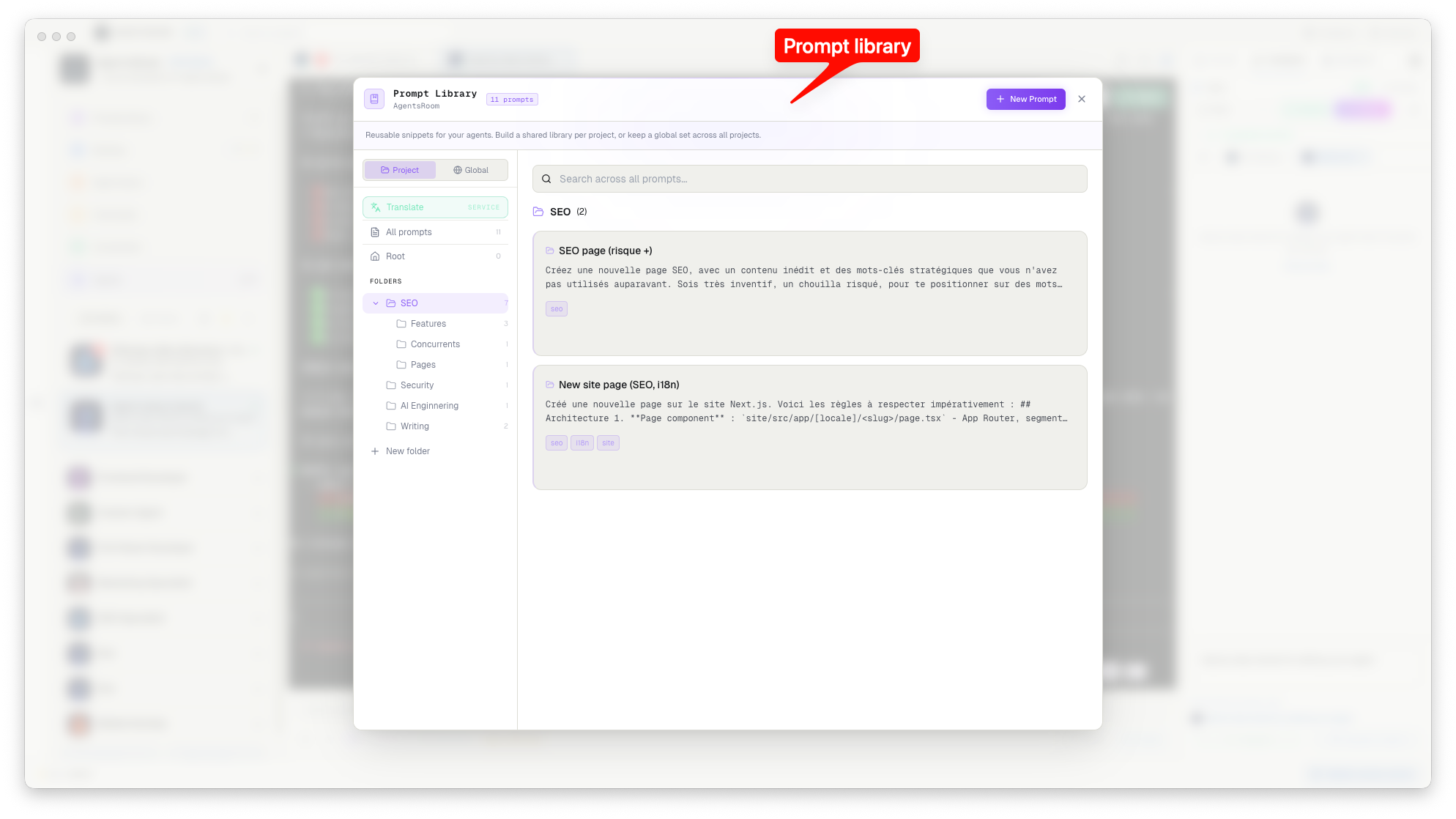
Arrêtez de réécrire les mêmes prompts. Enregistrez les meilleurs projet par projet, rangez-les dans des dossiers et envoyez-les à n'importe quel agent en un clic. Natif git. Aucun cloud requis.
Dossiers
Écris un middleware d'authentification JWT pour Express qui valide les jetons, rafraîchit ceux qui ont expiré et attache l'utilisateur décodé à req.user…
Note personnelle : la clé d'API de staging est dans 1Password sous « SaaS Staging ». Ne jamais la committer nulle part. En développement local, utiliser .env.local…
Crée un endpoint REST en suivant les conventions du projet : validation Zod, réponses d'erreur typées, requête Prisma avec gestion des erreurs…
Tout ce dont vous avez besoin, rien de plus
La bibliothèque de prompts est intégrée à chaque projet. Aucune installation, aucun plugin, aucune configuration supplémentaire.
Rangés dans des dossiers
Créez des dossiers par sujet, par workflow, par rôle d'agent. Réorganisez par glisser-déposer. Vos prompts, votre structure.
Synchronisation native git
Les prompts vivent dans .agentsroom/prompts.json, un vrai fichier de votre projet. Committez-le, poussez-le, et chaque machine qui récupère le dépôt reçoit les prompts automatiquement.
Prompts personnels, gitignorés
Marquez un prompt comme « Personnel » et il est stocké dans prompts-personal.json, automatiquement listé dans .agentsroom/.gitignore. Vous ne committerez jamais vos notes privées par accident.
Envoi immédiat à n'importe quel agent
Cliquez sur un prompt, cliquez sur « Envoyer à l'agent » et le texte part directement dans le terminal actif. Pas de copier-coller, pas de changement de contexte.
Recherche instantanée
Retrouvez n'importe quel prompt en quelques millisecondes. Filtrez par dossier, par étiquette, ou tapez simplement. La bibliothèque s'ouvre à pleine vitesse : elle lit des fichiers locaux.
Catalogue communautaire
Publiez un prompt pour tout le monde, ou reprenez celui de quelqu'un d'autre depuis l'onglet Communauté. Le partage est une case à cocher, décochée par défaut, et modérée. Chaque prompt publié est traduit dans 20 langues, corps compris, pour qu'un lecteur l'obtienne dans sa langue.
Historique des versions
Chaque sauvegarde qui modifie un prompt garde la version précédente. Ouvrez l'historique dans l'éditeur, comparez une ancienne version au texte actuel et restaurez-la en un clic, depuis le bureau ou l'application mobile.
Sauvegarde cloud (optionnelle)
Quand vous êtes connecté, vos prompts sont sauvegardés silencieusement sur votre compte. Restaurez-les sur n'importe quelle machine, même sans git.
Comment ça marche
Ouvrez n'importe quel projet
Cliquez sur le bouton Prompts, à côté d'Ajouter un agent dans l'en-tête du projet. La bibliothèque est limitée à ce projet.
Enregistrez votre premier prompt
Cliquez sur « Nouveau prompt », rédigez votre prompt, donnez-lui un titre, rangez-le dans un dossier. Activez Personnel s'il ne doit pas être committé.
Les prompts vivent dans votre dépôt
Les prompts publics sont enregistrés dans :
.agentsroom/prompts.jsonLes prompts personnels restent locaux
Les prompts personnels partent dans .agentsroom/prompts-personal.json, automatiquement gitignoré via :
.agentsroom/.gitignoreSynchronisation entre machines, gratuitement
Les autres outils synchronisent les prompts par le cloud. AgentsRoom les stocke dans .agentsroom/prompts.json : un simple fichier JSON à l'intérieur de votre projet. Committez-le une fois, et chaque développeur de votre équipe, sur chaque machine, récupère les mêmes prompts avec un git pull.
Prompts publics
.agentsroom/
└── prompts.json ← committé
Prompts personnels
.agentsroom/
├── .gitignore ← géré
└── prompts-personal.json ← ignoré
FAQ
La bibliothèque de prompts est-elle par projet ou globale ?
Par projet. Chaque projet possède son propre .agentsroom/prompts.json, limité à cette base de code. Les prompts restent ainsi pertinents pour le bon contexte.
La bibliothèque de prompts fonctionne-t-elle avec Claude Code, Codex et les autres CLI ?
Oui. La bibliothèque de prompts est agnostique du fournisseur : elle envoie du texte dans le terminal où tourne votre agent, donc le même prompt enregistré fonctionne avec Claude Code, Codex, GitHub Copilot CLI, Cursor et 10 autres CLI d'agent. Une bibliothèque par projet, quel que soit le CLI avec lequel vous l'ouvrez.
Puis-je partager mes prompts avec mon équipe ?
Oui. Committez .agentsroom/prompts.json dans votre dépôt. Chaque membre de l'équipe qui fait un pull récupère les mêmes prompts automatiquement. Aucun compte requis de leur côté.
Et mes prompts personnels, risquent-ils de fuiter ?
Non. Les prompts personnels partent dans .agentsroom/prompts-personal.json. AgentsRoom ajoute automatiquement ce fichier à .agentsroom/.gitignore dès la première utilisation. Ils ne quittent jamais votre machine par git.
Ai-je besoin d'un compte pour la bibliothèque de prompts ?
Non. La bibliothèque de prompts est entièrement locale : elle lit et écrit des fichiers JSON sur votre disque. Un compte débloque la sauvegarde cloud, comme filet de sécurité secondaire.
Puis-je réordonner et organiser mes prompts ?
Oui. Glissez-déposez pour réordonner les prompts dans un dossier ou les déplacer d'un dossier à l'autre. Créez autant de dossiers que nécessaire, ils sont gratuits.
Puis-je partager un prompt en dehors de mon équipe ?
Oui, et uniquement si vous le demandez. La bibliothèque reste locale ; une case à cocher dans l'éditeur, décochée par défaut, envoie une copie au catalogue public. Elle est scannée à la recherche de secrets, comparée aux quasi-doublons, relue par un humain, puis traduite dans 20 langues. Vous pouvez la dépublier à tout moment, et votre copie locale n'est jamais touchée.
Prompts liés
Liez n'importe quel prompt à un autre. Quand vous le copiez ou l'envoyez, les prompts attachés sont ajoutés automatiquement, chacun avec son titre. Écrivez vos règles une fois, référencez-les partout.
Découvrir les prompts liésVous aimerez aussi
Bloc-notes
Un éditeur de prompts épinglé au pied de page d'AgentsRoom. Rédigez de longs prompts dans une vraie zone de texte, conservez-les d'une session à l'autre et envoyez-les à l'agent actif en un clic.
Prompt engineering pour le code assisté par IA
Le guide pratique pour écrire des prompts qui livrent du code. Structure, contexte, contraintes : les patterns qui fonctionnent vraiment avec les agents IA.
Backlog et tableau de tâches
Empilez des tâches dans un backlog et déclenchez un agent sur chacune. Transformez votre bibliothèque de prompts en chaîne de montage pour livrer des fonctionnalités.
Revue par agent
Quand plusieurs agents travaillent en parallèle, filtrez les changements de code par agent, relisez leurs diffs isolément et committez chaque contribution séparément.
Pour aller plus loin
Comment communiquer avec vos agents IA : Claude, Codex, Antigravity, Grok Build
Le code n'est plus le goulot, la communication l'est. Voici comment parler à vos agents IA Claude, Codex, Antigravity et Grok Build pour aller plus vite, plus précis et avec moins de tokens.
AGENTS.md : un seul fichier de contexte pour tous tes agents de code (Codex, Antigravity, Claude)
AGENTS.md, c'est le fichier d'instructions portable que tes agents de code lisent avant de toucher à ton code. Ce qu'il faut y mettre, en quoi il diffère de CLAUDE.md, et comment garder un seul contexte entre Codex, Antigravity et Claude.
Arrêtez de réécrire vos prompts
Téléchargez AgentsRoom et commencez à construire votre bibliothèque de prompts en 30 secondes. Gratuit jusqu'à 2 projets.
App companion : suivez vos agents en déplacement
Utilisez Claude, Codex, Antigravity CLI ou un autre fournisseur IA.
Remontez bugs et demandes directement dans votre backlog public.