Multi-Agent Workflow • Handoff • Feedback Loop

Agent Teams.
A real tech crew, scripted.

AgentsRoom Teams chains your AI coding agents like a real engineering team. A Fullstack Dev ships the feature, a QA Engineer validates it, a PM signs it off. Each role is scripted, the workflow is visual, and every handoff carries the feature summary, the diff, the risks and the test hints. No more single agent doing everything badly.

Build your dream AI dev team on a visual canvas, just like an n8n workflow. Conditional edges, feedback loops, retries, max-cycles guard. Save it once, run it on every ticket, watch your agents pass the baton like seniors.

AgentsRoom Teams: visual multi-agent workflow editor, automatic handoff between Claude Code agents, Dev to QA feedback loop, MCP-based inter-agent communication.

Agent Teams is the AgentsRoom answer to a brutal truth about AI coding agents: a single agent that tries to do everything ends up doing everything badly. The Fullstack agent that codes, tests, reviews, deploys and writes the spec at the same time forgets half its instructions in the middle. The right answer, the one used by every serious software team in the world, is to split the work into roles. A developer codes. A QA engineer validates. A product manager signs off. A security reviewer audits. Each role has its own context, its own focus, its own tooling.

This is exactly what Agent Teams brings to AgentsRoom. You drop nodes on an infinite canvas (built on React Flow, the same engine as n8n, Make, Retool and Pipedream), each node is a Claude Code, Codex, OpenCode, Gemini CLI or Aider agent assigned to a specific role, and you wire them together. Run the team on a ticket from your backlog, or attach it to any new agent spawn. AgentsRoom orchestrates the chain: spawn the first agent, wait for the handoff, summarize the work, spawn the next agent with that summary as its inbound context, repeat until the team reaches the end node.

Other tools try to do this with a single super-agent and clever prompts. We tried that, it does not work past three steps. Roles drift, context gets lost, the agent forgets what it was supposed to verify. Agent Teams treats the agents as actual teammates: each one gets a clean session, a focused system prompt, a structured handoff payload, and a shared scratchpad to talk to the others. This is the AI engineering team workflow you actually want.

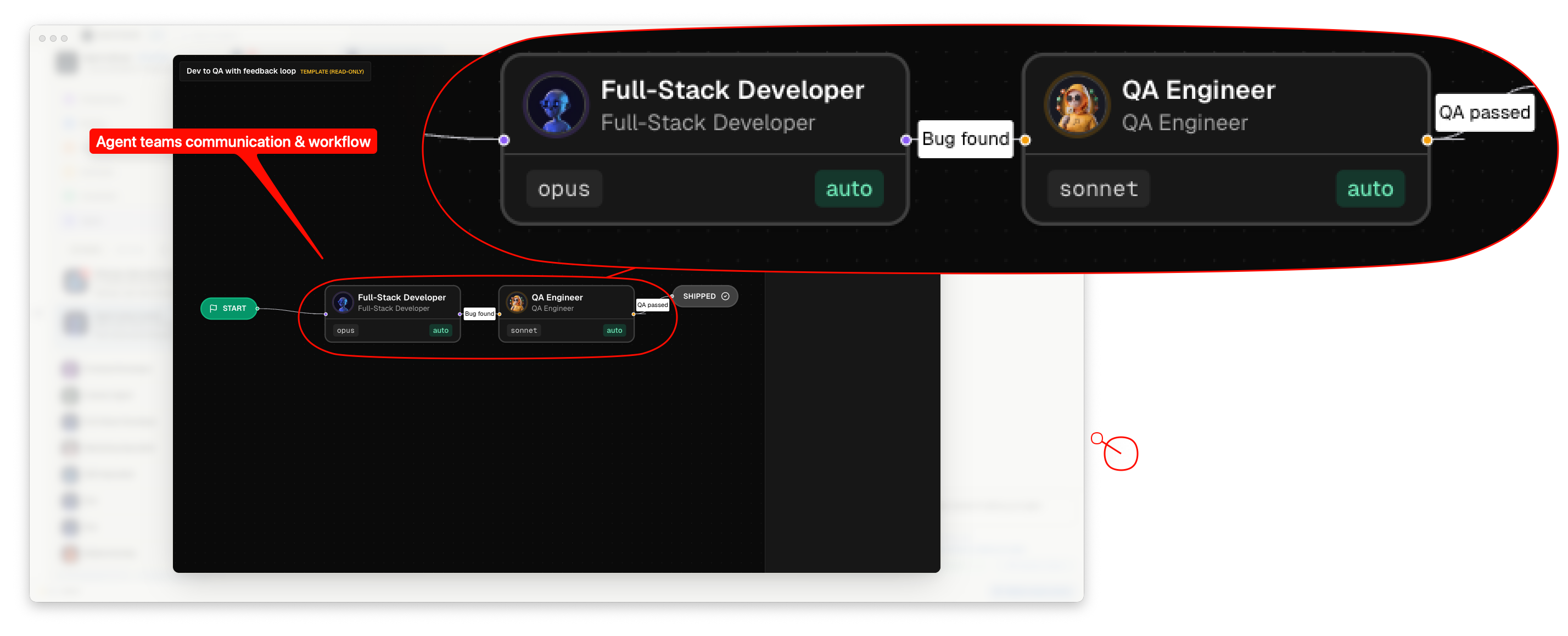
AgentsRoom Agent Teams visual workflow editor: nodes for Dev, QA, PM, Security and DevOps roles connected on an infinite canvas with conditional edges and feedback loops

AgentsRoom Teams editor: drop nodes for each role, wire them up, add conditions, save the team, run it on any ticket.

Multi-agent orchestration that actually scales

Every node on the canvas is an agent. You pick its role (Fullstack, Frontend, Backend, QA, Security, DevOps, PM, Architect, Mobile, Marketing, Git, SEO, Localization, or any custom role you have created), its model (Opus, Sonnet, Haiku, GPT-5, o3, Gemini Pro, etc.), its handoff mode (auto via Stop hook, or manual via a button) and a few lines of step-specific instructions. That is it. No prompt engineering ceremony, no YAML config file to write.

Edges connect the nodes. A simple edge means: when the first agent finishes its step, hand off to the next one. A conditional edge carries a flag check, for example qaPassed equals true. The QA agent sets that flag in its handoff payload, the runner picks the matching edge. This is how you build feedback loops: QA finishes, qaPassed equals false, edge sends back to Dev with the test hints and the risks. Dev fixes, hands off again. Loop until the QA passes or until the max-cycles guard kicks in.

Inter-agent communication is robust by design. AgentsRoom ships a dedicated MCP server (agentsroom-team) that gives every agent in the run a set of tools: read the team context, read the shared NOTES.md scratchpad, post a note for teammates, send a question to another role, read the inbox, read the timeline, read the git diff against the run baseline, and complete the step with a structured payload. These tools are re-injected into the Claude session at every turn, so they survive context compaction. Even after a /compact or a /clear, the agent still sees its team tools.

On top of that, a UserPromptSubmit hook reminds the agent of any new notes from teammates before each user message. A NOTES.md file in the workspace is append-only and survives crashes, restarts and Mac reboots. A handoff payload schema validated server-side prevents agents from handing off empty or junk payloads. This is the part most multi-agent demos quietly skip, and the reason most of them fall apart at cycle 3.

Everything you need to run an AI engineering crew

Visual workflow, real handoff, real feedback loops, real inter-agent communication. Built so you can ship a feature in one Slack ping instead of fifty.

Visual workflow canvas

Infinite zoomable canvas powered by React Flow, the same engine behind n8n, Retool, Pipedream and Make. Drop nodes, connect them, save the team. No code, no YAML.

14 built-in agent roles

Fullstack, Frontend, Backend, DevOps, QA, Security, PM, Architect, Mobile, Marketing, Git Expert, SEO, i18n. Plus any custom role you have already saved on your project.

Model and prompt per node

Each node picks its provider, its model and its step instructions. Use Opus for Architect, Haiku for QA, Codex for the heavy backend, Gemini for the cheap frontend. Mix and match.

Automatic handoff

When an agent calls team_complete_step, AgentsRoom builds the handoff payload (feature summary, changed files, risks, test hints, flags) and spawns the next node with that payload as its starting context.

Manual handoff option

Prefer to validate every step? Switch the node to manual mode. The agent waits, you click 'Hand off' when you are happy with the result. Best of both worlds.

Conditional edges

Each edge can carry a flag check (e.g. qaPassed equals true). Build branches: if QA passes go to PM, otherwise loop back to Dev. Real workflow logic, no scripting.

Feedback loops

Dev to QA to Dev to QA. When QA sends the ticket back, the original Dev agent is reused with full memory of the previous cycle, so it actually fixes the regression instead of starting over.

Max-cycles guard

Configurable cap (default 3). Avoids infinite QA-rejects-Dev loops. When the cap is reached, the run pauses on awaiting-finalization and you decide what to do.

Shared NOTES.md scratchpad

Every agent in the run reads and writes a markdown file in the workspace. Survives compaction, crash, restart. The single source of truth for the team's reasoning.

Role-to-role inbox

Need the QA to ask a question to the Architect mid-run? team_ask posts a message to the role's inbox. The next agent on that role reads it and replies. Real chat between agents.

MCP-based inter-agent comm

All team tools are exposed via an MCP server. Tools survive Claude context compaction (Anthropic re-sends them every turn). Resilient to /clear, /compact and long loops.

Haiku-powered handoff summary

If an agent does not write its own feature summary, a small Haiku call generates one from the git diff. Cheap, fast, and the next agent always lands with context.

Browser MCP propagation

A team node with verifyInBrowser switches its agent to browser-access mode automatically. The QA node lands with full browser tools (navigate, click, type, screenshot, get logs).

Ephemeral agents per run

Every team run spawns fresh agents and destroys them on dismiss. Your project agent list stays clean. The team is the workflow, the agents are the runtime.

Global and project teams

Save reusable teams in your global library (~/.agentsroom/teams) or pin them to a specific project (committed with the room). Same editor, different scope.

Team templates included

Three seed templates ship with the app: Dev to QA, Dev to QA with feedback loop, and Dev to Security to QA. Duplicate, edit, run. Start in 30 seconds.

Run timeline UI

Each handoff appears as a card in the run timeline: which role just finished, what the summary says, which files changed, which flags were set. Auditable, replayable.

Run on any backlog ticket

Drop a ticket on a team and the chain starts on that ticket. The first agent reads the ticket title and body, the rest of the team picks it up from there.
14 specialized roles, ready to be wired

Each role has its own system prompt, focus areas and example tasks. Mix and match them on the canvas. Add your own custom roles at any time.

Fullstack
End-to-end implementation
Frontend
UI, components, design tokens
Backend
API, database, performance
DevOps
CI/CD, infra, deployment
QA
Tests, edge cases, regression
Security
Audit, OWASP, secrets, auth
Architect
System design, refactor
PM
Specs, priorities, scope
Mobile
iOS, Android, React Native
Marketing
Copy, landing, SEO
Git Expert
Branches, rebase, history
SEO
Rankings, structured data
Localization
i18n, l10n, 14 languages
Custom
Bring your own role

Why a real team beats one super-agent

Multi-agent orchestration sounds like a buzzword. Here is the practical difference, on a feature you would actually ship.

Scenario: add a Stripe checkout flow to an e-commerce site

Solo super-agent

  • Reads the ticket. Writes 600 lines across the API, the React form, the webhook, the migration, the tests.
  • Forgets the idempotency key on the webhook. Forgets to test the failure path. Forgets the staging env var.
  • Says 'Done'. You spend two hours hunting bugs in production.

Agent Team (Dev to Security to QA)

  • Fullstack agent ships the implementation, commits, hands off with a summary and a risks list flagging the auth change.
  • Security agent reads the diff, audits the webhook signature check, writes test hints for the QA in the handoff payload.
  • QA agent runs the test hints in the embedded browser, hits an idempotency bug, sets qaPassed equals false, kicks the ticket back to Dev with the exact reproduction.
  • Dev fixes, hands off again. QA passes. The PM finalizes. Run goes to done.

Same ticket, same models, same project. Different shape of work. The team approach catches what the solo agent misses, because every role has a focused brief and a structured handoff.

How a team run works

01

Open the Teams tab

In your project view, the Teams tab lists three seed templates (Dev to QA, Dev to QA with feedback loop, Dev to Security to QA) plus any team you have already saved. Duplicate a template or click 'New team'.

02

Build the workflow on the canvas

Drop agent nodes on the React Flow canvas. For each node, pick the role (Fullstack, QA, Security, PM, etc.), the provider, the model, and a few lines of step instructions. Wire them with edges. Add conditions on edges if you need branching.

Dev → QA → PM
03

Set the handoff mode per node

Auto handoff: the agent calls team_complete_step when its work is done, the runner takes over. Manual handoff: the agent waits for you to click 'Hand off'. Mix both as needed.

04

Run the team

From a backlog ticket, click 'Run with team'. From an empty agent slot, click 'Create as team'. The first node spawns as an ephemeral agent in the project workspace.

05

Watch the handoff happen

When agent N finishes, AgentsRoom builds the handoff payload (feature summary via the agent or via Haiku, git diff, risks, test hints, flags), appends a note to NOTES.md, picks the right outgoing edge based on the flags, and spawns agent N+1 with that payload as its inbound context.

06

Loop, end, finalize

Feedback loops re-enter the original agent (full memory preserved). End node triggers awaiting-finalization. You click 'Finish run'. Dismiss the banner to destroy the agents and free the PTYs.

Inter-agent communication that survives anything

The detail most multi-agent demos skip. Here is what makes Agent Teams hold over long runs and many cycles.

Claude Code agents have a context window and they compact it. The classic mistake of multi-agent systems is to put the team coordination in the system prompt only. After two cycles of /compact, the agent has no idea it is in a team. AgentsRoom does not do that.

All team coordination lives in three places that survive compaction. First, an MCP server (agentsroom-team) exposes tools (team_get_context, team_read_notes, team_post_note, team_read_inbox, team_ask, team_read_timeline, team_read_diff, team_complete_step). MCP tools are re-sent to Claude at every turn by the CLI, so they are immune to context compression.

Second, a UserPromptSubmit hook runs before every user message and prepends a small reminder if there are new notes or new inbox messages for that role. Cheap when nothing happens, decisive when it does.

Third, NOTES.md and state.json live on disk in the workspace. The agent can re-read them at any moment with a simple Read or with team_read_notes. They survive crashes, restarts, /clear, /compact and Mac reboots. The system prompt is never the source of truth, the disk and the MCP tools are.

What people build with Agent Teams

Dev to QA pipeline

The classic. Fullstack ships the feature. QA validates it in the embedded browser, runs the test hints, signs off. Two-node team, runs on every ticket from the backlog.

Dev to QA with feedback loop

Same as above, but with a conditional edge: qaPassed equals false sends the ticket back to Dev with the test hints. Max 3 cycles. Catches regressions before they reach a human reviewer.

Dev to Security to QA

For features that touch auth, payments or PII. Security agent reviews the diff, flags risks, writes test hints for QA. Used by teams shipping fintech, healthtech and B2B SaaS.

PM to Architect to Dev

Spec-first workflow. PM agent turns the ticket into a structured spec. Architect picks the approach. Dev implements. Three roles, clean separation, traceable decisions.

Frontend, Backend, DevOps fan-out

Sequential split for full-stack features. Frontend ships the UI. Backend ships the API. DevOps adds the infra config. Each role works in its area, hands off with a clean diff.

Marketing to SEO to i18n

Yes, AgentsRoom Teams is not just for code. Marketing writes the landing copy. SEO injects the keywords. Localization translates to 14 languages. One team, one ticket, one ship.

How it compares to other multi-agent approaches

Multi-agent orchestration is a crowded buzzword. Here is what is actually shipping, and where AgentsRoom Teams fits.

Anthropic Subagents (Task tool, .claude/agents) let a single Claude session delegate to specialized helper agents. Great for inline delegation, but the parent session is still the coordinator and a single context. AgentsRoom Teams is one level above: each team node is a separate top-level Claude session with its own window, its own state, its own scrollback. CrewAI, AutoGen and LangGraph are excellent Python frameworks for multi-agent flows, but they live outside your IDE and they do not run real Claude Code, Codex or Gemini CLIs end-to-end on your local repo. n8n, Make, Pipedream and Retool ship the same kind of canvas editor we use, but they are general-purpose automation platforms, not built for AI coding agents. AgentsRoom Teams is the canvas-style multi-agent workflow editor, but specifically wired to your CLI agents, your project, your git, your terminals and your browser.

Claude subagentsTask toolCrewAIAutoGenLangGraphn8nMakePipedreamRetoolTemporalAirflowPrefectDagster

If you build agentic systems in Python, keep using CrewAI or LangGraph for production pipelines. If you ship code with Claude Code, Codex CLI, OpenCode, Gemini CLI or Aider, Agent Teams is the team workflow that runs where you actually code.

FAQ

How is this different from Claude Code subagents (the Task tool, .claude/agents)?

Claude subagents are inline delegations from a single parent Claude session. The parent decides when to call a subagent, the subagent runs in an isolated context window, returns a result, and the parent keeps going. AgentsRoom Teams is one level above: each node is a top-level Claude Code session with its own terminal, its own state and its own scrollback. You see every agent run live in its own tab, you can talk to any of them at any moment, you can pause the team, change the workflow and resume. It is not a replacement for Claude subagents, you can absolutely use both. A team node can use subagents internally.

Does this only work with Claude Code?

It works with every AgentsRoom-supported provider (Claude Code, Codex CLI, OpenCode, Gemini CLI, Aider). Each team node picks its own provider and model. The MCP-based team coordination tools work identically across providers because they are exposed through the standard Model Context Protocol. You can run a team with Codex on the heavy backend node and Haiku on the QA node if that is what fits your budget and your latency.

What is a handoff payload?

A structured object that travels from one agent to the next. Fields: featureSummary (a short description of what was just shipped), changedFiles (git diff name-status), touchedAreas (UI, API, DB, config), risks (anything the next agent should worry about), testHints (priorities for QA), flags (booleans like qaPassed, used by conditional edges). The agent calls team_complete_step with this payload, the runner validates it server-side, the next agent receives it as its starting context.

Can agents really go back and forth (Dev to QA to Dev)?

Yes. When a node is re-entered (cycle greater than 1), AgentsRoom does not spawn a new agent. It reuses the original agent of cycle 1, writes the new handoff payload directly into its existing terminal, and the agent keeps its full Claude session memory of the previous cycles. This is critical: a Dev agent that already knows what QA flagged last time fixes the bug. A fresh Dev agent without memory would just repeat the same mistake.

What happens if QA keeps rejecting Dev forever?

The team config has a max-cycles guard, default 3. When the cap is reached, the run pauses with a 'blocked' status and waits for you. You can finalize the run, manually hand off one more time, or cancel everything. No infinite loops, no surprise overnight bills.

Do all team agents share the same git workspace?

Yes. The team runs in a single workspace and a single branch (or worktree if you use the AgentsRoom Worktrees feature). Each agent sees the work of the previous one through git. The handoff payload includes a git diff against the run baseline so the next agent knows exactly what is new.

Does this require an extra subscription?

No. Teams are part of AgentsRoom. You bring your own provider keys (Claude, Codex, OpenCode, Gemini, Aider) and you pay only for the tokens you use, like with a single agent. Running a Dev to QA team on a small ticket typically costs the same as running a single Fullstack agent, because Haiku/Sonnet on the QA step is cheap.

Where are the teams stored? Are they committed to git?

Project-scoped teams live with the room, synced to the cloud and cached in {project}/.agentsroom/teams-cache.json (gitignored). Global teams live in ~/.agentsroom/teams/{teamId}.json on your machine, one file per team. You decide which scope fits each workflow.

What if an agent crashes or the app restarts mid-run?

Run state is persisted to disk in {workspace}/.agentsroom/team-runs/{runId}/ (state.json, NOTES.md, inbox/, timeline.jsonl). NOTES.md is append-only, every state write is atomic. Agents can re-read everything at any time with team_read_notes or team_get_context. The orchestration layer is being hardened to fully replay an interrupted run on app restart, but the on-disk story is already crash-safe.

Can I run several teams in parallel on different tickets?

Yes. Each team run is independent and identified by its runId. You can have a Dev to QA team running on ticket A, a Dev to Security to QA team on ticket B and a PM to Architect to Dev team on ticket C, all live in the same project. Inside a single run, execution is sequential (one node active at a time) for predictability.

Build your dream AI dev team

Three templates ship with the app. Open AgentsRoom, drop nodes, draw edges, run on any ticket. Your AI engineering crew is one click away.

FreeDownload AgentsRoom

Companion app: monitor your agents on the go

Bring your own: Claude, Codex, Gemini CLI, or other AI provider.

Get the extension
Chrome Web Store

Push bugs and requests straight to your public backlog.

A glimpse of AgentsRoom in action.

Multiple projects
Multi-provider
Multiple agents
Live status
File diff & commit
Mobile companion
Live preview
Agent teams
Browser automation
Backlog-driven dev
Prompt Library
Skills Library
View all features