A fresh context for your agent,
without losing the thread
Three hours into a task, the context is full of old logs and abandoned attempts, and the agent starts forgetting what it decided. You want it to start over clean, but not from zero.
Hand over and restart does the handoff for you: the agent writes where it stands in a file of the project, then its console starts a new conversation in the same tab, and the first message tells it to read that file and carry on. One click, one confirmation, on Claude Code, Codex and every agent CLI that has the AgentsRoom tools.
Long sessions wear out. Every file the agent read, every test log it printed and every approach it tried and dropped stays in its context window. At some point the useful part, the decisions and the plan, is buried under the rest, and the answers get worse.
The usual fix is a manual handoff: ask the agent to write a summary to a file, type /clear, then paste a first message that tells the new conversation to read the summary. It works, and people write handoff skills and prompts to make it faster, but it still takes you away from your work, three steps per agent, every time.
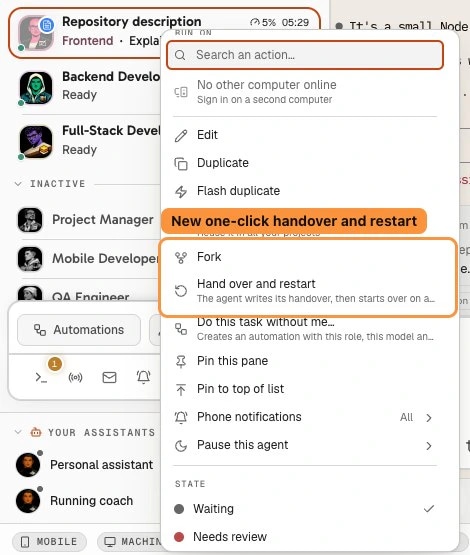
In AgentsRoom it is one menu entry. The agent writes its handover itself, because it knows what matters in its own context, and restarts on its own once its turn is over. You stay in control of one thing: the first message the new conversation starts with.
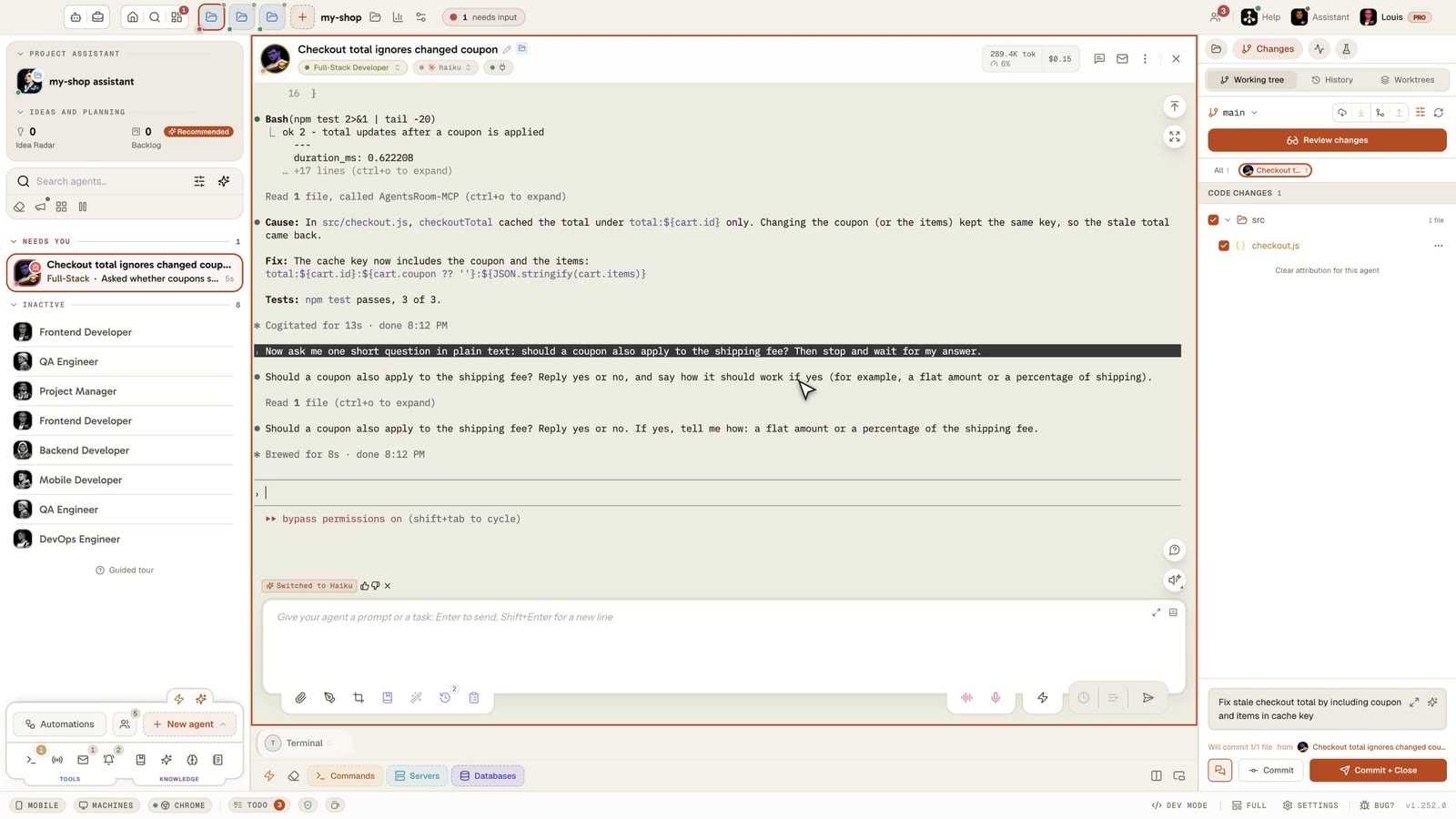
Filmed in the real app: a Claude Code agent does steps 1 and 2 of a three-step refactor, then a right-click on it, Hand over and restart and one confirmation. It writes where it stands, what it decided and what is left in a file of the project, and its console starts over in the same tab on a new conversation. It reads that file, goes on with step 3, and 5 tests out of 5 pass.
What Hand over and restart does
A clean context that starts from what the agent knew, not from zero.
One click instead of three steps
Right-click a running agent, pick Hand over and restart, confirm. No /clear to type, no summary to request, no prompt to paste. The console starts over in the same tab, with the same role, the same CLI and the same model.
A handover written by the agent
The agent writes where it stands, the decisions it made and what is left to do, in a file of the project: its own handover file if its routine keeps one, otherwise .handoff/latest.md. The file stays on disk, so you can read it too.
Your first message, saved per agent
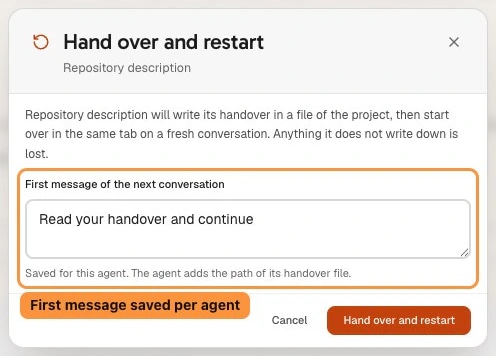
The new conversation opens with "Read your handover and continue" followed by the path of the file. Change it in the dialog and it is saved for that agent, on every computer of your account and on the phone.
Messages wait for the new conversation
From the moment the agent starts its handover, messages sent to it by you or by other agents are held and delivered to its next conversation, so nothing lands in the old one at the last second.
A coordinator can ask, never decide
The coordinator agent of a project can ask for a hand over on a teammate, for example when its context is full. The same dialog opens with the coordinator's name and its reason, and nothing happens until you click Hand over and restart.
Every CLI with the AgentsRoom tools
The restart goes through the AgentsRoom tools, not through a command of one CLI, so it works the same on Claude Code, Codex and the other agent CLIs that load them. A CLI without them says so, and you type /clear in its console instead.
How it works
Four steps, and you only do the first two.
- 1
Open the agent menu
Right-click an agent that is running on this computer and pick Hand over and restart. On the phone, long-press the agent and pick the same entry.
- 2
Check the first message
The dialog shows the First message of the next conversation, "Read your handover and continue" by default. Edit it if this agent needs something else, it is kept for next time, then click Hand over and restart.
- 3
The agent writes its handover
AgentsRoom asks the agent to write its handover in a file of the project and to end its turn. Messages for it now wait for its next conversation.
- 4
The console starts over
Once the turn is over, the console restarts on a new conversation in the same tab. The first message, followed by the path of the handover file, is sent for you, and the agent picks the work up where it left it.
Hand over, /compact or /clear?
/clear throws the whole conversation away. It is the right tool when the task is finished and the next one has nothing to do with it, and the wrong one in the middle of a task, because everything the agent knew goes with it.
/compact replaces the conversation with a summary the CLI writes, in the same session. You do not choose what survives, the summary lives only in the context, and a long session compacted several times keeps a summary of a summary.
Hand over and restart sits between the two. The agent writes its own handover, in a file you can read and edit, and the new conversation starts with nothing else in its context. It is the move for a task that is not finished but whose context is worn out. What the agent does not write down is gone with the old conversation, so it is worth a look at the file when the stakes are high.
Limits
- The agent needs the AgentsRoom tools (MCP) to restart itself. A CLI that does not load them cannot, and the action tells you to type /clear instead.
- The restart waits for the end of the agent's turn. If the agent is busy and the action says it cannot restart now, try again once it has answered.
- It is refused, with a message that says why, for a step of a running Agent Team, during a QA run, and while the project's terminals are shown in another window: bring them back to the main window first.
- One restart every 2 minutes and 6 per hour per agent, so a routine stuck in a loop cannot restart an agent over and over.
- The entry shows only for an agent running on this computer: not for an agent running on another machine of your account, and not for the project assistant.
- Anything the agent does not write in its handover is lost with the old conversation.
Frequently asked questions
Ask us something elseHow do I give a Claude Code agent a fresh context without losing its progress?
What is the difference with /compact?
Where does the handover file go?
Can I change the first message of the new conversation?
Can an agent hand over and restart on its own?
Does it work with Codex and the other CLIs?
Why does it say the agent cannot restart now?
Further reading
You may also like
Agent Fork
Fork a running AI agent in one click and get a twin that already has the whole conversation: same role, same CLI, same context. Or ask a side question in a bubble the agent never sees, so its terminal keeps working.
Token usage : per session : live
Live token meter on every Claude Code session in AgentsRoom. Red overuse alert, cache hit rate, full input, output and cache breakdown. 100% local. Free to download on macOS, Windows and Linux.
MCP : Agent-pilotable : Manual or automated
Four MCP servers let Claude Code, Codex and other CLIs drive AgentsRoom itself: read the backlog, run dev commands, use the prompt library, pilot the browser.
































Give your agents a fresh start that remembers
Hand over and restart is in AgentsRoom on macOS, Windows and Linux, free to download.
Companion app: monitor your agents on the go
Bring your own: Claude, Codex, Antigravity CLI, or other AI provider.
Push bugs and requests straight to your public backlog.
Agents you read like a conversation
Each agent has a role, a face, and a thread you read like a messaging app.