Relisez le Travail de Chaque Agent Separement
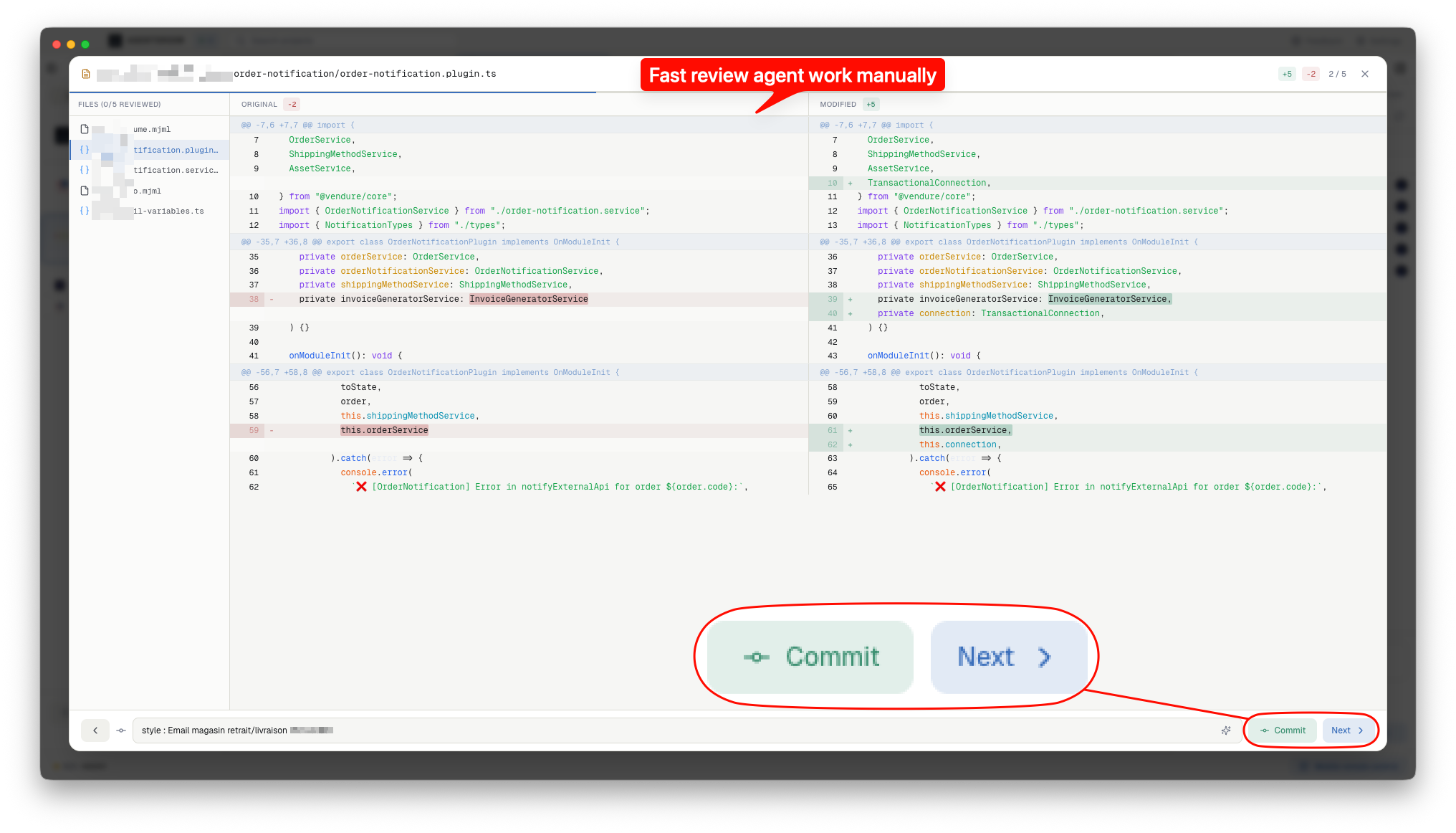
Quand cinq agents modifient cinquante fichiers, tout relire d'un coup est ingerable. AgentsRoom identifié quel agent a modifié quels fichiers. Filtrez par agent, relisez leur travail isolement, et commitez chaque contribution séparément.
Comment Fonctionne la Revue par Agent
Tous les outils nécessaires pour relire les modifications multi-agents sans perdre le fil de qui a fait quoi.
Onglets de Filtre par Agent
Quand deux agents ou plus ont modifié des fichiers, des onglets apparaissent en haut du panneau de revue. Chaque onglet affiché l'avatar de l'agent, son nom et le nombre de fichiers. Cliquez sur un onglet pour ne voir que les modifications de cet agent.
Attribution Automatique des Fichiers
AgentsRoom attribue les fichiers de deux façons. Un hook se déclenche à chaque appel Edit, Write et NotebookEdit et enregistre le fichier au moment où l'agent l'écrit. Pour les fichiers écrits par une commande shell, AgentsRoom sait quand chaque agent a lancé ses commandes et compare ces moments à la date de modification du fichier.
Commits Cibles par Agent
Quand un filtre agent est actif, l'action de commit ne stage que les fichiers de cet agent. Le travail de chaque agent obtient son propre commit avec un message clair. Votre historique git reste organisé par contributeur, même quand les agents travaillent en parallele.
Navigation Clavier Filtree
Naviguez dans la liste de fichiers filtree avec les fleches ou les raccourcis j/k. La barre de progression se met à jour pour refleter uniquement les fichiers du filtre actif. Marquez les fichiers comme relus un par un jusqu'à ce que l'ensemble filtre soit complet.
Suivi Automatique de l'Agent Actif
Basculez vers le terminal d'un agent et la liste de fichiers se filtre automatiquement pour afficher ses modifications récentes. Pas besoin de sélectionner le filtre manuellement. Vous pouvez changer a tout moment en cliquant sur un autre onglet.
Attribution au Niveau du Fichier
Chaque fichier dans le panneau de modifications indique quel agent l'a modifié. Quand plusieurs agents touchent le même fichier, tous sont listes. Vous savez toujours qui a change quoi, sans ambiguite.
Du Travail en Parallele aux Commits Propres
Quatre étapes pour passer du travail multi-agents a un historique git organisé.
Les agents travaillent en parallele
Plusieurs agents Claude Code s'executent simultanément sur votre projet. Chaque agent se concentre sur sa tâche assignee et modifié les fichiers nécessaires.
AgentsRoom suit chaque modification
Pendant que chaque agent travaille, AgentsRoom note les fichiers qu'il touche, qu'il soit passé par un outil d'écriture ou par une commande shell.
Filtrez par agent en mode revue
Ouvrez le mode revue et cliquez sur l'onglet d'un agent. La liste de fichiers se réduit pour ne montrer que les modifications de cet agent. Relisez ses diffs, posez des questions sur des changements spécifiques, et marquez les fichiers comme relus.
Commitez par agent
Une fois les fichiers d'un agent relus, commitez uniquement ses modifications. Le commit ne stage que ces fichiers. Repetez pour chaque agent afin de construire un historique git propre et bien attribue.
FAQ
Comment AgentsRoom sait-il quel agent a modifié quel fichier ?+
Puis-je relire toutes les modifications d'un coup, sans filtrer ?+
Que se passe-t-il si deux agents modifient le même fichier ?+
Est-ce que cela fonctionne avec n'importe quel nombre d'agents ?+
Puis-je commiter les modifications de tous les agents ensemble au lieu de séparément ?+
Pour aller plus loin
Faut-il encore relire le code de ses agents IA ?
Vos agents écrivent du meilleur code que la moitié des pull requests que vous mergiez avant. Faut-il encore lire chaque ligne ? Le débat pris au sérieux des deux côtés, les 10 signaux qui trahissent un agent qui a déconné, et le niveau de relecture que mérite vraiment chaque changement.
Claude marque désormais tout ce qu'il écrit. Votre code n'est presque pas concerné.
Anthropic marque désormais les sorties de Claude. Ce qui est réellement marqué, pourquoi le code y échappe en grande partie, qui peut le détecter, et pourquoi votre SEO ne bouge pas.
Relisez le Code Multi-Agents avec Clarte
Téléchargez AgentsRoom et voyez exactement ce que chaque agent IA a modifié dans votre codebase. Gratuit jusqu'à 2 projets.
App companion : suivez vos agents en déplacement
Utilisez Claude, Codex, Antigravity CLI ou un autre fournisseur IA.
Remontez bugs et demandes directement dans votre backlog public.