AI agents that ask clarifying questions
and wait for your answer
When your agent needs a decision, the question no longer hides in the middle of a 200-line reply. It shows up in a card right above the agent's input box: the question, clickable options, one line on what each option implies. You click, and the agent goes on with your choice instead of a guess.
Same card in Codex, Claude Code, Cursor, GitHub Copilot CLI and every agent CLI with MCP. Answer from your desk, from the AgentsRoom mobile app, or with two buttons on the lock screen.
Reading the database schema
Two ways to store the sessions. Asking you.
Where should the sessions live? → Postgres
Adding the sessions table
Where should the sessions live?
Your answer, or an option number
The agent asks, the card waits above its input box, one click answers, and the agent opens its reply with your answer.
You hand an agent a task and switch to something else. Twenty minutes later it has written 300 lines, and somewhere in the middle of its reply sits a question: Postgres or Redis? Either it picked one and kept going, or it stopped and the question scrolled out of view. Both ways, you find out late.
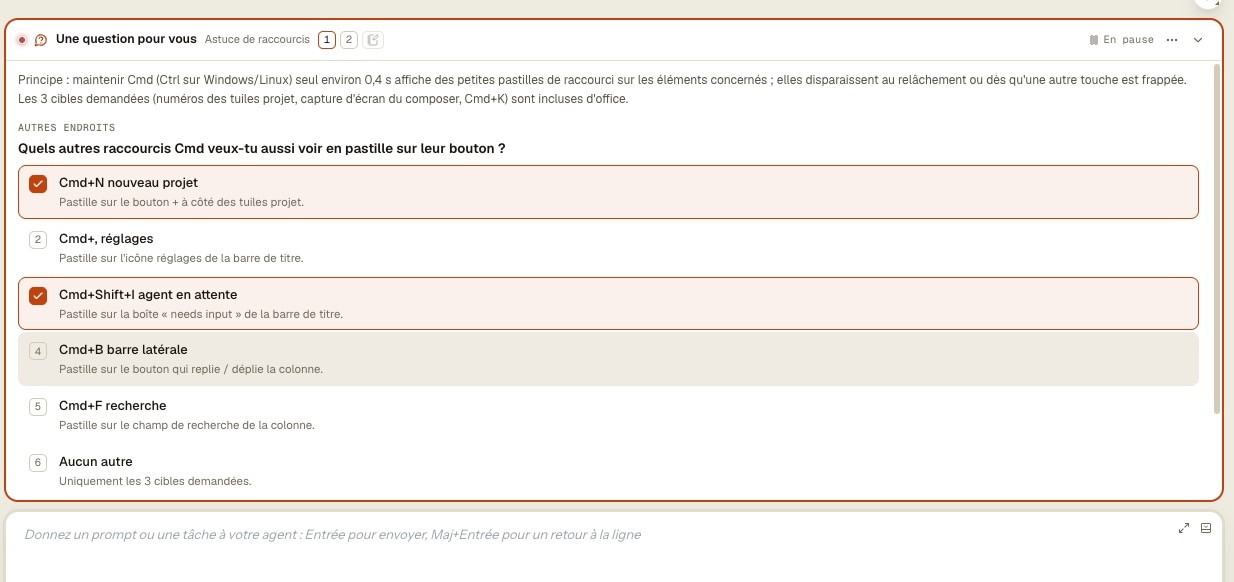
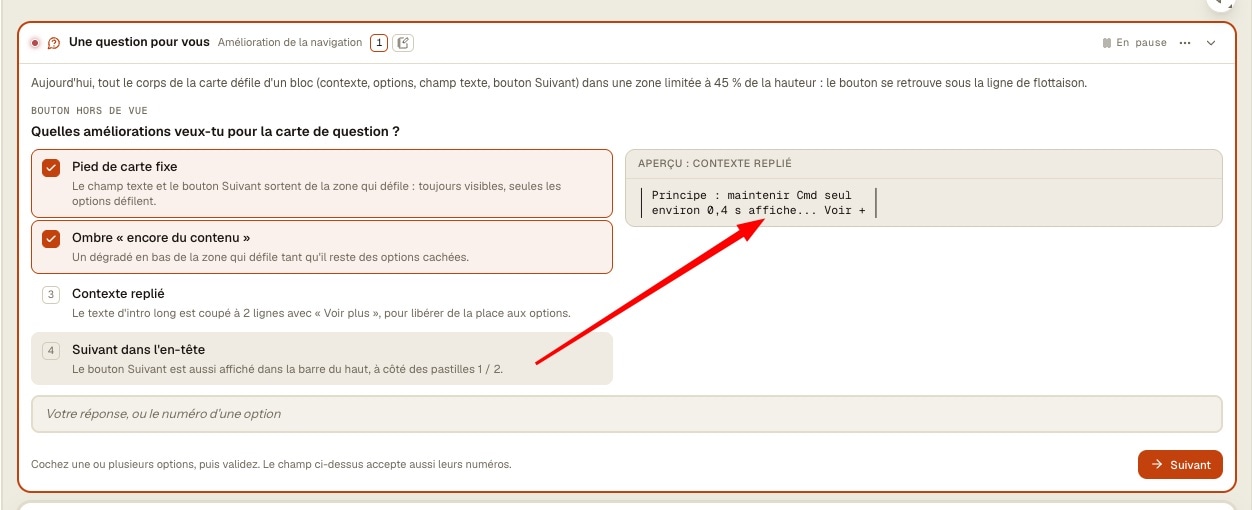
Structured questions fix that on the agent's side. AgentsRoom gives every agent the ask_user tool and a short brief at launch: when you need a decision, a preference or a missing fact, ask with the tool, then wait. The question becomes a card glued to the agent's input box, with clickable options, a line under each one, and a mockup when the agent compares layouts.
No arrow keys in the terminal, no hunting through the scrollback. The agent is marked as waiting for you, like any agent that needs you: red dot, Waiting for input list, push on your phone. And you answer wherever you are: in the pane, from that list at the top of the window, in the mobile app, or straight from the lock screen.
What the question card does
Everything an agent needs to ask a clean question, and everything you need to answer it in two seconds.
One question at a time
A card holds one to four questions, shown one after the other. Numbered steps in its header take you back to an earlier answer before you send.
Options that explain themselves
Two to eight options per question, each with a line on what it implies: cost, risk, side effect. On a single-choice question, your click is the answer and the next question appears.
Several picks when it makes sense
When more than one answer works, the options become checkboxes. Tick what you want, then Next.
Your own words
None of the options fits? Type in the card's own field. Numbers work too: 2 picks the second option, 1, 3 picks two at once. Enter sends.
Mockups side by side
Comparing layouts? The agent attaches a mockup to each option, in plain text or ASCII, or in HTML drawn in an isolated frame. Hover an option to see it.
A last word for the agent
Every card in the pane ends on Additional notes: add the remark no option covered, or click Skip and send.
The terminal stays in view
The card sits above the input box and pushes the terminal up instead of covering it. Fold it to one line with the arrow in its header: the question stays open.
The decision stays in the log
CLIs fold their tool calls, so the agent opens its reply by restating each question with your answer. Scroll back tomorrow and the decision is still there.
How a structured question works
Four steps, and the agent never moves on a guess.
The agent hits a decision
It needs a choice from you: which database, which wording, whether to touch the migration. Instead of writing the question in its reply, it calls ask_user, the question tool of the AgentsRoom MCP server.
The card appears above its input box
The question, its options, and the agent's context in a line or two. The agent switches to waiting for you: red dot on its tab, Waiting for input list, push on your phone.
You answer
Click an option, tick several and press Next, or type your own answer in the card's field. At the end, add a note or click Skip and send.
The agent goes on with your answer
It gets your choices and your note, restates them at the top of its reply, and carries on with what you decided.
Away from your desk? The question waits for you
No CLI holds a tool call open forever. AgentsRoom works around it, so your answer is never lost.
- The agent asks
- Pause in 0:17
- Paused, the card stays
- You answer, even an hour later
- Sent as a message, the agent resumes
The wait ends, the question stays. Whatever the CLI, a late answer reaches the agent as a message.
Every CLI cuts a tool call after a while: Codex stops at 60 seconds by default. So the agent waits a set time for the card, 45 seconds unless you change it (anywhere from 10 to 600). The header counts down: Pause in 0:17.
At zero the card does not close. The agent pauses, the header says Paused, and the agent stays marked as waiting for you. Answer an hour later and your answer is typed to the agent as a new message starting with [AgentsRoom] Answer to your question, every question recalled. It picks up where it stopped.
Claude Code and Grok Build wait as long as your setting says. Codex, and the CLIs whose limit is unknown, pause after about 50 seconds whatever the value: their tool calls are cut at 60.
Answer from anywhere
A card is shared by every screen of your account. The first answer wins, and the card closes on the other screens.
From the Waiting for input list
The list at the top of the window shows the question under the agent's name. A single question with a single choice is answered right there, in one click. Anything richer offers Open the agent.
From the mobile app
The same card sits above the agent's input box in the AgentsRoom app: tap an option, or type in the card's field. It folds to one line and never takes the whole screen. HTML mockups stay on the computer, text mockups show on the phone.
From the lock screen
A single question with two short options becomes two buttons on the iPhone Live Activity or the Android live notification. Face ID first on iPhone, an unlocked phone on Android. Any other card shows Open.
Never an answer to the wrong question
Each answer carries the card and the step it was given for. If the card moved on in the meantime, the answer is refused instead of landing on a question you never saw.
One card for every agent CLI
The question goes through AgentsRoom, not through the CLI's own dialog.
In Codex, a question often lands in the middle of the reply while the agent keeps going. Claude Code has its own dialog, answered in its terminal. Other CLIs each do their own thing. With structured questions on, they all ask the same way: through ask_user, a tool of the AgentsRoom MCP server that AgentsRoom already connects to every agent it launches.
Nothing to install, no rule to add to AGENTS.md or CLAUDE.md: AgentsRoom lists the tool and briefs the agent when it starts. Only the agents that have the feature on see the tool at all, so the others don't spend a single token on it.
It works with Claude, Codex, GitHub Copilot CLI, Cursor and 9 other agent CLIs, on macOS, Windows and Linux. Aider is the exception: it has no MCP client, so it keeps asking in the conversation.
For agents: the MCP side
An agent asks with ask_user: one to four questions, two to eight options each, multiple choice, a mockup per option. It can also turn the feature on or off for you with settings_set, when you ask it to.
ask_usersettings_setOn by default, and you choose where
Structured questions are on for every agent. Turn them off everywhere, for one project, for one agent, or for a single question.
From the card itself
The ⋯ menu of any card: Stop asking with cards, then For this agent, For this project or For all projects. A message says where to turn cards back on, with Undo.
For every agent
Settings > AI providers & accounts > Structured questions. The same place sets how long the agent waits before pausing, and whether HTML mockups are drawn.
For one project
Project settings > Default agents. Follow the global setting again removes the override.
For one agent
Edit agent > Advanced options: Same as Settings, On: asks through cards, or Off: asks in the conversation.
For one question
Rather talk it through? Answer in the conversation instead, in the ⋯ menu: the card closes, the agent is told and asks again in plain text.
A change applies at the agent's next launch, because its tool list and its brief are set when it starts. The global and project switches follow your account on every computer.
Questions agents actually ask
Each card is a decision the agent should not take alone.
Pick a stack
Where should the sessions live?
Postgres, Redis or a signed cookie, each with its cost in one line. One click, and the migration targets the store you picked.
Choose a layout
Which header layout?
Three ASCII mockups. You hover, compare, pick the second, and add a note: smaller logo.
Stop before the irreversible
Drop the legacy table now, or keep it one more release?
The agent stops before the step you can't undo, instead of deciding for you.
Scope the work
Which other shortcuts should get a badge?
Six options, two ticked. The agent builds those two and leaves the rest alone.
Name things
What should the setting be called?
Four wordings, each with where it shows in the app. None fits? You type yours.
Answer from the train
Deploy to staging now, or wait for the review?
Two short options, two buttons on your lock screen. Face ID, done.
Frequently asked questions
How do I make Codex ask clarifying questions before it codes?
Run it in AgentsRoom with structured questions on, which is the default. The Codex agent gets the ask_user tool and a brief at launch: ask with the tool when a decision is needed, then wait. Its questions show up as a card with clickable options above its input box, and it pauses until you answer.
Is it the same as AskUserQuestion in Claude Code?
Same idea, different place. AskUserQuestion is Claude Code's own dialog, answered in its terminal. Structured questions are an AgentsRoom card used by every agent CLI with MCP, Claude Code included: up to eight options per question, mockups to compare, a note at the end, answers from the phone and the lock screen. With the feature on, AgentsRoom asks Claude Code to use the card rather than its own dialog.
Which agent CLIs does it work with?
Claude, Codex, GitHub Copilot CLI, Cursor and 9 other agent CLIs: every CLI AgentsRoom runs that has an MCP client. Aider has none, so it keeps asking in the conversation. A step of an Agent Teams run doesn't use the card either: it asks through the run itself.
What happens if I don't answer in time?
Nothing is lost. After the wait (45 seconds by default, about 50 at most with Codex), the agent pauses and the card stays. When you answer, your answer is typed to the agent as a message starting with [AgentsRoom] Answer to your question, each question recalled, and it picks up from there.
Can I answer an agent's question from my phone?
Yes. The card shows above the agent's input box in the AgentsRoom mobile app, with the same options and its own answer field. A single question with two short options can also be answered from the lock screen: two buttons on the iPhone Live Activity or the Android live notification.
Can I type my own answer instead of picking an option?
Yes, in the card's field under the options. Your words reach the agent next to any option you clicked. Numbers pick options: 2 for the second one, 1, 3 for two of them. Enter sends.
Can the agent show me mockups before I choose?
Yes. Each option can carry a mockup, in plain text or ASCII, or in HTML drawn in an isolated frame with no access to the app or your files. Hover an option to see its mockup. Turn HTML drawing off and you get the source code instead.
Does the card block the terminal or the input box?
No. It sits above the input box and pushes the terminal up. Fold it to one line with the arrow in its header. The input box still sends normal messages to the agent, and the question stays open until you answer it on the card.
Can I turn it off for one agent or one project?
Yes. From any card: ⋯ > Stop asking with cards > For this agent, For this project or For all projects, with Undo. Or in Edit agent > Advanced options, Project settings > Default agents, and Settings > AI providers & accounts. The change applies at the agent's next launch.
Do I need to install an MCP server or add a rule to AGENTS.md?
No. The tool lives on the AgentsRoom MCP server, which AgentsRoom connects to every agent it launches, and the instruction is part of the agent's brief at launch. Nothing to install, nothing to write in AGENTS.md or CLAUDE.md.
How many questions and options fit in one card?
Up to four questions, shown one at a time, and up to eight options per question. A question can also come with no options at all: you just type the answer.
Does it cost tokens when it's off?
No. The tool is only listed to agents that have the feature on. An agent with it off never sees the tool, and its brief doesn't mention it.
Is it free?
Yes. Structured questions come with AgentsRoom on every plan, Free included.
I answered on my computer and on my phone at the same time. Which answer counts?
The first one. The card closes on the other screen, and an answer sent for a question that already moved on is refused instead of being applied to the wrong question.
Can I just ignore a question?
Yes. Fold the card, or pick Answer in the conversation instead in its ⋯ menu: the agent is told you'd rather talk in plain text. If you leave it be, the agent keeps waiting, marked as needing you.
You may also like
Live agents
Every agent on the iPhone lock screen, in the Dynamic Island and on Apple Watch, with answer buttons for the one that waits.
Agent status tracking
Working, waiting for you, done: the state of every agent at a glance, in every project.
Remote control
Drive your agents' terminals from your phone, start new ones, run the backlog.
Message Queue
The other direction: you stack your next messages above the input box and they leave in order.
Agent Fork and side questions
Ask the agent something on the side, without interrupting its work.
AgentsRoom MCP
The tools AgentsRoom hands every agent: backlog, dev commands, memory, browser.
Let your agents ask before they guess
Download AgentsRoom, open a project and give an agent a task with a real choice in it. The card shows up on its own.
Companion app: monitor your agents on the go
Bring your own: Claude, Codex, Antigravity CLI, or other AI provider.
Push bugs and requests straight to your public backlog.