One request, several agents.
Keep the result you prefer.
Give the same task to 2 to 4 CLIs or models in one gesture: Claude Code and Codex, or two models of the same CLI. Each agent works in its own git worktree, and your main checkout does not move until you pick one.
A published benchmark tells you how a model did on someone else's repository. This tells you how it does on yours, on the ticket you actually have to close.
Fix the login redirect loop
main, your last commit
race-1-claude- 3 files
- +42 -11
- 6 min
race-2-codex- 5 files
- +88 -23
- 9 min
race-3-antigravity- 2 files
- +31 -19
- 4 min
Three agents, one request, three worktrees. Numbers are an example: you read the diffs and you choose.
Comparisons of Claude Code and Codex are everywhere, and nearly all of them test a repository that is not yours. What you want to know is which agent copes with your stack, your conventions and this bug. The direct way to find out is to give both the same request and read the two diffs.
By hand, that means two worktrees, two terminals, the same prompt pasted twice, then a diff of each one against the commit you started from. It works, and this page shows the exact commands. AgentsRoom turns it into one launcher, for any of the 17 agent CLIs it runs (Claude, Codex, GitHub Copilot CLI, Cursor and 13 other agent CLIs).
AgentsRoom does not score the results and does not pick a winner. It gives you the same numbers for each agent, the whole diff, and a button to merge the one you decide to keep.
What the comparison does
Three agents already picked
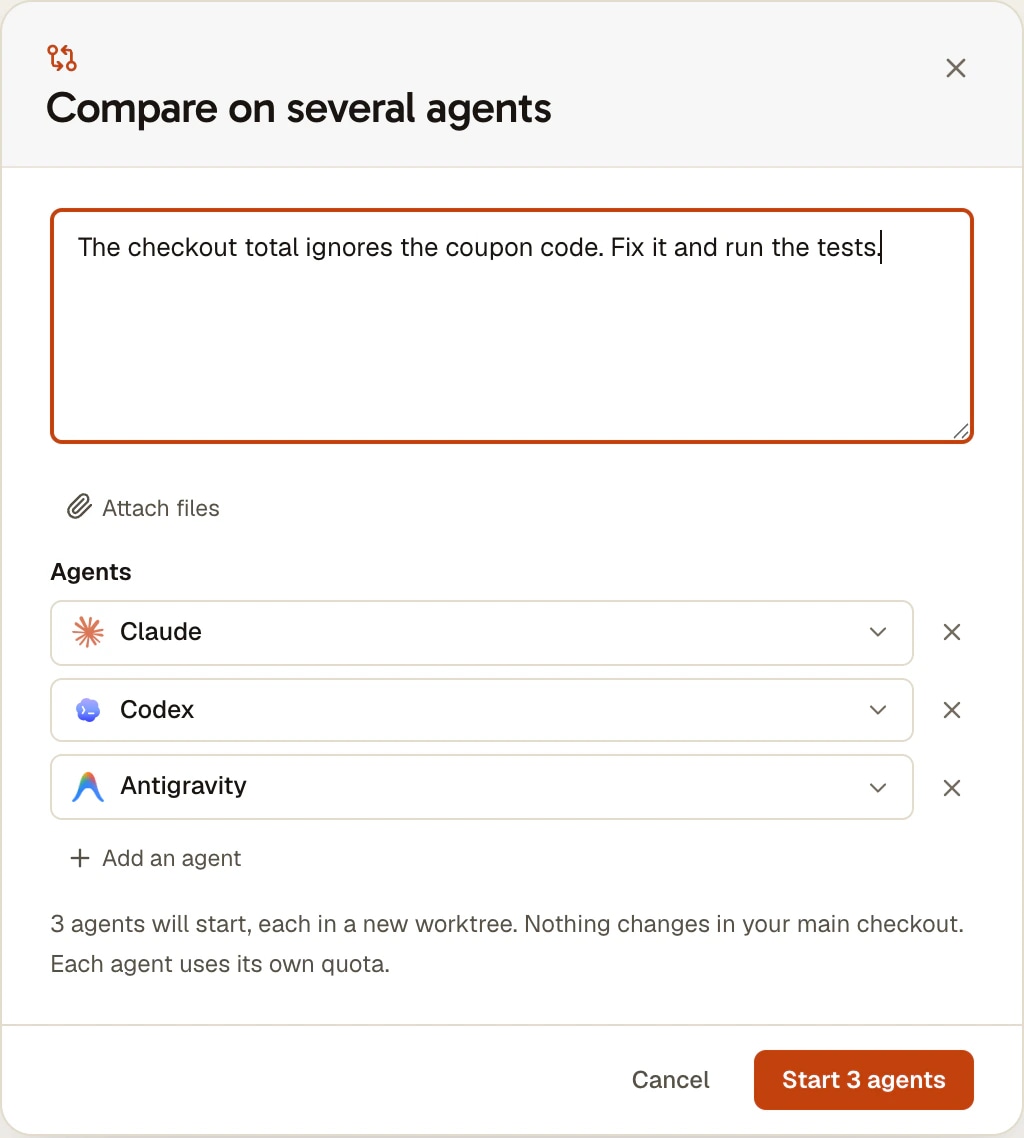
The launcher opens with three CLIs selected, so Start is enough. Each line can change its provider, model, effort or account, and you can go from 2 to 4 lines. Two models of the same CLI count as two agents.
A new worktree for each agent
Every agent gets its own branch and worktree, cut from your exact HEAD, commits you have not pushed included. If a worktree cannot be created, that line fails and the others start: an agent never falls back to your main checkout.
Side by side, while they work
The panes open in a row, or in a square with four agents. A bar above them follows each one: Starting, Working, Waiting for you, Finished, Failed. Nothing moves your screen afterwards: the end of the race is a notice with a Compare button.
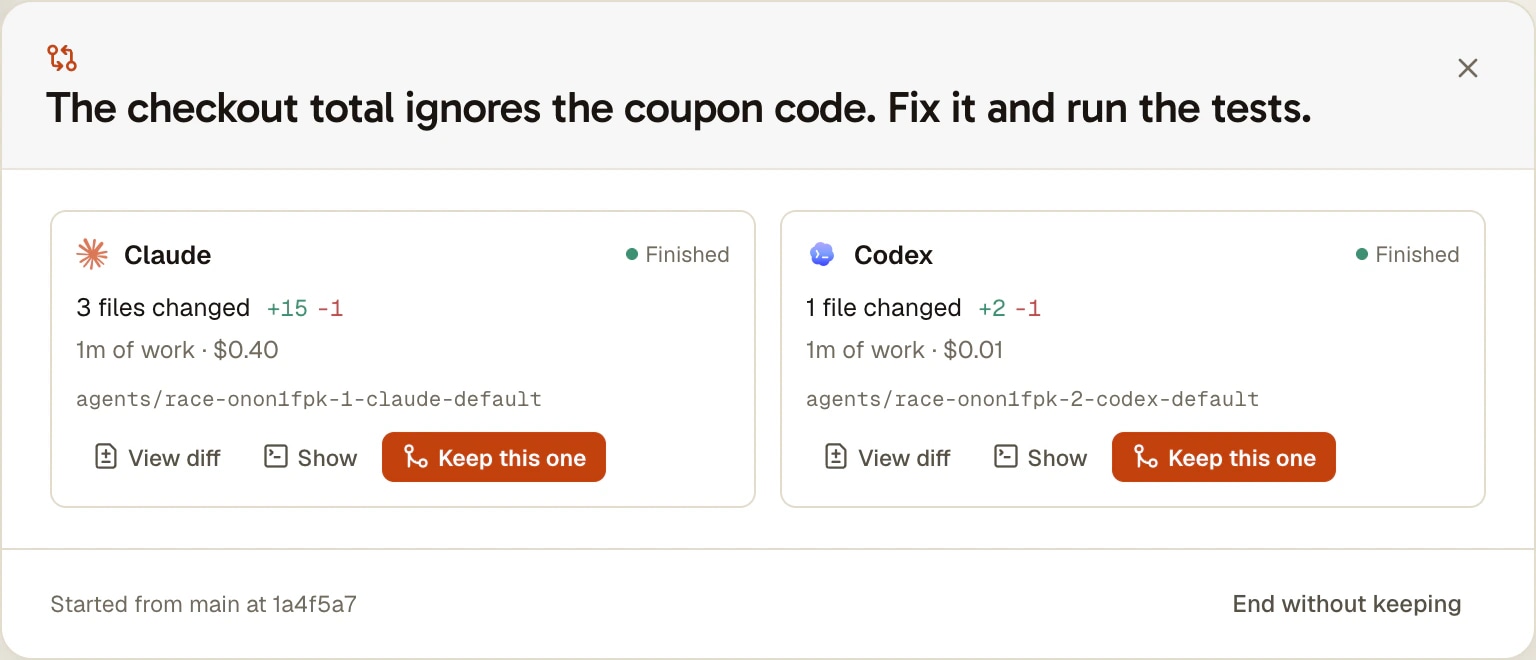
One card per agent
Files changed, lines added and removed, working time, and tokens or cost when the CLI reports them. View diff opens everything that agent did in a tab, committed or not, against the commit it started from.
Keep this one
It merges that branch into the branch you started from, after a confirmation that says what will happen. What the agent left uncommitted is committed on its branch first. A conflict cancels the merge and leaves your checkout as it was.
Start it from your phone
The iOS and Android apps can start and follow a comparison: the computer runs it, without touching its screen, and a card above the agent list shows each agent's status. Comparing and merging stay on the computer.
How to run a comparison
Five steps, from the request to the merge.
- 1
Open the launcher
In a project, open the lightning button and choose Compare on several agents, or New agent at the bottom of the agent list and Compare agents. Type the request and attach files if the task needs them.
- 2
Choose the agents
Three CLIs are ready. Click a line to change it, add or remove one. A line shows CLI not installed or Quota full when it cannot start, and it does not count. The launcher also tells you which uncommitted files stay out of the worktrees.
- 3
Start
Click Start 3 agents, or press Cmd/Ctrl+Enter. The worktrees are created one after the other, each agent receives the request as its first message, and the panes open side by side. You can answer any of them along the way.
- 4
Compare
When they have finished, Compare opens one card per agent. Read the numbers, then open View diff on the ones worth reading, and Show to bring back the console of an agent you want to question.
- 5
Keep one, clean up the rest
Keep this one merges its branch after a confirmation. The app then offers to close the other agents and delete their worktrees, and lists what would be lost first. You can refuse and do it later with Clean up the others, or leave with End without keeping.
The same comparison without AgentsRoom
You do not need our app for this, and the method is worth knowing. Each agent needs its own folder, or the second one overwrites the first. These commands were run on a test repository on November 5, 2026.
BASE=$(git rev-parse HEAD)
git worktree add -b try/claude ../try-claude HEAD
git worktree add -b try/codex ../try-codex HEAD

# one terminal per folder, the same request in each
cd ../try-claude && claude "fix the login redirect loop"
cd ../try-codex && codex "fix the login redirect loop"

# back in your main checkout: what did each one change?
git -C ../try-claude add -N . && git -C ../try-claude diff --stat $BASE
git -C ../try-codex add -N . && git -C ../try-codex diff --stat $BASE
Run the two agent commands in two separate terminals, one in each folder, then answer them as you go. To include new files in the numbers, mark them first with git add -N, because a plain git diff ignores untracked files. To keep one result, commit in its folder, merge its branch from your main checkout, then remove the worktrees and the branches you no longer need.
What other tools offer, as of November 2026
This idea is not ours alone, and on some points the others go further. Dates are the day we read their pages.
Cursor
Cursor 3 has a /best-of-n command that runs one task across several models, each in its own worktree. A parent agent comments on the results and can merge parts of different implementations into a single commit, which AgentsRoom does not do. It compares models inside Cursor (post on Cursor's forum, read on November 5, 2026).
VS Code
The Agents window of VS Code lists Compare Models as a Preview feature: the same task on several models, with results side by side. Our comparison page covers the rest of what that window does and where it does more than we do.
Orca
Orca is built around one worktree per agent and shows the same bug handed to three agents. It is the closest tool to this workflow, and it does not require a separate launcher for it. Our comparison page lists the differences.
What AgentsRoom adds
The comparison runs between different CLIs, not only different models, so Claude Code faces Codex with each one's own tools and your own subscriptions. Quota rules apply on every line, and the agent you keep goes on as a normal agent of the project.
Limits
- The project must be a git repository with at least one commit, and your checkout must be on a branch.
- Uncommitted changes in your main checkout are not in the worktrees: they start from your last commit. The launcher says so before starting.
- Each agent uses its own quota: three agents cost three times the request. If a plan limit or the machine's budget is reached, an agent waits for room and starts by itself.
- A project checked out on this computer whose agents run on an SSH host cannot be compared, because a worktree cut here would not exist on the host. A project opened directly on the server can.
- A comparison runs on the computer that starts it, never on another machine of the account or of a machine pool.
- File and line counts come from git: a new untracked file counts as a file, without line numbers. Working time is unknown if you turned off project statistics.
- From the phone you start and follow, without attachments. Comparing, merging and cleaning up happen on the computer.
- Shipped on November 5, 2026 in version 1.254.0 and tested by hand on macOS so far. Windows and Linux run the same git calls but have not been tested by hand yet.
Questions
Is Claude Code better than Codex?
It depends on your repository and on the task, which is why we do not publish a ranking. Among the accounts that started Codex in AgentsRoom in the four weeks to November 5, 2026, 84% also started Claude Code: many people keep both. The useful test is your own: give both the same real ticket, read the two diffs, and repeat it on two or three different kinds of task before drawing a conclusion.
How do I compare Claude Code and Codex on my own code?
Give both the same request from the same commit, each in its own git worktree, then diff each one against that commit. In AgentsRoom that is the Compare on several agents launcher. Without it, the commands are on this page: git worktree add for each agent, one terminal per folder, git diff against the starting commit.
Does a comparison touch my current branch before I choose?
No. Each agent has its own worktree and its own branch. Only Keep this one changes your branch, and only after you confirm. If your checkout has moved to another branch in the meantime, Keep this one refuses and says so, and nothing is merged elsewhere.
How much does a comparison cost?
As many times the request as there are agents, on each CLI's own quota or API key: AgentsRoom does not add a charge per comparison. The launcher announces the number of agents before starting. Keep it for tasks where the choice matters, such as a real bug or a feature that touches several files, rather than for every small change.
Can I compare two models of the same CLI?
Yes. Each line of the launcher has its own provider, model, effort and account, so you can put two Claude models side by side, or the same model at two effort levels, or the same CLI on two accounts.
What is the difference with Cursor's best-of-n?
Cursor's /best-of-n runs one task across several models inside Cursor, each in its own worktree, and a parent agent comments on the results and can merge parts of several attempts. AgentsRoom compares different CLIs as well as different models, on your own subscriptions, and leaves the judgment to you: it shows the numbers and the diffs, and merges one whole branch. Source: Cursor's forum post on Cursor 3, read on November 5, 2026.
Does AgentsRoom pick the best result for me?
No. Lines changed and time spent say little about quality, and a score would hide that. If you want a second opinion, ask another agent to review the diffs before you click Keep this one.
What happens if one agent crashes, or if the merge conflicts?
An agent that crashes is marked Failed and the others go on. If you close an agent or restart the app, the comparison comes back, and a closed agent can still be compared and kept. If the merge conflicts, it is cancelled and your checkout goes back to what it was: ask that agent to resolve the conflict, then keep it again.
Which CLIs can I compare?
Any of the 17 agent CLIs AgentsRoom supports (Claude, Codex, GitHub Copilot CLI, Cursor and 13 more) that is installed and signed in on the computer. The working time is known for all of them. Tokens or cost appear only for a CLI that reports them.
Next to this page
You may also like
Git Worktrees
Give each AI agent or ticket its own git worktree, ready to build (dependencies installed, .env copied), then review, commit and merge it from one window.
Claude and Codex together
Share your new agents between Claude Code and Codex: one ticket out of two, or 10% of the Claude session then 10% of the Codex week. Two subscriptions used in step, not one after the other. Quota rules do the rest.
Multi-Provider
AgentsRoom supports 17 AI coding providers: Claude, Codex, GitHub Copilot CLI, OpenCode, Antigravity CLI, Aider, Grok Build, Mistral Vibe, Kimi Code, Amp, oh-my-pi, Freebuff, Devin, Cursor, Command Code, Muse Code and Pi. Assign a different provider per agent, switch provider mid-conversation, and keep full context with automatic handoff. The best multi-provider AI coding tool.
Try it on the ticket you are stuck on
Download AgentsRoom, type one request, and read what two agents do with it.
Companion app: monitor your agents on the go
Bring your own: Claude, Codex, Antigravity CLI, or other AI provider.
Push bugs and requests straight to your public backlog.
Agents you read like a conversation
Each agent has a role, a face, and a thread you read like a messaging app.