Remote Control Your AI Agents
Straight From Your Phone
AgentsRoom turns your iPhone or Android into a remote control for every Claude, Codex and Antigravity agent running on your computer. Pilot terminals, drive coding sessions, fire saved prompts and preview tunneled dev servers, all from the couch, the train or the coffee shop.
An exclusive, fully encrypted mobile remote control for the whole AgentsRoom cockpit : projects, agents, terminals, tunnels, prompt library and backlog.
Remote control session : a desktop computer running multiple AI coding agents, driven live from an iPhone.
Remote control for AI coding agents used to mean SSH on a 6-inch screen, tmux panes the size of a postage stamp and a Bluetooth keyboard you forgot at home. AgentsRoom replaces all of that with a purpose-built mobile remote control for Claude, Codex, GitHub Copilot CLI, Cursor and 10 other agent CLIs. Your agents stay on your own machine, macOS, Windows or Linux, where they belong. You get a proper mobile remote control in your pocket.
The remote control is not a stripped-down viewer. It is a full cockpit : projects, agents, terminals, dev server tunnels, prompt library and backlog board, all at your thumb. Every button you can press on the desktop UI is exposed through the mobile remote control, with native iOS and Android gestures instead of a miniature keyboard.
Claude Code and Antigravity now ship a remote control of their own, and each one drives its own CLI from a browser or from the vendor's app. The AgentsRoom remote control is different in scope: one native iOS and Android app pilots all 14 agent CLIs at once, Claude, Codex, Antigravity and the others side by side, with the whole cockpit around them. AgentsRoom can do it because it ships its own relay, built for end-to-end encrypted remote control between a desktop app and a phone.
Full Remote Control, Not Just a Viewer
Every surface of the desktop app is wired into the phone remote control.
Remote Control Every Project
See every project from your phone : the codebase folder, the agents inside, the running dev servers, the backlog and the prompt library. Tap a project to take remote control of it as if you were sitting at your desk.
Pilot Claude, Codex and Antigravity Agents
Start a new Claude, Codex or Antigravity agent straight from your phone. Pick the role, the provider and the model. The remote control sends the order across the encrypted relay and the agent boots on your computer instantly.
Drive the Terminal From Mobile
Open any xterm.js terminal your agents are streaming into. Scroll through colored output, type commands with the native mobile keyboard, paste snippets. The phone becomes a real terminal remote control, not a half-broken SSH screen.
Remote Control the Localhost Tunnel
Launch the AgentsRoom built-in secure tunnel from mobile and open your local dev server inside the phone browser. Preview the site your agents are coding on a real device, from the same remote control app.
Fire Prompts From Your Library
Your per-project and global prompt library rides with you. Browse folders, pick a saved prompt, and send it to any running agent in one tap. The remote control turns your phone into a prompt launcher you can trigger from anywhere.
Operate the Backlog From Mobile
Drag tasks from TODO to In Progress on the backlog kanban directly from your phone. The remote control automatically spawns the right agent on your computer. Close a task during lunch, from the same mobile interface.
Read the Diff, Commit, Push
See what your agents actually wrote. The Changes panel lists the changed files of the working tree, filters them by the agent that touched them, opens the unified diff of any file, then commits the files you selected and pushes. Never a blind commit of the whole tree : you commit exactly what you read on screen. A change you do not want is discarded from the same screen, after a confirmation. The file goes back to its last commit, or is deleted if it was never committed.
An Exclusive Encrypted Relay, Not a Generic SSH Bridge
This remote control experience works because AgentsRoom ships its own secure relay. No third-party tunnel, no custom DNS, no cloud account. Just a purpose-built WebSocket relay designed from day one for end-to-end encrypted remote control between your computer and your phone.
When your desktop pairs with your mobile, both sides run an X25519 key exchange. From that point on, every byte of the remote control traffic (terminal input, prompts, backlog updates, tunnel packets) is sealed with XSalsa20-Poly1305 before it leaves your devices. The relay only sees opaque encrypted blobs : it cannot read your code, your prompts or your terminal output even if it wanted to.
That is what is specific to AgentsRoom. Most tools give you a raw SSH session or a web viewer, and a vendor's remote control only reaches that vendor's agent. AgentsRoom gives you a native mobile remote control for every CLI you use, wrapped in its own encrypted infrastructure, with zero configuration.
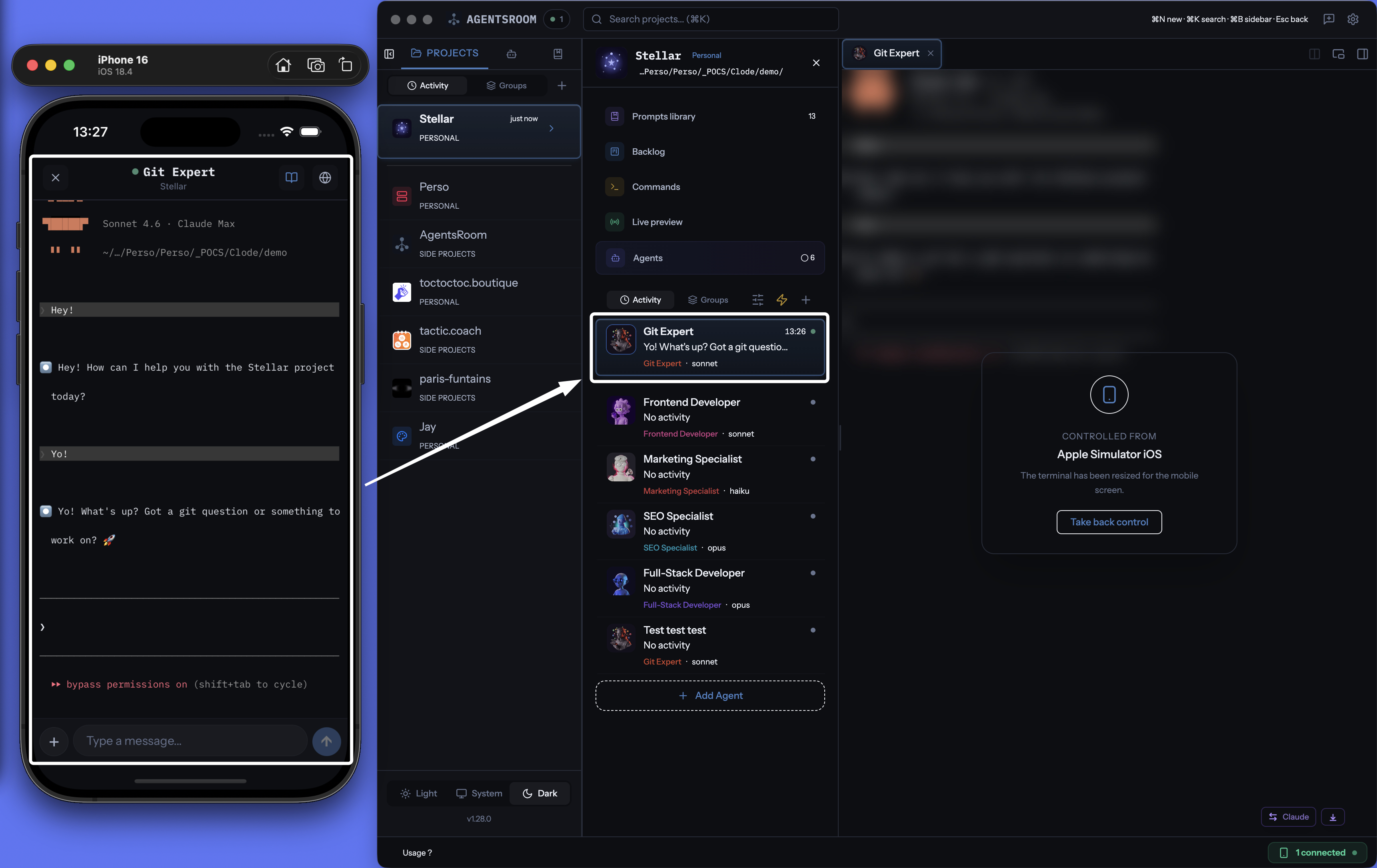
Mobile remote control in action : a phone driving a desktop running several AI coding agents in parallel.
Remote Control In Three Steps
Pair once, remote control forever.
Sign in on both devices
Open AgentsRoom on your computer, then sign in to the same account in the mobile app and tap that computer. X25519 key exchange happens in under a second. The remote control channel is live.
Your fleet appears on the phone
Every project, agent, terminal, dev server, prompt and backlog task syncs to your phone in real time. You are now looking at the exact same session as on your desktop, ready to remote control.
Pilot from anywhere on 4G, 5G or Wi-Fi
Tap to start an agent, swipe to switch project, type to drive the terminal, long-press to send a saved prompt. The remote control feels instant thanks to the relay. Your computer does the heavy lifting, your phone drives it.
Why a Phone Remote Control Changes Your Day
Coding sessions no longer end the moment you close the laptop lid.
On the commute
The Claude agent you launched on a refactor is still running. Pull out the phone, take remote control, check the diff, answer the one confirmation prompt, ship.
From the couch
A long test suite is crunching on your machine. You stay on the sofa, remote control the terminal from your Android and watch the Codex agent patch the last failure.
At the airport
Gate change, 30 minutes to kill. You open the phone, pilot an Antigravity agent through a quick prompt library run, and review the summary before boarding.
During standup
Your teammate needs the staging URL. You flick the localhost tunnel on from the phone remote control, send the link in the group chat, and never touch your keyboard.
FAQ
What exactly can I remote control from the mobile app?
Everything the desktop app exposes : projects, AI agents (Claude, Codex, GitHub Copilot CLI, Cursor and 10 other agent CLIs), xterm.js terminals, localhost tunnels, the per-project prompt library, the backlog kanban, agent status and token usage. The remote control is a complete cockpit, not a read-only dashboard. You also read the diff of every changed file, commit the selection you made and push, straight from the phone.
Is this just SSH dressed up with a nicer UI?
No. SSH gives you a raw terminal. The AgentsRoom remote control is a fully native iOS and Android interface with project views, chat-style agent messages, typed terminal input, tunnel controls and push notifications. It travels through a custom encrypted relay, not SSH.
Does my code leave my computer when I remote control it?
No. Agents still run on your own machine, and the remote control only forwards encrypted commands and output through the relay. The server never sees plaintext. Your source code, diffs and prompts stay on your disk. Running a task in the cloud is a separate mode, Cloud Agents, and you choose it task by task.
Which AI providers can I remote control?
All 14 agent CLIs AgentsRoom supports: Claude (Anthropic), Codex (OpenAI), GitHub Copilot CLI (GitHub), Cursor (Anysphere) and 10 more. The remote control is provider-agnostic : you can pilot a Claude agent, a Codex agent and an Antigravity agent side by side from the same phone session.
Is the mobile remote control on iOS and Android?
Yes. AgentsRoom ships a native iOS app on the App Store and an Android app on Google Play. Both are free and both speak to the same encrypted relay to remote control your desktop, on macOS, Windows or Linux.
Does the remote control work over cellular?
Yes. The remote control runs over a WebSocket relay and is happy on 4G, 5G and any Wi-Fi. Bandwidth is minimal because only text-level data and small tunnel packets are exchanged.
Do I need to configure a VPN or port forwarding?
No. AgentsRoom ships its own secure relay. There is no port to open on your router, no VPN to set up, no external account to create. Sign in on both devices and remote control from anywhere.
Antigravity has its own Remote Control since version 2.0. What is the difference?
Google shipped Remote Control for Antigravity 2.0 and the Antigravity CLI on August 21, 2026: you start the daemon on your machine (or agy --remote-control), open the Remote Control dashboard in a browser signed in with your Google account, and drive your Antigravity sessions from there, including from a phone by adding the dashboard to the home screen to receive push notifications. It reaches Antigravity only, it is a web page rather than an app, and it is being rolled out account by account, starting with Google AI Ultra subscribers. The AgentsRoom remote control is a native iOS and Android app for all 14 agent CLIs, Antigravity included: a Claude Code agent, a Codex agent and an Antigravity agent sit in the same list, with the terminal, the backlog, the diff and commit panel and the dev-server tunnels around them, over the AgentsRoom end-to-end encrypted relay. Nothing stops you from using both: Google's for a plain Antigravity session, AgentsRoom when several CLIs run on the same machine or when you want the rest of the cockpit.
You may also like
Mobile-Desktop Sync
The main AgentsRoom feature page on real-time encrypted sync between the desktop app and the mobile companion.
Localhost Tunnel (Live Preview)
Built-in secure tunnel that exposes any local dev server as a public HTTPS URL. Open your work in progress on the phone.
Dev Terminals
Per-project terminal manager and process launcher. Start backend, frontend and workers in one click, and remote control them from mobile.
Prompt Library
Per-project and global prompt collections with folders and tags, ready to fire at agents from the phone.
Further reading
Antigravity Remote Control: What It Does From Your Phone, and What It Does Not
Google shipped Remote Control for Antigravity 2.0 and the Antigravity CLI on August 21, 2026, and the search volume on its name says people want to know what it actually is. Here is what it does, checked against the documentation on September 22: the toggle and the agy remote-control commands, the web dashboard you sign into with your Google account, the home-screen install that gives you push notifications, several machines in one switcher, and the three limits that matter (Antigravity only, one daemon per machine, settings stay on the CLI). Then how the AgentsRoom mobile remote covers the other 13 CLIs, and how the two fit together.
Does Claude Code Remote Control Use More Tokens? And Does Codex Have One?
Two questions people type into Google since Anthropic shipped Remote Control: does driving a Claude Code session from your phone cost more tokens, and is there an equivalent for Codex. Short answers: no, a turn is a turn wherever you type it, and yes but only half of it exists. Here is what Remote Control actually is, how to measure the token question yourself in four commands, what codex remote-control does today, and how a mobile remote that never talks to a provider changes the math.
Driving Your Coding Agents From Your Phone While They Work
Your agents code for 20 minutes straight. You don't need to sit in front of the screen. Here's how to track and unblock them from your phone, whether they run on Claude, Codex or Antigravity.
Take the Remote Control With You
Download AgentsRoom on your desktop, get the iOS or Android app, pair in 10 seconds and pilot your AI coding agents from anywhere.
Companion app: monitor your agents on the go
Bring your own: Claude, Codex, Antigravity CLI, or other AI provider.
Push bugs and requests straight to your public backlog.