Localhost-Tunnel
öffentliches HTTPS mit einem Klick
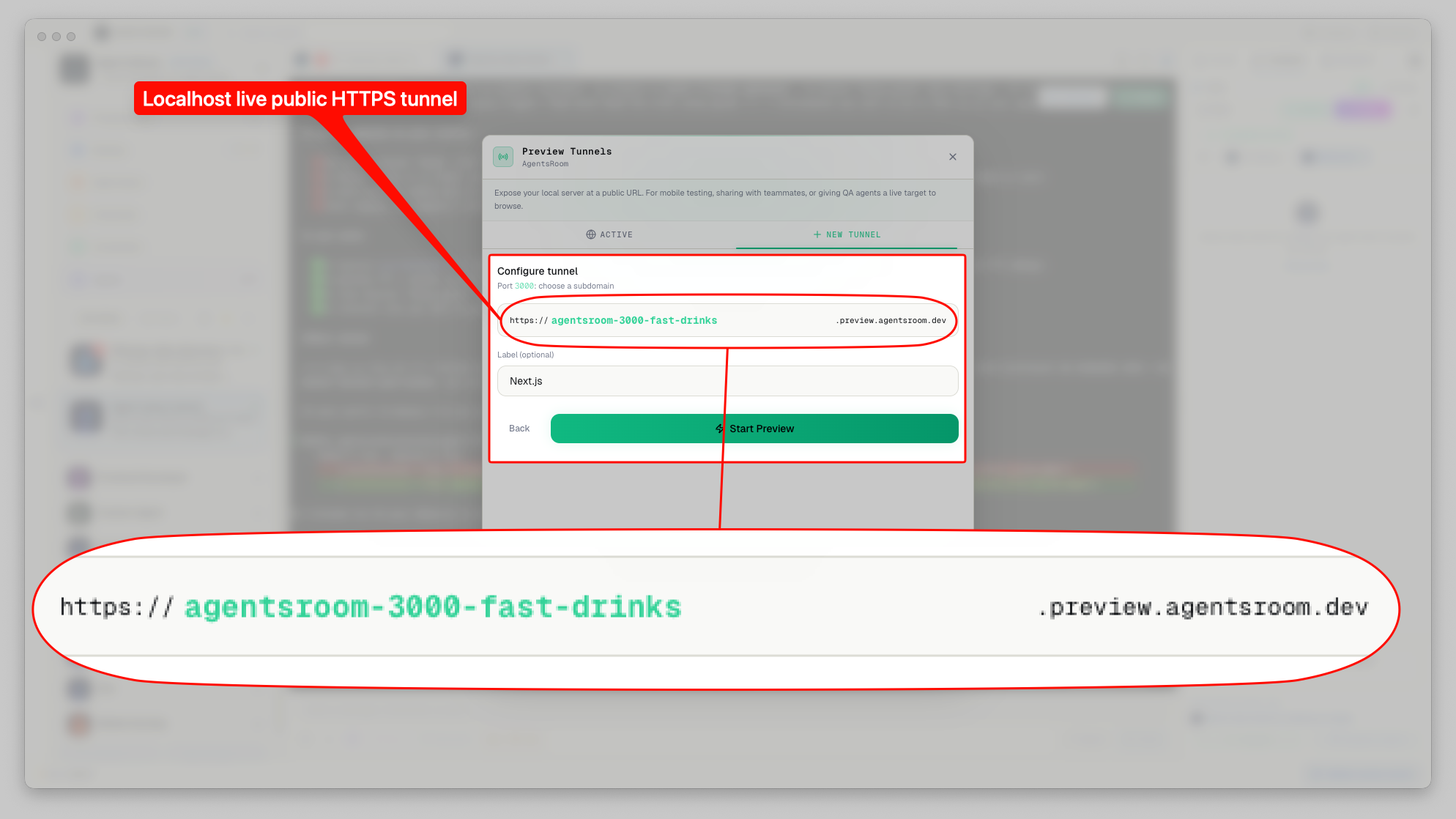
Du musst deinen lokalen Dev-Server mit einem Kollegen, einem Kunden teilen oder auf dem Handy testen. Kein Deployment. Keine ngrok-Konfiguration. Wähle eine Subdomain, drücke Start, und dein localhost ist live mit einer öffentlichen HTTPS-URL.
Alles, was du brauchst, um localhost zu teilen
Eine komplette Localhost-Tunneling-Lösung in deinen Entwicklungsworkflow integriert. Kein externes Tool, kein kostenpflichtiger Plan, keine CLI zu installieren.
Eigene Subdomain
Wähle deine eigene Subdomain wie my-app.preview.agentsroom.dev. Deine öffentliche URL ist einprägsam und professionell. Teile sie mit Kunden ohne Bedenken.
HTTPS standardmäßig
Jede Tunnel-URL wird über HTTPS via den eigenen Tunnel von AgentsRoom bereitgestellt. Keine selbstsignierten Zertifikate, keine Browser-Warnungen. Deine Live-Vorschau sieht aus und funktioniert wie eine Produktionsseite.
WebSocket-Passthrough
Vite HMR, Next.js Hot Reload, Expo Metro Bundler, Server-Sent Events: alles funktioniert durch den Tunnel. Deine Live-Vorschau aktualisiert sich in Echtzeit, während du codest.
Automatische Server-Erkennung
AgentsRoom scannt deine offenen Ports und erkennt laufende Dev-Server automatisch. Next.js auf 3000, Vite auf 5173, Expo auf 8081: wähle aus einer Liste oder gib einen eigenen Port ein.
Ein-Klick Start und Stopp
Keine CLI-Befehle. Keine Konfigurationsdateien. Drücke Start, um den Tunnel zu öffnen, drücke Stopp, um ihn zu schließen. Die öffentliche URL ist in Sekunden live.
Vorschau vom Handy
Öffne die Tunnel-URL auf deinem Handy, um responsives Design zu testen. Oder nutze die AgentsRoom Mobile-App, um einen Tunnel aus der Ferne zu starten und deine Seite in einem integrierten WebView zu sehen.
Automatische Wiederverbindung
Wenn die Verbindung abbricht, versucht AgentsRoom automatisch bis zu 5 Mal erneut. Ein Heartbeat alle 25 Sekunden hält den Tunnel durch Timeouts des integrierten sicheren Tunnels aktiv.
Gebrandete Offline-Seite
Wenn der Tunnel inaktiv ist, sehen Besucher eine gestylte Offline-Seite mit deiner Subdomain und einem Auto-Refresh der sofort wiederverbindet sobald du den Tunnel neustartest.
Dein lokaler Dev-Server, von überall erreichbar mit einem öffentlichen HTTPS-Link.
So funktioniert es
Wähle einen Dev-Server
AgentsRoom scannt deine offenen Ports und listet alle laufenden lokalen Server auf. Wähle den aus, den du bereitstellen willst: Next.js, Vite, Expo, Django, Rails oder einen eigenen Port.
Wähle eine Subdomain
Gib deine bevorzugte Subdomain ein. AgentsRoom validiert sie in Echtzeit und zeigt dir die vollständige öffentliche URL. Die Subdomain ist für dein Konto reserviert, niemand anders kann sie nehmen.
https://my-app.preview.agentsroom.devStarte den Tunnel
Drücke Start. AgentsRoom öffnet eine WebSocket-Verbindung zum Tunnel-Server, der alle eingehenden HTTP-Anfragen an deinen lokalen Dev-Server weiterleitet. Die öffentliche URL ist in unter 2 Sekunden live.
Teile den Link
Kopiere die HTTPS-URL und sende sie an jeden. Sie sehen deine lokale Seite, als wäre sie deployed. Hot Module Reload, WebSocket-Verbindungen und Server-Sent Events funktionieren alle durch den Tunnel.
Stoppe wenn fertig
Drücke Stopp. Der Tunnel schließt sich sofort. Besucher sehen eine gestylte Offline-Seite, bis du ihn neu startest. Deine Subdomain bleibt für das nächste Mal reserviert.
Warum nicht ngrok?
Der AgentsRoom-Tunnel ist für Entwickler gemacht die AgentsRoom bereits nutzen. Null Konfiguration, null Kosten, null Kontextwechsel.
Kostenlos, kein bezahlter Plan
ngrok berechnet $20+/Monat für eigene Subdomains und persistente URLs. Der AgentsRoom-Tunnel ist kostenlos in der App enthalten.
Kein Bandbreitenlimit
ngrok drosselt die Bandbreite in kostenlosen und sogar in bezahlten Tarifen. Der AgentsRoom-Tunnel hat keine Bandbreitenbegrenzung: streame Assets, teste Datei-Uploads und sieh dir medienreiche Seiten ohne Einschränkungen an.
Keine CLI zu installieren
ngrok erfordert die Installation eines Binarys und das Ausführen von Terminal-Befehlen. Der AgentsRoom-Tunnel ist ein Button in deinem Projekt-Dashboard.
In deinen Workflow integriert
Starte einen Tunnel aus derselben App in der du deine Agenten, Terminals und Code-Reviews verwaltest. Kein Wechseln zwischen Tools.
Mobile Companion inklusive
Starte einen Tunnel vom Handy und sieh dir deine Seite unterwegs an. ngrok hat keine Mobile-App.
FAQ
Ist der Localhost-Tunnel wirklich kostenlos?
Ja, und er bleibt kostenlos. Free- und Plus-Konten bekommen einen Tunnel-Start pro rollende sieben Tage, mit eigenen Subdomains, HTTPS, WebSocket-Passthrough und ohne Bandbreitenlimit. Pro hebt die Begrenzung auf, wie oft du einen öffnen darfst. Anders als ngrok gibt es bei keinem Plan eine Bandbreitenbegrenzung.
Funktioniert Hot Module Reload (HMR) durch den Tunnel?
Ja. Der Tunnel unterstützt vollständiges WebSocket-Passthrough, was bedeutet dass Vite HMR, Next.js Fast Refresh, Expo Metro Bundler Hot Reload und jedes andere WebSocket-basierte Protokoll nahtlos durch den Tunnel funktionieren.
Wie schnell ist der Tunnel? Gibt es Latenz?
Der Tunnel fügt einen einzelnen Roundtrip über den Relay-Server hinzu. Für Zwecke der Entwicklungsvorschau ist die Latenz vernachlässigbar. Er ist nicht für Produktionstraffic oder Performance-Benchmarking gedacht, aber für das Teilen von laufender Arbeit funktioniert er perfekt.
Können mehrere Personen meine Tunnel-URL gleichzeitig ansehen?
Ja. Der Tunnel verarbeitet mehrere gleichzeitige Besucher. Jede eingehende Anfrage wird unabhängig an deinen lokalen Dev-Server weitergeleitet. Es gibt ein Limit von 50 ausstehenden Anfragen pro Tunnel, um Missbrauch zu verhindern.
Was passiert wenn meine Verbindung abbricht?
AgentsRoom verbindet sich automatisch bis zu 5 Mal erneut, mit 3 Sekunden Verzögerung zwischen den Versuchen. Ein Heartbeat-Signal alle 25 Sekunden hält den WebSocket durch Timeouts des eigenen Tunnels aktiv. Besucher sehen eine gestylte Offline-Seite mit Auto-Refresh, bis der Tunnel wieder verbunden ist.
Teile deinen localhost in Sekunden
Lade AgentsRoom herunter und stelle deinen lokalen Dev-Server mit einer öffentlichen HTTPS-URL bereit. Kein ngrok, kein Deploy, keine Konfiguration.
Companion-App: Agenten auch unterwegs im Blick behalten
Nutzen Sie Claude, Codex, Antigravity CLI oder einen anderen KI-Anbieter.
Bugs und Wünsche direkt in dein öffentliches Backlog schicken.