Keep your notes in Obsidian.
Your agents read and write them too.
Link one folder of your Obsidian vault to a project. What you write in Obsidian becomes the memory your AI coding agents read before they start, and what they learn comes back to the vault as Markdown, with its [[links]] intact.
No plugin to install in Obsidian, no Obsidian Sync seat, no agent to run inside the vault. AgentsRoom watches the folder on disk while the desktop app is running and online, and the same notes reach Claude Code, Codex, GitHub Copilot CLI or any other agent CLI you launch on the project.
A real session, filmed in the app: Obsidian sync, in the project memory, links one folder of an Obsidian vault both ways. The two vault notes arrive in the memory with their descriptions and tags. An agent asked for a price helper checks the memory first and follows the pricing rule written in Obsidian. Asked to save what it learned, it adds a section to that note, which comes back to the vault folder as Markdown, links intact.
A note edited in Obsidian reaches the memory, a note saved by an agent lands in the vault. Two edits of the same note wait for you.
Plenty of developers already keep their thinking in Obsidian: architecture notes, decisions, a runbook, the reasons a module is built the way it is. Claude Code and the other agent CLIs start every session without any of it, unless you paste it in or run the agent inside the vault.
AgentsRoom already gives each project a memory that its agents read before they dig into the code and write to while they work. Obsidian Vault Sync connects the two. You pick one folder of your vault, and its Markdown notes become notes of that project's memory. In the other direction, the notes your agents save are written back into the folder, with frontmatter and [[wiki-links]], so Obsidian stays your editor and your graph.
It is a sync, not a one-time import, and it never settles a disagreement for you. When the same note changes on both sides between two passes, or is deleted on one side, both versions are kept and the note waits until you choose. Every other note keeps moving.
What Obsidian Vault Sync does
One folder of your vault, one project, the same notes for every agent.
Both ways
Edits made in Obsidian update the project memory. Notes created or changed by the agents are written into the folder as Markdown, and the notes already in the memory are exported there too.
Or vault to memory only
Prefer that nothing touches your vault? This mode only reads the folder. Agents still read your notes, but nothing they write ever lands in Obsidian.
Conflicts wait for you
No last-write-wins. Two edits of the same note, or an edit against a deletion, stop that one note and show both versions, the Obsidian one and the memory one. You choose which to keep.
Links and properties kept
[[note#heading|alias]] links, the Markdown body and the YAML properties you added stay as they are. Notes written by agents carry a description and tags in their frontmatter.
Every agent CLI
The notes become ordinary memory notes, read through the same memory tools by Claude, Codex, GitHub Copilot CLI, Cursor and the 10 other agent CLIs AgentsRoom supports.
Several computers
The link belongs to your account. On another computer, the project shows it and asks you to locate the matching vault folder there. Unlinking stops the sync on every computer.

How it works
Four steps. The first three happen once per project.
- 1
Open the project memory
In the project, open Project memory from the dock (the brain icon). In its toolbar, click Obsidian sync.
- 2
Choose a vault folder
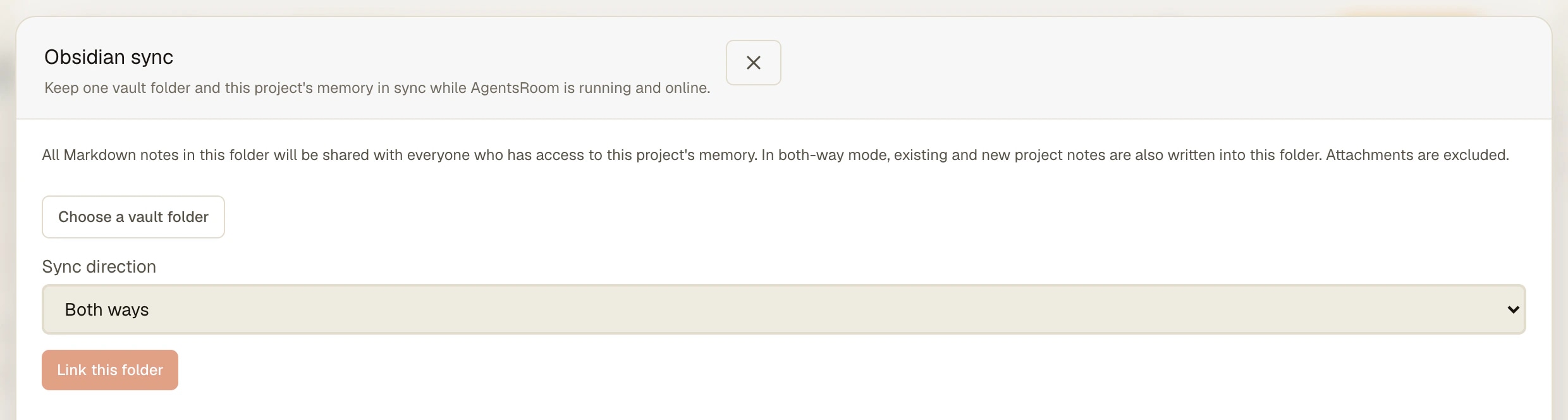
Click Choose a vault folder and pick your vault or one of its subfolders. A project folder of a few hundred notes is a better fit than the whole vault: every note in it will be shared with the project.
- 3
Pick a direction and link
Under Sync direction, choose Both ways or Vault to memory only, read the notice about sharing, then click Link this folder. The first pass runs right away.
- 4
Write, and let the agents write
Keep editing in Obsidian. AgentsRoom picks up saved files within seconds and checks the memory every 30 seconds, without the panel open. Sync now forces a pass; Conflicts to resolve lists the notes waiting for your choice.
What Obsidian and the agent CLIs already do on their own
You do not need AgentsRoom to put an agent on your notes. The simplest setup is to start Claude Code or Codex inside the vault folder: the notes are Markdown files, and the agent reads and edits them like code. Community plugins go further and bring the agent into Obsidian itself. Claudian, for example, opens Claude Code, Codex, OpenCode and other agents in a sidebar with the vault as their working directory.
There are also bridges for an agent that works elsewhere. MCP servers such as mcp-obsidian expose the vault through the Local REST API community plugin, which means Obsidian has to be open. Since version 1.12, Obsidian ships its own command line (Settings, General, Command line interface) with commands such as read, search, create and append, and it talks to the running app as well.
Obsidian Vault Sync answers a different need. Your agents work in a code repository, not in the vault, and you want the notes that matter to that project to be part of what every agent reads before it starts, on every computer and for every teammate on the project. The sync reads and writes the files on disk, so Obsidian does not need to be open, and it keeps a conflict for you instead of letting the last writer win. It works next to any of the setups above.
What to know
- The sync runs while the AgentsRoom desktop app is running and online. Edits made in Obsidian while it is closed are picked up at the next pass.
- Every Markdown note of the linked folder is shared with everyone who has access to the project memory, and the memory is stored on AgentsRoom's servers. Link a project folder, not a vault full of personal notes, and keep secrets out of it.
- Up to 2,000 notes, 1 MB per note and 16 MB in total, eight levels of subfolders. Attachments, hidden folders and symbolic links are left out.
- One vault folder per project. A folder cannot overlap the folder linked to another project.
- When an agent renames or moves a memory note, the file keeps its path in the vault, so your links do not break. A note renamed and edited in Obsidian between two passes can come back as a new note plus a deletion to confirm: nothing is deleted without your choice.
- Linking a folder and resolving conflicts happen on the desktop. Agents you drive from the mobile app read the same notes.
Frequently asked questions
Can Claude Code read my Obsidian vault?
Yes, the notes of the folder you link. They become notes of the project memory, and every agent you start on the project, Claude Code included, is told to check that memory before it explores the code. The agent does not need to run inside the vault, and Obsidian does not need to be open.
Will my agents write into my vault?
Only if you choose Both ways. Then the notes they create or change are written into the linked folder as Markdown, with a description and tags in the frontmatter and their [[links]] kept. With Vault to memory only, nothing is ever written into the vault.
What happens if I edit a note in Obsidian while an agent changes it?
That note stops and shows both versions, the Obsidian version and the Project Memory version, until you choose one. A deletion on one side also waits for your choice. The other notes keep syncing. If either version changes again before you decide, you review the updated conflict first.
Do I need an Obsidian plugin, Obsidian Sync or the Local REST API?
No. AgentsRoom reads and writes the Markdown files of the folder directly on disk. Nothing is installed in Obsidian, the app does not have to be open, and the sync does not use Obsidian Sync. It does need the AgentsRoom desktop app running and online.
Which agent CLIs can use the notes from my vault?
All 14 agent CLIs AgentsRoom supports (Claude, Codex, GitHub Copilot CLI, Cursor and 10 more). The vault notes are ordinary memory notes, read through the same memory tools as the notes the agents wrote themselves.
Who can see the notes of the linked folder?
Everyone who has access to the project memory, which is shared with everyone working on the project and stored on AgentsRoom's servers. That is why you choose the folder explicitly and why the panel warns you before linking. Link the folder that belongs to the project, not your whole vault, and never put passwords or keys in it.
Does it work on several computers?
Yes. The link is saved on your account. On a second computer the project shows it and asks you to locate the matching vault folder on that machine, since the path differs from one computer to another. Unlinking stops the sync everywhere and keeps the notes and the files where they are.
How is this different from Import from Obsidian?
Import from Obsidian copies notes into the memory once, and you pick which ones. Obsidian sync keeps one folder and the memory in step from then on, in both directions or from the vault only, and handles conflicts. Both buttons sit in the toolbar of the project memory.
Further reading
You may also like
Project Memory
Give your AI coding agents a long-term memory. Decisions, architecture and pitfalls persist across sessions and are shared with everyone on the project. Free, unlimited.
Obsidian Alternative
Looking for an Obsidian alternative for AI agent memory? Compare AgentsRoom and Obsidian: agent-written notes, team sharing included, MCP tools, knowledge graph.
Linked folders
Add other folders and repositories to an AgentsRoom project without moving them. Every agent you start gets them through --add-dir on Claude Code, Codex and four other CLIs, and the Changes tab commits each repo.
Multi-Provider
AgentsRoom supports 14 AI coding providers: Claude, Codex, GitHub Copilot CLI, OpenCode, Antigravity CLI, Aider, Grok Build, Mistral Vibe, Kimi Code, Amp, oh-my-pi, Freebuff, Devin and Cursor. Assign a different provider per agent, switch provider mid-conversation, and keep full context with automatic handoff. The best multi-provider AI coding tool.
Give your agents the notes you already keep
Link a vault folder to a project and let Claude Code, Codex and every agent CLI start from what you already wrote down.
Companion app: monitor your agents on the go
Bring your own: Claude, Codex, Antigravity CLI, or other AI provider.
Push bugs and requests straight to your public backlog.