A terminal manager
scoped to every project
AgentsRoom ships with a real per-project terminal manager. Every command is saved, categorized, launched in one click, and runs in the correct working directory of your project. Stop opening iTerm2, Warp or Terminal.app on the side: everything lives next to your AI agents.
And the unique part: with the iOS and Android mobile app, you trigger commands remotely on your computer. Spin up a localhost site from the subway, the gym or a coffee shop, then open it on your phone over 4G/5G through the built-in live preview tunnel.
Manage multiple terminals at once: drag-and-drop split panes, vertical and horizontal layouts, and a fully detached window you can move to a dedicated monitoring screen for your agents, logs and builds.
Dev Terminals is far more than a terminal emulator. It is a true per-project command manager, designed to replace the jungle of iTerm2, Warp, Ghostty, Kitty, Alacritty and Terminal.app tabs you open every morning. Each project has its own list of commands: dev server, backend, mobile bundler, worker, database, internal scripts. You name them once, you launch them forever.
The UX and UI are deliberately pushed hard to make command management as fast as possible. Every command remembers its name, shell command, working directory (relative to the project root), framework category (React, Next.js, Django, Rails, Go, Rust, Docker…) and kind (long-running process or one-shot snippet). Active commands bubble to the top of the list, and colorful framework icons let you spot your React frontend, your Django backend and your Docker services at a glance.
The big advantage of an integrated terminal living inside AgentsRoom is that commands run in the exact context of your project: same path, same environment, same cwd. Zero friction, zero endless cd, zero project confusion. And because everything lives next to your Claude, Codex and Antigravity AI agents, you stop juggling between fifteen different tools just to ship code.
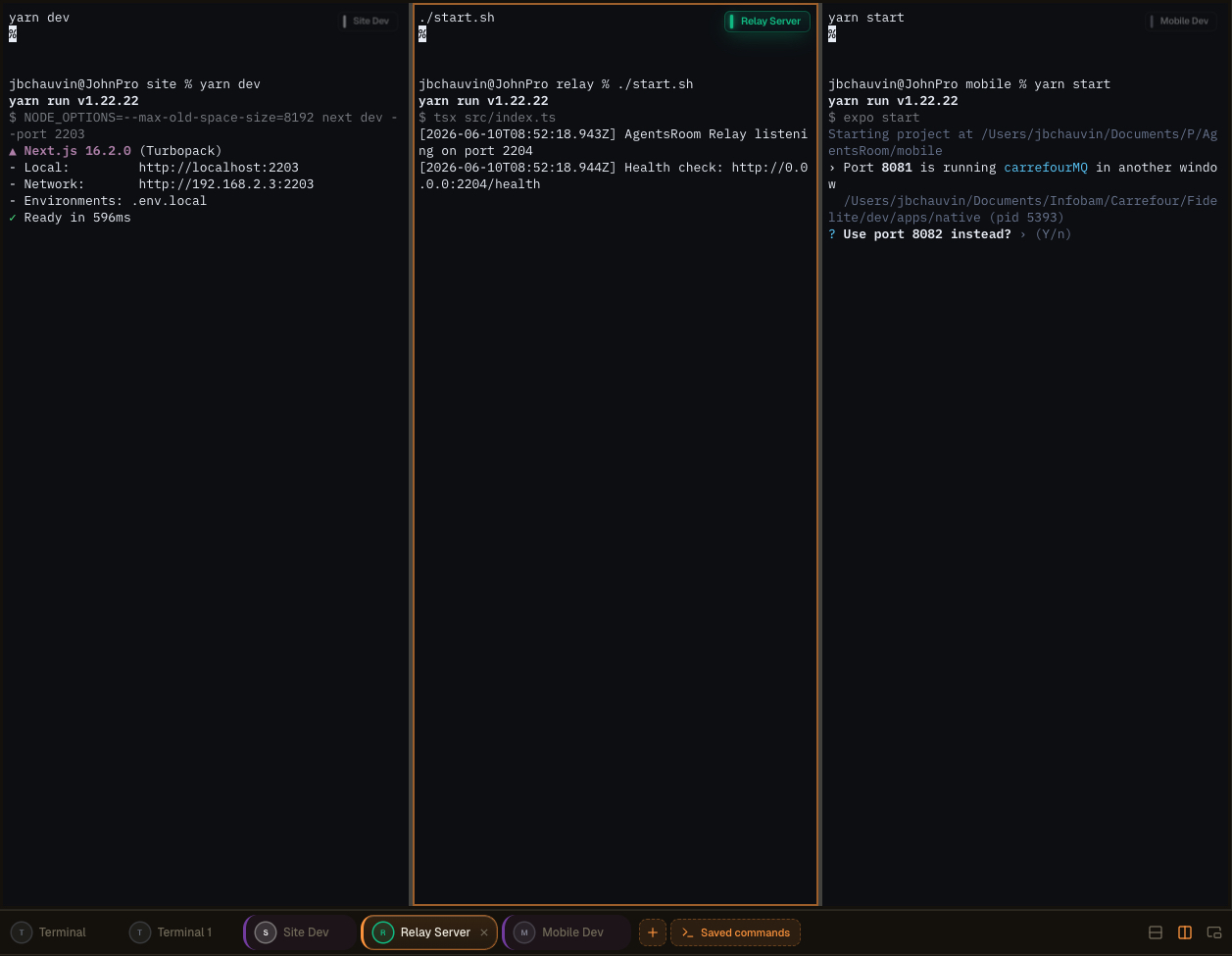
Multi-pane terminal layout in AgentsRoom: split your terminals, detach them onto a second screen, and supervise agents, logs and builds side by side.
A real integrated terminal, not a toy
Every command opens a full xterm.js terminal with ANSI colors, scrollback, clickable links, PTY resize and Unicode support. This is not a fake log viewer: it is a real pseudo-terminal, identical to what you get in iTerm2 or Terminal.app, but managed for you.
Each process status is displayed live: running, starting, stopped, crashed. When a dev server falls over, you see it immediately. One click to restart. And when you need several terminals in parallel (backend + frontend + mobile + relay), the global 'Start all' button launches every long-running process at once, in parallel, without typing anything.
Commands are grouped in folders, reorderable with the mouse, and stored in `.agentsroom/commands.json` at the root of your project. Commit this file: your whole team inherits the same terminal setup. Personal commands (local debug scripts, private env vars) go to `commands-personal.json`, automatically added to the `.gitignore` inside `.agentsroom`. Nobody ever has to type `yarn dev --port 2203` from memory when joining a new repo again.
Finally, everything is unified: your AI agents, your terminals, your prompts, your backlog and your live preview all live in the same window. You save a massive amount of time by killing the back-and-forth between AgentsRoom, your terminal emulator, your IDE and your browser. One screen, everything one click away.
Detached Commands and multi-screen setup
Dev Commands can now be fully detached into an independent window, separate from the main AgentsRoom interface. Pop your terminals out and move them wherever you work best: a second display, an ultrawide, or a vertical monitor dedicated to monitoring, logs, builds and AI agents.
A vertical screen on the side becomes a live wall for your running processes. Keep your editor and your agents in the main window, and watch every server, every build and every log stream in real time on the panel next door. No alt-tab, no lost context.
Better workspace organization
Free up your main window for code and agents. Detached terminals live on their own, so your development surface stays clean and focused instead of cramped into a single panel.
Optimized multi-screen layout
Drop the detached window on a second display or a vertical monitor. Your build output, dev servers and agent logs get a dedicated screen while you keep coding on the main one.
Real-time monitoring
Keep an always-on view of your agents and commands. Watch processes start, stream and crash live on a side screen, and react the second something goes wrong.
Higher productivity
Developers juggling several projects or environments stop switching contexts. Everything that needs watching stays visible, so you ship faster with fewer interruptions.
Advanced terminal layouts, built with drag-and-drop
You can now merge several terminals into the same pane through an extremely intuitive drag-and-drop interface. Grab a terminal, drop it where you want it, and AgentsRoom builds the layout for you. No config files, no keybindings to memorize.
Compose the workspace that fits the task in front of you:
Vertical splits
Place two terminals side by side to watch your backend and frontend at the same time.
Horizontal splits
Stack terminals on top of each other to keep logs and a running server in the same column.
Complex combined layouts
Mix vertical and horizontal splits to build a full grid of terminals tailored to your stack.
Reorganize in seconds
Drag any terminal to a new position and the layout rearranges instantly. Restructure your whole setup in a few seconds.
Supervise everything at once
Keep multiple agents, servers, logs and commands in view simultaneously, all inside a single pane.
No complex setup, no tmux configuration to learn. The experience is designed to feel immediate and natural, so you spend your time coding instead of arranging windows.
More ways to drive your terminals
The detachable window, AI command generation and remote launch from mobile are all part of the same Dev Terminals experience. Here is the original walkthrough.
AgentsRoom terminal manager: detached terminal on a second screen, commands triggered remotely from mobile, integrated xterm.js terminal per project.
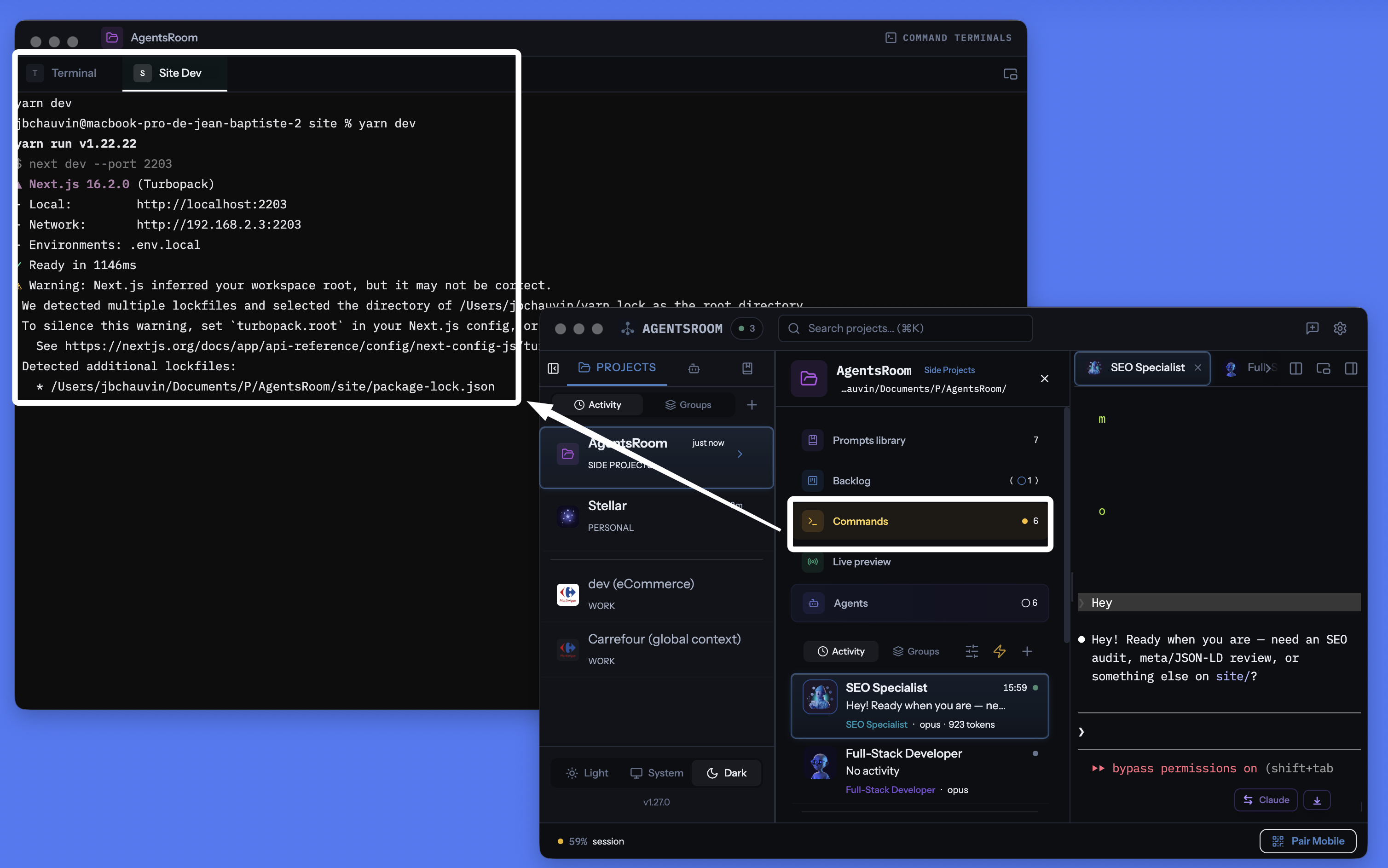
AgentsRoom per-project terminal manager: detachable window, integrated terminal per command, AI-generated commands, all in the same place as your agents.
Manage every terminal, every command, every service
Long-running processes, quick scripts, build commands, dev servers. All organized per project, with live status tracking, integrated AI and remote mobile control.
Per-project terminal manager
Each project owns its own command list, stored in .agentsroom/commands.json. Switch project, your commands change automatically. Zero confusion between repos.
Start everything in one click
A single Play button starts every long-running process: backend, frontend, mobile bundler, relay server, worker, database. No more five terminal tabs opened by hand.
Remote launch from mobile
Trigger commands from the iOS or Android app: terminals spawn on your computer, and you see live output streamed to your phone over 4G, 5G or Wi-Fi.
Detachable terminal window
Detach the terminals section into an independent floating window. Drop it on a second monitor to keep an eye on your servers while you code in the main window.
AI command generation
Click the magic wand: Claude scans your repo, detects package.json, Dockerfiles, Makefiles and generates every start command, path and category for you.
Live process status
See which service is running, starting, stopped or crashed. Exit codes are displayed on failure. Restart in one click without losing the terminal scrollback.
Process or snippet
Long-running servers are processes. One-shot build scripts, migrations and deploys are snippets. Both live in the same dashboard, both are one click away.
Real xterm.js terminal per command
Every process opens a real pseudo-TTY terminal with ANSI colors, scrollback, clickable links and full keyboard input. No compromise compared to iTerm2 or Terminal.app.
Wired to the localhost live preview
Launch your localhost site from an AgentsRoom terminal, then reach it from the outside through the built-in HTTPS tunnel. Test on your phone over 4G/5G without deploying.
30+ framework icons
React, Next.js, Vue, Nuxt, Angular, Svelte, Expo, Node.js, NestJS, Django, FastAPI, Rails, Laravel, Spring, Go, Rust, Docker, Redis, and many more, each with icon and color.
Git-native storage
Public commands live in .agentsroom/commands.json, committed to your repo. Personal commands live in commands-personal.json, automatically gitignored.
Terminals and AI agents together
Your terminals, your Claude Code agents, your prompts, your backlog and your live preview share the same app. Stop getting lost between ten different tools.
Launch terminals on your computer from your phone
This is probably the most unique feature of AgentsRoom. From the iOS or Android mobile app, you browse the command list of any project and launch any of them with a tap. The command does not run on your phone: it runs on your computer, in the right working directory, in a real PTY terminal. The output is streamed live to mobile through the end-to-end encrypted relay.
Concretely: you are in the subway, at the gym or on the other side of the world. You want to spin up your local site to check a design, or restart a worker that crashed while you were away. You open AgentsRoom mobile, you tap 'yarn dev', the server boots on your computer at home. You can even interact with the terminal keyboard from the phone.
Combined with the integrated localhost preview tunnel, you can even open your local site in the mobile browser, over 4G or 5G, with zero deploy. You code, start, test and validate, all from your pocket. AgentsRoom literally turns your computer into a remotely driven dev server.
Get notified when a long command finishes
A build, a test suite or a Docker image can run for several minutes. You switch to something else, and the terminal sits there finished for ten minutes before you notice. Arm the bell on a terminal tab and AgentsRoom tells you the second the command is done, with the command name and how long it ran.
The bell lives in the small floating label at the top right of every terminal pane. One click arms it, one click disarms it, and it stays armed for that terminal, so every run of the same build reports back. Clicking the notification opens that exact terminal tab.
One bell per terminal
Arm it only where you need it. There is nothing global to configure and no alert for the terminals you never asked about.
Long commands only
Anything under a minute counts as interactive use and stays silent, so cd, ls and git status never buzz you. Arm the bell while a command is already running and that one always reports back, whatever its length.
Never while you are watching
If that terminal is already on screen and the app has focus, nothing pops up. The alert exists for the moment you walked away, not for the moment you are reading the output.
macOS, Windows and Linux
Detection reads the terminal's foreground process, so nothing is added to your zsh, bash, fish or PowerShell configuration and it works with the shell you already use. Alerts also reach the iOS and Android app when you are away from your machine.
Your AI agents get the same treatment: AI agent notifications.
Detach mode: your terminals on a second monitor
The terminal panel can be detached into an independent floating window. Drag it onto a second screen and your backend, frontend and mobile bundler logs stay visible at all times while you code in the main AgentsRoom window. This is exactly what serious developers do with tmux or iTerm2 in tiling mode, except in AgentsRoom there is nothing to configure.
The detached window keeps every feature: launch, stop, restart, AI, categories, multi-project. You can keep typing in the terminal on the secondary screen while a Claude agent works in the main window. Zero alt-tab, zero context loss, zero obscure configuration.
A modern alternative to every terminal you've used
AgentsRoom Dev Terminals is the better option for project work compared to classic terminal emulators. Here are the tools our users have already replaced with it:
iTerm2 has been the macOS gold standard for years and Terminal.app is preinstalled on every Mac. Warp popularized command blocks and integrated AI. Ghostty is fast and native. Kitty is GPU-accelerated. Alacritty is minimalist. WezTerm is Lua-scriptable. Hyper is built on web tech. Tabby is cross-platform. Wave Terminal and Windows Terminal both push modern, multi-pane workflows. They are all excellent products. AgentsRoom does not try to compete on raw rendering speed: it brings a different value proposition, a terminal integrated into your development environment, scoped to each project, synced with your AI agents and drivable from your phone.
Everything a modern terminal needs, in one window
AgentsRoom is not just another terminal emulator. It brings together everything a modern coding workflow needs and puts it behind a single interface:
If you already manage your projects with several terminal tabs named 'backend', 'frontend', 'mobile', 'relay', you will save time with Dev Terminals. If you use tmux or zellij to organize sessions, you will find the same idea, without any config file to write.
How it works
Open your project
In the project view, the Dev Terminals section appears alongside your AI agents, prompt library and backlog. If no commands exist yet, a default terminal at the project root is created automatically.
Add your commands
Click + to add a command. Set the name, the shell command (yarn dev, docker compose up, pnpm start), the working directory relative to the project root, and the framework category. Choose long-running process or one-shot snippet.
.agentsroom/commands.jsonOr let AI generate the commands
Click the magic wand: Claude reads your repo structure (package.json, Dockerfile, Makefile, pyproject.toml, Cargo.toml, go.mod, composer.json) and generates the full list of your start commands with the right paths, categories and icons. Review, tweak, save.
Start everything in one click
Press the global Play button to start every long-running process at once. Each command opens a real xterm.js terminal where you can see output, type on the keyboard and interact just like in iTerm2 or Terminal.app.
Detach the panel
Click the detach icon: the terminals section opens in an independent floating window you can drop on a second monitor. Your servers stay visible while you code in the main window.
Drive it from your phone
Open AgentsRoom on iOS or Android, pick your project, tap a command: it launches remotely on your computer and you see its output live from your phone over 4G, 5G or Wi-Fi through the end-to-end encrypted relay.
Color-coded icons for every stack
Each command displays the icon and color of its framework. Spot your React frontend, your Django backend, your Expo bundler and your Docker services at a glance in your terminal list.
AI-powered command setup
New project? No need to configure every command manually. Click the magic wand: Claude scans your repository, detects the package manager (yarn, pnpm, npm, bun), every long-running service, every sub-project and every start command. It generates the full list with the right paths, framework categories, icons and folders. You review, adjust, and save. The entire setup takes seconds instead of minutes.
Default prompt
"Analyze my project structure and generate all the start commands for each long-running service, each sub-project and each dev server. Include the correct working directory, the shell command, and the appropriate framework category for each entry."
Want your agents to start the dev server themselves ?
AgentsRoom MCP exposes the same Terminal Commands you save here as MCP tools. Your AI agents can call commands_list, commands_run and commands_create through the Terminal Commands MCP server, then start your dev server, your API or your worker on their own.
That is just one of four AgentsRoom MCP servers. Backlog MCP, Prompt Library MCP and Browser MCP turn the rest of the AgentsRoom IDE into an agent-pilotable workspace. Manual when you want, automated when you don't.
Discover AgentsRoom MCPFAQ
How is this different from iTerm2, Warp, Ghostty or Terminal.app?
iTerm2, Warp, Ghostty, Kitty, Alacritty, WezTerm, Hyper and Terminal.app are all great terminal emulators. AgentsRoom Dev Terminals does not try to replace them for general system work: it is a project-scoped terminal manager. Commands are saved per project, launched in one click, drivable from mobile, and live next to your AI agents. If you mostly work on your own projects, you will spend 90% of your terminal time inside AgentsRoom without opening iTerm2.
Do AgentsRoom terminals really use xterm.js?
Yes. Every command opens a real xterm.js terminal backed by a pseudo-TTY on the Electron side. You get ANSI colors, scrollback, clickable links, keyboard input, dynamic resize and Unicode support, exactly like in a native terminal emulator.
How does remote command launch from mobile work?
From the iOS or Android app, you pick a project and a command. The mobile app sends an end-to-end encrypted message through the WebSocket relay. The desktop app receives the command, spawns a real PTY on your computer in the correct working directory and streams the output in real time back to mobile. The command physically runs on your computer, not on your phone. Perfect for restarting a server or worker while you are on the move.
Does detach mode work on multiple screens?
Yes. Click the detach icon: the Dev Terminals section opens in an independent floating window that you can drag onto a second monitor. Your logs and servers stay visible permanently while you code in the main AgentsRoom window.
What is the difference between a process and a snippet?
A process is a long-running service: dev server, backend, mobile bundler, file watcher, database. It stays alive until you stop it or it crashes. A snippet is a one-shot command: build script, migration, deploy, test. Both live in the same dashboard, but only processes are started by the global 'Start all' button.
Are commands shared with my team?
Yes. Public commands are stored in .agentsroom/commands.json inside your project directory. Commit this file: anyone who pulls the repo gets the same setup. Personal commands (local debug scripts) go to commands-personal.json, automatically added to .agentsroom/.gitignore.
How does AI command generation work?
When you click the magic wand, AgentsRoom spawns a Claude instance that reads your project structure (package.json, Dockerfiles, Makefiles, pyproject.toml, Cargo.toml…) to identify each long-running service and its start command. The result is a structured list of commands with paths, categories, folders and suggested names. You review the list before saving.
Can AgentsRoom notify me when a terminal command finishes?
Yes. Every terminal tab carries a bell in its floating label. Arm it and AgentsRoom fires a desktop notification the moment the running command hands back to the prompt, with the command name and its duration, plus a push to the iOS and Android app when you are away from your machine. Clicking the notification opens that terminal tab.
How does AgentsRoom know a command is finished if the terminal stays open?
A terminal tab is one long-lived shell, so nothing exits when a command ends. AgentsRoom watches the terminal's foreground process group instead: when it comes back to the shell itself, the prompt is back and the command is done. Nothing is written into your shell configuration, which is why it behaves the same with zsh, bash, fish or PowerShell, and works for commands you typed by hand as well as for saved ones.
Will I get a notification for every command I type?
No. Only commands that ran longer than a minute raise an alert, so routine interactive use stays silent. One deliberate exception: if you arm the bell while a command is already running, that command always reports back however long it takes. Nothing fires either when the terminal is already on screen and the app has focus.
Can a command be available in every project?
Yes. When you save a command you choose where it lives: this project only, or global. A global command belongs to your account and shows up in every project you open, which is what you want for a tunnel, a shared Docker stack or a database daemon you run everywhere. The Commands modal has a search bar and a scope filter (All / This project / Global), so a long list stays readable.
Can my AI agents launch these commands themselves?
Yes, through AgentsRoom MCP. Agents call commands_list to see everything available here (project commands and global ones, each tagged with its scope), commands_run to start one in a real terminal tab you can watch and stop, and commands_create to save a new one. They are told never to launch a long-running process through a raw shell, so what runs always ends up in a terminal tab you control. And when an agent's own sandbox refuses a command, it no longer has to print the line for you to paste into another terminal: it calls commands_propose, the command shows up as a Run this command? card in that agent's pane with the reason it cannot run it, and one click on Play runs it in a terminal tab the agent then reads itself. Nothing runs until you decide, there is no always allow option, and the command is neither saved nor replayed.
Further reading
Too many terminals, too many AI agents: the cognitive debt slowing you down (and how to get out)
Juggling ten AI-agent terminals builds a cognitive, documentation and financial debt that costs you time and tokens. Here is how to take back control.
Best terminal for agentic coding in 2026: cmux, Warp, tmux, and what actually wins
cmux, Warp, tmux, WezTerm, AgentsRoom: an honest comparison of the best terminal for agentic coding and vibe coding when you run AI agents in parallel.
Stop juggling terminals, IDE and dev servers
Download AgentsRoom and replace your iTerm2, Warp or Ghostty tab manager with a real per-project terminal manager you can drive from your phone. Free for up to 2 projects.
Companion app: monitor your agents on the go
Bring your own: Claude, Codex, Antigravity CLI, or other AI provider.
Push bugs and requests straight to your public backlog.