Your MCP servers,
in every agent CLI at once
Claude Code keeps its MCP servers in ~/.claude.json, Codex in ~/.codex/config.toml, and every other CLI in a file of its own. Add Notion to three of them and you write the same server three times, then sign in three times. AgentsRoom keeps one list.
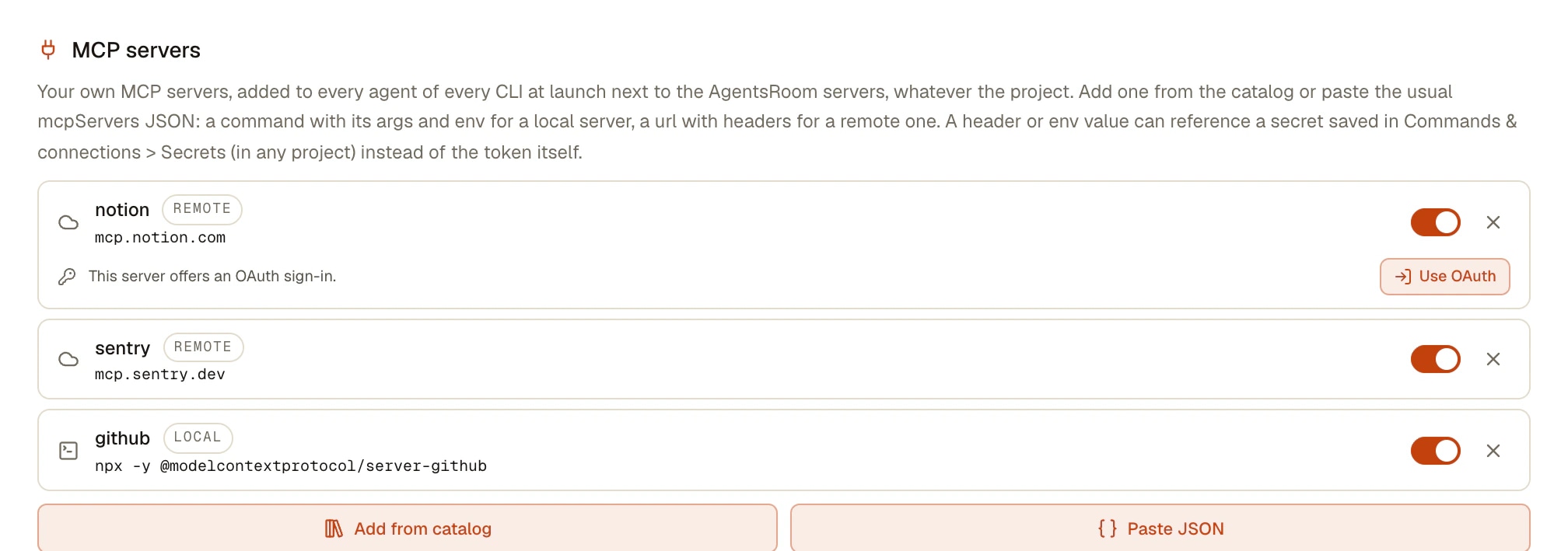
Declare a server in Settings > Agent behavior > MCP servers, on a project or on a single agent: every agent AgentsRoom launches gets it, written in the format of its own CLI. A remote server that signs in with OAuth, like Notion, Linear or Atlassian, shows a Connect button: sign in once in your browser and every CLI on that computer reaches it.
- notionmcp.notion.com/mcpConnected on this computer
- sentrymcp.sentry.dev/mcpRemote
- githubnpx github-mcpLocal
- Claude Code
- Codex
- GitHub Copilot CLI
- Cursor
- and 12 other agent CLIs
One declaration, delivered to every CLI at launch. The OAuth sign-in is done once per computer, for all of them.
MCP servers are how a coding agent reaches the rest of your tools: the issue tracker, the docs, the error monitoring, a database bridge. Every agent CLI supports them, and every CLI stores them its own way, with its own command to add one and, for servers that sign in with OAuth, its own login.
That is fine with one CLI. With three, a new server means three edits in three formats, and an OAuth server means three sign-ins, when the CLI supports OAuth at all. You usually find out the lists drifted the day an agent on another CLI says it has no access to Linear.
AgentsRoom moves the list one level up. You declare a server once, in the mcpServers JSON every CLI documents or from the catalog of the official MCP registry, and at launch the desktop writes it into the configuration of whichever CLI the agent runs on, next to AgentsRoom's own servers. It works with every CLI AgentsRoom runs that has an MCP client: Claude, Codex, GitHub Copilot CLI, Cursor and 12 other agent CLIs. Aider is the exception: it has no MCP client.
What one list of servers gives you
Declared once, in the format you already know, and delivered by AgentsRoom when each agent starts.
Declared once, delivered to every CLI
One mcpServers block, the format every CLI documents. At launch, AgentsRoom translates it for Claude Code, Codex, OpenCode, Grok Build, Cursor and the others, so you never write the same server twice.
Three levels, the narrowest wins
Settings for every agent of every project, a project for its repository, one agent for itself. Servers merge by name, and an agent can switch off an inherited server without declaring it again.
The official MCP registry, built in
Add from catalog searches the servers their maintainers published to the official MCP registry, with a Verified publisher mark, and writes the declaration for you: the remote address when there is one, otherwise the local package.
OAuth sign-in with one Connect button
When a remote server answers with an OAuth challenge, its row says This server offers an OAuth sign-in. Press Use OAuth, then Connect, finish in your browser, and the row shows Connected on this computer. Tokens renew on their own.
Keys stay references
Any address, header, environment value or argument accepts {{secret:NAME}}. The key lives in the Secret Manager and is resolved on the desktop at launch, never stored in the declaration.
Kept on resume, kept out of git
Claude Code and GitHub Copilot CLI get the servers in a private launch file, passed again when a conversation resumes. For the other CLIs, AgentsRoom writes the project-level config file and keeps it out of git.
How to add a server
Five steps, once. Every agent launched afterwards has the server.
- 1
Open MCP servers
In Settings > Agent behavior, under Agent tools, open MCP servers. It is not in a CLI's tab of AI providers, because a server is a tool you want for every CLI. The same field exists in Project settings > AI providers and in the agent editor, under Advanced options.
- 2
Add a server
Add from catalog opens the MCP server catalog: search, pick a server, press Add. Or press Paste JSON and drop in the mcpServers block you already use in a CLI, with or without the mcpServers wrapper. A local server needs a command, a remote one needs a url.
- 3
Keep the key out of the block
Where the server needs a key, write {{secret:NAME}} in the header or the environment value, and store the key in the Secret Manager under that name.
- 4
Connect an OAuth server
For a remote server that signs in with OAuth, press Use OAuth when the row offers it, then Connect. Your browser opens the service's sign-in page; once you approve, the row shows Connected on this computer.
- 5
Launch your agents
Every agent launched from then on, on any CLI, has the server next to AgentsRoom's own. Agents that were already running pick up a new server or a new connection when they restart.
What Claude Code and Codex already do on their own
Claude Code has a complete MCP setup of its own: claude mcp add --transport http notion https://mcp.notion.com/mcp adds a remote server, the local, project or user scope decides whether it lives in ~/.claude.json or in a .mcp.json shared through git, and /mcp signs you in to an OAuth server in your browser, with the tokens stored and refreshed for you (Claude Code 2.1.308, documentation read on 22 October 2026).
Codex CLI has one too: codex mcp add notion --url https://mcp.notion.com/mcp writes the server into ~/.codex/config.toml, and codex mcp login notion runs the OAuth sign-in, with --no-browser for a machine that has no browser (codex-cli 0.163.0). It takes streamable HTTP servers, not SSE.
If you use one CLI, that is all you need. AgentsRoom does not replace those commands and does not touch the servers you added with them. It adds the layer above: one list for every CLI, delivered at launch, and one sign-in per computer for an OAuth server, through the open-source mcp-remote bridge, which works the same on every CLI whatever its own OAuth support.
Limits
- Connecting an OAuth server needs Node.js on the computer, because the sign-in runs through npx. Without it, Connect says that npx was not found on this computer.
- The OAuth connection belongs to the computer: you sign in again on another machine, and Disconnect forgets it on this computer only. So does the list in Settings; the servers declared on a project follow the project to your other computers.
- An agent that was already running sees a new server or a new connection only when it restarts.
- Aider has no MCP client, so it gets no servers. Codex and Mistral Vibe have no SSE transport: a plain SSE server is skipped for them, HTTP works, and an OAuth server reaches them anyway through the local bridge.
- On Windows, an OAuth server whose address or headers contain characters that cmd.exe reads as special, such as & or %, cannot be started: it is skipped, and Connect says so.
- Each agent starts its own bridge process for each OAuth server it uses.
- The phone has no MCP server editor. An agent started from the phone is launched by the desktop with the same servers and uses the connection made on that computer.
Frequently asked questions
How do I add the same MCP server to Claude Code and Codex?
Declare it once in AgentsRoom, in Settings > Agent behavior > MCP servers, with the mcpServers JSON you would paste into any CLI or from the catalog. Every agent AgentsRoom launches then gets it in its own CLI's format, Claude Code and Codex included. Without AgentsRoom you add it twice: claude mcp add for Claude Code, codex mcp add for Codex.
How do I sign in to an MCP server that uses OAuth?
In Claude Code, run /mcp and follow the sign-in in your browser; in Codex CLI, run codex mcp login with the server's name. In AgentsRoom, the server's row offers Use OAuth when the server answers with an OAuth challenge: press Connect, finish in your browser, and every agent of every CLI on that computer reaches the server, with its tokens renewed on their own.
Does the OAuth connection work for CLIs that have no OAuth support?
Yes. An OAuth server reaches every CLI as the same local command, the open-source mcp-remote bridge, which handles the sign-in and renews the tokens. The connection works the same on every CLI with an MCP client, and an SSE server reaches Codex and Mistral Vibe that way too, although they have no SSE transport of their own.
Which servers can I connect with OAuth?
Any remote MCP server that signs in with OAuth: Notion, Linear, Atlassian, Buddy.Works and the like. AgentsRoom checks a remote server that has no header: when it answers with an OAuth challenge, its row says This server offers an OAuth sign-in.
Where do I keep the API key an MCP server needs?
In the Secret Manager. Write {{secret:NAME}} in the header, the address, the environment value or the argument that needs it, and store the key under that name. The value is resolved on the desktop at launch and never stored in the declaration.
Can I turn a server off for one agent only?
Yes. In the agent's editor, Advanced options > MCP servers, switch off the inherited row. The agent stores an override that only says the server is disabled, and the other agents keep it.
My Claude Code agents do not see the servers I added with claude mcp add. Why?
On an AgentsRoom account profile, Claude Code does not read your personal configuration by default. Turn on Use my personal CLI configuration in Settings > Multiple accounts, or declare the server in AgentsRoom's MCP servers, which reaches every account and every CLI.
Are my MCP servers the same on my other computers?
The servers declared on a project follow the project to your other computers. The list in Settings and the OAuth connection belong to the computer: you declare and connect them once on each machine. The phone has no editor; an agent started from it uses the servers and the connection of the computer that runs it.
You may also like
MCP : Agent-pilotable : Manual or automated
Four MCP servers let Claude Code, Codex and other CLIs drive AgentsRoom itself: read the backlog, run dev commands, use the prompt library, pilot the browser.
Secret Manager
Store API keys, tokens and passwords in your OS keychain, reference them as {ref} in dev commands and agent environments, and let AgentsRoom resolve them at launch. Agents see the names, never the values, and nothing is ever synced to a server.
Multi-Provider
AgentsRoom supports 17 AI coding providers: Claude, Codex, GitHub Copilot CLI, OpenCode, Antigravity CLI, Aider, Grok Build, Mistral Vibe, Kimi Code, Amp, oh-my-pi, Freebuff, Devin, Cursor, Command Code, Muse Code and Pi. Assign a different provider per agent, switch provider mid-conversation, and keep full context with automatic handoff. The best multi-provider AI coding tool.
Claude Multi-Account
Run two or more Claude Code accounts on one computer, side by side in AgentsRoom. Keep a personal account on one project, a work account on another, a client account on a third. Pin one account per project, override per agent, sign in from the app. Free to download on macOS, Windows and Linux.
Network proxy
Set a different HTTP or SOCKS proxy for Claude Code, Codex and every agent CLI. AgentsRoom sets HTTPS_PROXY per provider, shows the exit IP before launch and keeps the password out of plain text.
One list of MCP servers for every agent
Download AgentsRoom, declare your servers once and hand them to Claude Code, Codex and every agent CLI.
Companion app: monitor your agents on the go
Bring your own: Claude, Codex, Antigravity CLI, or other AI provider.
Push bugs and requests straight to your public backlog.