Two Claude Code accounts.
One AgentsRoom. Zero shell tricks.
Run a personal Claude Code login on one project and a work login on another, in the same window, at the same time. Pin one Claude account per project. Override per agent when you need to. Sign in directly from the Settings panel, no CLAUDE_CONFIG_DIR exports, no extra tool to install.
Free · macOS, Windows, Linux · Sign-in stays on your machine
Why use several Claude Code accounts
Real reasons developers run more than one Claude account, in plain words.
Keep work and personal cleanly separated
Your employer's Claude Code account stays on the work projects. Your personal account stays on your weekend projects. No accidental cross-pollination of prompts, no work credentials hitting a side project, no personal sessions logged on the work account.
Bill consumption per client
When a client gives you Claude access, sessions for that client run on their account. Their tokens get burned, not yours. The Claude usage tracker in AgentsRoom keeps the per-account totals separate, so refacturation is straightforward.
Avoid quota collisions
If your work account has a tight Anthropic quota, a long agent run on a personal weekend project does not eat into it. Each account has its own limits, its own rate-limiting state, its own usage history.
Run a test account next to a prod account
Spin up a separate Claude account for noisy experiments, throwaway agents and prompt drafts. Keep the prod account clean. Switch between them per agent, per project, in two clicks.
Different orgs, different policies
Some Claude accounts are tied to enterprise SSO with mandatory logging or telemetry. Keeping a personal account separate means your personal coding stays on your personal terms, with credentials, sessions and history isolated at the directory level on disk.
Pair coding for two humans on one computer
If two developers share a workstation occasionally, each can sign in with their own Claude Code account. AgentsRoom remembers both, the right one fires up depending on the project or the agent.
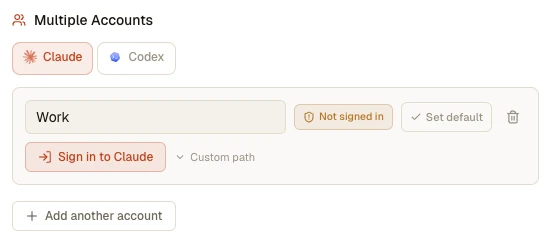
The Multiple Accounts panel in Settings: add a Claude account per context, sign in from the app, or point a custom path at an existing profile.
Built directly into AgentsRoom
No external switcher, no shell scripts, no logout-login dance.
One Claude account per project
Pin a Claude account on a project. Every agent in that project inherits it by default. Open a Work project and a Personal project in the same window, each running its own Claude account underneath.
Override per agent
Need a single agent on a different account? Edit the agent, pick another Claude account, save. The override only applies to that agent. The rest of the project keeps the project-level account.
Sign in inside the app
Click "Add an account" and AgentsRoom opens an embedded mini terminal running claude with the right CLAUDE_CONFIG_DIR. You type /login, complete OAuth in the browser, paste the code back. The status badge flips to Signed in the moment Claude Code records the sign-in.
Global default account
Set one Claude account as the global default. Every new project starts on that account unless you override. Change the default later and every non-pinned project follows automatically.
Compatible with CCS
Already using Claude Code Switcher? Point a profile at ~/.ccs/instances/work or any other CCS folder. AgentsRoom reuses the existing credentials, no re-login needed.
Strict on-disk isolation
Each account lives in its own directory: tokens, sessions, project history. Two accounts never share an identity, and deleting an account on AgentsRoom never touches another account's data. Preferences and extensions are the one thing you can choose to share, with a single switch.
Share your own setup across accounts
One switch loads your slash commands, skills, subagents, CLAUDE.md, hooks, plugins and user MCP servers into every account you signed in to, instead of leaving each one with an empty user layer. Credentials and history stay isolated.
Per-account token tracking
The Claude Code token usage meter in AgentsRoom reads each account's JSONL transcripts independently. Per-session totals, cache hit rate and warnings work the same on every account.
Per-agent file attribution
The vibe coding review and per-agent diff features keep working across accounts. Files modified by an agent are attributed correctly even when the agent runs on a non-default Claude account.
One account per folder of projects
Pin a Claude account on a sidebar folder and every project filed under it starts on that account, sub-folders included. A Work folder on the work account, a Personal folder on the personal one. A project, or a single agent, can still override it.
A colour per account
Give each Claude account its own colour in Settings. It shows as a small dot on the agent avatar, on the terminal header and on the project tile, so which account is running is readable at a glance instead of being looked up.
The usage gauge follows the right account
The gauge in the status bar reads the quota of the account the agent in front of you actually runs on, provider by provider. A project pinned on Work stops showing the personal percentage, and the tooltip names the account it measures. Prefer to see several accounts at once? Set the gauge to show the accounts you pick side by side, or as one compact pill that lists them when you hover it.
Quota broken down per project and per agent
Turn the quota breakdown on in the beta panel: the usage popover then splits each account's consumption across your projects and agents for the running window, every line carrying its provider mark and its account colour.
Temporary override scoped to one account
When you temporarily change the model or the reasoning effort, you choose what it applies to: every project, only the projects you pick, or only the agents that would otherwise run on one given account.
Temporary switch to another account
A temporary override can also change the account the new agents run on: out of credit on your personal account, keep working on the work one, then everything goes back to normal when the override expires.
Move a running agent to another account
Change the account from the Switch Provider window, the agent sheet, the project or a folder: the agents already running follow immediately. They restart on the new account with their context carried over, instead of waiting for their next launch.
How it works under the hood
Built on Claude Code's official multi-account mechanism.
CLAUDE_CONFIG_DIR drives everything
Claude Code reads its tokens, session metadata and project history from the directory pointed at by CLAUDE_CONFIG_DIR. Default is ~/.claude. Setting this variable to another directory swaps the active account. AgentsRoom uses this official mechanism to power multi-account support.
Each account is a managed directory
When you click "Add an account", AgentsRoom creates ~/.agentsroom/claude-profiles/<id>/ and signs in there. You can also point an account at any existing folder, including a CCS instance directory like ~/.ccs/instances/work.
Sign-in flow is embedded in Settings
AgentsRoom spawns a mini PTY running claude with CLAUDE_CONFIG_DIR set to the new profile. You type /login, the browser opens, you paste the code back. AgentsRoom checks the profile once a second, so the Signed-in badge appears the moment Claude Code records the sign-in: the .credentials.json file on Linux and Windows, the account entry of .claude.json on macOS, where the tokens themselves go to the Keychain.
Cascade resolution at spawn time
When an agent starts, AgentsRoom resolves the effective Claude account in this order: agent override, project pin, settings default, system default ~/.claude. The right CLAUDE_CONFIG_DIR is set on the PTY environment before claude launches.
Token usage and file tracking stay correct
AgentsRoom internal readers (token usage, file attribution, session monitor) iterate over all known account directories plus ~/.claude as the fallback. The right session metafile wins by PID, so per-agent counters and diffs stay accurate no matter which account spawned the agent.
What lives in each account directory
Every Claude account directory holds its own login (the OAuth credentials, kept on macOS in a Keychain item named after the directory), the session metadata files keyed by PID, the JSONL transcripts per project, the Claude settings and the project history. AgentsRoom never copies identity between them. It also means an account starts with an empty user layer, so "Use my personal CLI configuration" in Settings is what loads your own commands, skills, subagents, CLAUDE.md, hooks, plugins and user MCP servers into every one of them.
Per-account contents
- • OAuth credentials (.credentials.json, or a Keychain item per directory on macOS)
- • Session metafiles in sessions/<pid>.json
- • JSONL transcripts in projects/<encoded-cwd>/<sessionId>.jsonl
- • Per-account settings, history and, unless you share it, your user layer
Use two Claude accounts in step, one launch out of two
Two subscriptions never merge into one plan, but they can work as a pair. A quota rule shares your new agents between two Claude accounts in turn: Personal for one launch, Work for the next, or 20% of each session before handing over. Agents already running keep their account, and the same rotation can mix Claude and Codex.
Use Claude and Codex togetherAlternatives to AgentsRoom
Other ways to handle multiple Claude Code accounts, and what AgentsRoom does differently.
CCS (Claude Code Switcher)
CCS is a shell wrapper that maintains separate Claude profile directories under ~/.ccs/instances/<name> and switches CLAUDE_CONFIG_DIR before exec'ing claude. It works, but it lives outside the IDE: you switch profile globally for the whole shell, not per project or per agent. AgentsRoom is fully compatible with CCS profiles. Point an AgentsRoom account at a CCS instance and reuse the credentials directly.
CLAUDE_CONFIG_DIR by hand
The official Anthropic-supported way: export CLAUDE_CONFIG_DIR=/path/before launching claude. Manual, error-prone, and the moment you open a second tab you forget which account you're on. AgentsRoom drives this variable for you, per-project and per-agent, and shows you the active account in the picker every time.
Two separate machines or two user sessions
Some teams use a separate machine or a separate OS user session per Claude account. Heavy, slow, and you cannot run a work agent and a personal agent in parallel. AgentsRoom runs both at the same time on the same computer, in the same window.
Logout and login each time
Type claude /logout, then claude /login on the new account, then again to switch back. Loses your sessions, costs minutes per switch, and breaks --resume on every previous session. AgentsRoom keeps every account signed in permanently, switches with one click, and never invalidates a session.
Custom shell scripts and aliases
Some developers wrap claude in a shell function that exports CLAUDE_CONFIG_DIR based on the current directory. Brittle, hand-rolled, and invisible from the IDE. AgentsRoom encodes the same idea declaratively at the project level, with a UI badge that always tells you which account is active.
What AgentsRoom does that the others do not
AgentsRoom is the only IDE that surfaces multiple Claude Code accounts as a first-class concept, with a per-project pin, a per-agent override, an in-app sign-in flow, a status badge per account, and full compatibility with CCS profiles. You sign in once per account, you pin accounts per project, you override per agent, and you stop worrying about which account is loaded. Multiple accounts AND multiple providers in the same project: a Claude Work agent, a Claude Personal agent and a Codex agent can all run side by side.
FAQ
How many Claude Code accounts can I add to AgentsRoom?
There is no hard limit. Each account is a directory on disk. Add a Work account, a Personal account, one account per client, a test account: AgentsRoom lists them all in the Settings panel and lets you pick any of them per project or per agent.
Do I need to install CCS or any other tool to use multiple Claude accounts in AgentsRoom?
No. AgentsRoom drives Claude Code's CLAUDE_CONFIG_DIR mechanism directly. No external switcher, no shell wrapper, no extra dependency. The sign-in flow is fully embedded in the Settings panel.
I already use CCS. Can I keep my existing CCS profiles?
Yes. When you add an account in AgentsRoom, click "Custom path" and point at your existing CCS profile directory, for example ~/.ccs/instances/work. AgentsRoom reuses the credentials already saved there. No re-login required.
Can two different agents in the same project run on two different Claude accounts at the same time?
Yes. The project pins a default account, but each agent can override it. Open a project pinned on the Work account, edit one specific agent to use the Personal account, and the two agents run in parallel on different Claude accounts in the same window.
Are token counters and file attribution accurate when an agent runs on a non-default Claude account?
Yes. AgentsRoom scans every configured account directory, plus ~/.claude as the fallback, when reading session metadata. PIDs are globally unique so each agent's session metafile is found in exactly one directory. Per-session token counts, cache hit rate and per-agent file diffs work identically across accounts.
What happens if I delete an account that some agents still reference?
Nothing breaks. The agents fall back to the default Claude account silently. The deleted directory is left on disk in case you want to point another profile at it later. You can rebind the orphaned agents to another account at any time from the Edit Agent dialog.
Are credentials shared with other AgentsRoom users or sent to a server?
Your credentials are not shared with other users or sent to AgentsRoom servers. To display the usage gauge, AgentsRoom reads the access token available on your computer and uses it to query Anthropic's usage service directly. This check does not modify or refresh the token.
Does the resume feature work after I switch an agent's Claude account?
When an agent's account changes, its previous session lives under the old account directory and cannot be resumed under the new one. AgentsRoom detects the failure and starts a fresh session automatically. No manual cleanup needed.
Can I combine two Claude subscriptions to get more rate limit headroom?
Each Claude account keeps its own quota and its own rate limits: separate accounts never share or throttle each other, so a heavy agent run on one account leaves the other untouched. Whether running several paid subscriptions fits your situation depends on Anthropic's terms of service for your account type. AgentsRoom simply manages the sign-ins and keeps each account's identity isolated on disk.
Can I pin a Claude account to a whole group of projects?
Yes. Sidebar folders carry their own defaults, and the Claude account is one of them. Pin Work on the folder holding your work repositories and every project inside starts on that account, including projects added later and projects in sub-folders. The resolution order is: agent override, project pin, nearest folder that pins an account, global default, then ~/.claude.
With several accounts signed in, which one does the usage gauge show?
The one you are actually spending, resolved separately for each provider: the account of the agent in the foreground first, otherwise the account this project would launch on, otherwise your primary account. The gauge tooltip names it, and the usage popover lists one section per signed-in account, so a work quota and a personal quota are never added into a single figure. That is the default: you can also switch the gauge to show every account you pick side by side, or as one compact pill that expands on hover, from the usage panel or from Settings.
Can I see how much of an account's quota one project or one agent has used?
Yes, with the quota breakdown enabled in the beta panel. AgentsRoom takes the percentage published by the account for the running window and splits it across your projects and agents, weighted by the local cost of each session. It is an estimate and it is marked as such: consumption AgentsRoom cannot see, from another computer or from claude.ai, is missing from the calculation, so this is never an invoice.
Do my slash commands, skills and CLAUDE.md work on a second account?
Yes, once you turn on "Use my personal CLI configuration" in Settings. Signing an account in gives it its own Claude Code configuration directory, and Claude Code loads its whole user layer from there: without that switch a new account starts empty, so your own slash commands, skills, subagents, CLAUDE.md, hooks, plugins and user-scope MCP servers are not loaded. The switch links them into every account at once and keeps them up to date, while credentials, sessions, transcripts and usage stay isolated per account. AgentsRoom also lists exactly what it found in your configuration, so you never have to guess whether something is being used.
Can I be logged into two Claude accounts at the same time on one computer?
Yes, that is exactly what this feature does. Each Claude account you add gets its own Claude Code configuration directory, and every agent is launched with the account you picked for its project. A work agent and a personal agent then run side by side, in the same window, each signed in to its own account, with no logout in between. The limit you may have hit is in the Claude web app, which keeps one login per browser profile; the command line has no such limit once each account has its own directory.
Can I merge two Claude accounts into one?
No. As of this writing, Anthropic offers no way to merge two Claude accounts: each one keeps its own subscription, conversation history and quota. What AgentsRoom does is the opposite, and it needs no merge: keep both accounts, sign each of them in once, pin one per project or per agent, and use them from the same app. You get what people usually want from a merge, one place for everything, while the two accounts and their quotas stay separate.
Can I combine two Claude accounts to get more usage?
Yes, by using their quotas as a pair rather than merging them. A quota rule with the action Alternate providers shares new agents between the two accounts, one launch out of two or a share of each session in turn, so both quotas get spent at the same pace. A rule with Move running agents adds the safety net: when one account is full, its running agents carry on with the other one, same conversation.
What is claude-multiprofile, and does it work with AgentsRoom?
claude-multiprofile is an unofficial open source tool (MIT, installed with npm install -g claude-multiprofile) that sets up side-by-side Claude profiles: for the Claude desktop app, a separate launcher with its own data folder, which needs macOS; for Claude Code, a separate configuration folder such as ~/.claude-work with a shell alias such as claude-work, on macOS or Linux. It is the tool to use if you want two Claude chat apps open on one Mac, which AgentsRoom does not do. For Claude Code, both rely on the same CLAUDE_CONFIG_DIR mechanism, so you can keep a profile it created: add an account in AgentsRoom, turn on Custom path and point it at that folder, and AgentsRoom reuses the sign-in saved there. AgentsRoom then pins that account per project, folder or agent, on macOS, Windows and Linux.
Can my Claude accounts follow agents that run on an SSH server?
Yes, through a server token per account. A Claude sign-in cannot be copied to another machine: its refresh token works only once, so the server and your computer would sign each other out at the first renewal. Instead, open Settings > Multiple accounts > Claude, click Server token on an account and create its token: AgentsRoom runs claude setup-token for you, keeps the long-lived token encrypted on this computer and copies it, before each launch, to the servers where that account's agents run, in a file only your user can read. The pinned account then applies on the server as on your laptop, and a Move running agents quota rule moves remote agents to another account that has a token, same conversation. A server where copying accounts is turned off, or an account without a token, keeps the login the server has, and the agent terminal says so.
You may also like: Multi-Provider
Multiple Claude accounts give you several Claude logins in one app. Multi-Provider gives you several AI engines in one app: Claude, Codex, GitHub Copilot CLI, Cursor and 13 other agent CLIs. Same idea, applied to the AI provider rather than the account. Pin a provider per project, override per agent, switch mid-conversation while keeping context.
See the Multi-Provider featureYour agent hits a usage limit. It keeps working anyway.
When the Claude, Codex or Grok Build account an agent runs on is about to exhaust its quota, a quota rule hands the same conversation to another account you are already signed in to, and the work continues.
See how it worksFurther reading
Multiple Accounts in the Claude App: Desktop, Mobile and Merging
The Claude desktop app keeps one account signed in at a time, the iPhone and Android apps can now hold up to three, and two personal Claude accounts cannot be merged. What works in October 2026, the browser-profile workaround, and when it is Claude Code you actually need.
One Claude Account on Two Computers, or for Two People: What Works
One Claude account can be signed in on every device you own, and they all draw from the same 5-hour and weekly limits, Claude and Claude Code together. Two people on one account is against Anthropic's terms, and there is no family plan. What we checked on October 25, 2026, and how to see which computer spent what.
Claude Code Keeps One Login at a Time. Here Is How to Run Several.
A field guide to running a work account and a personal account on the same machine: the one environment variable that decides which login is active, why the shell approach breaks once you have more than two terminals, and how to pin an account per project.
Stop juggling shell variables. Pick the account from a picker.
Run a Work Claude account, a Personal Claude account and a client Claude account in AgentsRoom, side by side, today.
Companion app: monitor your agents on the go
Bring your own: Claude, Codex, Antigravity CLI, or other AI provider.
Push bugs and requests straight to your public backlog.