Bạn đang tìm giải pháp thay thế Warp Dev? Đây là AgentsRoom.
Warp Dev đã đi từ một terminal AI thành môi trường phát triển agentic hoàn chỉnh, với agent chạy trên cloud và cách tính tiền theo credit. AgentsRoom chọn hướng ngược lại: một trung tâm điều khiển trực quan lái chính những CLI bạn đã trả tiền, ngay trên máy của bạn.
Hai sản phẩm giờ chồng lấn nhiều hơn trước, nên câu hỏi đáng đặt ra không còn là bên nào có agent. Mà là agent của bạn chạy ở đâu, ai tính tiền token, và bạn cần một lớp sản phẩm nằm trên terminal hay ngay bên trong nó.
Nhìn thoáng qua là thấy khác biệt
Với Warp Dev
- •Sản phẩm lấy terminal làm gốc: shell vẫn là nơi mọi thứ diễn ra
- •Các gói tính theo credit: 1.500 credit ở Warp Build giá 20 USD, 18.000 ở Warp Max giá 200 USD
- •Phiên làm việc của agent được xếp thành tab dọc và nhóm tab trong cùng một cửa sổ
- •Agent cloud Oz chạy trong container do Warp lưu trữ, kích hoạt bằng webhook hoặc cron
- •Điều khiển từ xa phải đẩy phiên làm việc lên cloud của Warp, rồi bạn lái nó từ trình duyệt
- •Client mã nguồn mở, cấp phép kép MIT và AGPL v3 từ năm 2026
Với AgentsRoom
- +Sản phẩm ưu tiên trực quan: dự án và agent chiếm vị trí trung tâm, terminal chỉ cách một cú nhấp
- +Không credit, không phụ phí AI: bạn chỉ trả một lần cho gói Claude, Codex hoặc Antigravity của mình
- +Lưới đa dự án: chuyển qua lại giữa các dự án và agent mà không mất phiên nào
- +Agent chạy trên máy bạn, ngay trên working tree thật, hoặc trên một máy ảo cloud dùng một lần nếu bạn chọn thế cho từng lần chạy
- +App iOS và Android native nối với desktop qua relay mã hóa đầu cuối, không phải qua phiên cloud
- +Backlog kanban tự khởi động agent, terminal dev và tunnel preview trực tiếp tích hợp sẵn
Warp Dev đã thay đổi những gì gần đây
Warp ra mắt rất nhiều thứ trong năm 2026, và vài bản phát hành trong số đó đưa họ thẳng vào địa hạt đa agent. Đây là những gì thực sự mới, để bạn so sánh với sản phẩm hiện tại chứ không phải bản của năm ngoái.
Hỗ trợ mọi loại agent
Warp giờ chạy trực tiếp các agent CLI bên thứ ba: Claude Code, Codex, Gemini CLI và OpenCode. Bên trên bất kỳ agent nào bạn khởi động, Warp phủ thêm tab dọc, trung tâm thông báo, đính kèm ngữ cảnh và ô nhập liệu nâng cao.
Agent cloud Oz
Oz là bộ điều phối cloud của Warp. Agent chạy trong môi trường container hóa, khởi động bằng webhook, cron hoặc bấm tay, và mỗi lần chạy đều được ghi lại để audit. Các lần chạy trên cloud hỗ trợ harness Claude Code và Codex.
Điều phối đa agent
Agent của Warp giờ có thể chia nhỏ công việc cho cả một đội subagent, kèm theo dõi trạng thái và bàn giao qua lại giữa chúng. Một cuộc hội thoại đang chạy cục bộ cũng có thể được bàn giao lên cloud giữa chừng.
Client mã nguồn mở
Mã nguồn client của Warp công khai trên GitHub, cấp phép kép MIT và AGPL v3. Đó là lợi thế thật sự so với AgentsRoom, vốn không phải mã nguồn mở, và rất đáng cân nhắc nếu bạn cần tự kiểm tra được mã nguồn.
Router model tùy chỉnh
Định tuyến theo quy tắc hoặc theo độ phức tạp sẽ đẩy mỗi tác vụ sang một model khác nhau, đi kèm endpoint inference tùy chỉnh, theo dõi lượng token tiêu thụ và logic model dự phòng.
Code review và git từ xa
Một panel code review gửi comment inline thẳng vào phiên agent đang chạy, các thao tác git hoạt động qua phiên từ xa, và những file quy tắc dự án như WARP.md hay AGENTS.md được nhận diện tự động.
Tính năng và giá của Warp Dev được đối chiếu trên warp.dev ngày 20 tháng 7 năm 2026. Warp ra bản mới hàng tuần, nên hãy xem changelog của họ để biết những thay đổi mới hơn.
So sánh chi tiết từng tính năng
AgentsRoom và Warp Dev khác nhau ra sao khi bạn chạy song song nhiều agent lập trình AI. Bao gồm cả những dòng mà Warp Dev thắng.
| Tính năng | AgentsRoom | Warp Dev |
|---|---|---|
| Giao diện đồ họa trực quan | ✓ | ✓ |
| Hỗ trợ đa agent | ✓ | ✓ |
| Trung tâm điều khiển đa dự án | ✓ | Tabs + tab groups |
| Trạng thái agent (đang nghĩ / xong / kẹt) | ✓ | ✓ |
| Backlog kanban tự khởi động agent | ✓ | ✗ |
| Terminal dev (backend / frontend / mobile) | ✓ | ✓ |
| Tunnel preview trực tiếp | ✓ | ✗ |
| Truy cập từ mobile | Native iOS + Android | Remote control (web) |
| Nơi agent chạy | Always local | Local or Oz cloud |
| Kết nối mobile mã hóa đầu cuối | ✓ | ✗ |
| Mã nguồn mở | ✗ | ✓ |
| Model riêng cho từng agent | ✓ | ✓ |
| Mô hình credit AI | None (BYO CLI) | 1,500–18,000/mo |
| Dùng key / CLI của riêng bạn | ✓ | ✓ |
| Thời gian cài đặt | 30 sec | ~2 min |
Ranh giới thật sự: agent của bạn chạy ở đâu
Giờ cả hai sản phẩm đều điều phối được nhiều agent, nên danh sách tính năng không còn quan trọng bằng mô hình thực thi. Đây mới là chỗ hai bên thực sự tách nhau.
Máy của bạn, không phải một container
Theo mặc định, agent của AgentsRoom chạy cục bộ ngay trên working tree thật của bạn, nên bạn thấy được hành vi kết hợp của nhiều tính năng theo thời gian thực và không phải đẩy gì lên môi trường từ xa trước. Cloud Agents bổ sung chế độ còn lại khi bạn yêu cầu, trên một máy ảo dùng một lần trả lời bằng một nhánh git, nên nơi diễn ra một lần chạy là lựa chọn bạn đưa ra theo từng tác vụ chứ không phải một thuộc tính cố định của sản phẩm.
Dùng trên mobile mà không cần phiên cloud
Điều khiển từ xa của Warp đẩy phiên agent của bạn lên cloud của họ để trình duyệt có thể lái. AgentsRoom ghép app iOS và Android native với máy desktop qua một relay mã hóa đầu cuối chỉ truyền dữ liệu đã mã hóa, nên nội dung phiên làm việc không bao giờ đọc được ở phía máy chủ.
Không có hạn mức credit nào để cạn
AgentsRoom không bao giờ đong đếm token của bạn. Agent dùng chính gói Claude, Codex, GitHub Copilot CLI, Cursor hoặc bất kỳ CLI agent nào trong 10 CLI agent còn lại mà AgentsRoom hỗ trợ mà bạn đã có, nên chi phí AI không hề tăng khi bạn thêm agent thứ hai hay thứ ba.
Xem AgentsRoom vận hành
Một buồng lái trực quan đầy đủ cho các agent Claude, Codex, GitHub Copilot CLI, Cursor và 10 CLI agent khác, trên toàn bộ dự án của bạn.
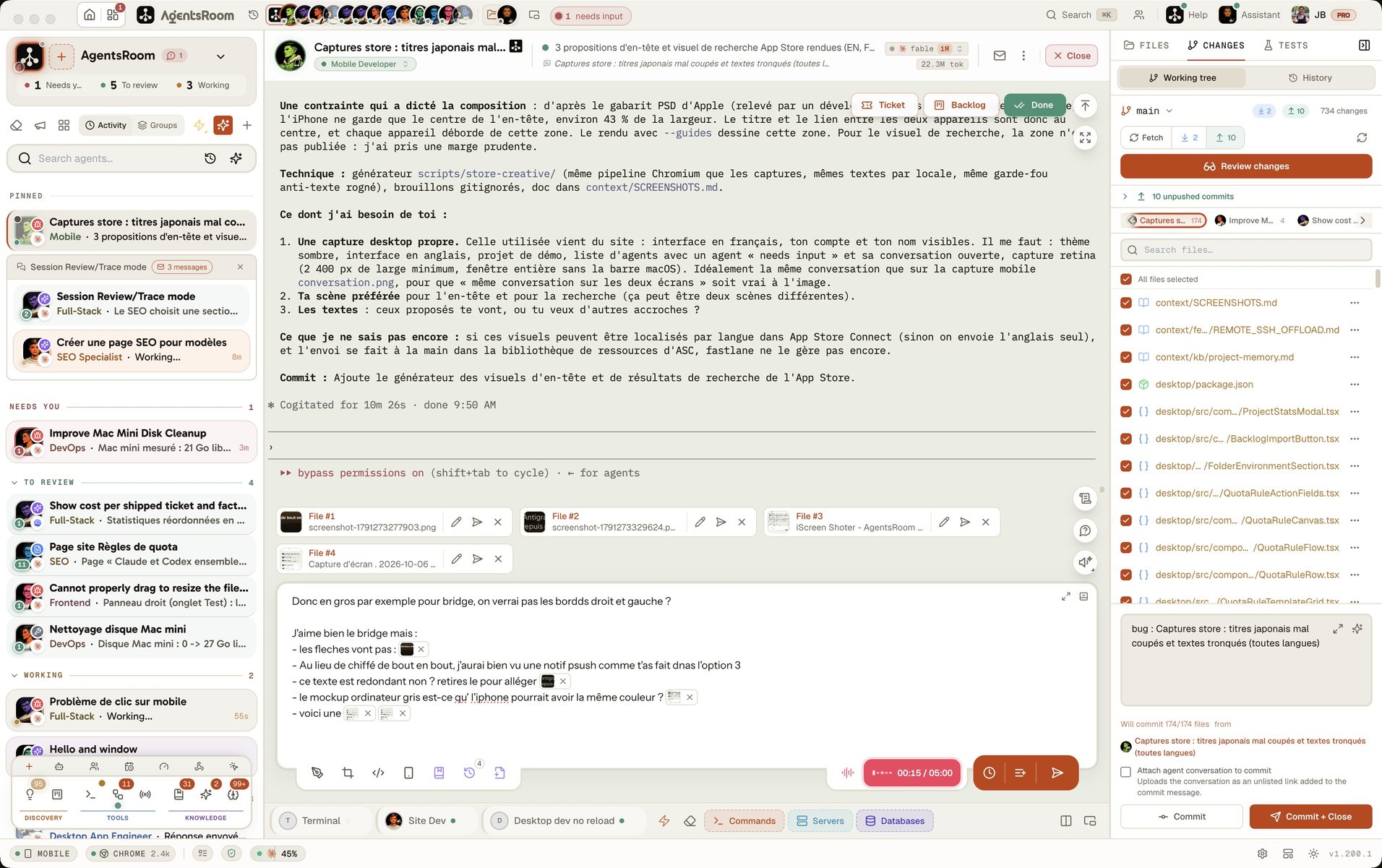
Ứng dụng máy tính, ở chế độ Đơn giản
Trên điện thoại, bản demo chạy ứng dụng máy tính thật ở chế độ giao diện Đơn giản: một dự án, các agent của nó, một prompt. Buồng lái đầy đủ nằm trên máy tính của bạn.
Khi nào Warp Dev là lựa chọn tốt hơn
Warp là một sản phẩm mạnh, và còn mạnh hơn trong năm 2026. Đây là những chỗ nó thực sự thắng AgentsRoom.
Bạn muốn một terminal chỉn chu làm shell hằng ngày
Warp thay thế trọn vẹn terminal của bạn, với command block, autocomplete bằng AI và workflow. Nếu mục tiêu của bạn là dẹp hẳn iTerm2 hay Terminal.app và có AI hỗ trợ mọi câu lệnh bạn gõ, từ devops đến các script chữa cháy, thì Warp sinh ra đúng cho việc đó. AgentsRoom không phải trình giả lập terminal và cũng không cố trở thành như vậy.
Bạn muốn chính lần chạy trên cloud được sự kiện khởi động
Cả hai sản phẩm đều chạy agent khi máy bạn đã tắt: Oz bên Warp, Cloud Agents bên AgentsRoom. Cả hai cũng phản ứng với sự kiện bên ngoài: Oz qua webhook, AgentsRoom qua bộ kích hoạt webhook, khởi chạy agent khi có sự kiện GitHub, GitLab, Slack, Linear, Sentry hay CI, kèm xác minh chữ ký và bộ lọc payload. Khác biệt còn lại hẹp nhưng có thật: Oz thực hiện lần chạy đó trong container do Warp lưu trữ, nên không cần máy nào của bạn thức, còn bộ kích hoạt của AgentsRoom khởi chạy agent trên chính máy bạn và xếp sự kiện vào hàng đợi để phát lại ở lần khởi động sau. Nếu cần cả sự kiện và việc thực thi đều ở phía server, Warp vẫn giữ lợi thế đó.
Mã nguồn mở và gộp hóa đơn quan trọng với bạn
Client của Warp là mã nguồn mở theo giấy phép MIT và AGPL v3, nên bạn tự soát được. Các gói của Warp cũng gộp phần dùng AI vào một hóa đơn duy nhất, thay vì phải đăng ký riêng Claude, Codex hay Antigravity. Nếu ưu tiên của bạn là tự kiểm tra mã nguồn hoặc chỉ muốn một hóa đơn, đó là lợi thế thật.
Chuyển sang chỉ mất 30 giây
AgentsRoom nằm cạnh bộ Warp Dev hay terminal bạn đang dùng. Code của bạn vẫn ở nguyên chỗ cũ.
Tải AgentsRoom
Tải app desktop tại agentsroom.dev. Một file duy nhất, không cần trình cài đặt, không phải nạp credit.
Thêm dự án của bạn
Kéo thả thư mục dự án vào. Các file CLAUDE.md và AGENTS.md sẵn có sẽ được nhận diện, repo của bạn không hề bị đụng tới.
Kết nối CLI của bạn
Claude, Codex, GitHub Copilot CLI, Cursor hoặc bất kỳ CLI agent nào trong 10 CLI agent còn lại mà AgentsRoom hỗ trợ. Dùng đúng gói bạn đang trả tiền, không có rào credit nào chắn phía trên.
Câu hỏi thường gặp
Warp Dev là gì?+
AgentsRoom khác Warp Dev ở chỗ nào?+
Tôi có cần credit AI để dùng AgentsRoom không?+
AgentsRoom có cách ly agent trong git worktree như agent cloud của Warp không?+
Có dùng được Warp Dev từ điện thoại không?+
Tôi dùng song song AgentsRoom và Warp Dev được không?+
Warp Dev có mã nguồn mở không?+
Agent cloud của Warp là gì, AgentsRoom có thứ tương đương không?+
AgentsRoom có hỗ trợ cùng những agent CLI như tính năng hỗ trợ mọi loại agent của Warp không?+
AgentsRoom hay Warp Dev rẻ hơn?+
So sánh tiếp
Những trang khác đào sâu các câu hỏi mà người ta thường đặt cùng lúc với Warp Dev.
Warp vs cmux vs tmux: so sánh các terminal
Màn đối đầu trực tiếp giữa những terminal và multiplexer mà dân dev thực sự dùng để chạy agent, kèm vị trí của Warp so với cmux và tmux.
Warp vs Conductor
Conductor chọn hướng cách ly bằng worktree. Xem mô hình điều phối đó so với cả Warp Dev lẫn AgentsRoom ra sao.
Điều khiển agent từ điện thoại
App iOS và Android native hoạt động thế nào, và relay mã hóa đầu cuối truyền đi những gì, không truyền đi những gì.
Mọi CLI trong cùng một chỗ
Claude Code, Codex, OpenCode, Antigravity CLI, Aider, Grok Build, Mistral Vibe và Kimi Code đặt cạnh nhau, mỗi agent một model riêng.
Dùng thử AgentsRoom ngay hôm nay
Một buồng lái trực quan cho các agent AI của bạn, không rào credit. Miễn phí cho 2 dự án.
Ứng dụng đồng hành: theo dõi agent khi đi đường
Sử dụng Claude, Codex, Antigravity CLI hoặc nhà cung cấp AI khác.
Gửi lỗi và yêu cầu thẳng vào backlog công khai của bạn.