Your clients drive the backlog.
Your agents ship it.
Expose your AgentsRoom backlog as a public or private feedback portal. Clients and users report bugs, request features, upvote tickets and track progress, all piped straight into your AI coding agents. No more rewriting WhatsApp messages into Linear tickets at midnight.
Public-facing backlog portal, client feedback, upvotes, private access, embeddable widget and a Chrome extension, all synced with your AI agents.
Everything your backlog needs to face the outside world
A client-facing backlog for AI-first teams: visibility modes, upvotes, roadmap, comments, emails, embed widget, Chrome extension and direct wiring into your AgentsRoom agents.
Public, unlisted, or restricted
Choose exactly who sees your backlog. Public indexed pages for open-source roadmaps, unlisted link-only backlogs for private clients, or a strict allow-list with magic-link sign-in for named external contributors.
Client tickets become agent tasks
Every ticket submitted through the remote backlog lands in the same AgentsRoom backlog your AI agents already watch. Drag it to In Progress and a Claude agent starts coding immediately. No copy-paste between tools, no triage friction.
Upvotes & social proof
Visitors vote on the tickets that matter to them. See demand per feature at a glance, reprioritize your sprint with real signal instead of loudest-voice bias, and show clients the ideas they all agree on.
Client conversations, not black-box tickets
Each ticket has a public thread. Clients reply, the team answers, emails fire automatically on both sides. Internal notes stay private, client-facing discussion stays visible. No more CC-hell on Gmail.
Public roadmap (optional)
Flip a switch to show visitors what you are working on and what is already done. They get a Received / In progress / Done view of everything they sent you, and your client-facing status labels stay fully customizable so you never leak internal jargon like 'blocked by infra'.
Automatic client emails
Branded AgentsRoom emails fire when a ticket is picked up, when the team replies, or when the team marks it as done. Hourly digest for the team, 3-per-day cap for clients, one-click unsubscribe per ticket or globally.
Embeddable widget
Drop a tiny 3 KB script on any website to get a floating 'Feedback' button that opens the ticket form in an iframe. Custom brand color, custom label, zero framework assumptions.
Chrome extension
One click on any webpage sends a bug or feature request to an AgentsRoom backlog. Capture the current URL, pre-fill the description with the selected text, pick the project, done. Works with your own projects or with any public backlog slug.
Custom subdomain, 301 safe rename
Claim a catchy subdomain like my-saas.backlog.agentsroom.dev. Rename it later and we keep a 30-day automatic redirect so no backlink ever breaks and no SEO juice leaks.
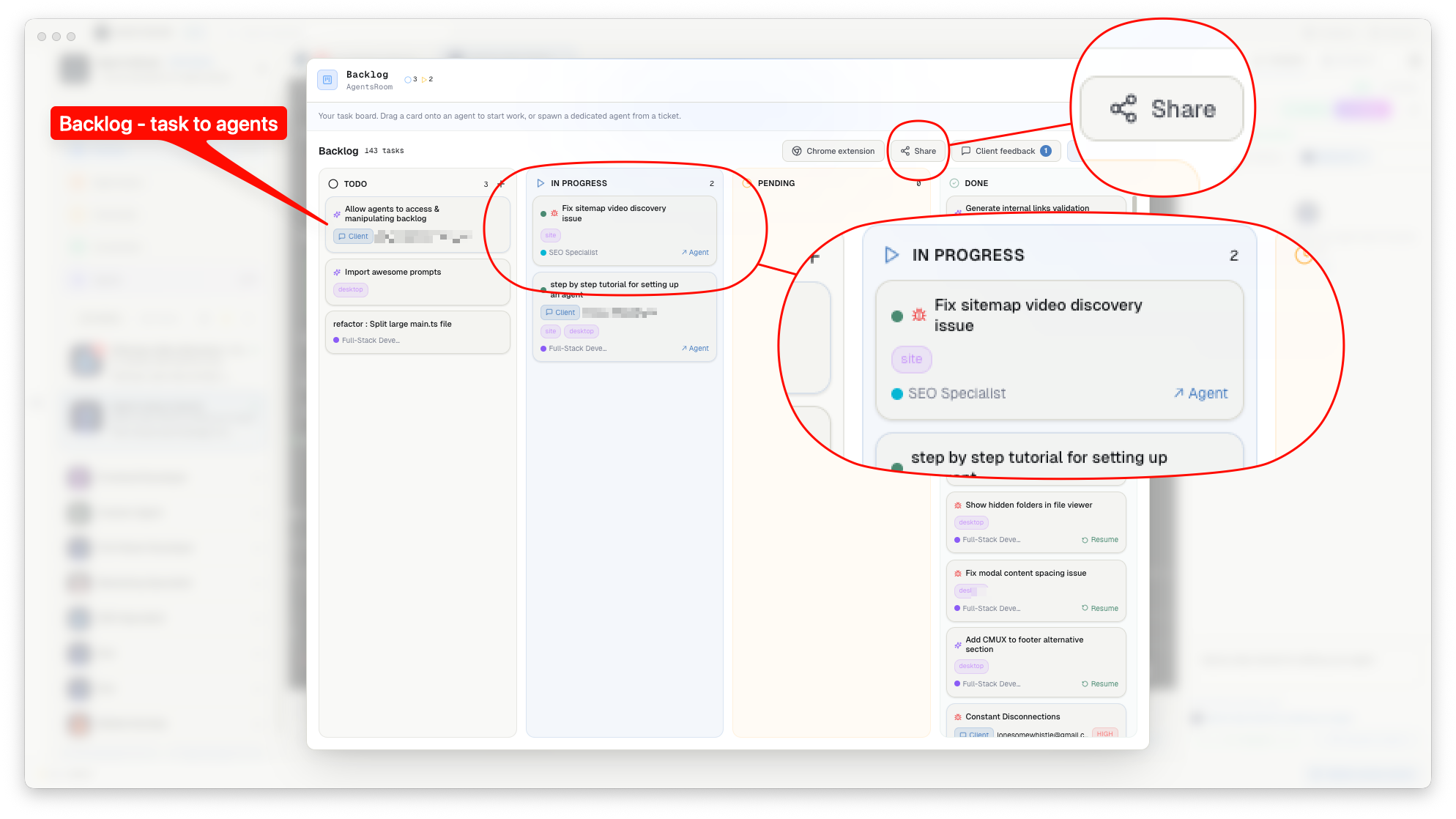
Public-facing backlog portal, client feedback, upvotes, private access, embeddable widget and a Chrome extension, all synced with your AI agents.
How the remote backlog works
Create and configure your backlog
From your AgentsRoom project settings, open the Remote Backlog tab. Pick a slug, choose the visibility mode (public, unlisted, restricted), toggle write access and upvotes, pick the default agent role to assign to incoming tickets, and configure the client-facing status labels.
Share the link, widget or Chrome extension
Copy the public URL, scan the QR code during a client meeting, drop the widget on your landing page, or ask your clients to install the AgentsRoom Chrome extension so they can report bugs from anywhere on the web with one click.
Clients submit tickets
They pick bug, feature request or question, add a title, a description, an optional priority, and hit submit. Their ticket lands directly in your backlog with source = user_feedback, tagged with their email, their user-agent, and the URL they were on when they reported it.
Your AI agents pick them up
The desktop app lights up with an unread badge on the Remote Feedback filter. Drag the ticket into In Progress and an agent running Claude, Codex, GitHub Copilot CLI, Cursor or any of the 10 other agent CLIs AgentsRoom supports starts coding immediately, with the context your client provided.
Ship, notify, close the loop
When the agent is done and you reviewed the diff, move the ticket to Done. A modal asks whether to notify the client; one click and they receive a branded email with the resolution summary. Your client is in the loop, your backlog is always fresh.
Two clients, one bug, one ticket
Duplicate reports are the tax of any public backlog: the same crash arrives three times, worded three ways. Select them on your board and merge them into a single ticket. AgentsRoom combines the titles and descriptions, adds up the upvotes so the real priority shows, and moves every comment over. Nobody is dropped in the process: each reporter stays subscribed to the surviving ticket and receives the update when the fix ships, and their original ticket link keeps working, it redirects to the ticket that absorbed it.
The tickets you already have in GitHub Issues, JIRA Cloud and Notion
Client feedback is rarely your only inbox. Part of the work already sits in GitHub Issues, JIRA Cloud or Notion, and it belongs on the same board. Pick the source, connect it, choose what to bring in (a repository with its state and its labels, a JIRA project or a JQL query, a Notion database shared with the integration), preview the result, import. Replay that same import later and the tickets already imported are updated rather than duplicated: the source rewrites the title, the description, the type and the labels, while the assigned agent, the internal notes, the order on the board and the links between tickets are left untouched. A ticket already in progress or done here never drops back to TODO, and an issue that leaves the query keeps its ticket. The import only reads: nothing is ever written back to GitHub, JIRA or Notion, your access token stays encrypted on your machine and never reaches our servers, and only the query is saved on your account so the refresh follows the project from one machine to the next. Each imported ticket shows its source and links back to the original issue. Screenshots attached to the issue come across as attachments on the ticket, so an agent can actually open them. And when you only need one ticket rather than a whole query, paste its reference into the TODO column, from the desktop or from your phone; each imported ticket can also be brought back in step on its own.
Because none of them talk to your AI agents
Linear, Jira, GitHub Issues, Canny, Featurebase, Fider, Trello, ClickUp. They all store tickets. AgentsRoom Remote Backlog stores tickets AND wires them directly into your agent pool, whichever CLI it runs on: Claude, Codex, GitHub Copilot CLI, Cursor and 10 other agent CLIs. When a client reports a bug at 11pm, your AgentsRoom agent can pick it up, fix it and tag you on Slack before you finish dinner. No integrations to build, no webhooks to wire up, no Zapier in the middle.
FAQ
Can my clients vote on tickets?
Yes. Every ticket on a public or unlisted remote backlog exposes an upvote button. Each email address can upvote a ticket once, clients cannot upvote their own tickets, and you can disable upvotes entirely in the settings if you prefer. Upvote counts are visible to everyone so you can use them to prioritize your sprint.
How is restricted access enforced?
In restricted mode, only the email addresses you explicitly add to the allow-list can access the backlog. When they visit the public URL, they are asked for their email, we send them a magic link (HMAC-signed, 24h validity), and a signed cookie identifies them on subsequent visits. Remove them from the list and they lose access immediately.
What happens when I rename the slug?
We keep a 30-day 301 redirect from the old slug to the new one. All existing public links, bookmarks, QR codes and embeds keep working through that transition period so you never break inbound links or lose SEO juice.
Can I embed the feedback form on my own website?
Yes. Drop a 3 KB script tag pointing at your backlog slug and it adds a floating Feedback button that opens the form in an iframe. Works on any stack (React, Vue, plain HTML, WordPress, Wix). You can also use the direct iframe URL if you prefer to position the widget yourself.
Does the Chrome extension work on my own projects?
Yes. Sign in with your AgentsRoom account and the extension lets you file tickets directly into any of your own projects, not just public backlogs. Great for filing internal bug reports during QA passes without leaving the browser.
Is there a free tier?
It is free, on every plan. Any account can expose a public backlog, one per project, and there is no monthly cap on the tickets your clients submit; the only limit is an anti-spam rate limit that applies to everyone. What Pro adds on top is AI triage: incoming tickets are routed to the right agent role instead of landing on the developer default.
Does this replace Linear, Jira or GitHub Issues?
It depends on your setup. If your team already lives in Linear and you only need a client-facing intake surface, use AgentsRoom Remote Backlog as the intake and keep Linear as the internal tracker. If you already use AgentsRoom as your primary backlog for AI agents, Remote Backlog is your complete client portal without a second tool in the loop.
Two people reported the same bug. Can I merge their tickets?
Yes. Pick the duplicates on your board and merge them into one ticket. The titles and descriptions are combined for you, and you can edit the result before confirming. Upvotes add up, comments and screenshots move over, and every reporter of every merged ticket stays subscribed: they all get the email and the chat message when the fix ships. The links you already sent them keep working and redirect to the surviving ticket.
If I merge two reports, do both reporters still get notified?
Yes, and that is the rule the merge is built around. When duplicate reports are merged into one ticket, every reporter of every absorbed ticket becomes a follower of the survivor, so all of them are notified when the fix ships. The public links already sent out redirect to the surviving ticket, upvotes add up, and comments, screenshots and links move over. Nobody who took the time to report something is dropped.
Will my users get one email per shipped ticket?
No. When a release ships several tickets that concern the same person, their notifications are merged into a single localized release digest instead of one email per ticket. Per-client notification preferences still apply on top of that.
You may also like
Ticket scoping: frame feedback into a mockup before you build
Turn a fuzzy backlog suggestion into a product-faithful mockup with a Product Manager AI agent, and validate it with the reporter before any code is written.
Figma to AI agents: ship designs in one drag
Capture any Figma frame with the AgentsRoom Chrome extension, drop a ticket in your backlog, and let a Claude, Codex or Cursor agent implement it pixel-perfect.
Public AI agents: showing your clients what your bots are up to
How exposing your AgentsRoom backlog turns silent AI work into visible progress your clients can trust, cite and share.
Client-driven AI backlog: let users write your sprint
Stop rewriting WhatsApp messages into tickets. When clients type directly into your backlog, your agents are one drag away from executing.
Feedback-driven AI development: shipping from user voices
A practical look at building software where the prioritization signal comes from end-users upvoting tickets in a public backlog, not from a product manager's gut.
An AI-powered client portal for agencies and solo devs
Why a remote backlog is the simplest client portal you will ever build: no SaaS subscription, no custom code, no feature creep.
Further reading
A Feedback Board for AI Agents: Let Your Users Write the Prompt
Feedback tools collect requests. None of them can build one. When the board your users write into is the same board your coding agents execute from, the rewriting step disappears.
How to Scale AI Coding Agents Across a Dev Team
One developer with a coding agent is a productivity story. Five developers with twenty agents is a coordination problem. Here is what breaks first when a team scales up, and the setup that holds: committed context files, clear file ownership, review by blast radius, and cost you can actually see.
Agents Write the Code Now. Here Is What the Developer's Job Became.
Writing code was one link in a six-link chain, and it is the link agents took. The other five got heavier. A walkthrough of the job that is left: hearing what to build, deciding, briefing, running, reviewing, shipping.
Turn your backlog into a feedback engine
Download AgentsRoom, expose your first project in under a minute, and let your clients drive your AI agents.
Companion app: monitor your agents on the go
Bring your own: Claude, Codex, Antigravity CLI, or other AI provider.
Push bugs and requests straight to your public backlog.