Pause your AI coding agents
and pick them up later
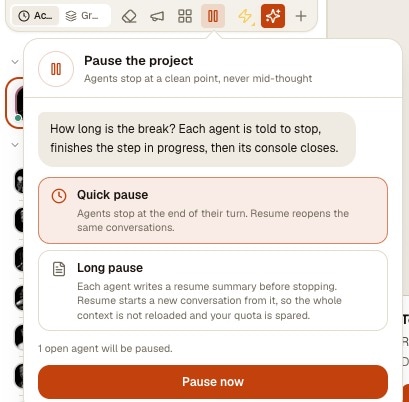
Six agents are working on a project and you need to close the laptop, install an update or save what is left of your Claude Code quota. One Pause button on the project stops all of them cleanly, without cutting any agent off in the middle of a thought.
A quick pause closes each console once its agent has finished its turn, and resuming reopens the same conversation. A long pause first asks every agent to write a resume summary, then resumes from that summary in a fresh conversation, so restarting does not reload a huge context. Until you resume, nothing wakes the project up.
- FrontendFinishing its turn
- BackendWriting its resume summary
- QAPaused
The follow-up panel of a long pause: one agent is still finishing its turn, one is writing its resume summary, one is already paused.
Stopping a group of AI agents by hand is surprisingly risky. Close a terminal while Claude Code is halfway through an edit and you get a file written in two halves. Quit the app during an update and some agents come back, others do not, and you are never quite sure which one was in the middle of what.
AgentsRoom turns this into one action per project. Every open agent of the project gets the same instruction, waits until its current turn is over, then its console closes. A panel lists each agent and its state, and tells you plainly when the last one is down. That message is the signal you were missing: from then on, closing the laptop or restarting AgentsRoom loses nothing.
The project then stays marked as paused, and it really stays asleep: no automatic restore at launch, no message from another agent, no scheduled task, no trigger can bring it back behind your back. You decide when it resumes, all at once or one agent at a time.
Two kinds of pause
Choose when you press Pause. The difference is what happens when you come back.
Quick pause
Each agent is told to stop for now. Its console closes as soon as its turn is over; an agent that was already idle closes right away.
Resuming reopens the same conversation, with all its context. Best for a lunch break, an app update or closing the laptop for the night.
Long pause
Each agent is asked to stop and write a resume summary: what it was doing, what is done, what is left. AgentsRoom keeps that summary, then closes the console.
Resuming starts a new conversation from the summary instead of reloading a long context. Restarting a project after a week does not burn a large part of your quota in one go.
How a project pause works
Four steps, from the button to the moment you can safely walk away.
- 1
Press Pause on the project
The button sits in the project's agent toolbar, next to the megaphone you use to broadcast a message to every agent. Pick a quick pause, or a long pause with summaries, and the panel tells you how many open agents will be paused.
- 2
Every agent finishes its turn
No agent is interrupted mid-thought. An agent that is working completes the step in progress, writes its resume summary if the pause is long, then its console closes. Idle agents close immediately.
- 3
Follow each agent in the panel
The panel counts the agents already paused and shows where each one stands: finishing its turn, writing its resume summary, paused, or not paused with the reason. If an agent does not stop on its own, a Close now button closes its console without waiting, and its conversation is kept for the resume.
- 4
Close AgentsRoom when it says so
When the last agent is down, the panel tells you every agent is paused and that you can close AgentsRoom. That is the moment to shut the laptop or install the update.
A paused project stays paused
The project is marked as paused, and every path that could relaunch an agent on its own is closed until you resume.
Not restored at launch
Reopen AgentsRoom tomorrow: the paused project does not bring its agents back with the rest of your session.
Messages wait in the inbox
A message sent by another agent to a paused agent is kept in its inbox. It does not wake the agent up, and it is still there when you resume.
Scheduled tasks hold off
A task planned for 3 a.m. on a paused project does not start an agent: it is skipped, not replayed when you resume. A trigger fired by a webhook is skipped the same way.
Resume all, or just one
The Resume button relaunches every agent that was paused. Opening a single agent by hand relaunches only that one, and the others keep sleeping.
When you will reach for it
Three situations users told us about, and one you can delegate.
Updating AgentsRoom reliably
Pause the projects, wait for the panel to say every agent is paused, install the update. Nothing was cut in the middle of a write, and you resume each project when you want.
Closing the laptop and coming back later
Leaving for the evening or for a trip: a quick pause for tomorrow, a long pause if you will be away for days and want a clean, light restart.
Near a usage limit
Your Claude Code or Codex quota is running low and three projects are active. Pause the less urgent ones so the quota left goes to the project that matters today.
Asking your personal assistant
Say it in plain words and the assistant does the rest, on every project at once.
Ask your personal assistant to do it
The personal assistant of your AgentsRoom account can pause and resume projects for you, from the desktop or from your phone. Useful when the choice is about priorities rather than about one project.
Pause every project except AgentsRoom.
Resume the billing project.
From your phone too
In the mobile app, the project's "..." menu offers the same pause, the same follow-up panel and the same Resume button. Pause a project from the train, check that every agent is down, resume it the next morning before you even reach your desk.
Discover the mobile appEvery agent CLI, every desktop OS
The pause works the same way with Claude Code, Codex, Antigravity and the other agent CLIs AgentsRoom runs, including several providers mixed in the same project. On macOS, Windows and Linux alike.
What a pause does not do
- A pause waits for the end of the current turn. An agent in the middle of a long task can take several minutes before it stops; Close now is there when you cannot wait.
- A resume summary is written by the agent itself. Its quality depends on the model and on how far the work went: read it before resuming if the task was delicate.
- Agents that belong to a running team keep going, since the team run manages their consoles, and so does your personal assistant. The pause panel says how many agents are left out before you confirm.
- Pausing closes the agents, not your dev servers or the commands you started in other terminals.
- Nothing pauses a project for you: it is always your decision, or one you asked your personal assistant to take.
Frequently asked questions
Can I pause Claude Code without losing the conversation?
Yes. A quick pause closes the console only once the agent has finished its turn, and Resume reopens that same conversation with its full context. A long pause keeps a resume summary instead and starts a fresh conversation from it.
What is the difference between a quick pause and a long pause?
A quick pause resumes the same conversation; use it for a few hours or a night. A long pause asks each agent to write a resume summary, then resumes from that summary in a new conversation, which avoids reloading a long context when you come back days later.
Does a long pause save quota?
It saves quota at the moment you resume. Reopening an old conversation reloads its whole context into the model, which counts against your plan. Starting from a short summary sends much less. While the project is paused, its agents use no quota at all.
How do I know when I can close my laptop or update AgentsRoom?
The follow-up panel lists every agent and its state. When the last one is down, it says all agents are paused and that you can close AgentsRoom. Before that message, an agent may still be writing a file.
Will a scheduled task or another agent restart a paused project?
No. While a project is paused, nothing relaunches it on its own: not the restore at launch, not messages from other agents (they wait in the inbox), not scheduled tasks, not triggers. Only Resume, or opening an agent by hand, brings agents back.
What happens if an agent does not stop?
The panel marks it as not paused and says why: its turn has not ended after 30 minutes, it wrote no summary, or it could not be reached. AgentsRoom never kills it on its own: a Close now button closes its console without waiting, and its conversation is kept for the resume. The other agents of the project are not affected.
Can I resume only one agent?
Yes. Open that agent by hand and only it starts again. The rest of the project stays paused until you press Resume.
Does it work with Codex, Antigravity and other agents?
Yes. The pause works with every agent CLI AgentsRoom runs, Claude Code, Codex, Antigravity and the others, on macOS, Windows and Linux, and from the mobile app.
Can my personal assistant pause several projects at once?
Yes. Ask it something like "pause every project except AgentsRoom" and it pauses each of them, then you can follow the result. "Resume project X" works the same way.
You may also like
Restore • Resume • No Friction
On quit, choose what AgentsRoom brings back. Reopen it tomorrow and the same agents, terminals, dev command tabs and working directories are already there, one click from running.
Personal assistant
The assistant is the one agent of your AgentsRoom account you can reach from anywhere. Say "Talk to Bot" to Siri, press the Action button, tap a widget or the Assistant tab: the app opens with the microphone already listening, transcribes what you said, and sends it over an end-to-end encrypted link to the desktop, where the assistant runs through your own agent CLI with your connectors (mail, calendar, messaging) and reaches every one of your projects. It files or picks up a ticket, launches an agent, drafts a reply, remembers you from one day to the next, and the answer comes back as a push.
Usage alerts
A desktop notification or a push on your phone when a Claude Code, Codex, Grok, GitHub Copilot CLI, Kimi, Cursor, Antigravity, OpenCode Go or Z.AI Coding Plan quota bar crosses 50%, 75% then 90%, or the thresholds you pick per bar. One reminder per window, sent before the limit is reached.
Mobile Companion
Dictate prompts and attach files from your phone. Share screenshots on iOS or Android, choose a project and send to an agent or save in its backlog.
Keep awake
Stop your computer from going to sleep in the middle of a build, a dev server or an AI agent's turn. AgentsRoom holds system sleep while Claude Code, Codex or any agent works, a dev command runs or a database export is in flight, then lets the machine sleep again. A cup icon in the status bar shows when and why, and one click keeps the machine awake for 1, 4 or 8 hours, like Caffeine or PowerToys Awake. macOS, Windows and Linux.
Stop your agents cleanly, start them again on your terms
Download AgentsRoom, press Pause on a project and watch every agent finish its turn before it goes to sleep.
Companion app: monitor your agents on the go
Bring your own: Claude, Codex, Antigravity CLI, or other AI provider.
Push bugs and requests straight to your public backlog.