Multiple directories, one project
for every AI agent you start
A game in one folder and its port to a newer engine version in another. A web app and the API it calls, in two repositories. A shared library next to the apps that use it. Your agents need both sides, and moving the folders under one parent would break a setup that works.
Link the other folders to the project instead. They stay where they are and keep their own version control. Every agent you start in the project gets them: through --add-dir on Claude Code, Codex, GitHub Copilot CLI, Antigravity CLI, Kimi Code and Mistral Vibe, and in its brief for the other CLIs. The Changes tab then reviews and commits each repository.
- /work/web-appProject folder · git
- /work/apiLinked folder · git
- /work/shared-libLinked folder · git
One project, three repositories: each agent starts in the project folder and gets the two others, in the form its CLI understands.
An agent starts in one folder, and most CLIs keep it there. It can often read around, but editing outside its working directory means a permission prompt, a sandbox refusal, or a flag you have to remember on every launch. That holds until the work spans two places: the app and its API, a game and its copy on a newer engine, a library and the projects that consume it.
The usual fixes cost something. Moving both folders under one parent breaks paths, scripts and editor setups that worked. A symlink confuses some tools and hides where the files really live. Typing --add-dir on every launch works until the one launch where you forget it.
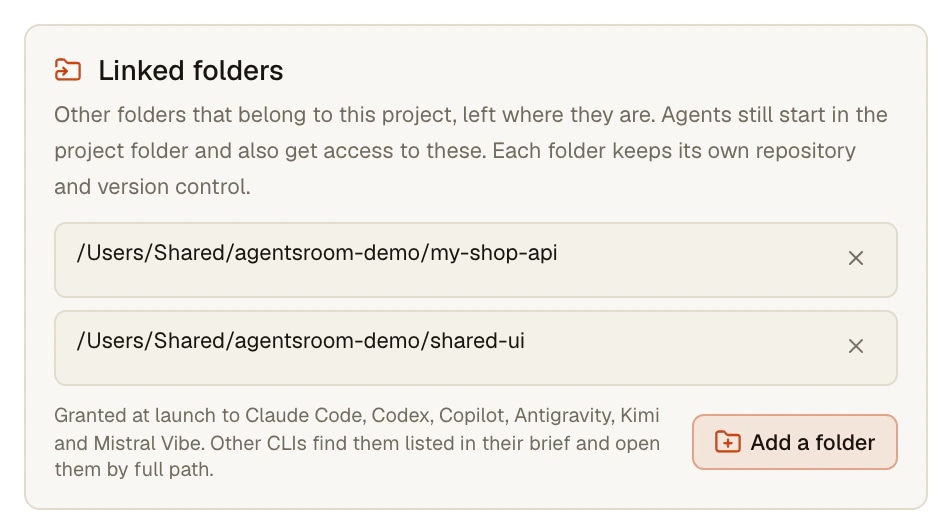
Linked folders are a list kept on the project. You add a folder once, in Project settings, General, Linked folders. From then on every agent of the project, whether you start it from the agent list, from a backlog ticket or from your phone, gets those folders, and each folder keeps its own repository.
What linked folders do
A list on the project, read at every launch. A project without linked folders works exactly as before.
Folders stay where they are
Pick a folder with the system folder picker. Nothing is moved, copied or symlinked, and each folder keeps its own repository, branch and history. Up to ten folders per project.
The right flag for each CLI
Claude Code, Codex, GitHub Copilot CLI, Antigravity CLI, Kimi Code and Mistral Vibe receive each folder through their own --add-dir flag, when the agent starts fresh and when it resumes a session.
Named in the agent's brief
Every agent, whatever its CLI, also gets a short block in its brief: the folders, that they belong to the project, and that git runs from inside each one. The CLIs without a flag reach them by full path when their sandbox allows it.
Commit each repository
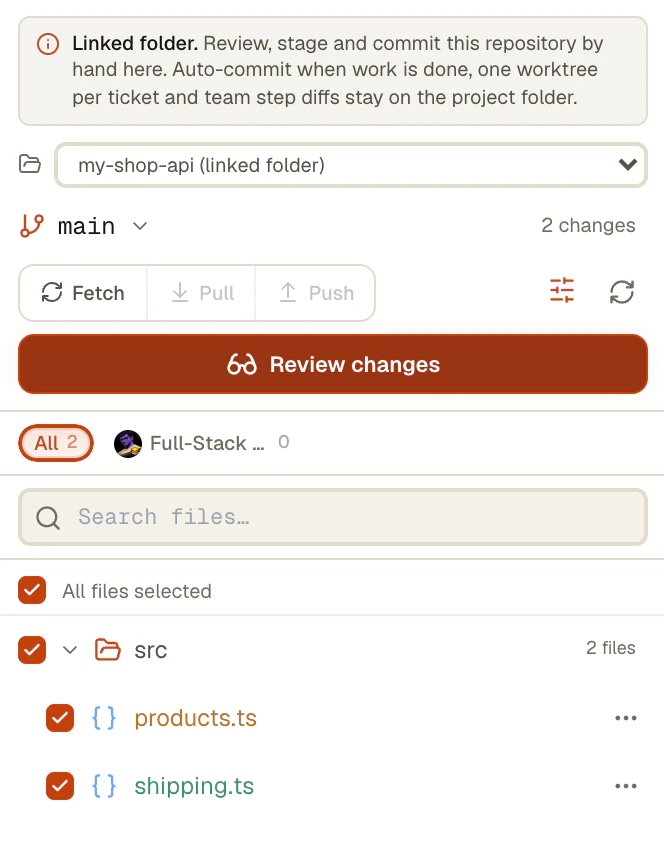
In the Changes tab, a repository picker lists the project folder and every linked folder that is a git repository. Pick one to see its diff, then stage, commit and push it.
Same on the phone
An agent started from the AgentsRoom mobile app gets the same flags and the same brief, because the desktop builds the launch. The phone shows the linked folders in the project menu, and its Changes screen offers the linked repositories too.
Checked at launch
A folder missing from the disk, on an unplugged drive for example, stays in the list with a warning and is skipped at launch, with one line in the terminal. The project folder itself and duplicates are refused.
How it works
Four steps, and the first two happen once per project.
- 1
Open the project settings
Project settings, General, Linked folders. The field says which CLIs receive the folders through a flag and how the others reach them.
- 2
Add a folder
Add a folder opens the system folder picker, and the folder is saved at once. The cross next to it removes it from the project later: nothing on disk changes.
- 3
Start an agent
Start any agent of the project as usual: from the agent list, from a backlog ticket or from your phone. It starts in the project folder and has the linked folders too.
- 4
Review and commit each repository
Open the Changes tab and pick a repository: the project folder or a linked folder. Read its diff, then stage, commit and push it there. Each folder keeps its own history.
Claude Code and Codex can already add a directory. Here is what changes
Claude Code takes --add-dir when it starts and /add-dir during a session, and keeps a lasting list in additionalDirectories of its settings files. An added directory gets file access under the same permission rules as the working directory. From a directory passed with --add-dir or /add-dir it also loads skills, commands and subagents, but not its CLAUDE.md unless CLAUDE_CODE_ADDITIONAL_DIRECTORIES_CLAUDE_MD=1 is set; a directory listed in a settings file only grants file access. Checked on the Claude Code documentation and version 2.1.300 in October 2026.
Codex has --add-dir too, which makes a directory writable alongside the main workspace, and writable_roots under sandbox_workspace_write in config.toml for a lasting list (codex-cli 0.162.1). GitHub Copilot CLI, Antigravity CLI, Kimi Code and Mistral Vibe each have their own --add-dir.
So the flag is not the new part. What AgentsRoom adds is the list kept on the project and passed to every agent at every launch, in the form each CLI expects (Claude Code needs the flag and the folder in one piece, as in --add-dir=/work/api, otherwise the option swallows the prompt that follows it), the same brief for the CLIs that have no flag, launches from the phone that get the same folders, and a Changes tab that commits each repository. AgentsRoom does not set CLAUDE_CODE_ADDITIONAL_DIRECTORIES_CLAUDE_MD for you.
What to know
- Automatic commits when a ticket is done, one worktree per ticket and team step diffs stay on the project folder. In a linked folder, you review and commit by hand.
- The list is saved on each computer, because a path like D:\Games\UE5 means nothing on another machine. Add the folders again on your other computers.
- An agent started on a remote server over SSH does not get the linked folders: they are paths on this computer. A line in its terminal says so.
- OpenCode, Aider, Grok Build, Amp, oh-my-pi, Freebuff, Devin and Cursor have no flag for an extra directory. Their agents find the folders in their brief and reach them by full path only when their own sandbox lets them.
- The phone shows the list but does not edit it: a folder is picked with the folder picker of the computer.
- Ten folders per project at most, because a launch command has a length limit on Windows.
Frequently asked questions
How do I give Claude Code access to multiple directories?
In Claude Code itself: --add-dir followed by a path when you start it, /add-dir during a session, or additionalDirectories in a settings file for a lasting list. In AgentsRoom, add the folders once as linked folders of the project (Project settings, General, Linked folders): every Claude Code agent of the project then starts with --add-dir for each of them, and so do the agents of the other CLIs that have the flag.
Can Codex work across multiple repos?
Yes. Codex starts in one workspace, --add-dir makes another directory writable next to it, and writable_roots in config.toml keeps a lasting list. AgentsRoom passes --add-dir to every Codex agent of the project for each linked folder, including when the agent resumes a session, and its brief tells it to run git from inside each repository.
Can one project include several git repositories?
Yes. The project keeps its main folder, where agents start, and links the other repositories. Each one keeps its own version control. In the Changes tab, the repository picker switches between the project folder and each linked repository to read its diff, commit and push it.
Are my folders moved, copied or symlinked?
No. AgentsRoom only stores their paths and passes them to the agents at launch. Nothing on disk changes when you add or remove a linked folder.
Which agent CLIs get the linked folders?
Claude Code, Codex, GitHub Copilot CLI, Antigravity CLI, Kimi Code and Mistral Vibe receive each folder through their own --add-dir flag. OpenCode, Aider, Grok Build, Amp, oh-my-pi, Freebuff, Devin and Cursor have no such flag: they find the folders in their brief and open them by full path when their sandbox allows it.
Does the agent read the CLAUDE.md of a linked folder?
Not by default. Claude Code loads the skills, commands and subagents of a directory passed with --add-dir, but its CLAUDE.md only when CLAUDE_CODE_ADDITIONAL_DIRECTORIES_CLAUDE_MD=1 is set, and AgentsRoom does not set it for you. What every agent does get is the brief: where each linked folder is, that it belongs to the project, and that it keeps its own version control.
Do worktrees and auto-commit cover the linked folders?
No, they stay on the project folder: one worktree per ticket, automatic commits when a ticket is done, and team step diffs. In a linked folder, review and commit by hand from the Changes tab.
Do linked folders follow me to my other computers?
No. The list is saved on the computer where you made it, because a folder path only exists there. Agents started on a remote server over SSH do not get the folders either. The rest of the project, its agents, backlog and settings, follows your account as usual.
Does it work on Windows and Linux?
Yes, on macOS, Windows and Linux. On Windows, drive letters and both kinds of slashes are understood, and each --add-dir is quoted for PowerShell.
You may also like
Multi-project · Multi-agent · Parallel
AgentsRoom runs AI agents in parallel across multiple projects, all in a single window: Claude, Codex, GitHub Copilot CLI, Cursor and 10 other agent CLIs. Color-coded roles, live status, per-project counters, native desktop and mobile notifications. The visual alternative to 12 terminal tabs and the chaos of Claude Code sessions scattered across iTerm2, Warp and tmux.
Git Worktrees
Give each AI agent or ticket its own git worktree, ready to build (dependencies installed, .env copied), then review, commit and merge it from one window.
Per-Agent Review
Review code changes from each AI agent separately. AgentsRoom tracks which Claude Code agent modified which files. Filter diffs by agent, review individually, commit per agent for clean git history.
Multi-Provider
AgentsRoom supports 14 AI coding providers: Claude, Codex, GitHub Copilot CLI, OpenCode, Antigravity CLI, Aider, Grok Build, Mistral Vibe, Kimi Code, Amp, oh-my-pi, Freebuff, Devin and Cursor. Assign a different provider per agent, switch provider mid-conversation, and keep full context with automatic handoff. The best multi-provider AI coding tool.
SSH Connections
Save your SSH connections, open a built-in terminal over SSH, and run Claude Code, Codex or Antigravity CLI directly on your remote server or VPS. SSH key or password auth, per-project connection profiles, no separate SSH client needed.
Give your agents the whole project
Download AgentsRoom, open your main repository as the project and link the others in Project settings, General, Linked folders.
Companion app: monitor your agents on the go
Bring your own: Claude, Codex, Antigravity CLI, or other AI provider.
Push bugs and requests straight to your public backlog.