A git worktree manager
for Claude Code, Codex and every agent CLI
Tick one box on a ticket, or pick a worktree when you add an agent, and it works in its own checkout on its own branch. Several agents edit the same repository at the same time without touching each other's files.
Before the agent starts, AgentsRoom installs the dependencies and copies your .env files into the new worktree, so it can build and run the tests right away. When it is done, you review, commit, push and merge that worktree from the Changes tab, on the desktop or from your phone.
- Backend agent.worktrees/fix-login-redirectPrepared
- Frontend agent.worktrees/settings-dark-modeWorking
- QA agent.worktrees/agents/qaReview
Three agents, three worktrees, one repository: each checkout is prepared before its agent starts, then reviewed and merged on its own.
Two agents in the same checkout are two people typing in the same file. One runs the formatter while the other is halfway through an edit, one switches branch under the other's feet, and the diff you review at the end mixes both jobs. A git worktree fixes that: a second checkout of the same repository, in its own folder and on its own branch, sharing the history but not the files.
Creating one takes a single git command. Living with ten of them is the hard part: a fresh worktree has no node_modules and no .env, so the agent's first build fails; nothing tells you which agent works where; and when the work is done you still have to find the folder, review it, commit it and merge it back.
AgentsRoom handles that lifecycle. A backlog ticket or an agent asks for a worktree, AgentsRoom cuts it from an up-to-date base branch inside the project under .worktrees/, prepares it, starts the agent in it, and gives you a selector in the Changes tab to review, commit, push and merge it. It works the same whichever CLI runs the agent: Claude, Codex, GitHub Copilot CLI, Cursor and 10 other agent CLIs.
Worktrees stay optional. An agent without one keeps working in the project folder like before, and you decide per ticket, per agent or per agent template.
What the worktree manager does
From the moment a task asks for an isolated checkout to the moment its branch is merged back.
One worktree per backlog ticket
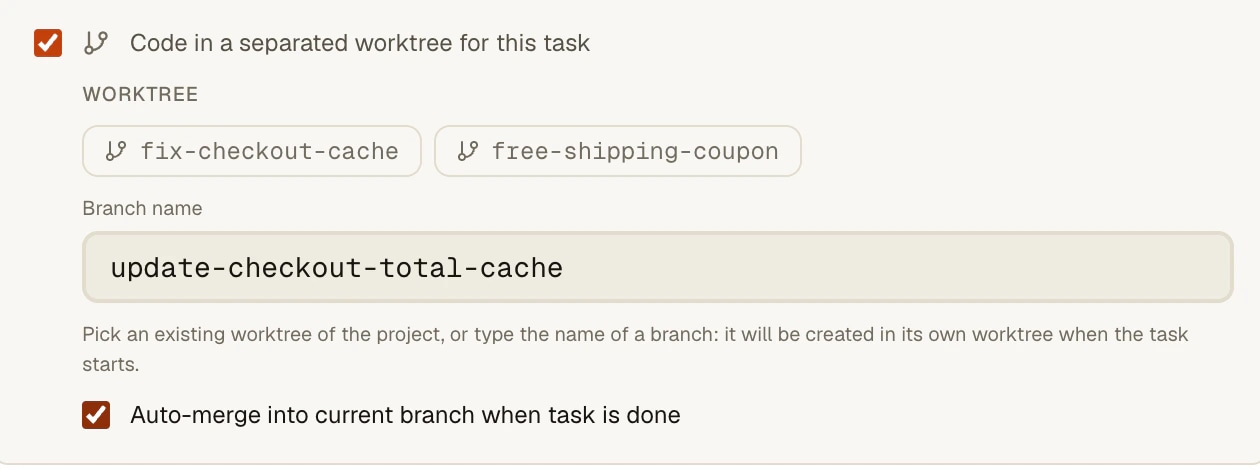
Tick Code in a separated worktree for this task on a ticket, pick one of the project's worktrees or type a new branch name, and starting the ticket creates the worktree and launches the agent inside it.
Pick a worktree when you add an agent
The Workspace card of the Add agent window shows Main, the project's existing worktrees and New. A worktree you made yourself with git worktree add is listed too.
A new worktree for every agent of a template
Turn on New worktree per agent on a saved agent or a default profile, and each agent spawned from it gets its own branch, named agents/<template> then -2, -3, so copies never share a checkout.
Ready to build on the first launch
Before the first agent starts in a new worktree, AgentsRoom copies the git-ignored files it needs (every .env file by default) and runs the install command detected from your lockfile: yarn, pnpm, npm, bun, uv, poetry, pipenv, bundle or composer.
Review, commit and push each worktree
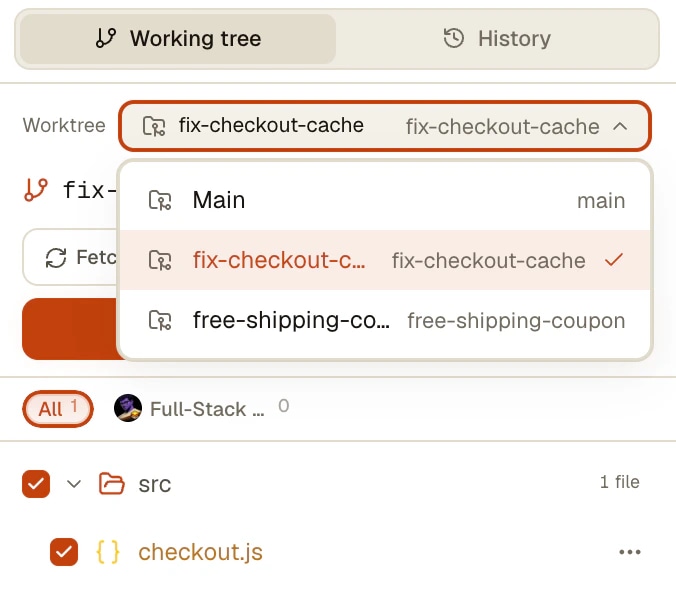
The Worktree selector at the top of the Changes tab switches the diff, the review, Commit, Pull and Push to that checkout. Clicking the pill of an agent that has its own worktree opens it directly.
Merged back when the ticket is done
With Auto-merge into current branch when task is done, marking the ticket Done merges its branch. Turn on Commit automatically when work is done so what the agent left uncommitted is part of the merge.
How it works
The path of one ticket, from the form to the merge.
- 1
Ask for a worktree on the ticket
In the ticket form, under Execution, tick Code in a separated worktree for this task. Pick an existing worktree from the chips, or keep the Branch name field: it is pre-filled from the title until you edit it, and becomes a new worktree when the task starts.
- 2
Start the ticket
AgentsRoom fetches the base branch (the remote default branch, or the Worktree base branch set in the project's settings), creates the worktree under .worktrees/<branch>/ and adds that folder to the clone's .git/info/exclude, so it never shows up as untracked files in your main checkout.
- 3
The worktree is prepared, then the agent starts
The agent's terminal shows the install command and its output, a toast says how many ignored files were copied, then the agent CLI starts in the worktree. This happens once per worktree; a failed install never blocks the agent, the error stays in its terminal.
- 4
Review and merge
Pick the worktree in the Changes tab to read the diff and commit. Mark the ticket Done and, with auto-merge on, its branch is merged into the current branch; the confirmation shows the result. The worktree itself stays on disk for a last look.
Claude Code and Codex already make worktrees. Here is the difference.
Claude Code has its own flag: claude --worktree feature-auth creates .claude/worktrees/feature-auth on a branch named worktree-feature-auth, copies the git-ignored files listed in a .worktreeinclude file, and asks whether to keep or remove the worktree when you exit. Its documentation says plainly that a worktree is a fresh checkout and that you install the dependencies yourself or ask Claude to. Subagents can also get a worktree each with isolation: worktree.
The Codex app manages worktrees in $CODEX_HOME/worktrees, starts them in detached HEAD from the branch you picked, also reads .worktreeinclude, runs the setup scripts of a local environment if you choose one, and keeps the 15 most recent by default. Handoff moves a chat and its code between Local and a worktree. codex-cli 0.162.1 has a --worktree flag as well.
Both are good, and both belong to one vendor. AgentsRoom does not replace them: it puts the same isolation one level up, where your tickets and your agents live, for every CLI at once, prepares the checkout before the agent sees it, and keeps the review, the commit and the merge in the window you already use. Checked on Claude Code 2.1.299 and codex-cli 0.162.1, October 2026.
What to know
- A worktree is never deleted automatically, on purpose, so you can review it. They accumulate under .worktrees/; remove one with git worktree remove when you are done, never while an agent is still running inside it.
- An auto-merge that hits a conflict logs a warning and the ticket still moves to Done: resolve that merge by hand.
- Worktrees need a git repository at the project root. A folder that only groups several repositories side by side gets none: open each repository as its own project.
- A project opened on an SSH server gets its worktrees on the server, without the install step. A local checkout whose agents run on a remote host cannot use worktrees, and the ticket says so instead of starting.
- A QA agent never gets its own worktree: it tests inside its master agent's checkout, because a fresh worktree would not contain the uncommitted work it has to test.
Frequently asked questions
What is a git worktree, and why give one to an AI agent?
A git worktree is a second checkout of the same repository, in its own folder and on its own branch, sharing the history and the remote with your main checkout. Giving one to each AI coding agent means each agent edits, builds and commits its own copy of the files, so two agents working at the same time never overwrite each other or switch branch under each other's feet. Our blog has a longer guide to the git side: Git worktrees, the foundation for running multiple AI agents without conflicts.
Does Claude Code have worktrees built in?
Yes. claude --worktree <name> (or -w) creates .claude/worktrees/<name> on a branch named worktree-<name>, copies the git-ignored files listed in .worktreeinclude, and asks whether to keep or remove the worktree when you exit; subagents can run in their own worktree with isolation: worktree. It does not install your dependencies. In AgentsRoom you can keep using it, or let the ticket or the agent ask for the worktree, which also prepares it and shows it in the Changes tab (checked on Claude Code 2.1.299).
Does Codex support worktrees?
The Codex app does: it creates managed worktrees in $CODEX_HOME/worktrees, in detached HEAD, copies the ignored files listed in .worktreeinclude, can run the setup scripts of a local environment, keeps the 15 most recent and moves a chat between Local and a worktree with Handoff. codex-cli 0.162.1 has a --worktree flag that runs a session in a new managed worktree. AgentsRoom gives a Codex agent a worktree the same way as any other agent, from the ticket or the Add agent window.
Which agent CLIs can run in an AgentsRoom worktree?
All of them: the worktree is simply the agent's working directory, whatever CLI runs there, so Claude, Codex, GitHub Copilot CLI, Cursor and 10 other agent CLIs work in it the same way. Kimi Code and Antigravity CLI trust a folder by its exact path; AgentsRoom records a new worktree as trusted for them before the launch, so they do not stop on a trust question.
Do I have to run yarn install and copy my .env into every worktree?
No. Before the first agent starts in a new worktree, AgentsRoom copies the git-ignored files of the main checkout that match Files copied from this checkout (every .env file by default) and runs the install command detected from the lockfile at the root. Both are set in Project settings > Defaults > Git > Prepare new worktrees, where you can replace the command, for example pnpm install && pnpm build:deps. A file already present in the worktree is never overwritten.
How do I review and merge what an agent did in its worktree?
Open the Changes tab and pick the worktree in the Worktree selector at the top: the file list, the diffs, the review, Commit, Pull and Push then act on that checkout. For a ticket, Auto-merge into current branch when task is done merges its branch when you mark it Done, and Commit automatically when work is done (Settings > Backlog) commits what the agent left first, so the merge carries the whole job.
Where are the worktrees, and are they cleaned up?
Inside the project, under .worktrees/<branch>/, cut from the remote default branch unless you set a Worktree base branch in Project settings > Defaults. The folder is added to the clone's .git/info/exclude, never to your .gitignore, so it stays out of your commits. Worktrees are never deleted automatically: remove one with git worktree remove when you are done with it.
Can I use worktrees from my phone or on a remote server?
Yes for both. On the phone, the Changes screen has the same Worktree selector, and a ticket that asks for a worktree runs in it when you start it from the phone, prepared by the desktop like any other. A project opened on an SSH server gets its worktrees on the server, without the install step. A local checkout whose agents run on a remote host cannot use worktrees, and the ticket tells you so instead of starting.
Further reading
Git worktrees: the foundation for running multiple AI agents without conflicts
Your agents overwrite each other when they run in parallel. Git worktrees fix it in two commands. Here's how to use them.
Ten Agents Ran the Same Type Check at Once. The Fix Was a Directory.
Seventeen coding agents in one checkout, ten tsc processes at the same time, load average 37 and 87 MB of free RAM. A ninety second type check took 7 minutes 36. Here is the measurement, why the machine was not computing, and the small shared lock that fixed it. Copyable into any repository.
How to Run 3 to 8 Coding Agents in Parallel Without Losing Track
Launching multiple Claude Code or Codex agents at once is easy. Keeping control is where it falls apart. Here's the method that actually works.
You may also like
Task management
Visual kanban board to orchestrate AI agents with drag-and-drop. Create tasks in TODO, drag them to In Progress to automatically spawn a Claude agent, and track completion through Pending and Done columns. Backlog-driven development for parallel AI coding.
Per-Agent Review
Review code changes from each AI agent separately. AgentsRoom tracks which Claude Code agent modified which files. Filter diffs by agent, review individually, commit per agent for clean git history.
Multi-project · Multi-agent · Parallel
AgentsRoom runs AI agents in parallel across multiple projects, all in a single window: Claude, Codex, GitHub Copilot CLI, Cursor and 10 other agent CLIs. Color-coded roles, live status, per-project counters, native desktop and mobile notifications. The visual alternative to 12 terminal tabs and the chaos of Claude Code sessions scattered across iTerm2, Warp and tmux.
Customize Agents
Pick from 14 built-in agent roles, add specialist agents from The Agency, or build your own custom AI coding agent with its own system prompt. Then share your agents with your team through the chat, and publish them to the community so everyone levels up together.
Multi-Agent Workflow • Handoff • Feedback Loop
AgentsRoom Agent Teams chains AI coding agents like a real engineering team. Visual workflow editor (n8n-style canvas) to wire Dev, QA, PM, Security and DevOps roles. Automatic handoff with feature summary, git diff, risks and test hints. Machine-verified quality gates (your test suite decides, not the agent), parallel QA and Security review branches, conditional edges, feedback loops, max-cycles guard. Choose per team how the roles run: one agent that morphs from role to role and keeps the whole context, or one live agent per role, messaging each other in real time. The multi-agent orchestrator your agents were missing, on Claude, Codex, GitHub Copilot CLI, Cursor and 10 other agent CLIs.
Give every agent its own checkout
Download AgentsRoom for macOS, Windows or Linux and let several agents work on the same repository without stepping on each other.
Companion app: monitor your agents on the go
Bring your own: Claude, Codex, Antigravity CLI, or other AI provider.
Push bugs and requests straight to your public backlog.