AI assistants
for people who don't code
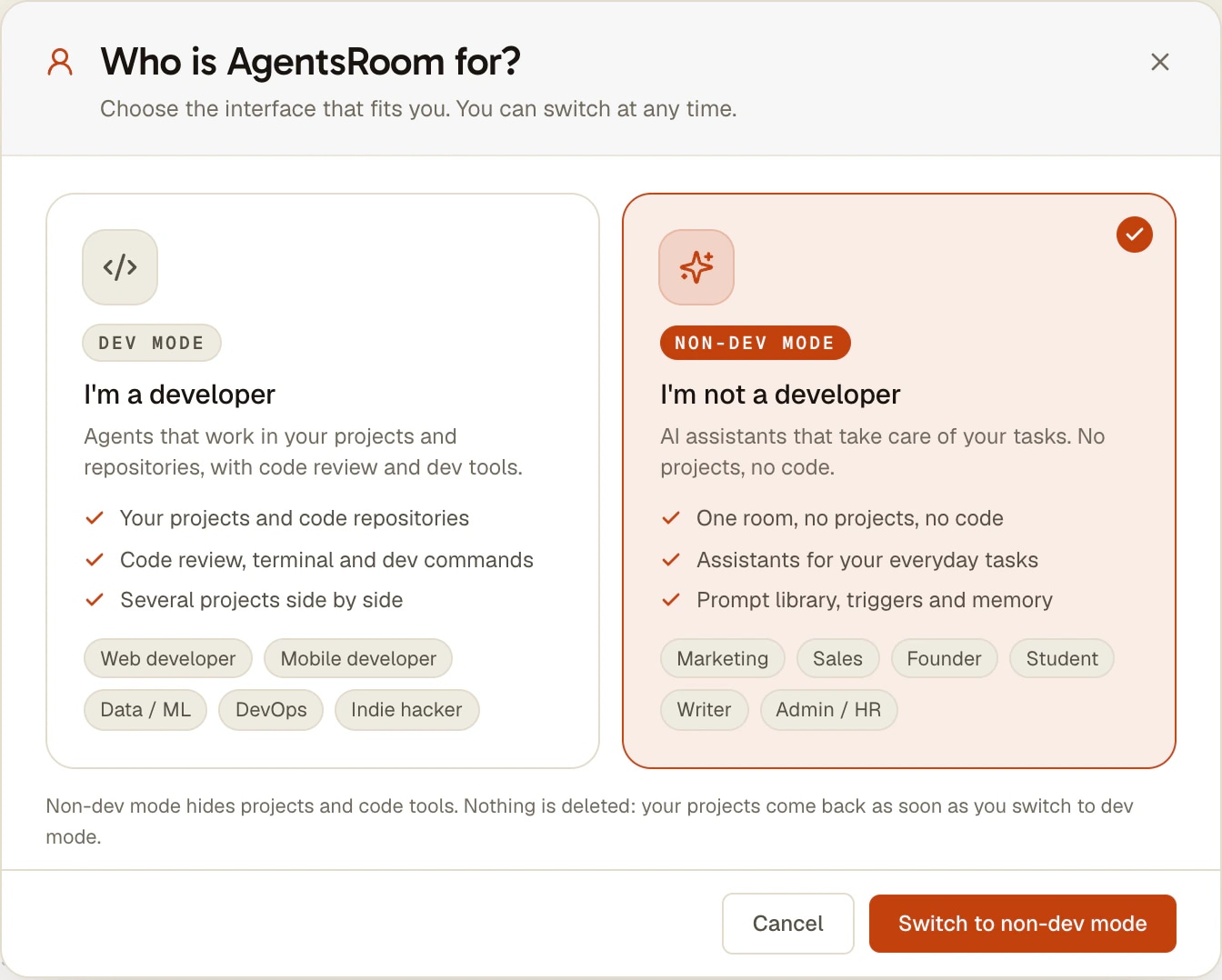
AgentsRoom started as a cockpit for developers. Answer "I'm not a developer" at its first question and it becomes something else: one room of AI assistants that take on your tasks, with no project, no repository and no code tool in sight.
Research, writing, email drafts, planning, follow-ups. Each assistant has a role and its own conversation, the room keeps a shared memory, and everything runs on an agent CLI you sign in to with your own account: Claude Code, Codex, Antigravity CLI and others.
My assistants
- Lead assistant
- Writer
- Researcher
- Coach & Trainer
The first question of the walkthrough decides the interface. Nothing is deleted when you change your mind.
Most AI agent tools assume you are a developer: you open a project, you point at a code repository, and the screen fills with terminals, diffs and commit buttons. AgentsRoom was built that way too. The Non-dev mode removes all of it, for people who simply want AI assistants to take work off their plate.
What is left is one room called My assistants. It starts with a Lead assistant and three assistants useful to almost anyone: a Writer, a Researcher and a Coach & Trainer. You add more from 17 business roles, you talk to each one in plain words, and the room keeps a shared memory so you do not have to repeat yourself.
It is the same app, with the same prompt library, triggers, task board and phone app. If you want to build a website one day, the Non-dev mode chip at the bottom right switches to dev mode: your projects come back, nothing was deleted.
What the Non-dev mode gives you
One room, no projects
Instead of a list of projects, a single room, My assistants, created for you the first time. Every assistant you add lives there, and opens on a readable conversation rather than a terminal.
17 business roles
Personal Assistant, Writer, Researcher, Sales Representative, Legal Counsel, Accountant and more. Each role has its own expertise and one rule: speak plainly to someone who does not code. Marketing, Project Manager, Brainstormer and SEO are offered too.
A space per client or topic
Need a separate place for a client, a project or a subject? The + of the title bar creates a new space from a name and an optional mission, and the app makes its folder. One click on its tile to switch.
Tasks, prompts and memory
The backlog is called Tasks here: write a request as a card and an assistant takes it. The prompt library keeps your best requests, and the memory keeps what the assistants learned about your work. Two board templates are made for this mode: Everyday requests and Research and writing.
Work that runs without you
Triggers start an assistant at a set time or when a webhook calls: a Monday summary, a monthly report, a reminder. They work exactly as they do for developers.
Your room on the phone
When your account is in Non-dev mode, the AgentsRoom mobile app opens straight on the room My assistants, connected to the computer where the assistants run.
From the first question to the first answer
Five steps, and no command to type.
- 1
Answer Who are you?
The first screen of the walkthrough asks it, and it is the only question you must answer. Pick I'm not a developer: the questions meant for developers, experience level and interface mode, are skipped.
- 2
Pick the agent your assistants run on
AgentsRoom does not ship its own AI model. The assistants run on an agent CLI such as Claude Code, Codex or Antigravity CLI, signed in with your own account. If none is installed yet, the app offers a guided installer.
- 3
Open the room My assistants
At the end of the walkthrough the room opens with its Lead assistant, the Writer, the Researcher and the Coach & Trainer. An empty conversation suggests four everyday requests: click one to put it in the message box, change it, send it.
- 4
Add the assistants you need
The + of the assistants list shows the 17 business roles first. Add an Accountant for your invoices or a Translator for your client emails: each one gets its own conversation in the room.
- 5
Change your mind at any time
The chip at the bottom right always reads Non-dev mode. Click it, choose Switch to dev mode, and AgentsRoom shows your projects again. The same chip brings you back.
17 business roles
Each assistant starts from a role written for its job. You can rename it, give it your own instructions or create a role of your own.
- Personal Assistant
- Writer
- Researcher
- Community Manager
- Sales Representative
- Customer Support
- Data Analyst
- Finance & Admin
- HR & Recruiting
- Legal Counsel
- Coach & Trainer
- Creative Designer
- Translator
- Accountant
- Communications & PR
- Procurement Buyer
- Operations & Logistics
Marketing, Project Manager, Brainstormer and SEO are offered in this mode too, and the development roles stay one click away for the day you need them.
What people hand to their assistants
Four examples, written the way you would ask. The assistants work on files in the space's folder and answer in the conversation.
Founder or freelancer
Ask the Researcher for the five competitors of a new client with their prices, then the Writer for a two-page proposal based on that research. Both land as documents in the client's space.
Marketing and sales
The Community Manager drafts a week of posts from your last article, the Sales Representative prepares the follow-up emails for this month's leads. You read them, adjust them and send them yourself.
Student
The Coach & Trainer builds a revision plan up to the exam date and quizzes you on your notes, the Researcher finds and summarizes sources for a paper, with their links.
Admin, HR and finance
The HR & Recruiting assistant writes the job posting and the interview grid, the Accountant turns this quarter's expense files into a summary table. A trigger can run that summary every month.
What the Non-dev mode is not
It is not a chatbot in a browser tab. The assistants are agents running on your computer, through the agent CLI you chose, and they can read and write files in the room's folder. That is what lets them hand you a real document, and it is also why the computer has to be on for them to work.
It is not the assistant you reach from your phone either. AgentsRoom has a separate personal assistant, one agent of your account that you talk to from anywhere and that remembers you from one day to the next. In Non-dev mode its header button is hidden, and the room My assistants takes its place on screen.
And it is not the only way to use AI for work that is not code. A developer who wants a project for a trip or a research uses workspaces in dev mode, and the two board templates of this mode, Everyday requests and Research and writing, are described with the others on the Backlog page.
Limits Worth Knowing
- AgentsRoom does not include an AI model. Each assistant runs on an agent CLI (Claude Code, Codex, Antigravity CLI and others) and the account you sign in to it with, under that provider's usage limits.
- The room is a folder on your computer, under AgentsRoom in your home folder. The assistants work while that computer is on, like any agent in AgentsRoom.
- Out of the box, the assistants do not read your mailbox or your calendar: they draft, you send. Connecting a mail or calendar service goes through an MCP server you add yourself, a step more technical than the rest.
- The mode is chosen on the computer. The phone follows the choice of your account and opens the room, but cannot switch modes yet.
- Simple, Balanced and Full, the interface modes meant for developers, are not offered in Non-dev mode: the screen is already reduced to the room.
FAQ
Can I use AgentsRoom if I am not a developer?
Yes. Answer I'm not a developer at the first question of the walkthrough, or click the mode chip at the bottom right later. You get one room of AI assistants, no projects and no code tools, with the same prompt library, triggers, tasks and memory as developers.
Do I need to use a terminal?
No, not to work with the assistants: you talk to them in a conversation view and they answer in plain words. The one technical step is the first: an agent CLI such as Claude Code or Codex must be installed on the computer, and AgentsRoom offers a guided installer when it is missing.
Which subscription do I need?
The one of the agent CLI your assistants run on, for example a Claude plan for Claude Code or a ChatGPT plan for Codex. AgentsRoom itself is free to download, and the assistants use your own plan, under its limits.
Which assistants are available?
Seventeen business roles: Personal Assistant, Writer, Researcher, Community Manager, Sales Representative, Customer Support, Data Analyst, Finance & Admin, HR & Recruiting, Legal Counsel, Coach & Trainer, Creative Designer, Translator, Accountant, Communications & PR, Procurement Buyer and Operations & Logistics, plus Marketing, Project Manager, Brainstormer and SEO.
I chose Non-dev mode by mistake. How do I get my projects back?
Click the Non-dev mode chip at the bottom right of the window and choose Switch to dev mode. Nothing was deleted: your projects, their agents and their history come back as they were.
Is Non-dev mode the same as the Simple interface mode?
No. Simple only lightens the screen of a developer's project. Non-dev mode removes the notion of project altogether and replaces it with a room of assistants.
Can the assistants send my emails or book things for me?
Not on their own. They prepare: a draft email, a comparison table, a plan, a document in the room's folder. Acting in your mailbox or calendar requires connecting that service through an MCP server, which you add yourself.
Does it work on my phone?
Yes, through the AgentsRoom mobile app connected to your computer: when your account is in Non-dev mode, the app opens the room My assistants directly. The assistants still run on the computer.
You may also like
Personal assistant
The assistant is the one agent of your AgentsRoom account you can reach from anywhere. Say "Talk to Bot" to Siri, press the Action button, tap a widget or the Assistant tab: the app opens with the microphone already listening, transcribes what you said, and sends it over an end-to-end encrypted link to the desktop, where the assistant runs through your own agent CLI with your connectors (mail, calendar, messaging) and reaches every one of your projects. It files or picks up a ticket, launches an agent, drafts a reply, remembers you from one day to the next, and the answer comes back as a push.
Scheduled Tasks: cron for AI agents
Schedule recurring AI agents and development workflows without writing a single cron expression. Run a Claude Code or Codex session every morning to review pull requests, scan crash logs every night, check dependencies every Monday, generate a weekly changelog or run a QA pass after every deploy. Pick a frequency (every N minutes, hourly, daily once or twice a day, weekly, monthly, or on your AI plan's quota window), a prompt and an agent role. AgentsRoom launches it for you, catches up missed runs on next launch and keeps a reopenable run history.
Non-coding workspaces
Use Claude Code, Codex or any agent CLI for work that is not code: a support incident, a trip, a product research. Create a workspace from a name, a mission and an agent, and AgentsRoom makes the folder. Memory, skills and backlog included.
New feature
AgentsRoom's Prompt Library lets you save, organize, and instantly reuse your best Claude prompts, per project and across your account. Synced to your AgentsRoom account, cached on your machine for offline use, personal prompts visible to you only.
Your assistants are one question away
Download AgentsRoom, answer I'm not a developer, and hand your first task to the room.
Companion app: monitor your agents on the go
Bring your own: Claude, Codex, Antigravity CLI, or other AI provider.
Push bugs and requests straight to your public backlog.