Your terminal conversations,
picked up in one click.
You already use Claude Code or Codex in a terminal. Open that folder in AgentsRoom: the conversations you had there are listed under the agents, with what you asked and when. Click Resume and an agent continues the conversation where you left it.
No new agents to set up, nothing to explain twice. The agent resumes with the CLI's own resume command, so the whole history comes back, and it now has the AgentsRoom tools: backlog, mail between agents, your phone.
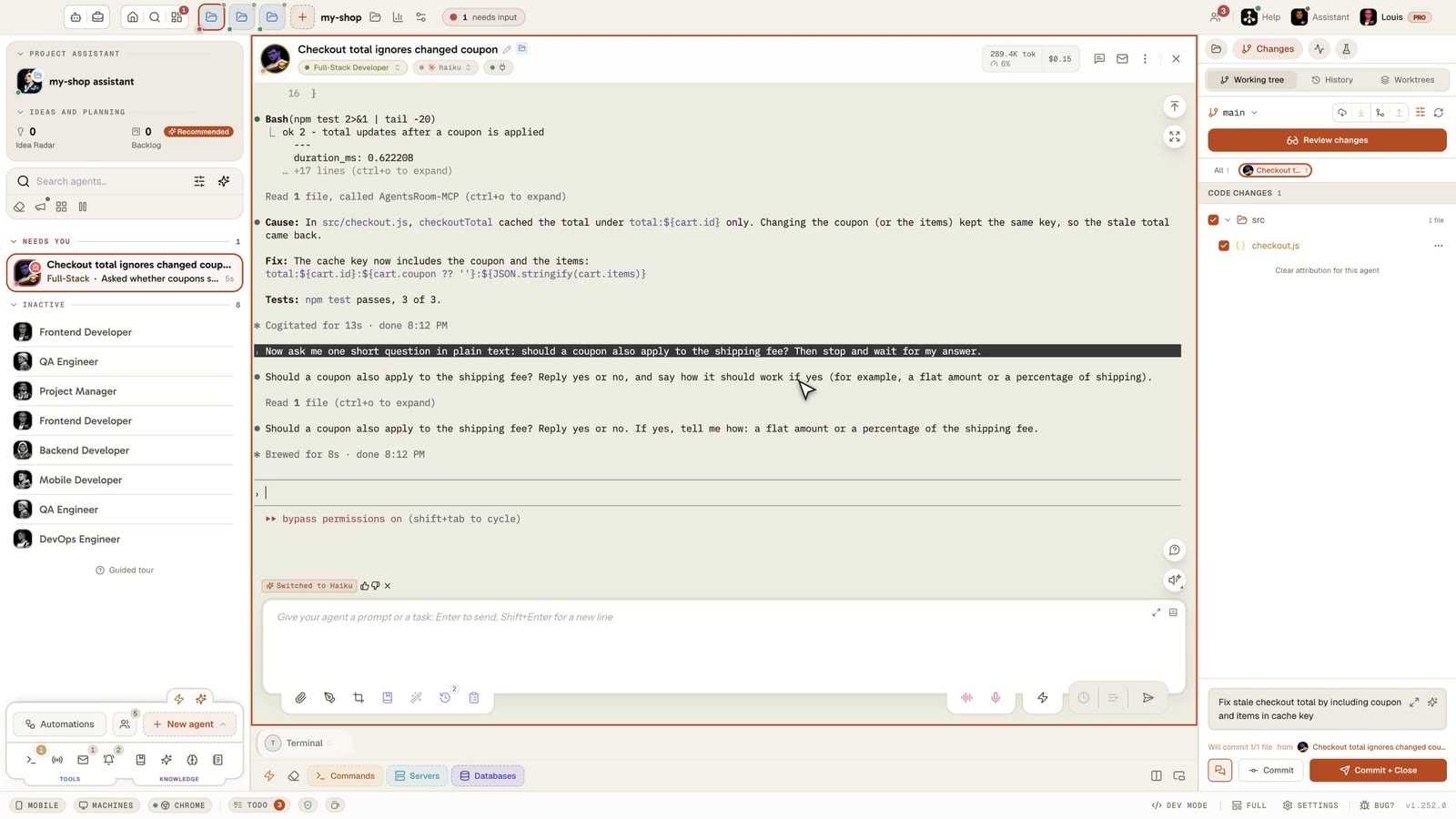
A real session, filmed in the app: Claude Code fixed a coupon bug in an ordinary terminal, then the terminal was closed. In AgentsRoom, the project's Started in a terminal section lists that conversation, and one click on Resume opens a new agent on it with the whole history. A follow-up question shows it remembers: one change in the checkout file, all three tests passed.
A conversation started in a terminal shows up under the project's agents; Resume continues it in an agent, with its whole history.
Most people meet AgentsRoom with work already in progress: a Claude Code session in iTerm, a Codex conversation in another tab, a few days of decisions they do not want to explain again. Creating fresh agents means starting over.
So AgentsRoom reads what your CLIs already keep on disk. Open a project and, under its agents, the section Started in a terminal lists the conversations of that folder from the last 30 days that no agent of the app owns: the CLI, the first thing you asked, how long ago.
Resume creates an agent on that conversation and opens it. It is your conversation, not a summary of it: the CLI reopens it with its own resume command, every earlier turn included.
Three steps, no setup
On the desktop, or from the project screen of the mobile app.
- 1
Open the folder
Add the folder where you ran Claude Code, Codex or Antigravity as a project, or open it if it is already one. Nothing to import, nothing to configure.
- 2
Find the conversation
Under the agents, Started in a terminal lists the folder's recent conversations: the CLI's logo, your first message, the time of the last change. Three are shown, the rest one click away.
- 3
Click Resume
A new agent opens on the conversation and continues it where you left it. It stays in the project like any other agent, named after the conversation.
A row marked maybe still open was written in the last two minutes: the conversation probably still runs in its terminal. Close it there first, so two programs do not write the same conversation.
Which CLIs are listed
Claude Code
Every conversation of the folder, from every Claude account AgentsRoom knows. If it lives under another account than the one the agent launches with, it is copied over before the resume.
Codex
Every conversation of the folder from your own Codex home. Its rollout is copied into the agent's Codex home, then codex resume picks it up.
Antigravity
The last conversation of the folder, the one agy -c would reopen: Antigravity does not record a folder per conversation, so older ones stay reachable from the CLI itself.
Other CLIs
Not listed yet. Their conversations stay where they are, and you can still start new agents on any of the supported CLIs.
What it does, and what it does not
Read on your computer
The list comes from the files your CLIs already write on this computer. Nothing is uploaded to list them: only the CLI name, the first line and the date reach your phone, end-to-end encrypted.
Your terminal conversations only
Conversations run by AgentsRoom's own agents are recognised and left out, so the list only shows what you started yourself. Scripts run with claude -p or codex exec are not listed.
The same conversation, continued
New turns are added to the same conversation, exactly as if you had run the CLI's resume command yourself. Nothing is rewritten or summarised.
Not a view of a running process
AgentsRoom cannot watch a program it did not start. It continues the conversation instead: close it in the terminal, then resume it here.
Can AgentsRoom show the Claude Code sessions I already run in a terminal?
Do I have to create new agents to start using AgentsRoom?
Will the agent remember what we said in the terminal?
Why is my conversation not in the list?
Can I resume a terminal conversation from my phone?
Is anything sent to AgentsRoom's servers?
You may also like
Restore Session
Bring your agents, terminals and their working directories back after a restart.
Continue on Another Computer
Move an agent with its conversation from one of your computers to another.
Multi-Project, Multi-Agent
Every project and every agent in one window, with live status instead of a dozen terminal tabs.
Multi-Provider
Claude Code, Codex, Antigravity and many more agent CLIs side by side.
Mobile-Desktop Sync
Drive your agents from your phone, end-to-end encrypted.
































Bring your terminal sessions with you
Install AgentsRoom, open the folder you work in, and continue the conversations you already have.
Companion app: monitor your agents on the go
Bring your own: Claude, Codex, Antigravity CLI, or other AI provider.
Push bugs and requests straight to your public backlog.
Agents you read like a conversation
Each agent has a role, a face, and a thread you read like a messaging app.