Your agents answer in your language,
on every CLI
Claude Code, Codex and the other agent CLIs answer in the language of the last message they received. Write once in English and once in German, and the answers, the phone notifications and the tab titles switch back and forth.
AgentsRoom fixes the language once, in Settings > Language > Agent replies, for every agent of every CLI it launches. You keep writing in whatever language comes to you; the agents keep answering in yours.
Behebe den Login-Fehler
¿Por qué falla el test?
このPRをレビューして
Three messages in three languages, three CLIs, one reply language.
A coding agent has no fixed language. Each CLI answers in the language of the message it just received, and a long day mixes languages without anyone choosing to: an English stack trace pasted into a French conversation, a German ticket, a teammate's Spanish comment quoted as is. The agent follows whatever it read last.
That matters more than it looks once agents work without you watching. Their summaries, their questions, the notification on your phone and the title of their tab are the parts you actually read, and they are the parts that flip.
AgentsRoom adds one standing instruction to the boot prompt of every agent it starts, on every CLI: answer in this language. It is a default, not a translator and not a cage, and the rest of this page says exactly what it covers and what it leaves alone.
What the setting does
Every CLI, one setting
The instruction goes into the boot prompt of every agent AgentsRoom launches: Claude Code, Codex, GitHub Copilot CLI, Cursor and 13 other agent CLIs. No file to edit per CLI or per repository.
No more flip-flopping
Without it, a CLI mirrors your last message. With it, an English log, a German ticket or a Japanese quote in your prompt no longer changes the language of the answer.
Notifications and tab titles too
The agent writes the title of its session and the text of its notifications in the same language, so the phone alert and the tab you scan match the answer.
Three ways to choose
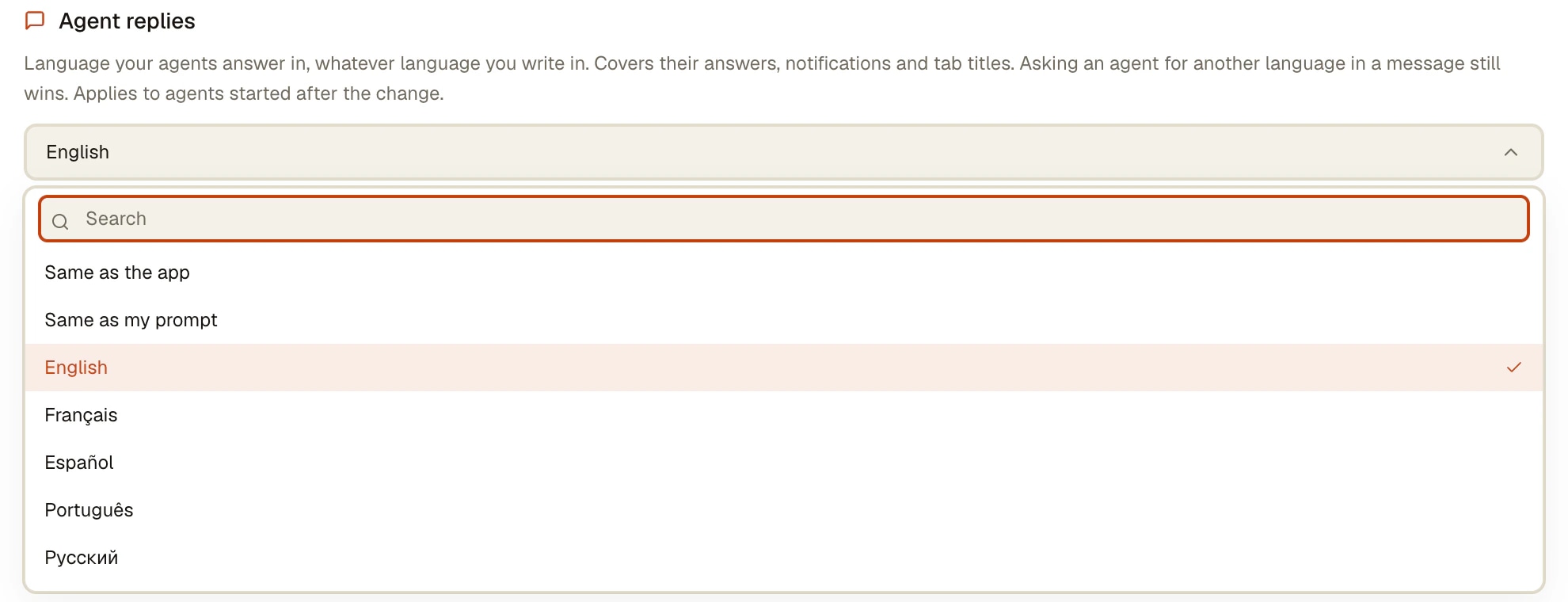
Same as the app (the default, which follows the interface language), one fixed language among the 20 interface languages plus Czech and Slovak, or Same as my prompt, which adds no instruction at all.
A default, not a cage
Four cases win over it: you ask for another language in a message, a project file such as CLAUDE.md or AGENTS.md pins one, the agent writes to someone else, or the text goes into the repository.
Agents started from the phone
There is no setting on the phone. An agent you launch from the mobile app is started by your desktop, with your desktop's reply language, so its answers and notifications follow the same rule.
How to set it
Four steps, once. Signed in to AgentsRoom, the choice follows your account to your other computers.
- 1
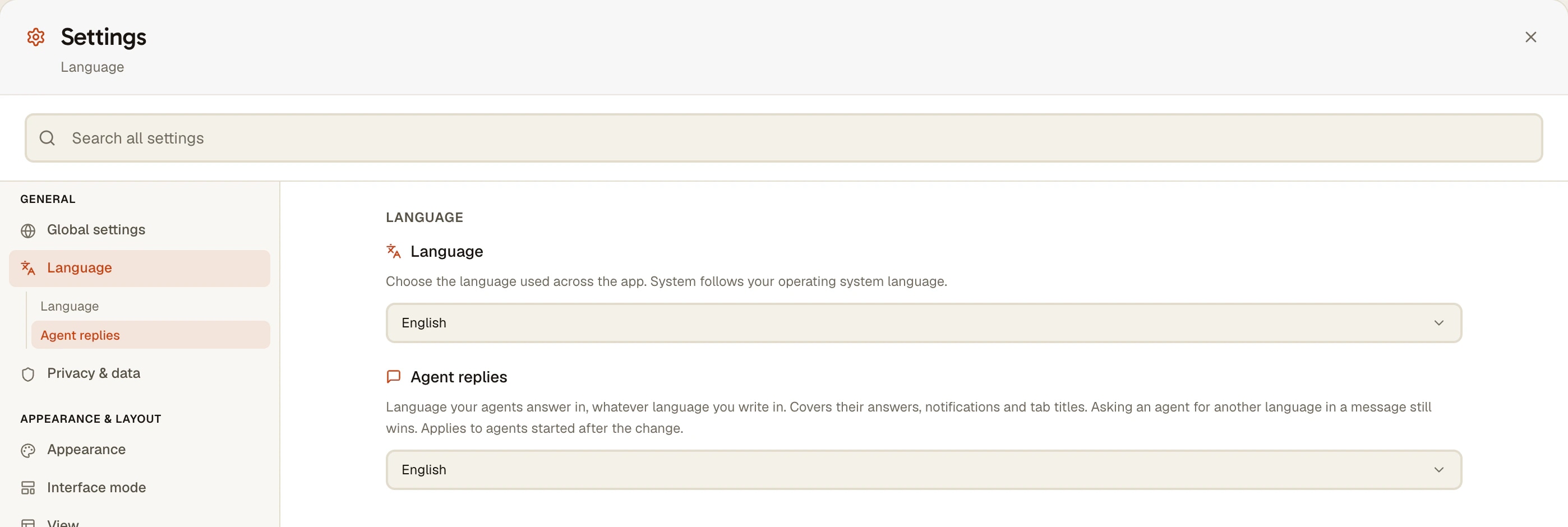
Open Settings > Language
In the desktop app, open Settings and go to Language. The first picker is the language of the app itself; the second one, Agent replies, is the language of your agents.
- 2
Pick a reply language
Same as the app follows the interface language, which follows your operating system unless you forced one. Pick a language to fix it, or Same as my prompt to let each agent mirror your messages as before.
- 3
Start or restart your agents
The setting applies to agents started after the change. An agent already running keeps the instruction it started with: restart it, or open a new one.
- 4
Ask for another language when you need one
Write "answer me in English" in a message and the agent switches, and stays switched until you say otherwise. The setting is what it falls back to, not what it must obey.
What Claude Code and Codex do on their own
Claude Code has its own key, documented in its settings reference: "language": "japanese" (any language name) in ~/.claude/settings.json or in a project's .claude/settings.json. Claude Code passes the value as is to Claude, as an instruction to always respond in that language, and does not check it. The same value sets the voice dictation language and the auto-generated session titles. It applies to Claude Code, and only to Claude Code.
In codex-cli 0.164.0 and its documentation, we found no reply-language setting. The usual way is a line in AGENTS.md, such as "Always answer in French", which Codex reads when a session starts. The other CLIs that read an instruction file work the same way, one file per repository.
AgentsRoom does not replace either. A project file that pins a language still wins over the setting. What the setting adds is one choice for every CLI you run, with notifications and tab titles included, without a settings file per CLI or an instruction line per repository.
What it does not do
- It applies to agents started after the change. A running agent keeps the language it started with until you restart it.
- It is an instruction to the model, not a translation layer. A model can still slip after a long log in another language; one line in your message puts it back.
- It does not translate the CLI's own interface: the menus, prompts and error messages of Claude Code or Codex stay as the CLI prints them.
- It never translates code, identifiers, comments or commit messages: anything written into the repository keeps the project's conventions.
- There is no reply-language setting on the phone; the desktop's setting applies to every agent, including those launched from the mobile app.
- With Minimal system prompt (an agent's advanced options), only the notifications and the tab title follow the setting: the answers follow the CLI and your project's own files.
Questions
How do I make Claude Code answer in my language?
Two ways. Claude Code's own language key in settings.json, for example "language": "french", which applies to Claude Code only. Or, in AgentsRoom, Settings > Language > Agent replies, which applies to every agent CLI you run from it, Claude Code included, with notifications and tab titles in the same language.
Does Codex CLI have a language setting?
We found none in codex-cli 0.164.0 and its documentation. Write the instruction in the project's AGENTS.md, for example "Always answer in French", or set Agent replies in AgentsRoom, which reaches Codex agents like all the others.
Can I change the language of Claude Code's interface?
Claude Code's documented language key changes Claude's responses, the voice dictation language and the auto-generated session titles. We found no setting for the CLI's own interface text, and AgentsRoom does not translate it either. The AgentsRoom app around the CLI exists in 20 languages, set under Settings > Language.
Which languages can my agents answer in?
In AgentsRoom: Same as the app, Same as my prompt, any of the 20 interface languages, plus Czech and Slovak, available since October 12, 2026. With Claude Code's own key, any language name Claude can read.
My agent still answers in English although I picked French. Why?
Three usual causes. The agent was started before the change: restart it. A project file such as CLAUDE.md or AGENTS.md pins English: a project's own instructions win. Or you asked it once for English in a message: that request holds until you say otherwise. Check also that Agent replies is not set to Same as my prompt.
Will it translate my code, comments or commit messages?
No. Code, identifiers, comments, commit messages and anything written into the repository keep the project's existing conventions. The setting covers what you read from the agent: answers, questions, plans, summaries, notifications and tab titles.
Do phone notifications follow the reply language?
Yes. The agent writes its notifications and its session title in the reply language, so the alert on your phone reads like its answers. Agents you launch from the mobile app are started by your desktop with the desktop's setting.
Does it work with Arabic and other right-to-left languages?
Yes, Arabic is one of the reply languages. A terminal grid cannot lay out right-to-left text, so when an agent's reply language is right-to-left, its pane opens on the Conversation view by default, a readable chat of the same session, for the CLIs whose transcript AgentsRoom can read.
You may also like
Conversation view
A chat view for Claude Code, Codex and five more agent CLIs: the session read from the CLI's own transcript, tool calls folded, answers live, on desktop and phone.
Voice dictation : dictate prompts, your agent codes
Voice dictation built into the composer : dictate your prompts to your AI agents instead of typing them. A microphone button turns speech into text right in the draft. Server-side transcription with nothing to configure, 21 languages plus auto-detect, on-device speech recognition on mobile. Dictate long, precise prompts in seconds, send more context, burn fewer tokens.
Notifications
Unread badges, desktop alerts and dock counts tell you which agent finished. Mobile push carries the agent avatar, so you know who it is before unlocking.
Multi-Provider
AgentsRoom supports 17 AI coding providers: Claude, Codex, GitHub Copilot CLI, OpenCode, Antigravity CLI, Aider, Grok Build, Mistral Vibe, Kimi Code, Amp, oh-my-pi, Freebuff, Devin, Cursor, Command Code, Muse Code and Pi. Assign a different provider per agent, switch provider mid-conversation, and keep full context with automatic handoff. The best multi-provider AI coding tool.
One language for every agent
Download AgentsRoom, set Agent replies once, and every agent you start on any CLI answers in it.
Companion app: monitor your agents on the go
Bring your own: Claude, Codex, Antigravity CLI, or other AI provider.
Push bugs and requests straight to your public backlog.