Looking for a RunPane alternative?
Pane, from runpane.com, runs terminal coding agents in parallel, each in its own git worktree. AgentsRoom runs each official CLI in its own terminal too, and adds the tools to organize a team of agents around them:  Claude,
 Codex,
 GitHub Copilot CLI,
 Cursor and 15 other agent CLIs.
AgentsRoom runs onmacOSWindowsLinuxiOSAndroid
Below: what Pane does best, checked on runpane.com and in its GitHub repository on 9 November 2026, where each tool is ahead, and when you should keep Pane.
The short answer
Keep Pane if you want a free, open-source app driven from the keyboard, with one worktree per agent and a CLI you can script. Choose AgentsRoom when running agents in parallel is no longer the hard part and you need to plan, hand off and follow their work from your desk and your phone.
Keep Pane if
- You want free software with the code public under the AGPL-3.0 license.
- You want every agent isolated in its own git worktree, always.
- You work from the keyboard and want git actions as shortcuts.
- You want to drive panes from scripts through a documented CLI.
Choose AgentsRoom if
Agents, organized- You plan the work on a Kanban backlog whose tickets start agents.
- You give agents roles and chain them in team workflows.
- You want native iOS and Android apps to follow and answer your agents.
- You use more than three CLIs, several accounts, or hosted cloud runs.
We make AgentsRoom, so read this page with that in mind. Every Pane fact below is dated and its sources are linked.
Try the real interface
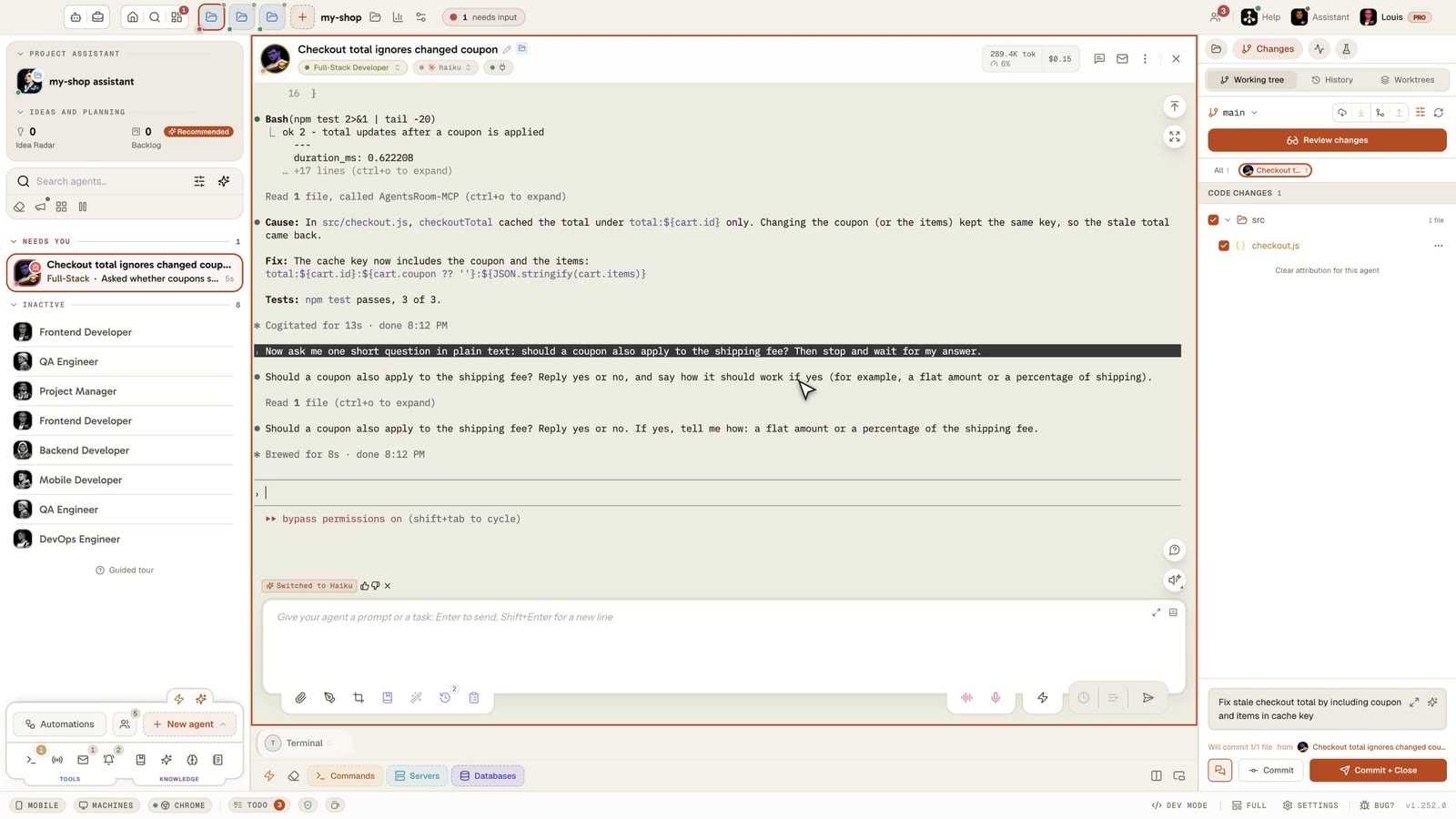
This is not a video: it is AgentsRoom running in your browser, with several coding agents in one window, each with its terminal, its status and its input box.
The desktop app, in Simple mode
On a phone the demo runs the real desktop app in its Simple interface mode: one project, its agents, one prompt. The full cockpit is on your computer.
What Pane does best
Checked on 9 November 2026 on runpane.com and on GitHub. Pane is made by Dcouple, and its repository greenfield-inc/Pane has about 600 stars.
Free and open source
Pane says it is free, with no paid plan, seat fee or usage fee. The code is public under the AGPL-3.0 license. You pay only your AI provider.
One worktree per agent
Each pane gets its own git worktree and branch, created and removed by Pane. You review syntax-highlighted diffs, then commit, rebase, squash or merge from the app.
Keyboard-first
Pane presents itself as a keyboard-first desktop app. Git actions are shortcuts, and you can preview a git command before it runs.
A CLI you can script
The runpane command creates panes, adopts existing worktrees, reports estimated token cost per pane and hands work to a fresh agent, with a published contract for scripts.
Remote Pane you host
A self-hosted daemon runs the agents on another machine while the interface stays on yours, over Tailscale, an SSH tunnel or HTTPS. A browser app reaches it from a phone.
Sessions, Notify and Loops
Orchestrator sessions split work and start panes. Notify lets agents ask you questions in a card. Loops run an agent on a schedule, at most once an hour.
Sources:runpane.comPricingDocumentation for AIGitHub repository
Feature-by-feature comparison
Pane as described on runpane.com and GitHub on 9 November 2026, AgentsRoom as it ships today. "Not found" means absent from what we read, not proof that it does not exist. The first rows are where Pane is ahead, then what both do, then where AgentsRoom is ahead.
| Feature | AgentsRoom | Pane |
|---|---|---|
| Source code | AgentsRoomDesktop source not published | PanePublic, AGPL-3.0Ahead |
| Price | AgentsRoomFree for 2 projects, 6 agents in parallel | PaneFree, no paid planAhead |
| Git worktree per agent | AgentsRoomOptional, per agent | PaneAlways, one per paneAhead |
| Keyboard-driven git | AgentsRoomCommand palette and shortcuts | PaneEvery git action is a shortcutAhead |
| Drive it from scripts | AgentsRoomMCP tools for your agents | Panerunpane CLI with a published contractAhead |
| macOS, Windows and Linux | AgentsRoom✓ | Pane✓ |
| Agents in parallel | AgentsRoom✓ | Pane✓ |
| Works without an account | AgentsRoom✓ | Pane✓ |
| Diff review, commit and push | AgentsRoom✓ | Pane✓ |
| Built-in browser | AgentsRoom✓ | Pane✓ |
| MCP server for agents | AgentsRoom✓ | Pane✓ |
| Agent questions as cards | AgentsRoom✓ | Pane✓ |
| Scheduled agent runs | AgentsRoomClock, quota window or on demand | PaneCron, at most once an hour |
| Agents on another machine | AgentsRoomMachines you link to your account | PaneSelf-hosted daemon |
| Agents that coordinate agents | AgentsRoomTeam workflows and agent messaging | PaneOrchestrator sessions |
| Phone access | AgentsRoomNative iOS and Android appsAhead | PaneBrowser app, native app in early access |
| Agents supported directly | AgentsRoom19 agent CLIsAhead | PaneClaude Code, Codex, Cursor, others as custom commands |
| Kanban backlog that starts agents | AgentsRoom✓Ahead | PaneNo task management, per its own comparison |
| Built-in agent roles | AgentsRoom✓Ahead | PaneNot found |
| Several accounts per CLI | AgentsRoom✓Ahead | PaneNot found |
| Prompt library | AgentsRoom✓Ahead | PaneNot found |
| Hosted cloud runs | AgentsRoomClaude Code and Codex (Plus and Pro plans)Ahead | PaneYour own machines only |
| Databases and Kubernetes in the app | AgentsRoom✓Ahead | PaneNot found |
Pane to start, AgentsRoom to go further
Running agents side by side is the first step. These are the needs that come next, and how AgentsRoom answers them.
You have more ideas than agents
Write them as tickets on a Kanban backlog. Moving a ticket to a column starts an agent with that column's prompt, and the ticket keeps the trace of the work.
One agent should hand work to the next
Give each agent a role, then chain them in a team workflow: one plans, one codes, one reviews. Saved agents can also write to each other directly.
You are away from your desk
The iOS and Android apps show every agent, ring when one needs you and let you answer, over an end-to-end encrypted link.
Your quotas run out
Add several accounts for the same CLI and let AgentsRoom switch to the next one when a limit is near, or send a job to a cloud machine.
When Pane is the better choice
An honest comparison says when to stay. These are the cases where Pane is the right tool and AgentsRoom is not.
You want to pay nothing, ever
Pane has no paid plan at all. AgentsRoom Free has caps on projects and agents in parallel.
Open source is a requirement
Pane's code is public under AGPL-3.0, so you can read, audit and build it. The AgentsRoom desktop source is not published.
You never leave the keyboard
Pane is built keyboard-first, with git actions as shortcuts. AgentsRoom has a command palette and shortcuts, but many actions are made with the mouse.
You script everything
The runpane CLI creates panes, reads their cost and hands work over from your own scripts. AgentsRoom exposes its controls to agents through MCP tools.
Your phone is just for checking
If a browser app on your phone is enough, Pane's Remote Pane covers it. AgentsRoom's native apps matter when you want notifications and to answer agents on the go.
You run three agents, not thirty
For a few agents on one repository, one worktree each, Pane does the job with less around it. AgentsRoom pays off when you have many projects and agents to organize.
Trying AgentsRoom after Pane
Your AI plans stay yours, and you can run both apps side by side while you decide.
Install AgentsRoom
Download it for macOS, Windows or Linux. It finds the CLIs already on your computer, and its guided installer adds the ones that are missing.
Open your repositories
Add the same project folders. Branches and worktrees created by Pane are ordinary git, so they stay where they are.
Create agents and plan
Pick a role and a CLI for each agent, then write your next tasks on the backlog. There is no automatic import of Pane sessions.
Questions
Short answers about price, platforms, phones and how the two apps differ.
Ask us something elseWhat is the best RunPane alternative?
Pane vs AgentsRoom: what is the difference?
Is RunPane free?
Is Pane open source?
Does Pane work on Windows?
Does Pane have a phone app?
Which agents does Pane support compared with AgentsRoom?
Does Pane have a task board?
Can I use Pane and AgentsRoom together?
Other comparisons
See how AgentsRoom compares with the agent managers and terminals developers also look at.
































Organize your agents, not just run them
Download AgentsRoom and run your first agents on the plans you already have. Free for 2 projects.
Companion app: monitor your agents on the go
Bring your own: Claude, Codex, Antigravity CLI, or other AI provider.
Push bugs and requests straight to your public backlog.
Agents you read like a conversation
Each agent has a role, a face, and a thread you read like a messaging app.