बहुत सारे टर्मिनल, बहुत सारे AI एजेंट: वो संज्ञानात्मक कर्ज़ जो आपको धीमा कर देता है (और इससे बाहर कैसे निकलें)
दस AI-एजेंट टर्मिनल के बीच जूझते रहना एक संज्ञानात्मक, दस्तावेज़ी और आर्थिक कर्ज़ खड़ा कर देता है जो आपका समय और token दोनों खा जाता है। कंट्रोल वापस पाने का तरीका यहां है।
पांच टर्मिनल खुले हुए, हर टैब में एक एजेंट। कागज़ पर यह सधा हुआ और गंभीर लगता है। असल में, आप आगे बढ़ने से ज़्यादा वक़्त यह पता लगाने में लगाते हैं कि कौन-सा एजेंट आपसे बात कर रहा है।
आप यह नज़ारा जानते हैं। एक एजेंट दस मिनट पहले काम पूरा कर चुका है और आपने देखा ही नहीं। दूसरा पंद्रह मिनट से आपके जवाब का इंतज़ार कर रहा है। तीसरा किसी error पर अटककर खाली घूम रहा है। आप आधी-अधूरी समझी हुई windows में scroll करते रहते हैं, एक ऐसा task दोबारा चला देते हैं जो पहले ही हो चुका था, और एक productive दोपहर उलझन भरी शाम में बदल जाती है।
समस्या एजेंट नहीं हैं। समस्या यह है कि टर्मिनल इसके लिए कभी बना ही नहीं था।
असली वजह क्यों आपका समय (और पैसा) बर्बाद होता है
2025 में MIT Media Lab की एक टीम ने एक study छापी जो वायरल हो गई, Your Brain on ChatGPT। रिसर्चरों ने एक सटीक शब्द गढ़ा: संज्ञानात्मक कर्ज़ (cognitive debt)। बात सीधी है: जो टूल उस पल में आपकी मानसिक मेहनत बचाता है, वह बाद में इसकी कीमत वसूलता है, बंटे हुए ध्यान और खोए हुए सिलसिले के रूप में।
टर्मिनल के बीच जूझना बिल्कुल यही है, बस आपके पूरे दिन के पैमाने पर। हर window बदलने की एक कीमत है। आपके दिमाग को दोबारा context लोड करना पड़ता है: यह एजेंट कहां तक पहुंचा था, मैंने इससे क्या पूछा था, यह इंतज़ार क्यों कर रहा है। इसे दस windows और घंटे में तीस बार की अदला-बदली से गुणा कीजिए, तो समझ आ जाता है कि "सब ठीक चल रहा था" फिर भी आप थककर चूर क्यों हो जाते हैं।
टर्मिनल एक task शुरू करने के लिए बेहतरीन है। पर जिस पल आप कई को एक साथ चलाने लगते हैं, यह जाल बन जाता है।
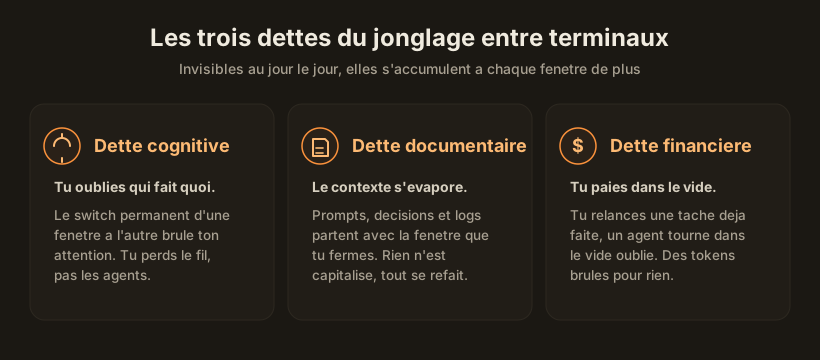
तीन कर्ज़ जो आपके टर्मिनल चुपचाप जमा करते रहते हैं
जाल यह है कि ये कर्ज़ उस पल में दिखते नहीं। इनका हिसाब हफ़्ते के आख़िर में चुकाना पड़ता है, जब आप सोचते हैं कि आपका सारा वक़्त कहां चला गया।
संज्ञानात्मक कर्ज़
आप भूल जाते हैं कि कौन-सा एजेंट क्या कर रहा है। आपको पता नहीं रहता कि कौन इंतज़ार कर रहा है, किसने काम पूरा किया, कौन रुक गया। लगातार switch करते रहना आपका ध्यान जला देता है और सिलसिला तोड़ देता है। यह अनुशासन की कमी नहीं है: यह यांत्रिक बात है, कोई इंसान दस active context एक साथ दिमाग में नहीं रख सकता।
दस्तावेज़ी कर्ज़
जब आप एक window बंद करते हैं, तो जो prompt बढ़िया चल रहा था वह भी उसके साथ चला जाता है। वो फ़ैसला कि "हमने यह तरीका इसलिए चुना क्योंकि" भी उसके साथ चला जाता है। उस error का log जिसने आपका एक घंटा खा लिया, वह भी चला जाता है। कुछ भी सहेजा नहीं जाता, इसलिए सब कुछ दोबारा करना पड़ता है। आप एक ही prompt तीन बार लिखते हैं क्योंकि आपने उसे कहीं भी नहीं रखा।
आर्थिक कर्ज़
यह सबसे ठोस वाला है। आप एक ऐसा task दोबारा चला देते हैं जो पहले ही पूरा हो चुका था, क्योंकि आपको याद ही नहीं रहा कि वह हो चुका है। कोई एजेंट किसी भूले हुए टैब में खाली घूमता रहता है। दूसरा किसी और दिशा में भटक चुका है और बीस मिनट से hallucinate कर रहा है, और आपको ख़बर तक नहीं। हर बार, ये token होते हैं जो बेकार में चुकाए जाते हैं।
टर्मिनल चलाता है, संचालन नहीं करता
यही तो असली बात है। टर्मिनल एक execution टूल है: एक task, एक output, एक stream। इसमें यह लाजवाब है। पर जिस पल आप तीन से दस एजेंट पर पहुंचते हैं, आपके काम की प्रकृति ही बदल जाती है। अब आप code नहीं लिख रहे, आप एक टीम को दिशा दे रहे हैं। और एक टीम लीड जिसे इस पल यह पता नहीं कि कौन क्या कर रहा है और किसे उसकी ज़रूरत है, किसी काम का नहीं।
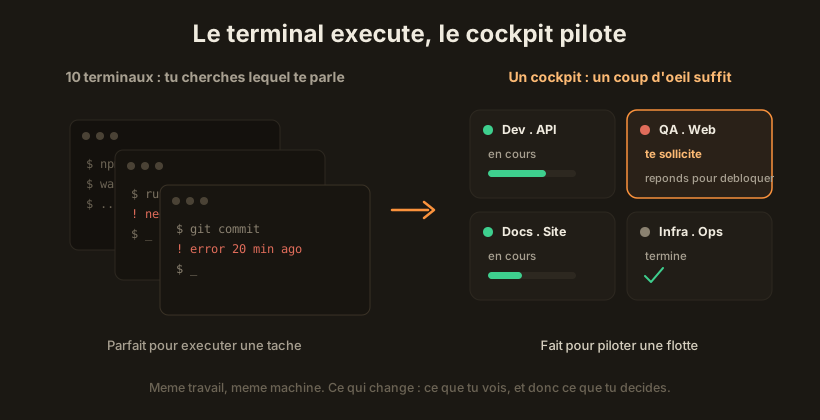
तब आपको जो चाहिए वह एक बेहतर टर्मिनल नहीं है। वह है ऊपर एक परत: एक ऐसा view जहां हर एजेंट एक tile है, अपने role, साफ़ status और अपने project के साथ। जो इंतज़ार कर रहा है वह लाल हो जाता है और आपको ping करता है। आप गलत pane में scroll करना बंद कर देते हैं और एक board पढ़ते हैं।
टर्मिनल से बाहर निकलने के रास्ते
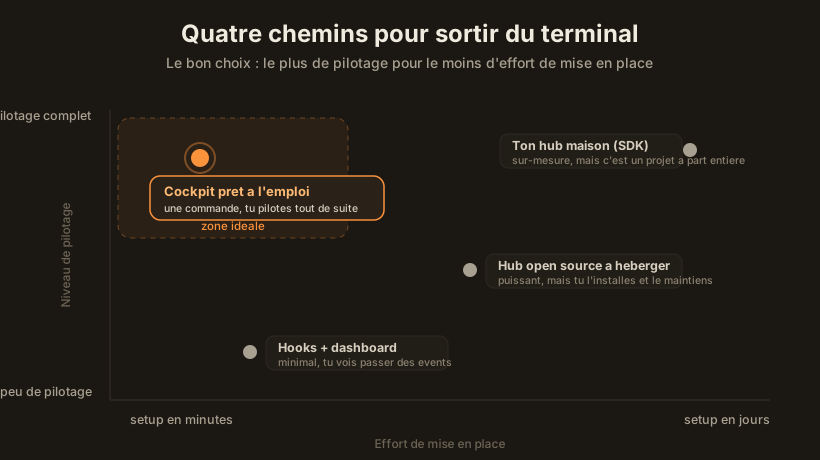
एक स्तर ऊपर उठने के कई तरीके हैं, मामूली जुगाड़ से लेकर तैयार-मिले cockpit तक। सही कसौटी यह नहीं है कि "कौन-सा सबसे ट्रेंडी है", बल्कि यह है: कितना संचालन मुझे मिलता है, और उसके बदले सेटअप में कितनी मेहनत लगती है।
1. Native hooks और एक dashboard
सबसे हल्का। CLI एजेंट करीब एक दर्जन events देते हैं (शुरू होना, ख़त्म होना, sub-agent लॉन्च होना, input का इंतज़ार)। आप इन events को एक छोटे dashboard से जोड़ देते हैं जो उन्हें दिखाता है। यह मुफ़्त है, local है, बेहद सादा। पर यही सबसे कमज़ोर भी है: आप बस events को गुज़रते हुए देखते हैं, संचालन ठीक से नहीं करते। क्या हो रहा है यह समझने के लिए अच्छा है, पर कंट्रोल वापस पाने के लिए काफ़ी नहीं।
2. एक self-hosted open-source hub
एक पायदान ऊपर: एक open-source प्रोजेक्ट जिसे आप ख़ुद deploy करते हैं, dashboards, per-agent budget, tickets और फ़ैसलों की logging के साथ। कागज़ पर दमदार। छिपी हुई कीमत: आप अपने ही टूल के ops बन जाते हैं। Install, updates, incidents, security। जो वक़्त आप अब टर्मिनल में नहीं बिताते, वह infra को संभालने में लगता है।
3. SDK के साथ अपना ख़ुद का hub
सबसे लचीला: आप official agent SDK से अपना ख़ास कंट्रोल सेंटर बनाते हैं। जो चाहें जोड़ लें, crons, internal API, voice transcription। अगर आपकी ज़रूरत बहुत ख़ास है और dev का वक़्त लगाने को तैयार हैं, तो यह शाही रास्ता है। पर ईमानदारी से कहें तो: यह अपने आप में एक पूरा software project है, जिसे डिज़ाइन करना, test करना और लंबे समय तक maintain करना पड़ता है।
4. तैयार-मिला cockpit (जिसे लगभग हर कोई छोड़ देता है)
ऊपर के तीनों विकल्प आपको मेहनत और संचालन के बीच सौदा करने पर मजबूर करते हैं। एक चौथा रास्ता है जो इस सौदे को ही तोड़ देता है: एक cockpit जो पहले से बना हुआ है, इसी के लिए सोचा गया है, जिसे आप एक ही command में install करते हैं और जो पहले ही launch से आपके एजेंट संभालने लगता है। न कोई infra maintain करनी, न कोई hub code करना। यही तो नक्शे का वो खाली हिस्सा है: कम-से-कम मेहनत में ज़्यादा-से-ज़्यादा संचालन।
AgentsRoom यहीं बैठता है।
एक cockpit तीनों कर्ज़ कैसे मिटाता है, feature दर feature
एक विज़ुअल कंट्रोल सेंटर कोई और गैजेट भर नहीं है। हर कर्ज़ का एक ठोस जवाब है। यह रहा मिलान, बिंदु दर बिंदु।
| टर्मिनल में आप क्या खोते हैं | cockpit में इसे क्या मिटाता है |
|---|---|
| आप तालमेल खो देते हैं कि कौन क्या कर रहा है | मल्टी-प्रोजेक्ट, मल्टी-एजेंट view: हर एजेंट के लिए एक tile, सब एक ही स्क्रीन पर |
| आप चूक जाते हैं कि किसने पूरा किया या कौन क्रैश हुआ | लाइव status और अपने आप बने एजेंट titles: एक नज़र काफ़ी है |
| आप उस एजेंट को चूक जाते हैं जो आपका इंतज़ार कर रहा है | Notifications और Dynamic Island: जिसे आपकी ज़रूरत है वह लाल हो जाता है और ping करता है |
| बंद करते ही आपके prompt गायब हो जाते हैं | Prompt Library: सहेजें, दोबारा इस्तेमाल करें, शेयर करें |
| आपकी procedures हर बार दोबारा बनानी पड़ती हैं | Skills Library: जानकारी दोबारा इस्तेमाल लायक बन जाती है |
| आप दिन की sessions खो देते हैं | Session restore: कल आप वहीं से शुरू करते हैं जहां छोड़ा था |
| आप बिना देखे token जलाते रहते हैं | Project statistics और usage tracking: कीमत दिखने लगती है |
| कोई एजेंट भटककर hallucinate करता है | Context-drift detection: गलती की कीमत चुकाने से पहले ही आपको चेता दिया जाता है |
संज्ञानात्मक कर्ज़ घटता है क्योंकि अब आप दस context अपने दिमाग में नहीं रखते, स्क्रीन यह आपके लिए करती है। दस्तावेज़ी कर्ज़ घटता है क्योंकि prompts, skills और sessions फेंकने के बजाय सहेजे जाते हैं। आर्थिक कर्ज़ घटता है क्योंकि बर्बादी दिखने लगती है, और इसीलिए टाली जा सकती है। और चूंकि जब आप कुछ और कर रहे होते हैं तब भी एजेंट चलते रहते हैं, आप उन्हें अपने फ़ोन से भी देख सकते हैं और जो एजेंट मांगे उसे अपनी स्क्रीन से दूर रहकर भी unblock कर सकते हैं।
और बाकी टूल? ईमानदार तुलना
AgentsRoom इस मैदान में अकेला नहीं है, और यह हर ख़ाना नहीं जीतता। यह रहा पूरा नज़ारा, हर टूल के लिए एक पंक्ति में।
- hooks से जुड़ा एक dashboard: मुफ़्त और सादा, पर आप संचालन से ज़्यादा events को गुज़रते हुए देखते हैं।
- Conductor: एक बहुत अच्छा macOS डेस्कटॉप ऐप, साफ़-सुथरी diff समीक्षा के साथ, पर सिर्फ़ macOS, एक बार में एक project, कोई mobile नहीं।
- Claude Squad: बढ़िया अगर आप टर्मिनल में ही रहना चाहते हैं, पर बात यही है, यह टर्मिनल ही रह जाता है, बिना किसी पढ़ने लायक समग्र नज़रिए के।
- Omnara: फ़ोन से संचालन के लिए शानदार, पर सामने कोई असली डेस्कटॉप cockpit नहीं।
- AgentsRoom: वो कमांड सेंटर जो डेस्क से फ़ोन तक आपके साथ चलता है, कई projects और कई providers पर एक साथ।
पूरा ब्योरा, टूल दर टूल, हमारी अलग तुलना में है: कई कोडिंग एजेंट चलाने के सबसे अच्छे टूल। और अगर आपका असली मुद्दा कई एजेंट को साफ़-सुथरे तरीके से साथ चलाना है, तो उन्हें parallel में चलाने का तरीका आपको सही ढांचा देता है।
कहां से शुरू करें
अपनी असली समस्या को लेकर ईमानदार रहिए। अगर आप एक ही repo पर एक-दो एजेंट चलाते हैं और टर्मिनल से आपका काम चल जाता है, तो आपको इनमें से किसी की ज़रूरत नहीं। जैसे हैं वैसे ही रहिए।
पर अगर आप कई एजेंट के बीच जूझते हैं, कई projects पर, और बार-बार यह तालमेल खोते रहते हैं कि किसे आपकी ज़रूरत है, तो कर्ज़ पहले से मौजूद है। यह आपका समय और token खा रहा है, बस दिखता हफ़्ते के आख़िर में है।
एजेंट की गिनती कभी सबसे मुश्किल बात नहीं थी। यह जानना कि इस वक़्त, अभी, किसे आपकी ज़रूरत है, हमेशा से सबसे मुश्किल रहा है। इसे सुलझा लीजिए और बाकी सब आसान हो जाता है। आप अपने ही बेड़े पर AgentsRoom आज़मा सकते हैं और board को ख़ुद पढ़कर देख सकते हैं।
FAQ
AI की मदद से डेवलपमेंट में संज्ञानात्मक कर्ज़ क्या है? यह उस टूल की छिपी हुई मानसिक कीमत है जो उस पल में आपकी मेहनत बचाता है पर बाद में उसकी वसूली करता है। यह शब्द 2025 की एक MIT Media Lab study से आया है। AI की मदद से कोडिंग पर लागू करें तो यह वही बयां करता है जो तब होता है जब आप बहुत सारे टर्मिनल के बीच जूझते हैं: आपका ध्यान बंट जाता है, सिलसिला टूट जाता है, और आप लगातार context दोबारा लोड करते रहते हैं।
सच में, मैं एक साथ कितने कोडिंग एजेंट संभाल सकता हूं? ज़्यादातर लोग एक ही मशीन पर टर्मिनल में तीन से पांच पर आकर रुक जाते हैं। इससे आगे, अड़चन आपकी नज़र रखने की क्षमता बन जाती है, एजेंट नहीं। एक पढ़ने लायक समग्र नज़रिए के साथ, आठ projects संभालने लायक हो जाते हैं, क्योंकि अब आप logs नहीं पढ़ते, आप एक status पढ़ते हैं।
मुझे टर्मिनल चाहिए या dashboard? दोनों, दो अलग-अलग कामों के लिए। टर्मिनल एक ठोस task चलाने के लिए। विज़ुअल cockpit पूरे बेड़े को संभालने के लिए: देखना कि कौन क्या कर रहा है, कौन इंतज़ार कर रहा है, किसने पूरा किया। एक दूसरे की जगह नहीं लेता, वह उसके ऊपर बैठता है।
मैं अपनी एजेंट sessions और prompts खोना कैसे बंद करूं? सब कुछ फेंकने लायक windows में रखना बंद कीजिए। एक prompt library, एक skills library और session restore आपके दस्तावेज़ी कर्ज़ को हर बंद होती window के साथ गायब होने देने के बजाय दोबारा इस्तेमाल लायक पूंजी में बदल देते हैं।
AgentsRoom डाउनलोड करें
अपने सभी AI एजेंट्स को, अपने सभी प्रोजेक्ट्स पर, एक ही विंडो से चलाएं।
कंपेनियन ऐप: चलते-फिरते अपने एजेंट्स मॉनिटर करें
Claude, Codex, Antigravity CLI या किसी अन्य AI प्रदाता का उपयोग करें।
बग और अनुरोध सीधे अपने सार्वजनिक बैकलॉग में भेजें।
पढ़ते रहें
AgentsRoom में अब Ollama का समर्थन: लोकल मॉडल क्लाउड के साथ-साथ चलाएँ
Ollama अब AgentsRoom में एक provider है। Llama, Qwen, Gemma और DeepSeek जैसे लोकल ओपन-सोर्स मॉडल क्लाउड एजेंट्स के साथ-साथ चलाएँ, और हर एजेंट पर लोकल-या-क्लाउड डायल सेट करें, जो बातचीत के बीच में ही बदला जा सकता है।
लेख पढ़ेंClaude Ads: वह Claude Code स्किल जो आपके विज्ञापन अकाउंट का ऑडिट करती है
Claude Ads, Claude Code के लिए एक ओपन-सोर्स स्किल है: Google, Meta, LinkedIn, TikTok या Amazon Ads पर 250 से ज़्यादा जाँचें, 100 में से एक स्कोर और प्राथमिकता के हिसाब से बनी एक्शन प्लान, वो भी करीब दस मिनट में। इंस्टॉलेशन, कमांड, सीमाएँ, और इसे AgentsRoom में कैसे चलाएँ।
लेख पढ़ेंAgentsRoom x The Agency: 230+ विशेषज्ञ एजेंट, पहले से मौजूद
हमने msitarzewski की ओपन-सोर्स (MIT) विशेषीकृत AI एजेंट लाइब्रेरी The Agency को AgentsRoom में जोड़ दिया है। 16 डिवीज़नों में फैले 230+ विशेषज्ञ, लाइव और डायनैमिक।
लेख पढ़ें