AgentsRoom Now Supports Ollama: Run Local Models Next to the Cloud
Ollama is now a provider in AgentsRoom. Run local open-source models like Llama, Qwen, Gemma and DeepSeek next to cloud agents, and set a local-or-cloud dial on each agent, switchable mid-conversation.
Ollama is now a supported provider in AgentsRoom. You can assign a local open-source model to any agent, run it on the same board as Claude, Codex, Grok Build and Mistral Vibe, and switch mid-conversation without losing your context. The open weights you already know, Llama, Qwen, Gemma, DeepSeek and the rest, now report for duty in your room.
Ollama is not quite like the other providers we have added. It is not one more agent to bet on. It is a doorway to the whole open-source model catalogue, running on your own hardware, at zero cost per token and private by default.
What Ollama is
Ollama is a free, open-source runtime that downloads and runs large language models on your own machine. One command, ollama pull qwen3-coder, fetches the model. ollama run serves it on a local endpoint at http://localhost:11434. It exposes an OpenAI-compatible API, which is exactly why coding agents can talk to it with no custom glue, and it ships on macOS, Windows and Linux.
It also supports tool calling, the thing a coding agent needs in order to edit files and run commands rather than just chat. The model library reads like a who's-who of open weights: Llama, Qwen, Gemma, DeepSeek, Mistral, Phi and more, at sizes to match anything from a laptop to a workstation GPU.
Two facts carry the rest of this article. Models run on your machine, so nothing you type crosses the network. And local inference has no per-token bill. Everything below is a consequence of those two.
The local-versus-cloud choice everyone accepts
Until now the decision was binary. Go all-in on the cloud and you get frontier reasoning, but every prompt and every file you touch is shipped to a third-party API and metered by the token. Go all-in local and you get privacy and zero cost, but you give up the strongest models on the problems that actually need them. Most teams pick one lane and stay in it.
That binary is a false one, because a codebase is not one kind of work. Renaming a symbol across forty files, writing boilerplate tests, summarising a diff, drafting a commit message: none of that needs a frontier model, and much of it touches code you would rather not send anywhere. One gnarly architectural refactor might need the big engine. Paying frontier cloud prices for the boilerplate, or handicapping the hard task with a model that is too small, is the tax you pay for treating the choice as all-or-nothing.
In AgentsRoom, local or cloud is a dial, not a switch
AgentsRoom already gives every agent its own provider and model. Adding Ollama means every agent can now sit anywhere on the local-to-cloud dial, and you set it per agent, per task.
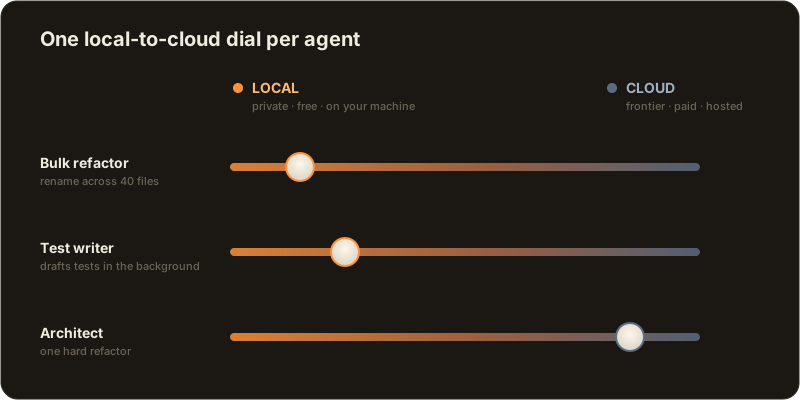
The dial is literally the model id. Type qwen3-coder:30b and the agent runs Qwen locally through Ollama, on your hardware, for free. Add a :cloud suffix, glm-4.6:cloud, and the same agent runs that model through your Ollama Cloud subscription instead. One suffix moves an agent from your GPU to a hosted one without touching anything else in the setup.
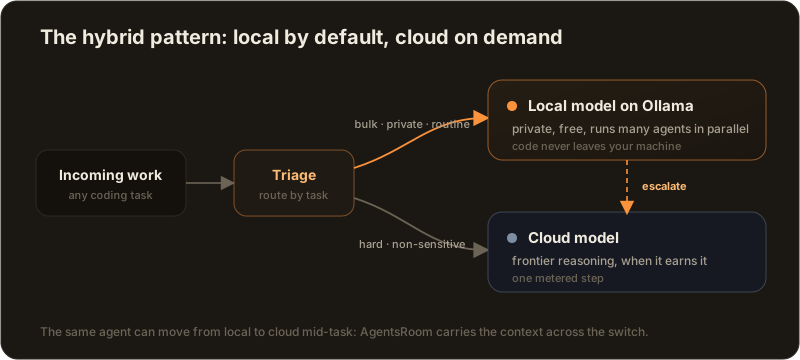
Because AgentsRoom keeps your context across a provider switch, the dial moves mid-conversation too. Start an agent on a local model, let it grind through the mechanical part of a task, then switch it to a cloud model for the one step that needs deeper reasoning. AgentsRoom builds a handoff summary of the files touched, the progress and the session activity, so the cloud model picks up exactly where the local one stopped. Flip it back when the hard part is done.
How to use it
If you already run AgentsRoom, there is almost nothing new to learn:
- Install Ollama from
ollama.comand pull a model:ollama pull qwen3-coder:30b. A Qwen Coder model is a strong default for code. Smaller machines run the 7B comfortably, and a 24GB GPU handles the 30B with a large context window. - In AgentsRoom settings, pick Ollama as a provider, either as your default or on a single agent.
- Create an agent, give it a role, and in the model field type the Ollama model id. Use
qwen3-coder:30bto run it locally, or add:cloudto run it through Ollama Cloud. - Send a prompt. AgentsRoom spawns the real
ollama runprocess in your project folder and streams the output live, the same way it drives every other provider.
One tip from the field: Ollama defaults new models to a small context window. For agentic work, raise it so the agent can hold a real slice of your repository in view, not just the last few messages.
The economics of a free, private swarm
AgentsRoom is built to run agents in parallel: a board of them, each on its own task, each with a status dot. On cloud providers that parallelism comes with a running meter, because six agents working at once is six token bills climbing together. On local Ollama models the marginal cost of a token is zero. Spin up a swarm, let it run all afternoon, and the only bill is electricity.
That changes what parallelism is for. When each agent is metered, you ration them. When they are free, you can afford to be generous in the useful way: a local agent that watches for lint drift, one that keeps the changelog current, one that drafts tests for every new function, all running in the background at no marginal cost while your metered cloud agent stays reserved for the work that genuinely needs it. If running many agents at once is new to you, we wrote about the pattern in running coding agents in parallel.
Privacy you do not have to argue for
For a lot of teams the deciding factor is not cost, it is where the code goes. Regulated industries, client work under NDA, an internal codebase that legal will not let near a third-party API: local inference answers the question before it is asked, because the model runs on the machine and the prompt never crosses the network. There is nothing to review, no data-processing agreement, no data-residency clause.
AgentsRoom fits that posture end to end. Local models keep your code on the machine, and AgentsRoom's own sync between your desktop and your phone is end-to-end encrypted, so supervising the fleet from across the room never undoes the privacy the local model just bought you. If compliance is the reason you are reading this, that combination is the point, and it pairs well with the practices in our note on vibe coding and GDPR compliance.
The hybrid pattern then falls out on its own: route the private and the bulk to a local model, escalate only the hard, non-sensitive reasoning to the cloud, and let the dial handle the handoff. You get frontier power where it earns its keep, and local privacy everywhere else.
Why it matters
AgentsRoom has never been a client for one model or one vendor. It is a cockpit for running the right agent for each task, side by side, under one pair of eyes. Ollama widens that promise in a specific way: it is not one more cloud agent to wire in, it is the entire open-weights ecosystem, on your own terms, priced at zero and private by default.
Local for the many, cloud for the few, and a dial to move any agent between the two. Download AgentsRoom, connect Ollama, and put a room full of open-source models to work. See the full provider compatibility matrix, or read more about multi-provider support and how mid-conversation switching keeps your context intact.
Download AgentsRoom
Run all your AI agents, on all your projects, from a single window.
Companion app: monitor your agents on the go
Bring your own: Claude, Codex, Antigravity CLI, or other AI provider.
Push bugs and requests straight to your public backlog.
Keep reading
AgentsRoom Now Supports Kimi Code
Kimi Code, Moonshot AI's terminal coding agent, is now a first-class provider in AgentsRoom. Run it next to Claude, Codex, Antigravity CLI, OpenCode, Aider, Grok Build and Mistral Vibe, and switch mid-conversation.
Read the articleAgentsRoom Now Supports Grok Build
Grok Build, xAI's terminal coding agent, is now a first-class provider in AgentsRoom. Run it next to Claude, Codex, Antigravity CLI, OpenCode and Aider, and switch mid-conversation.
Read the articleClaude Ads: the Claude Code skill that audits your ad accounts
Claude Ads is an open source skill for Claude Code: 250+ checks on Google, Meta, LinkedIn, TikTok or Amazon Ads, a score out of 100 and a prioritized action plan, in about ten minutes. Install, commands, limits, and how to orchestrate it in AgentsRoom.
Read the article