Convert PDF to Markdown to Save LLM Tokens: The MarkItDown Guide

Feeding PDFs straight to Claude or any LLM quietly burns tokens: every page is also turned into an image. Convert the file to Markdown first with MarkItDown, Microsoft's free open-source tool, and cut your token bill by up to 80%. Full guide with CLI, Python, and MCP setup.

You drop a 20-page PDF into Claude, ask one question, and the answer comes back fine. What you do not see is the bill. Before your question is even read, that document can swallow tens of thousands of tokens. Do it a few times a day across a team and you are paying real money to shovel raw PDFs into a model that would have been just as happy with clean text.

There is a free fix, and it has been sitting in the open the whole time. Convert the file to Markdown first. This guide explains exactly why PDFs are so expensive, how much you save, and how to do the conversion in one command with MarkItDown, Microsoft's open-source converter.

Why a PDF costs so many tokens

Here is the part nobody tells you. When you hand a PDF to an LLM, it is not read the way you read it. According to Anthropic's own PDF documentation, the system does two things to every single page:

  1. It extracts the text from the page.
  2. It converts the whole page into an image, then sends that image alongside the text.

That second step is the silent token sink. The model is not just reading words, it is also looking at a picture of each page so it can understand charts, tables, and layout. You pay for both.

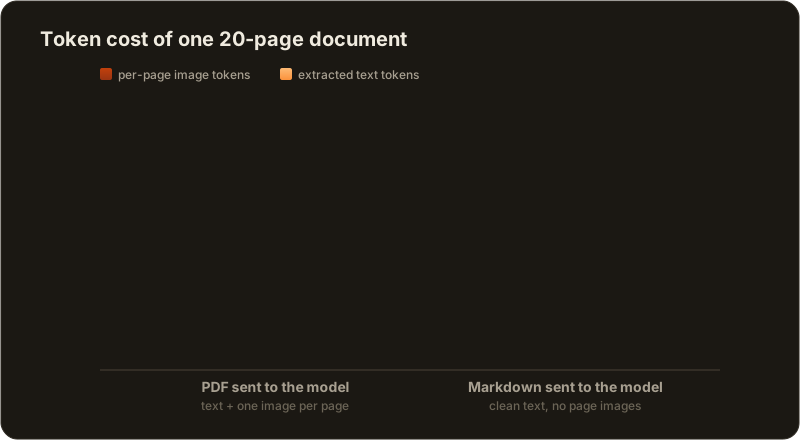
Anthropic's numbers make the cost concrete. The extracted text alone runs 1,500 to 3,000 tokens per page depending on density. On top of that, every page carries the cost of an image. A revealing data point from the Amazon Bedrock integration: full visual PDF mode uses about 7,000 tokens for a 3-page PDF, while plain text extraction of the same three pages uses about 1,000 tokens. That is a 7x gap, and it is entirely the per-page images.

Scale that to a real document. A dense 20-page report can land anywhere from 40,000 to 70,000 tokens once every page has been rasterized into an image. You have not asked anything yet. You have just opened the file.

Bar chart comparing the token cost of one 20-page document sent as a PDF versus the same document converted to Markdown. The PDF stacks extracted-text tokens plus per-page image tokens for roughly 48,000 tokens, while the Markdown version uses only text tokens for roughly 11,000 tokens, about 77 percent fewer.

The orange-red block is pure overhead: one image for every page, whether or not the page has any visuals worth seeing.

The fix: feed clean Markdown instead

Most documents do not need to be seen. A contract, a spec, a research paper, a slide deck full of bullet points: all of that is text wearing a layout. If you strip away the layout and keep the structure, the model loses nothing it actually needed.

That is what Markdown gives you. It is about as close to plain text as a format gets, but it still encodes the structure that matters: headings, lists, tables, links, code blocks, bold and emphasis. Mainstream LLMs are trained on enormous amounts of Markdown, so they parse it natively and effortlessly. Microsoft, who builds MarkItDown, puts it plainly: Markdown is "extremely close to plain text, with minimal markup or formatting, but still provides a way to represent important document structure."

Convert your PDF to Markdown and you drop the per-page images entirely. No rasterized pages, no vision overhead, just the structured text the model was going to read anyway. That is where the savings come from.

Meet MarkItDown, Microsoft's free converter

MarkItDown is a lightweight Python utility from Microsoft, released under the permissive MIT license and one of the most-starred developer tools on GitHub, with more than 135,000 stars. Its single job is to turn messy real-world files into clean Markdown that an LLM can read cheaply.

It is not just a PDF tool. It converts a long list of formats:

  • PDF documents
  • Word (.docx)
  • Excel (.xlsx, .xls)
  • PowerPoint (.pptx)
  • Images, with EXIF metadata and OCR for text inside the picture
  • Audio, with metadata and speech transcription
  • HTML pages
  • CSV, JSON, and XML data
  • ZIP archives (it walks the contents)
  • YouTube URLs (it pulls the transcript)
  • EPub e-books
  • Outlook messages (.msg)

One tool, one output format, for almost anything you might otherwise have thrown at a model as a heavy binary.

Install MarkItDown in 30 seconds

It is a normal Python package. To get everything, install the all extra:

pip install 'markitdown[all]'

If you only care about a few formats and want a leaner install, ask for just those extras:

pip install 'markitdown[pdf, docx, pptx]'

The available options include [all], [pdf], [docx], [pptx], [xlsx], [xls], [outlook], [audio-transcription], and [youtube-transcription], among others.

Convert a PDF to Markdown from the command line

The fastest path is the CLI. Point it at a file and send the output wherever you want:

markitdown report.pdf -o report.md

Or use a plain redirect, which does the same thing:

markitdown report.pdf > report.md

You can also pipe a file straight in:

cat report.pdf | markitdown

That is the whole workflow. You now have a report.md you can hand to any model, drop into a repository, or paste into a chat, and it costs a fraction of the original.

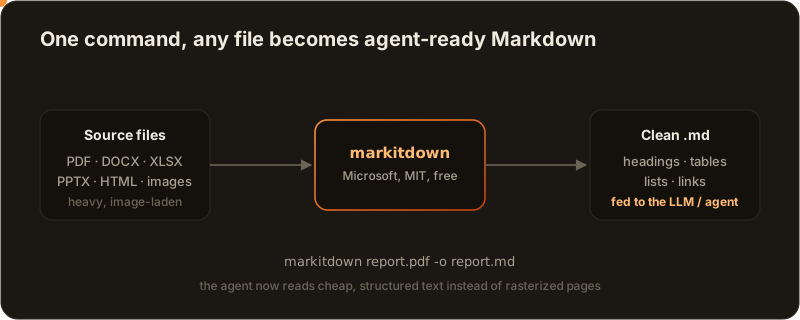
Workflow diagram: source files such as PDF, DOCX, XLSX and PPTX flow into MarkItDown, which outputs a single clean Markdown file, which is then fed to a large language model or coding agent. A token marker travels along the path to show the document moving through the pipeline.

Heavy file in, agent-ready Markdown out, one command in between.

Convert in Python (and batch a whole folder)

If you are wiring this into a pipeline, the Python API is just as short:

from markitdown import MarkItDown

md = MarkItDown(enable_plugins=False)
result = md.convert("report.pdf")
print(result.text_content)

result.text_content is your Markdown string, ready to write to disk or feed to a model. To convert an entire folder of documents in one pass, loop over it:

from pathlib import Path
from markitdown import MarkItDown

md = MarkItDown(enable_plugins=False)
for src in Path("docs").glob("*.pdf"):
    out = src.with_suffix(".md")
    out.write_text(md.convert(str(src)).text_content, encoding="utf-8")

Run that once and a directory of expensive PDFs becomes a directory of cheap, structured Markdown that any agent can read on every turn without re-paying the vision tax.

How much do you actually save?

The honest answer: it depends on the document, but the win is large and consistent. Here is the shape of it for a typical text-heavy file.

PDF sent to the modelConverted to Markdown
Extracted textyesyes
One image per pageyes, every pageno
Vision overheadfullnone
3-page document (Bedrock figure)~7,000 tokens~1,000 tokens
20-page document (estimate)40,000 to 70,000 tokens10,000 to 15,000 tokens

For a document whose value is in its words, converting to Markdown routinely cuts the token cost by well over half, and often 80% or more. The savings are not magic: you are simply no longer paying to send a picture of every page when the model only needed the text.

Markdown is not literally free, of course. The extracted text still costs tokens. But that text cost is the floor you were always going to pay. What you remove is the per-page image stack sitting on top of it.

When to keep the PDF (do not over-optimize)

Conversion is the right default, not a universal rule. Keep the original PDF when the visual layout is the point:

  • Charts and graphs you actually need the model to read. If the meaning lives in a bar chart, the image is doing real work.
  • Scanned documents that are images of text. MarkItDown can OCR them, but if recognition is shaky, the model's own vision may read the page more reliably.
  • Complex visual tables or forms where position and alignment carry meaning that flattens out in Markdown.
  • Infographics and design-heavy pages where the layout is the content.

For everything else, which is most documents, Markdown wins.

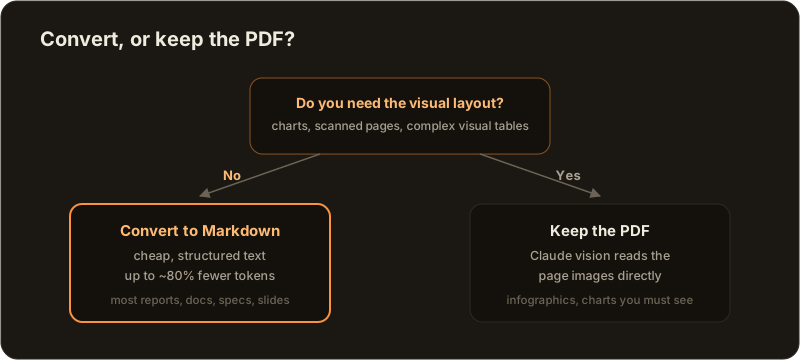
Decision diagram: ask whether you truly need the visual layout of the document, such as charts, scanned pages, or complex visual tables. If no, convert it to Markdown to save tokens, the recommended path. If yes, keep the PDF so the model's vision can read the page images directly.

The question is never "PDF or Markdown" in the abstract. It is "does the model need to see this page, or just read it?"

Beyond PDFs: Word, Excel, PowerPoint, even YouTube

The same one-liner works on the rest of your document pile. A Word doc, a spreadsheet, a slide deck, a web page, even the transcript of a YouTube video all collapse into clean Markdown the same way:

markitdown deck.pptx -o deck.md
markitdown budget.xlsx -o budget.md
markitdown https://www.youtube.com/watch?v=VIDEO_ID -o transcript.md

If your workflow involves regularly pulling context out of Office files or the web and handing it to a model, standardizing everything to Markdown first is one of the cheapest, highest-leverage habits you can build.

Plug it into your coding agents with the MarkItDown MCP server

If you work with coding agents, this gets even better. MarkItDown ships an official MCP (Model Context Protocol) server, so your agent can convert files itself, mid-task, without you running anything by hand.

Install it and run it over stdio:

pip install markitdown-mcp
markitdown-mcp

The server exposes a single tool, convert_to_markdown(uri), where the uri can be any http:, https:, file:, or data: URI. Wire it into your agent once and it can pull a PDF, a spreadsheet, or a web page and turn it into Markdown on demand, paying text-token prices instead of vision prices the whole time.

This is exactly the kind of thing that compounds when you are running more than one agent. In AgentsRoom, the multi-agent cockpit, you configure an MCP server once and every agent in the room inherits it. Convert your reference documents to .md, commit them to the repository, and each agent reads cheap, structured text on every turn instead of re-rasterizing the same PDF over and over. The same discipline that keeps a single session lean keeps a whole fleet affordable, which matters when you are running coding agents in parallel and every one of them is reading your shared context.

It also pairs naturally with the way good agent setups already manage context. If you keep an AGENTS.md context file, pointing it at lightweight .md references rather than raw PDFs keeps the context window tight, which, as we covered in the canary trick for catching context drift, is half the battle in any long session.

The takeaway

Feeding raw PDFs to an LLM is a tax you have been paying without noticing, because every page is quietly turned into an image. MarkItDown removes that tax for free: one command turns almost any file into clean Markdown, you drop up to 80% of the token cost, and the model answers just as well, often better, because it is reading structure instead of squinting at page pictures.

Convert first, then ask. Your token bill and your context window will both thank you.

Ready to run this across a whole team of agents instead of one terminal? Download AgentsRoom, see what each agent supports in the provider compatibility matrix, and read more about multi-provider support.

Download AgentsRoom

Run your AI agents (Claude, Codex, Antigravity CLI, OpenCode, Aider, Grok Build, Mistral Vibe, Kimi Code) on all your projects, from a single window.

FreeDownload AgentsRoom

Companion app: monitor your agents on the go

Bring your own: Claude, Codex, Antigravity CLI, or other AI provider.

Get the extension
Chrome Web Store

Push bugs and requests straight to your public backlog.

A glimpse of AgentsRoom in action.

Multiple projects
Multi-provider
Multiple agents
Live status
File diff & commit
Mobile companion
Live preview
Agent teams
Browser automation
Backlog-driven dev
Prompt Library
Skills Library
View all features

Keep reading