The Canary Trick: Catch Claude (or Any AI Agent) Before It Starts Hallucinating
A one-line trick to know when your AI coding agent is degrading: make it begin every reply with a name. When the name vanishes, the canary is dead and it is time for a fresh session. Works on Claude, Codex, Antigravity CLI, Mistral Vibe and every LLM.
A long session with an AI coding agent rarely breaks all at once. Claude does not jump from sharp to nonsense in a single turn. First it quietly skips a small instruction. A turn or two later, it starts inventing: a file that does not exist, an API that was never there, a decision you explicitly ruled out. By the time you spot a hallucinated path, you have already lost trust in the last few replies and you are debugging the agent instead of your code.
There is a free, almost embarrassingly simple way to get an early warning. It is called a canary, and you can set it up in one line.
Why agents go off the rails: context rot
Every turn, the agent re-reads the whole conversation from the first message to the last and rebuilds its understanding from scratch. As the context window fills up, instruction-following is the first thing to slip. The model still sounds confident, but it has started dropping the least important constraints to keep up. Researchers call this "context rot", and the related "lost in the middle" effect: the longer the context, the less reliably the model honors any single instruction buried inside it.
That is the key insight. Degradation does not start with hallucinations. It starts with the model silently ignoring a small instruction. So if you plant a small instruction whose only job is to be noticed when it goes missing, you get a tripwire that fires before the real damage.
What the canary trick is
Coal miners used to carry a canary underground. The bird was more sensitive to toxic gas than humans, so when it stopped singing, the miners knew to get out long before they felt anything themselves.
A prompt canary is the same idea. You add one trivial instruction to the file your agent reads on every turn: begin every reply with a chosen name. That name is your canary. As long as it shows up at the top of each reply, the model is still reading and honoring your instructions. The first reply that forgets the name is your signal that the session is degrading, usually a turn or two before genuine hallucinations appear. The technique has been popularized in the agentic-coding community by developers like Peter Steinberger, creator of OpenClaw, who lean on small canary signals to catch a session going bad early.
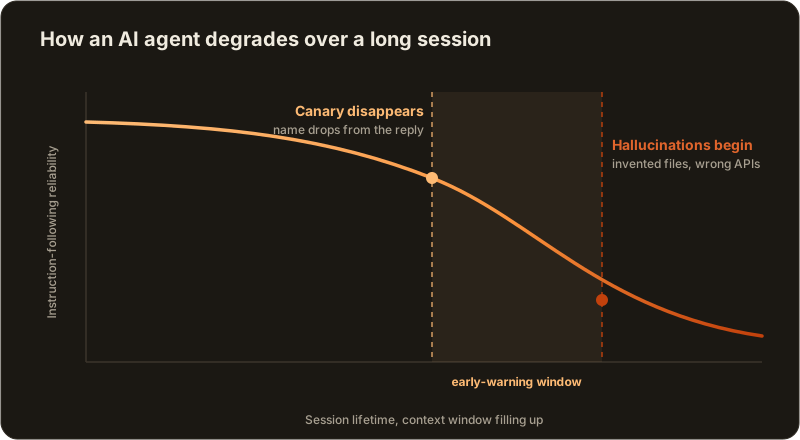
The canary goes missing before the hallucinations start. That gap is your window to react.
Set it up in one line
Put the instruction in the file your agent loads on every turn:
- Claude Code reads
CLAUDE.md. - Codex, Antigravity CLI, Mistral Vibe and most other CLIs read
AGENTS.md.
## Canary
Begin every response with the name "Felix".
Pick any short, distinctive name: your cat, a color, anything you will notice instantly at the start of a reply. Keep it dead simple. A complex instruction defeats the purpose, because you want the easiest possible thing for the model to drop. If even this falls off, everything more nuanced in your context is already at risk.
What to do when the canary dies
The point was never the name. It is the timing. When the canary disappears, do not keep pushing the current thread:
- Stop trusting the last couple of replies and re-read them with suspicion.
- Run
/clearor start a fresh session. - Re-inject only the context that matters: the file you are editing, the goal, and the decisions already made.
A clean window with a tight brief beats a bloated one every time. You are not losing progress, you are dropping the dead weight that was dragging the model down.
The canary pairs well with two other habits from our Claude Code tips: /compact with an instruction on what to keep, and Esc Esc to rewind a wrong turn instead of arguing with it.
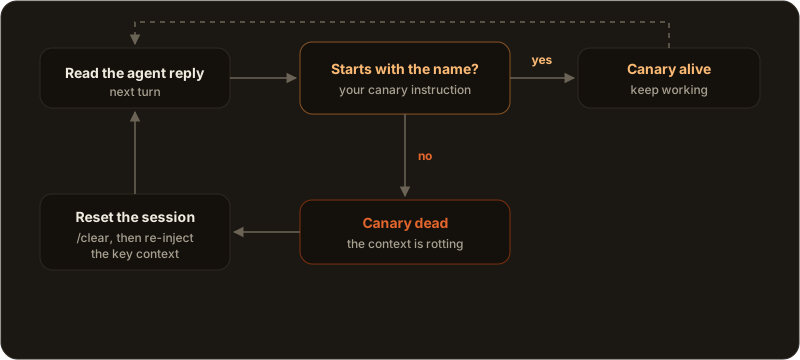
The whole habit fits in one loop: glance at the first word, decide, continue or reset.
It works on every model, not just Claude
This trick is provider-agnostic by design. Claude, Codex, Antigravity CLI, Mistral Vibe, Grok and Aider all share the same context limits, all read a context file, and all can carry a canary. We focus on Claude first because it is the most used coding agent today, but nothing here is Claude-specific. Any LLM that fills its context will start by dropping your smallest instruction, so the same canary protects every one of them. If you maintain an AGENTS.md context file, the canary is just one more line in it.
Watching the canary across a whole fleet
Reading every reply for a missing name is easy with one agent. It does not scale when you are running several at once, which is exactly where most serious work happens now.
That is the part AgentsRoom makes easy. It is a multi-agent cockpit: every agent has a role, a live status dot and its own color, and you supervise the whole fleet from one window. Drop the canary into your shared CLAUDE.md or AGENTS.md once, and every agent inherits it. When one agent starts dropping the name, you catch it at a glance and reset just that thread instead of the entire project. Optional git worktree isolation keeps parallel agents from stepping on each other while you do it.
AgentsRoom actually ships this trick built in, so you do not even have to watch the replies yourself. Every agent it launches already writes a one-line status at the end of each turn, and AgentsRoom treats that as the canary: when an agent stops updating it for two turns in a row, a warning appears above that agent's terminal, with a one-click restart on a clean context and a reminder to compact. You get the early warning automatically, on every agent, across the whole fleet. Read how it works on the context drift detection page.
12 providers, one cockpit, and a canary watching each of them. Download AgentsRoom, check the provider compatibility matrix to see what each agent supports, and read more about multi-provider support and how switching mid-conversation keeps your context intact.
Download AgentsRoom
Run all your AI agents, on all your projects, from a single window.
Companion app: monitor your agents on the go
Bring your own: Claude, Codex, Antigravity CLI, or other AI provider.
Push bugs and requests straight to your public backlog.
Keep reading
How Many Tokens Do I Have Left in Claude? The Two Screens to Check.
Your Claude plan is not denominated in tokens, so no screen shows a token balance. What it actually meters, the two screens that do show it, why it drains while you are not typing, and what the September 2026 weekly-window change does to your week.
Read the articleClaude Watermarks Its Output Now. Your Code Is Barely Affected.
Anthropic now watermarks Claude's output. What it really marks, why generated code mostly escapes it, who can actually detect it, and why your SEO does not change.
Read the articleAGENTS.md: One Context File for Every Coding Agent (Codex, Antigravity, Claude)
AGENTS.md is the portable instructions file your AI coding agents read before touching your code. What to put in it, how it differs from CLAUDE.md, and how to keep one context across Codex, Antigravity and Claude.
Read the article