One app, every AI provider
Claude · Codex · Copilot · Antigravity · OpenCode · Aider · Grok · Mistral Vibe · Kimi · Amp · oh-my-pi · Freebuff · Devin · Cursor · Command Code · Muse Code · Pi
Stop choosing between Claude, Codex, GitHub Copilot CLI, Antigravity CLI, OpenCode, Aider, Grok Build, Mistral Vibe, Kimi Code, Amp, oh-my-pi, Freebuff, Devin, Cursor, Command Code, Muse Code and Pi. Use them all in the same project, at the same time. Switch provider on any agent mid-conversation and keep your full context: no lost work, no copy-paste, no restart from scratch.
Multi-provider AI coding, unified
Every major AI coding CLI in one interface. Switch providers, keep context, configure per agent.
Switch provider anytime
Change from Claude to Codex, GitHub Copilot CLI, Antigravity CLI, OpenCode, Aider, Grok Build, Mistral Vibe, Kimi Code, Amp, oh-my-pi, Freebuff, Devin, Cursor, Command Code, Muse Code or Pi mid-conversation. Your agent picks up where it left off with full handoff context.
Keep context on switch
When you switch provider, AgentsRoom builds a handoff summary: modified files, session activity, and last response. The new provider continues the work seamlessly.
17 AI providers supported
Claude (Anthropic), Codex (OpenAI), GitHub Copilot CLI (GitHub), OpenCode, Antigravity CLI (Google), Aider, Grok Build (xAI), Mistral Vibe (Mistral AI), Kimi Code (Moonshot AI), Amp (Sourcegraph), oh-my-pi, Freebuff, Devin (Cognition), Cursor (Anysphere), Command Code, Muse Code (Meta) and Pi. Each with its own models, CLI flags and capabilities.
Per-provider CLI settings
Configure CLI options per provider with quick toggles. Claude: skip permissions, verbose. Codex: full-auto, quiet. Antigravity: sandbox, debug. Aider: auto-commits.
Different provider per agent
One agent uses Claude Opus for complex architecture. Another uses Codex for auto-mode tasks. A third uses Antigravity for its free tier. Mix providers freely in the same project.
Per-agent CLI options
Give one agent its own launch flags, overriding the provider default. Pin a specific model or version the picker does not list with a flag like --model opus-4.8, or pass any other CLI option, for that agent only. When your flags already pin a model, AgentsRoom adds none of its own.
Environment variables, per project or per agent
Set a KEY=value block once for a whole project and every agent in it inherits it, whatever CLI it runs on, so a repository's own token or staging URL is never re-typed agent by agent. An agent can still carry its own block on top, and both layer over the provider-wide one from Settings. This is how you point a CLI at an OpenAI-compatible gateway or a company proxy, with OPENAI_BASE_URL or ANTHROPIC_BASE_URL, since no launch flag can do it. A value can reference a secret from the built-in Secret Manager instead of the token itself.
A network proxy per provider
Send each CLI out through its own address: Codex through your home connection, Claude through your company network, set once per provider, with a Test button that shows the exit IP.
Your own MCP servers, on every provider
Declare an MCP server once and AgentsRoom writes it into the config of whichever CLI the agent runs on, Claude Code, Codex, Grok, Cursor and the others, with OAuth servers like Notion or Linear connected once per computer.
Live model switch (Claude)
Switching between Claude models (Opus, Sonnet, Haiku) is instant: no restart, no kill. AgentsRoom sends the model change command directly to the running session.
Switch from mobile
Long-press any agent on the mobile app to switch its provider. The command is sent to your desktop via encrypted relay. Switch providers from your phone, couch, or commute.
Handoff summary file
Before switching, the current agent can write a detailed handoff summary: work completed, remaining tasks, gotchas, key decisions. The new agent reads it and continues.
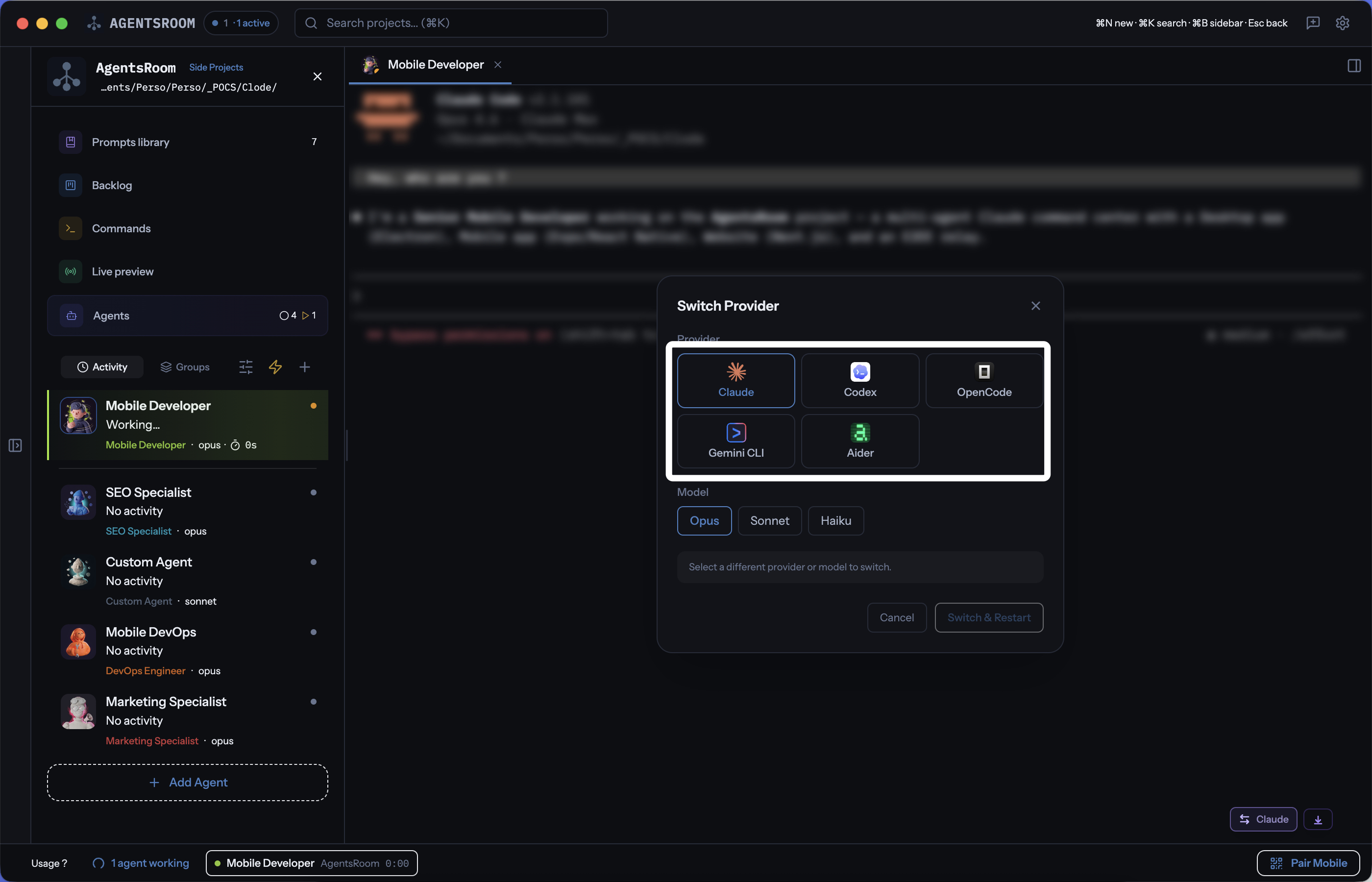
Switch between Claude, Codex, GitHub Copilot CLI, Antigravity CLI, OpenCode, Aider, Grok Build, Mistral Vibe, Kimi Code, Amp, oh-my-pi, Freebuff, Devin, Cursor, Command Code, Muse Code and Pi with one click. Pick a model, switch, and keep coding.
17 AI coding providers, one unified interface
AgentsRoom is the only multi-provider AI coding IDE that supports Claude, Codex, GitHub Copilot CLI, OpenCode, Antigravity CLI, Aider, Grok Build, Mistral Vibe, Kimi Code, Amp, oh-my-pi, Freebuff, Devin, Cursor, Command Code, Muse Code and Pi. Each agent can use a different provider. Switch anytime. Lists follow community launch popularity, refreshed at most daily, with Claude first and providers not yet ranked at the end. Desktop and mobile share this order.
How provider switching works
Pick your provider when creating an agent
When you add a new agent, choose between Claude, Codex, GitHub Copilot CLI, OpenCode, Antigravity CLI, Aider, Grok Build, Mistral Vibe, Kimi Code, Amp, oh-my-pi, Freebuff, Devin, Cursor, Command Code, Muse Code or Pi. The model picker adapts dynamically: Opus/Sonnet/Haiku for Claude, the GPT-6 / GPT-5.6 family for Codex, Claude Sonnet 5/GPT-6 Astra for Copilot, Gemini 3.1 Pro/Flash for Antigravity, Grok 4.7 for Grok, Mistral Medium 3.5/Devstral for Mistral Vibe, mode-based routing for Amp, DeepSeek V4.1 Flash among the Command Code models, and Muse Spark 1.3 or 1.2 for Muse Code.
Work with your agent as usual
Send prompts, review output, iterate. Your agent runs as its provider's CLI in a terminal. AgentsRoom launches command-code for Command Code, muse for Muse Code and pi for Pi. Available models and capabilities follow the installed CLI.
Click Switch Provider when you need a different AI
Hit the Switch Provider button in the terminal bar. An overlay shows all 17 providers with their available models. Select your target provider and model.
AgentsRoom builds the handoff context
The current agent optionally writes a detailed summary. AgentsRoom collects the list of modified files, session activity, and last response. All of this is packaged as a handoff prompt for the new provider.
New provider picks up where you left off
The previous session is closed. A new CLI process starts with the selected provider. The handoff context is injected as the first prompt. The new agent reads what was done and continues the work: no lost progress, no repeated work.
Smart context handoff
When you switch from one AI provider to another, AgentsRoom doesn't just kill the old session. It assembles a structured handoff that tells the new provider exactly where you left off, so the new agent can continue without redoing any work.
Handoff context includes
- • Previous provider and model name
- • List of all modified files (tracked per agent)
- • Session activity summary (tools used, commands run)
- • Detailed agent-written summary (optional, with work done, remaining tasks, gotchas)
Model equivalents, right in every model list
You know your Claude models by heart, then you open the Codex list and none of the names tell you which one plays the role of Opus. Every model list in AgentsRoom answers in the terms you already know: under each model, a small tag names its counterpart of the same tier in your reference provider. It works in every direction, for every CLI that has a model catalog.
- GPT-6 Astra≈ Fable
- GPT-6.1 Sol≈ Opus
- GPT-6 SolOlder version≈ Opus
- GPT-6 Luna≈ Sonnet
- Codex Spark≈ Haiku
Same tier, or the closest one
≈ means same tier: ≈ Opus is a model of Opus level. When the reference has nothing at that level, the tag names its closest model with a direction: > for a model stronger than its strongest, < for one lighter than its lightest. Routers such as Auto, and model families AgentsRoom does not know yet, get no tag at all rather than a wrong one.
Your reference provider
On Auto, the list of your default provider shows no tags at all, since its models are already your yardstick, and every other list is read in the terms of the provider most of your agents run on. You can pick a reference yourself instead, any CLI installed on your machine, which then applies to every list, default provider included, or choose No comparison. The choice is saved to your account, so your other computers and the mobile app show the same tags.
Older versions flagged, never hidden
When a newer generation of the same model line sits in the list, the older one is marked Older version. It stays a full choice, because some agents are pinned to a version on purpose.
Sort by power, price or popularity
Every model list sorts by Power (most capable first), Price (cheapest first) or Popular (most launched by the AgentsRoom community over the last 30 days). Click the active order again to reverse it. The three most launched models of each provider carry a flame. Power and price use one scale across providers, so the same model gets the same $ badge on Claude, GitHub Copilot CLI or OpenCode.
On Claude sessions: live Claude Code token usage tracking
Multi-provider gives you the choice of model. For Claude sessions specifically, AgentsRoom adds a per-session Claude Code token usage meter on every agent terminal: input, output, cache reads, cache writes, cache hit rate, plus a red warning when consumption gets heavy.
About the Claude Code token usage trackerFAQ
Which AI providers does AgentsRoom support?
AgentsRoom supports 17 AI coding providers: Claude Code (Anthropic) with Opus, Sonnet and Haiku models; Codex CLI (OpenAI) with the GPT-6 / GPT-5.6 family (Astra, Sol, Sol Max, Terra, Luna); GitHub Copilot CLI (GitHub) with Claude Sonnet 5, GPT-6 Astra and Claude Haiku 4.5 on your existing Copilot seat; OpenCode with Claude Sonnet, GPT-5 and Claude Opus; Antigravity CLI (Google) with Gemini 3.1 Pro and Gemini Flash; Aider with Claude Sonnet, Claude Opus, GPT-4o and DeepSeek; Grok Build (xAI) with Grok 4.7; Mistral Vibe (Mistral AI) with Mistral Medium 3.5 and Devstral; Kimi Code (Moonshot AI) with Kimi K3 and Kimi K2.7 Code; Amp (Sourcegraph), which resolves its own model behind low/medium/high/ultra modes instead of a model picker; oh-my-pi, an open-source agent routing to 60+ model backends; Freebuff, a free agent built on the Codebuff platform with no model picker; Devin (Cognition), whose single plan reaches Claude, GPT, Gemini, Cognition's own SWE models and open-source ones like GLM, Kimi and DeepSeek, and can hand a session off to a cloud agent; Cursor (Anysphere), the terminal agent of the Cursor editor, whose plan reaches Anthropic, OpenAI and Google models plus Cursor's own Composer, with the catalogue read from your own account at pick time; Command Code, whose own CLI offers models including DeepSeek V4.1 Flash; Muse Code (Meta), with Muse Spark 1.3 and 1.2; and Pi (Earendil), the minimal open-source agent oh-my-pi was forked from, which reaches Anthropic, OpenAI, Google, Z.ai, DeepSeek and many more backends with your own accounts or API keys. Access and usage limits remain those of each provider. GitHub Copilot CLI here means the standalone `copilot` agent from npm (@github/copilot), not the gh copilot shell-command helper.
Can I switch AI provider mid-conversation without losing context?
Yes. AgentsRoom builds a handoff context when you switch providers. It includes the list of modified files, session activity, and optionally a detailed summary written by the current agent. The new provider receives all of this as its first prompt and picks up exactly where the previous agent left off.
Can different agents use different providers in the same project?
Absolutely. Each agent in AgentsRoom has its own provider and model setting. You can have one agent running Claude Opus for complex architecture, another running Codex in full-auto mode for repetitive tasks, and a third running Antigravity CLI on the free tier, all in the same project.
Can I switch provider from my phone?
Yes. On the mobile companion app (iOS and Android), long-press any agent to open the provider switcher. Select a new provider and model, and the switch command is sent to your desktop via the end-to-end encrypted relay. The switch happens on your machine.
Is switching between Claude models (Opus, Sonnet, Haiku) instant?
Yes. When both the old and new provider are Claude, AgentsRoom sends a live model change command directly to the running session. There is no restart, no kill, no handoff. The model switch is instant and the conversation continues uninterrupted.
Can I use a model or version that isn't in the picker?
Yes. Each agent has a per-agent CLI options field that passes flags straight to the underlying CLI at launch. Add a model flag such as --model opus-4.8 to pin a specific version, for example an Opus release your plan still has access to, without waiting for it to appear in the model picker. It overrides the provider-wide CLI options set in Settings, and applies to that agent only. When your flags already pin a model, AgentsRoom adds none of its own, so the CLI only ever sees one: that is how you reach a model alias served by an external OpenAI-compatible gateway. Picking Default in the model picker has the same effect with no flag at all, leaving the CLI on its own model.
Can I run agents on a cheap flat-rate plan like OpenCode Go?
Yes. OpenCode Go is a low-cost flat-rate plan that bundles a curated set of open models behind one monthly price instead of per-token billing. Connect it from inside OpenCode with the /connect command: its opencode-go models are then discovered from your own CLI and listed in the AgentsRoom model picker, so an agent can run on them without you holding any provider key. Its endpoint also speaks the OpenAI and Anthropic formats, so you can point a Claude Code or Codex agent at it with two environment variables in Settings, and keep your premium subscriptions for the agents that really need them.
Can I set a default reasoning effort for a CLI, for all my agents at once?
Yes, since AgentsRoom 1.194.0. Settings > AI providers > the provider's tab has a Default reasoning effort field for every CLI that exposes an effort level (Claude Code, Codex, Antigravity CLI, Kimi Code and the others with a lever), and the project settings can override it per project. An agent that has no effort of its own inherits it at launch, so changing the default moves every agent that relies on it; an agent with its own effort, a launch override or a backlog ticket that pins one keeps theirs. The level is clamped to what the launched model offers: a level the model does not have falls back to the CLI's own default. It came from a user who wanted all his Kimi agents on low to keep costs down without editing them one by one.
Does AgentsRoom show which model of another CLI matches mine?
AgentsRoom tells you in the model list itself. Under each model, a tag names its counterpart of the same tier in the provider you pick as reference. With Claude as the reference, the Codex list currently reads GPT-6.1 Sol ≈ Opus, GPT-6 Luna ≈ Sonnet, Codex Spark ≈ Haiku and GPT-6 Astra ≈ Fable. It works in every direction (Claude in Codex terms, OpenCode or Grok Build in Claude terms) because every model is placed on one tier scale shared by all providers, and a model from a family AgentsRoom does not know gets no tag rather than a guess.
Further reading
Claude Code vs Codex CLI: which one to pick in 2026 (and why not both)
An honest comparison of Claude Code and Codex CLI: pricing, speed, MCP, control. And why, after a few weeks, I stopped choosing between them.
Codex, Claude Code, Cursor or Copilot: choosing by how you actually work
Codex, Claude Code, Cursor, GitHub Copilot and AgentsRoom compared by working style rather than by feature list: coding alone, running several agents, or shipping with a team.
How to Communicate With Your AI Agents: Claude, Codex, Antigravity, Grok Build
Code is no longer the bottleneck, communication is. Here is how to talk to your AI agents Claude, Codex, Antigravity and Grok Build to ship faster, more precisely and with fewer tokens.
Use every AI provider from one app
Claude, Codex, GitHub Copilot CLI, OpenCode, Antigravity CLI, Aider, Grok Build, Mistral Vibe, Kimi Code, Amp, oh-my-pi, Freebuff, Devin, Cursor, Command Code, Muse Code, Pi: all in AgentsRoom. Switch mid-conversation, keep context, ship faster.
Companion app: monitor your agents on the go
Bring your own: Claude, Codex, Antigravity CLI, or other AI provider.
Push bugs and requests straight to your public backlog.