Claude Code Keeps One Login at a Time. Here Is How to Run Several.
A field guide to running a work account and a personal account on the same machine: the one environment variable that decides which login is active, why the shell approach breaks once you have more than two terminals, and how to pin an account per project.
There is a moment that happens to most people who use Claude Code for both a job and their own projects. You finish a work session, switch to a side project, and realise the agent is still signed in on the account your employer pays for. So you log out, log back in with your own account, and half an hour later you have to do the reverse.
That loop is not a missing feature. It is a consequence of where Claude Code keeps its login, and once you know where that is, running several accounts side by side becomes a configuration detail rather than a workflow problem.
One environment variable decides which account is live
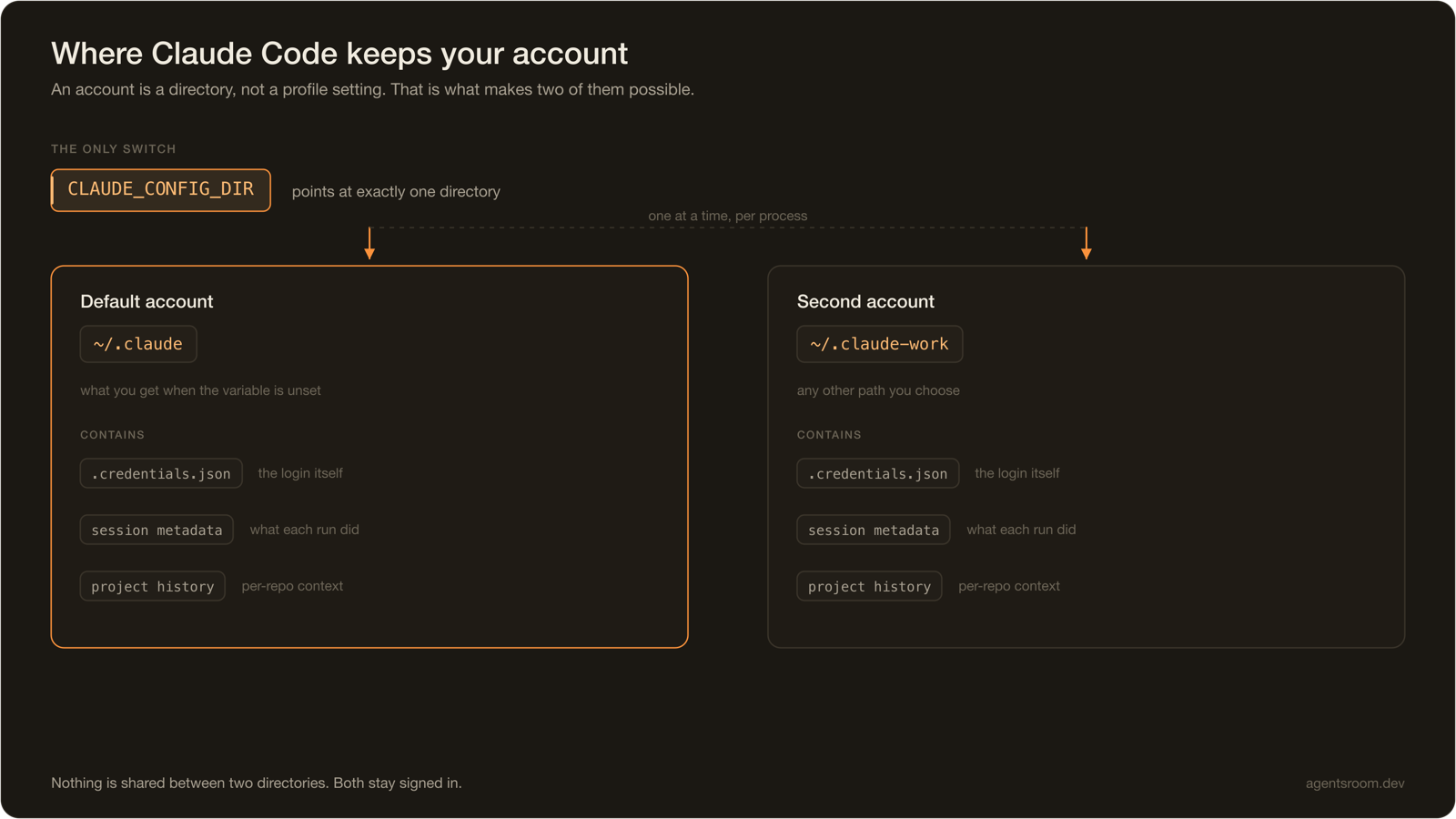
Claude Code does not keep credentials in a database or a keyring entry keyed by profile. It reads everything it needs from a single directory: credentials, session metadata, and the per-project history.
That directory is whatever CLAUDE_CONFIG_DIR points at. If you never set it, it is ~/.claude.

This is the whole mechanism, and it has a useful property: because an account is a directory rather than a global setting, having two accounts means having two directories. Nothing is shared between them. Both stay signed in indefinitely, and neither knows the other exists.
So the naive version works:
# personal
CLAUDE_CONFIG_DIR=~/.claude claude
# work
CLAUDE_CONFIG_DIR=~/.claude-work claude
Run /login once inside the second one, and you have two live accounts on one machine.
Where the shell approach starts to hurt
The two-line version above is genuinely fine if you open one terminal at a time and you are disciplined. It stops being fine for three reasons, and they compound.
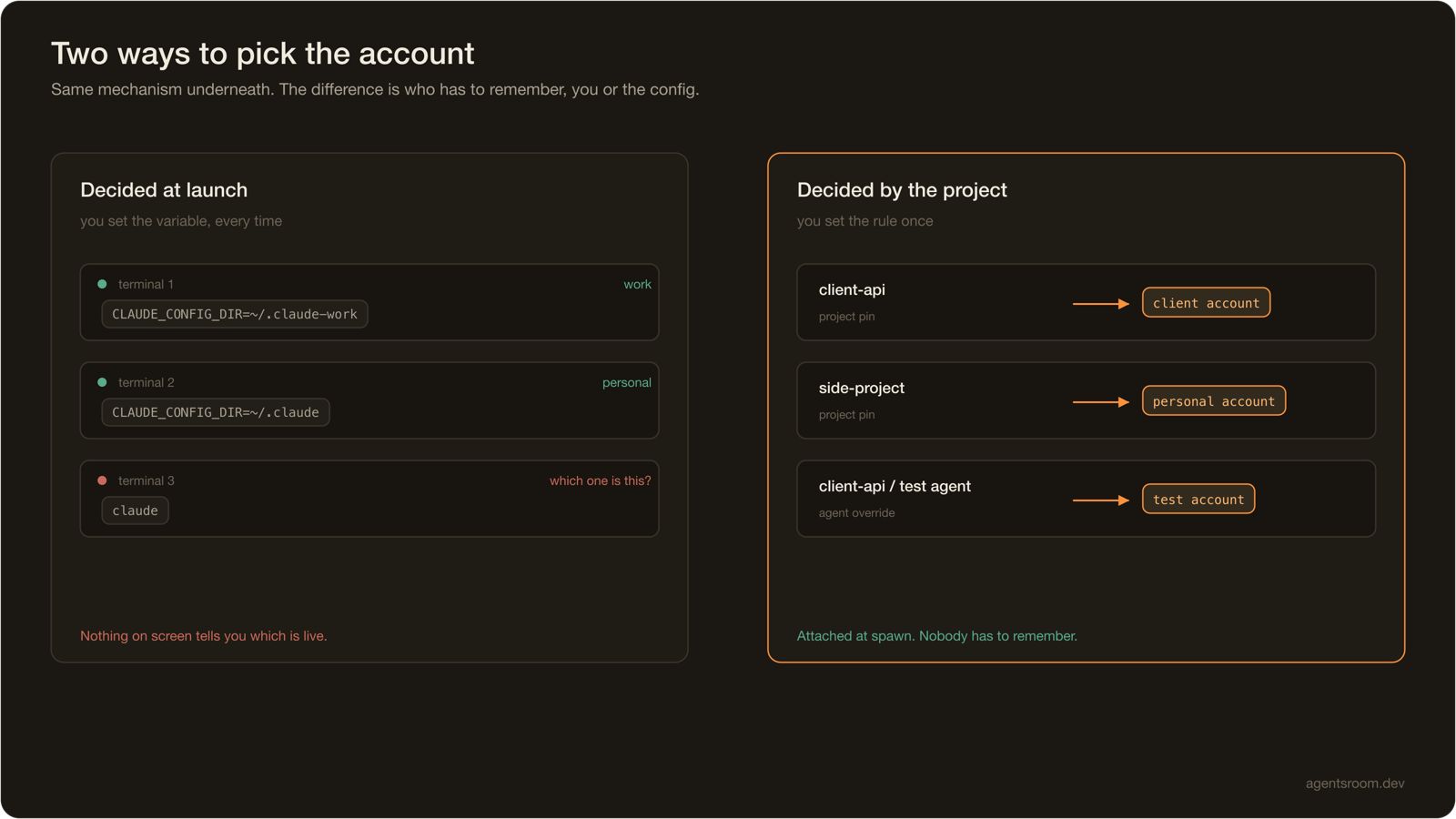
The variable is per process, not per machine. Every new terminal, every new pane, every editor-integrated shell starts from your profile's default. Export it in .zshrc and you have simply moved the problem: now the other account is the one you keep forgetting.
Nothing tells you which account is active. Claude Code does not print the account in its prompt. If you have two terminals open and one of them is on the work account, they look identical. The moment you notice is usually the moment you check the billing.
It does not survive parallelism. The interesting setups run several agents at once, on several projects. Once you are past two concurrent sessions, remembering which pane was launched with which variable is not a discipline problem, it is a design problem.

The fix is not more shell. It is to stop making the decision at launch time and start attaching the account to the thing that actually determines it: the project.
Attach the account to the project, not to the terminal
What you usually want is a rule, not a command. Something like: this client's repository always runs on this client's account. Once that rule exists, no one has to remember anything.
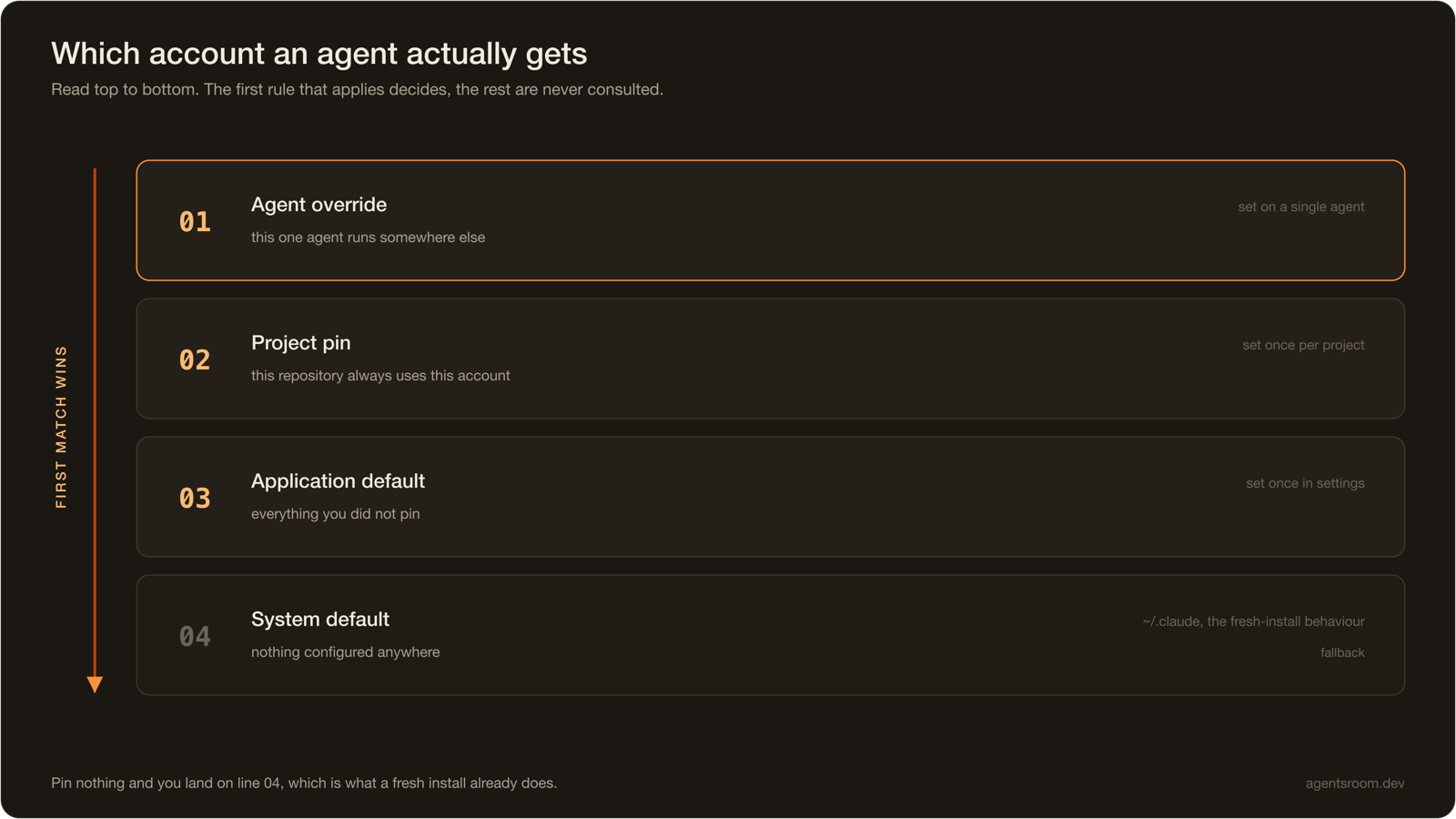
Doing that properly means resolving the account in a defined order, because the rule needs exceptions. A project-wide default is right most of the time, but one specific agent may need to run elsewhere: a throwaway experiment on a test account, or a review agent on a seat with a larger quota.

Read from the top, the first rule that matches wins. An agent override beats the project pin. The project pin beats whatever you set as the general default. If nothing is configured anywhere, you land on ~/.claude, which is what a fresh install already does. That last fallback matters: it means adding this to an existing setup changes nothing until you explicitly pin something.
This is the model AgentsRoom implements. Each account is a managed directory, the sign-in happens inside the app rather than in a shell, and the resolution above runs when an agent spawns, setting CLAUDE_CONFIG_DIR on that process only. If you already use a third-party switcher such as CCS, you can point an account at an existing profile directory instead of signing in again.
The same problem exists on Codex, with a different variable
If you run more than one provider, you will hit this twice. The shape is identical and the variable is not, so a switcher built for one does not cover the other. We keep the Codex side documented separately in multi-account for Codex, including what differs in the sign-in flow.
The general point is worth stating once: account isolation is a per-provider mechanism. Any tool that claims to handle it globally is either wrapping each provider individually or only supporting one.
Know which account is actually burning tokens
Separating accounts is only half the reason people do this. The other half is knowing where consumption lands, especially when a client is paying.
This is the part that quietly breaks with the shell approach. Usage readers that only look at ~/.claude will under-report the moment an agent runs somewhere else, and the numbers look plausible enough that nobody notices for weeks. A reader that is account-aware has to iterate over every configured directory, not just the default one.
If you want per-account and per-session numbers, we covered the measurement side in how to check Claude Code token usage, and the live view is on the token usage page.
What this is not for
One clarification, because the question comes up and it deserves a straight answer rather than a silence.
Everything above is about separating accounts that already legitimately exist. A seat your employer pays for and a personal subscription you pay for are two different commercial relationships, and keeping them on one machine without cross-contamination is a real, ordinary need. So is billing a client's tokens to that client, and so is keeping an experimental account away from a production one.
Creating additional accounts to get around the capacity limits of the plan you are on is a different thing, and it is what usage policies are aimed at. The mechanism described here does not make that acceptable, and a tool that automated it would be helping you breach an agreement you signed. If your second account exists because someone else pays for it, you are on solid ground. If it exists to reset a rate limit, you are not. Anthropic's usage policies are the reference, not this article.
Questions people actually ask
Can I use two Claude Code accounts on the same computer?
Yes. Claude Code reads its credentials, session metadata and project history from the directory that CLAUDE_CONFIG_DIR points at, which defaults to ~/.claude. Point that variable at a second directory and log in there, and you have two independent accounts on the same machine. Nothing is shared between the two directories, so both stay signed in at the same time.
How do I switch Claude Code accounts without logging out?
You do not log out at all. Logging out and back in re-uses the same directory, so you lose the first session to gain the second. Instead you give each account its own config directory and select between them by setting CLAUDE_CONFIG_DIR when you launch the CLI. Both credentials stay valid on disk, and switching costs nothing.
Where does Claude Code store its login?
In the directory pointed at by CLAUDE_CONFIG_DIR, which is ~/.claude unless you change it. The credentials themselves land in a .credentials.json file inside that directory, next to the session metadata and the per-project history. That single directory is the whole account, which is what makes swapping it a clean switch rather than a hack.
Can two agents run on two different Claude accounts at the same time?
Yes, as long as each agent process gets its own CLAUDE_CONFIG_DIR in its environment. The variable is read per process at launch, not globally, so two agents started with two different values run on two different accounts in parallel. This is what makes a work project and a personal project usable in the same window.
Is it against Anthropic's terms to have more than one Claude account?
Holding separate accounts for separate purposes is ordinary: a seat your employer pays for and a personal subscription you pay for are two different commercial relationships. What usage policies target is creating accounts to get around the capacity limits of the plan you are on. If your second account exists because someone else pays for it, you are on solid ground. If it exists to reset a rate limit, you are not. Anthropic's usage policies are the reference.
The short version
Claude Code stores an account as a directory, and CLAUDE_CONFIG_DIR decides which one is live. Two directories mean two accounts, permanently signed in, with nothing shared between them.
The shell version of this works until you have more than one terminal open. After that, what you want is for the account to be a property of the project, with a per-agent override for the exceptions, so that the correct credentials are attached at spawn time and nobody has to remember anything.
Download AgentsRoom
Run your AI agents (Claude, Codex, Antigravity CLI, OpenCode, Aider, Grok Build, Mistral Vibe, Kimi Code) on all your projects, from a single window.
Companion app: monitor your agents on the go
Bring your own: Claude, Codex, Antigravity CLI, or other AI provider.
Push bugs and requests straight to your public backlog.
A glimpse of AgentsRoom in action.
Keep reading
How to Scale AI Coding Agents Across a Dev Team
One developer with a coding agent is a productivity story. Five developers with twenty agents is a coordination problem. Here is what breaks first when a team scales up, and the setup that holds: committed context files, clear file ownership, review by blast radius, and cost you can actually see.
Read the articleThe Best Memory Solutions for Your Claude AI Agents in 2026
CLAUDE.md, mem0, Letta, Zep, basic-memory, Obsidian plus MCP, AgentsRoom Project Memory: an honest map of the memory options for AI coding agents, and how to pick one.
Read the articleA Feedback Board for AI Agents: Let Your Users Write the Prompt
Feedback tools collect requests. None of them can build one. When the board your users write into is the same board your coding agents execute from, the rewriting step disappears.
Read the article