Your Agents, in Your Pocket
AgentsRoom syncs your desktop AI agent sessions (Claude, Codex, GitHub Copilot CLI, Cursor and 10 other agent CLIs) to your phone in real time. Start agents, type commands in the terminal, send saved prompts, and check on progress from anywhere. All communication is end-to-end encrypted.
A real session, filmed in the app: on the phone, you open the project, tap the agent and ask it to fix a checkout total that ignores the coupon. The message reaches the computer end-to-end encrypted, and the agent fixes the bug and runs the tests while the phone shows it working, live. One file changed, all three tests pass, and the answer is waiting on the phone.
Every Mobile App Feature in One Demo
Start an agent from the couch, open a terminal on the subway, send a prompt during standup: this is what AgentsRoom looks like in your pocket.
Full walkthrough of the iOS and Android mobile app: agents, terminals, prompts, localhost preview and notifications.
Why the Mobile App Changes Everything
This is not about "coding on your phone". The point is that your dev studio no longer stops when you close the laptop. Your agents keep running on your desktop, and you keep the remote in your pocket.
For 20 years, leaving your desk meant cutting the cord: no more terminal, no more dev server, no more IDE, nothing. With AgentsRoom, your computer stays the engine but the interface comes with you. Everything happening on your desktop is mirrored on your phone in real time, end-to-end encrypted.
In practice, your AI agents keep working on your branches while you live your life. You kick off a task, walk away, and get a push notification when it's done. You can review the diff, send a follow-up prompt, rerun the command, all from the lock screen of your iPhone or Android.
Here are the situations where our users tell us the mobile app genuinely saved their day:
"I forgot a feature, I want to fix it on the subway"
You leave the office, and halfway through the commute you realize a tiny piece was missing on the Jira ticket you just closed. You pull out your phone, open AgentsRoom, send a prompt to the agent that was already on the project. By the time you step off the train, the PR is ready to review.
"A critical bug fix drops while I'm at the gym"
Slack ping between two sets: prod is down, everyone's panicking. You open the app from the treadmill, spin up a "bug-hunter" agent, feed it the stack trace as text or screenshot. It investigates, fixes, commits while you finish your workout. You approve the PR before the shower.
"I'm in daily standup and the PO wants to see the live localhost"
During daily standup, the Product Owner asks to see the new UI you're working on. You flip on AgentsRoom's built-in secure tunnel in one tap, drop the public https URL into the video call chat. Everyone sees your localhost directly: no ngrok, no deployment, no waiting.
"I'm grabbing a coffee, might as well ship something"
30-minute break, no laptop, not in the mood to pull it out. You browse the backlog on your phone, launch 3 agents in parallel on 3 small tasks. You get back to your laptop at the end of the day: three PRs waiting, all you need to do is review them.
"I'm on a train / a plane / in an Uber"
2-hour trip, no real desk, but you just had an idea to refactor a component. You describe the intent to your agent through a saved prompt, watch the terminal output live, fix a typing error by tapping in the mobile terminal. You arrive with code that's already mergeable.
"I'm already in bed and I want to kick off the nightly build"
Already under the covers, you realize you forgot to launch the long build / the full test suite / the migration script. You open the app, send the command to the terminal, put the phone down. Your desktop runs all night, and the push notification will wake you up if something breaks.
This is not "mobile coding" in the sense of trying to replace VS Code with a touchscreen keyboard. You're not writing 500 lines of TypeScript with your thumbs. You're piloting agents that write the code on your real machine, with your real tools, in your real stack.
The phone becomes a blazing-fast remote: start, monitor, correct, restart, preview. The real work still happens on your desktop the way it always has. You just keep the steering wheel in your hand, even when you're not in front of the screen.
What You Can Do from Your Phone
The mobile companion app is not just a viewer. It gives you real control over your desktop sessions.
Start Agents Remotely
Create new AI agent sessions directly from your phone. Pick the project, assign a role, choose the provider and model, and launch. The agent starts on your desktop machine immediately.
Full Terminal Access
Read agent output with ANSI colors and formatting preserved. Type commands, send instructions, and interact with the terminal just like sitting at your desk. History replay included.
Send Saved Prompts
Access your project's prompt library from the mobile app. Browse folders, pick a prompt, and send it to any running agent with one tap. No need to retype anything.
Live Dev Server Preview
View your local dev server on your phone through AgentsRoom's built-in secure tunnel. See frontend changes in real time as your agents modify the code. Test responsive layouts on a real device.
Agent Status Monitoring
See which agents are thinking, done, idle, or waiting for input. Token usage bars show consumption per agent. Push notifications alert you when an agent finishes or needs attention.
End-to-End Encrypted
Desktop-to-mobile communication uses X25519 key exchange and XSalsa20-Poly1305 encryption. The relay server never sees your code, terminal output, or prompts. New keys every session.
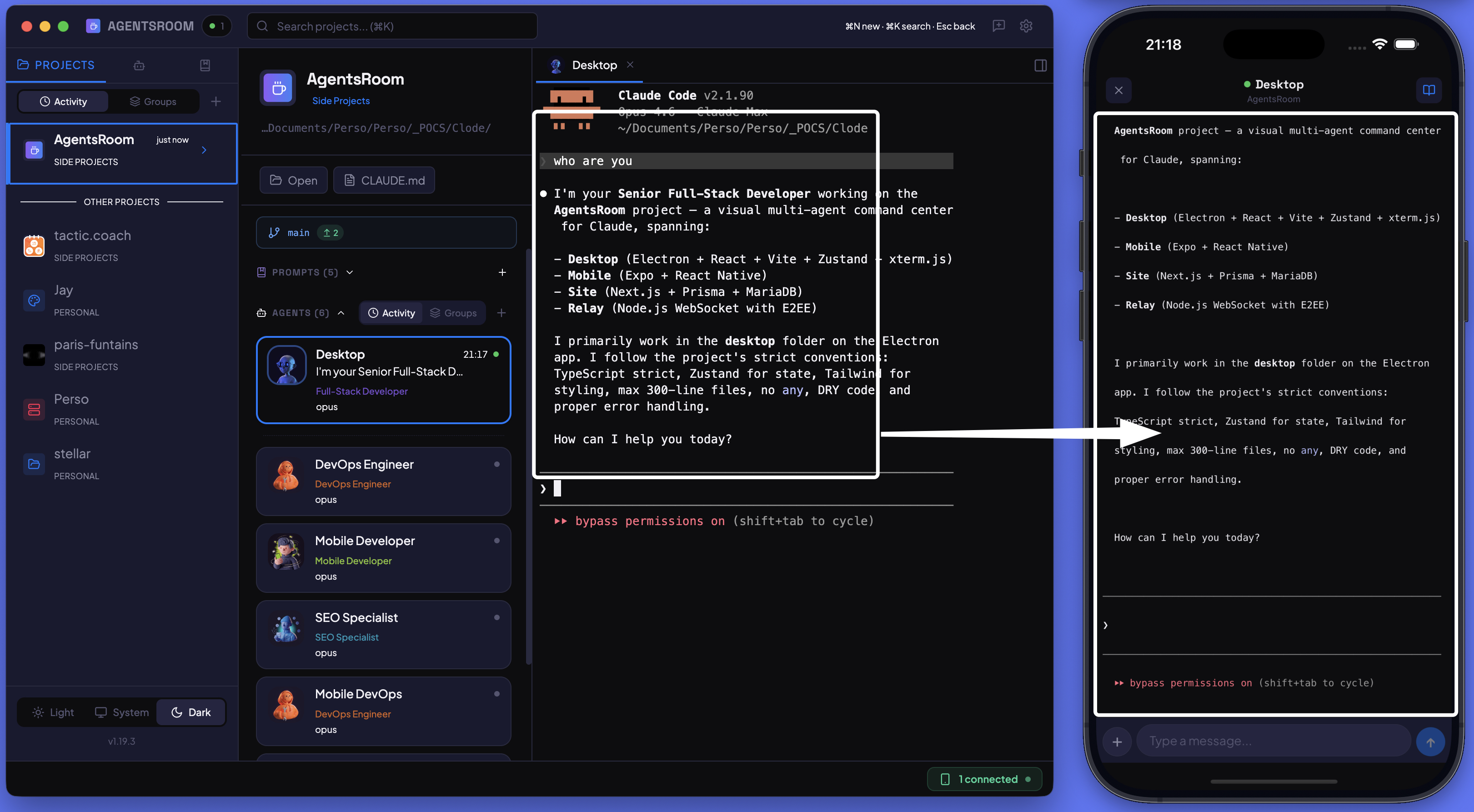
Desktop and mobile side by side: the same AI agent session displayed on both devices with live sync.
How Sync Works
Three steps to connect your phone to your desktop sessions.
Pair your devices
Sign in to the same account on both devices and tap your computer in the list. Both devices join an encrypted channel. The relay server only forwards opaque encrypted blobs.
Projects and agents sync instantly
Your projects, agents, terminal sessions, and status indicators appear on your phone. Changes on either side propagate in real time through the WebSocket connection.
Control from anywhere
Start new agents, send prompts, type in terminals, preview dev servers. Every action travels encrypted from your phone to your desktop and executes locally on your machine.
FAQ
Does the mobile app need the desktop app running?+
Is my code sent through a server?+
Can I start agents from my phone when away from my desk?+
Does it work on both iOS and Android?+
Is there any latency when typing in the terminal from mobile?+
Without opening the app: Live agents puts every agent you run on the lock screen, in the Dynamic Island and on Apple Watch, with answer buttons for the agent that waits, and a live notification on Android.
Live agents on your phoneYou may also like
Remote Control AI Agents From Your Phone
SEO companion to this page : pilot Claude, Codex and Antigravity agents as a true mobile remote control, through AgentsRoom's exclusive encrypted relay.
Localhost Tunnel (Live Preview)
Share any local dev server as a public HTTPS URL with a custom subdomain. Preview work in progress on a real phone.
Agent Notifications
Unread badges, desktop alerts and mobile push when an agent finishes a task or needs your input. Never miss an agent event.
Dev Terminals
Per-project process manager to start backend, frontend, mobile bundler and workers in one click, remotely or locally.
Further reading
Driving Your Coding Agents From Your Phone While They Work
Your agents code for 20 minutes straight. You don't need to sit in front of the screen. Here's how to track and unblock them from your phone, whether they run on Claude, Codex or Antigravity.
Background Coding Agents: Putting Your AI on the Night Shift
A coding agent doesn't need you watching it. Here's how to run agents in the background while you work on something else, and how to let a whole fleet code overnight while you sleep.
Code From Anywhere
Download the desktop app and the mobile companion. Pair them in 10 seconds. Control your AI agents from your couch, your commute, or your coffee shop.
Companion app: monitor your agents on the go
Bring your own: Claude, Codex, Antigravity CLI, or other AI provider.
Push bugs and requests straight to your public backlog.