Huấn luyện viên chạy bộ AI của tôi là một kho Git và một tác nhân Claude
Tôi chạy xong, đồng hồ tự đồng bộ, và ba phút sau bài phân tích đã nằm trong kho của tôi, tuần tập đã được điều chỉnh, và huấn luyện viên đã để lại bình luận dưới hoạt động Strava. Không viết ứng dụng, không dựng máy chủ, không hóa đơn API tính theo token: một gói đăng ký Claude, AgentsRoom, và những tệp Markdown. Đây là toàn bộ cách lắp ráp, ai cũng làm lại được.
Tôi chạy xong buổi tập. Đồng hồ tự đồng bộ lên Strava, như thường lệ. Tôi đi tắm.
Lúc tôi tắm xong, ba chuyện đã xảy ra mà tôi không đụng vào gì cả. Bài phân tích buổi tập đã nằm trong kho tập luyện của tôi. Tuần tập đã được điều chỉnh, kèm lý do thay đổi ghi ngay bên cạnh. Và dưới hoạt động Strava là một bình luận của huấn luyện viên, nói cho tôi biết buổi tập đó đáng giá thế nào và nó thay đổi điều gì cho thứ Sáu.
Huấn luyện viên đó không phải là ứng dụng do tôi viết. Nó là một kho Git chứa các tệp Markdown, một gói đăng ký Claude, và AgentsRoom giữ tất cả lại với nhau. Không máy chủ nào được viết, không hóa đơn theo token, khoảng một cuối tuần để lắp ráp.
Toàn bộ được xuất bản dưới dạng mẫu: github.com/AgentsRoomDev/running-performance-coach. Bạn có thể nhân bản nó và biến nó thành của mình bằng cách điền vào các chỗ để trống. Bài này giải thích nó chạy ra sao, từng mảnh một, với giả định bạn từng nghe tới chữ "API" nhưng chưa bao giờ viết một webhook.
Để bạn hình dung: tôi chạy đã lâu, 2:47 marathon, 1:13:59 bán marathon, 33:45 cự ly 10 km. Mục tiêu của chu kỳ hiện tại là quay lại dưới 34 phút cho 10 km. Điều đó quan trọng cho phần sau: một huấn luyện viên chung chung cứ giảng lại cho tôi buổi chạy ngưỡng là gì thì chẳng giúp được gì, và đó đúng là vấn đề mà cách lắp ráp này giải quyết.
Chuyện gì xảy ra giữa lúc tôi chạy xong và lúc có bình luận
Toàn bộ chuỗi gồm sáu bước:
- Đồng hồ gửi hoạt động lên Strava. Phần đó thì ai cũng đã có sẵn.
- Cứ mỗi 15 phút, một kịch bản Python nhỏ hỏi Strava xem có gì mới không.
- Khi tìm thấy buổi tập mới, nó dựng một phiếu buổi tập bằng Markdown trong kho của tôi: lap, split, khối lượng, nhịp tim. Chỉ dữ liệu đo được.
- Nó cũng viết lại tiêu đề và mô tả của hoạt động trên Strava, để bảng tin của tôi thôi hiện dòng "Chạy buổi chiều".
- Rồi nó gửi một tin nhắn có chữ ký tới AgentsRoom, và AgentsRoom mở một tác nhân Claude với buổi tập đã sẵn trong tay.
- Tác nhân đó làm công việc của huấn luyện viên: nó đọc, nó so sánh, nó viết bài phân tích, nó điều chỉnh tuần tập, nó commit, nó push, nó bình luận trên Strava, nó gửi email cho tôi bản báo cáo dài.
Năm bước đầu chỉ là đường ống. Bước thứ sáu mới là chủ đề của bài này.
Nhật ký tập luyện là một kho Git, không phải cơ sở dữ liệu
Đây là quyết định thay đổi mọi thứ, và cũng là quyết định khiến người ta ngạc nhiên nhất.
Một buổi tập = một tệp, journal/2026/2026-09-03.md. Một tuần = một tệp, plan/weeks/2026-W36.md. Một thay đổi giáo án = một commit, với lý do nằm trong thông điệp commit. Không có cơ sở dữ liệu, không lược đồ, không migration, không giao diện.
Ba hệ quả, xếp theo mức độ quan trọng:
Huấn luyện viên có thể đọc lại lịch sử của chính nó. Nó biết nó đã kê gì ba tuần trước, và nó kiểm tra được điều đó có hiệu quả không. Một chatbot mà bạn kể buổi tập cho nghe thì bắt đầu lại từ số không ở mỗi cuộc trò chuyện. Một tác nhân có kho thì có trí nhớ, và trí nhớ đó con người đọc được.
Tôi đọc giáo án trên điện thoại, trong ứng dụng GitHub. Tệp README.md của kho không phải trang giới thiệu: nó là bảng điều khiển của tôi. Bản giao kèo viết trong CLAUDE.md nói rõ điều đó, không kế hoạch nào coi là xong chừng nào README chưa phản ánh nó. Kết quả: tôi không có giao diện nào phải bảo trì, mà vẫn có một màn hình cho tôi biết hôm nay tôi tập gì.
Không có gì là không thể đảo ngược. Mọi thứ tác nhân viết ra đều là một commit. Tôi đọc được, phản bác được, hoàn tác được. Chuyện đó rất khác với một ứng dụng tự quyết định một mình.
Bước 1: Strava đánh thức một kịch bản nhỏ
Strava mở một API: một cách để một chương trình hỏi "cho tôi các hoạt động gần đây của vận động viên này". Kịch bản strava_sync.py làm đúng việc đó, rồi biến câu trả lời thành một phiếu buổi tập.
Phần thú vị không phải lời gọi mạng, mà là việc dựng lại. Đồng hồ ghi các lap thô. Kịch bản phải suy ra đó là buổi tập gì:
Lap 1  : 4.40 km in 26'07 (5:56/km)   ← khởi động
Lap 2  : 1.00 km in 3'41  (3:41/km)   ← tổ 1
Lap 3  : 0.20 km in 1'59  (9:55/km)   ← hồi phục
...                                     → "5 x 1000m r' 2'"
Nó thử mọi cách chia theo dạng "k lap nhanh nhất là các tổ lặp" rồi giữ lại cách nào đứng vững nhất. Nghe có vẻ tầm thường nhưng không hề: cách gom nhóm ngây thơ theo tốc độ sẽ dính bẫy ngay khi phần khởi động nhanh hơn phần hồi phục.
Trên hết, hình dạng buổi tập được dựng lại từ đồng hồ, không bao giờ từ giáo án. Làm ngược lại thì rất hấp dẫn (giáo án ghi 5 x 1000m, thì cứ chép vậy) và đó đúng là sai lầm: toàn bộ mục đích là phát hiện những ngày tôi tập khác đi. Khi hai bên lệch nhau, chính chỗ lệch đó mới là thông tin, và huấn luyện viên nhìn thấy nó:
Dự kiến 3 x 8' → chạy liên tục
Hai lời cảnh báo trước khi bạn bắt đầu.
API Strava đòi hỏi gói đăng ký nhà phát triển trả phí từ tháng 6 năm 2026. Không có nó, mọi lời gọi đều trả về 403 Application Status Inactive. Phương án dự phòng có sẵn và đã được tính trong kho mẫu: xuất một tệp TCX từ đồng hồ của bạn rồi đưa cho import_tcx.py. Mọi thứ nằm sau bước nhập dữ liệu chạy y hệt.
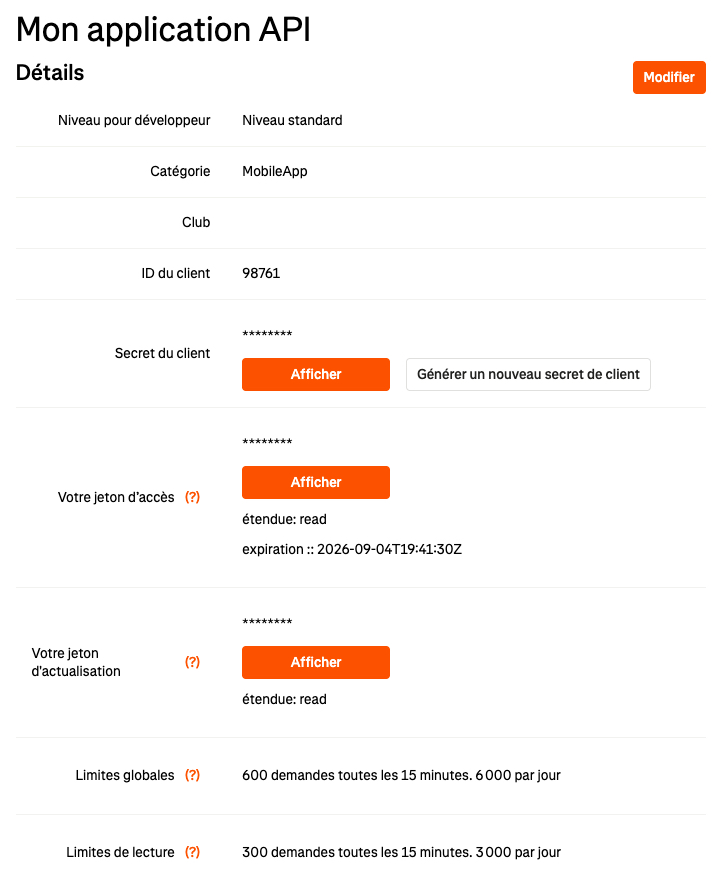
Hạn mức thì rộng rãi, nhưng có thật. Trên ứng dụng của tôi là 300 yêu cầu mỗi 15 phút và 3.000 mỗi ngày cho thao tác đọc. Kịch bản dùng một yêu cầu mỗi lượt quét ở trạng thái ổn định, tức 96 mỗi ngày. Còn xa mới chạm trần, nhưng đây là loại chuyện nên kiểm tra trước chứ không phải sau.
Bước 2: kịch bản đánh thức tác nhân, kèm một chữ ký
Đây là chỗ bắt đầu thú vị.
Một webhook là điều ngược lại với một câu hỏi. Thay vì cứ năm phút lại hỏi xem có gì mới không, bạn đưa một địa chỉ web cho một chương trình, và chính nó gửi tin nhắn cho bạn khi sự kiện xảy ra. Bạn không trả gì cả chừng nào chưa có chuyện gì xảy ra.
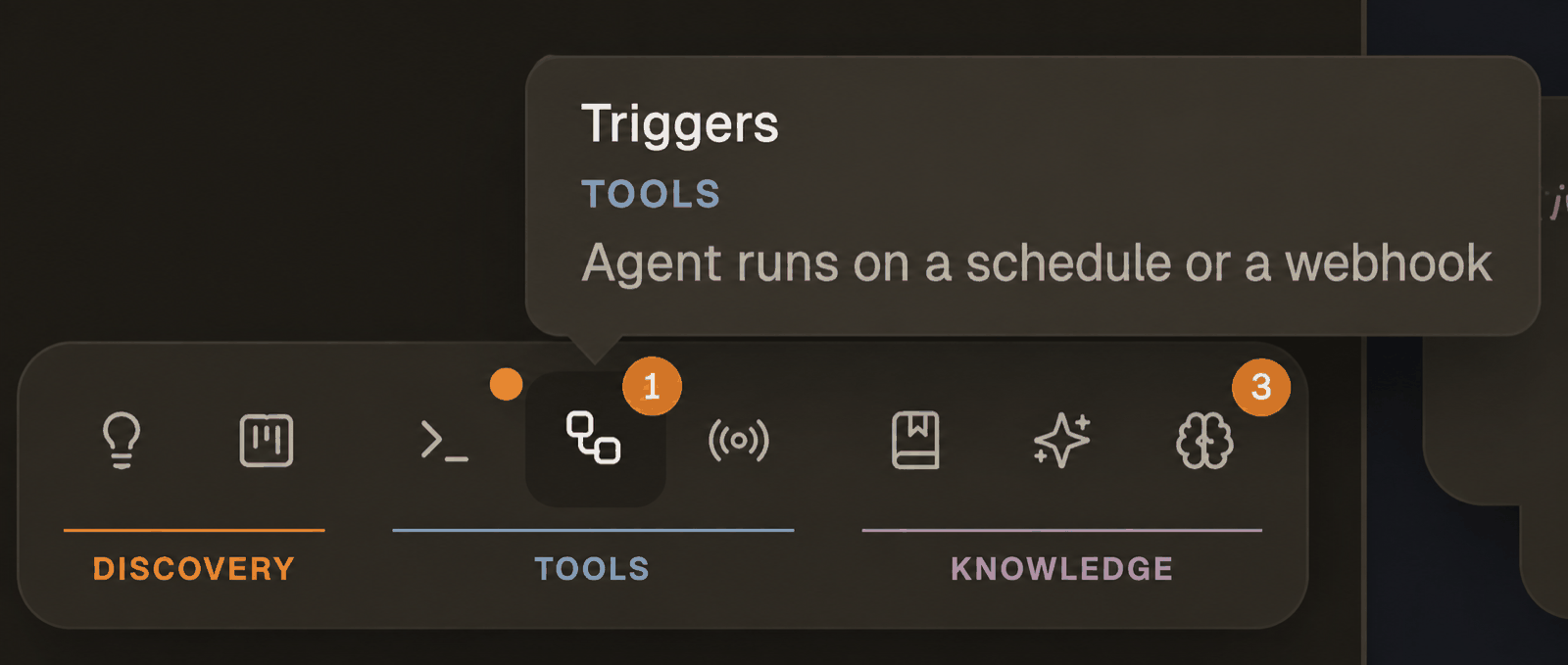
AgentsRoom cung cấp đúng thứ đó: một bộ kích hoạt webhook. Bạn tạo một bộ kích hoạt trong ứng dụng, nó trả lại cho bạn một URL và một khóa bí mật. Bất kỳ ai gửi một tin nhắn JSON tới URL đó đều mở ra một tác nhân, với prompt bạn đã viết và nội dung tin nhắn đã được chèn sẵn vào đó.
Tin nhắn mà kịch bản của tôi gửi đi cố tình rất nhỏ:
{
  "type": "created",
  "title": "03/09 · 5 x 1000m r' 2'",
  "body": "Buổi tập ngày 03/09/2026 nhập từ Strava.\n\nBuổi tập chất lượng: 5 x 1000m r' 2'\nSplit: 3'41 - 3'40 - 3'38 - 3'40 - 3'35\n\nTổng khối lượng: 12.51 km trong 1h07'42 (5:25/km), độ cao+ 56 m\nBuổi tập dự kiến: RP10-5x1000\n\nPhiếu buổi tập: journal/2026/2026-09-03.md\nPhiếu tuần: plan/weeks/2026-W36.md"
}
Hãy để ý thứ không có trong đó: nội dung giáo án. Webhook mang theo mã của buổi tập dự kiến và đường dẫn tới các phiếu, không bao giờ mang nội dung của chúng. Tác nhân nào có kho thì sẽ tự đi đọc; tác nhân không có kho thì chẳng có lý do gì để nhận các chỉ dẫn nội bộ của tôi. Vẫn là quy tắc áp dụng cho phần mô tả đăng lên Strava.
Chữ ký, và cái bẫy đi kèm
Một URL công khai mở ra được một tác nhân thì không thể để ngỏ cho bất cứ ai tìm thấy nó. Vì vậy bộ kích hoạt được ký: kịch bản tính một dấu vân tay của tin nhắn bằng khóa bí mật dùng chung (một HMAC-SHA256, nếu thuật ngữ đó có ý nghĩa với bạn) rồi gửi kèm trong header X-AgentsRoom-Signature. Máy chủ tính lại đúng dấu vân tay đó ở phía nó; nếu không khớp, nó từ chối.
Không có chữ ký thì câu trả lời rất gọn:
{"error":"REJECTED","message":"Signature missing."}
Và đây là cái bẫy, thứ đã lấy của tôi một buổi tối. Chữ ký phủ lên đúng những byte được gửi lên đường truyền, chứ không phải đối tượng trong bộ nhớ. Nếu bạn ký một tệp đúng như nó nằm trên đĩa, rồi để một lớp khác tuần tự hóa lại đối tượng (thừa một dấu cách, thứ tự khóa khác đi, một dấu thanh được escape theo kiểu khác), bạn sẽ có một chữ ký hoàn toàn hợp lệ cho một tin nhắn mà máy chủ sẽ không bao giờ nhận được. Cú từ chối đó không thể gỡ lỗi: nhìn hai bên đều thấy đúng hết.
Cách sửa gói gọn trong một câu: tuần tự hóa và ký ở cùng một chỗ. Trong kho mẫu, hàm post_json làm cả hai việc, và không thứ gì khác được phép động vào phần thân tin nhắn.
Bước 3: ba lớp nói cho huấn luyện viên biết nó là ai, ở đây vận hành thế nào, và ngay bây giờ phải làm gì
Một tác nhân biết huấn luyện không phải là một prompt to đùng. Nó là ba văn bản tách rời, và sự tách rời đó rất quan trọng.
Lớp 1, persona: nó là ai
Một prompt hệ thống gắn vào tác nhân trong AgentsRoom. Nó mang triết lý tập luyện, và nó cố tình được viết chung cho mọi môn: nó có thể huấn luyện bất kỳ ai.
Việc của bạn không đơn thuần là tạo ra giáo án. Bạn huấn luyện vận động viên một cách liên tục bằng cách phân tích quá trình tập, hiểu thể trạng hiện tại, điều chỉnh các buổi tập sắp tới. […] Hãy nói như một huấn luyện viên dày dạn, đừng nói như một chatbot động viên.
Nó cũng nói rõ những gì nó không làm: không đánh giá một buổi tập chỉ dựa trên chuyện có giữ được pace mục tiêu hay không, nói thẳng về mức bất định của một dự đoán thành tích, và không xác nhận một mục tiêu chỉ vì vận động viên muốn thế. Chính dòng cuối đó làm cho huấn luyện viên này có ích.
Bạn không cần tự viết nó: persona này đã được xuất bản trong danh mục tác nhân của AgentsRoom dưới tên Running Performance Coach. Một cú nhấp là cài xong, dùng được ngay.
Lớp 2, CLAUDE.md: ở đây vận hành thế nào
Đây là bản giao kèo, được đọc ở đầu mỗi phiên. Nó chứa cấu trúc tệp, các quy tắc giữ cho cấu trúc đó nhất quán, các nguyên tắc tập luyện ràng buộc mọi đề xuất, và trên hết là nghi thức: trình tự chính xác phải chạy khi một buổi tập được báo về.
Một đoạn trích, vì nó cho thấy mức độ chi tiết:
Thứ tự hy sinh khi tuần tập trật đường ray: trước hết là số phút cộng thêm ở các buổi chạy nhẹ, rồi tới bài bổ trợ sức mạnh, rồi tới độ dài buổi chạy dài, rồi tới một buổi tập chất lượng. Không bao giờ hy sinh cả tuần.
Đây là chỗ huấn luyện viên thôi làm chatbot. Nó không ứng biến ra một quy trình mới mỗi lần, nó theo đúng quy trình tôi đã viết một lần duy nhất. Nếu bạn chỉ đọc một tệp trong kho mẫu, hãy đọc tệp đó.
Lớp 3, prompt của bộ kích hoạt: ngay bây giờ phải làm gì
Đây là tin nhắn trao cho tác nhân khi một buổi tập đáp xuống. Nó nhận hoạt động qua các biến khuôn mẫu: {{event.title}}, {{event.body}}, {{event.url}}. Nhờ vậy tác nhân khởi động với buổi tập đã sẵn trong tay, thay vì phải đi tìm.
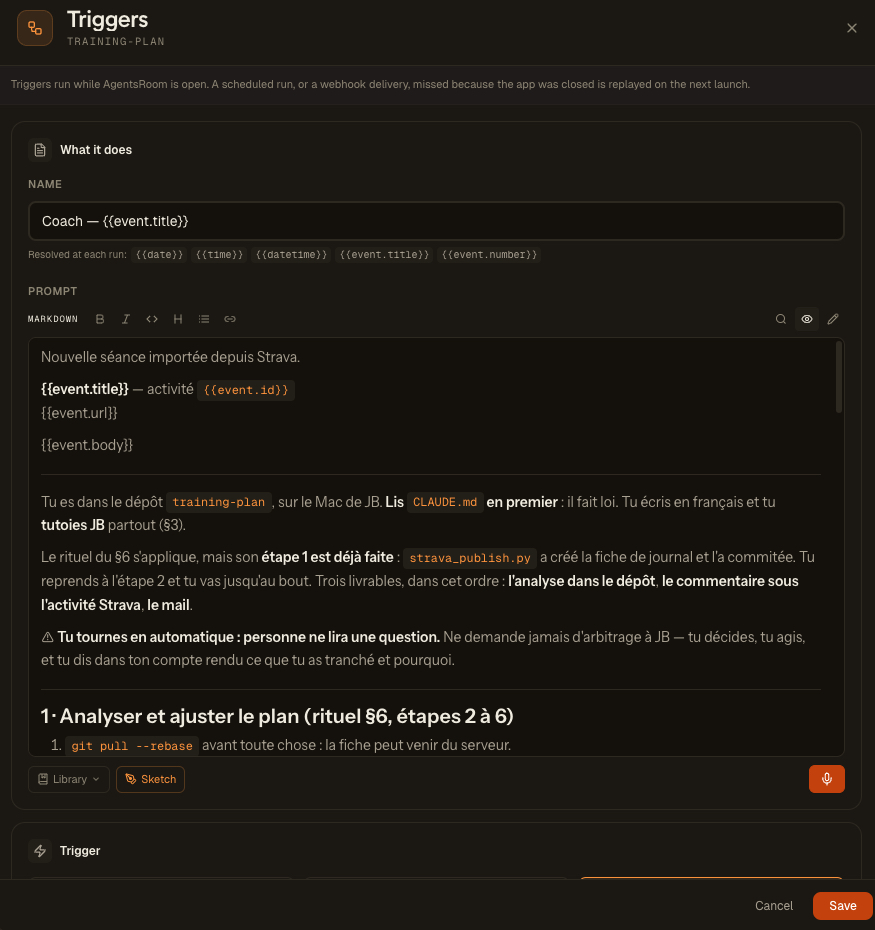
Đây là bộ khung của nó, đúng như trong bộ kích hoạt:
Buổi tập mới đã nhập từ Strava.

**{{event.title}}** · hoạt động {{event.id}}
{{event.url}}

{{event.body}}

---

Bạn đang ở trong kho `training-plan`. Đọc `CLAUDE.md` trước tiên: nó là luật.
Bạn viết bằng ngôn ngữ của tôi và xưng hô trực tiếp với tôi xuyên suốt (§3).

Nghi thức §6 được áp dụng, nhưng **bước 1 của nó đã xong**: `strava_publish.py`
đã tạo phiếu buổi tập và đã commit. Bạn tiếp tục từ bước 2 và đi tới cùng.
Ba sản phẩm phải giao, theo thứ tự này: **bài phân tích trong kho**,
**bình luận dưới hoạt động Strava**, **email**.

⚠️ **Bạn đang chạy không có người trông: sẽ không ai đọc câu hỏi của bạn.**
Đừng bao giờ xin phân xử: bạn quyết, bạn làm, và bạn nói trong báo cáo là bạn
đã chốt điều gì và vì sao.

## 1 · Phân tích và điều chỉnh giáo án (nghi thức §6, bước 2 tới 6)

1. `git pull --rebase` trước đã: phiếu có thể đến từ máy chủ.
2. Đọc theo thứ tự này: phiếu hôm nay, phiếu tuần,
   `athlete/zones-and-paces.md`, và **3 phiếu buổi tập gần nhất**:
   một buổi tập không bao giờ được đánh giá một mình.
3. Viết mục `## Analysis`: **kết luận trước**, rồi tới các tín hiệu chống đỡ
   cho kết luận đó, rồi tới điều nó làm thay đổi.
   ⛔ Nếu `## Analysis` đã có nội dung, đừng viết lại.
4. Cập nhật phiếu tuần và ghi vết **mọi** thay đổi giáo án dưới mục
   `## Adjustments`, kèm lý do.
5. **Dựng lại `README.md`**: đó là màn hình tôi đọc trên điện thoại.
6. Commit và push, ghi rõ từng đường dẫn, ⛔ không bao giờ `git add -A`.

## 2 · Kudos và bình luận trên Strava
   ⛔ Bình luận Strava là CÔNG KHAI: không nhịp tim mục tiêu, không chỗ đau
   lặt vặt, không cân nhắc nội bộ, không thành tích dự đoán.

## 3 · Báo cáo đầy đủ qua email
Dòng làm nhiều việc nhất là dòng ở giữa: "sẽ không ai đọc câu hỏi của bạn". Một tác nhân chạy mà không có ai trước màn hình rồi lại đi xin phân xử thì không phải là mắc lỗi, nó chỉ đơn giản là dừng lại, và hôm sau bạn mới biết.
Chọn mô hình nào, và vì sao một triệu token không phải là phô trương
| Thiết lập | Giá trị |
|---|---|
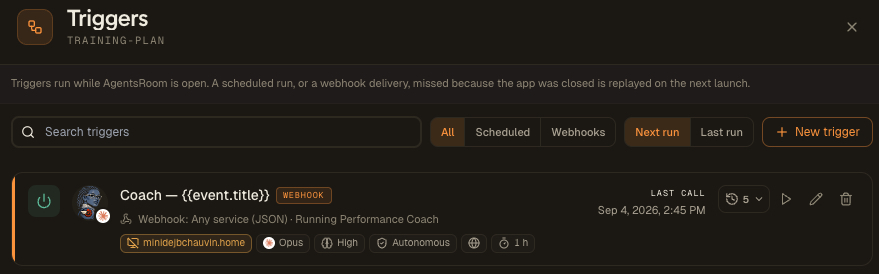
| Mô hình | Claude Opus, ngữ cảnh 1M |
| Mức độ suy luận | Cao |
| Chế độ quyền | Tự chủ |
| Truy cập trình duyệt | Bật |
Ngữ cảnh dài không phải là điệu đà. Để đánh giá một buổi tập cho đúng, huấn luyện viên đọc phiếu hôm nay, phiếu tuần, bảng pace tham chiếu, và ba buổi tập trước đó. Một buổi tập không bao giờ được đánh giá một mình: khối lượng tích lũy, trình tự các ngày và những điểm đang phải theo dõi làm thay đổi hoàn toàn kết luận. Ba tổ ở 3:38 ngay sau một buổi chạy dài hai tiếng kể một câu chuyện khác hẳn so với cũng 3:38 đó sau một ngày nghỉ.
Chế độ tự chủ không phải là cẩu thả, nó là hệ quả: một lượt chạy không có ai trước màn hình thì không có ai để duyệt một lệnh git push. Còn truy cập trình duyệt là thứ cho phép tác nhân đi bình luận trên Strava và gửi email, hai việc mà ở đây không có API nào tiện cả.
Cái gì được tự động hóa, và cái gì cố tình không
Đây là quyết định thiết kế tôi hài lòng nhất, và nó rất dễ bị bỏ qua.
Tác vụ nhập dữ liệu ghi chép và đăng tải, nó không bao giờ đánh giá.
| Kịch bản làm gì | Nó không làm gì |
|---|---|
| Lấy các hoạt động mới | Điền mục Analysis |
| Tạo phiếu buổi tập | Động vào phiếu tuần |
| Viết tiêu đề và mô tả trên Strava | Động vào pace tham chiếu |
| Commit các phiếu nó vừa tạo | Đưa ra bất kỳ ý kiến nào |
Một kịch bản mà bắt đầu đánh giá thì sẽ sinh ra những kết luận không có ngữ cảnh, với logic đông cứng trong mã nguồn mà chẳng ai đọc lại. Đánh giá nghĩa là giữ cùng lúc trong đầu khối lượng của tuần, thể trạng hiện tại, điều đã nói lần trước: đó là việc của huấn luyện viên, và tác nhân làm việc đó, với cả hồ sơ bày trước mặt.
Lợi ích thực tế thấy ngay: khi tác nhân không chạy (máy tắt, API sập), cái phiếu vẫn tồn tại. Không mất gì cả, chỉ thiếu bình luận, và chỉ cần phát lại một lần là xong.
Một lựa chọn khác cũng đi cùng hướng: kịch bản không giữ tệp trạng thái nào để biết nó đã xử lý những gì. Phần mô tả trên Strava mới là nguồn sự thật. Trống thì nó ghi; đang mang chữ ký của nó thì nó bỏ qua; không trống mà không có chữ ký thì chính bạn đã viết và nó không đụng vào. Một tệp trạng thái cục bộ sẽ chẳng nói được gì về việc một máy khác đã làm; theo cách này, hai máy có thể chạy song song mà không giẫm chân nhau.
Thêm hai quy tắc tách bạch nữa, khắc thẳng vào kho và không được lách:
- phần mô tả đăng lên Strava không bao giờ chép nội dung giáo án: phiếu tuần của tôi chứa nhịp tim mục tiêu và những cân nhắc chẳng liên quan gì tới một hoạt động công khai;
- một phần mô tả do người viết tay thì không bao giờ bị ghi đè.
Bình luận đáp xuống dưới hoạt động
Vấn đề không phải là tự khen. Vấn đề là kết luận của huấn luyện viên đọc được ngay trên điện thoại của tôi, ngay dưới hoạt động, mà không cần mở kho, và nó nằm lại đó, gắn với buổi tập, mãi mãi.
Nên bình luận được cố ý viết rất hẹp: một emoji kết luận, con số chống đỡ cho nó, và điều nó làm thay đổi cho buổi tập kế tiếp. Khoảng 250 ký tự.
✅ Năm tổ trung bình 3'39 cho mục tiêu 3'38-3'44, và nhịp tim phẳng suốt cả khối. Bảng pace vẫn đúng. Thứ Sáu giữ nguyên mức nhẹ: bạn đã tiêu hết phần dư của tuần này rồi.
Bản dài, bản có nhịp tim, điểm tôi đánh dấu để theo dõi và phần cân nhắc về khối lượng tuần sau, thì đi vào kho và vào email. Hai kênh, hai đối tượng người đọc, và chính prompt giữ cái ranh giới đó.
Ba thứ chỉ hỏng khi chạy thật
Mỗi dòng dưới đây tồn tại vì đã có thứ gì đó hỏng khi thiếu nó. Chúng đáng học hơn cả phần còn lại của bài viết.
1. Ghim cứng trình duyệt. Tôi có hai tiện ích Claude kết nối trong Chrome. Không gì bảo đảm tác nhân sẽ vớ được cái nào, mà chỉ một cái giữ phiên đăng nhập Strava. Kết quả: cứ cách một lượt chạy, tác nhân lại rơi vào đúng trình duyệt sai, ở trạng thái đã đăng xuất, không bình luận được gì. Việc chọn trình duyệt theo mã thiết bị không được lưu lại từ phiên này sang phiên khác: vậy nên chỗ của nó là trong prompt, kèm lệnh cấm rõ ràng việc đi hỏi người dùng nên chọn cái nào. Khi chạy không có người trông, một câu hỏi là một ngõ cụt.
2. Ô bình luận của Strava không có maxlength. Không có gì trong trình duyệt ngăn bạn viết quá dài: chính máy chủ mới từ chối lúc gửi. Một tác nhân soạn ra một đoạn văn 600 ký tự thật đẹp sẽ gõ hết ra, bấm "Post", rồi nhận một lỗi mà nó không hiểu. Vậy nên prompt phải ép sự ngắn gọn trước khi viết, và tính sẵn cho tình huống đó: nếu gửi thất bại thì rút gọn rồi gửi lại, tuyệt đối không tách thành hai bình luận.
3. Mỗi hoạt động chỉ một bình luận của huấn luyện viên. Khi bạn phát lại một sự kiện để thử nghiệm (và lúc đầu bạn làm chuyện đó rất nhiều), thiếu quy tắc này thì tác nhân sẽ chồng thêm bình luận lên một hoạt động đã xử lý rồi. Vậy nên prompt bắt nó đọc tab "Comments" trước khi viết, và bỏ lượt nếu nó đã có mặt ở đó. Cùng một logic ở phía kho: nếu mục ## Analysis đã có nội dung thì không viết lại.
Cái này tốn bao nhiêu
| Hạng mục | Ở đâu | Chi phí |
|---|---|---|
| Tác nhân huấn luyện viên | Máy của tôi, qua AgentsRoom | gói đăng ký Claude của tôi |
| Vòng quét 15 phút | Một máy Linux nhỏ bật suốt | ~5 €/tháng, hoặc không tốn gì trên Raspberry Pi |
| Nhật ký | Một kho Git riêng tư | miễn phí |
| API Strava | Strava Developer Program | xem bảng giá của Strava |
Trong cách lắp ráp này không có khóa API nào tính tiền theo token. Đó là điểm tôi thấy bị xem nhẹ nhất: cũng chừng đó thứ mà dựng trên một API tính theo mức dùng thì sẽ có một cái đồng hồ tính tiền chạy ở mỗi buổi tập, và chắc tôi đã bỏ ngang từ lâu.
Lắp nó ngay cuối tuần này
Các bước, theo thứ tự. Tính khoảng một buổi tối nếu bạn đã có tài khoản Strava và một gói đăng ký Claude.
1. Nhân bản kho mẫu và biến nó thành của bạn.
git clone https://github.com/AgentsRoomDev/running-performance-coach.git my-coach
cd my-coach
rm -rf .git && git init
Để bản sao của bạn ở chế độ riêng tư. Nhật ký tập luyện chứa dữ liệu sức khỏe: nhịp tim, giấc ngủ, chấn thương. Kho mẫu thì công khai, bản sao của bạn thì không nên.
Sau đó điền vào, theo thứ tự này: athlete/profile.md (bạn là người chạy bộ thế nào), athlete/records.md (các thành tích tốt nhất của bạn), athlete/constraints.md (những khung giờ bạn thật sự có), athlete/zones-and-paces.md (pace tham chiếu của bạn), plan/objective.md (giải đấu và mục tiêu), rồi tới CLAUDE.md, nơi bạn thay hết các chỗ đánh dấu {{...}}.
Cuối cùng, mở kho bằng tác nhân Claude của bạn và nói: "đọc CLAUDE.md và athlete/, rồi dựng cho tôi tuần tập đầu tiên."
2. Kết nối Strava.
cp .env.example .env && chmod 600 .env
python3 scripts/strava_oauth.py     # một cú nhấp trên trình duyệt, một lần duy nhất
python3 scripts/strava_sync.py --dry-run
Tùy chọn --dry-run in ra những gì sẽ được ghi mà không ghi gì cả. Đó là lúc để kiểm tra xem cách dựng lại buổi tập có hợp ý bạn không.
3. Tạo bộ kích hoạt trong AgentsRoom. Trong mục Triggers, New trigger:
| Trường | Giá trị |
|---|---|
| Loại | Webhook, nguồn generic |
| Prompt | nội dung của docs/trigger-prompt.md |
| Vai trò / persona | docs/coach-persona.md |
| Chế độ quyền | Tự chủ |
| Truy cập trình duyệt | Bật |
AgentsRoom sinh ra một URL và một khóa bí mật để ký. Đặt cả hai vào tệp .env của bạn:
WEBHOOK_URL=https://agentsroom.dev/api/triggers/t_xxxxxxxxxxxx
WEBHOOK_SECRET=whsec_xxxxxxxxxxxxxxxxxxxxxxxx
4. Thử nó trước khi tin nó.
python3 scripts/webhook_replay.py scripts/examples/webhook-session.json --dry-run
python3 scripts/webhook_replay.py scripts/examples/webhook-session.json
Lệnh này phát lại một buổi tập vào bộ kích hoạt mà không phải chờ tới lượt chạy kế tiếp và không đụng gì tới trạng thái của tác vụ tự động. Bạn sẽ thấy ✅ HTTP 202, và một thẻ tác nhân sẽ mở ra trong AgentsRoom.
5. Cho nó chạy mỗi 15 phút.
bash scripts/systemd/install.sh # trên một máy chủ Linux
Một đơn vị oneshot cộng một timer: không có tiến trình nào nằm thường trú, và lượt quét bị bỏ lỡ lúc máy tắt sẽ được bù vào lần khởi động sau.
Nếu bạn không có máy nào bật suốt, cứ bỏ qua bước này: chạy strava_sync.py bằng tay lúc nào bạn thích, hoặc đơn giản là kể buổi tập cho tác nhân nghe trong một cuộc trò chuyện. Nghi thức trong CLAUDE.md chạy y hệt. Bạn mất phần tự động, chứ không mất huấn luyện viên.
Điều tôi rút ra, ngoài chuyện chạy bộ
Không có gì trong cách lắp ráp này là riêng của chạy bộ. Thứ nó cho thấy là một khuôn mẫu dùng lại được cho gần như mọi lĩnh vực mà bạn tích lũy dữ liệu cá nhân và muốn có một ý kiến có nghề về chúng.
Ba phần, chỉ vậy thôi. Một kho Git chứa các tệp Markdown làm bộ nhớ mà cả máy lẫn bạn đều đọc được. Một sự kiện đánh thức tác nhân thay vì một tác nhân cứ quét vòng lặp và đốt token vô ích. Ba lớp cấu hình tách bạch rõ ràng tác nhân là ai, ở chỗ bạn nó vận hành ra sao, và ngay bây giờ nó phải làm gì.
Thay "buổi chạy" bằng "sao kê ngân hàng", "phiên lập trình", "chỉ số đường huyết" hay "ghi chú đọc sách": cơ chế không đổi.
Câu hỏi thường gặp
Có cần biết lập trình để tự làm một huấn luyện viên chạy bộ AI không?
Bạn chỉ cần chạy được một lệnh trong terminal và sửa được một tệp văn bản. Kho mẫu đã sẵn sàng để nhân bản, các kịch bản Python chỉ dùng thư viện chuẩn (không cần pip install), còn phần huấn luyện thì được cấu hình bằng cách viết văn xuôi bình thường trong các tệp Markdown. Việc thật sự khó không nằm ở kỹ thuật: đó là mô tả trung thực bạn là người chạy bộ thế nào và bạn đang nhắm tới điều gì.
Mỗi tháng tốn bao nhiêu?
Tác nhân chạy trên gói đăng ký Claude bạn đã có sẵn (Pro hoặc Max): không có khóa API tính tiền theo token. Ngoài ra bạn có thể muốn một máy nhỏ bật suốt ngày để hỏi Strava mỗi 15 phút, khoảng 5 euro một tháng trên VPS, hoặc không tốn gì trên Raspberry Pi. Kho Git riêng tư thì miễn phí. Còn lại là API Strava, vốn đòi hỏi gói đăng ký nhà phát triển trả phí từ tháng 6 năm 2026.
Vì sao dùng kho Git thay vì cơ sở dữ liệu?
Vì lịch sử trở nên đọc được, cho cả huấn luyện viên lẫn bạn. Mỗi buổi tập là một tệp Markdown, mỗi thay đổi giáo án là một commit kèm lý do. Tác nhân có thể đọc lại điều nó đã kê ra ba tuần trước và kiểm tra xem có hiệu quả không, còn bạn thì đọc giáo án trên điện thoại trong ứng dụng GitHub, mà không phải viết một dòng giao diện nào.
Webhook là gì, nói cho dễ hiểu?
Webhook là một dịch vụ gọi cho bạn thay vì bạn phải gọi cho nó. Thay vì cứ năm phút lại hỏi xem có gì mới không, bạn đưa một địa chỉ web cho một chương trình, và chính nó gửi tin nhắn cho bạn khi sự kiện xảy ra. Ở đây, kịch bản nhập buổi tập gửi tin nhắn đó tới AgentsRoom, và AgentsRoom mở một tác nhân Claude ngay trong vòng một giây. Đó cũng là thứ làm cho cách lắp ráp này rẻ: một tác nhân cứ quét vòng lặp thì đốt token ở mỗi lượt, còn một bộ kích hoạt webhook thì không tốn gì cho tới khi có chuyện xảy ra.
Cách này có dùng được cho môn thể thao khác ngoài chạy bộ không?
Được. Phần nhập dữ liệu dựng lại các lap của đồng hồ, mà đạp xe và bơi cũng ghi lap. Thứ thay đổi là các tệp chiến lược và danh mục bài tập, vốn chỉ là văn bản bạn viết lại. Còn cơ chế (nhập dữ liệu, webhook, tác nhân, kho) thì không đổi.
Tác nhân có thể sai và phá hỏng giáo án của tôi không?
Nó có thể sai, nhưng không phá được bao nhiêu: mọi thứ nó viết ra đều là một commit Git mà bạn có thể đọc, phản bác và hoàn tác. Tệp CLAUDE.md cấm nó một cách rõ ràng: viết lại lịch sử, bịa ra dữ liệu bạn không cung cấp, đổi giáo án mà không ghi lý do, và đưa lời khuyên y tế. Đau bất thường thì nó chỉ bạn đi gặp chuyên gia.
Kho mẫu nằm ở đây: AgentsRoomDev/running-performance-coach. Nhân bản nó, điền pace của bạn vào, và bạn đã có huấn luyện viên riêng. Nếu bạn muốn xem phần đánh thức tác nhân, nó được mô tả ở trang bộ kích hoạt webhook, và tải AgentsRoom tại đây.
Tải AgentsRoom
Chạy tất cả agent AI của bạn, trên mọi dự án, trong một cửa sổ duy nhất.
Ứng dụng đồng hành: theo dõi agent khi đi đường
Sử dụng Claude, Codex, Antigravity CLI hoặc nhà cung cấp AI khác.
Gửi lỗi và yêu cầu thẳng vào backlog công khai của bạn.
Đọc thêm
Routines của Claude Code: cái gì chạy trên cloud, cái gì ở lại trên máy của bạn, và chọn thế nào
Routines là cách Claude Code chạy một prompt đã lưu mà không cần bạn: theo lịch, khi có một lệnh gọi API hoặc một sự kiện GitHub, dưới dạng một cloud session trên một bản clone mới của repo. Chúng đang ở giai đoạn research preview. Claude Code còn có hai cách cục bộ để lên lịch công việc, các tác vụ định kỳ của ứng dụng desktop và /loop, và ba cách này không hoạt động giống nhau: khoảng cách tối thiểu, quyền truy cập vào tệp cục bộ, yêu cầu cấp quyền, điều gì xảy ra khi laptop ngủ. Hướng dẫn này đặt ba cách cạnh nhau với các giới hạn lấy từ tài liệu, rồi giải thích vì sao bảy agent chạy mỗi đêm của chúng tôi lại chạy trên một máy cục bộ.
Đọc bài viếtiTerm2's Claude Code Integration: What It Does and How to Set It Up
iTerm2 3.7 added a Claude Code integration: a status on every Claude session (working, waiting, idle, and since 3.7.5 done and error), a Chat / Diff / Code Review workgroup, and review comments sent back as clippings. How to install it, what it changes in ~/.claude/settings.json, why the status stops, and what Codex needs.
Đọc bài viếtAntigravity CLI chỉ giữ một phiên đăng nhập Google cho mỗi máy. Đây là cách làm thật sự hiệu quả.
Vì sao bạn không thể luân phiên hai gói đăng ký Google AI Pro trên Antigravity CLI, nơi nó thật sự cất phiên đăng nhập của bạn, các công cụ đổi tài khoản thực chất làm gì với kho thông tin đăng nhập của hệ điều hành, vì sao một gói gia đình không nhân đôi hạn mức của bạn, và cách tiếp cận duy nhất chạy được nhiều tài khoản song song thật sự.
Đọc bài viết