How Many Tokens Do I Have Left in Claude? The Two Screens to Check.
Your Claude plan is not denominated in tokens, so no screen shows a token balance. What it actually meters, the two screens that do show it, why it drains while you are not typing, and what the September 2026 weekly-window change does to your week.
It is one of the most searched questions about Claude, and it is asked in almost every language. It also has an uncomfortable answer: there is no such number, because your plan is not sold in tokens.
That is not a technicality. It explains why you cannot find the counter you are looking for, why every page that claims to show you one is guessing, and why the thing that actually stops you mid-task is not the thing most people are watching.
Your plan is metered in windows, not in tokens
Anthropic does not express a Claude subscription as a token allowance. It meters it as usage windows: a session window that rolls, and a weekly window on top of it. Both are shared across every surface you sign in to, so a long afternoon in Claude chat leaves you less room for Claude Code that evening. Both are also shared across models, which is why switching to a cheaper model with /model does not hand your limit back once you have hit it.
What you can read is therefore a share of a window and the time it comes back, not a balance. When you do run out, the message that stops you says which ceiling you hit and when it resets, and that message is the only authoritative figure for your account.
The one place a token count means something literal is the API, which is billed per token. Everything below is about the subscription, which is what most people are actually asking about.
The weekly window is not a constant
The part nobody plans for is that the weekly window can be resized, and it does not stay the same for long.
Since May 2026 the weekly allowance has carried a temporary 50% boost, extended three times. It runs until 14 September 2026, and from that date a permanent 25% above the pre-boost baseline takes its place. Against that original baseline it is an increase. Against what you actually have in your account this week it is a 17% cut: a week worth 150 becomes a week worth 125. The rolling session window does not change, so the difference only appears in weeks long enough to reach the weekly ceiling, which is exactly when it is felt.
The unit of that ceiling is not tokens either. It is counted in active compute hours, which advance while a turn is being processed rather than while you sit and read it, and Claude Code, claude.ai and Cowork all draw from the same pool. An afternoon with three subagents running burns the week far faster than the number of messages you sent suggests.
How much of that week one full 5-hour session actually uses is not published either. Robin Hood measures it on real subscriptions, per provider and plan, and flags the day a provider changes its limits.
The number you can read, and where it lives
Two screens, and they answer different questions.
Inside Claude Code, /usage is the one worth learning. On a Pro, Max, Team or Enterprise plan it shows usage bars for your plan limits, and press d or w to switch between the last 24 hours and the last 7 days. Below the bars it does something more useful than any raw number: it attributes recent usage to skills, subagents, plugins and individual MCP servers, each as a percentage, and raises a behaviour flag when one pattern accounts for 10% or more of your recent consumption, such as long context or cache misses.
One caveat matters, and it is easy to miss: those figures are computed from your local session history on that machine. Work done from another laptop, or on claude.ai, is not in them.
On the web, Settings then Usage on claude.ai is the account-level view: your plan, where you stand, and when the weekly window resets. If you work across two machines, this is the one that is complete.
For a per-session breakdown of what a piece of work actually cost, the top block of /usage prints the raw counts:
Usage by model:
   claude-sonnet-4-6:  1.2k input, 5.3k output, 940.0k cache read, 50.0k cache write
Those four numbers are the whole story of a coding session, and the largest one is almost always cache read. If you want that view continuously rather than on demand, AgentsRoom keeps a live token meter on every session beside the terminal, with the same input, output and cache split and a red badge when a session starts running hot. The step-by-step version of reading the CLI's own counter is covered in how to check Claude Code token usage.
/usage attributes what you spent to skills, subagents, plugins and MCP servers, but never to a project or to a coding agent. AgentsRoom adds that split: it takes the same percentage your provider publishes and divides it between your projects and your agents, weighting each session by what it would cost at API rates.
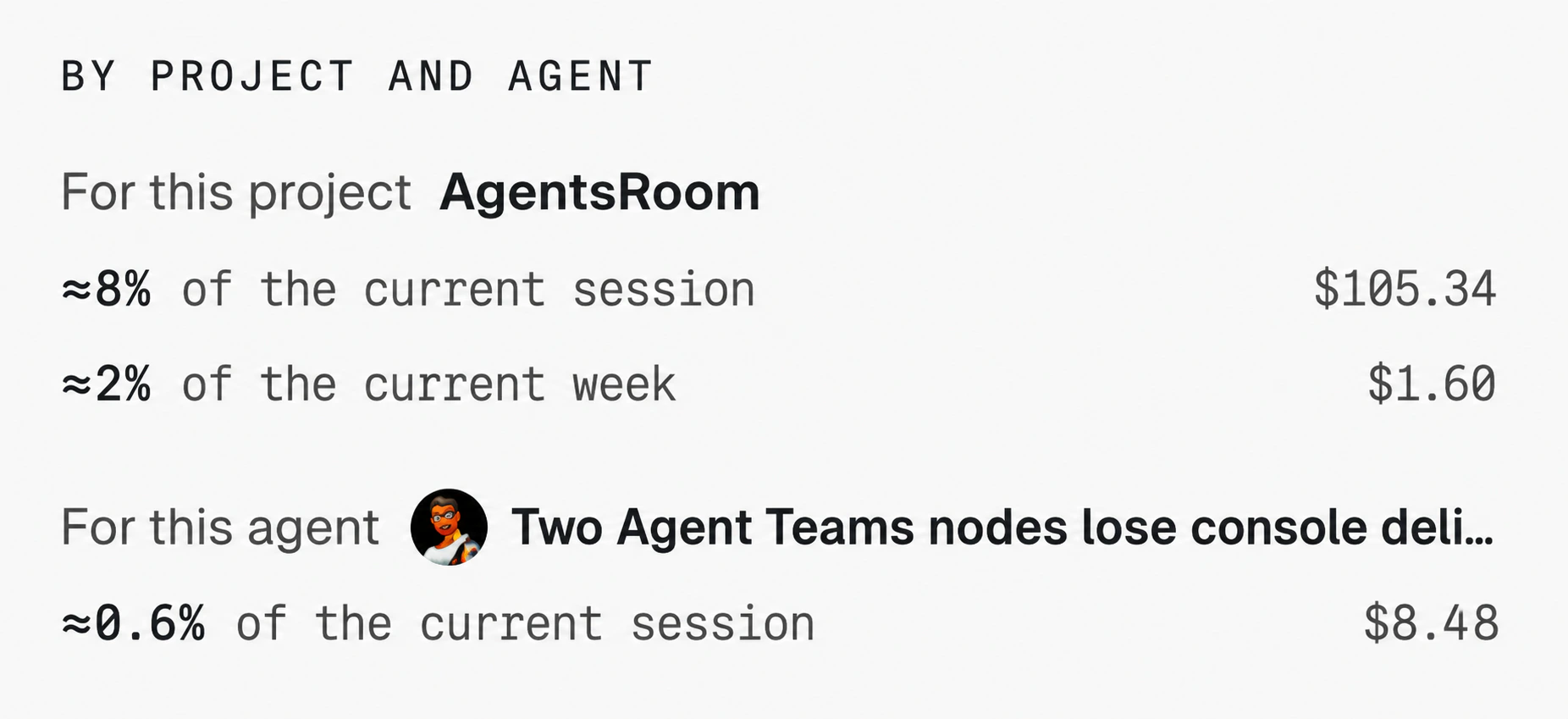
Read it as an estimate, not as an invoice. Only the work this machine can see is in the denominator, so anything you did on another laptop or on the web is missing and every share comes out slightly too high.
What a token actually is once an agent is involved
A token is a fragment of text: roughly three quarters of a word in English, and noticeably less in code, where punctuation and identifiers fragment easily.
The part that surprises people is that a conversation is re-sent in full on every request. Ask a one-line question in a session that has been open since morning and you are not paying for that line, you are paying for the entire history that travels with it. Each time the agent uses a tool it sends another request, carrying the previous tool results with it, which is why a single "fix this test" can turn into a dozen round trips.
Prompt caching is what makes this survivable. Repeated history is charged at a much lower cached rate, which is why the cache read figure is enormous and the bill is not. It also sets up the single most expensive habit in agent work, which is the subject of the next section.
Why the bar moves while you are not typing
If your usage climbs on an idle session, it is one of these, and none of them is a bug:
- The cache expiring. Cached context lives for about an hour on a subscription, and drops to five minutes once you are drawing on usage credits, or on an API key. Come back from lunch and your first message misses the cache: your whole conversation is reprocessed at full price. One pause, one full reprocessing.
- Anything that starts a turn on its own. A scheduled task firing, a message arriving from another of your sessions, a goal check-in while background work runs. Each one resends the full context, exactly like a message you typed.
- Agent teammates. Every active teammate runs its own context window and keeps consuming until it exits. Anthropic's own guidance puts a team in plan mode at roughly seven times a standard session.
- Compaction.
/compacthas to read the conversation it summarizes, so compacting a large context is itself a large request./clearcosts nothing, and when you do not need continuity it is the better move. - Background work. Summaries for
--resumeand similar chores draw a small amount even when you are idle, typically under four cents per session.
This is also where the two warnings people conflate part company. A context or auto-compact warning says one conversation is nearing the model's context window, and clearing that session fixes it. A usage limit says your plan allowance is spent across all sessions, and clearing gives none of it back. The reliable tell: a usage limit names a reset time, a context warning does not.
What to do when the bar is nearly full
In rough order of how much they return for the effort:
- Clear between unrelated tasks. Stale context is re-sent on every message for the rest of the session.
/renamebefore/clearif you want to find it again with/resume. - Match the model to the job. Sonnet handles most coding work; keeping Opus as the default is the most common cause of an allowance that vanishes by Thursday.
- Read the attribution in
/usage. If one MCP server or one subagent is 30% of your week, that is the fix, and you would never have guessed which one. - Turn thinking down before turning it off. Thinking tokens are billed as output. Lowering the effort level is usually enough.
- Push verbose work into subagents. Test output and log files stay in the subagent's context and only a summary comes back.
- Keep the context file short. Anything in
CLAUDE.mdorAGENTS.mdis loaded at session start and paid for on every turn, including when it is irrelevant. Long workflow instructions belong in a skill, which loads only when invoked. There is more on that in the AGENTS.md context file guide.
If you want the longer version of the cost-cutting side specifically, reducing Claude Code token costs goes through it in detail.
All six of those assume you noticed in time, and the bar is only shown when you ask for it. If you would rather be told, AgentsRoom sends a usage alert on the desktop or on your phone when a bar crosses 50% and then 75% by default, or a threshold you pick per bar, once per window. The list above only changes something while there is still week left to save.
What still works once the window is spent
Every lever in the previous section is preventive: they change how fast you approach the ceiling, and none of them gives anything back once you are past it. Waiting for the reset is the default, and the limit message is the one place that tells you when it comes. Three things shorten the wait.
A second account. A window belongs to an account, not to a machine, so an account you have not spent still has its own. The difficulty is that Claude Code holds one login at a time; running several Claude Code accounts on one machine covers the mechanics of that. AgentsRoom automates the handover: when an account reaches its ceiling, the running conversation moves to another account you are signed in to and continues where it stopped, instead of restarting somewhere else.
Another provider. A weekly window is Anthropic's, not the industry's. If you also have a Codex, Antigravity or Copilot seat, the work that does not specifically need Claude can go there for the rest of the week, and running several providers side by side is the version of that which does not cost you the context you had built up.
The cheaper model, before the ceiling rather than after. Switching with /model returns nothing once a window is spent, but it does stretch the one you are in. It is the only one of the three that costs nothing to set up, and it is the reason a default left on Opus is the most common way to lose a Thursday.
The short version
Stop looking for a token balance: your plan does not have one. Learn the two windows, read /usage for attribution rather than for a total, and treat the cache as the thing that decides your week. The developers who never hit a limit are rarely the ones who type less. They are the ones who start a fresh session when the subject changes.
Running several agents at once makes all of this both worse and easier to see, because the consumption stops being one number and becomes one number per agent. That is the view AgentsRoom is built around.
Frequently asked questions
How many tokens do I have left in Claude?
There is no such number to look up. A Claude subscription is not sold as a token budget: it is metered as a share of a rolling session window plus a weekly window, and what you can read is a percentage of those windows and the time they reset, not a balance of tokens. The place to read it is the /usage command inside Claude Code, or Settings then Usage on claude.ai. Only on the API, billed per token, does a token figure mean anything.
How do Claude's tokens work?
A token is a fragment of text, roughly three quarters of a word in English and less in code. Every request sends your whole conversation again, so a coding session pays for its accumulated history on every turn, not just for the sentence you typed. That is why usage is counted in four separate figures: input, output, cache write and cache read. Cached history is charged at a much lower rate than fresh input, which is exactly why a session left open all day still draws on your plan.
When does my Claude usage reset?
There are two clocks and they are independent. A session window rolls, so it expires a fixed number of hours after it opened rather than at a time you chose. A weekly window sits on top of it and resets at a fixed moment assigned to your account. The limit message itself tells you when the window that stopped you comes back, and that message is the authoritative answer for your account. The two clocks are shared across Claude chat and Claude Code, so heavy chat use shortens your coding budget.
Does switching to a cheaper model give me my limit back?
No. The session and weekly windows are shared across models, so switching with /model does not restore access once you have hit them. It does help in one specific case: a model-specific message such as hitting your Opus limit, where moving to Sonnet lets you keep working. It also helps before you run out, because a cheaper model consumes less of the same allowance for the same work.
Why does my usage climb when I am not doing anything?
Because idleness is not free in an agent session. Anything that starts a turn resends your whole context: a scheduled task firing, a message arriving from another session, an agent teammate still running, a goal check-in. Two more things cost tokens without a turn: compaction, which has to read the conversation it summarizes, and the first message after a long pause, which misses the prompt cache and reprocesses your full history at full price.
Is Claude Code cutting its weekly limits in September 2026?
The temporary boost that added 50% to the weekly window runs until 14 September 2026, and from that date a permanent 25% above the pre-boost baseline takes its place. Measured against that original baseline it is an increase, but measured against what a Claude Code user has today it is a 17% reduction: a week worth 150 becomes a week worth 125. The rolling session window is unchanged, so the difference only shows up in weeks long enough to reach the weekly ceiling.
Is a context warning the same as a usage limit?
No, and confusing the two leads people to the wrong fix. A context or auto-compact warning is about one conversation getting close to the model's context window, and it is solved by clearing or compacting that session. A usage limit is about your plan allowance across every session, and clearing does not give any of it back. The tell is in the wording: a limit message names a reset time, a context warning does not.
Download AgentsRoom
Run all your AI agents, on all your projects, from a single window.
Companion app: monitor your agents on the go
Bring your own: Claude, Codex, Antigravity CLI, or other AI provider.
Push bugs and requests straight to your public backlog.
Keep reading
How to Cut Your Claude Code Token Costs Without Slowing Down
Claude Code bills you per token, and most of the spend is invisible: bloated context, the wrong model, raw PDFs, agents re-reading the same files. Here is where the money actually goes and how to cut it, with the habits and tools that keep your bill low without slowing you down.
Read the articleHow to check Claude Code token usage: 4 ways to see what your agents spend
Four ways to check Claude Code token usage: the /cost command, the session transcripts, the ccusage CLI, and a live per-session meter. See exactly what each agent spends.
Read the articleAgents Write the Code Now. Here Is What the Developer's Job Became.
Writing code was one link in a six-link chain, and it is the link agents took. The other five got heavier. A walkthrough of the job that is left: hearing what to build, deciding, briefing, running, reviewing, shipping.
Read the article